battery SUBARU WRX 2016 Owner's Guide
[x] Cancel search | Manufacturer: SUBARU, Model Year: 2016, Model line: WRX, Model: SUBARU WRX 2016Pages: 594, PDF Size: 19.43 MB
Page 242 of 594
damage the conductors printed
on the window.
NOTE . Turn on the defogger and deicer
system if the wipers are frozen to the
windshield.
. If the windshield is covered with
snow, remove the snow so that the
windshield wiper deicer works effec-
tively.
. While the defogger and deicer sys-
tem is in the continuous operation
mode, if the vehicle speed remains at
9mph(15km/h)orlowerfor15
minutes, the windshield wiper deicer
automatically stops operating, though
the rear window defogger and outside
mirror defogger maintain continuous
operation in this condition.
. While the defogger and deicer sys-
tem is in the continuous operation
mode, if the battery voltage drops
below the permissible level, continu-
ous operation of the defogger and
deicer system is canceled and the
system stops operating. Tilt/telescopic steering wheel WARNING. Do not adjust the steering wheel
tilt/telescopic position while driv-
ing. This may cause loss of
vehicle control and result in
personal injury.
. If the lever cannot be raised to
the fixed position, adjust the
steering wheel again. It is dan-
gerous to drive without locking
the steering wheel. This may
cause loss of vehicle control
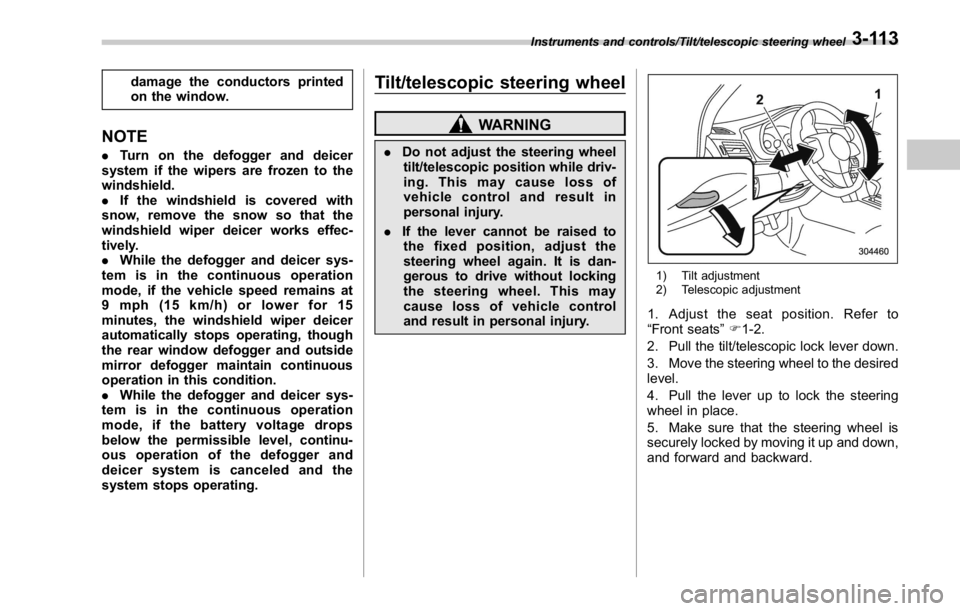
and result in personal injury. 1) Tilt adjustment
2) Telescopic adjustment
1. Adjust the seat position. Refer to
“ Front seats ” F 1-2.
2. Pull the tilt/telescopic lock lever down.
3. Move the steering wheel to the desired
level.
4. Pull the lever up to lock the steering
wheel in place.
5. Make sure that the steering wheel is
securely locked by moving it up and down,
and forward and backward.Instruments and controls/Tilt/telescopic steering wheel
3-113
Page 251 of 594
Climate control/Manual climate control operation
. Turn the passenger ’ s side temperature
control dial
The “ DUAL ” mode can be canceled by
pressing the “ DUAL ” button.
When the “ DUAL ” mode is selected:
Turn the driver ’ ssidedialtosetthe
driver ’ s side temperature. Turn the front
passenger ’ ssidedialtosetthefront
passenger ’ s side temperature.
When the “ DUAL ” mode is canceled:
Set the desired temperature by turning the
driver ’ s side dial.
When the “ DUAL ” mode is canceled, only
the driver ’ s side temperature is displayed.
& Fan speed controlThe fan operates only when the ignition
switch is in the “ ON ” position. Select the
preferred fan speed by turning the fan
speed control dial.
& Air conditioner controlThe air conditioner operates only when
the engine is running.
Press the air conditioner button while the
fan is in operation to turn on the air
conditioner. When the air conditioner is
on, the “ A/C ” indicator light illuminates.
To turn off the air conditioner, press the button again.
NOTE For efficient defogging or dehumidify-
ing in cold weather, turn on the air
conditioner. However, if the ambient
temperature decreases to approxi-
mately 32 8 F(0 8 C), the air conditioner
compressor will stop operating.
& Air inlet selection Select the air inlet by pressing the air inlet
selection button.
ON position (recirculation): Interior air is
recirculated inside the vehicle. Press the
air inlet selection button to the ON position
for fast cooling with the air conditioner or
when driving on a dusty road.
OFF position (outside air): Outside air is
drawn into the passenger compartment.
Press the air inlet selection button to the
OFF position when the interior has cooled
to a comfortable temperature and the road
is no longer dusty.
WARNING
Continued operation in the ON posi-
tion may fog up the windows. Switch
to the OFF position as soon as the
outside conditions are no longer dusty.
NOTE When the battery is disconnected or
the battery voltage drops, the air inlet
selection operation indicator light may
blink. This does not indicate a malfunc-
tion. However, if the indicator light
blinks every time you start the engine,
a malfunction may occur in the elec-
trical circuit. Have the vehicle in-
spected at the nearest SUBARU dealer.4-8
Page 267 of 594
Audio/Basic operation
Item Function
Vocal Im-
age Con-
trol Select to pick-up vocal sound
signal from the sound data, and
adjust it to right/left or front/rear.
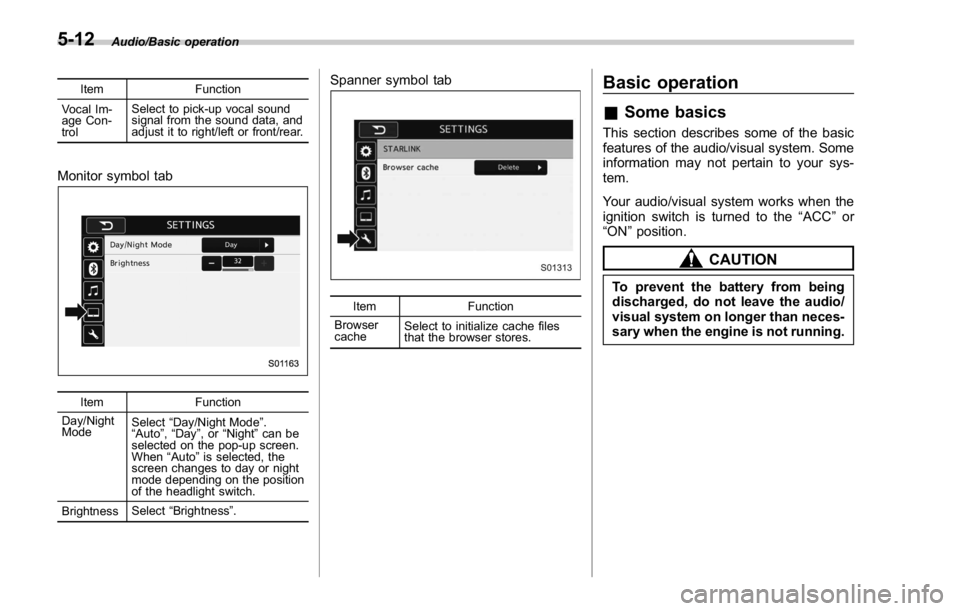
Monitor symbol tab
Item Function
Day/Night
Mode Select “ Day/Night Mode ” .
“ Auto ” , “ Day ” ,or “ Night ” can be
selected on the pop-up screen.
When “ Auto ” is selected, the
screen changes to day or night
mode depending on the position
of the headlight switch.
Brightness Select “ Brightness ” . Spanner symbol tab
Item Function
Browser
cache Select to initialize cache files
that the browser stores.Basic operation & Some basics This section describes some of the basic
features of the audio/visual system. Some
information may not pertain to your sys-
tem.
Your audio/visual system works when the
ignition switch is turned to the “ ACC ” or
“ ON ” position.
CAUTIONTo prevent the battery from being
discharged, do not leave the audio/
visual system on longer than neces-
sary when the engine is not running.5-12
Page 315 of 594
Audio/Media operation
WARNINGDo not operate the player ’ s controls
or connect the iPod while driving.
CAUTION. Do not leave your portable player
in the car. In particular, high
temperatures inside the vehicle
may damage the portable player.
. Do not push down on or apply
unnecessary pressure to the por-
table player while it is connected
as this may damage the portable
player or its terminal.
. Do not insert foreign objects into
the port as this may damage the
portable player or its terminal.
NOTE . When an iPod is connected using a
genuine iPod cable, the iPod starts
charging its battery.
. When an iPod is connected and the
audio source is changed to iPod mode,
the iPod will resume playing from the
same point it was last used.
. Depending on the iPod that is con-
nected to the system, certain functions may not be available.
. Files/tracks selected by operating a
connected iPod may not be recognized
or displayed properly.
. If you press the “ Mute ” switch on
the steering wheel during playback, the
track pauses. If you press the “ Mute ”
switch once again, the playback will
resume.
& Bluetooth audio The Bluetooth audio system enables
users to enjoy listening to music that is
played on a portable player on the vehicle
speakers via wireless communication.
This audio system supports Bluetooth, a
wireless data system capable of playing
portable audio music without cables. If
your device does not support Bluetooth,
the Bluetooth audio system will not func-
tion.
! Overview
Select
BT Audio (BT Audio) on the “ Select
Audio Source (Select Audio Source) ”
screen. Refer to “ Selecting an audio
source ” F 5-13.
Depending on the type of portable player
connected, some functions may not be
available and/or the screen may look
differently than shown in this manual.5-60
Page 318 of 594
WARNING. Do not operate the player ’ s con-
trols or connect to the Bluetooth
audio system while driving.
. Your audio unit is fitted with
Bluetooth antennas. People with
implantable cardiac pacemakers,
cardiac resynchronization ther-
apy-pacemakers or implantable
cardioverter defibrillators should
maintain a reasonable distance
between themselves and the
Bluetooth antennas. The radio
waves may affect the operation
of such devices.
. Before using Bluetooth devices,
users of any electrical medical
device other than implantable
cardiac pacemakers, cardiac re-
synchronization therapy-pace-
makers or implantable cardiover-
ter defibrillators should consult
the manufacturer of the device
for information about its opera-
tion under the influence of radio
waves. Radio waves could have
unexpected effects on the opera-
tion of such medical devices. CAUTIONDo not leave your portable player in
the vehicle. In particular, high tem-
peratures inside the vehicle may
damage the portable player.
NOTE . Depending on the Bluetooth device
that is connected to the system, the
music may start playing when selecting
while it is paused. Conversely, the
music may pause when selecting
while it is playing.
. In the following conditions, the sys-
tem may not function:
– The Bluetooth device is turned
off.
– The Bluetooth device is not con-
nected.
– The Bluetooth device has a low
battery.
. Itmaytaketimetoconnectthe
phone when Bluetooth audio is being
played.
. For operating the portable player,
see the instruction manual that comes
with it.
. If the Bluetooth device is discon-
nected due to poor reception from the
Bluetooth network when the ignition switch is in the “ ACC ” or “ ON ” posi-
tion, the system will automatically
reconnect to the portable player.
. If the Bluetooth device is discon-
nected on purpose, such as it was
turned off, this does not happen.
Reconnect the portable player manu-
ally.
. Bluetooth device information is re-
gistered when the Bluetooth device is
connected to the Bluetooth audio sys-
tem. When selling or disposing of the
vehicle, remove the Bluetooth audio
information from the system. Refer to
“ Other settings ” F 5-10.
! Connecting a Bluetooth device
To use the Bluetooth audio system, it is
necessary to register a Bluetooth device
with the system.
Registering an additional device
1. Select the Bluetooth Setting Key on
the BT Audio menu screen.
2. Select
Add (Add) on the BT Devices
Connection screen.
3. Register a Bluetooth device.
4. For more information: Refer to “ Regis-
tering a Bluetooth device ” F 5-84.
Selecting a registered device
1. Select the Bluetooth Setting Key on
the BT Audio menu screen. Audio/Media operation
– CONTINUED –5-63
Page 323 of 594
Audio/Media operation
WARNING. Do not connect or operate the
smartphone while driving.
. Be sure to park the vehicle in a
safe location before connecting
or operating the smartphone.
CAUTION. Do not leave your smartphone in
the car. In particular, high tem-
peratures inside the vehicle may
damage the smartphone.
. Do not push down on or apply
unnecessary pressure to the
smartphone while it is connected
as this may damage the smart-
phone or its terminal.
. Do not insert foreign objects into
the port as this may damage the
smartphone or its terminal.
NOTE . For safety reasons, certain func-
tions are not available while your
vehicle is in motion.
. In order to maximize signal recep-
tion, performance and precision of the
smartphone, please ensure the smart- phone is placed as close to the system
as possible, while ensuring it is stowed
and secure while driving.
. Use USB cables of iPhone/iPod
touch accessories.
. When the ignition switch is in the
“ ACC ” or “ ON ” position, the battery of
the connected iPhone/iPod touch is
charged.
. iPhone/iPod touch may not be re-
cognized when the ignition switch is in
the “ ACC ” or “ ON ” position. In this
case, remove the iPhone/iPod touch
and reconnect it.
. The accuracy of the displayed in-
formation or the signal reception per-
formance depends on the smartphone
or the connected device, and it ’ s wire-
less connection.
. Since the aha application uses sig-
nals from GPS satellites and wireless
communication lines, it may not work
properly in the following locations.
– In a tunnel
– In underground parking lots
– Outside wireless communication
range, such as some countryside
areas
– Where the wireless communica-
tion network is congested, or where
communications are restricted
. Depending on the circumstances and environment, the signal may be
weak or not be received. In such cases,
an error may occur.
. Top 35 entries in the preset station
list on the smartphone are displayed.
When there are more than 35 entries in
the preset station list, change the order
of the entries in the list on the smart-
phone. You can change the priority of
your preset stations within the aha
application (after disconnected from
this system) to modify the station list
shown on the screen. Please see your
smartphone aha application “ Edit Pre-
sets (in Main menu) ” to modify this list.
. For operating the smartphone, see
the instruction manual that comes with
it.
. If there are multiple music files
stored on your iPhone or iPod touch,
it may take some time until playback
starts.
. Playback may be intermittent when
youswitchtostreamingBluetooth
audio from aha on your smartphone
device.
. When connecting the device via
Bluetooth, the communication speed
may become slower than via USB.5-68
Page 344 of 594
tion under the influence of radio
waves. Radio waves could have
unexpected effects on the opera-
tion of such medical devices.
CAUTIONDo not leave your cellular phone in
the vehicle. The temperature inside
mayrisetoalevelthatcould
damage the phone.
NOTE . If your cellular phone does not
support Bluetooth, this system cannot
function.
. In the following conditions, the sys-
tem may not function:
– The cellular phone is turned off.
– The current position is outside
the communication area.
– The cellular phone is not con-
nected.
– The cellular phone has a low
battery.
. When using the hands free function
and other Bluetooth functions at the
same time, the following problems may
occur:
– The Bluetooth connection may be cut.
– Noise may be heard when play-
ing back voice with the Bluetooth
function.
! Registering/connecting a Bluetooth
phone
To use the hands-free system for cellular
phones, it is necessary to register a
cellular phone with the system. Refer to
“ Registering/connecting Bluetooth ®
de-
vice ” F 5-81.
! Bluetooth phone condition dis-
play
The condition of the Bluetooth phone
appears on the upper right side of the
screen. Refer to “ Bluetooth phone condi-
tion display ” F 5-89.
! Using the phone switch/micro-
phone
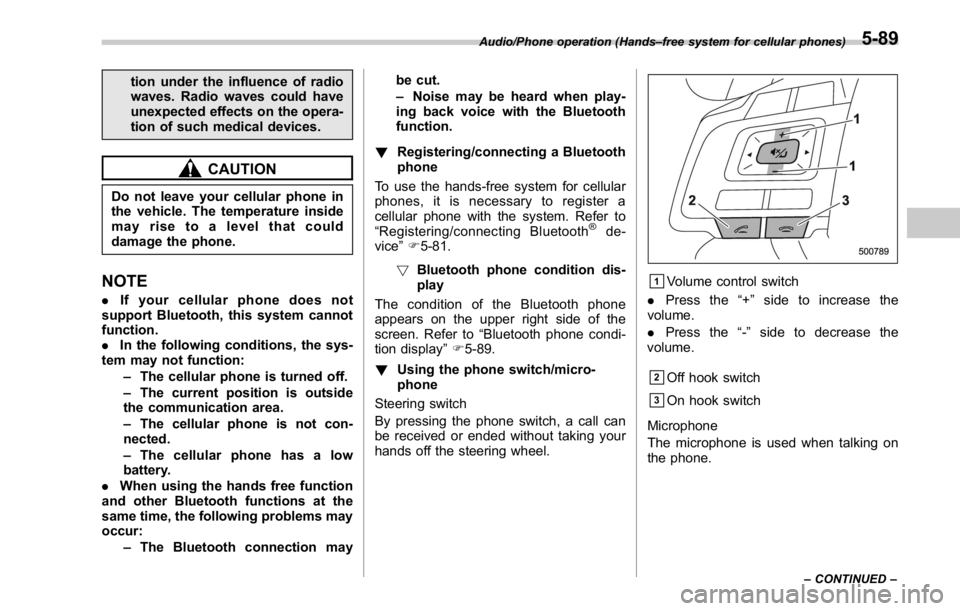
Steering switch
By pressing the phone switch, a call can
be received or ended without taking your
hands off the steering wheel. & 1
Volume control switch
. Press the “ + ” side to increase the
volume.
. Press the “ - ” side to decrease the
volume.
& 2
Off hook switch
& 3
On hook switch
Microphone
The microphone is used when talking on
the phone.Audio/Phone operation (Hands – free system for cellular phones)
– CONTINUED –5-89
Page 361 of 594

Audio/What to do if...
In other situations Symptom Likely cause Solution Page
Cellular
phone This
system
Even though all conceivable mea-
sures have been taken, the symptom
status does not change. The cellular phone is not close enough
to this system. Bring the cellular phone closer to this system. ——
The cellular phone is the most likely
cause of the symptom. Turn the cellular phone off, remove and
reinstall the battery pack, and then restart the
cellular phone. * —
Enable the cellular phone ’ s Bluetooth con-
nection. * —
Stop the cellular phone ’ s security software
and close all applications. * —
Before using an application installed on the
cellular phone, carefully check its source and
how its operation might affect this system. * —
*: For details, refer to the owner ’ s manual that came with the cellular phone.5-106
Page 373 of 594
Interior equipment/Interior lights
Interior lights CAUTIONWhen leaving your vehicle, make
sure the lights are turned off to
avoid battery discharge.
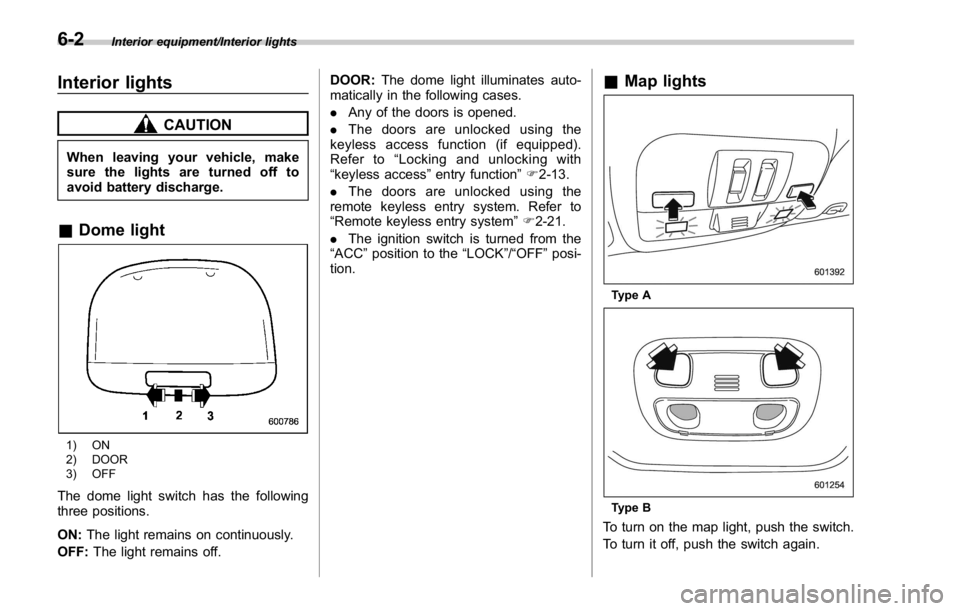
& Dome light
1) ON
2) DOOR
3) OFF
The dome light switch has the following
three positions.
ON: The light remains on continuously.
OFF: The light remains off. DOOR: The dome light illuminates auto-
matically in the following cases.
. Any of the doors is opened.
. The doors are unlocked using the
keyless access function (if equipped).
Refer to “ Locking and unlocking with
“ keyless access ” entry function ” F 2-13.
. The doors are unlocked using the
remote keyless entry system. Refer to
“ Remote keyless entry system ” F 2-21.
. The ignition switch is turned from the
“ ACC ” position to the “ LOCK ” / “ OFF ” posi-
tion. & Map lights
Type A
Type B
To turn on the map light, push the switch.
To turn it off, push the switch again.6-2
Page 374 of 594

When leaving the vehicle, make sure the
lights are turned off to avoid battery
discharge.
! Automatic illumination (type A map
lights)
The map lights illuminate automatically in
the following cases.
. Any of the doors is opened.
. The doors are unlocked using the
keyless access function (if equipped).
Refer to “ Locking and unlocking with
“ keyless access ” entry function ” F 2-13.
. The doors are unlocked using the
remote keyless entry transmitter.
. The ignition switch is turned from the
“ ACC ” position to the “ LOCK ” / “ OFF ” posi-
tion. & OFF delay timer The following lights have an automatic
illumination function.
. dome light (when the dome light switch
is in the “ DOOR ” position)
. map light (type A)
After being illuminated automatically,
these lights remain on for several seconds
and then gradually turn off after all doors
are closed.
While the lights are illuminated, if any of
the following operations are performed,
the lights turn off immediately.
. The ignition switch is turned from the
“ LOCK ” / “ OFF ” position to the “ ACC ” or
“ ON ” position.
. All doors are locked using the keyless
access function (if equipped).
. All doors are locked using the remote
keyless entry system.
The setting for the period of time in which
the lights remain on (OFF delay timer) can
be changed by a SUBARU dealer. Con-
tact your SUBARU dealer for details. Also,
the setting can be changed by operating
the multi function display. For details, refer
to “ Interior light off delay timer setting ” F 3-
87. Sun visors
To block out glare, swing down the visors.
To use the sun visor at a side window,
swing it down and move it sideways. Interior equipment/Sun visors
– CONTINUED –6-3