fuel SUBARU WRX 2016 Owner's Manual
[x] Cancel search | Manufacturer: SUBARU, Model Year: 2016, Model line: WRX, Model: SUBARU WRX 2016Pages: 594, PDF Size: 19.43 MB
Page 183 of 594
Instruments and controls/Multi function display
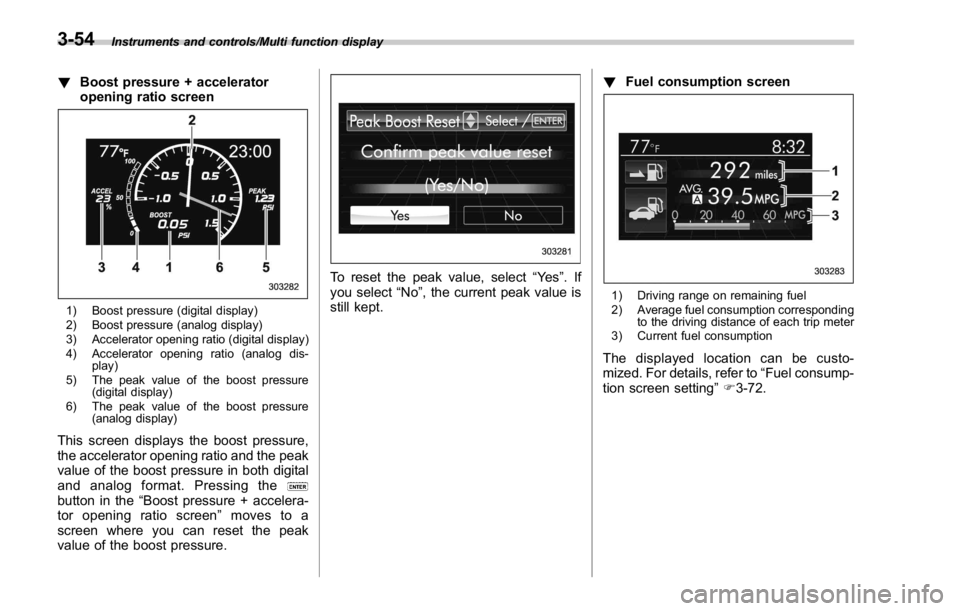
! Boost pressure + accelerator
opening ratio screen
1) Boost pressure (digital display)
2) Boost pressure (analog display)
3) Accelerator opening ratio (digital display)
4) Accelerator opening ratio (analog dis-
play)
5) The peak value of the boost pressure
(digital display)
6) The peak value of the boost pressure
(analog display)
This screen displays the boost pressure,
the accelerator opening ratio and the peak
value of the boost pressure in both digital
and analog format. Pressing the
button in the “ Boost pressure + accelera-
tor opening ratio screen ” moves to a
screen where you can reset the peak
value of the boost pressure. To reset the peak value, select “ Ye s ” .If
you select “ No ” , the current peak value is
still kept. ! Fuel consumption screen
1) Driving range on remaining fuel
2) Average fuel consumption corresponding
to the driving distance of each trip meter
3) Current fuel consumption
The displayed location can be custo-
mized. For details, refer to “ Fuel consump-
tion screen setting ” F 3-72.3-54
Page 184 of 594
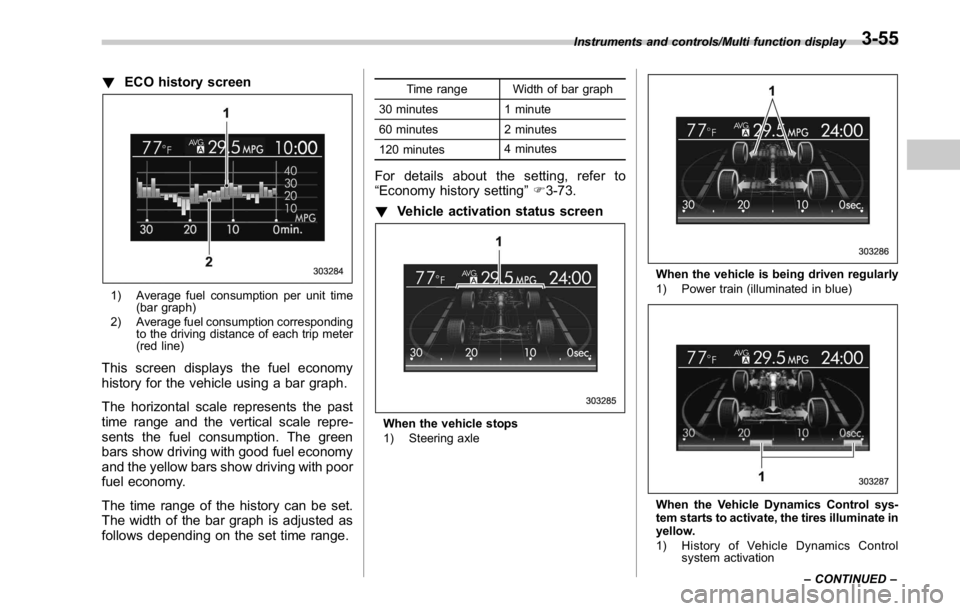
! ECO history screen
1) Average fuel consumption per unit time
(bar graph)
2) Average fuel consumption corresponding
to the driving distance of each trip meter
(red line)
This screen displays the fuel economy
history for the vehicle using a bar graph.
The horizontal scale represents the past
time range and the vertical scale repre-
sents the fuel consumption. The green
bars show driving with good fuel economy
and the yellow bars show driving with poor
fuel economy.
The time range of the history can be set.
The width of the bar graph is adjusted as
follows depending on the set time range. Time range Width of bar graph
30 minutes 1 minute
60 minutes 2 minutes
120 minutes 4 minutes
For details about the setting, refer to
“ Economy history setting ” F 3-73.
! Vehicle activation status screen
When the vehicle stops
1) Steering axle When the vehicle is being driven regularly
1) Power train (illuminated in blue)
When the Vehicle Dynamics Control sys-
tem starts to activate, the tires illuminate in
yellow.
1) History of Vehicle Dynamics Control
system activationInstruments and controls/Multi function display
– CONTINUED –3-55
Page 185 of 594
Instruments and controls/Multi function display
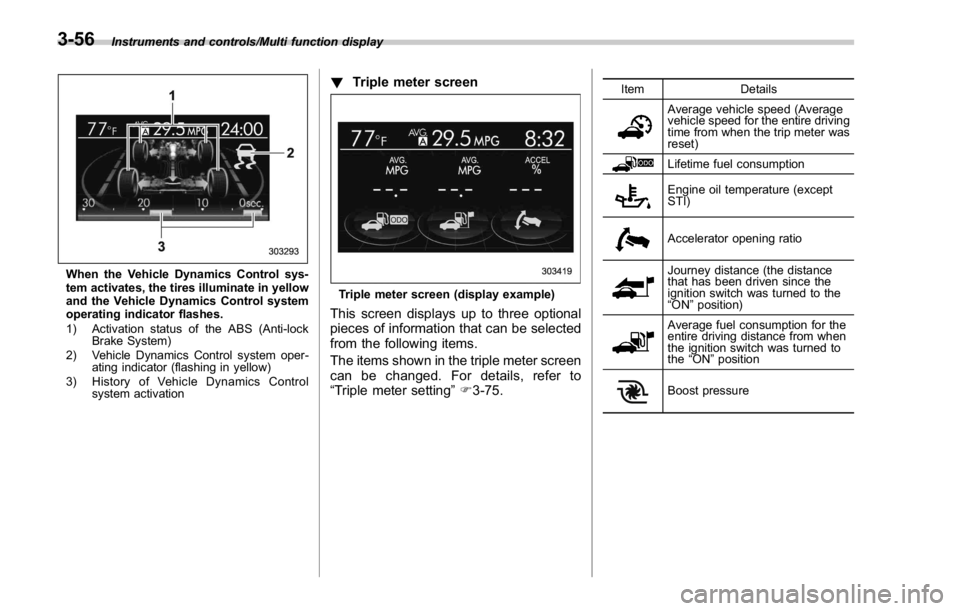
When the Vehicle Dynamics Control sys-
tem activates, the tires illuminate in yellow
and the Vehicle Dynamics Control system
operating indicator flashes.
1) Activation status of the ABS (Anti-lock
Brake System)
2) Vehicle Dynamics Control system oper-
ating indicator (flashing in yellow)
3) History of Vehicle Dynamics Control
system activation ! Triple meter screen
Triple meter screen (display example)
This screen displays up to three optional
pieces of information that can be selected
from the following items.
The items shown in the triple meter screen
can be changed. For details, refer to
“ Triple meter setting ” F 3-75. Item Details
Average vehicle speed (Average
vehicle speed for the entire driving
time from when the trip meter was
reset)
Lifetime fuel consumption
Engine oil temperature (except
STI)
Accelerator opening ratio
Journey distance (the distance
that has been driven since the
ignition switch was turned to the
“ ON ” position)
Average fuel consumption for the
entire driving distance from when
the ignition switch was turned to
the “ ON ” position
Boost pressure3-56
Page 186 of 594
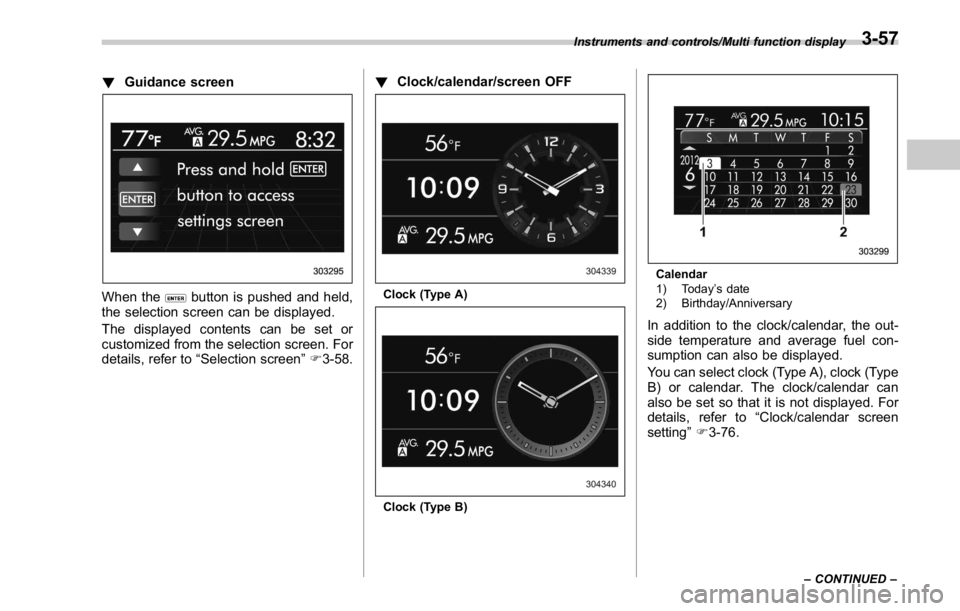
! Guidance screen
When the button is pushed and held,
the selection screen can be displayed.
The displayed contents can be set or
customized from the selection screen. For
details, refer to “ Selection screen ” F 3-58. ! Clock/calendar/screen OFF
Clock (Type A)
Clock (Type B) Calendar
1) Today ’ s date
2) Birthday/Anniversary
In addition to the clock/calendar, the out-
side temperature and average fuel con-
sumption can also be displayed.
You can select clock (Type A), clock (Type
B) or calendar. The clock/calendar can
also be set so that it is not displayed. For
details, refer to “ Clock/calendar screen
setting ” F 3-76.Instruments and controls/Multi function display
– CONTINUED –3-57
Page 188 of 594

Top menu Menu option Description Initial setting Page
Screen
Setting Top Display Set and customize the top display information
contents. Avg Cons, Inst Cons, Range
or Off Avg Cons 3-71
Cons Customize the fuel consumption information display. Upper part: Driv-
ing range, lower
part: Fuel con-
sumption 3-72
Eco History Set and customize the time of logging fuel
consumption history. 30 min, 60 min or 120 min 30 min 3-73
Triple Meter Set and customize the triple meter. Left: Lifetime fuel
consumption,
center: Average
fuel consumption,
right: Accelerator
opening ratio 3-75
Clock Select the clock format. Type A clock, Type B clock,
Calendar or Off Analog clock 3-76
Bypass Screen Set the bypass screen for each item. On or Off Welcome screen:
On
Eco Summary: Off
Birthday Remin-
der: On
Anniversary Re-
minder: On 3-77
Languages Select the display language. English or French or Spanish
(U.S.-spec. models only) The default lan-
guage settings
vary depending
on individual
countries. 3-78
Go Back Return to the top menu. ——Instruments and controls/Multi function display
– CONTINUED –3-59
Page 190 of 594

Top menu Menu option Description Initial setting Page
Initialize
Reset to Defaults Reset all settings to the default settings. Yes or No — 3-92
Lifetime Fuel Cons
Reset Clear logged lifetime fuel consumption data. Yes or No — 3-93
Go Back Return to the top menu. ——
Go Back
— Return to the top menu. — —Instruments and controls/Multi function display
– CONTINUED –3-61
Page 201 of 594
Instruments and controls/Multi function display
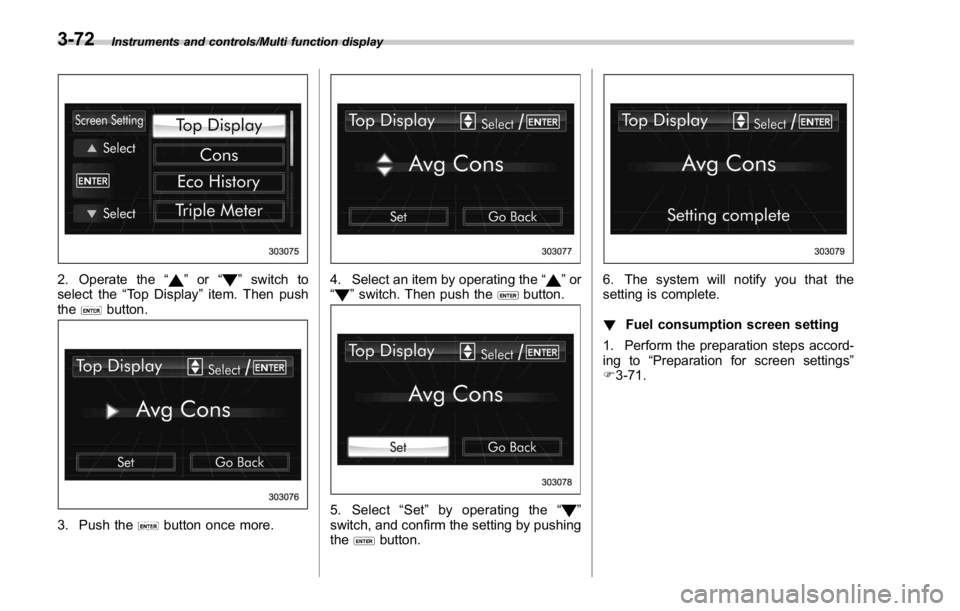
2. Operate the “ ” or “ ” switch to
select the “ Top Display ” item. Then push
the
button.
3. Push the button once more. 4. Select an item by operating the “ ” or
“
” switch. Then push the button.
5. Select “ Set ” by operating the “ ”
switch, and confirm the setting by pushing
the
button. 6. The system will notify you that the
setting is complete.
! Fuel consumption screen setting
1. Perform the preparation steps accord-
ing to “ Preparation for screen settings ”
F 3-71.3-72
Page 203 of 594
Instruments and controls/Multi function display
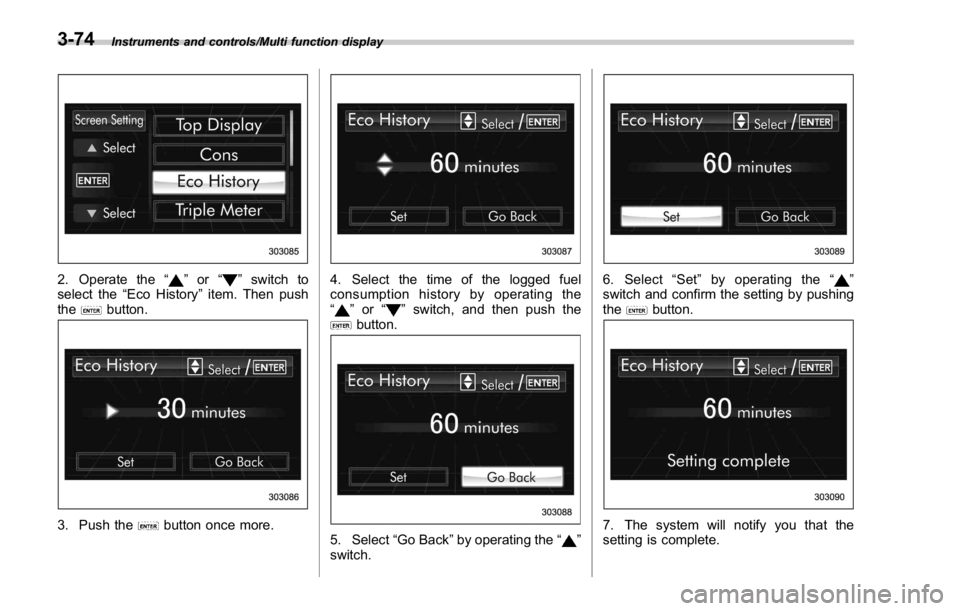
2. Operate the “ ” or “ ” switch to
select the “ Eco History ” item. Then push
the
button.
3. Push the button once more. 4. Select the time of the logged fuel
consumption history by operating the
“
” or “ ” switch, and then push the
button.
5. Select “ Go Back ” by operating the “ ”
switch. 6. Select “ Set ” by operating the “ ”
switch and confirm the setting by pushing
the
button.
7. The system will notify you that the
setting is complete.3-74
Page 222 of 594
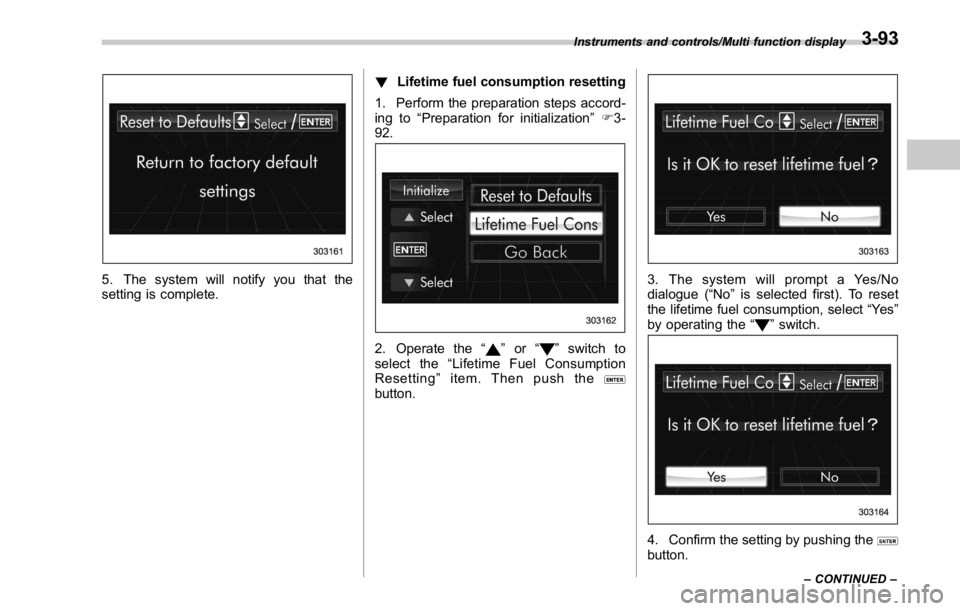
5. The system will notify you that the
setting is complete. ! Lifetime fuel consumption resetting
1. Perform the preparation steps accord-
ing to “ Preparation for initialization ” F 3-
92.
2. Operate the “ ” or “ ” switch to
select the “ Lifetime Fuel Consumption
Resetting ” item. Then push the
button. 3. The system will prompt a Yes/No
dialogue ( “ No ” is selected first). To reset
the lifetime fuel consumption, select “ Ye s ”
by operating the “
” switch.
4. Confirm the setting by pushing the
button.Instruments and controls/Multi function display
– CONTINUED –3-93
Page 230 of 594
Wiper and washer WARNINGIn freezing weather, do not use the
windshield washer until the wind-
shield is sufficiently warmed by the
defroster.
Otherwise the washer fluid can
freeze on the windshield, blocking
your view.
CAUTION. Do not operate the washer con-
tinuously for more than 10 sec-
onds, or when the washer fluid
tank is empty. This may cause
overheating of the washer motor.
Check the washer fluid level
frequently, such as at fuel stops.
. Do not operate the wipers when
the windshield or rear window is
dry. This may scratch the glass,
damage the wiper blades and
might cause the wiper motor to
fail. Before operating the wiper
on a dry windshield or rear
window, always use the wind-
shield washer. . In freezing weather, be sure that
the wiper blades are not frozen to
the windshield or rear window
before switching on the wipers.
Attempting to operate the wiper
with the blades frozen to the
window glass could cause not
only the wiper blades to be
damaged but also might cause
the wiper motor to fail. If the
wiper blades are frozen to the
window glass, be sure to operate
the defroster, windshield wiper
deicer (if equipped) or rear win-
dow defogger before turning on
the wiper.
. If the wipers stop during opera-
tion because of ice or some other
obstruction on the window, this
might cause the wiper motor to
fail even if the wiper switch is
turned off. If this occurs,
promptly stop the vehicle in a
safe place, turn the ignition
switch to the “ LOCK ” / “ OFF ” po-
sition and clean the window
glass to allow proper wiper op-
eration.
. Use clean water if windshield
washer fluid is unavailable. In
areas where water freezes in
winter, use SUBARU Windshield Washer Fluid or the equivalent.
Refer to “ Windshield washer
fluid ” F 11-38.
Also, when driving the vehicle
when there are freezing tempera-
tures, use non-freezing type wi-
per blades.
. Do not clean the wiper blades
with gasoline or a solvent, such
as paint thinner or benzine. This
will cause deterioration of the
wiper blades.
NOTE . The windshield wiper motor is pro-
tected against overloads by a circuit
breaker. If the motor operates continu-
ously under an unusually heavy load,
the circuit breaker may trip to stop the
motor temporarily. If this happens, park
your vehicle in a safe place, turn off the
wiper switch, and wait for approxi-
mately 10 minutes. The circuit breaker
will reset itself, and the wipers will
again operate normally.
. Clean your wiper blades and win-
dow glass periodically with a washer
solution to prevent streaking, and to
remove accumulations of road salt or
road film. Operate the windshield
washer for at least 1 second so that Instruments and controls/Wiper and washer
– CONTINUED –3-101