fuel SUBARU WRX 2016 User Guide
[x] Cancel search | Manufacturer: SUBARU, Model Year: 2016, Model line: WRX, Model: SUBARU WRX 2016Pages: 594, PDF Size: 19.43 MB
Page 142 of 594
ever the engine speed enters the red
zone of the tachometer.
To change the REV indicator settings,
perform the procedures described in “ REV
settings (STI) ” F 3-47.
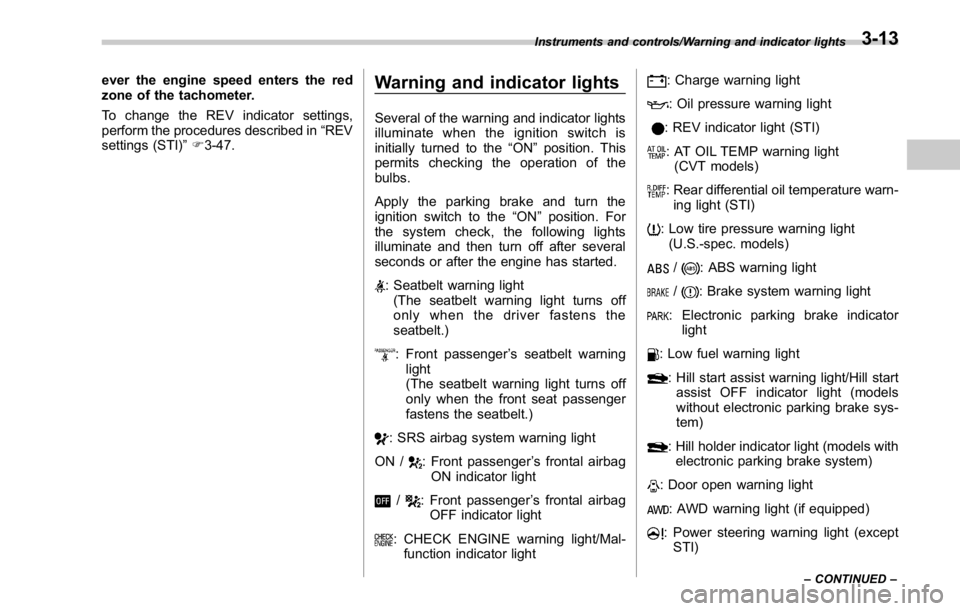
Warning and indicator lights Several of the warning and indicator lights
illuminate when the ignition switch is
initially turned to the “ ON ” position. This
permits checking the operation of the
bulbs.
Apply the parking brake and turn the
ignition switch to the “ ON ” position. For
the system check, the following lights
illuminate and then turn off after several
seconds or after the engine has started.
: Seatbelt warning light
(The seatbelt warning light turns off
only when the driver fastens the
seatbelt.)
: Front passenger ’ s seatbelt warning
light
(The seatbelt warning light turns off
only when the front seat passenger
fastens the seatbelt.)
: SRS airbag system warning light
ON /
: Front passenger ’ s frontal airbag
ON indicator light
/ : Front passenger ’ s frontal airbag
OFF indicator light
: CHECK ENGINE warning light/Mal-
function indicator light : Charge warning light
: Oil pressure warning light
: REV indicator light (STI)
: AT OIL TEMP warning light
(CVT models)
: Rear differential oil temperature warn-
ing light (STI)
: Low tire pressure warning light
(U.S.-spec. models)
/ : ABS warning light
/ : Brake system warning light
: Electronic parking brake indicator
light
: Low fuel warning light
: Hill start assist warning light/Hill start
assist OFF indicator light (models
without electronic parking brake sys-
tem)
: Hill holder indicator light (models with
electronic parking brake system)
: Door open warning light
: AWD warning light (if equipped)
: Power steering warning light (except
STI)Instruments and controls/Warning and indicator lights
– CONTINUED –3-13
Page 146 of 594
NOTE This light also illuminates when the fuel
filler cap is not tightened until it clicks.
If you have recently refueled your vehicle,
the cause of the CHECK ENGINE warning
light/malfunction indicator light illuminating
could be a loose or missing fuel filler cap.
Remove the cap and retighten it until it
clicks. Make sure nothing is interfering
with the sealing of the cap. Tightening the
cap will not make the CHECK ENGINE
warning light/malfunction indicator light
turn off immediately. It may take several
driving trips. If the light does not turn off,
take your vehicle to your authorized
SUBARU dealer immediately.
! If the light is blinking
If the light is blinking while driving, an
engine misfire condition has been de-
tected which may damage the emission
control system.
To prevent serious damage to the emis-
sion control system, you should do the
following.
. Reduce vehicle speed.
. Avoid hard acceleration.
. Avoid steep uphill grades.
. Reduce the amount of cargo, if possi-
ble.
The CHECK ENGINE warning light may stop blinking and illuminate steadily after
several driving trips. You should have your
vehicle checked by an authorized
SUBARU dealer immediately.
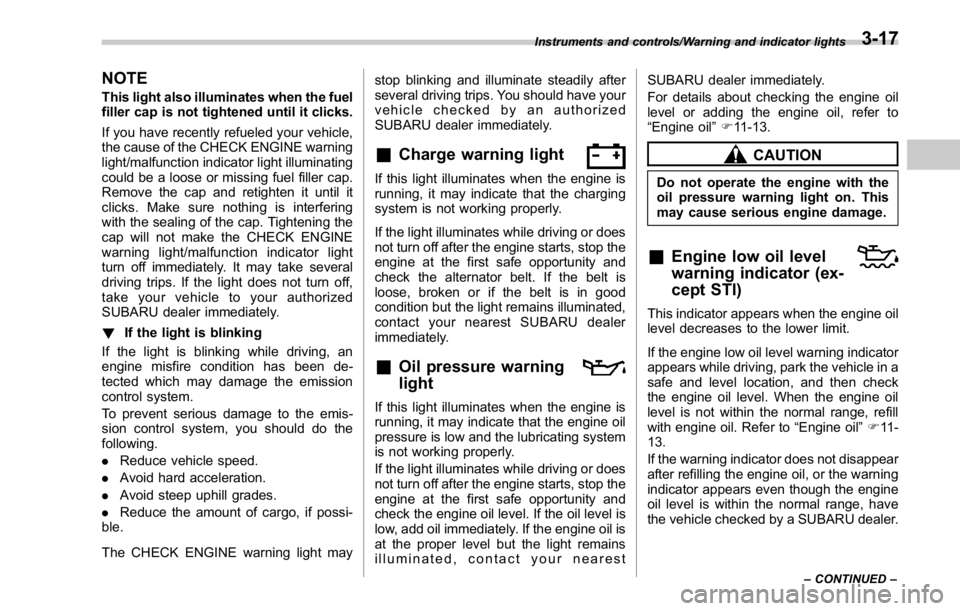
& Charge warning light If this light illuminates when the engine is
running, it may indicate that the charging
system is not working properly.
If the light illuminates while driving or does
not turn off after the engine starts, stop the
engine at the first safe opportunity and
check the alternator belt. If the belt is
loose, broken or if the belt is in good
condition but the light remains illuminated,
contact your nearest SUBARU dealer
immediately.
& Oil pressure warning
light If this light illuminates when the engine is
running, it may indicate that the engine oil
pressure is low and the lubricating system
is not working properly.
If the light illuminates while driving or does
not turn off after the engine starts, stop the
engine at the first safe opportunity and
check the engine oil level. If the oil level is
low, add oil immediately. If the engine oil is
at the proper level but the light remains
illuminated, contact your nearest SUBARU dealer immediately.
For details about checking the engine oil
level or adding the engine oil, refer to
“ Engine oil ” F 11-13.
CAUTIONDo not operate the engine with the
oil pressure warning light on. This
may cause serious engine damage.
& Engine low oil level
warning indicator (ex-
cept STI) This indicator appears when the engine oil
level decreases to the lower limit.
If the engine low oil level warning indicator
appears while driving, park the vehicle in a
safe and level location, and then check
the engine oil level. When the engine oil
level is not within the normal range, refill
with engine oil. Refer to “ Engine oil ” F 11 -
13.
If the warning indicator does not disappear
after refilling the engine oil, or the warning
indicator appears even though the engine
oil level is within the normal range, have
the vehicle checked by a SUBARU dealer.Instruments and controls/Warning and indicator lights
– CONTINUED –3-17
Page 148 of 594
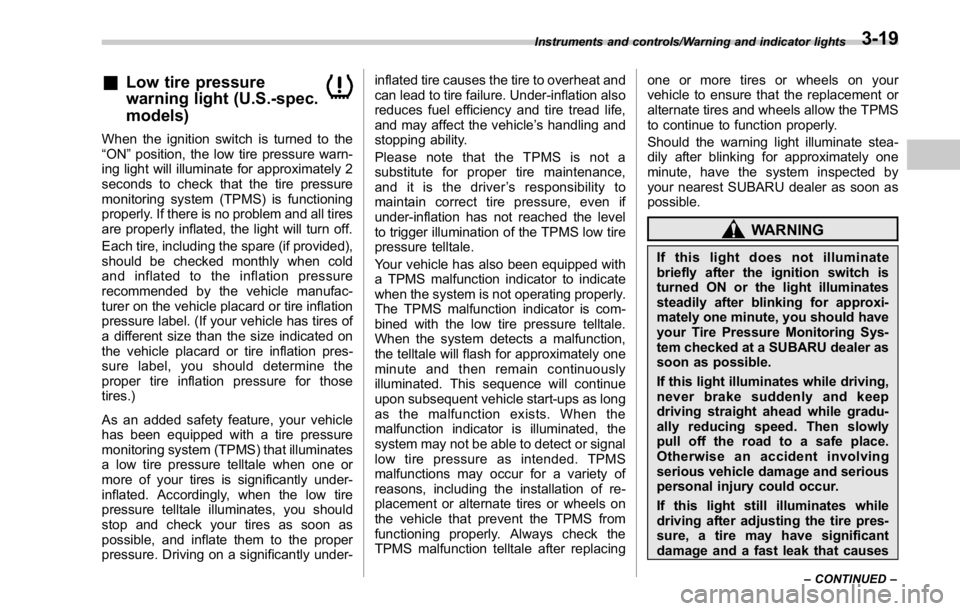
& Low tire pressure
warning light (U.S.-spec.
models)When the ignition switch is turned to the
“ ON ” position, the low tire pressure warn-
ing light will illuminate for approximately 2
seconds to check that the tire pressure
monitoring system (TPMS) is functioning
properly. If there is no problem and all tires
are properly inflated, the light will turn off.
Each tire, including the spare (if provided),
should be checked monthly when cold
and inflated to the inflation pressure
recommended by the vehicle manufac-
turer on the vehicle placard or tire inflation
pressure label. (If your vehicle has tires of
a different size than the size indicated on
the vehicle placard or tire inflation pres-
sure label, you should determine the
proper tire inflation pressure for those
tires.)
As an added safety feature, your vehicle
has been equipped with a tire pressure
monitoring system (TPMS) that illuminates
a low tire pressure telltale when one or
more of your tires is significantly under-
inflated. Accordingly, when the low tire
pressure telltale illuminates, you should
stop and check your tires as soon as
possible, and inflate them to the proper
pressure. Driving on a significantly under- inflated tire causes the tire to overheat and
can lead to tire failure. Under-inflation also
reduces fuel efficiency and tire tread life,
and may affect the vehicle ’ s handling and
stopping ability.
Please note that the TPMS is not a
substitute for proper tire maintenance,
and it is the driver ’ s responsibility to
maintain correct tire pressure, even if
under-inflation has not reached the level
to trigger illumination of the TPMS low tire
pressure telltale.
Your vehicle has also been equipped with
a TPMS malfunction indicator to indicate
when the system is not operating properly.
The TPMS malfunction indicator is com-
bined with the low tire pressure telltale.
When the system detects a malfunction,
the telltale will flash for approximately one
minute and then remain continuously
illuminated. This sequence will continue
upon subsequent vehicle start-ups as long
as the malfunction exists. When the
malfunction indicator is illuminated, the
system may not be able to detect or signal
low tire pressure as intended. TPMS
malfunctions may occur for a variety of
reasons, including the installation of re-
placement or alternate tires or wheels on
the vehicle that prevent the TPMS from
functioning properly. Always check the
TPMS malfunction telltale after replacing one or more tires or wheels on your
vehicle to ensure that the replacement or
alternate tires and wheels allow the TPMS
to continue to function properly.
Should the warning light illuminate stea-
dily after blinking for approximately one
minute, have the system inspected by
your nearest SUBARU dealer as soon as
possible.
WARNINGIf this light does not illuminate
briefly after the ignition switch is
turned ON or the light illuminates
steadily after blinking for approxi-
mately one minute, you should have
your Tire Pressure Monitoring Sys-
tem checked at a SUBARU dealer as
soon as possible.
If this light illuminates while driving,
never brake suddenly and keep
driving straight ahead while gradu-
ally reducing speed. Then slowly
pull off the road to a safe place.
Otherwise an accident involving
serious vehicle damage and serious
personal injury could occur.
If this light still illuminates while
driving after adjusting the tire pres-
sure, a tire may have significant
damage and a fast leak that causesInstruments and controls/Warning and indicator lights
– CONTINUED –3-19
Page 153 of 594
Instruments and controls/Warning and indicator lights
! Parking brake apply inhibit warn-
ing
The electronic parking brake indicator light
flashes for 10 seconds and a chirp sound
will be heard if the parking brake switch is
operated when the parking brake cannot
be applied.
! Frequent operation warning
The electronic parking brake indicator light
flashes for 10 seconds and a chirp sound
will be heard if the parking brake switch is
operated too frequently. In this case, the
operation of the parking brake switch is
restricted to protect the electronic parking
brake system.
NOTE Wait until the indicator light turns off.
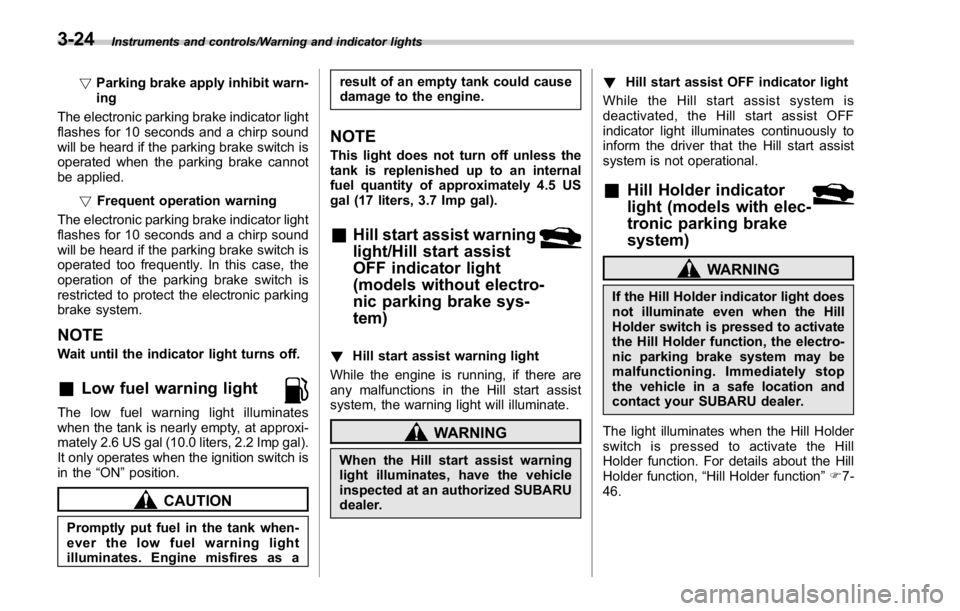
& Low fuel warning lightThe low fuel warning light illuminates
when the tank is nearly empty, at approxi-
mately 2.6 US gal (10.0 liters, 2.2 Imp gal).
It only operates when the ignition switch is
in the “ ON ” position.
CAUTION
Promptly put fuel in the tank when-
ever the low fuel warning light
illuminates. Engine misfires as a result of an empty tank could cause
damage to the engine.
NOTE This light does not turn off unless the
tank is replenished up to an internal
fuel quantity of approximately 4.5 US
gal (17 liters, 3.7 Imp gal).
& Hill start assist warning
light/Hill start assist
OFF indicator light
(models without electro-
nic parking brake sys-
tem) ! Hill start assist warning light
While the engine is running, if there are
any malfunctions in the Hill start assist
system, the warning light will illuminate.
WARNING
When the Hill start assist warning
light illuminates, have the vehicle
inspected at an authorized SUBARU
dealer. ! Hill start assist OFF indicator light
While the Hill start assist system is
deactivated, the Hill start assist OFF
indicator light illuminates continuously to
inform the driver that the Hill start assist
system is not operational.
& Hill Holder indicator
light (models with elec-
tronic parking brake
system) WARNINGIf the Hill Holder indicator light does
not illuminate even when the Hill
Holder switch is pressed to activate
the Hill Holder function, the electro-
nic parking brake system may be
malfunctioning. Immediately stop
the vehicle in a safe location and
contact your SUBARU dealer.
The light illuminates when the Hill Holder
switch is pressed to activate the Hill
Holder function. For details about the Hill
Holder function, “ Hill Holder function ” F 7-
46.3-24
Page 163 of 594
Instruments and controls/Warning and indicator lights
& SI-DRIVE indicator (if
equipped)
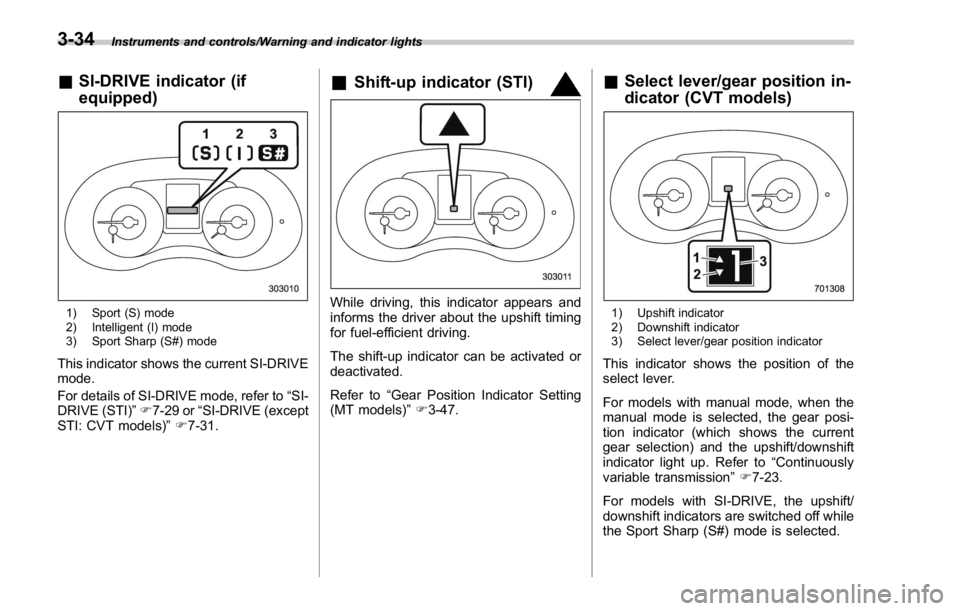
1) Sport (S) mode
2) Intelligent (I) mode
3) Sport Sharp (S#) mode
This indicator shows the current SI-DRIVE
mode.
For details of SI-DRIVE mode, refer to “ SI-
DRIVE (STI) ” F 7-29 or “ SI-DRIVE (except
STI: CVT models) ” F 7-31. & Shift-up indicator (STI)
While driving, this indicator appears and
informs the driver about the upshift timing
for fuel-efficient driving.
The shift-up indicator can be activated or
deactivated.
Refer to “ Gear Position Indicator Setting
(MT models) ” F 3-47. & Select lever/gear position in-
dicator (CVT models)
1) Upshift indicator
2) Downshift indicator
3) Select lever/gear position indicator
This indicator shows the position of the
select lever.
For models with manual mode, when the
manual mode is selected, the gear posi-
tion indicator (which shows the current
gear selection) and the upshift/downshift
indicator light up. Refer to “ Continuously
variable transmission ” F 7-23.
For models with SI-DRIVE, the upshift/
downshift indicators are switched off while
the Sport Sharp (S#) mode is selected.3-34
Page 170 of 594
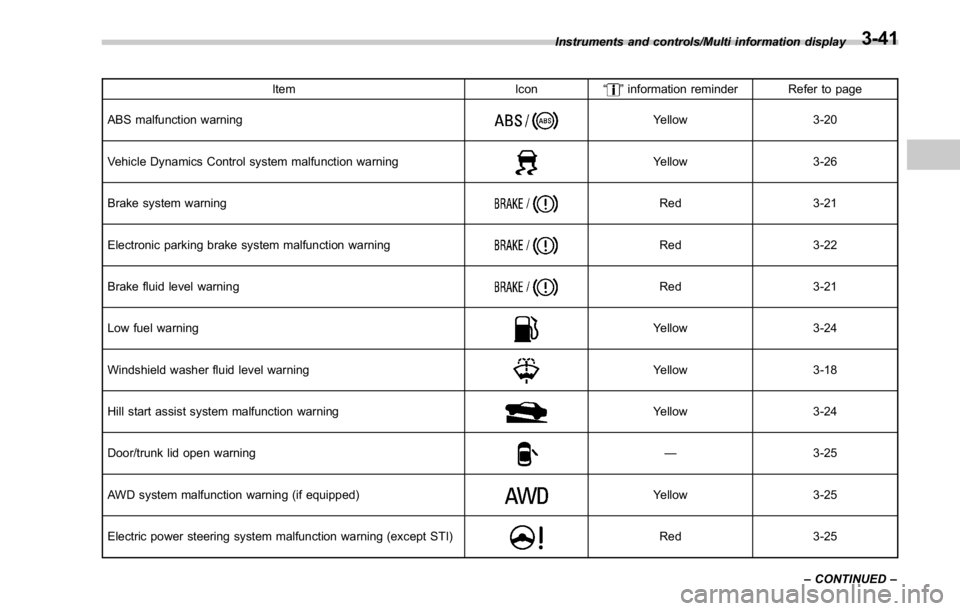
Item Icon “ ” information reminder Refer to page
ABS malfunction warning Yellow 3-20
Vehicle Dynamics Control system malfunction warning Yellow 3-26
Brake system warning Red 3-21
Electronic parking brake system malfunction warning Red 3-22
Brake fluid level warning Red 3-21
Low fuel warning Yellow 3-24
Windshield washer fluid level warning Yellow 3-18
Hill start assist system malfunction warning Yellow 3-24
Door/trunk lid open warning — 3-25
AWD system malfunction warning (if equipped) Yellow 3-25
Electric power steering system malfunction warning (except STI) Red 3-25Instruments and controls/Multi information display
– CONTINUED –3-41
Page 177 of 594
Instruments and controls/Multi function display
“ On ” to activate the buzzer. Select “ Off ” to
deactivate the buzzer.
! BSD/RCTA (if equipped)
After entering the “ BSD/RCTA ” menu,
select the “ Warning Volume ” menu. You
can set the volume of the warning buzzer
that sounds when the BSD/RCTA is in
use. You can select “ Max ” , “ Mid ” , “ Min ” or
“ Off ” .
! Default Settings
Select “ Ye s ” to use the menu screen to
restore customized settings to the factory
default settings. Select “ No ” to return to
the previous screen without restoring to
the factory default settings. Multi function display NOTE . Illustrations show the display for
U.S.-spec. models as an example. For
models other than U.S.-spec. models,
elements in the illustrations (such as
the display indication and measure-
ment unit) may be different than the
ones for U.S.-spec. models.
. When the vehicle is in motion,
certain functions and selections may
not be available.
. The images shown in this Owner ’ s
Manual are sample images. The actual
images may vary depending on the
destinations and specifications.
WARNING
Always pay adequate attention to
safe driving when operating the
multi function display while the
vehicle is in motion. When operation
of the multi function display is
disturbing your awareness and abil-
ity to concentrate on driving, stop
the vehicle in a safe place before
performing operations on the
screen. Also, do not concentrate
on the display while driving. Doing
so may cause you to look away from the road and could result in an
accident.
The multi function display has the follow-
ing functions. Description Page
Displays useful messages, such
as warning information, etc. 3-52
Displays basic screens (e.g. fuel
consumption screen, etc.) 3-52
Sets and adjusts maintenance
notification 3-79
Registers driving history 3-82
Sets and customizes car opera-
tion 3-83
Also, the multi function display can also be
used to set and initialize the multi function
display itself.3-48
Page 179 of 594
Instruments and controls/Multi function display
& Date screenIf you have set the date and time in the
selection screen, after the welcome
screen is displayed, the current date will
be displayed for a certain period of time. If
“ On/Off setting ” is set to “ On ” in the
“ Maintenance settings ” , the date will be
displayed after the self-check screen.
! Birthday/anniversary screen
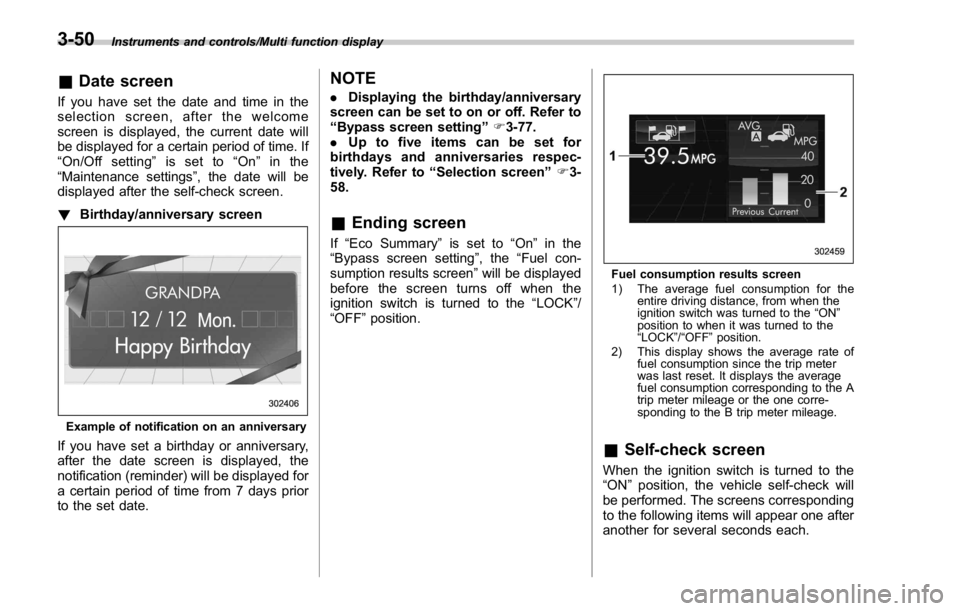
Example of notification on an anniversary
If you have set a birthday or anniversary,
after the date screen is displayed, the
notification (reminder) will be displayed for
a certain period of time from 7 days prior
to the set date. NOTE . Displaying the birthday/anniversary
screen can be set to on or off. Refer to
“ Bypass screen setting ” F 3-77.
. Up to five items can be set for
birthdays and anniversaries respec-
tively. Refer to “ Selection screen ” F 3-
58.
& Ending screen If “ Eco Summary ” is set to “ On ” in the
“ Bypass screen setting ” , the “ Fuel con-
sumption results screen ” will be displayed
before the screen turns off when the
ignition switch is turned to the “ LOCK ” /
“ OFF ” position. Fuel consumption results screen
1) The average fuel consumption for the
entire driving distance, from when the
ignition switch was turned to the “ ON ”
position to when it was turned to the
“ LOCK ” / “ OFF ” position.
2) This display shows the average rate of
fuel consumption since the trip meter
was last reset. It displays the average
fuel consumption corresponding to the A
trip meter mileage or the one corre-
sponding to the B trip meter mileage.
& Self-check screen When the ignition switch is turned to the
“ ON ” position, the vehicle self-check will
be performed. The screens corresponding
to the following items will appear one after
another for several seconds each.3-50
Page 181 of 594
Instruments and controls/Multi function display
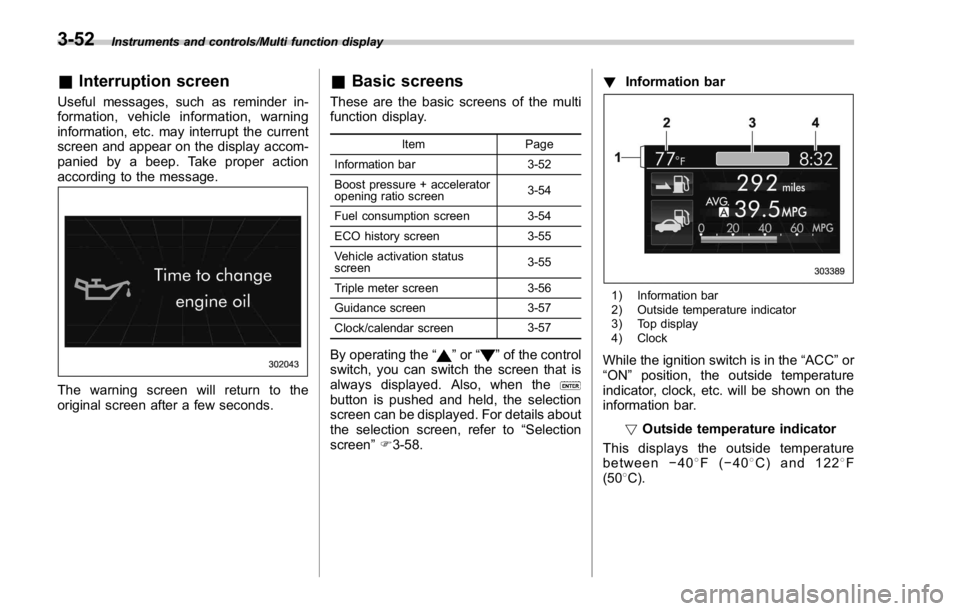
& Interruption screenUseful messages, such as reminder in-
formation, vehicle information, warning
information, etc. may interrupt the current
screen and appear on the display accom-
panied by a beep. Take proper action
according to the message.
The warning screen will return to the
original screen after a few seconds. & Basic screens These are the basic screens of the multi
function display. Item Page
Information bar 3-52
Boost pressure + accelerator
opening ratio screen 3-54
Fuel consumption screen 3-54
ECO history screen 3-55
Vehicle activation status
screen 3-55
Triple meter screen 3-56
Guidance screen 3-57
Clock/calendar screen 3-57
By operating the “ ” or “ ” of the control
switch, you can switch the screen that is
always displayed. Also, when the
button is pushed and held, the selection
screen can be displayed. For details about
the selection screen, refer to “ Selection
screen ” F 3-58. ! Information bar
1) Information bar
2) Outside temperature indicator
3) Top display
4) Clock
While the ignition switch is in the “ ACC ” or
“ ON ” position, the outside temperature
indicator, clock, etc. will be shown on the
information bar.
! Outside temperature indicator
This displays the outside temperature
between − 40 8 F( − 40 8 C) and 122 8 F
(50 8 C).3-52
Page 182 of 594
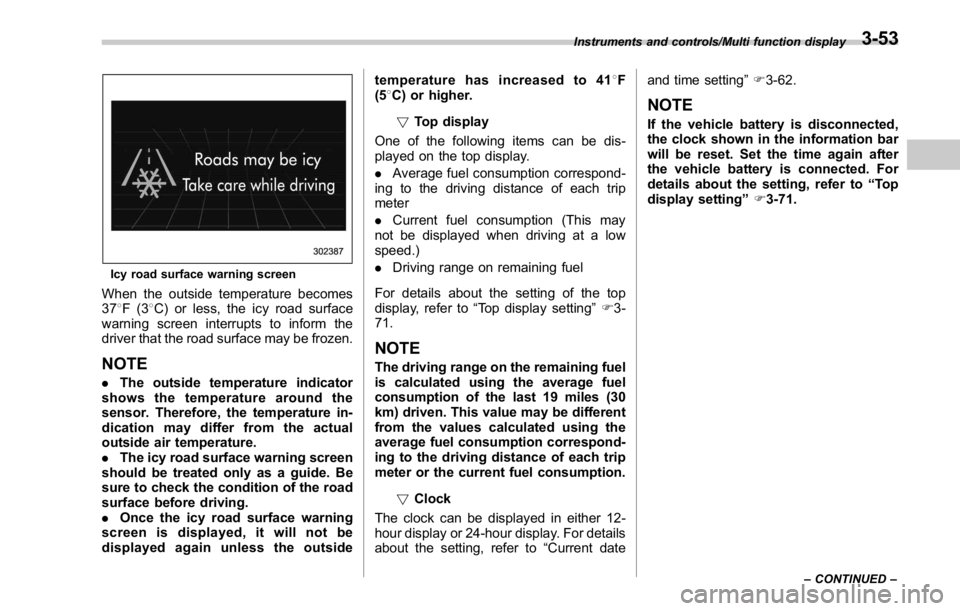
Icy road surface warning screen
When the outside temperature becomes
37 8 F(3 8 C) or less, the icy road surface
warning screen interrupts to inform the
driver that the road surface may be frozen.
NOTE . The outside temperature indicator
shows the temperature around the
sensor. Therefore, the temperature in-
dication may differ from the actual
outside air temperature.
. The icy road surface warning screen
should be treated only as a guide. Be
sure to check the condition of the road
surface before driving.
. Once the icy road surface warning
screen is displayed, it will not be
displayed again unless the outside temperature has increased to 41 8 F
(5 8 C) or higher.
! Top display
One of the following items can be dis-
played on the top display.
. Average fuel consumption correspond-
ing to the driving distance of each trip
meter
. Current fuel consumption (This may
not be displayed when driving at a low
speed.)
. Driving range on remaining fuel
For details about the setting of the top
display, refer to “ Top display setting ” F 3-
71.
NOTE The driving range on the remaining fuel
is calculated using the average fuel
consumption of the last 19 miles (30
km) driven. This value may be different
from the values calculated using the
average fuel consumption correspond-
ing to the driving distance of each trip
meter or the current fuel consumption.
! Clock
The clock can be displayed in either 12-
hour display or 24-hour display. For details
about the setting, refer to “ Current date and time setting ” F 3-62.
NOTE If the vehicle battery is disconnected,
the clock shown in the information bar
will be reset. Set the time again after
the vehicle battery is connected. For
details about the setting, refer to “ To p
display setting ” F 3-71.Instruments and controls/Multi function display
– CONTINUED –3-53