tow SUBARU WRX 2016 Owner's Manual
[x] Cancel search | Manufacturer: SUBARU, Model Year: 2016, Model line: WRX, Model: SUBARU WRX 2016Pages: 594, PDF Size: 19.43 MB
Page 345 of 594
Audio/Phone operation (Hands – free system for cellular phones)
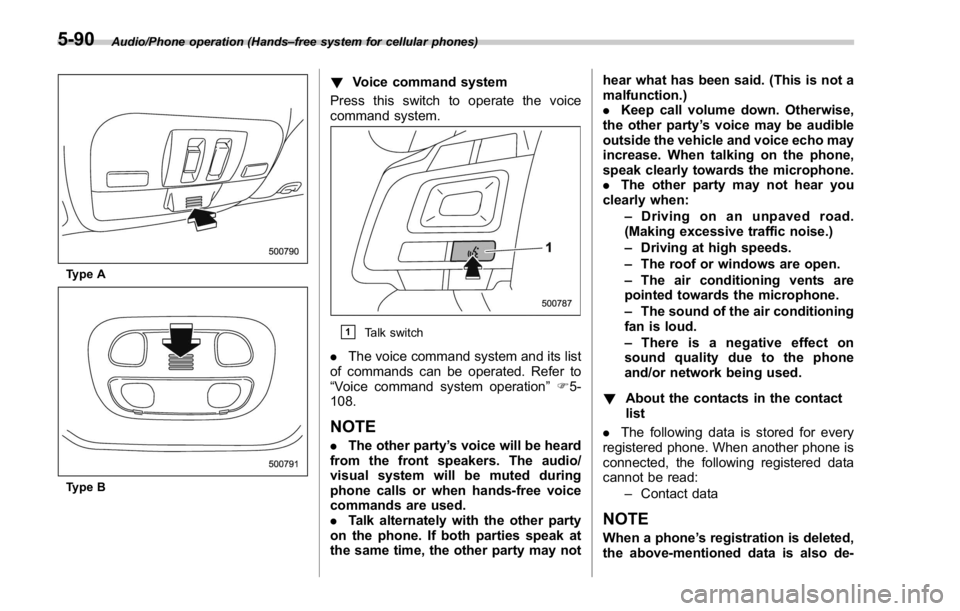
Type A
Type B ! Voice command system
Press this switch to operate the voice
command system.
& 1
Talk switch
. The voice command system and its list
of commands can be operated. Refer to
“ Voice command system operation ” F 5-
108.
NOTE . The other party ’ s voice will be heard
from the front speakers. The audio/
visual system will be muted during
phone calls or when hands-free voice
commands are used.
. Talk alternately with the other party
on the phone. If both parties speak at
the same time, the other party may not hear what has been said. (This is not a
malfunction.)
. Keep call volume down. Otherwise,
the other party ’ s voice may be audible
outside the vehicle and voice echo may
increase. When talking on the phone,
speak clearly towards the microphone.
. The other party may not hear you
clearly when:
– Drivingonanunpavedroad.
(Making excessive traffic noise.)
– Driving at high speeds.
– The roof or windows are open.
– The air conditioning vents are
pointed towards the microphone.
– The sound of the air conditioning
fan is loud.
– Thereisanegativeeffecton
sound quality due to the phone
and/or network being used.
! About the contacts in the contact
list
. The following data is stored for every
registered phone. When another phone is
connected, the following registered data
cannot be read:
– Contact data
NOTE
When a phone ’ s registration is deleted,
the above-mentioned data is also de-5-90
Page 362 of 594
Voice command system op-
eration & Voice command system The voice command system enables the
audio, hands-free systems, etc. to be
operated using voice commands.
Refer to the “ Command list ” F 5-110 for
samples of voice commands.
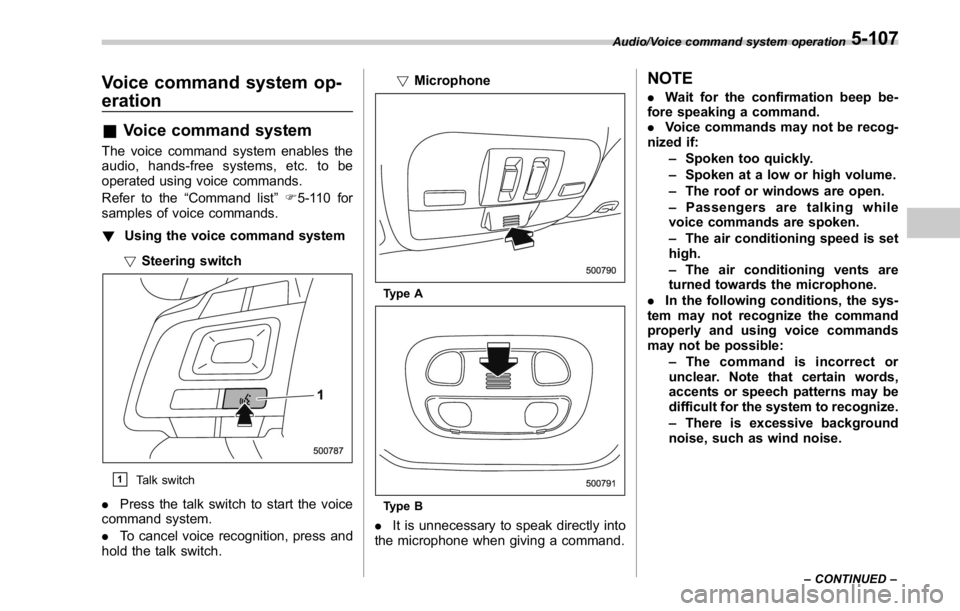
! Using the voice command system
! Steering switch
& 1
Talk switch
. Press the talk switch to start the voice
command system.
. To cancel voice recognition, press and
hold the talk switch. ! Microphone
Type A
Type B
. It is unnecessary to speak directly into
the microphone when giving a command. NOTE . Wait for the confirmation beep be-
fore speaking a command.
. Voice commands may not be recog-
nized if:
– Spoken too quickly.
– Spoken at a low or high volume.
– The roof or windows are open.
– Passengers are talking while
voice commands are spoken.
– The air conditioning speed is set
high.
– The air conditioning vents are
turned towards the microphone.
. In the following conditions, the sys-
tem may not recognize the command
properly and using voice commands
may not be possible:
– The command is incorrect or
unclear. Note that certain words,
accents or speech patterns may be
difficult for the system to recognize.
– There is excessive background
noise, such as wind noise. Audio/Voice command system operation
– CONTINUED –5-107
Page 375 of 594
Interior equipment/Sun visors
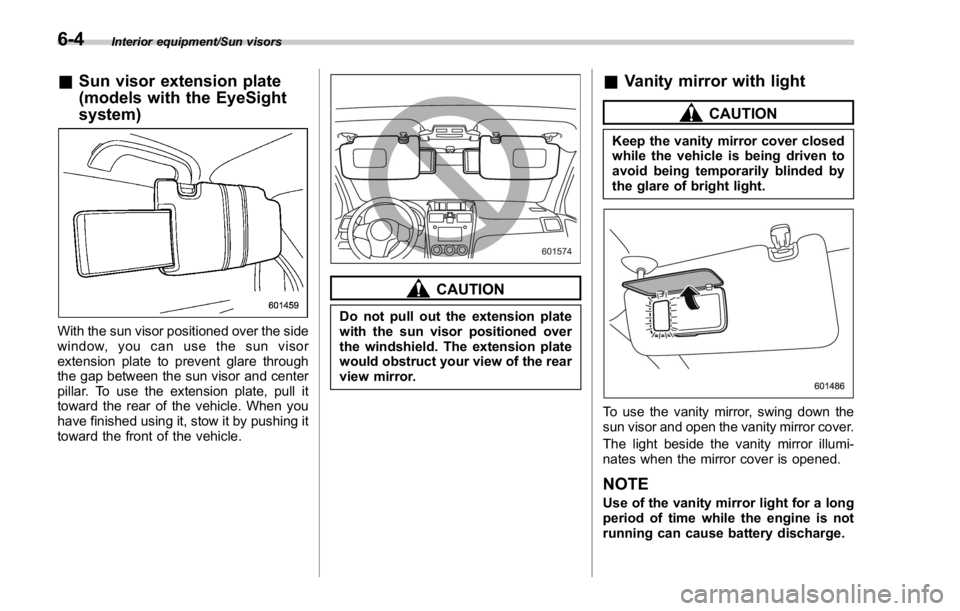
& Sun visor extension plate
(models with the EyeSight
system)
With the sun visor positioned over the side
window, you can use the sun visor
extension plate to prevent glare through
the gap between the sun visor and center
pillar. To use the extension plate, pull it
toward the rear of the vehicle. When you
have finished using it, stow it by pushing it
toward the front of the vehicle. CAUTIONDo not pull out the extension plate
with the sun visor positioned over
the windshield. The extension plate
would obstruct your view of the rear
view mirror. & Vanity mirror with light CAUTIONKeep the vanity mirror cover closed
while the vehicle is being driven to
avoid being temporarily blinded by
the glare of bright light.
To use the vanity mirror, swing down the
sun visor and open the vanity mirror cover.
The light beside the vanity mirror illumi-
nates when the mirror cover is opened.
NOTE Use of the vanity mirror light for a long
period of time while the engine is not
running can cause battery discharge.6-4
Page 377 of 594

Interior equipment/Cup holders
Cup holders CAUTIONTake care to avoid spills. Beverages,
if hot, might burn you and/or your
passengers. Spilled beverages may
also damage upholstery, carpets or
audio equipment.
& Front passenger ’ s cup holder
CAUTIONDo not pick up a cup from the cup
holder or put a cup in the holder
while you are driving, as this may
distract you and lead to an accident. ! Except STI
Type A
Type B
A dual cup holder is built into the center
console. ! STI
The dual cup holder is built into the center
console near the parking brake lever.
To access the cup holder, pull the lid
toward the rear.6-6
Page 378 of 594
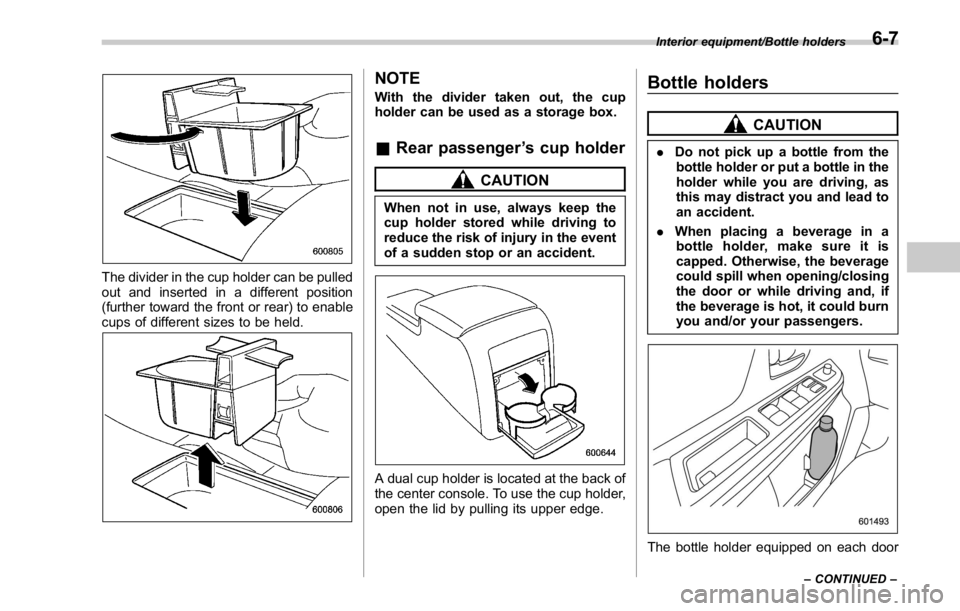
The divider in the cup holder can be pulled
out and inserted in a different position
(further toward the front or rear) to enable
cups of different sizes to be held. NOTE With the divider taken out, the cup
holder can be used as a storage box.
& Rear passenger ’ s cup holder CAUTIONWhen not in use, always keep the
cup holder stored while driving to
reduce the risk of injury in the event
of a sudden stop or an accident.
A dual cup holder is located at the back of
the center console. To use the cup holder,
open the lid by pulling its upper edge. Bottle holders CAUTION. Do not pick up a bottle from the
bottle holder or put a bottle in the
holder while you are driving, as
this may distract you and lead to
an accident.
. When placing a beverage in a
bottle holder, make sure it is
capped. Otherwise, the beverage
could spill when opening/closing
the door or while driving and, if
the beverage is hot, it could burn
you and/or your passengers.
The bottle holder equipped on each door Interior equipment/Bottle holders
– CONTINUED –6-7
Page 412 of 594

– When a temporary spare tire
is installed
– When your vehicle is towed
– When the vehicle is stopped
with the manual mode se-
lected
NOTE . A higher initial LSD torque setting
gives the vehicle greater traction when
driving straight ahead but makes cor-
nering more difficult. Remember this
when adjusting the initial LSD torque.
In general, higher initial LSD torque
settings assist driving on slippery
roads and lower settings for non-slip-
pery roads. When the vehicle is stuck
in snow or mud, setting the initial LSD
torque to the maximum will help to free
the vehicle.
. The setting of the initial LSD torque
will remain even when the auto mode is
selected or the ignition switch is turned
to the “ LOCK ” / “ OFF ” position. How-
ever, the initial LSD torque will be
minimized when the battery is discon-
nected and reconnected.
. During cornering or when making
turns (especially when going into the
garage), the rotational difference be-
tween the front and rear wheels may cause a braking effect accompanied by
vibration and noise. This does not
indicate a problem. The phenomenon
will disappear when setting the initial
LSD torque to the minimum.
In the auto mode, it controls the initial
LSD torque automatically. While in the
auto mode, this phenomenon some-
times occurs depending on the driving
condition, however, it does not indicate
a problem.
. Use the center differential indicator
only as a rough indication of the initial
LSD torque.
. If you operate the center differential
control switch while quickly accelerat-
ing or turning a tight corner, you may
feel slight shocks. This is due to
differential action by the center differ-
ential and does not indicate a problem.
& Temporary release When the driver stops the vehicle and
pulls the parking brake lever after manu-
ally setting the initial LSD torque, the LSD
torque is temporarily minimized. However
the indicator on the combination meter
continues to show the driver ’ s selected
initial LSD torque. When the driver re-
leases the parking brake lever, the initial
LSD torque set by the driver is restored. Continuously variable trans-
mission The continuously variable transmission is
electronically controlled and provides an
infinite number of forward speeds and 1
reverse speed. It also has a manual mode.
WARNINGDo not shift from the “ P ” or “ N ”
position into the “ D ” or “ R ” position
while depressing the accelerator
pedal. This may cause the vehicle
to jump forward or backward.
CAUTION. Shift into the “ P ” or “ R ” position
only after the vehicle is comple-
tely stopped. Shifting while the
vehicle is moving may cause
damage to the transmission.
. Do not race the engine for more
than 5 seconds in any position
except the “ N ” or “ P ” position
when the brake is applied or
when chocks are used in the
wheels. This may cause the
transmission fluid to overheat.
. Never move the vehicle rearwardStarting and operating/Continuously variable transmission
– CONTINUED –7-23
Page 418 of 594
. Do not keep the vehicle in a stationary
position on an uphill grade by using the
“ D ” position. Use the brake instead.
. The engine may, on rare occasions,
knock when the vehicle rapidly acceler-
ates or rapidly pulls away from a standstill.
This phenomenon does not indicate a
malfunction.
SI-DRIVE (STI) SI-DRIVE (SUBARU Intelligent Drive)
works to maximize engine performance,
control and efficiency.
This system consists of three modes:
Intelligent (I), Sport (S), and Sport Sharp
(S#). By adjusting the SI-DRIVE selector,
the character of the power unit changes.
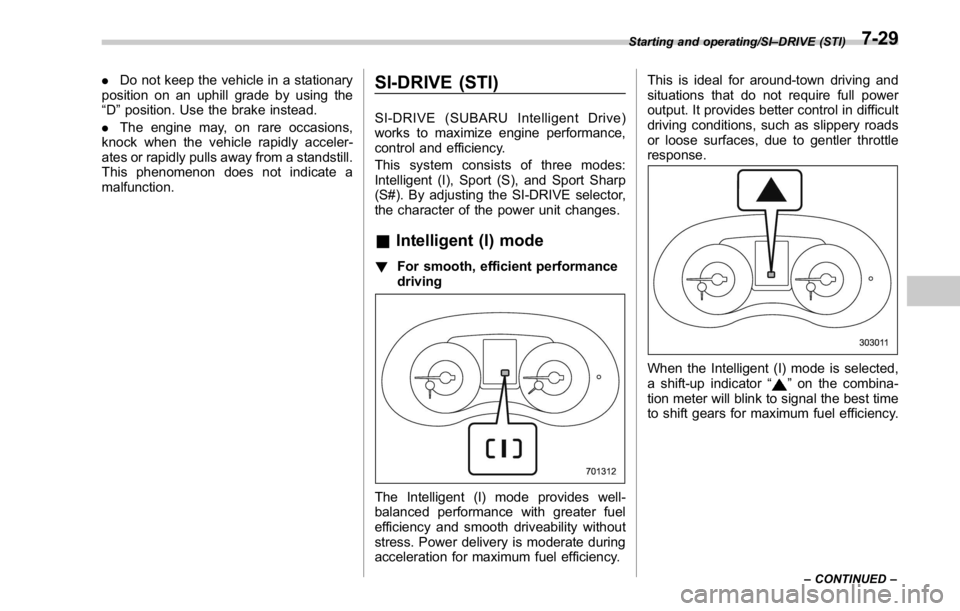
& Intelligent (I) mode ! For smooth, efficient performance
driving
The Intelligent (I) mode provides well-
balanced performance with greater fuel
efficiency and smooth driveability without
stress. Power delivery is moderate during
acceleration for maximum fuel efficiency. This is ideal for around-town driving and
situations that do not require full power
output. It provides better control in difficult
driving conditions, such as slippery roads
or loose surfaces, due to gentler throttle
response.
When the Intelligent (I) mode is selected,
a shift-up indicator “
” on the combina-
tion meter will blink to signal the best time
to shift gears for maximum fuel efficiency. Starting and operating/SI – DRIVE (STI)
– CONTINUED –7-29
Page 420 of 594
mode, the SI-DRIVE mode will stay in
the same mode as when the engine
was turned off.
. While the engine is running, if the
CHECK ENGINE warning light/malfunc-
tion indicator light illuminates, the SI-
DRIVE mode changes to the Sport (S)
mode. In this case, it is not possible to
change to the Sport Sharp (S#) mode or
Intelligent (I) mode.
. If there is a possibility that the
engine could overheat because of a
temperature increase of the engine
coolant, it is not possible to change to
the Sport Sharp (S#) mode. While the
vehicle is in the Sport Sharp (S#) mode,
it changes to the Sport (S) mode when
the engine coolant temperature in-
creases.
. If any of the SI-DRIVE indicators
blink, the SI-DRIVE system may be
malfunctioning. Contact your SUBARU
dealer.
. While the engine is cool, you cannot
change to Sport Sharp (S#) mode. SI-DRIVE (except STI: CVT
models) SI-DRIVE (SUBARU Intelligent Drive)
works to maximize engine performance,
control and efficiency.
This system consists of three modes:
Intelligent (I), Sport (S), and Sport Sharp
(S#). By operating the SI-DRIVE switches,
the character of the power unit changes.
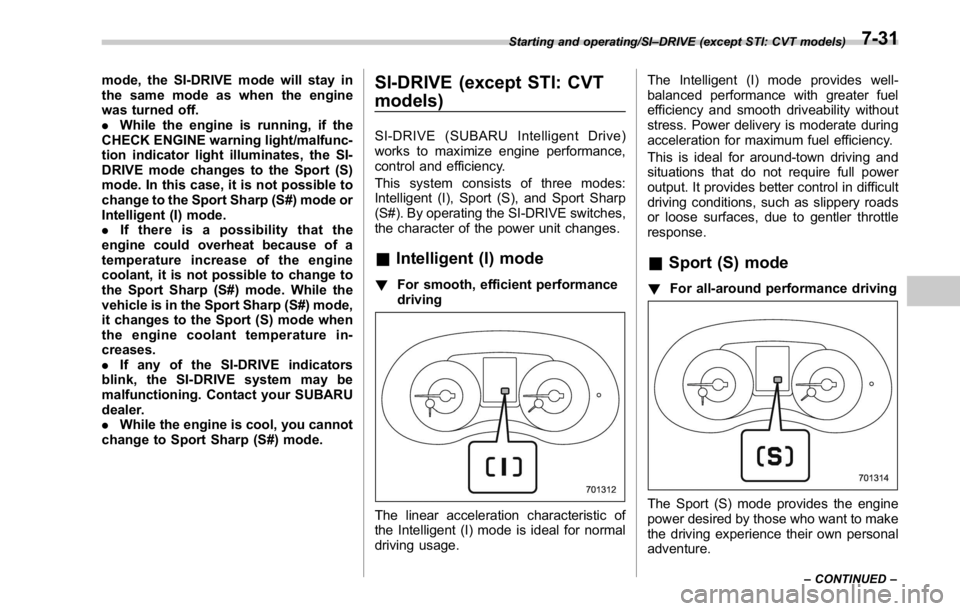
& Intelligent (I) mode ! For smooth, efficient performance
driving
The linear acceleration characteristic of
the Intelligent (I) mode is ideal for normal
driving usage. The Intelligent (I) mode provides well-
balanced performance with greater fuel
efficiency and smooth driveability without
stress. Power delivery is moderate during
acceleration for maximum fuel efficiency.
This is ideal for around-town driving and
situations that do not require full power
output. It provides better control in difficult
driving conditions, such as slippery roads
or loose surfaces, due to gentler throttle
response.
& Sport (S) mode ! For all-around performance driving
The Sport (S) mode provides the engine
power desired by those who want to make
the driving experience their own personal
adventure.Starting and operating/SI – DRIVE (except STI: CVT models)
– CONTINUED –7-31
Page 427 of 594
Starting and operating/Vehicle Dynamics Control system
If the brake system warning light and ABS
warning light illuminate simultaneously,
take the following steps.
1. Stop the vehicle in the nearest safe,
flat location.
2. Apply the parking brake and turn off
the engine.
3. Restart the engine.
4. Release the parking brake.
Even if both warning lights turn off:
The EBD system may be malfunctioning.
Drive carefully to the nearest SUBARU
dealer and have the system inspected.
If both warning lights illuminate again
and remain illuminated after restarting
the engine:
1. Turn off the engine again.
2. Apply the parking brake.
3. Check the brake fluid level. For details
about checking the brake fluid level, refer
to “ Checking the fluid level ” F 11-25.
. If the brake fluid level is not below the
“ MIN ” mark, the EBD system may be
malfunctioning. Drive carefully to the
nearest SUBARU dealer and have the
system inspected.
. If the brake fluid level is below the
“ MIN ” mark, DO NOT drive the vehicle.
Instead, have the vehicle towed to the nearest SUBARU dealer for repair.
WARNING. Driving with the brake system
warning light illuminated is dan-
gerous. This indicates your brake
system may not be working
properly. If the light remains
illuminated, have the brakes in-
spected by a SUBARU dealer
immediately.
. If at all in doubt about whether
the brakes are operating prop-
erly, do not drive the vehicle.
Have your vehicle towed to the
nearest SUBARU dealer for re-
pair. Vehicle Dynamics Control
system WARNINGAlways use the utmost care in
driving – overconfidence because
you are driving a vehicle with the
Vehicle Dynamics Control system
could easily lead to a serious acci-
dent.
CAUTION. Even if your vehicle is equipped
with Vehicle Dynamics Control
system, winter tires should be
used when driving on snow-cov-
ered or icy roads; in addition,
vehicle speed should be reduced
considerably. Simply having a
Vehicle Dynamics Control sys-
tem does not guarantee that the
vehicle will be able to avoid
accidents in any situation.
. Activation of the Vehicle Dy-
namics Control system is an
indication that the road being
travelled on has a slippery sur-
face; since having Vehicle Dy-7-38
Page 436 of 594
dicator light illuminates.
. Depending on the condition of the
road surface and braking force, the
brakes operate temporarily and feel
different than usual.
. When the electronic parking brake
system has a malfunction while the Hill
Holder function is activated, a chirp
sound is heard, the Hill Holder indica-
tor light turns off and the brake system
warning light turns on.
. When the hill holder activates on a
slope, the electronic parking brake is
engaged. The electronic parking brake
will release when you accelerate from
the stop. If you manually release the
electronic parking brake while the hill
holder is activated, the hill holder
function is cancelled and will not re-
engage until the vehicle has moved
some distance. In that case, you will
need to manually engage the electronic
parking brake if needed. ! Hill Holder switch
WARNINGWhen stopping on an uphill slope
with the Hill Holder function acti-
vated, release the brake pedal after
the electronic parking brake indica-
tor light has illuminated. Otherwise,
the Hill Holder function may not
operate properly and an accident
may occur.
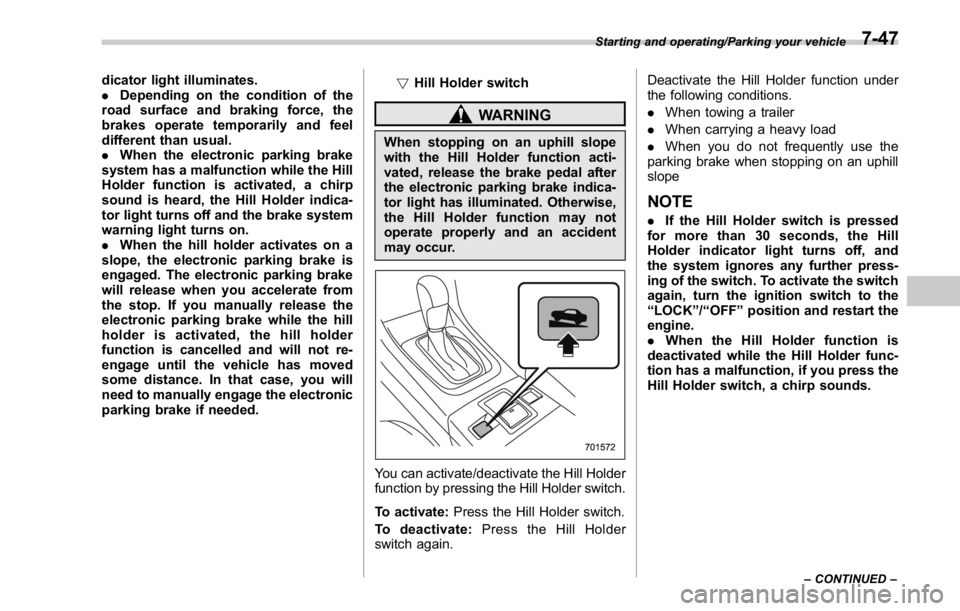
You can activate/deactivate the Hill Holder
function by pressing the Hill Holder switch.
To activate: Press the Hill Holder switch.
To deactivate: Press the Hill Holder
switch again. Deactivate the Hill Holder function under
the following conditions.
. When towing a trailer
. When carrying a heavy load
. When you do not frequently use the
parking brake when stopping on an uphill
slope
NOTE . If the Hill Holder switch is pressed
for more than 30 seconds, the Hill
Holder indicator light turns off, and
the system ignores any further press-
ing of the switch. To activate the switch
again, turn the ignition switch to the
“ LOCK ” / “ OFF ” position and restart the
engine.
. When the Hill Holder function is
deactivated while the Hill Holder func-
tion has a malfunction, if you press the
Hill Holder switch, a chirp sounds. Starting and operating/Parking your vehicle
– CONTINUED –7-47