ECU SUBARU WRX 2016 Workshop Manual
[x] Cancel search | Manufacturer: SUBARU, Model Year: 2016, Model line: WRX, Model: SUBARU WRX 2016Pages: 594, PDF Size: 19.43 MB
Page 349 of 594
Audio/Phone operation (Hands – free system for cellular phones)
! Outgoing Calls
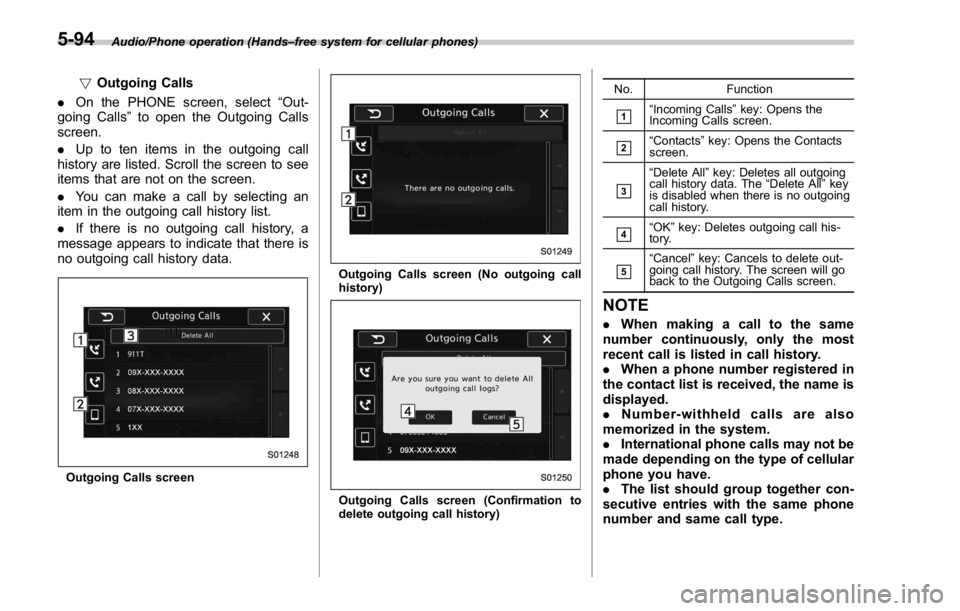
. On the PHONE screen, select “ Out-
going Calls ” to open the Outgoing Calls
screen.
. Up to ten items in the outgoing call
history are listed. Scroll the screen to see
items that are not on the screen.
. You can make a call by selecting an
item in the outgoing call history list.
. If there is no outgoing call history, a
message appears to indicate that there is
no outgoing call history data.
Outgoing Calls screen Outgoing Calls screen (No outgoing call
history)
Outgoing Calls screen (Confirmation to
delete outgoing call history) No. Function
& 1
“ Incoming Calls ” key: Opens the
Incoming Calls screen.
& 2
“ Contacts ” key: Opens the Contacts
screen.
& 3
“ Delete All ” key: Deletes all outgoing
call history data. The “ Delete All ” key
is disabled when there is no outgoing
call history.
& 4
“ OK ” key: Deletes outgoing call his-
tory.
& 5
“ Cancel ” key: Cancels to delete out-
going call history. The screen will go
back to the Outgoing Calls screen.
NOTE . When making a call to the same
number continuously, only the most
recent call is listed in call history.
. When a phone number registered in
the contact list is received, the name is
displayed.
. Number-withheld calls are also
memorized in the system.
. International phone calls may not be
made depending on the type of cellular
phone you have.
. The list should group together con-
secutive entries with the same phone
number and same call type.5-94
Page 361 of 594

Audio/What to do if...
In other situations Symptom Likely cause Solution Page
Cellular
phone This
system
Even though all conceivable mea-
sures have been taken, the symptom
status does not change. The cellular phone is not close enough
to this system. Bring the cellular phone closer to this system. ——
The cellular phone is the most likely
cause of the symptom. Turn the cellular phone off, remove and
reinstall the battery pack, and then restart the
cellular phone. * —
Enable the cellular phone ’ s Bluetooth con-
nection. * —
Stop the cellular phone ’ s security software
and close all applications. * —
Before using an application installed on the
cellular phone, carefully check its source and
how its operation might affect this system. * —
*: For details, refer to the owner ’ s manual that came with the cellular phone.5-106
Page 381 of 594
Interior equipment/Ashtray
Ashtray (if equipped) CAUTION. Do not use ashtrays as waste
receptacles or leave a lighted
cigarette in an ashtray. This
could cause a fire.
. Always extinguish matches and
cigarettes before putting them
into the ashtray, and then close
the ashtray securely. If you keep
the ashtray open, the fire of the
cigarette may spread to another
cigarette butt and start a fire.
. Do not put flammable material in
the ashtray.
. Do not leave a lot of cigarette
butts in the ashtray.
NOTE Particles of ash and tobacco will accu-
mulate around the hinges of the ash-
tray ’ s inner lid. Clean them off using a
toothbrush or a similar narrow-ended
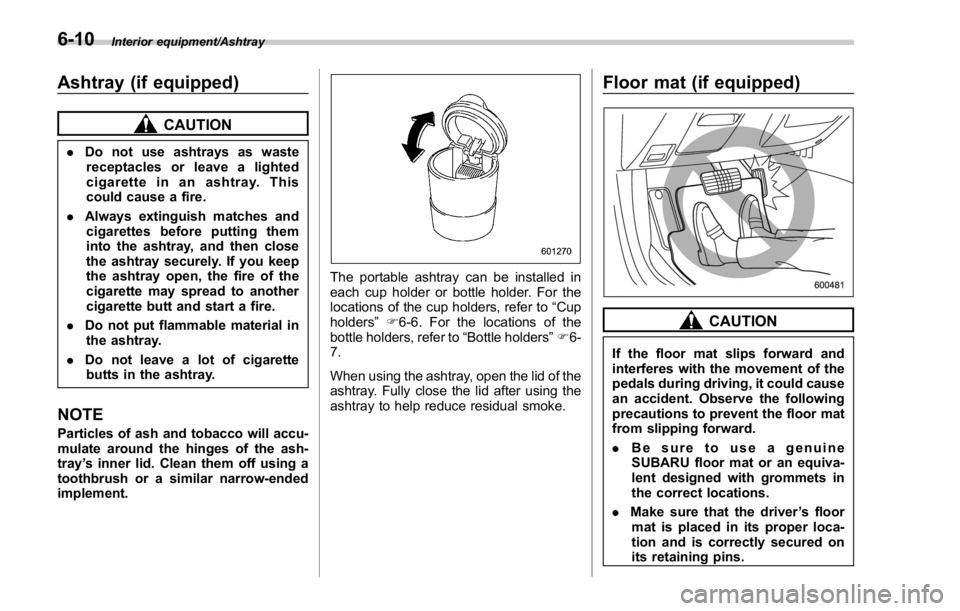
implement. The portable ashtray can be installed in
each cup holder or bottle holder. For the
locations of the cup holders, refer to “ Cup
holders ” F 6-6. For the locations of the
bottle holders, refer to “ Bottle holders ” F 6-
7.
When using the ashtray, open the lid of the
ashtray. Fully close the lid after using the
ashtray to help reduce residual smoke. Floor mat (if equipped)
CAUTION
If the floor mat slips forward and
interferes with the movement of the
pedals during driving, it could cause
an accident. Observe the following
precautions to prevent the floor mat
from slipping forward.
. Be sure to use a genuine
SUBARU floor mat or an equiva-
lent designed with grommets in
the correct locations.
. Make sure that the driver ’ s floor
mat is placed in its proper loca-
tion and is correctly secured on
its retaining pins.6-10
Page 382 of 594
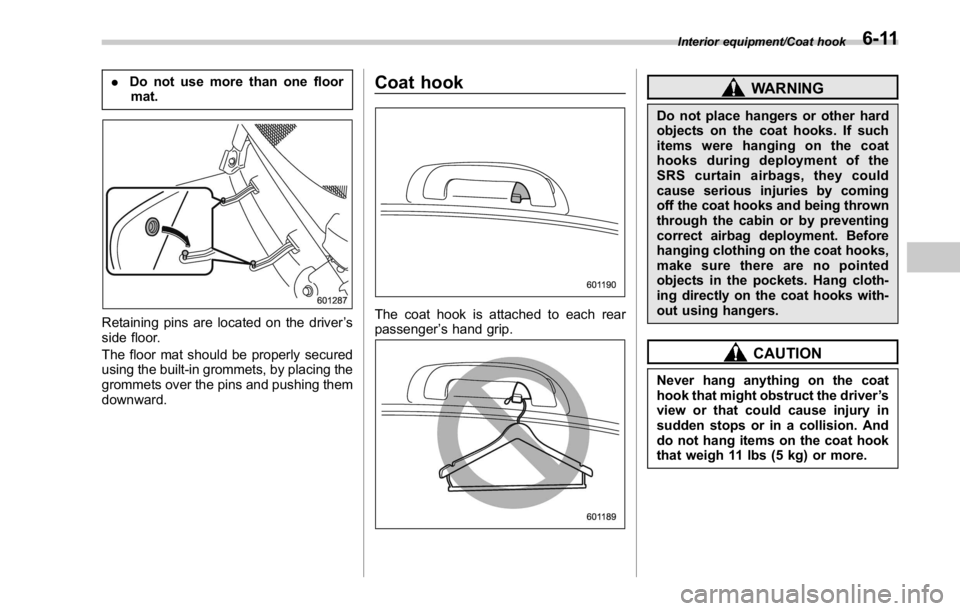
. Do not use more than one floor
mat.
Retaining pins are located on the driver ’ s
side floor.
The floor mat should be properly secured
using the built-in grommets, by placing the
grommets over the pins and pushing them
downward. Coat hook
The coat hook is attached to each rear
passenger ’ s hand grip. WARNINGDo not place hangers or other hard
objects on the coat hooks. If such
items were hanging on the coat
hooks during deployment of the
SRS curtain airbags, they could
cause serious injuries by coming
off the coat hooks and being thrown
through the cabin or by preventing
correct airbag deployment. Before
hanging clothing on the coat hooks,
make sure there are no pointed
objects in the pockets. Hang cloth-
ing directly on the coat hooks with-
out using hangers.
CAUTION
Never hang anything on the coat
hook that might obstruct the driver ’ s
view or that could cause injury in
sudden stops or in a collision. And
do not hang items on the coat hook
that weigh 11 lbs (5 kg) or more. Interior equipment/Coat hook
6-11
Page 395 of 594
Starting and operating/Fuel
left. Do not remove the cap
quickly. Fuel may be under pres-
sure and spray out of the fuel
filler neck, especially in hot
weather. If you hear a hissing
sound while you are removing
the cap, wait for the sound to
stop and then slowly open the
cap to prevent fuel from spraying
out and creating a fire hazard.
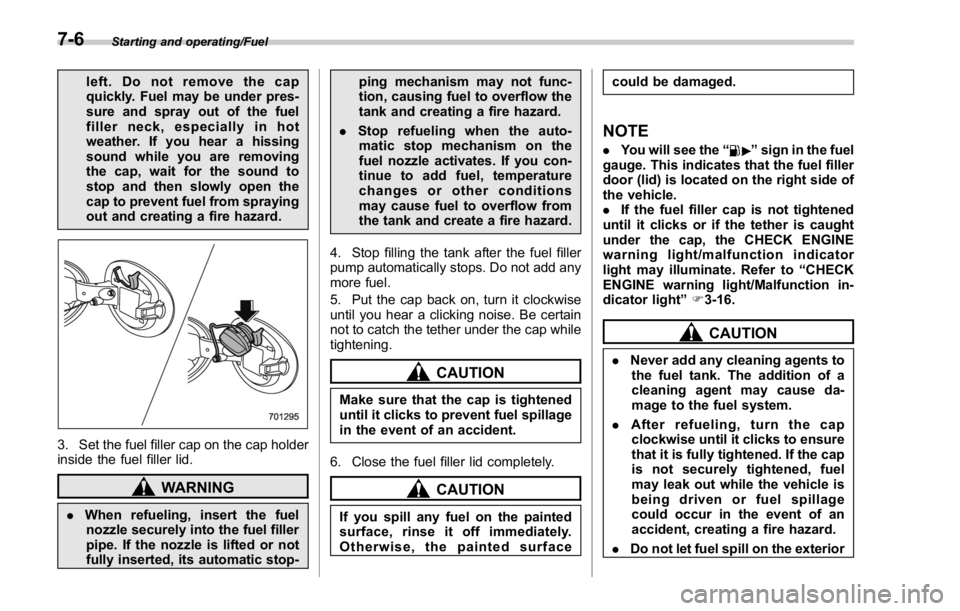
3. Set the fuel filler cap on the cap holder
inside the fuel filler lid.
WARNING
. When refueling, insert the fuel
nozzle securely into the fuel filler
pipe. If the nozzle is lifted or not
fully inserted, its automatic stop- ping mechanism may not func-
tion, causing fuel to overflow the
tank and creating a fire hazard.
. Stop refueling when the auto-
matic stop mechanism on the
fuel nozzle activates. If you con-
tinue to add fuel, temperature
changes or other conditions
may cause fuel to overflow from
the tank and create a fire hazard.
4. Stop filling the tank after the fuel filler
pump automatically stops. Do not add any
more fuel.
5. Put the cap back on, turn it clockwise
until you hear a clicking noise. Be certain
not to catch the tether under the cap while
tightening.
CAUTION
Make sure that the cap is tightened
until it clicks to prevent fuel spillage
in the event of an accident.
6. Close the fuel filler lid completely.
CAUTION
If you spill any fuel on the painted
surface, rinse it off immediately.
Otherwise, the painted surface could be damaged.
NOTE . You will see the “ ” sign in the fuel
gauge. This indicates that the fuel filler
door (lid) is located on the right side of
the vehicle.
. If the fuel filler cap is not tightened
until it clicks or if the tether is caught
under the cap, the CHECK ENGINE
warning light/malfunction indicator
light may illuminate. Refer to “ CHECK
ENGINE warning light/Malfunction in-
dicator light ” F 3-16.
CAUTION. Never add any cleaning agents to
the fuel tank. The addition of a
cleaning agent may cause da-
mage to the fuel system.
. After refueling, turn the cap
clockwise until it clicks to ensure
that it is fully tightened. If the cap
is not securely tightened, fuel
may leak out while the vehicle is
being driven or fuel spillage
could occur in the event of an
accident, creating a fire hazard.
. Do not let fuel spill on the exterior7-6
Page 401 of 594
Starting and operating/Starting and stopping engine (models with push – button start system)
Starting and stopping engine
(models with push-button
start system) & Safety precautionsRefer to “ Safety precautions ” F 2-10.
& Operating range for push-
button start systemRefer to “ Operating range for push-button
start system ” F 3-6.
& Starting engine
WARNING. There are some general precau-
tions when starting the engine.
Carefully read the precautions
described in “ General precau-
tions when starting engine ” F 7-
9.
. If the indicator on the push-
button ignition switch flashes in
green after the engine has
started, never drive the vehicle.
The steering is still locked, and it
may result in an accident. CAUTION. When the operation indicator on
the push-button ignition switch is
flashing in orange, there may be
a malfunction with the vehicle.
Contact a SUBARU dealer imme-
diately.
. If the indicator on the push-
button ignition switch is flashing
in green after the engine has
started, it means that the steering
is still locked. Depress the brake
pedal while moving the steering
wheel to the right and left, and
press the push-button ignition
switch.
. Do not continue pushing the
push-button ignition switch for
more than 10 seconds. Doing so
could cause a malfunction. If the
engine does not start, stop push-
ing the push-button ignition
switch and turn off the engine.
Wait 10 seconds, and then push
the push-button ignition switch
to start the engine.
NOTE
. When the push-button ignition
switch is pressed while depressing the clutch pedal (MT models) or the
brake pedal (CVT models), the engine
starter operates for a maximum of 10
seconds and after starting the engine,
the starter stops automatically.
. When the push-button ignition
switch is pressed while depressing
the clutch pedal (MT models) or the
brake pedal (CVT models), the engine
can be started regardless of the status
of the push-button ignition switch.
. If the security indicator light illumi-
nates when you attempt to start the
engine but the engine does not start,
press the push-button ignition switch
to switch the power to “ OFF ” and then
try to start the engine again.
. If the engine does not start, press
the push-button ignition switch without
depressing the clutch pedal (MT mod-
els) or the brake pedal (CVT models) to
switch the power to “ OFF ” . Then, while
depressing the clutch pedal (MT mod-
els) or the brake pedal (CVT models)
more forcefully, press the push-button
ignition switch.
. The engine start procedures may
not function depending on the radio
wave conditions around the vehicle. In
such a case, refer to “ Starting engine ”
F 9-17.
. If the vehicle battery is discharged,
the steering cannot be unlocked.7-12
Page 413 of 594
Starting and operating/Continuously variable transmission
by inertia with the select lever set
in a forward position or move the
vehicle forward by inertia with
the select lever set in the reverse
position. Doing so may result in
an unexpected accident or mal-
function.
. Do not shift from the “ D ” position
into the “ R ” position or vice
versa until the vehicle has com-
pletely stopped. Such shifting
may cause damage to the trans-
mission.
. When parking the vehicle, first
securely apply the parking brake
and then place the select lever in
the “ P ” position. Do not park for
a long time with the select lever
in any other position as doing so
could result in a dead battery.
NOTE . When the engine coolant tempera-
ture is still low, the transmission will
upshift to higher engine speeds than
when the coolant temperature is suffi-
ciently high in order to shorten the
warm-up time and improve driveability.
The gearshift timing will automatically
shift to the normal timing after the
engine has warmed up. . Immediately after transmission fluid
is replaced, you may feel that the
transmission operation is somewhat
unusual. This results from invalidation
of data which the on-board computer
has collected and stored in memory to
allow the transmission to shift at the
most appropriate times for the current
condition of your vehicle. Optimized
shifting will be restored as the vehicle
continues to be driven for a while.
. When driving a CVT model under
continuous heavy load conditions such
as when climbing a long, steep hill, the
engine speed or the vehicle speed may
automatically be reduced. This is not a
malfunction. This phenomenon results
from the engine control function main-
taining the cooling performance of the
vehicle. The engine and vehicle speed
will return to a normal speed when the
engine is able to maintain the optimum
cooling performance after the heavy
load decreases. Driving under a heavy
load must be performed with extreme
care.
. The continuously variable transmis-
sion is a chain type system that
provides superior transmission effi-
ciency for maximum fuel economy. At
times, depending on varying driving
conditions, a chain operating noise
may be heard that is characteristic of this type of system.
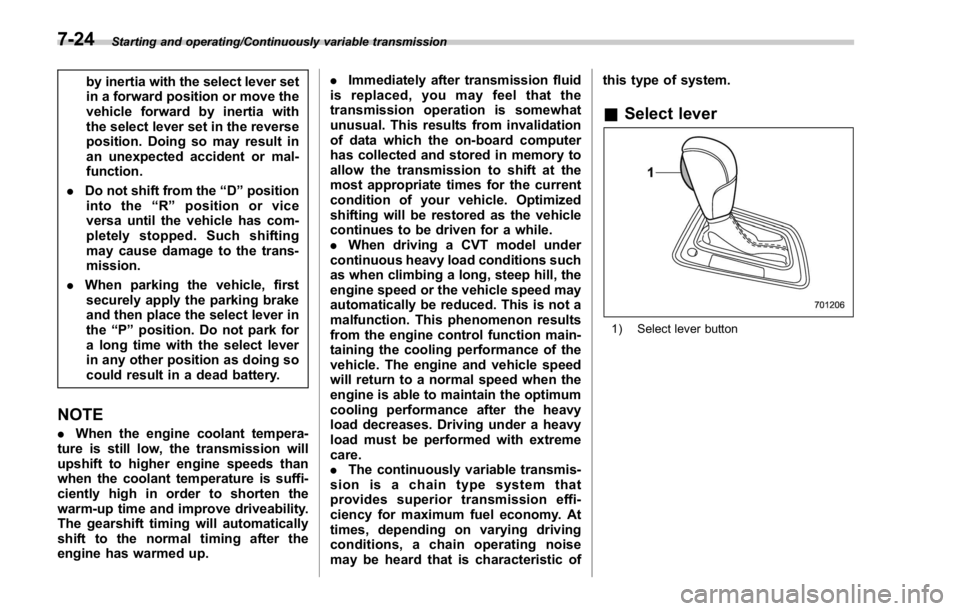
& Select lever
1) Select lever button7-24
Page 464 of 594
possible.
. Stow cargo and luggage in the
trunk whenever possible.
. To prevent cargo and luggage
from sliding forward during brak-
ing, do not stack anything in the
enlarged trunk. Keep cargo and
luggage low, as close to the floor
as possible.
. When you carry something inside
the vehicle, secure it whenever
you can to prevent it from being
thrown around inside the vehicle
during sudden stops, sharp turns
or in an accident.
. Do not pile heavy loads on the
roof. These loads raise the vehi-
cle ’ s center of gravity and make it
more prone to tip over.
. Secure lengthy items properly to
prevent them from shooting for-
ward and causing serious injury
during a sudden stop.
. Never exceed the maximum load
limit. If you do, some parts on
your vehicle can break, or it can
change the way your vehicle
handles. This could result in loss
of control and cause personal
injury. Also, overloading can
shorten the life of your vehicle. . Do not place cargo or luggage in
or on the following locations as
the item may get under the
clutch, brake, or accelerator ped-
al and prevent the pedals from
being depressed properly, block
the driver ’ s vision, or hit the
driver or passengers, causing
an accident:
– At the feet of the driver
– On the front passenger or rear
seats (when stacking items)
– On the rear shelf
– On the instrument panel
– On the dashboard
CAUTION
Do not carry spray cans, containers
with flammable or corrosive liquids
or any other dangerous items inside
the vehicle.
NOTE For better fuel economy, do not carry
unneeded cargo. & Vehicle capacity weight
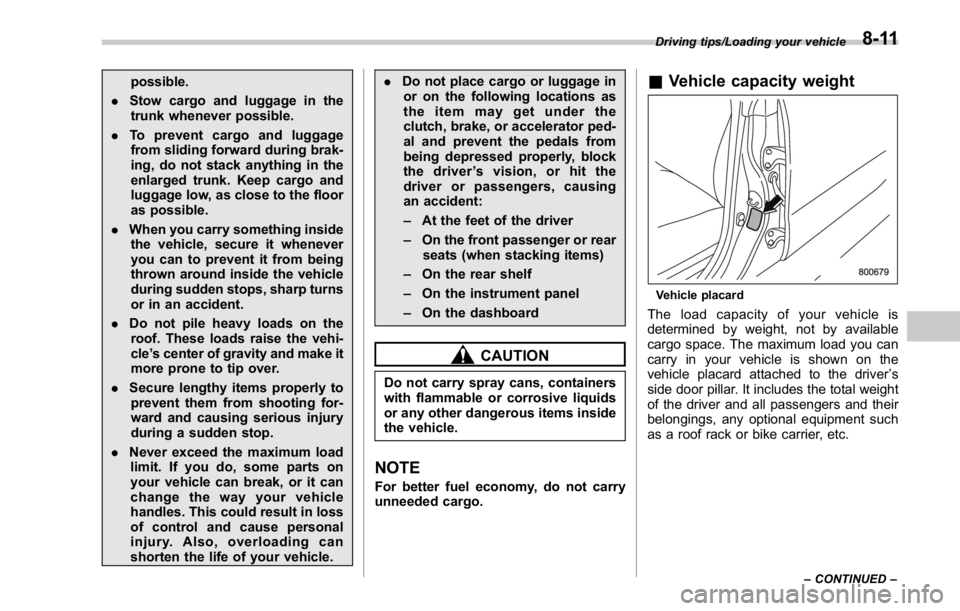
Vehicle placard
The load capacity of your vehicle is
determined by weight, not by available
cargo space. The maximum load you can
carry in your vehicle is shown on the
vehicle placard attached to the driver ’ s
side door pillar. It includes the total weight
of the driver and all passengers and their
belongings, any optional equipment such
as a roof rack or bike carrier, etc. Driving tips/Loading your vehicle
– CONTINUED –8-11
Page 470 of 594
. Always turn off the engine before
raising the flat tire off the ground
using the jack. Never swing or
push the vehicle supported with
the jack. The jack can come out
of the jacking point due to a jolt
and this can result in a severe
accident.
1. Park on a hard, level surface, when-
ever possible, then stop the engine.
2. Set the parking brake securely and
shift the shift lever in reverse (MT models)
or the select lever to the “ P ” (Park)
position (CVT models).
3. Turn on the hazard warning flasher
and have everyone get out of the vehicle.
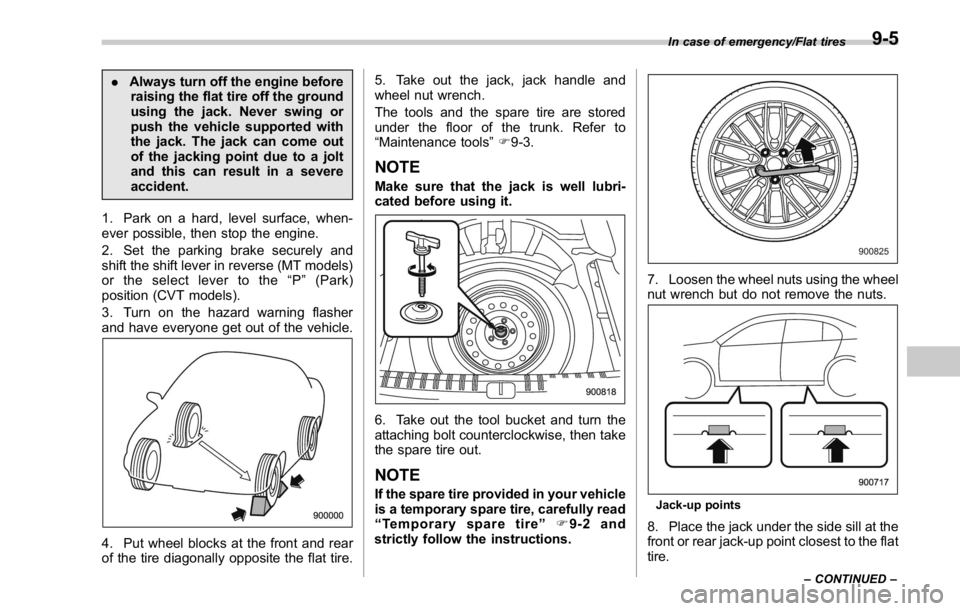
4. Put wheel blocks at the front and rear
of the tire diagonally opposite the flat tire. 5. Take out the jack, jack handle and
wheel nut wrench.
The tools and the spare tire are stored
under the floor of the trunk. Refer to
“ Maintenance tools ” F 9-3.
NOTE Make sure that the jack is well lubri-
cated before using it.
6. Take out the tool bucket and turn the
attaching bolt counterclockwise, then take
the spare tire out.
NOTE If the spare tire provided in your vehicle
is a temporary spare tire, carefully read
“ Temporary spare tire ” F 9-2 and
strictly follow the instructions. 7. Loosen the wheel nuts using the wheel
nut wrench but do not remove the nuts.
Jack-up points
8. Place the jack under the side sill at the
front or rear jack-up point closest to the flat
tire. In case of emergency/Flat tires
– CONTINUED –9-5
Page 472 of 594
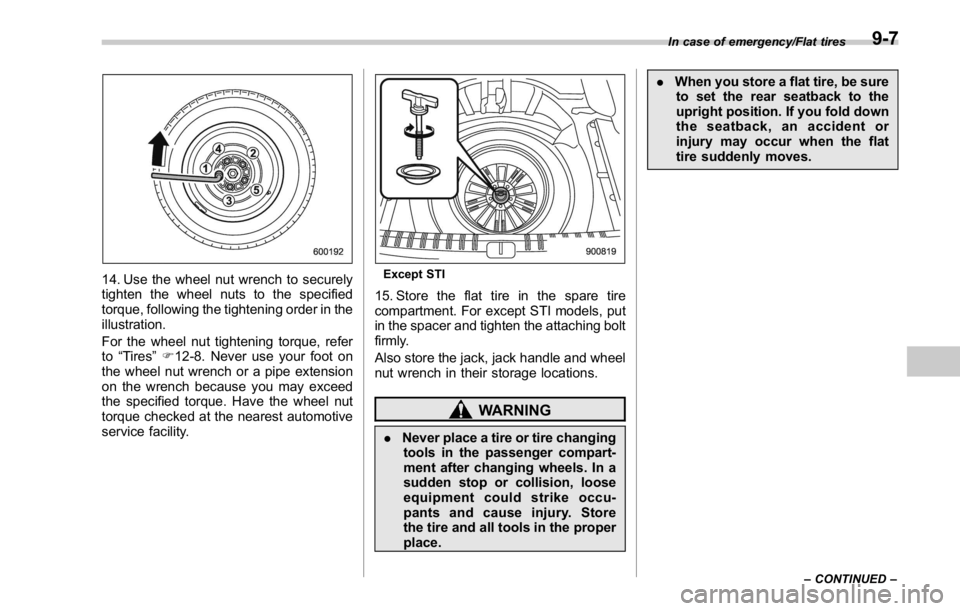
14. Use the wheel nut wrench to securely
tighten the wheel nuts to the specified
torque, following the tightening order in the
illustration.
For the wheel nut tightening torque, refer
to “ Tires ” F 12-8. Never use your foot on
the wheel nut wrench or a pipe extension
on the wrench because you may exceed
the specified torque. Have the wheel nut
torque checked at the nearest automotive
service facility. Except STI
15. Store the flat tire in the spare tire
compartment. For except STI models, put
in the spacer and tighten the attaching bolt
firmly.
Also store the jack, jack handle and wheel
nut wrench in their storage locations.
WARNING
. Never place a tire or tire changing
tools in the passenger compart-
ment after changing wheels. In a
sudden stop or collision, loose
equipment could strike occu-
pants and cause injury. Store
the tire and all tools in the proper
place. . When you store a flat tire, be sure
to set the rear seatback to the
upright position. If you fold down
the seatback, an accident or
injury may occur when the flat
tire suddenly moves. In case of emergency/Flat tires
– CONTINUED –9-7