oil change SUBARU WRX 2016 Owners Manual
[x] Cancel search | Manufacturer: SUBARU, Model Year: 2016, Model line: WRX, Model: SUBARU WRX 2016Pages: 594, PDF Size: 19.43 MB
Page 45 of 594
Seat, seatbelt and SRS airbags/Seatbelts
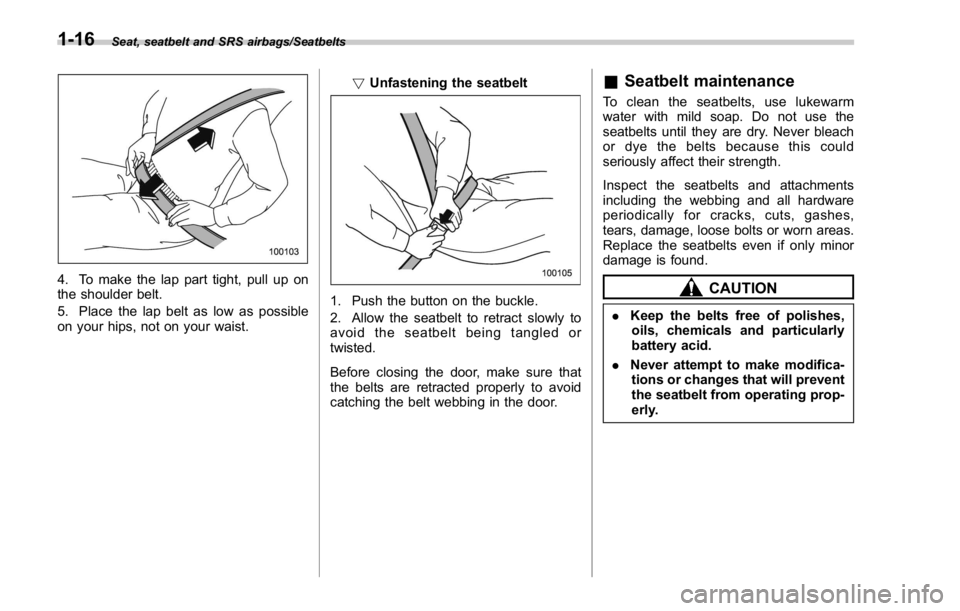
4. To make the lap part tight, pull up on
the shoulder belt.
5. Place the lap belt as low as possible
on your hips, not on your waist. ! Unfastening the seatbelt
1. Push the button on the buckle.
2. Allow the seatbelt to retract slowly to
avoid the seatbelt being tangled or
twisted.
Before closing the door, make sure that
the belts are retracted properly to avoid
catching the belt webbing in the door. & Seatbelt maintenance To clean the seatbelts, use lukewarm
water with mild soap. Do not use the
seatbelts until they are dry. Never bleach
or dye the belts because this could
seriously affect their strength.
Inspect the seatbelts and attachments
including the webbing and all hardware
periodically for cracks, cuts, gashes,
tears, damage, loose bolts or worn areas.
Replace the seatbelts even if only minor
damage is found.
CAUTION. Keep the belts free of polishes,
oils, chemicals and particularly
battery acid.
. Never attempt to make modifica-
tions or changes that will prevent
the seatbelt from operating prop-
erly.1-16
Page 142 of 594

ever the engine speed enters the red
zone of the tachometer.
To change the REV indicator settings,
perform the procedures described in “ REV
settings (STI) ” F 3-47.
Warning and indicator lights Several of the warning and indicator lights
illuminate when the ignition switch is
initially turned to the “ ON ” position. This
permits checking the operation of the
bulbs.
Apply the parking brake and turn the
ignition switch to the “ ON ” position. For
the system check, the following lights
illuminate and then turn off after several
seconds or after the engine has started.
: Seatbelt warning light
(The seatbelt warning light turns off
only when the driver fastens the
seatbelt.)
: Front passenger ’ s seatbelt warning
light
(The seatbelt warning light turns off
only when the front seat passenger
fastens the seatbelt.)
: SRS airbag system warning light
ON /
: Front passenger ’ s frontal airbag
ON indicator light
/ : Front passenger ’ s frontal airbag
OFF indicator light
: CHECK ENGINE warning light/Mal-
function indicator light : Charge warning light
: Oil pressure warning light
: REV indicator light (STI)
: AT OIL TEMP warning light
(CVT models)
: Rear differential oil temperature warn-
ing light (STI)
: Low tire pressure warning light
(U.S.-spec. models)
/ : ABS warning light
/ : Brake system warning light
: Electronic parking brake indicator
light
: Low fuel warning light
: Hill start assist warning light/Hill start
assist OFF indicator light (models
without electronic parking brake sys-
tem)
: Hill holder indicator light (models with
electronic parking brake system)
: Door open warning light
: AWD warning light (if equipped)
: Power steering warning light (except
STI)Instruments and controls/Warning and indicator lights
– CONTINUED –3-13
Page 180 of 594
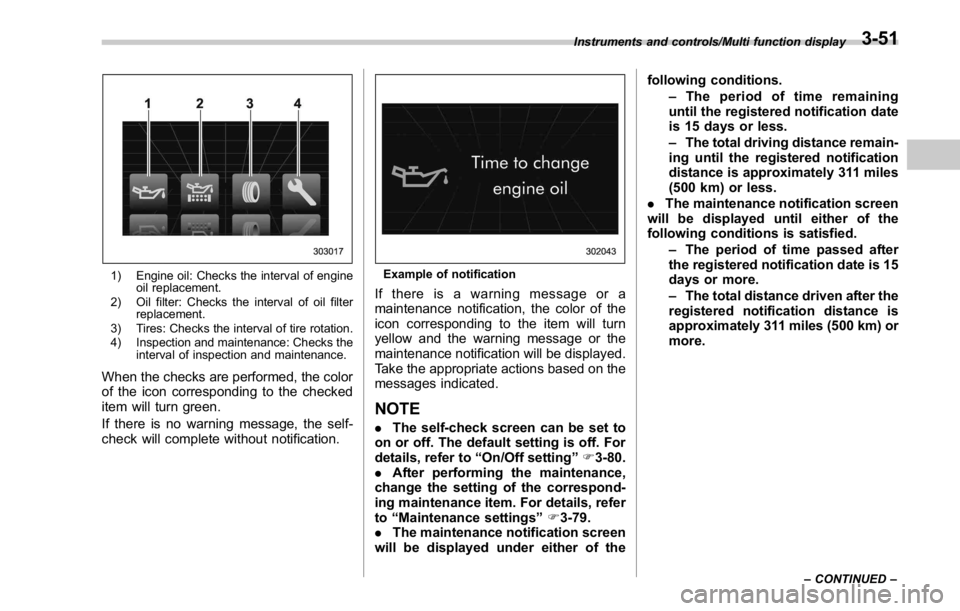
1) Engine oil: Checks the interval of engine
oil replacement.
2) Oil filter: Checks the interval of oil filter
replacement.
3) Tires: Checks the interval of tire rotation.
4) Inspection and maintenance: Checks the
interval of inspection and maintenance.
When the checks are performed, the color
of the icon corresponding to the checked
item will turn green.
If there is no warning message, the self-
check will complete without notification. Example of notification
If there is a warning message or a
maintenance notification, the color of the
icon corresponding to the item will turn
yellow and the warning message or the
maintenance notification will be displayed.
Take the appropriate actions based on the
messages indicated.
NOTE . The self-check screen can be set to
on or off. The default setting is off. For
details, refer to “ On/Off setting ” F 3-80.
. After performing the maintenance,
change the setting of the correspond-
ing maintenance item. For details, refer
to “ Maintenance settings ” F 3-79.
. The maintenance notification screen
will be displayed under either of the following conditions.
– The period of time remaining
until the registered notification date
is 15 days or less.
– The total driving distance remain-
ing until the registered notification
distance is approximately 311 miles
(500 km) or less.
. The maintenance notification screen
will be displayed until either of the
following conditions is satisfied.
– The period of time passed after
the registered notification date is 15
days or more.
– The total distance driven after the
registered notification distance is
approximately 311 miles (500 km) or
more.Instruments and controls/Multi function display
– CONTINUED –3-51
Page 185 of 594
Instruments and controls/Multi function display
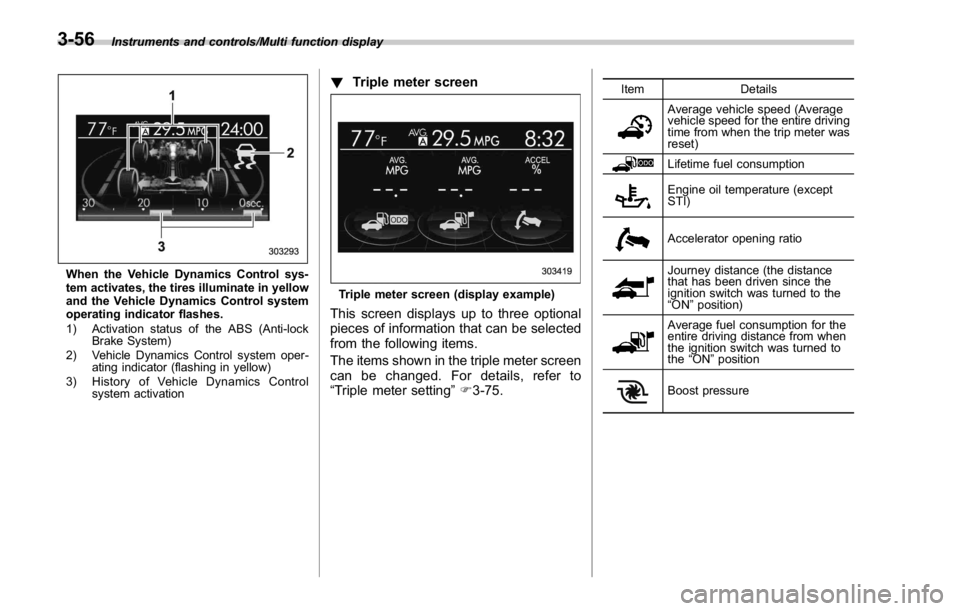
When the Vehicle Dynamics Control sys-
tem activates, the tires illuminate in yellow
and the Vehicle Dynamics Control system
operating indicator flashes.
1) Activation status of the ABS (Anti-lock
Brake System)
2) Vehicle Dynamics Control system oper-
ating indicator (flashing in yellow)
3) History of Vehicle Dynamics Control
system activation ! Triple meter screen
Triple meter screen (display example)
This screen displays up to three optional
pieces of information that can be selected
from the following items.
The items shown in the triple meter screen
can be changed. For details, refer to
“ Triple meter setting ” F 3-75. Item Details
Average vehicle speed (Average
vehicle speed for the entire driving
time from when the trip meter was
reset)
Lifetime fuel consumption
Engine oil temperature (except
STI)
Accelerator opening ratio
Journey distance (the distance
that has been driven since the
ignition switch was turned to the
“ ON ” position)
Average fuel consumption for the
entire driving distance from when
the ignition switch was turned to
the “ ON ” position
Boost pressure3-56
Page 208 of 594
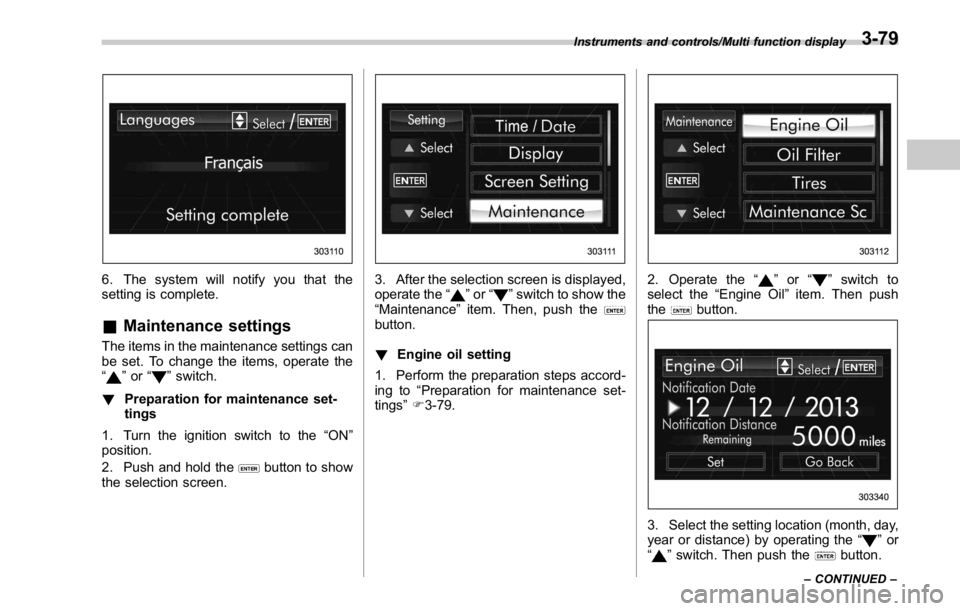
6. The system will notify you that the
setting is complete.
& Maintenance settings The items in the maintenance settings can
be set. To change the items, operate the
“
” or “ ” switch.
! Preparation for maintenance set-
tings
1. Turn the ignition switch to the “ ON ”
position.
2. Push and hold the
button to show
the selection screen. 3. After the selection screen is displayed,
operate the “
” or “ ” switch to show the
“ Maintenance ” item. Then, push the
button.
! Engine oil setting
1. Perform the preparation steps accord-
ing to “ Preparation for maintenance set-
tings ” F 3-79. 2. Operate the “ ” or “ ” switch to
select the “ Engine Oil ” item. Then push
the
button.
3. Select the setting location (month, day,
year or distance) by operating the “
” or
“
” switch. Then push the button.Instruments and controls/Multi function display
– CONTINUED –3-79
Page 209 of 594
Instruments and controls/Multi function display
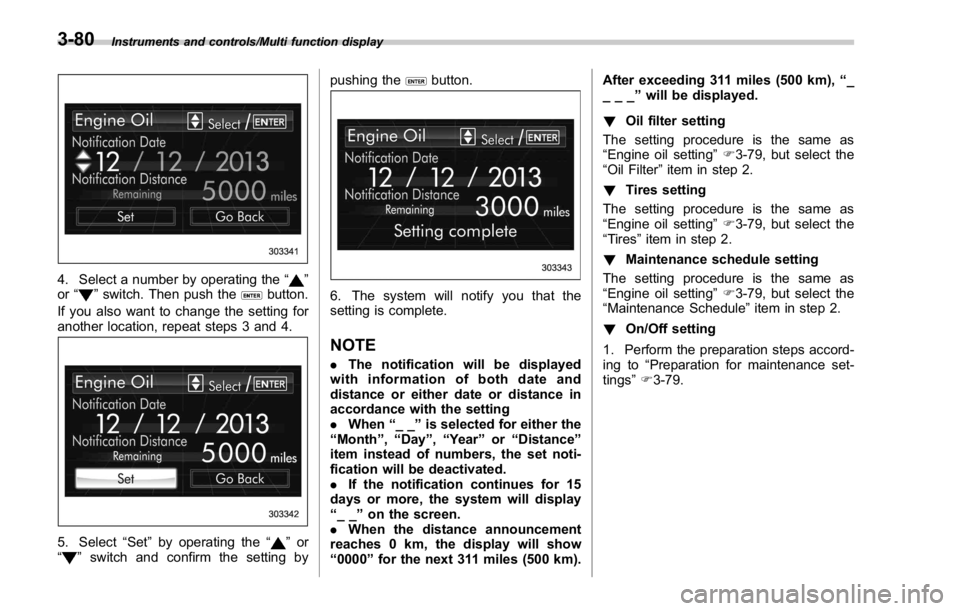
4. Select a number by operating the “ ”
or “
” switch. Then push the button.
If you also want to change the setting for
another location, repeat steps 3 and 4.
5. Select “ Set ” by operating the “ ” or
“
” switch and confirm the setting by pushing the button.
6. The system will notify you that the
setting is complete.
NOTE . The notification will be displayed
with information of both date and
distance or either date or distance in
accordance with the setting
. When “ __ ” is selected for either the
“ Month ” , “ Day ” , “ Year ” or “ Distance ”
item instead of numbers, the set noti-
fication will be deactivated.
. If the notification continues for 15
days or more, the system will display
“ __ ” on the screen.
. When the distance announcement
reaches 0 km, the display will show
“ 0000 ” for the next 311 miles (500 km). After exceeding 311 miles (500 km), “ _
___ ” will be displayed.
! Oil filter setting
The setting procedure is the same as
“ Engine oil setting ” F 3-79, but select the
“ Oil Filter ” item in step 2.
! Tires setting
The setting procedure is the same as
“ Engine oil setting ” F 3-79, but select the
“ Tires ” item in step 2.
! Maintenance schedule setting
The setting procedure is the same as
“ Engine oil setting ” F 3-79, but select the
“ Maintenance Schedule ” item in step 2.
! On/Off setting
1. Perform the preparation steps accord-
ing to “ Preparation for maintenance set-
tings ” F 3-79.3-80
Page 408 of 594
as necessary; this helps to maintain a safe
speed and to extend brake pad life.
In this way, the engine provides a braking
effect. Remember, if you “ ride ” (over use)
the brakes while descending a hill, they
may overheat and not work properly.
The engine may, on rare occasions, knock
when the vehicle rapidly accelerates or
rapidly pulls away from a standstill. This
phenomenon is not an indication of a
problem in your vehicle. Driver ’ s Control Center Dif-
ferential (C.DIFF/DCCD) (STI) WARNINGAlways use the utmost care when
driving. Being overconfident be-
cause you are driving a vehicle with
a driver ’ s control center differential
could easily lead to a serious acci-
dent.
CAUTION
. All the indicators will flash in the
event that the driver ’ s control
center differential has a malfunc- tion. Have the vehicle inspected
by your SUBARU dealer.
. If a malfunction occurs in the
vehicle (for example, when the
rear differential oil temperature
warning light illuminates), all of
the indicators may disappear and
the setting value for the initial
limited slip differential (LSD) tor-
que of the driver ’ s control center
differential (C.DIFF/DCCD) may
be cancelled. However, it does
not indicate a malfunction of the
C.DIFF/DCCD itself.
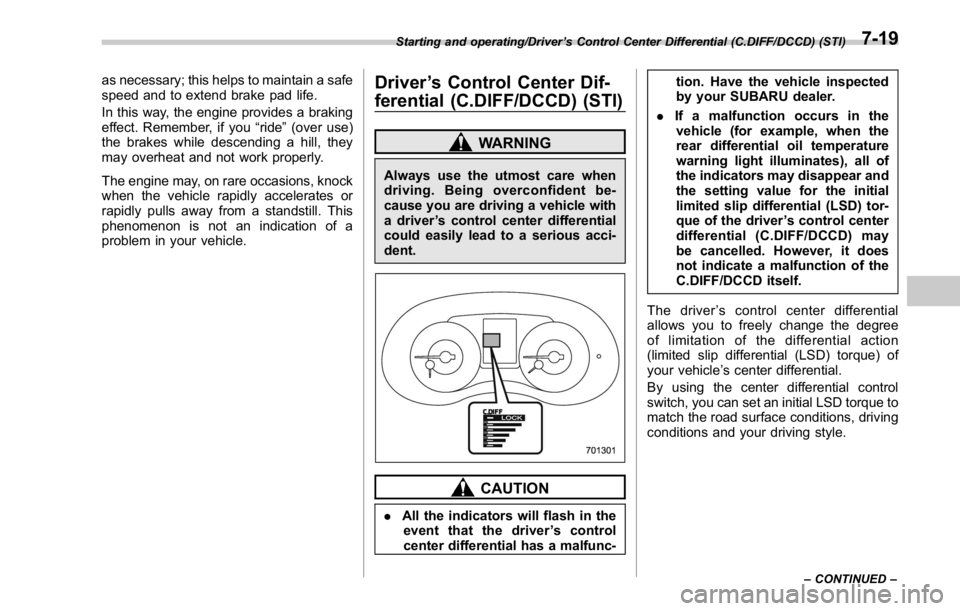
The driver ’ s control center differential
allows you to freely change the degree
of limitation of the differential action
(limited slip differential (LSD) torque) of
your vehicle ’ s center differential.
By using the center differential control
switch, you can set an initial LSD torque to
match the road surface conditions, driving
conditions and your driving style.Starting and operating/Driver ’ s Control Center Differential (C.DIFF/DCCD) (STI)
– CONTINUED –7-19
Page 416 of 594
“ ” appears, downshifting is possible.
When both indicators appear, upshifting
and downshifting are both possible. When
the vehicle stops (for example, at traffic
signals), the downshift indicator turns off.
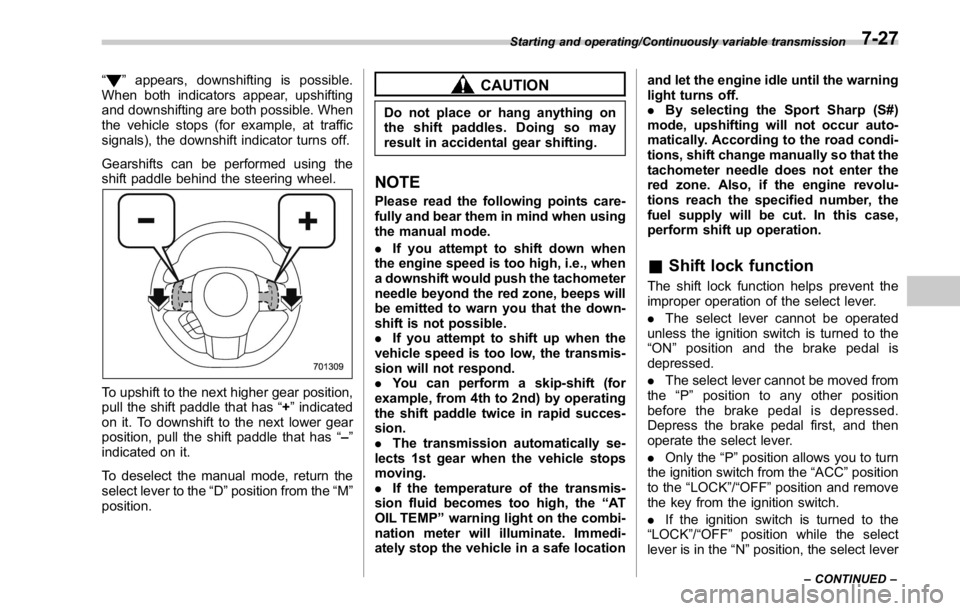
Gearshifts can be performed using the
shift paddle behind the steering wheel.
To upshift to the next higher gear position,
pull the shift paddle that has “ + ” indicated
on it. To downshift to the next lower gear
position, pull the shift paddle that has “ – ”
indicated on it.
To deselect the manual mode, return the
select lever to the “ D ” position from the “ M ”
position. CAUTIONDo not place or hang anything on
the shift paddles. Doing so may
result in accidental gear shifting.
NOTE Please read the following points care-
fully and bear them in mind when using
the manual mode.
. If you attempt to shift down when
the engine speed is too high, i.e., when
a downshift would push the tachometer
needle beyond the red zone, beeps will
be emitted to warn you that the down-
shift is not possible.
. If you attempt to shift up when the
vehicle speed is too low, the transmis-
sion will not respond.
. You can perform a skip-shift (for
example, from 4th to 2nd) by operating
the shift paddle twice in rapid succes-
sion.
. The transmission automatically se-
lects 1st gear when the vehicle stops
moving.
. If the temperature of the transmis-
sion fluid becomes too high, the “ AT
OIL TEMP ” warning light on the combi-
nation meter will illuminate. Immedi-
ately stop the vehicle in a safe location and let the engine idle until the warning
light turns off.
. By selecting the Sport Sharp (S#)
mode, upshifting will not occur auto-
matically. According to the road condi-
tions, shift change manually so that the
tachometer needle does not enter the
red zone. Also, if the engine revolu-
tions reach the specified number, the
fuel supply will be cut. In this case,
perform shift up operation.
& Shift lock function The shift lock function helps prevent the
improper operation of the select lever.
. The select lever cannot be operated
unless the ignition switch is turned to the
“ ON ” position and the brake pedal is
depressed.
. The select lever cannot be moved from
the “ P ” position to any other position
before the brake pedal is depressed.
Depress the brake pedal first, and then
operate the select lever.
. Only the “ P ” position allows you to turn
the ignition switch from the “ ACC ” position
to the “ LOCK ” / “ OFF ” position and remove
the key from the ignition switch.
. If the ignition switch is turned to the
“ LOCK ” / “ OFF ” position while the select
lever is in the “ N ” position, the select leverStarting and operating/Continuously variable transmission
– CONTINUED –7-27
Page 502 of 594
Engine oil CAUTION. If the level gauge is not pulled out
easily, twist the level gauge right
and left, then pull it out. Other-
wise, you may be injured acci-
dentally straining yourself.
. Use only engine oil with the
recommended grade and vis-
cosity.
. Be careful not to spill engine oil
when adding it. If oil touches the
exhaust pipe, it may cause a bad
smell, smoke, and/or a fire. If
engine oil gets on the exhaust
pipe, be sure to wipe it off.
& Engine oil consumption Some engine oil will be consumed while
driving. Under the following conditions, oil
consumption can be increased and thus
require refilling between maintenance
intervals:
. When the engine is new and within the
break-in period
. When the engine oil is of lower quality
. When the incorrect oil viscosity is used . When engine braking is employed
. When the engine is operated at high
engine speeds
. When the engine is operated under
heavy loads
. When the engine idles for long periods
of time
. When the vehicle is operated in stop
and go and/or heavy traffic situations
. When the vehicle is used under severe
thermal conditions
. When the vehicle accelerates and
decelerates frequently
Under these or similar conditions, you
should check your oil at least every 2nd
fuel fill-up and change your engine oil
more frequently. If your oil consumption
rate is greater than 1 quart every 1,200
miles or 1 liter every 2,000 kilometers,
contact your SUBARU dealer who may
perform a test under controlled conditions.
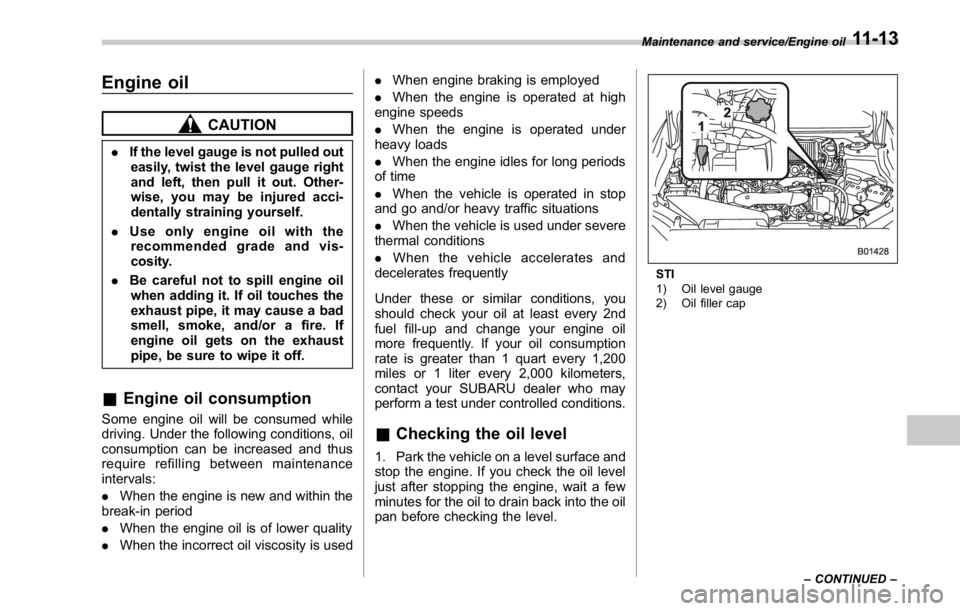
& Checking the oil level 1. Park the vehicle on a level surface and
stop the engine. If you check the oil level
just after stopping the engine, wait a few
minutes for the oil to drain back into the oil
pan before checking the level. STI
1) Oil level gauge
2) Oil filler capMaintenance and service/Engine oil
– CONTINUED –11-13
Page 504 of 594

CAUTION. For models except STI, be careful
not to touch the engine oil filter
when removing the oil filler cap.
Doing so may result in a burn, a
pinched finger, or may cause
some other injury.
. Use only engine oil with the
recommended grade and vis-
cosity.
. Be careful not to spill engine oil
when adding it. If oil touches the
exhaust pipe, it may cause a bad
smell, smoke, and/or a fire. If
engine oil gets on the exhaust
pipe, be sure to wipe it off.
To add engine oil, remove the engine oil
filler cap and slowly pour engine oil
through the filler neck. After pouring oil
into the engine, you must use the level
gauge to confirm that the oil level is
correct.
For models STI, just after driving or while
the engine is warm, the engine oil level
reading may be in a range between the
upper level and the notch mark. This is
caused by thermal expansion of the
engine oil. NOTE To prevent overfilling the engine oil, do
not add any additional oil above the
upper level when the engine is cold.
& Changing the oil and oil filter Change the oil and oil filter according to
the maintenance schedule in the “ War-
ranty and Maintenance Booklet ” .
NOTE . Changing the engine oil and oil filter
should be performed by a well-trained
expert. Contact your SUBARU dealer
for changing the engine oil and oil filter.
Fully trained mechanics are on standby
at a SUBARU dealer to utilize the
special tools, spare parts and recom-
mended oil for this work, and also,
used oils are properly disposed of.
. If performing oil replacement your-
self, observe the local regulations and
dispose of waste oil properly.
The engine oil and oil filter must be
changed more frequently than listed in
the maintenance schedule when driving
on dusty roads, when short trips are
frequently made, or when driving in
extremely cold weather. ! Changing the oil filter
It may be difficult to change the oil filter.
Have the oil filter changed by your
SUBARU dealer if necessary.
! Changing the oil
1. Warm up the engine by letting the
engine idle for approximately 10 minutes
to ease draining the engine oil.
2. Park the vehicle on a level surface and
stop the engine.
3. Remove the oil filler cap.
STIMaintenance and service/Engine oil
– CONTINUED –11-15