ECO mode SUBARU WRX 2018 Owners Manual
[x] Cancel search | Manufacturer: SUBARU, Model Year: 2018, Model line: WRX, Model: SUBARU WRX 2018Pages: 578, PDF Size: 33.21 MB
Page 219 of 578
(224,1)
北米Model "A1700BE-B" EDITED: 2017/ 10/ 11
online at www.HomeLink.com and
www.youtube.com/HomeLinkGentex.
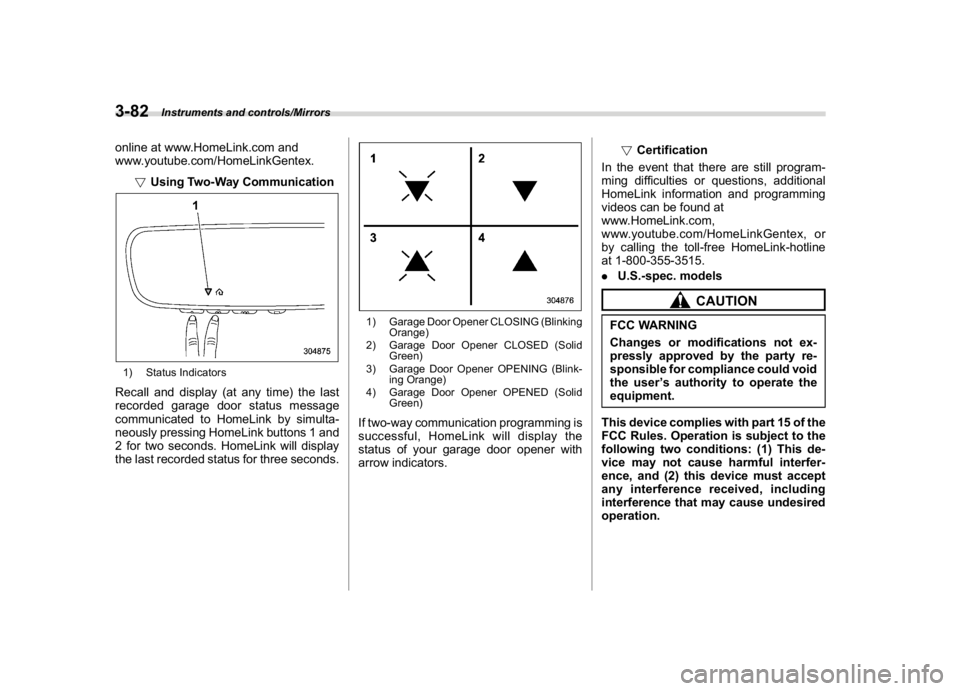
!Using Two-Way Communication1) Status IndicatorsRecall and display (at any time) the last
recorded garage door status message
communicated to HomeLink by simulta-
neously pressing HomeLink buttons 1 and
2 for two seconds. HomeLink will display
the last recorded status for three seconds.
1) Garage Door Opener CLOSING (Blinking
Orange)
2) Garage Door Opener CLOSED (Solid
Green)
3) Garage Door Opener OPENING (Blink-
ing Orange)
4) Garage Door Opener OPENED (Solid
Green)If two-way communication programming is
successful, HomeLink will display the
status of your garage door opener with
arrow indicators.!Certification
In the event that there are still program-
ming difficulties or questions, additional
HomeLink information and programming
videos can be found at
www.HomeLink.com,
www.youtube.com/HomeLinkGentex, or
by calling the toll-free HomeLink-hotline
at 1-800-355-3515.
.U.S.-spec. models
CAUTION
FCC WARNING
Changes or modifications not ex-
pressly approved by the party re-
sponsible for compliance could void
the user’s authority to operate the
equipment.
This device complies with part 15 of the
FCC Rules. Operation is subject to the
following two conditions: (1) This de-
vice may not cause harmful interfer-
ence, and (2) this device must accept
any interference received, including
interference that may cause undesired
operation.
Instruments and controls/Mirrors
3-82
Page 229 of 578

(236,1)
北米Model "A1700BE-B" EDITED: 2017/ 10/ 11
–Solar sensor: beside the windshield
defroster grille
–Interior air temperature sensor: next to
the steering column
–Outside temperature sensor: near the
front bumper opening
These sensors are delicate. If they are not
treated properly and become damaged,
the system may not be able to control the
interior temperature correctly. To avoid
damaging the sensors, observe the follow-
ing precautions.
–Do not subject the sensors to impact.
–Keep water away from the sensors.
–Do not cover the sensors.
Manual climate control op-
eration&Airflow mode selectionTo select the airflow mode:
Type A:Turn the airflow mode selection
dial.
Type B:Press the airflow mode selection
button.
To select the defrost mode:
Press the defroster button.
Airflow modes are as follows.(Ventilation):Instrument panel outlets
(Bi-level):Instrument panel outlets and
foot outlets(Heat):Foot outlets, both side outlets of
the instrument panel and some through
windshield defroster outlets (A small
amount of air flows to the windshield and
Climate control/Manual climate control operation
4-6
Page 234 of 578
(241,1)
北米Model "A1700BE-B" EDITED: 2017/ 10/ 11
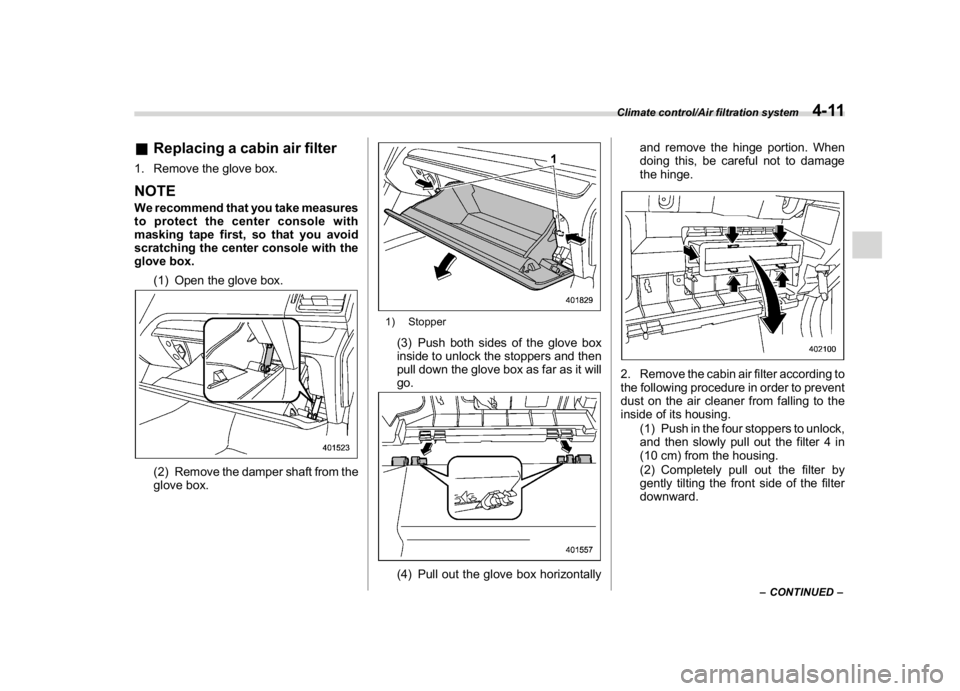
&Replacing a cabin air filter1. Remove the glove box.NOTEWe recommend that you take measures
to protect the center console with
masking tape first, so that you avoid
scratching the center console with the
glove box.
(1) Open the glove box.
(2) Remove the damper shaft from the
glove box.
1) Stopper(3) Push both sides of the glove box
inside to unlock the stoppers and then
pull down the glove box as far as it will
go.(4) Pull out the glove box horizontallyand remove the hinge portion. When
doing this, be careful not to damage
the hinge.
2. Remove the cabin air filter according to
the following procedure in order to prevent
dust on the air cleaner from falling to the
inside of its housing.
(1) Push in the four stoppers to unlock,
and then slowly pull out the filter 4 in
(10 cm) from the housing.
(2) Completely pull out the filter by
gently tilting the front side of the filter
downward.
–CONTINUED–
Climate control/Air filtration system
4-11
4
Page 241 of 578

(250,1)
北米Model "A1700BE-B" EDITED: 2017/ 10/ 11
&Tips for operating the audio/
visual system
CAUTION
To avoid damage to the audio/visual
system:
.Be careful not to spill beverages
over the audio/visual system.
.Do not put anything other than an
appropriate disc into the disc
slot.NOTEThe use of a cell phone inside or near
the vehicle may cause a noise from the
speakers of the audio/visual system
which you are listening to. However,
this does not indicate a malfunction.
!Radio
Usually, a problem with radio reception
does not mean there is a problem with the
radio—it is just the normal result of
conditions outside the vehicle.
For example, nearby buildings and terrain
can interfere with FM reception. Power
lines or phone wires can interfere with AM
signals. And of course, radio signals have
a limited range. The farther the vehicle isfrom a station, the weaker its signal will be.
In addition, reception conditions change
constantly as the vehicle moves.
Here, some common reception problems
that probably do not indicate a problem
with the radio are described.
!FM
Fading and drifting stations: Generally, the
effective range of FM is about 25 miles (40
km). Once outside this range, you may
notice fading and drifting, which increase
with the distance from the radio transmit-
ter. They are often accompanied by
distortion.
Multi-path: FM signals are reflective, mak-
ing it possible for 2 signals to reach the
vehicle’s antenna at the same time. If this
happens, the signals will cancel each other
out, causing a momentary flutter or loss of
reception.
Static and fluttering: These occur when
signals are blocked by buildings, trees or
other large objects. Increasing the bass
level may reduce static and fluttering.
Station swapping: If the FM signal being
listened to is interrupted or weakened, and
there is another strong station nearby on
the FM band, the radio may tune in the
second station until the original signal can
be picked up again.!AM
Fading: AM broadcasts are reflected by
the upper atmosphere—especially at
night. These reflected signals can interfere
with those received directly from the radio
station, causing the radio station to sound
alternately strong and weak.
Station interference: When a reflected
signal and a signal received directly from
a radio station are very nearly the same
frequency, they can interfere with each
other, making it difficult to hear the broad-
cast.
Static: AM is easily affected by external
sources of electrical noise, such as high
tension power lines, lightening or electrical
motors. This results in static.
!SiriusXM (if equipped)
.Cargo loaded on the roof luggage
carrier, especially metal objects, may
adversely affect the reception of SiriusXM
Satellite Radio.
.Alternation or modifications carried out
without appropriate authorization may in-
validate the user’s right to operate the
equipment.
Audio/Audio set
5-6
Page 244 of 578
(253,1)
北米Model "A1700BE-B" EDITED: 2017/ 10/ 11
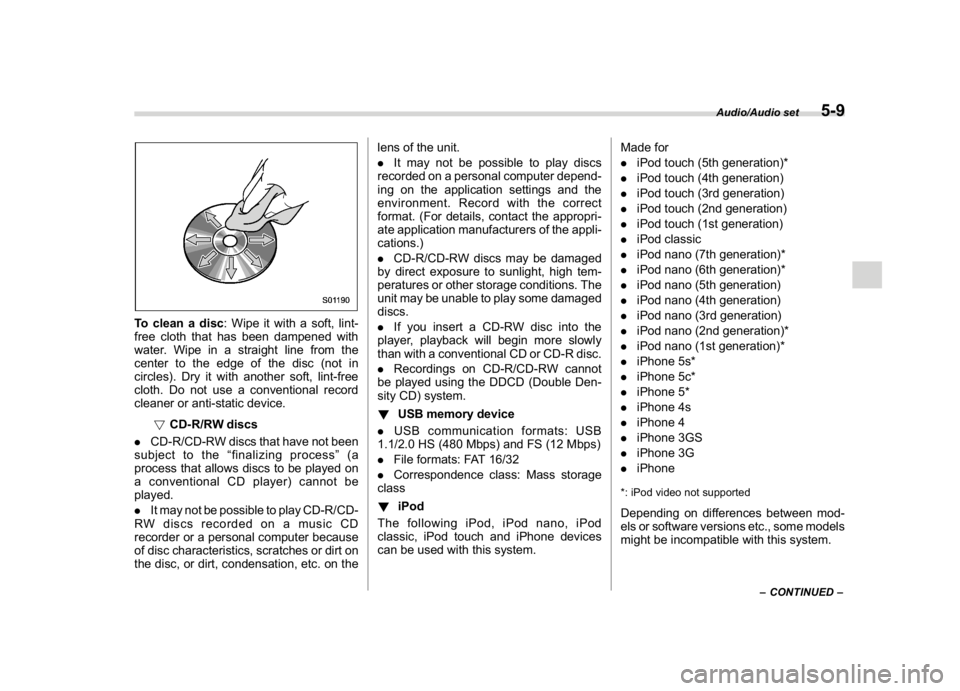
To clean a disc: Wipe it with a soft, lint-
free cloth that has been dampened with
water. Wipe in a straight line from the
center to the edge of the disc (not in
circles). Dry it with another soft, lint-free
cloth. Do not use a conventional record
cleaner or anti-static device.
!CD-R/RW discs
.CD-R/CD-RW discs that have not been
subject to the“finalizing process”(a
process that allows discs to be played on
a conventional CD player) cannot be
played.
.It may not be possible to play CD-R/CD-
RW discs recorded on a music CD
recorder or a personal computer because
of disc characteristics, scratches or dirt on
the disc, or dirt, condensation, etc. on thelens of the unit.
.It may not be possible to play discs
recorded on a personal computer depend-
ing on the application settings and the
environment. Record with the correct
format. (For details, contact the appropri-
ate application manufacturers of the appli-
cations.)
.CD-R/CD-RW discs may be damaged
by direct exposure to sunlight, high tem-
peratures or other storage conditions. The
unit may be unable to play some damaged
discs.
.If you insert a CD-RW disc into the
player, playback will begin more slowly
than with a conventional CD or CD-R disc.
.Recordings on CD-R/CD-RW cannot
be played using the DDCD (Double Den-
sity CD) system.
!USB memory device
.USB communication formats: USB
1.1/2.0 HS (480 Mbps) and FS (12 Mbps)
.File formats: FAT 16/32
.Correspondence class: Mass storage
class
!iPod
The following iPod, iPod nano, iPod
classic, iPod touch and iPhone devices
can be used with this system.Made for
.iPod touch (5th generation)*
.iPod touch (4th generation)
.iPod touch (3rd generation)
.iPod touch (2nd generation)
.iPod touch (1st generation)
.iPod classic
.iPod nano (7th generation)*
.iPod nano (6th generation)*
.iPod nano (5th generation)
.iPod nano (4th generation)
.iPod nano (3rd generation)
.iPod nano (2nd generation)*
.iPod nano (1st generation)*
.iPhone 5s*
.iPhone 5c*
.iPhone 5*
.iPhone 4s
.iPhone 4
.iPhone 3GS
.iPhone 3G
.iPhone
*: iPod video not supportedDepending on differences between mod-
els or software versions etc., some models
might be incompatible with this system.
–CONTINUED–
Audio/Audio set
5-9
5
Page 245 of 578

(254,1)
北米Model "A1700BE-B" EDITED: 2017/ 10/ 11
!File information
Compatible compressed files (Audio)
Item USB DISC
Compatible
file formatMP3/WMA/AAC
Folders in the
deviceMaximum
512Maximum
255
Files in the
deviceMaximum
8000Maximum
512
Files per
folderMaximum
255—
Corresponding sampling frequency
(Audio)
File type Frequency (kHz)
MP3 files:
MPEG 1 LAYER 332/44.1/48
MP3 files:
MPEG 2 LSF LAYER 316/22.05/24
WMA files:
Ver. 7, 8, 9 (9.1/9.2)32/48/64/80/96/128/
160/192
AAC files:
MPEG4/AAC-LC48/44.1/32/24/22.05/
16/12/11.025/8
Corresponding bit rates (Audio)
File type Bit rate (kbps)
MP3 files:
MPEG 1 LAYER 332 - 320
MP3 files:
MPEG 2 LSF LAYER 38 - 160
WMA files: Ver. 7, 8 CBR 48 - 192
WMA files:
Ver. 9 (9.1/9.2)CBR 32 - 192
AAC files:
MPEG4/AAC-LC16 - 320
(Variable Bit Rate (VBR) compatible)
.MP3 (MPEG Audio Layer 3), WMA
(Windows Media Audio) and AAC (Ad-
vanced Audio Coding) are audio compres-
sion standards.
.This system can play MP3/WMA/AAC
files on CD-R, CD-RW discs, USB mem-
ory, and Bluetooth device.
.This system can play disc recordings
compatible with ISO 9660 level 1 and level
2 and with the Romeo and Joliet file
system.
.When naming an MP3/WMA/AAC file,
add an appropriate file extension (.mp3/
.wma/.m4a).
.This system plays back files with .mp3/
.wma/.m4a file extensions as MP3/WMA/
AAC files respectively. To prevent noiseand playback errors, use the appropriate
file extension.
.This system can play only the first
session when using multi-session compa-
tible CDs.
.MP3 files are compatible with the ID3
Tag Ver. 1.0, Ver. 1.1, Ver. 2.2 and Ver. 2.3
formats. This system cannot display disc
title, track title and artist name in other
formats.
.WMA/AAC files can contain a WMA/
AAC tag that is used in the same way as an
ID3 tag. WMA/AAC tags carry information
such as track title and artist name.
.The emphasis function is available only
when playing MP3/WMA files recorded at
32, 44.1 and 48 kHz.
.This system can play back AAC files
encoded by iTunes.
.The sound quality of MP3/WMA files
generally improves with higher bit rates. In
order to achieve a reasonable level of
sound quality, discs recorded with a bit rate
of at least 128 kbps are recommended.
.The MP3/WMA player does not play
back MP3/WMA files from discs recorded
using packet write data transfer (UDF
format). Discs should be recorded using
“pre-mastering”software rather than pack-
etwrite software.
.M3u playlists are not compatible with
Audio/Audio set
5-10
Page 246 of 578
(255,1)
北米Model "A1700BE-B" EDITED: 2017/ 10/ 11
the audio device.
.MP3i (MP3 interactive) and MP3PRO
formats are not compatible with the audio
device.
.The player is compatible with VBR
(Variable Bit Rate).
.When playing back files recorded as
VBR (Variable Bit Rate) files, the play time
will not be correctly displayed if the fast
forward or reverse operations are used.
.It is not possible to check folders that do
not include MP3/WMA/AAC files.
.MP3/WMA/AAC files in folders up to 8
levels deep can be played. However, the
start of playback may be delayed when
using discs containing numerous levels of
folders. For this reason, we recommend
creating discs with no more than 2 levels of
folders.
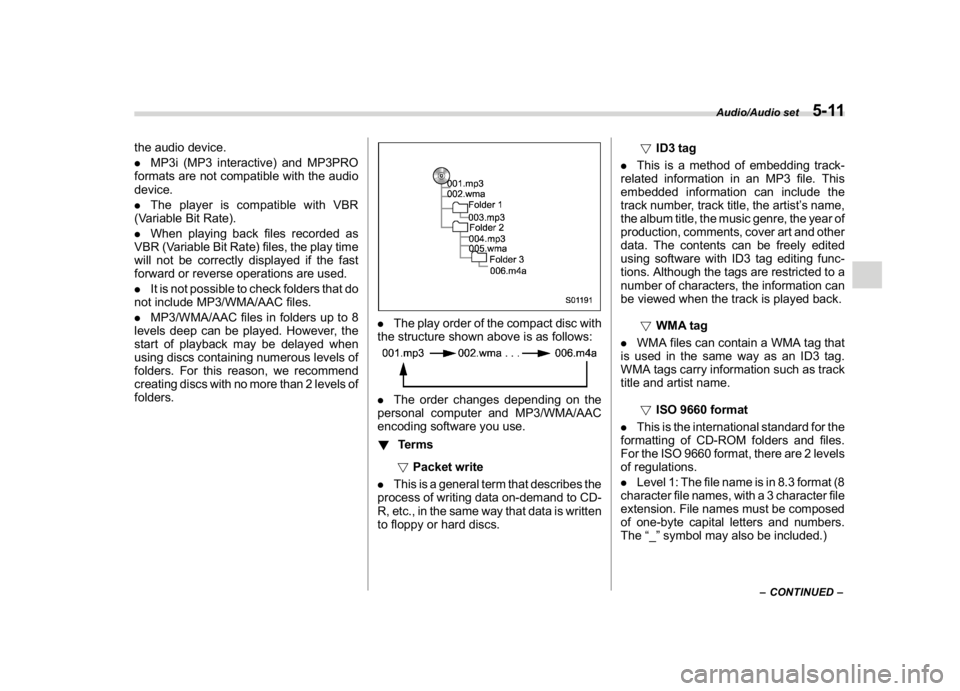
.The play order of the compact disc with
the structure shown above is as follows:.The order changes depending on the
personal computer and MP3/WMA/AAC
encoding software you use.
!Terms
!Packet write
.This is a general term that describes the
process of writing data on-demand to CD-
R, etc., in the same way that data is written
to floppy or hard discs.!ID3 tag
.This is a method of embedding track-
related information in an MP3 file. This
embedded information can include the
track number, track title, the artist’s name,
the album title, the music genre, the year of
production, comments, cover art and other
data. The contents can be freely edited
using software with ID3 tag editing func-
tions. Although the tags are restricted to a
number of characters, the information can
be viewed when the track is played back.
!WMA tag
.WMA files can contain a WMA tag that
is used in the same way as an ID3 tag.
WMA tags carry information such as track
title and artist name.
!ISO 9660 format
.This is the international standard for the
formatting of CD-ROM folders and files.
For the ISO 9660 format, there are 2 levels
of regulations.
.Level 1: The file name is in 8.3 format (8
character file names, with a 3 character file
extension. File names must be composed
of one-byte capital letters and numbers.
The“_”symbol may also be included.)
–CONTINUED–
Audio/Audio set
5-11
5
Page 247 of 578

(256,1)
北米Model "A1700BE-B" EDITED: 2017/ 10/ 11
.Level 2: The file name can have up to
31 characters (including the separation
mark“.”and file extension). Each folder
must contain fewer than 8 hierarchies.
!MP3
.MP3 is an audio compression standard
determined by a working group (MPEG) of
the ISO (International Standard Organiza-
tion). MP3 compresses audio data to
about 1/10 the size of that on conventional
discs.
!WMA
.WMA (Windows Media Audio) is an
audio compression format developed by
Microsoft
®. It compresses files into a size
smaller than that of MP3 files. The decod-
ing formats for WMA files are Ver. 7, 8 and
9.
.This product is protected by certain
intellectual property rights of Microsoft
Corporation and third parties. Use or
distribution of such technology outside of
this product is prohibited without a license
from Microsoft or an authorized Microsoft
subsidiary and third parties.!AAC
.AAC is short for Advanced Audio
Coding and refers to an audio compres-
sion technology standard used with
MPEG2 and MPEG4.Audio/Audio set
5-12
Page 250 of 578
(259,1)
北米Model "A1700BE-B" EDITED: 2017/ 10/ 11
!Touch screen operation
This system is operated mainly by the keys
on the screen.
When a screen key is touched, a beep
sounds. You can set the beep sound.
Refer to“Unit settings”F5-18.NOTE.If the system does not respond to
touching a screen key, move your
finger away from the screen and touch
it again.
.Grayed-out screen keys cannot be
operated.
.The displayed image may become
darker and moving images may be
slightly distorted when the screen is
cold.
.In extremely cold conditions, the
screen may not be displayed correctly.
Also, the screen keys may be less
responsive than usual when pressed.
.When you look at the screen through
polarized material such as polarized
sunglasses, the screen may be dark
and difficult to see. If so, look at the
screen from different angles, adjust the
screen settings or take off your sun-
glasses. Refer to“Unit settings”F5-18.!Entering letters and numbers/list
screen operation
!Entering letters and numbers
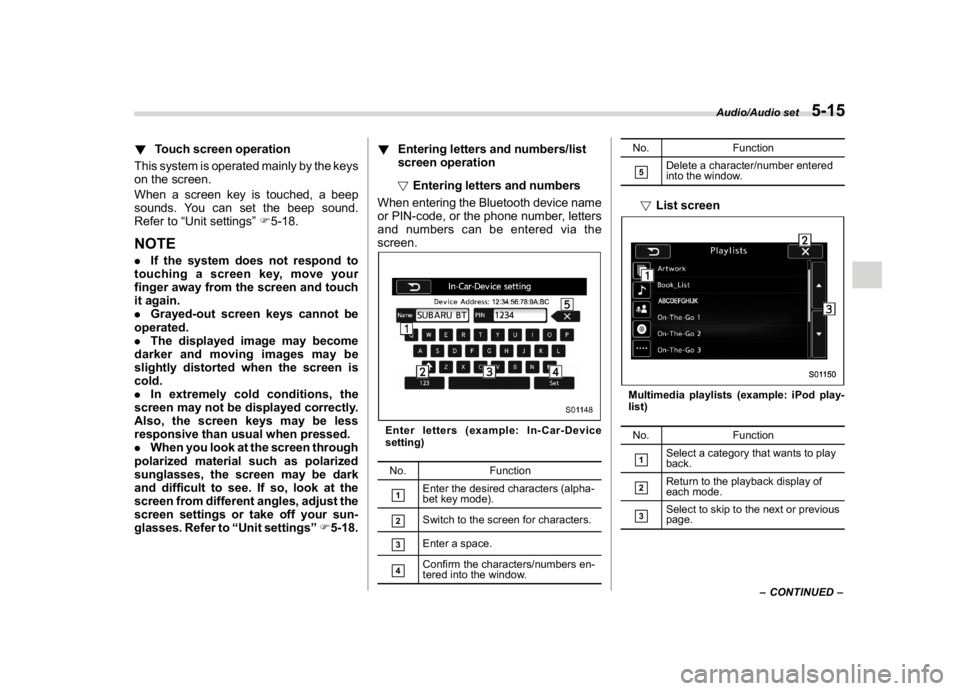
When entering the Bluetooth device name
or PIN-code, or the phone number, letters
and numbers can be entered via the
screen.
Enter letters (example: In-Car-Device
setting)
No. Function&1
Enter the desired characters (alpha-
bet key mode).
&2
Switch to the screen for characters.
&3
Enter a space.
&4
Confirm the characters/numbers en-
tered into the window.No. Function
&5
Delete a character/number entered
into the window.
!List screenMultimedia playlists (example: iPod play-
list)
No. Function&1
Select a category that wants to play
back.
&2
Return to the playback display of
each mode.
&3
Select to skip to the next or previous
page.
–CONTINUED–
Audio/Audio set
5-15
5
Page 251 of 578
(260,1)
北米Model "A1700BE-B" EDITED: 2017/ 10/ 11
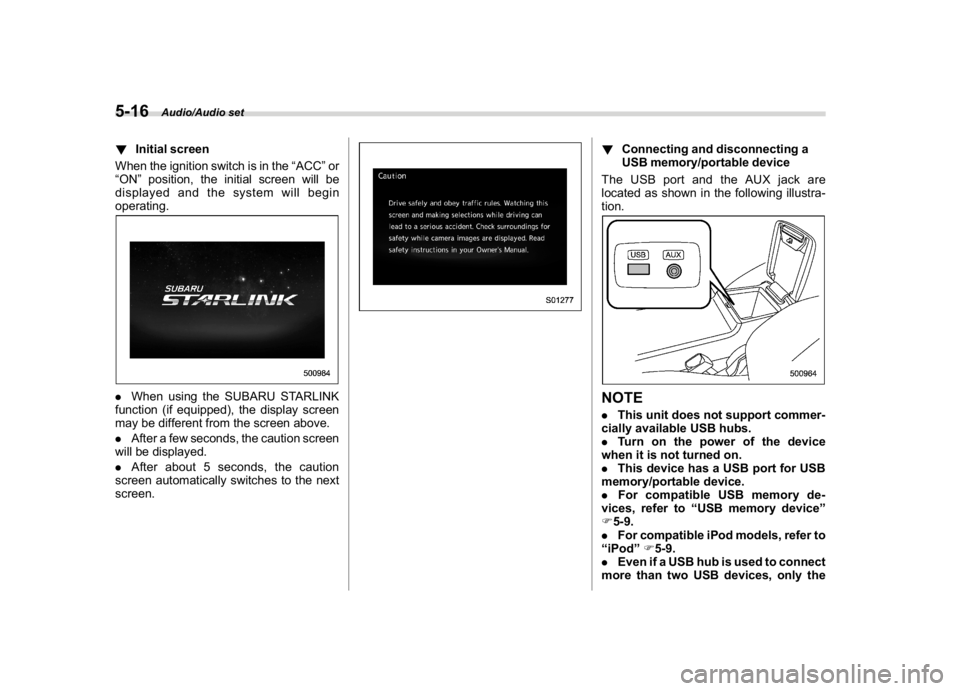
!Initial screen
When the ignition switch is in the“ACC”or
“ON”position, the initial screen will be
displayed and the system will begin
operating..When using the SUBARU STARLINK
function (if equipped), the display screen
may be different from the screen above.
.After a few seconds, the caution screen
will be displayed.
.After about 5 seconds, the caution
screen automatically switches to the next
screen.
!Connecting and disconnecting a
USB memory/portable device
The USB port and the AUX jack are
located as shown in the following illustra-
tion.NOTE.This unit does not support commer-
cially available USB hubs.
.Turn on the power of the device
when it is not turned on.
.This device has a USB port for USB
memory/portable device.
.For compatible USB memory de-
vices, refer to“USB memory device”
F5-9.
.For compatible iPod models, refer to
“iPod”F5-9.
.Even if a USB hub is used to connect
more than two USB devices, only the
Audio/Audio set
5-16