ECO mode SUBARU WRX 2018 Owners Manual
[x] Cancel search | Manufacturer: SUBARU, Model Year: 2018, Model line: WRX, Model: SUBARU WRX 2018Pages: 578, PDF Size: 33.21 MB
Page 281 of 578

(290,1)
北米Model "A1700BE-B" EDITED: 2017/ 10/ 11
connected content is subject to change
without notice and could be affected by
any of the following: compatibility
issues with future firmware versions
of the smartphone; compatibility is-
sues with future versions of the con-
nected content application(s) for the
smartphone; changes to or disconti-
nuation of the connected content ap-
plication(s) or service by its provider.
.Communication and phone call
charges for smartphones should be
paid by the wireless subscriber.
.If you lose the data in a smartphone
or other device while using it with the
system, no compensation will be given
for the lost data.
.SUBARU CORPORATION makes no
guarantee regarding the content pro-
vided by aha.
.aha may not work due to factors on
smartphones, smartphone applica-
tions or stations. SUBARU CORPORA-
TION is not responsible for it.!About the supported devices
This system supports the following de-
vices.
.For iPhone/iPod touch users
Type GenerationFirmware
version or
OS
iPhoneiPhone 3G iOS 4.2.x
iPhone 3GS iOS 6.1.x
iPhone 4 iOS 7.0.x
iPhone 4s iOS 7.0.x
iPhone 5 iOS 7.0.x
iPhone 5c iOS 7.0.x
iPhone 5s iOS 7.0.x
iPod touchiPod touch iOS 3.1.x
iPod touch 2 iOS 4.2.x
iPod touch 3 iOS 5.1.x
iPod touch 4 iOS 6.1.x
iPod touch 5iOS 7.0.x
NOTENote that the warranty does not apply if
an unsupported iPhone/iPod touch is
connected..For Android device users
Android OS Specification Profile
Android
Ver. 2.2 or
Ver. 2.3Bluetooth
Specification
Ver. 1.1 or
higher
(Ver. 2.0 +
EDR or higher
is recom-
mended).aha Con-
nect Bin-
ary API
over SPP
.Digital
audio by
A2DPNOTEThe available functions may vary de-
pending on the type of Android device.
!Connecting a smartphone
If you connect a smartphone to this system
after starting a supported aha application
on the smartphone, you can display and
operate the aha application displayed on
the smartphone on the system screen.
1. Runtheahaapplicationonyour
smartphone.
2. Connect the iPhone/iPod touch to the
USB port or connect the Android device by
utilizing the Bluetooth connection (SPP
and A2DP profile).
.For details about connecting an
iPhone/iPod touch: Refer to“Connect-
ing and disconnecting a USB memory/
portable device”F5-16.
.For details about registering or con-
Audio/Audio set
5-46
Page 283 of 578
(292,1)
北米Model "A1700BE-B" EDITED: 2017/ 10/ 11
&Pandora
®(if equipped)
Pandora is an application for a smart-
phone. This can automatically select and
play recommended tracks.
By rating the track currently playing, tracks
that better match your preference will be
recommended.
In order to connect to this system, use a
USB port for an iPhone or iPod touch and
Bluetooth for Android devices.
Depending on differences between mod-
els or software version etc., some models
might be incompatible with this system.
This function is not available if the Pandora
application has not been installed on the
smartphone.
WARNING
Do not operate the player’s controls
or connect the smartphone while
driving. Doing so may result in loss
of control of your vehicle and cause
an accident or serious injury.
CAUTION
.Do not leave your smartphone in
the car. In particular, high tem-
peratures inside the vehicle may
damage the smartphone.
.Do not push down on or apply
unnecessary pressure to the
smartphone while it is connected
as this may damage the smart-
phone or its terminal.
.Do not insert foreign objects into
the port as this may damage the
smartphone or its terminal.NOTEFollow the specific operation proce-
dures for the smartphone application.
Audio/Audio set
5-48
Page 286 of 578
(295,1)
北米Model "A1700BE-B" EDITED: 2017/ 10/ 11
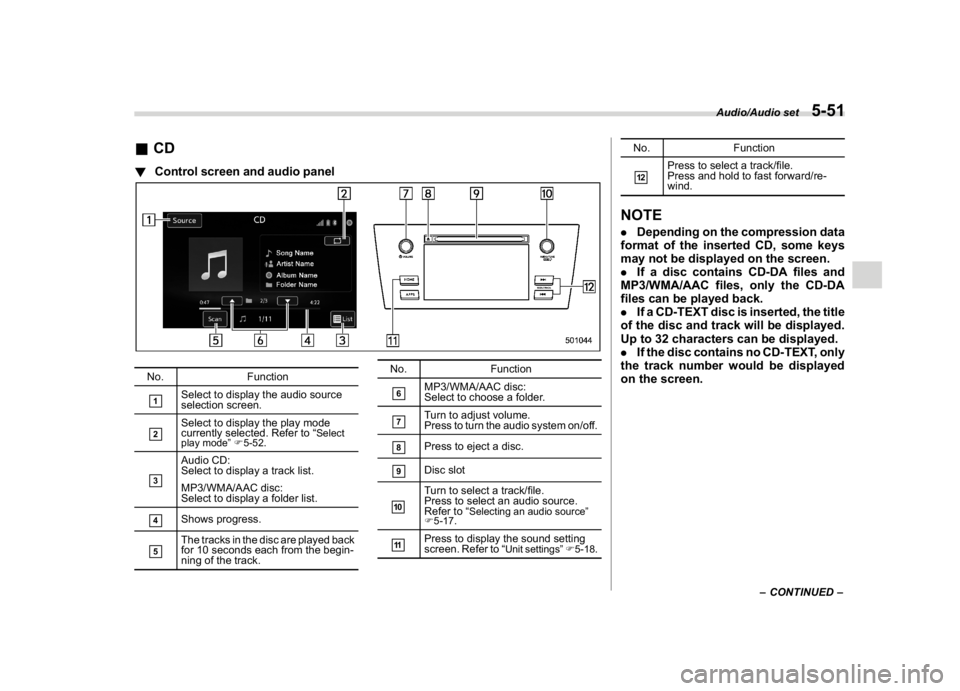
&CD!Control screen and audio panelNo. Function&1
Select to display the audio source
selection screen.
&2
Select to display the play mode
currently selected. Refer to“
Select
play mode”F5-52.
&3
Audio CD:
Select to display a track list.
MP3/WMA/AAC disc:
Select to display a folder list.
&4
Shows progress.
&5
The tracks in the disc are played back
for 10 seconds each from the begin-
ning of the track.No. Function
&6
MP3/WMA/AAC disc:
Select to choose a folder.
&7
Turn to adjust volume.
Press to turn the audio system on/off.
&8
Press to eject a disc.
&9
Disc slot
&10
Turn to select a track/file.
Press to select an audio source.
Refer to“
Selecting an audio source”
F5-17.
&11
Press to display the sound setting
screen. Refer to“
Unit settings”F5-18.
No. Function&12
Press to select a track/file.
Press and hold to fast forward/re-
wind.
NOTE.Depending on the compression data
format of the inserted CD, some keys
may not be displayed on the screen.
.If a disc contains CD-DA files and
MP3/WMA/AAC files, only the CD-DA
files can be played back.
.If a CD-TEXT disc is inserted, the title
of the disc and track will be displayed.
Up to 32 characters can be displayed.
.If the disc contains no CD-TEXT, only
the track number would be displayed
on the screen.
–CONTINUED–
Audio/Audio set
5-51
5
Page 288 of 578
(297,1)
北米Model "A1700BE-B" EDITED: 2017/ 10/ 11
&USB memoryAudio files on the USB memory can be
played.
WARNING
Do not operate the player’s controls
or connect the USB memory while
driving. Doing so may result in
losing control of your vehicle and
cause an accident or serious injury.
CAUTION
.Do not leave your USB memory in
the car. In particular, high tem-
peratures inside the vehicle may
damage the USB memory.
.Do not push down on or apply
unnecessary pressure to the USB
memory while it is connected as
this may damage the USB mem-
ory or its terminal.
.Do not insert foreign objects into
the port as this may damage the
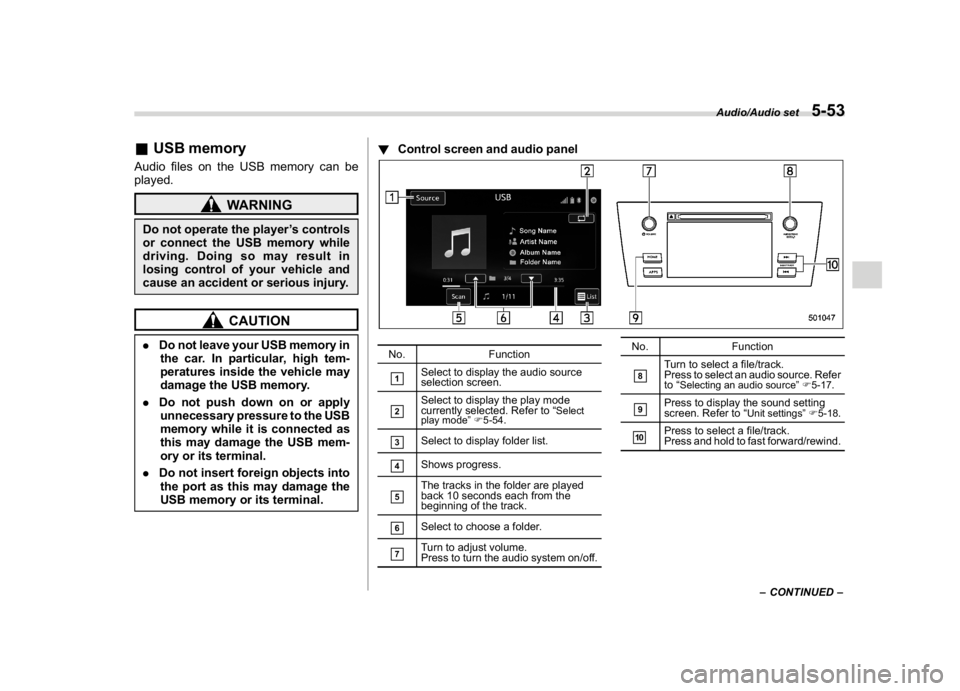
USB memory or its terminal.!Control screen and audio panel
No. Function&1
Select to display the audio source
selection screen.
&2
Select to display the play mode
currently selected. Refer to“
Select
play mode”F5-54.
&3
Select to display folder list.
&4
Shows progress.
&5
The tracks in the folder are played
back 10 seconds each from the
beginning of the track.
&6
Select to choose a folder.
&7
Turn to adjust volume.
Press to turn the audio system on/off.No. Function
&8
Turn to select a file/track.
Press to select an audio source. Refer
to“
Selecting an audio source”F5-17.
&9
Press to display the sound setting
screen. Refer to“
Unit settings”F5-18.
&10
Press to select a file/track.
Press and hold to fast forward/rewind.
–CONTINUED–
Audio/Audio set
5-53
5
Page 290 of 578
(299,1)
北米Model "A1700BE-B" EDITED: 2017/ 10/ 11
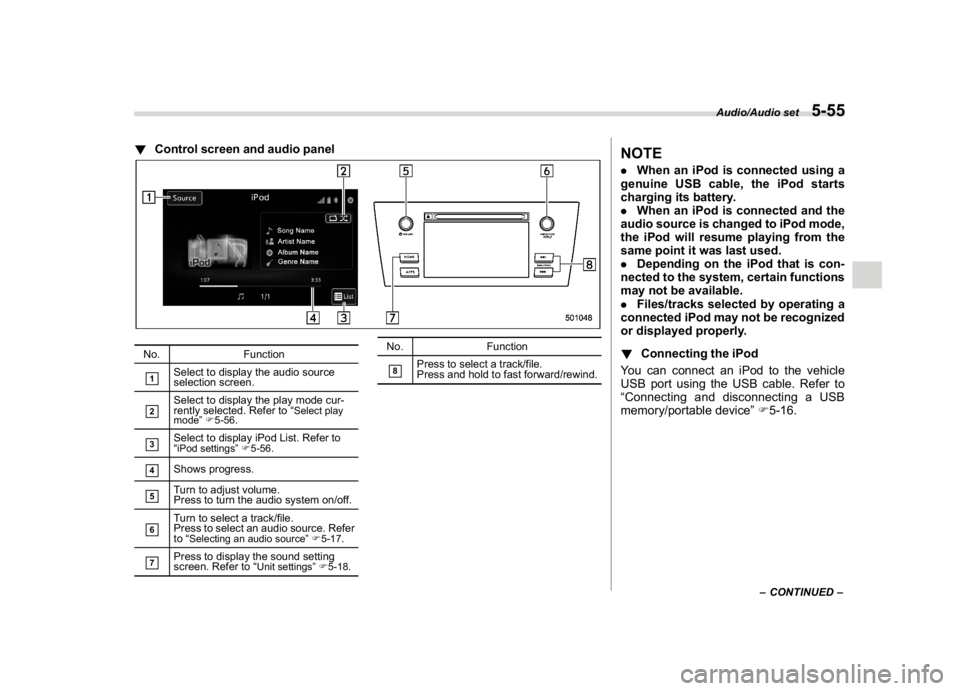
!Control screen and audio panelNo. Function&1
Select to display the audio source
selection screen.
&2
Select to display the play mode cur-
rently selected. Refer to“
Select play
mode”F5-56.
&3
Select to display iPod List. Refer to
“iPod settings”F5-56.
&4
Shows progress.
&5
Turn to adjust volume.
Press to turn the audio system on/off.
&6
Turn to select a track/file.
Press to select an audio source. Refer
to“
Selecting an audio source”F5-17.
&7
Press to display the sound setting
screen. Refer to“
Unit settings”F5-18.
No. Function&8
Press to select a track/file.
Press and hold to fast forward/rewind.
NOTE.When an iPod is connected using a
genuine USB cable, the iPod starts
charging its battery.
.When an iPod is connected and the
audio source is changed to iPod mode,
the iPod will resume playing from the
same point it was last used.
.Depending on the iPod that is con-
nected to the system, certain functions
may not be available.
.Files/tracks selected by operating a
connected iPod may not be recognized
or displayed properly.
!Connecting the iPod
You can connect an iPod to the vehicle
USB port using the USB cable. Refer to
“Connecting and disconnecting a USB
memory/portable device”F5-16.
–CONTINUED–
Audio/Audio set
5-55
5
Page 293 of 578

(302,1)
北米Model "A1700BE-B" EDITED: 2017/ 10/ 11
NOTE.Depending on the Bluetooth device
that is connected to the system, the
music may start playing when selecting
the
key while it is paused. Con-
versely, the music may pause when
selecting the
key while it is playing.
.In the following conditions, the sys-
tem may not function:
–The Bluetooth device is turned
off.
–The Bluetooth device is not con-
nected.
–The Bluetooth device has a low
battery.
.It may take time to connect the
phone when Bluetooth audio is being
played.
.For operating the portable player,
see the instruction manual that comes
with it.
.If the Bluetooth device is discon-
nected due to poor reception from the
Bluetooth network when the ignition
switch is in the“ACC”or“ON”position,
the system will automatically recon-
nect to the portable player.
.If the Bluetooth device is discon-
nected on purpose, such as it was
turned off, this does not happen. Re-
connect the portable player manually.
.Bluetooth device information is re-gistered when the Bluetooth device is
connected to the Bluetooth audio sys-
tem. When selling or disposing of the
vehicle, remove the Bluetooth audio
information from the system. Refer to
“Bluetooth
®settings”F5-64.
!Connecting a Bluetooth device
To use the Bluetooth audio system, it is
necessary to register a Bluetooth device
with the system.
.Registering an additional device
1. Select the“Add”key on the Bluetooth
devices connection screen.
2. For more information: Refer to“Regis-
tering/connecting Bluetooth
®device”F5-
64.
.Selecting a registered device
1. Select the“Select”key on the Blue-
tooth devices connection screen.
2. For more information: Refer to“BT
Devices Connection screen”F5-67.
!How to change the source
Select the“BT Audio”key on the source
select screen. Refer to“Selecting an audio
source”F5-17.
NOTEDepending on the type of portable
player connected, some functions
may not be available and/or the screen
may look differently than shown in this
manual.
!Select play mode
The play mode settings display will appear
when play mode key is touched. Select the
preferred play mode from the following
items.
Icon Function
Touch to start 1 track repeat.Touch to start repeat all.Touch to repeat the tracks in the
group.Touch to start shuffle all.Touch to play tracks in the order
in which they are registered in the
audio device.Touch to start shuffle group.
Audio/Audio set
5-58
Page 297 of 578

(306,1)
北米Model "A1700BE-B" EDITED: 2017/ 10/ 11
.+/switch
Mode Operation Function
Except list screenPress Volume up/down
Press and hold Volume up/down continuously
List screen Press Move cursor up/down
Pandora main screen (if equipped) Press and hold“+”switch is thumb up/“”switch is thumb down
.
/
switch
Mode Operation Function
AM/FM Radio, SiriusXM (if equipped)Press Preset channel up/down
Press and holdSeek up/down continuously while the switch is
being pressed
ahaPress Content up/down
Press and holdReverse the current content item for 15 seconds/
Fast forward the current content item for 30
seconds
Audio CD, MP3/WMA/AAC disc, USB, iPod, BT
audioPress Select a track/file
Press and hold Fast forward/rewind
Pandora (if equipped) Press and hold Thumbs up
List screen PressMove cursor left/right
Audio/Steering switches for audio
5-62
Page 301 of 578

(310,1)
北米Model "A1700BE-B" EDITED: 2017/ 10/ 11
!Profiles
This system supports the following services.
Bluetooth Device Spec. Function Requirements Recommendations
Bluetooth Phone/Bluetooth
Audio DeviceBluetooth SpecificationRegistering a Bluetooth de-
viceVer. 1.1Ver. 2.1 + EDR
Bluetooth Device Profile Function Requirements Recommendations
Bluetooth PhoneHFP (Hands-Free Profile) Hands-free system Ver. 1.0 Ver. 1.5
OPP (Object Push Profile)
Transferring the contactsVer. 1.1 Ver. 1.1
PBAP (Phone Book Access
profile)Ver. 1.0 Ver. 1.0
MAP (Message Access
Profile)Bluetooth phone message—Ver. 1.0
SPP (Serial Port Profile)Connecting a Bluetooth
phone—Ver. 1.1
Bluetooth Audio DeviceA2DP (Advanced Audio
Distribution Profile)
Bluetooth audio systemVer. 1.0 Ver. 1.2
AVRCP (Audio/Video Re-
mote Control Profile)Ver. 1.0Ver. 1.4
NOTE.If your cell phone does not support HFP, registering the Bluetooth phone or using OPP, PBAP, MAP or SPP profiles
individually will not be possible.
.If the connected Bluetooth device version is older than recommended or incompatible, the Bluetooth device function may
not work properly.
.For USA customers, please visit www.subaru.com for details. Outside of the USA customers, contact your local dealer to
arrange a demonstration in order to confirm whether or not the device can be paired with the vehicle.
Audio/Bluetooth
®settings
5-66
Page 315 of 578
(324,1)
北米Model "A1700BE-B" EDITED: 2017/ 10/ 11
Action Function
PressStart the voice com-
mand system.
Press and holdCancel voice recogni-
tion.
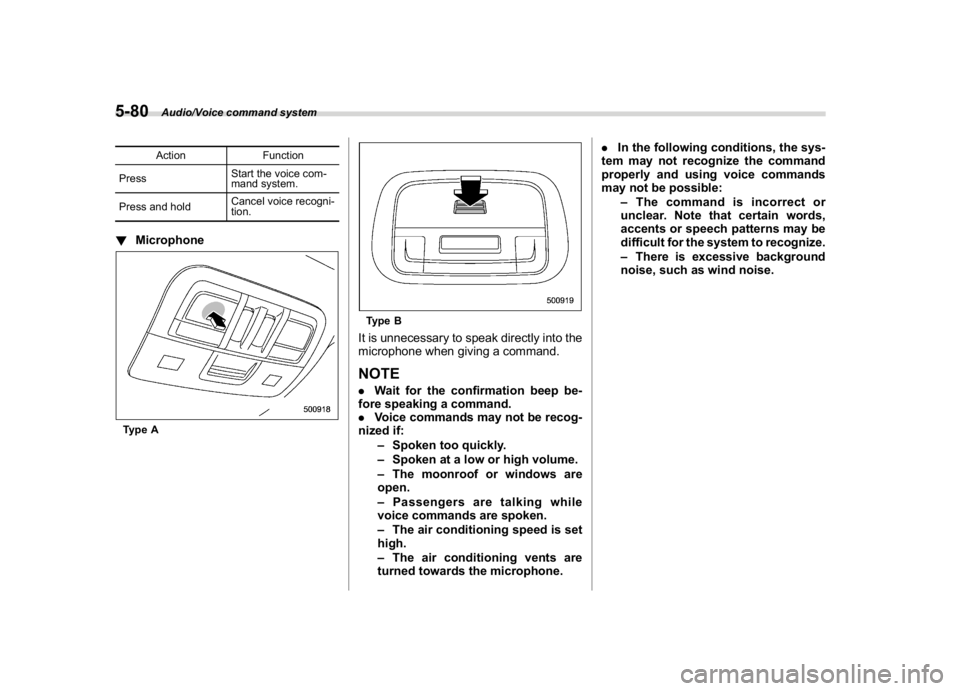
!MicrophoneType A
Type BIt is unnecessary to speak directly into the
microphone when giving a command.NOTE.Wait for the confirmation beep be-
fore speaking a command.
.Voice commands may not be recog-
nized if:
–Spoken too quickly.
–Spoken at a low or high volume.
–The moonroof or windows are
open.
–Passengers are talking while
voice commands are spoken.
–The air conditioning speed is set
high.
–The air conditioning vents are
turned towards the microphone..In the following conditions, the sys-
tem may not recognize the command
properly and using voice commands
may not be possible:
–The command is incorrect or
unclear. Note that certain words,
accents or speech patterns may be
difficult for the system to recognize.
–There is excessive background
noise, such as wind noise.
Audio/Voice command system
5-80
Page 316 of 578
(325,1)
北米Model "A1700BE-B" EDITED: 2017/ 10/ 11
&Voice command system op-
eration1. Press the talk switch on the steering
wheel.
After the voice command top screen has
been displayed, speech guidance will
commence.NOTEWhen the voice command mode is
audio mode, voice guidance for the
voice command system can be skipped
by pressing the talk switch on the
steering wheel.
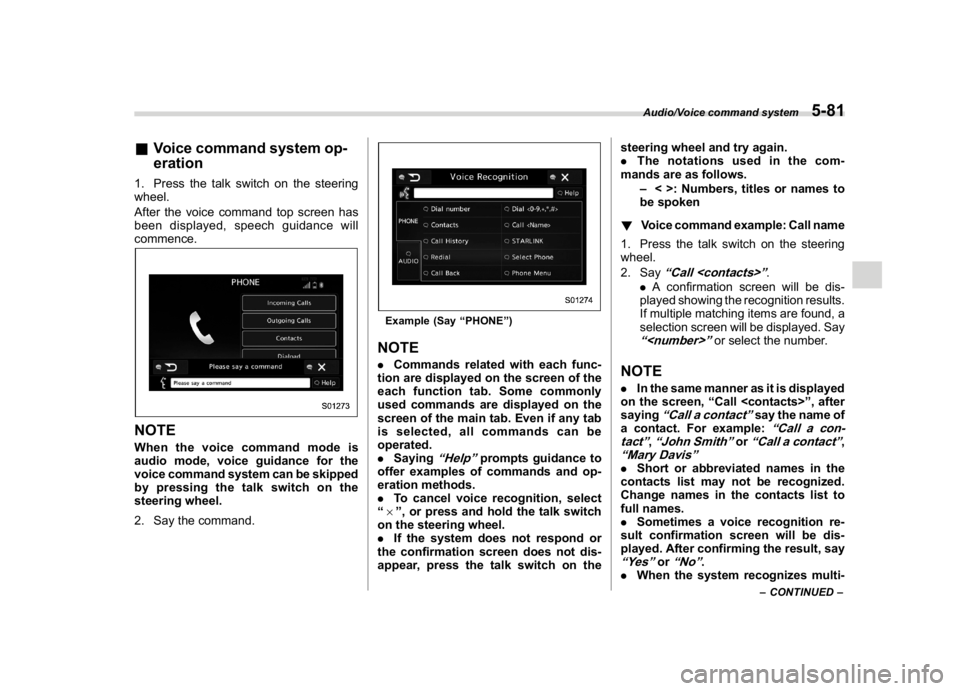
2. Say the command.
Example (Say“PHONE”)NOTE.Commands related with each func-
tion are displayed on the screen of the
each function tab. Some commonly
used commands are displayed on the
screen of the main tab. Even if any tab
is selected, all commands can be
operated.
.Saying
“Help”
prompts guidance to
offer examples of commands and op-
eration methods.
.To cancel voice recognition, select
“6”, or press and hold the talk switch
on the steering wheel.
.If the system does not respond or
the confirmation screen does not dis-
appear, press the talk switch on thesteering wheel and try again.
.The notations used in the com-
mands are as follows.
–< >: Numbers, titles or names to
be spoken
!Voice command example: Call name
1. Press the talk switch on the steering
wheel.
2. Say
“Call
.
.A confirmation screen will be dis-
played showing the recognition results.
If multiple matching items are found, a
selection screen will be displayed. Say
“
or select the number.
NOTE.In the same manner as it is displayed
on the screen,“Call
saying
“Call a contact”
say the name of
a contact. For example:
“Call a con-
tact”
,“John Smith”
or
“Call a contact”
,
“Mary Davis”.Short or abbreviated names in the
contacts list may not be recognized.
Change names in the contacts list to
full names.
.Sometimes a voice recognition re-
sult confirmation screen will be dis-
played. After confirming the result, say“Yes”
or
“No”
.
.When the system recognizes multi-
–CONTINUED–
Audio/Voice command system
5-81
5