ignition SUBARU WRX 2018 Owners Manual
[x] Cancel search | Manufacturer: SUBARU, Model Year: 2018, Model line: WRX, Model: SUBARU WRX 2018Pages: 578, PDF Size: 33.21 MB
Page 360 of 578
(373,1)
北米Model "A1700BE-B" EDITED: 2017/ 10/ 11
!If the engine does not start
CAUTION
For safety, release the accelerator
pedal as soon as the engine starts.
Try the following procedure.
1. Turn the ignition switch to the“LOCK”
position and wait for at least 10 seconds.
2. After checking that the parking brake is
firmly set, turn the ignition switch to the
“START”position while depressing the
accelerator pedal slightly (approximately
a quarter of the full stroke).
3. If this fails to start the engine, turn the
ignition switch back to the“LOCK”position
and wait for at least 10 seconds.
4. Fully depress the accelerator pedal
and turn the ignition switch to the“START”
position.
If this fails to start the engine, try the
following procedure.
1. Turn the ignition switch again to the
“LOCK”position.
2. After waiting for 10 seconds or longer,
turn the ignition switch to the“START”
position without depressing the accelera-
tor pedal.
If the engine still does not start, contactyour nearest SUBARU dealer for assis-
tance.
!Stopping the engine
The ignition switch should be turned off
only when the vehicle is stopped and the
engine is idling.
WARNING
Do not stop the engine when the
vehicle is moving. This will cause
loss of power to the power steering
and the brake booster, making steer-
ing and braking more difficult. It
could also result in accidental acti-
vation of the“LOCK”position on the
ignition switch, causing the steering
wheel to lock.&Models with push-button
start systems!Safety precautions
Refer to“Safety precautions”F2-8.
!Operating range for push-button
start system
Refer to“Operating range”F3-6.!Starting engine
WARNING
If the indicator on the push-button
ignition switch flashes in green after
the engine has started, never drive
the vehicle. The steering is still
locked, and it may result in an
accident. In this case, press the
push-button ignition switch with
the brake pedal depressed and with
the steering wheel turned from the
right to the left.
CAUTION
.When the operation indicator on
the push-button ignition switch is
flashing in orange, there may be a
malfunction with the vehicle.
Contact a SUBARU dealer imme-
diately.
.Do not continue pressing the
push-button ignition switch for
more than 10 seconds. Doing so
could cause a malfunction. If the
engine does not start, stop press-
ing the push-button ignition
switch. Instead, press the push-
buttonignitionswitchwithout
depressing the brake pedal to
–CONTINUED–
Starting and operating/Starting and stopping the engine
7-11
7
Page 361 of 578
(374,1)
北米Model "A1700BE-B" EDITED: 2017/ 10/ 11
switch the power status to“OFF”.
Wait 10 seconds, and then push
the push-button ignition switch
to start the engine.
NOTE.When pressing the push-button igni-
tion switch with the clutch pedal (MT
models) or the brake pedal (CVT mod-
els) depressed:
–The engine starter operates for a
maximum of 10 seconds and after
starting the engine, the starter stops
automatically.
–You can start the engine regard-
less of the power status.
.If the engine does not start, check
the security indicator light. Then press
the push-button ignition switch without
depressing the clutch pedal (MT mod-
els) or the brake pedal (CVT models) to
switch the power to“OFF”.
–If the light had illuminated, try to
start the engine again.
–If the light had been off, press the
push-button ignition switch while
depressing the clutch pedal (MT
models) or the brake pedal (CVT
models) more forcefully.
.The engine may not start depending
on the radio wave conditions aroundthe vehicle. In such a case, refer to
“Starting engine”F9-27.
.If the vehicle battery is discharged,
the steering cannot be unlocked.
Charge the battery.
.Do not shift the shift lever/select
lever while the starter is cranking.
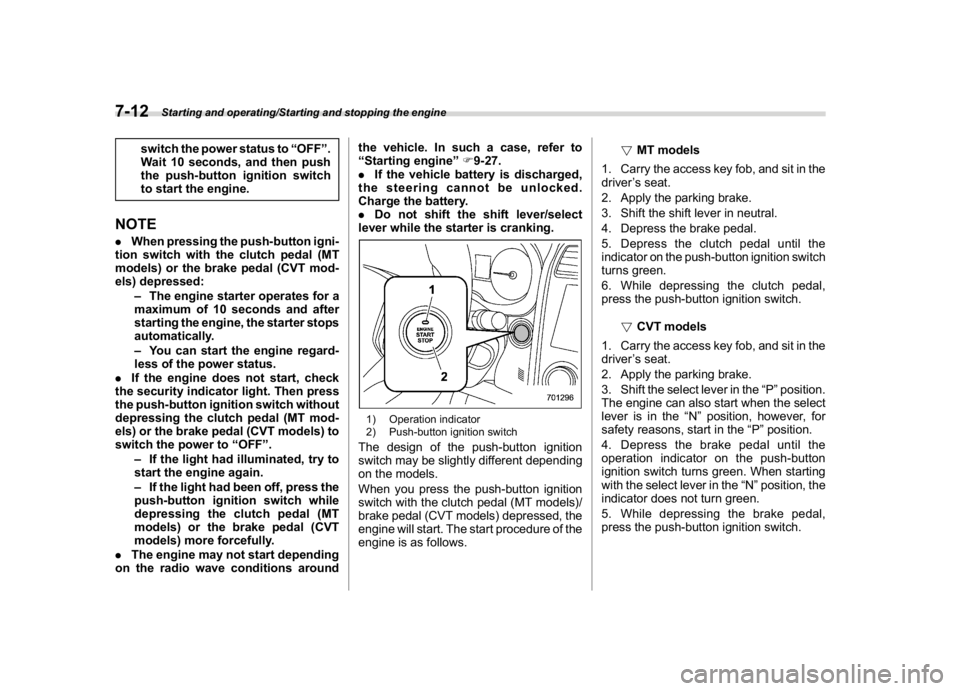
1) Operation indicator
2) Push-button ignition switchThe design of the push-button ignition
switch may be slightly different depending
on the models.
When you press the push-button ignition
switch with the clutch pedal (MT models)/
brake pedal (CVT models) depressed, the
engine will start. The start procedure of the
engine is as follows.!MT models
1. Carry the access key fob, and sit in the
driver’s seat.
2. Apply the parking brake.
3. Shift the shift lever in neutral.
4. Depress the brake pedal.
5. Depress the clutch pedal until the
indicator on the push-button ignition switch
turns green.
6. While depressing the clutch pedal,
press the push-button ignition switch.
!CVT models
1. Carry the access key fob, and sit in the
driver’s seat.
2. Apply the parking brake.
3. Shift the select lever in the“P”position.
The engine can also start when the select
lever is in the“N”position, however, for
safety reasons, start in the“P”position.
4. Depress the brake pedal until the
operation indicator on the push-button
ignition switch turns green. When starting
with the select lever in the“N”position, the
indicator does not turn green.
5. While depressing the brake pedal,
press the push-button ignition switch.
Starting and operating/Starting and stopping the engine
7-12
Page 362 of 578
(375,1)
北米Model "A1700BE-B" EDITED: 2017/ 10/ 11
NOTE.While pressing the select lever but-
ton in, the indicator on the push-button
ignition switch will not turn green even
when the select lever is in the“P”
position.
.When the engine is not started, the
brake pedal may feel stiff. In such a
case, depress the brake pedal more
forcefully than usual. Check that the
operation indicator on the push-button
ignition switch turns green, and press
the push-button ignition switch to start
the engine.
!In case of the engine does not
start by the normal engine start
procedure
1. Move the shift lever to the neutral
position (MT models), or move the select
lever to the“P”position (CVT models).
2. Switch the power status to“ACC”.
3. Press and hold the push-button ignition
switch for at least 15 seconds with the
clutch pedal (MT models)/brake pedal
(CVT models) depressed.
Although the engine may start, only use
this procedure in the case of an emer-
gency. If the engine still does not start,
refer to“Starting engine”F9-27.!Stopping engine
1. Stop the vehicle completely.
2. Move the select lever to the“P”
position (CVT models).
3. Press the push-button ignition switch.
The engine will stop, and the power will be
switched to“OFF”.
WARNING
.Do not touch the push-button
ignition switch while driving.
When you operate the push-but-
ton ignition switch as follows, the
engine will stop.
–Pressing and holding the
switch for 3 seconds or longer.
–Pressing the switch briefly 3
times or more in succession.
When the engine stops, the brake
booster will not function. A great-
er foot pressure will be required
on the brake pedal.
The power steering system will
not operate either. A greater force
will be required to steer, and it
may result in an accident.
.If the engine stops while driving,
do not operate the push-button
ignition switch or open any of thedoors until the vehicle is stopped
in a safe location. It is dangerous
because the steering may be
locked. Stop the vehicle in a safe
location, and contact a SUBARU
dealer immediately.
CAUTION
For CVT models:
.Do not stop the engine while the
select lever is in a position other
than the“P”position.
.If the engine is stopped while the
select lever is in a position other
than the“P”position, the power
will be in“ACC”. If the vehicle is
left in this condition, the battery
may be discharged.NOTEAlthough you can stop the engine by
operating the push-button ignition
switch, do not stop the engine while
driving except in an emergency.
–CONTINUED–
Starting and operating/Starting and stopping the engine
7-13
7
Page 364 of 578

(377,1)
北米Model "A1700BE-B" EDITED: 2017/ 10/ 11
!Before starting the engine
Before using the remote engine start
system to start the engine, confirm the
following conditions.
.The select lever is in the“P”position.
.All doors are closed.
.The engine hood is closed.
.The push-button ignition switch is in the
“OFF”position.
!Starting the engine
1. Press the lock button briefly. The
hazard warning flashers then flash once.
2. Within 2 seconds, press the lock button
briefly again. The hazard warning flashers
then flash once again.
3. After step 2, immediately press and
hold the lock button. The hazard warning
flashers then flash once.
4. Approximately 3 seconds after step 3,
release the lock button. The engine will
then start successfully.
!Stopping the engine
Press and hold the lock button to stop the
engine with remote engine start system.
!Automatic engine shutdown
The remote engine start system will auto-
matically shut down or will not start theengine under the following conditions.
.The total run-time has exceeded 20
minutes.
.Any door is opened.
.The select lever is moved to any
position other than“P”.
.The engine hood is opened.
.The push-button ignition switch is
pressed.
.The brake pedal is depressed.
.The engine speed is 3,000 rpm or more.
The time setting until the engine automa-
tically stops can be changed. To change it,
please contact your SUBARU dealer. Note
that some settings may violate state,
provincial, or local laws and regulations.
Check the laws in your area to determine
which setting is permitted.
!Entering the vehicle while it is run-
ning via remote start
1. Unlock the vehicle doors using the
keyless access function. If you unlock the
vehicle’s doors manually using the key, the
vehicle’s alarm system will trigger (if the
alarm system is armed prior to activating
the remote engine start system) and the
engine will turn off. Perform either of the
following procedures to disarm the alarm
system. Refer to“Alarm system”F2-24.
.Switch the ignition to the“ACC”or“ON”state by pressing the push-button
ignition switch once or twice, respec-
tively.
.Press any button on the access key
fob/transmitter.
2. Enter the vehicle.
3. The engine will shut down when any
door is opened.
4. Press the push-button ignition switch
while depressing the brake pedal to restart
the engine.
!Entering the vehicle following re-
mote engine start shutdown
An alarm trigger may occur if the vehicle is
opened by the remote keyless entry
transmitter within a few seconds immedi-
ately following remote engine start shut-
down.
!Pre-heating or pre-cooling the in-
terior of the vehicle
Before exiting the vehicle, set the tem-
perature controls to the desired setting and
operation. After the system starts the
engine, the heater or air conditioning will
activate and heat or cool the interior to
your setting.
–CONTINUED–
Starting and operating/Starting and stopping the engine
7-15
7
Page 369 of 578
(382,1)
北米Model "A1700BE-B" EDITED: 2017/ 10/ 11
&Auto modeIn the auto mode, the system estimates the
driving and road conditions using signals
from the wheel speed sensor, throttle
position sensor, steering angle sensor
and brake switch, etc. According to the
result, it electronically and automatically
controls the degree of limitation of the
differential action (LSD torque) to optimize
the differential action of the center differ-
ential. When you turn the ignition switch
ON, the“AUTO”indicator on the combina-
tion meter appears.The auto mode has 3 modes as follows.
Mode Operation
AUTO [+] This mode emphasizes traction
control and strengthens the lim-
itation of differential action that
is suitable for driving on slippery
roads for vehicle stability.
AUTO This mode is suitable for most
driving situations.
AUTO [] This mode is suitable when you
seek quick response from the
steering wheel and smooth
driving.
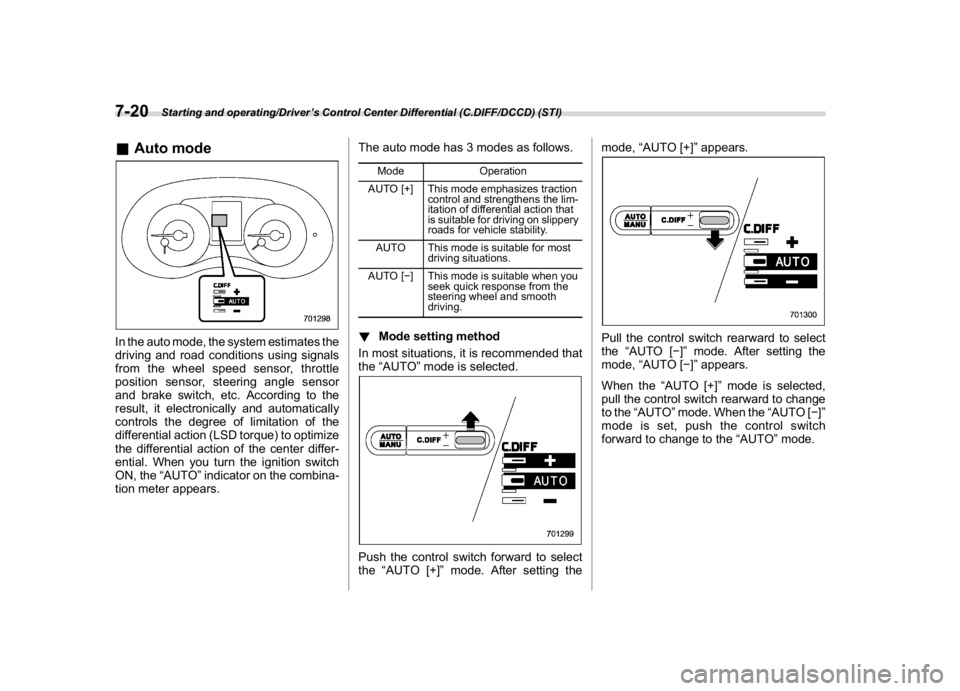
!Mode setting method
In most situations, it is recommended that
the“AUTO”mode is selected.Push the control switch forward to select
the“AUTO [+]”mode. After setting themode,“AUTO [+]”appears.
Pull the control switch rearward to select
the“AUTO []”mode. After setting the
mode,“AUTO []”appears.
When the“AUTO [+]”mode is selected,
pull the control switch rearward to change
to the“AUTO”mode. When the“AUTO []”
mode is set, push the control switch
forward to change to the“AUTO”mode.
Starting and operating/Driver’s Control Center Differential (C.DIFF/DCCD) (STI)
7-20
Page 371 of 578
(384,1)
北米Model "A1700BE-B" EDITED: 2017/ 10/ 11
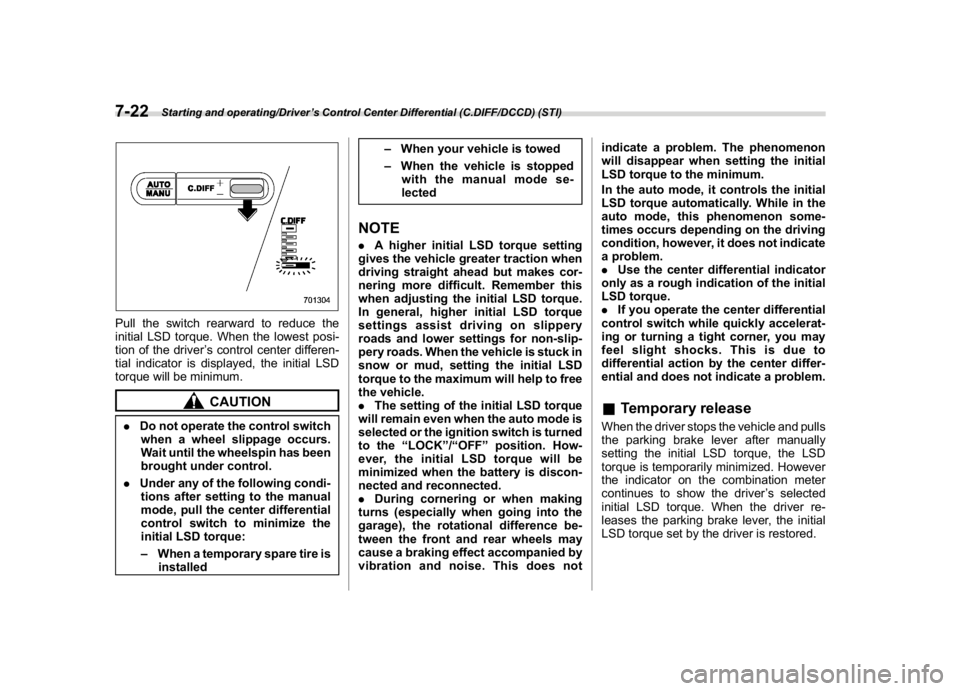
Pull the switch rearward to reduce the
initial LSD torque. When the lowest posi-
tion of the driver’s control center differen-
tial indicator is displayed, the initial LSD
torque will be minimum.
CAUTION
.Do not operate the control switch
when a wheel slippage occurs.
Wait until the wheelspin has been
brought under control.
.Under any of the following condi-
tions after setting to the manual
mode, pull the center differential
control switch to minimize the
initial LSD torque:
–When a temporary spare tire is
installed–When your vehicle is towed
–When the vehicle is stopped
with the manual mode se-
lected
NOTE.A higher initial LSD torque setting
gives the vehicle greater traction when
driving straight ahead but makes cor-
nering more difficult. Remember this
when adjusting the initial LSD torque.
In general, higher initial LSD torque
settings assist driving on slippery
roads and lower settings for non-slip-
pery roads. When the vehicle is stuck in
snow or mud, setting the initial LSD
torque to the maximum will help to free
the vehicle.
.The setting of the initial LSD torque
will remain even when the auto mode is
selected or the ignition switch is turned
to the“LOCK”/“OFF”position. How-
ever, the initial LSD torque will be
minimized when the battery is discon-
nected and reconnected.
.During cornering or when making
turns (especially when going into the
garage), the rotational difference be-
tween the front and rear wheels may
cause a braking effect accompanied by
vibration and noise. This does notindicate a problem. The phenomenon
will disappear when setting the initial
LSD torque to the minimum.
In the auto mode, it controls the initial
LSD torque automatically. While in the
auto mode, this phenomenon some-
times occurs depending on the driving
condition, however, it does not indicate
a problem.
.Use the center differential indicator
only as a rough indication of the initial
LSD torque.
.If you operate the center differential
control switch while quickly accelerat-
ing or turning a tight corner, you may
feel slight shocks. This is due to
differential action by the center differ-
ential and does not indicate a problem.
&Temporary releaseWhen the driver stops the vehicle and pulls
the parking brake lever after manually
setting the initial LSD torque, the LSD
torque is temporarily minimized. However
the indicator on the combination meter
continues to show the driver’s selected
initial LSD torque. When the driver re-
leases the parking brake lever, the initial
LSD torque set by the driver is restored.
Starting and operating/Driver’s Control Center Differential (C.DIFF/DCCD) (STI)
7-22
Page 373 of 578
(386,1)
北米Model "A1700BE-B" EDITED: 2017/ 10/ 11
heard that is characteristic of this type
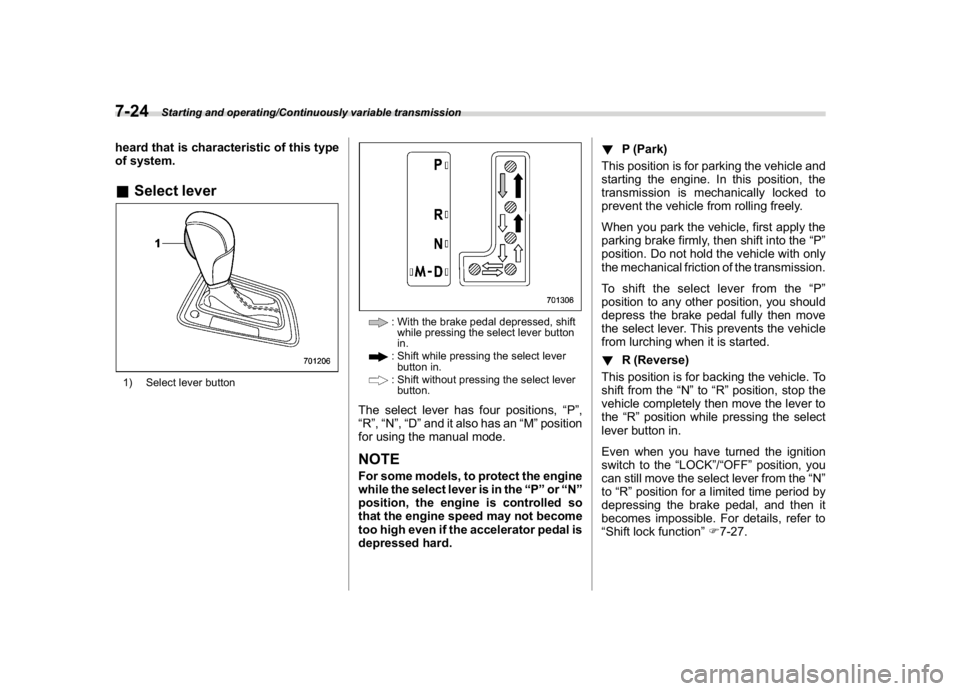
of system.&Select lever1) Select lever button
: With the brake pedal depressed, shift
while pressing the select lever button
in.: Shift while pressing the select lever
button in.: Shift without pressing the select lever
button.
The select lever has four positions,“P”,
“R”,“N”,“D”and it also has an“M”position
for using the manual mode.NOTEFor some models, to protect the engine
while the select lever is in the“P”or“N”
position, the engine is controlled so
that the engine speed may not become
too high even if the accelerator pedal is
depressed hard.!P (Park)
This position is for parking the vehicle and
starting the engine. In this position, the
transmission is mechanically locked to
prevent the vehicle from rolling freely.
When you park the vehicle, first apply the
parking brake firmly, then shift into the“P”
position. Do not hold the vehicle with only
the mechanical friction of the transmission.
To shift the select lever from the“P”
position to any other position, you should
depress the brake pedal fully then move
the select lever. This prevents the vehicle
from lurching when it is started.
!R (Reverse)
This position is for backing the vehicle. To
shift from the“N”to“R”position, stop the
vehicle completely then move the lever to
the“R”position while pressing the select
lever button in.
Even when you have turned the ignition
switch to the“LOCK”/“OFF”position, you
can still move the select lever from the“N”
to“R”position for a limited time period by
depressing the brake pedal, and then it
becomes impossible. For details, refer to
“Shift lock function”F7-27.
Starting and operating/Continuously variable transmission
7-24
Page 374 of 578
(387,1)
北米Model "A1700BE-B" EDITED: 2017/ 10/ 11
!N (Neutral)
This position is for restarting a stalled
engine. In this position, the transmission is
neutral, meaning that the wheels and
transmission are not locked. Therefore,
the vehicle will roll freely, even on the
slightest incline unless the parking brake
or foot brake is applied.
WARNING
Do not drive the vehicle with the
select lever in the“N”(neutral)
position. Engine braking has no
effect in this condition and the risk
of an accident is consequently in-
creased.NOTEIf the select lever is in the“N”position
when you stop the engine for parking,
you may not subsequently be able to
move it to the“R”and“P”positions. If
this happens, turn the ignition switch to
the“ON”position. You will then be able
to move the select lever to the“P”
position.!D (Drive)
This position is for normal driving. The
transmission shifts automatically and con-
tinuously into a suitable gear according to
the vehicle speed and the acceleration you
require. Also, while driving up and down a
hill, the transmission assists and controls
the driving performance and engine brak-
ing while corresponding to the road grade.
When more acceleration is required in the
“D”position, depress the accelerator pedal
fully to the floor and hold that position. The
transmission will automatically downshift.
If the Intelligent (I) mode or the Sport (S)
mode has been selected, the transmission
will operate like a conventional automatic
transmission. When you release the pedal,
the transmission will return to the original
gear position.
If you operate one of the shift paddles
behind the steering wheel while driving in
the“D”position, the transmission will
temporarily switch to the manual mode.
In this mode, you can shift into any gear
position using the shift paddles. For details
about the manual mode, refer to“Selection
of manual mode”F7-25. Once the vehicle
speed stabilizes, the transmission will
switch from the manual mode back to the
“D”position for normal driving.
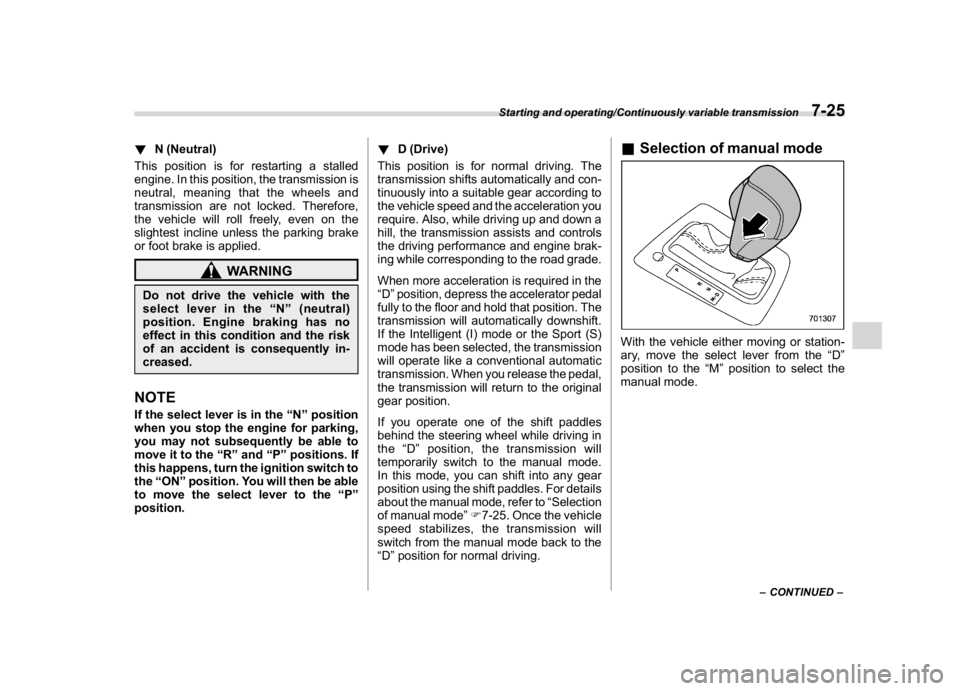
&Selection of manual modeWith the vehicle either moving or station-
ary, move the select lever from the“D”
position to the“M”position to select the
manual mode.
–CONTINUED–
Starting and operating/Continuously variable transmission
7-25
7
Page 376 of 578
(389,1)
北米Model "A1700BE-B" EDITED: 2017/ 10/ 11
red zone. Also, if the engine revolutions
reach the specified number, the fuel
supply will be cut. In this case, perform
shift up operation.
!To deselect the manual mode
To deselect the manual mode, return the
select lever to the“D”position from the“M”
position.&Shift lock functionThe shift lock function helps prevent the
improper operation of the select lever.
.You cannot move the select lever with
the ignition switch in the“ON”position and
the brake pedal depressed.
.You cannot move the select lever from
the“P”position to any other position
unless the brake pedal is depressed.
Depress the brake pedal first, and then
operate the select lever.
.Only the“P”position allows you to turn
the ignition switch from the“ACC”position
to the“LOCK”/“OFF”position and remove
the key from the ignition switch.
.If you turn the ignition switch to the
“LOCK”/“OFF”position while the select
lever is in the“N”position, the select lever
may not be moved to the“P”position after
a period of time. Therefore, move the
select lever to the“P”position with the
brake pedal depressed soon after turningthe ignition switch to the“LOCK”/“OFF”
position.
!Shift lock release
If you cannot move the select lever, turn
theignitionswitchbacktothe“ON”
position then move the select lever to the
“P”position with the select lever button
pressed and brake pedal depressed.
If the select lever does not move after
performing the above procedure, perform
the following steps.
.When you cannot shift the select
lever from“P”to“N”:
Refer to“
Shift lock release using the shift
lock release button”F7-27.
.When you cannot shift the select
lever from“N”to“R”,“P”:
Within 60 seconds after placing the ignition
switch in the“ACC”position, move the
select lever to the“P”position with the
select lever button pressed and brake
pedal depressed.
If you must perform the above procedure,
the shift lock system (or the vehicle control
system) may be malfunctioning. Contact a
SUBARU dealer for an inspection as soon
as possible.
If the select lever does not move after
performing the above procedure, refer to“Shift lock release using the shift lock
release button”F7-27.
!Shift lock release using the shift
lock release button
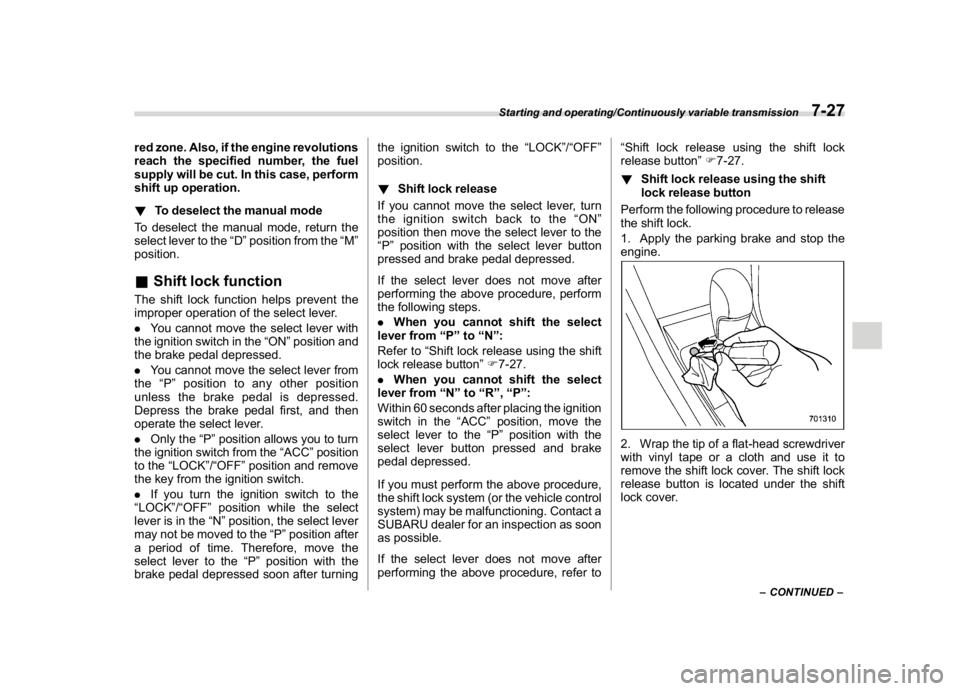
Perform the following procedure to release
the shift lock.
1. Apply the parking brake and stop the
engine.
2. Wrap the tip of a flat-head screwdriver
with vinyl tape or a cloth and use it to
remove the shift lock cover. The shift lock
release button is located under the shift
lock cover.
–CONTINUED–
Starting and operating/Continuously variable transmission
7-27
7
Page 381 of 578
(394,1)
北米Model "A1700BE-B" EDITED: 2017/ 10/ 11
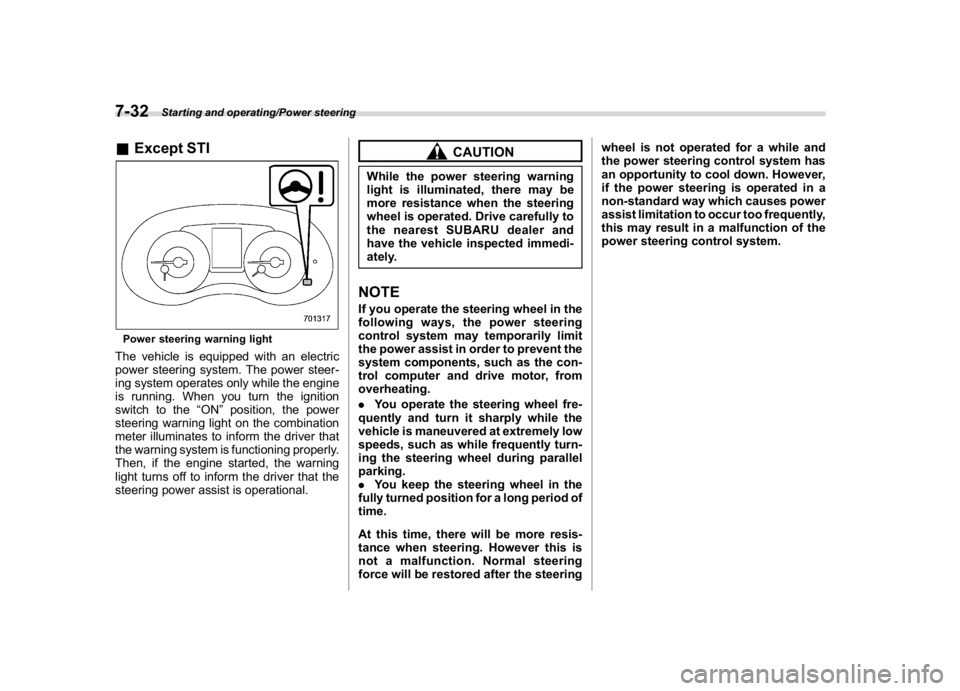
&Except STIPower steering warning lightThe vehicle is equipped with an electric
power steering system. The power steer-
ing system operates only while the engine
is running. When you turn the ignition
switch to the“ON”position, the power
steering warning light on the combination
meter illuminates to inform the driver that
the warning system is functioning properly.
Then, if the engine started, the warning
light turns off to inform the driver that the
steering power assist is operational.
CAUTION
While the power steering warning
light is illuminated, there may be
more resistance when the steering
wheel is operated. Drive carefully to
the nearest SUBARU dealer and
have the vehicle inspected immedi-
ately.NOTEIf you operate the steering wheel in the
following ways, the power steering
control system may temporarily limit
the power assist in order to prevent the
system components, such as the con-
trol computer and drive motor, from
overheating.
.You operate the steering wheel fre-
quently and turn it sharply while the
vehicle is maneuvered at extremely low
speeds, such as while frequently turn-
ing the steering wheel during parallel
parking.
.You keep the steering wheel in the
fully turned position for a long period of
time.
At this time, there will be more resis-
tance when steering. However this is
not a malfunction. Normal steering
force will be restored after the steeringwheel is not operated for a while and
the power steering control system has
an opportunity to cool down. However,
if the power steering is operated in a
non-standard way which causes power
assist limitation to occur too frequently,
this may result in a malfunction of the
power steering control system.
Starting and operating/Power steering
7-32