ignition SUBARU WRX 2018 Manual Online
[x] Cancel search | Manufacturer: SUBARU, Model Year: 2018, Model line: WRX, Model: SUBARU WRX 2018Pages: 578, PDF Size: 33.21 MB
Page 215 of 578
(220,1)
北米Model "A1700BE-B" EDITED: 2017/ 10/ 11
outside of the garage.
.Do not use HomeLink with any
garage door opener that lacks
safety stop and reverse features
as required by U.S. federal safety
standards (this includes any gar-
age door opener model manufac-
tured before April 1, 1982). A
garage door that cannot detect
an object signaling the door to
stop and reverse does not meet
current U.S. federal safety stan-
dards.
.It is also recommended that a new
battery be placed in the hand-
held remote (garage door opener
remote) of the device for quicker
and more accurate training.
.Some vehicles may require the
ignition switch to be turned to the
“ON”or“ACC”position for pro-
gramming and/or operation of
HomeLink.
.Keep the hand-held remote (gar-
age door opener remote) of the
device you are programming for
use in other vehicles as well as
for future HomeLink program-
ming. It is also suggested that
upon the sale of the vehicle, the
programmed HomeLink buttonsbe erased for security purposes.
Refer to“Erasing HomeLink But-
tons”F3-81.
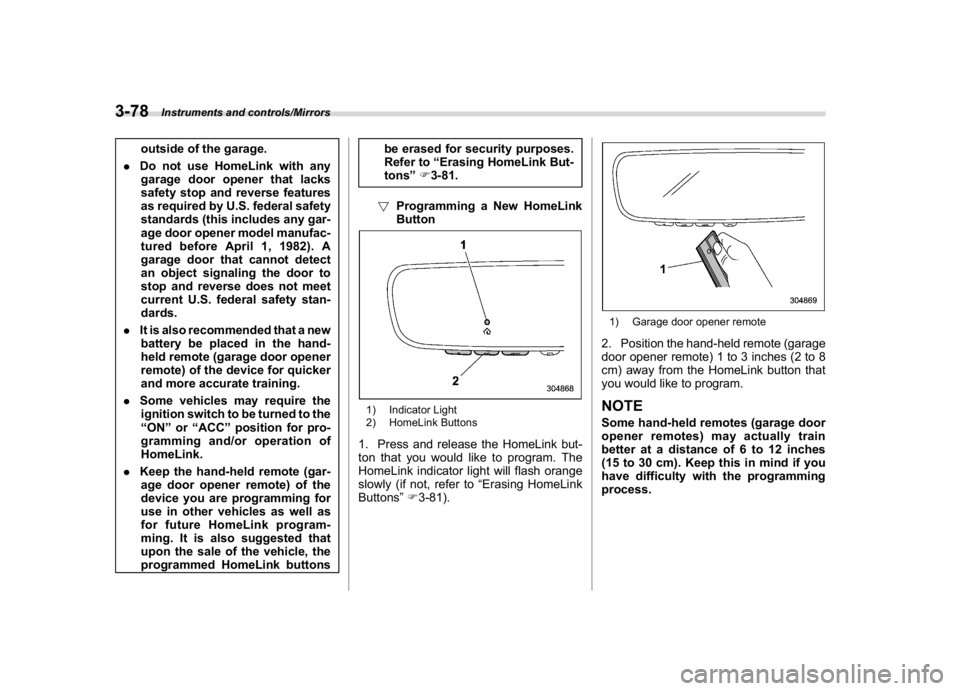
!Programming a New HomeLink
Button
1) Indicator Light
2) HomeLink Buttons1. Press and release the HomeLink but-
ton that you would like to program. The
HomeLink indicator light will flash orange
slowly (if not, refer to“Erasing HomeLink
Buttons”F3-81).
1) Garage door opener remote2. Position the hand-held remote (garage
door opener remote) 1 to 3 inches (2 to 8
cm) away from the HomeLink button that
you would like to program.NOTESome hand-held remotes (garage door
opener remotes) may actually train
better at a distance of 6 to 12 inches
(15 to 30 cm). Keep this in mind if you
have difficulty with the programming
process.
Instruments and controls/Mirrors
3-78
Page 221 of 578
(226,1)
北米Model "A1700BE-B" EDITED: 2017/ 10/ 11
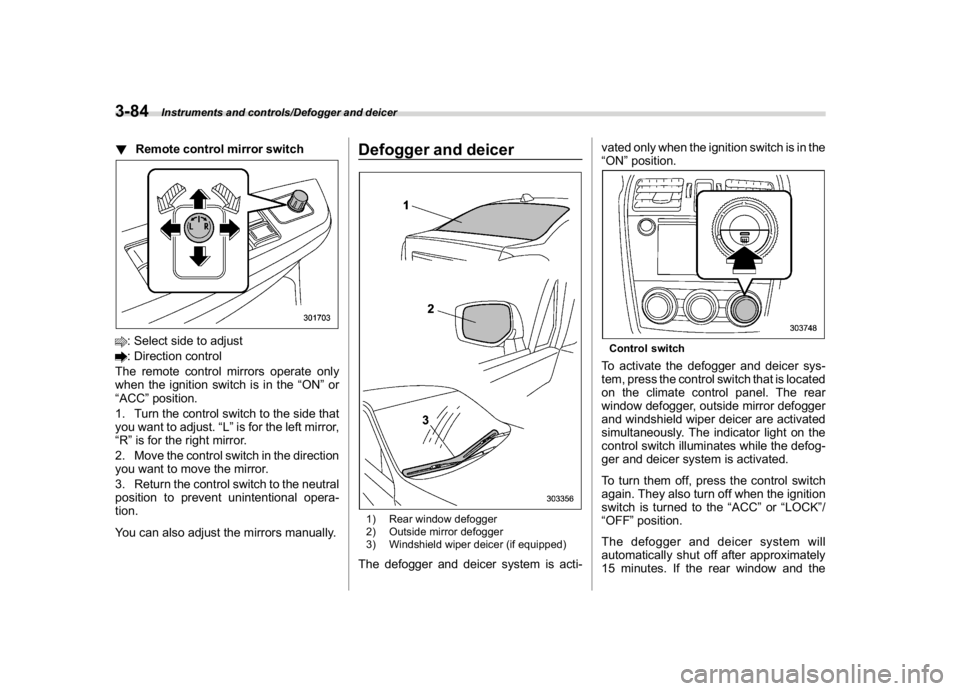
!Remote control mirror switch: Select side to adjust: Direction control
The remote control mirrors operate only
when the ignition switch is in the“ON”or
“ACC”position.
1. Turn the control switch to the side that
you want to adjust.“L”is for the left mirror,
“R”is for the right mirror.
2. Move the control switch in the direction
you want to move the mirror.
3. Return the control switch to the neutral
position to prevent unintentional opera-
tion.
You can also adjust the mirrors manually.
Defogger and deicer1) Rear window defogger
2) Outside mirror defogger
3) Windshield wiper deicer (if equipped)The defogger and deicer system is acti-vated only when the ignition switch is in the
“ON”position.
Control switchTo activate the defogger and deicer sys-
tem, press the control switch that is located
on the climate control panel. The rear
window defogger, outside mirror defogger
and windshield wiper deicer are activated
simultaneously. The indicator light on the
control switch illuminates while the defog-
ger and deicer system is activated.
To turn them off, press the control switch
again. They also turn off when the ignition
switch is turned to the“ACC”or“LOCK”/
“OFF”position.
The defogger and deicer system will
automatically shut off after approximately
15 minutes. If the rear window and the
Instruments and controls/Defogger and deicer
3-84
Page 231 of 578
(238,1)
北米Model "A1700BE-B" EDITED: 2017/ 10/ 11
control dial
Press the“DUAL”button to cancel the
“DUAL”mode.
When the“DUAL”mode is selected:
Turn the driver’s side dial to set the driver’s
side temperature. Turn the front passen-
ger’s side dial to set the front passenger’s
side temperature.
When the“DUAL”mode is canceled:
Turn the driver’s side dial to set the desired
temperature.
When the“DUAL”mode is canceled, only
the driver’s side temperature is displayed.&Fan speed controlThe fan operates only when the ignition
switch is in the“ON”position. Turn the fan
speed control dial to select the preferred
fan speed.
&Air conditioner controlThe air conditioner operates only when the
engine is running.
Press the air conditioner button while the
fan is in operation to turn on the air
conditioner. When the air conditioner is
on, the“A/C”indicator light illuminates.
To turn off the air conditioner, press the
button again.NOTEFor efficient defogging or dehumidify-
ing in cold weather, turn on the air
conditioner. However, if the ambient
temperature decreases to approxi-
mately 328F(08C), the air conditioner
compressor will stop operating.&Air inlet selectionSelect the air inlet by pressing the air inlet
selection button.
ON position (recirculation):Interior air is
recirculated inside the vehicle. Press the
air inlet selection button to the ON position
for fast cooling with the air conditioner or
when driving on a dusty road.
OFF position (outside air):Outside air is
drawn into the passenger compartment.
Press the air inlet selection button to the
OFF position when the interior has cooledto a comfortable temperature and the road
is no longer dusty.
WARNING
Continued operation in the ON posi-
tion may fog up the windows. Switch
to the OFF position as soon as the
outside conditions are no longer
dusty.NOTEWhen the battery is disconnected or the
battery voltage drops, the air inlet
selection operation indicator light may
blink. This does not indicate a malfunc-
tion. However, if the indicator light
blinks every time you start the engine,
a malfunction may occur in the elec-
trical circuit. Have the vehicle in-
spected at the nearest SUBARU dealer.
Climate control/Manual climate control operation
4-8
Page 238 of 578

(247,1)
北米Model "A1700BE-B" EDITED: 2017/ 10/ 11
&Base display audio set (if equipped)1) Power/VOLUME knob
2) Eject button
3) AUDIO/TUNE knob
4) HOME button5) APPS button
6) Display
7) SEEK/TRACK buttons
The audio set will operate only when the
ignition switch is in the“ACC”or“ON”
position.
.Power and audio controls: refer to
“Basic operation”F5-17.
.SUBARU STARLINK (if equipped):
refer to“SUBARU STARLINK”F5-25.
.Radio operation: refer to“AM/FM radio”
F5-27.
.Satellite radio operation (if equipped):
refer to“SiriusXM Satellite Radio”F5-36.
.aha
TM: refer to“aha
TM
by HARMAN”
F5-42.
.Pandora
®(if equipped): refer to“Pan-
dora
®”F5-48.
.CD (compact disc) player operation:
refer to“CD”F5-51.
.USB storage device: refer to“USB
memory”F5-53.
.iPod operation: refer to“iPod”F5-54.
.Bluetooth
®audio: refer to“Bluetooth
audio”F5-56.
.Auxiliary input jack: refer to“AUX”F5-
59.
.Hands-free phone system: refer to
“Hands-free phone system”F5-69.
–CONTINUED–
Audio/Audio set
5-3
5
Page 240 of 578

(249,1)
北米Model "A1700BE-B" EDITED: 2017/ 10/ 11
&SUBARU STARLINK
TM
7.0 Multimedia Plus audio set (U.S. spec.
models only, if equipped)
The audio set will operate only when the
ignition switch is in the“ACC”or“ON”
position.
For details about how to use the SUBARU
STARLINK
TM
7.0 Multimedia Plus audio
set, refer to the SUBARU STARLINK
TM
7.0
Multimedia Plus or SUBARU
STARLINK
TM
7.0 Multimedia Navigation
Owner’s Manual.
NOTEHD Radio Technology should be in-
cluded as a feature in the SUBARU
STARLINK
TM
7.0 Multimedia Plus audio
set.
–CONTINUED–
Audio/Audio set
5-5
5
Page 251 of 578
(260,1)
北米Model "A1700BE-B" EDITED: 2017/ 10/ 11
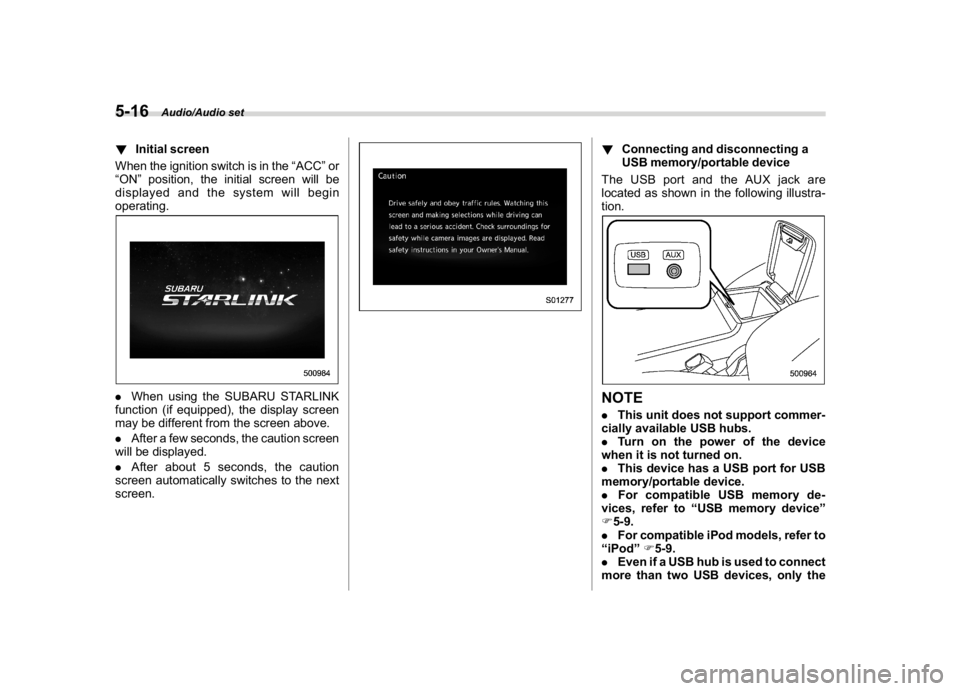
!Initial screen
When the ignition switch is in the“ACC”or
“ON”position, the initial screen will be
displayed and the system will begin
operating..When using the SUBARU STARLINK
function (if equipped), the display screen
may be different from the screen above.
.After a few seconds, the caution screen
will be displayed.
.After about 5 seconds, the caution
screen automatically switches to the next
screen.
!Connecting and disconnecting a
USB memory/portable device
The USB port and the AUX jack are
located as shown in the following illustra-
tion.NOTE.This unit does not support commer-
cially available USB hubs.
.Turn on the power of the device
when it is not turned on.
.This device has a USB port for USB
memory/portable device.
.For compatible USB memory de-
vices, refer to“USB memory device”
F5-9.
.For compatible iPod models, refer to
“iPod”F5-9.
.Even if a USB hub is used to connect
more than two USB devices, only the
Audio/Audio set
5-16
Page 252 of 578
(261,1)
北米Model "A1700BE-B" EDITED: 2017/ 10/ 11
first two connected devices will be
recognized.&Basic operationThis section describes some of the basic
features of the audio/visual system. Some
information may not pertain to your sys-
tem.
Your audio/visual system works when the
ignition switch is turned to the“ACC”or
“ON”position.
CAUTION
To prevent the battery from being
discharged, do not leave the audio/
visual system on longer than neces-
sary when the engine is not running.NOTESome functions can also be operated
by using the voice command system.
For details, refer to“Voice command
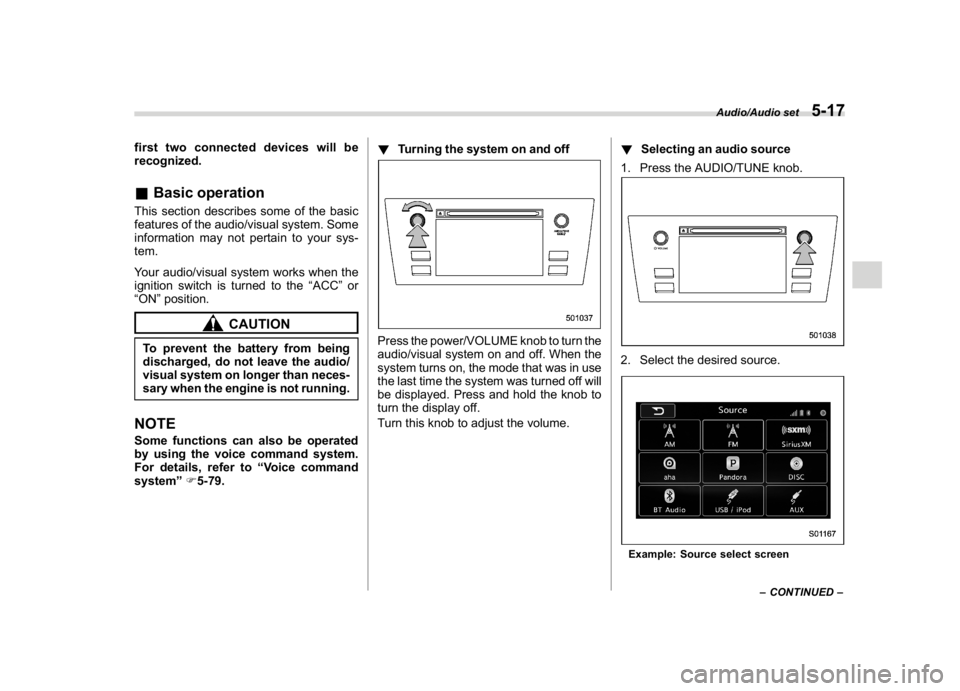
system”F5-79.!Turning the system on and off
Press the power/VOLUME knob to turn the
audio/visual system on and off. When the
system turns on, the mode that was in use
the last time the system was turned off will
be displayed. Press and hold the knob to
turn the display off.
Turn this knob to adjust the volume.!Selecting an audio source
1. Press the AUDIO/TUNE knob.
2. Select the desired source.Example: Source select screen
–CONTINUED–
Audio/Audio set
5-17
5
Page 254 of 578
(263,1)
北米Model "A1700BE-B" EDITED: 2017/ 10/ 11
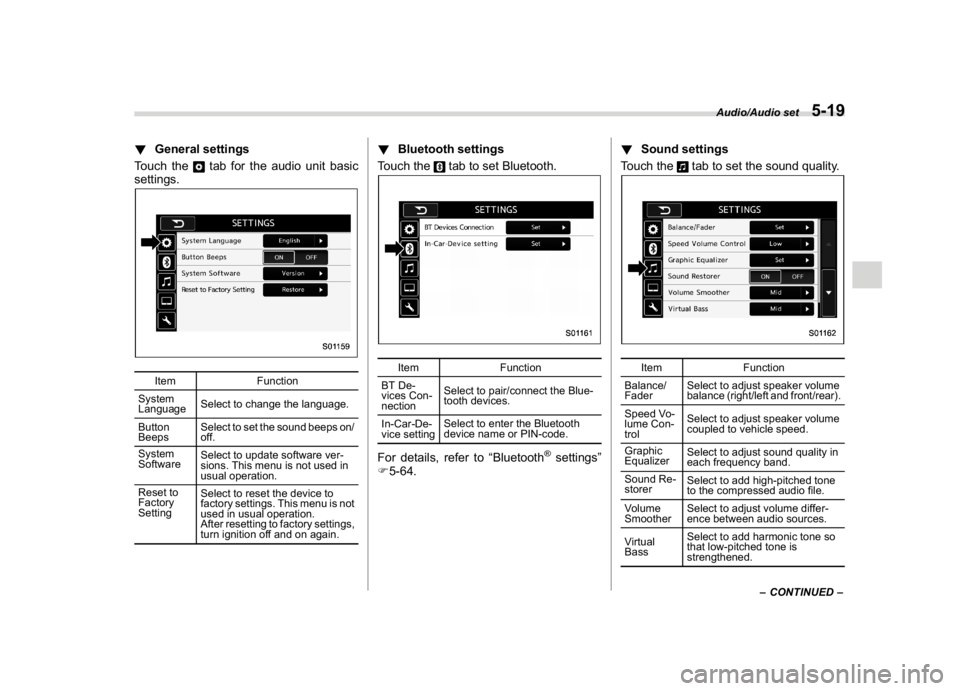
!General settings
Touch the
tab for the audio unit basic
settings.
Item Function
System
LanguageSelect to change the language.
Button
BeepsSelect to set the sound beeps on/
off.
System
SoftwareSelect to update software ver-
sions. This menu is not used in
usual operation.
Reset to
Factory
SettingSelect to reset the device to
factory settings. This menu is not
used in usual operation.
After resetting to factory settings,
turn ignition off and on again.
!Bluetooth settings
Touch the
tab to set Bluetooth.
Item Function
BT De-
vices Con-
nectionSelect to pair/connect the Blue-
tooth devices.
In-Car-De-
vice settingSelect to enter the Bluetooth
device name or PIN-code.
For details, refer to“Bluetooth
®settings”
F5-64.!Sound settings
Touch the
tab to set the sound quality.
Item Function
Balance/
FaderSelect to adjust speaker volume
balance (right/left and front/rear).
Speed Vo-
lume Con-
trolSelect to adjust speaker volume
coupled to vehicle speed.
Graphic
EqualizerSelect to adjust sound quality in
each frequency band.
Sound Re-
storerSelect to add high-pitched tone
to the compressed audio file.
Volume
SmootherSelect to adjust volume differ-
ence between audio sources.
Virtual
BassSelect to add harmonic tone so
that low-pitched tone is
strengthened.
–CONTINUED–
Audio/Audio set
5-19
5
Page 279 of 578

(288,1)
北米Model "A1700BE-B" EDITED: 2017/ 10/ 11
Audio panel
No. Function&1
Turn to adjust volume.
Press to turn the audio system on/off.
&2
Press to display the sound setting
screen. Refer to“
Unit settings”F5-18.
&3
Press to display the station operation
screen.
Press to select an audio mode.
&4
Turn to display the next/previous con-
tent item.
Press to select an audio source. Refer
to“
Selecting an audio source”F5-17.
&5
Press to display the next/previous con-
tent item.
NOTE.For safety reasons, certain func-
tions are not available while your
vehicle is in motion.
.In order to maximize signal recep-
tion, performance and precision of the
smartphone, please ensure the smart-
phone is placed as close to the system
as possible, while ensuring it is stowed
and secure while driving.
.When the ignition switch is in the
“ACC”or“ON”position, the battery of
the connected iPhone/iPod touch is
charged.
.iPhone/iPod touch may not be re-
cognized when the ignition switch is in
the“ACC”or“ON”position. In this
case, remove the iPhone/iPod touch
and reconnect it.
.The accuracy of the displayed in-
formation or the signal reception per-
formance depends on the smartphone
or the connected device, and it’s wire-
less connection.
.Since the aha application uses sig-
nals from GPS satellites and wireless
communication lines, it may not work
properly in the following locations.
–In a tunnel
–In underground parking lots
Audio/Audio set
5-44
Page 293 of 578

(302,1)
北米Model "A1700BE-B" EDITED: 2017/ 10/ 11
NOTE.Depending on the Bluetooth device
that is connected to the system, the
music may start playing when selecting
the
key while it is paused. Con-
versely, the music may pause when
selecting the
key while it is playing.
.In the following conditions, the sys-
tem may not function:
–The Bluetooth device is turned
off.
–The Bluetooth device is not con-
nected.
–The Bluetooth device has a low
battery.
.It may take time to connect the
phone when Bluetooth audio is being
played.
.For operating the portable player,
see the instruction manual that comes
with it.
.If the Bluetooth device is discon-
nected due to poor reception from the
Bluetooth network when the ignition
switch is in the“ACC”or“ON”position,
the system will automatically recon-
nect to the portable player.
.If the Bluetooth device is discon-
nected on purpose, such as it was
turned off, this does not happen. Re-
connect the portable player manually.
.Bluetooth device information is re-gistered when the Bluetooth device is
connected to the Bluetooth audio sys-
tem. When selling or disposing of the
vehicle, remove the Bluetooth audio
information from the system. Refer to
“Bluetooth
®settings”F5-64.
!Connecting a Bluetooth device
To use the Bluetooth audio system, it is
necessary to register a Bluetooth device
with the system.
.Registering an additional device
1. Select the“Add”key on the Bluetooth
devices connection screen.
2. For more information: Refer to“Regis-
tering/connecting Bluetooth
®device”F5-
64.
.Selecting a registered device
1. Select the“Select”key on the Blue-
tooth devices connection screen.
2. For more information: Refer to“BT
Devices Connection screen”F5-67.
!How to change the source
Select the“BT Audio”key on the source
select screen. Refer to“Selecting an audio
source”F5-17.
NOTEDepending on the type of portable
player connected, some functions
may not be available and/or the screen
may look differently than shown in this
manual.
!Select play mode
The play mode settings display will appear
when play mode key is touched. Select the
preferred play mode from the following
items.
Icon Function
Touch to start 1 track repeat.Touch to start repeat all.Touch to repeat the tracks in the
group.Touch to start shuffle all.Touch to play tracks in the order
in which they are registered in the
audio device.Touch to start shuffle group.
Audio/Audio set
5-58