warning SUBARU WRX 2018 Owners Manual
[x] Cancel search | Manufacturer: SUBARU, Model Year: 2018, Model line: WRX, Model: SUBARU WRX 2018Pages: 578, PDF Size: 33.21 MB
Page 179 of 578
(184,1)
北米Model "A1700BE-B" EDITED: 2017/ 10/ 11
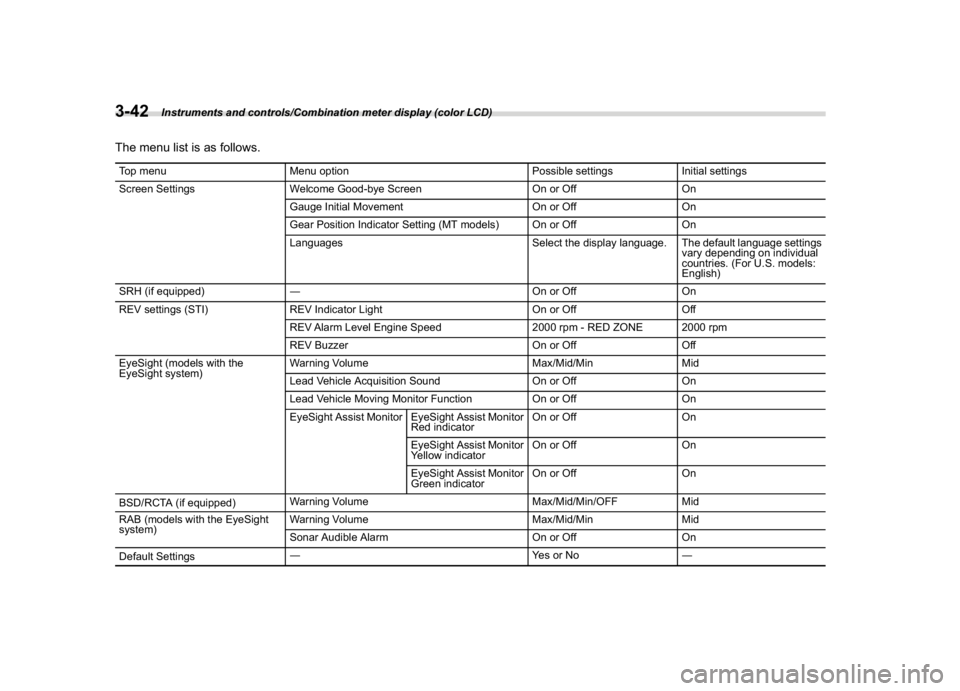
The menu list is as follows.Top menu Menu option Possible settings Initial settings
Screen Settings Welcome Good-bye Screen On or Off On
Gauge Initial Movement On or Off On
Gear Position Indicator Setting (MT models) On or Off On
Languages Select the display language. The default language settings
vary depending on individual
countries. (For U.S. models:
English)
SRH (if equipped)―On or Off On
REV settings (STI) REV Indicator Light On or Off Off
REV Alarm Level Engine Speed 2000 rpm - RED ZONE 2000 rpm
REV Buzzer On or Off Off
EyeSight (models with the
EyeSight system)Warning Volume Max/Mid/Min Mid
Lead Vehicle Acquisition Sound On or Off On
Lead Vehicle Moving Monitor Function On or Off On
EyeSight Assist Monitor EyeSight Assist Monitor
Red indicatorOn or Off On
EyeSight Assist Monitor
Yellow indicatorOn or Off On
EyeSight Assist Monitor
Green indicatorOn or Off On
BSD/RCTA (if equipped)Warning Volume Max/Mid/Min/OFF Mid
RAB (models with the EyeSight
system)Warning Volume Max/Mid/Min Mid
Sonar Audible Alarm On or Off On
Default Settings―Ye s o r N o―
Instruments and controls/Combination meter display (color LCD)
3-42
Page 180 of 578
(185,1)
北米Model "A1700BE-B" EDITED: 2017/ 10/ 11
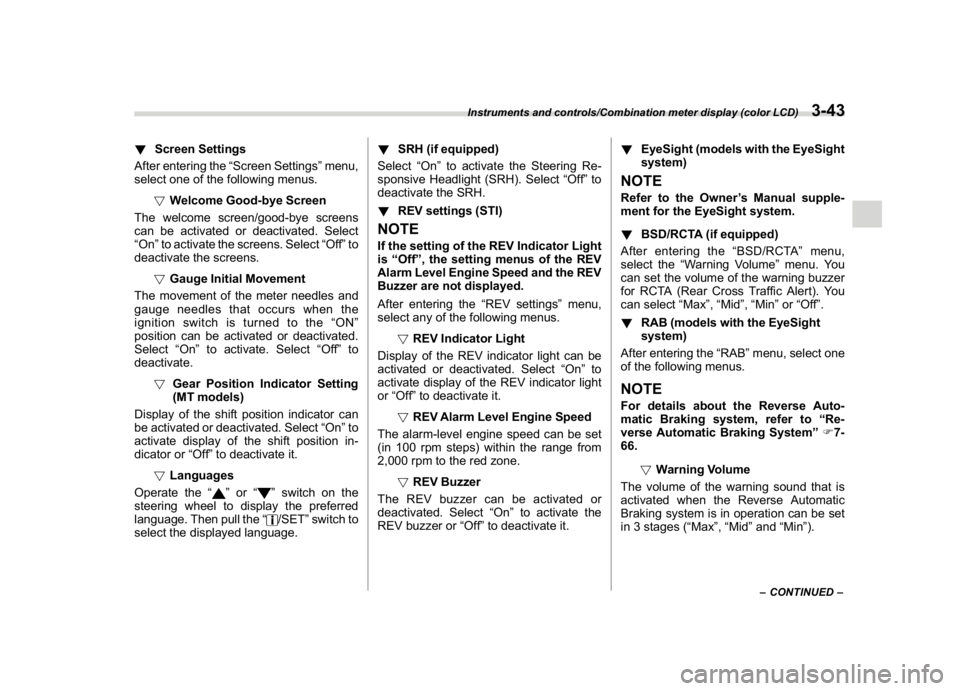
!Screen Settings
After entering the“Screen Settings”menu,
select one of the following menus.
!Welcome Good-bye Screen
The welcome screen/good-bye screens
can be activated or deactivated. Select
“On”to activate the screens. Select“Off”to
deactivate the screens.
!Gauge Initial Movement
The movement of the meter needles and
gauge needles that occurs when the
ignition switch is turned to the“ON”
position can be activated or deactivated.
Select“On”to activate. Select“Off”to
deactivate.
!Gear Position Indicator Setting
(MT models)
Display of the shift position indicator can
be activated or deactivated. Select“On”to
activate display of the shift position in-
dicator or“Off”to deactivate it.
!Languages
Operate the“
”or“
”switch on the
steering wheel to display the preferred
language. Then pull the“/SET”switch to
select the displayed language.!SRH (if equipped)
Select“On”to activate the Steering Re-
sponsive Headlight (SRH). Select“Off”to
deactivate the SRH.
!REV settings (STI)
NOTEIf the setting of the REV Indicator Light
is“Off”, the setting menus of the REV
Alarm Level Engine Speed and the REV
Buzzer are not displayed.
After entering the“REV settings”menu,
select any of the following menus.
!REV Indicator Light
Display of the REV indicator light can be
activated or deactivated. Select“On”to
activate display of the REV indicator light
or“Off”to deactivate it.
!REV Alarm Level Engine Speed
The alarm-level engine speed can be set
(in 100 rpm steps) within the range from
2,000 rpm to the red zone.
!REV Buzzer
The REV buzzer can be activated or
deactivated. Select“On”to activate the
REV buzzer or“Off”to deactivate it.!EyeSight (models with the EyeSight
system)
NOTERefer to the Owner’s Manual supple-
ment for the EyeSight system.
!BSD/RCTA (if equipped)
After entering the“BSD/RCTA”menu,
select the“Warning Volume”menu. You
can set the volume of the warning buzzer
for RCTA (Rear Cross Traffic Alert). You
can select“Max”,“Mid”,“Min”or“Off”.
!RAB (models with the EyeSight
system)
After entering the“RAB”menu, select one
of the following menus.NOTEFor details about the Reverse Auto-
matic Braking system, refer to“Re-
verse Automatic Braking System”F7-
66.
!Warning Volume
The volume of the warning sound that is
activated when the Reverse Automatic
Braking system is in operation can be set
in 3 stages (“Max”,“Mid”and“Min”).
–CONTINUED–
Instruments and controls/Combination meter display (color LCD)
3-43
3
Page 181 of 578
(186,1)
北米Model "A1700BE-B" EDITED: 2017/ 10/ 11
!Sonar Audible Alarm
The Reverse Automatic Braking system is
equipped with a function that emits a
warning sound when the system operates.
The function can be activated or deacti-
vated. Select“On”to set the warning
sound to active. Select“Off”to set the
warning sound to inactive.
!Default Settings
Select“Ye s”to use the menu screen to
restore customized settings to the factory
default settings. Select“No”to return to the
previous screen without restoring to the
factory default settings.
Multi-function display (color
LCD)
WARNING
Always pay adequate attention to
safe driving when operating the
multi-function display while the ve-
hicle is in motion. When operation of
the multi-function display is disturb-
ing your awareness and ability to
concentrate on driving, stop the
vehicle in a safe place before per-
forming operations on the screen.
Also, do not concentrate on the
display while driving. Doing so may
cause you to look away from the
road and could result in an accident.
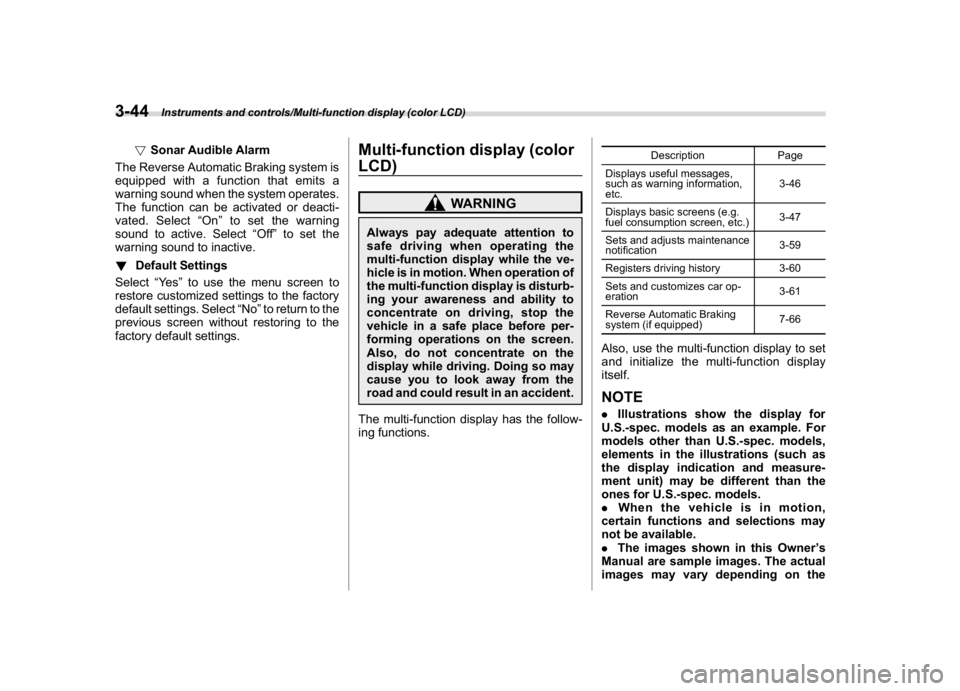
The multi-function display has the follow-
ing functions.
Description Page
Displays useful messages,
such as warning information,
etc.3-46
Displays basic screens (e.g.
fuel consumption screen, etc.)3-47
Sets and adjusts maintenance
notification3-59
Registers driving history 3-60
Sets and customizes car op-
eration3-61
Reverse Automatic Braking
system (if equipped)7-66
Also, use the multi-function display to set
and initialize the multi-function display
itself.NOTE.Illustrations show the display for
U.S.-spec. models as an example. For
models other than U.S.-spec. models,
elements in the illustrations (such as
the display indication and measure-
ment unit) may be different than the
ones for U.S.-spec. models.
.When the vehicle is in motion,
certain functions and selections may
not be available.
.The images shown in this Owner’s
Manual are sample images. The actual
images may vary depending on the
Instruments and controls/Multi-function display (color LCD)
3-44
Page 183 of 578
(188,1)
北米Model "A1700BE-B" EDITED: 2017/ 10/ 11
nance notifications, it turns yellow.
If there is a notification, the message will
be displayed. Take the appropriate actions
based on the message indicated.NOTE.You can set the self-check screen to
on or off. The default setting is off. For
details, refer to“On/Off setting”F3-59.
.After performing the maintenance,
change the setting of the correspond-
ing maintenance item. For details, refer
to“Maintenance settings”F3-59.
.The maintenance notification screen
will be displayed under either of the
following conditions.
–The period of time remaining until
the registered notification date is 15
days or less.
–The total driving distance remain-
ing until the registered notification
distance is approximately 311 miles
(500 km) or less.
.The maintenance notification screen
will be displayed until either of the
following conditions is satisfied.
–The period of time passed after
the registered notification date is 15
days or more.
–The total distance driven after the
registered notification distance is
approximately 311 miles (500 km) ormore.
&Interruption screenUseful messages, such as reminder in-
formation, vehicle information, warning
information, etc. may interrupt the current
screen and appear on the display accom-
panied by a beep. Take proper action
according to the message.The warning screen will return to the
original screen after a few seconds.
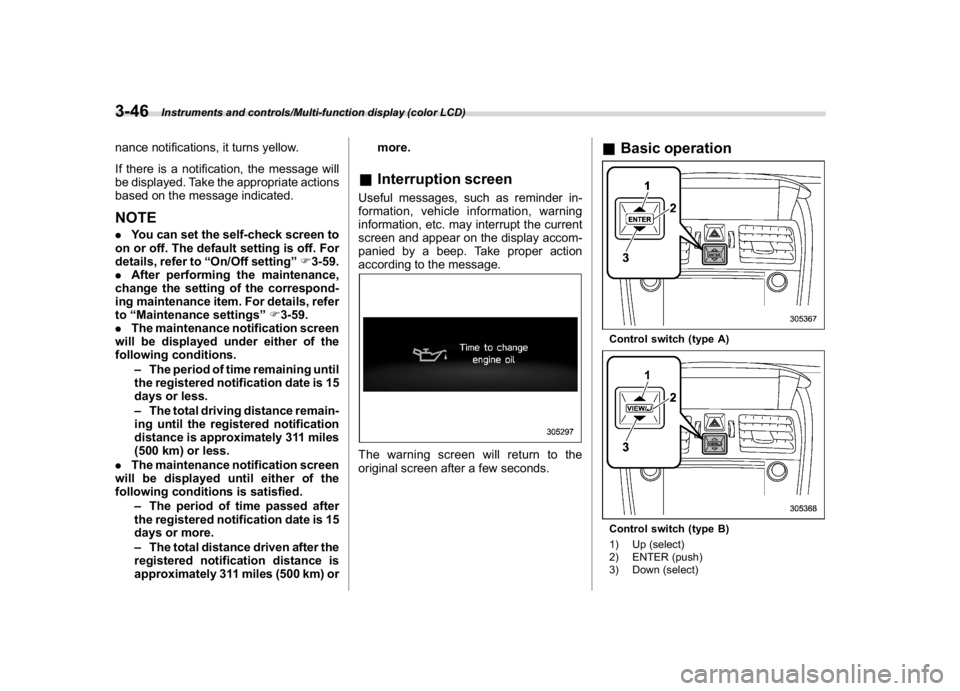
&Basic operationControl switch (type A)Control switch (type B)
1) Up (select)
2) ENTER (push)
3) Down (select)
Instruments and controls/Multi-function display (color LCD)
3-46
Page 185 of 578
(190,1)
北米Model "A1700BE-B" EDITED: 2017/ 10/ 11
Content Description Page
Fuel consumption screen Displays fuel consumption screen. 3-48
Triple meter screen Displays up to 3 optional items. 3-49
Prevention safety screen Displays the status of your vehicle. 3-49
Boost pressure screen Displays the boost pressure, etc. 3-50
Guidance screen Enters the setting screen 3-50
Clock/calendar screen Displays the clock/calendar.3-51
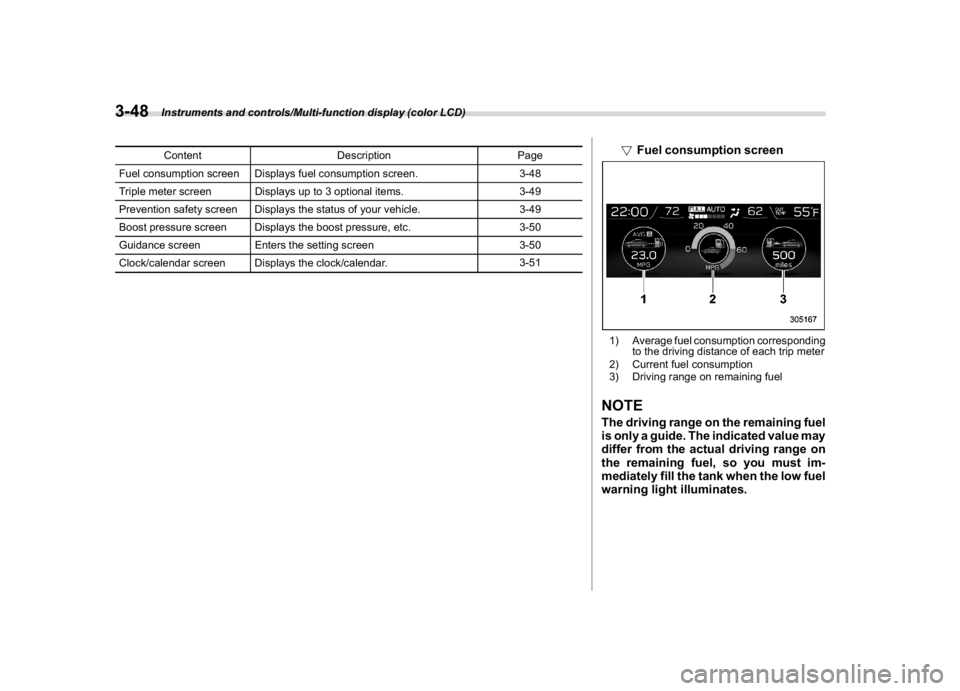
!Fuel consumption screen1) Average fuel consumption corresponding
to the driving distance of each trip meter
2) Current fuel consumption
3) Driving range on remaining fuelNOTEThe driving range on the remaining fuel
is only a guide. The indicated value may
differ from the actual driving range on
the remaining fuel, so you must im-
mediately fill the tank when the low fuel
warning light illuminates.
Instruments and controls/Multi-function display (color LCD)
3-48
Page 191 of 578
(196,1)
北米Model "A1700BE-B" EDITED: 2017/ 10/ 11
Top menu Menu option Description Page
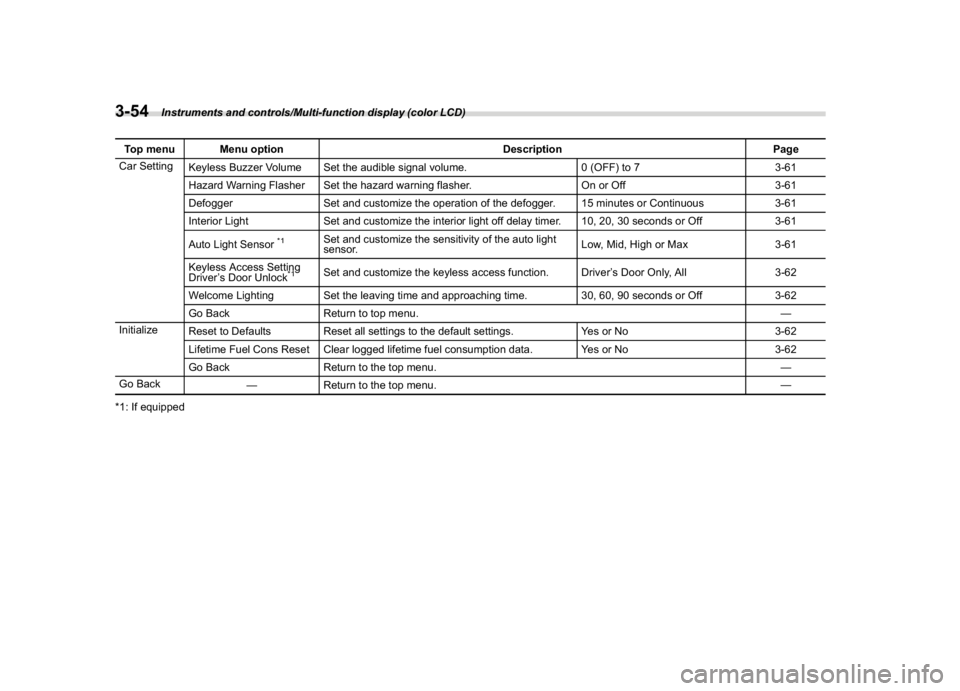
Car Setting
Keyless Buzzer Volume Set the audible signal volume. 0 (OFF) to 7 3-61
Hazard Warning Flasher Set the hazard warning flasher. On or Off 3-61
Defogger Set and customize the operation of the defogger. 15 minutes or Continuous 3-61
Interior Light Set and customize the interior light off delay timer. 10, 20, 30 seconds or Off 3-61
Auto Light Sensor
*1
Set and customize the sensitivity of the auto light
sensor.Low, Mid, High or Max 3-61
Keyless Access Setting
Driver’s Door Unlock
*1
Set and customize the keyless access function. Driver’s Door Only, All 3-62
Welcome Lighting Set the leaving time and approaching time. 30, 60, 90 seconds or Off 3-62
Go Back Return to top menu.—
Initialize
Reset to Defaults Reset all settings to the default settings. Yes or No 3-62
Lifetime Fuel Cons Reset Clear logged lifetime fuel consumption data. Yes or No 3-62
Go Back Return to the top menu.—
Go Back
—Return to the top menu.—
*1: If equipped
Instruments and controls/Multi-function display (color LCD)
3-54
Page 198 of 578
(203,1)
北米Model "A1700BE-B" EDITED: 2017/ 10/ 11
!Car setting
You can set the vehicle setting.
!Keyless buzzer volume setting
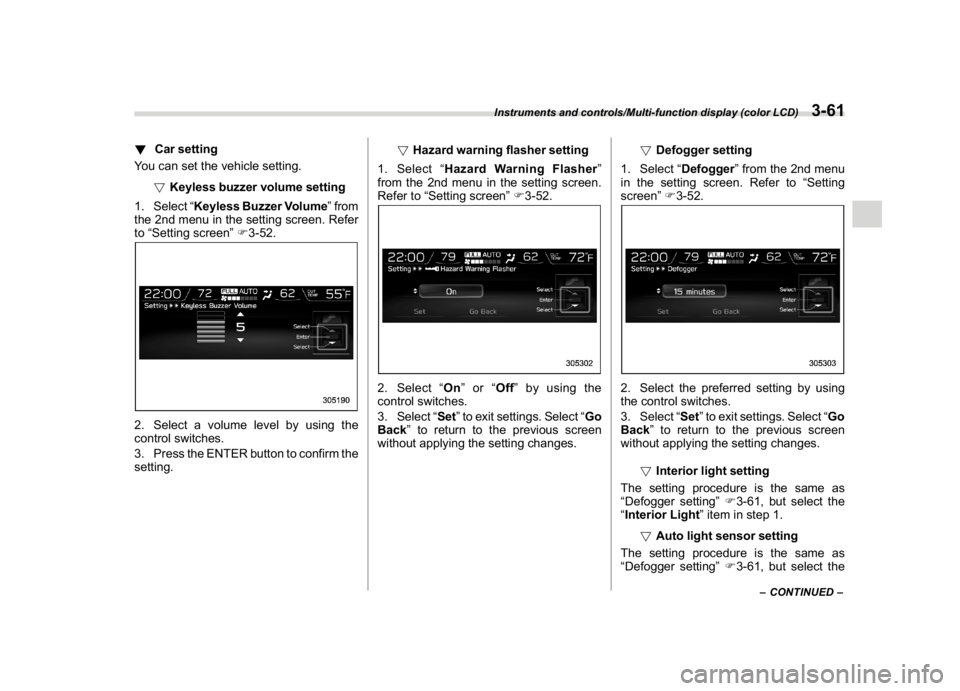
1. Select“Keyless Buzzer Volume”from
the 2nd menu in the setting screen. Refer
to“Setting screen”F3-52.2. Select a volume level by using the
control switches.
3. Press the ENTER button to confirm the
setting.!Hazard warning flasher setting
1. Select“Hazard Warning Flasher”
from the 2nd menu in the setting screen.
Refer to“Setting screen”F3-52.
2. Select“On”or“Off”by using the
control switches.
3. Select“Set”to exit settings. Select“Go
Back”to return to the previous screen
without applying the setting changes.!Defogger setting
1. Select“Defogger”from the 2nd menu
in the setting screen. Refer to“Setting
screen”F3-52.
2. Select the preferred setting by using
the control switches.
3. Select“Set”to exit settings. Select“Go
Back”to return to the previous screen
without applying the setting changes.
!Interior light setting
The setting procedure is the same as
“Defogger setting”F3-61, but select the
“Interior Light”item in step 1.
!Auto light sensor setting
The setting procedure is the same as
“Defogger setting”F3-61, but select the
–CONTINUED–
Instruments and controls/Multi-function display (color LCD)
3-61
3
Page 204 of 578
(209,1)
北米Model "A1700BE-B" EDITED: 2017/ 10/ 11
NOTE.You cannot lower the sensitivity of
the high beam assist function in the
following conditions.
–Cruise control or Adaptive Cruise
Control is in operation
–The EyeSight warning indicator
(yellow) is illuminated
.The sensitivity of the high beam
assist function returns to normal level
the next time the ignition switch is
turned to the“LOCK”/“OFF”position
and the engine is restarted.
!How to change the headlight
mode manually
Change to the low beam:
Return the turn signal lever to the center
position to turn off the high beam assist
function. Then the high beam assist
indicator will turn off.
Change to the high beam:
Turn the light control switch to the“
”
position to change the headlight mode to
the high beam.
At this time, the high beam assist function
will turn off, the high beam assist indicator
will turn off and the high beam indicator
light will turn on.
NOTEAfter manually selecting the high beam
mode:
.If you want to turn on the high beam
assist function, return the light control
switch to the“AUTO”position.
.Turn the light control switch to the
“
”position to turn on the instrument
panel illumination, parking lights, front
side marker lights, rear side marker
lights, tail lights and license plate
lights.
!Tips for the high beam assist
function
.The high beam assist function recog-
nizes the condition surrounding the vehicle
based on the brightness of illumination
ahead of your vehicle, etc. Therefore, the
headlight mode may switch in some
situations that do not match to the driver’s
sense.
.A bicycle or cargo cycle may not be
detected.
.Under the following situations, the high
beam assist function may not work prop-
erly. As a result, the glare of the high beam
may disturb the oncoming vehicle or
vehicle ahead. Also, the low beam mode
may continue although there are no
oncoming vehicles and vehicles ahead.In the such cases, change the headlight
mode manually.
–In bad weather (fog, snow, sand
storm, heavy rain, etc.)
–When the windshield glass is dirty,
fogged, cracked or damaged
–Whenthestereocameraisde-
formed or the stereo camera lenses
are dirty
–If there are lights similar to the
headlights or the tail lights in the
surrounding area
–When an oncoming vehicle or ve-
hicle ahead is driven without its head-
lights and tail lights on
–If the headlights of an oncoming
vehicle or the tail lights of a vehicle
ahead are dirty or discolored, or if the
light beams are not aimed correctly
–When a rapid change of brightness
continues while driving
–When driving on a road with many
ups and downs, uneven surfaces or
curves
–When there are some objects that
reflect light strongly, such as a road
sign or a mirror in vehicle ahead
–When the rear part of the vehicle
ahead, such as a container, reflects
light strongly
–When the headlights of your vehicle
are damaged or dirty
–CONTINUED–
Instruments and controls/Light control switch
3-67
3
Page 206 of 578
(211,1)
北米Model "A1700BE-B" EDITED: 2017/ 10/ 11
&Daytime running light system
WARNING
When the daytime running lights are
illuminated, the tail lights do not
illuminate. When it becomes dark
outside, turn the light switch to the
“
”position to illuminate the head-
lights and tail lights. This will im-
prove visibility and allow other dri-
vers to see your vehicle more easily.
The daytime running lights will automati-
cally illuminate when the following condi-
tions are fulfilled.
.The engine is running.
.The parking brake is fully released.
.The light control switch is in the“AUTO”
(if equipped),“
”or off position.
.For CVT models, the select lever is in a
position other than the“P”position.
NOTEWhen the light switch is in the“
”
position, the instrument panel illumina-
tion, front side marker lights, tail lights
and license plate lights are also illumi-
nated.
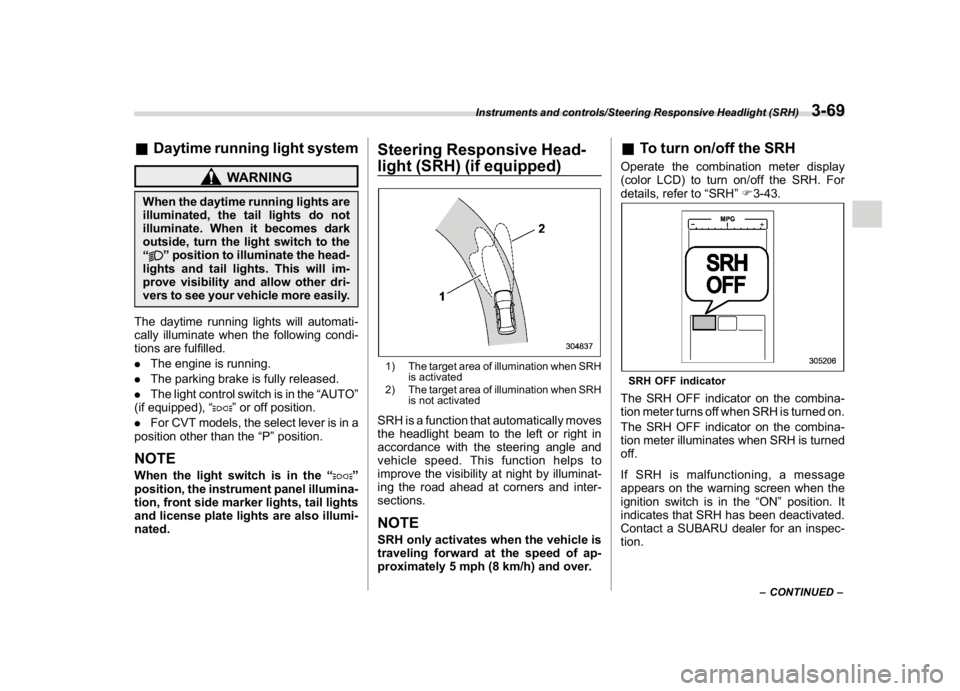
Steering Responsive Head-
light (SRH) (if equipped)1) The target area of illumination when SRH
is activated
2) The target area of illumination when SRH
is not activatedSRH is a function that automatically moves
the headlight beam to the left or right in
accordance with the steering angle and
vehicle speed. This function helps to
improve the visibility at night by illuminat-
ing the road ahead at corners and inter-
sections.NOTESRH only activates when the vehicle is
traveling forward at the speed of ap-
proximately 5 mph (8 km/h) and over.
&To turn on/off the SRHOperate the combination meter display
(color LCD) to turn on/off the SRH. For
details, refer to“SRH”F3-43.SRH OFF indicatorThe SRH OFF indicator on the combina-
tion meter turns off when SRH is turned on.
The SRH OFF indicator on the combina-
tion meter illuminates when SRH is turned
off.
If SRH is malfunctioning, a message
appears on the warning screen when the
ignition switch is in the“ON”position. It
indicates that SRH has been deactivated.
Contact a SUBARU dealer for an inspec-
tion.
–CONTINUED–
Instruments and controls/Steering Responsive Headlight (SRH)
3-69
3
Page 209 of 578
(214,1)
北米Model "A1700BE-B" EDITED: 2017/ 10/ 11
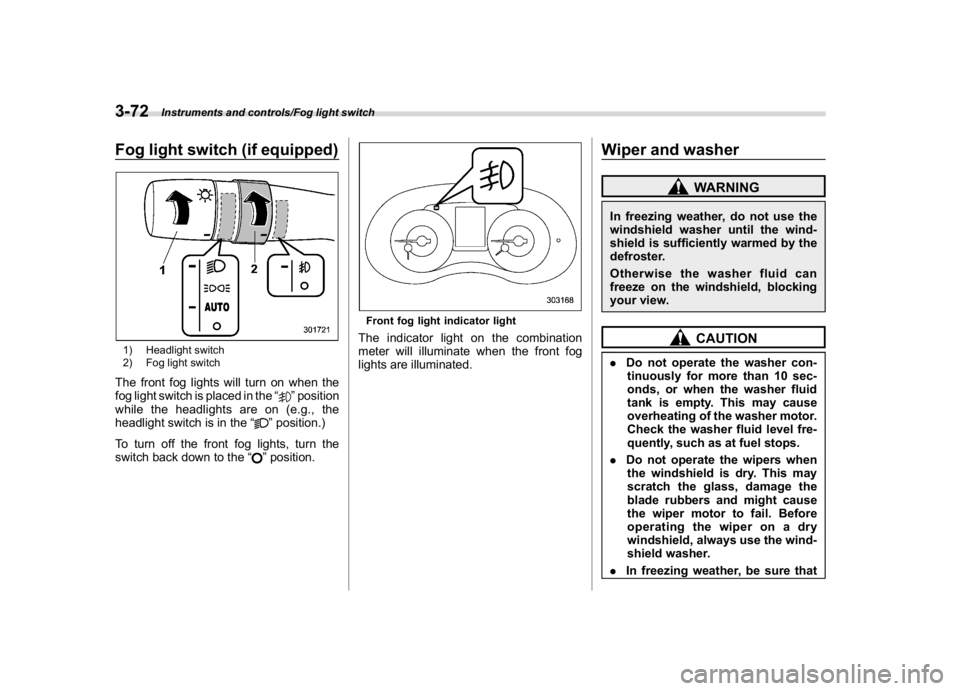
Fog light switch (if equipped)1) Headlight switch
2) Fog light switchThe front fog lights will turn on when the
fog light switch is placed in the“
”position
while the headlights are on (e.g., the
headlight switch is in the“
”position.)
To turn off the front fog lights, turn the
switch back down to the“”position.
Front fog light indicator lightThe indicator light on the combination
meter will illuminate when the front fog
lights are illuminated.
Wiper and washer
WARNING
In freezing weather, do not use the
windshield washer until the wind-
shield is sufficiently warmed by the
defroster.
Otherwise the washer fluid can
freeze on the windshield, blocking
your view.
CAUTION
.Do not operate the washer con-
tinuously for more than 10 sec-
onds, or when the washer fluid
tank is empty. This may cause
overheating of the washer motor.
Check the washer fluid level fre-
quently, such as at fuel stops.
.Do not operate the wipers when
the windshield is dry. This may
scratch the glass, damage the
blade rubbers and might cause
the wiper motor to fail. Before
operating the wiper on a dry
windshield, always use the wind-
shield washer.
.In freezing weather, be sure that
Instruments and controls/Fog light switch
3-72