warning SUBARU WRX 2018 Owners Manual
[x] Cancel search | Manufacturer: SUBARU, Model Year: 2018, Model line: WRX, Model: SUBARU WRX 2018Pages: 578, PDF Size: 33.21 MB
Page 212 of 578
(217,1)
北米Model "A1700BE-B" EDITED: 2017/ 10/ 11
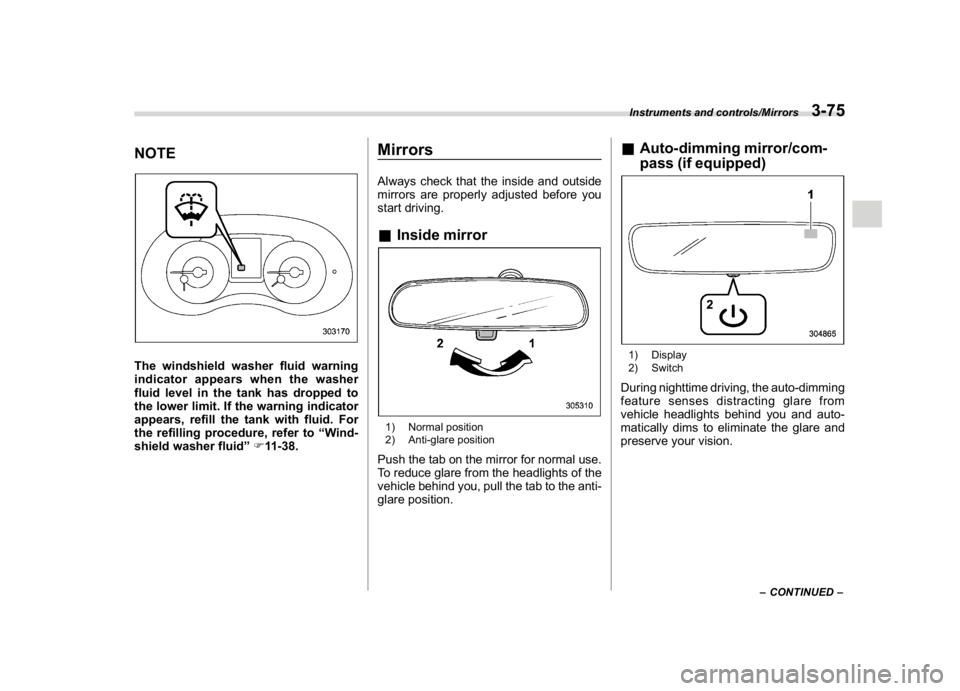
NOTEThe windshield washer fluid warning
indicator appears when the washer
fluid level in the tank has dropped to
the lower limit. If the warning indicator
appears, refill the tank with fluid. For
the refilling procedure, refer to“Wind-
shield washer fluid”F11-38.
MirrorsAlways check that the inside and outside
mirrors are properly adjusted before you
start driving.&Inside mirror1) Normal position
2) Anti-glare positionPush the tab on the mirror for normal use.
To reduce glare from the headlights of the
vehicle behind you, pull the tab to the anti-
glare position.
&Auto-dimming mirror/com-
pass (if equipped)1) Display
2) SwitchDuring nighttime driving, the auto-dimming
feature senses distracting glare from
vehicle headlights behind you and auto-
matically dims to eliminate the glare and
preserve your vision.
–CONTINUED–
Instruments and controls/Mirrors
3-75
3
Page 219 of 578
(224,1)
北米Model "A1700BE-B" EDITED: 2017/ 10/ 11
online at www.HomeLink.com and
www.youtube.com/HomeLinkGentex.
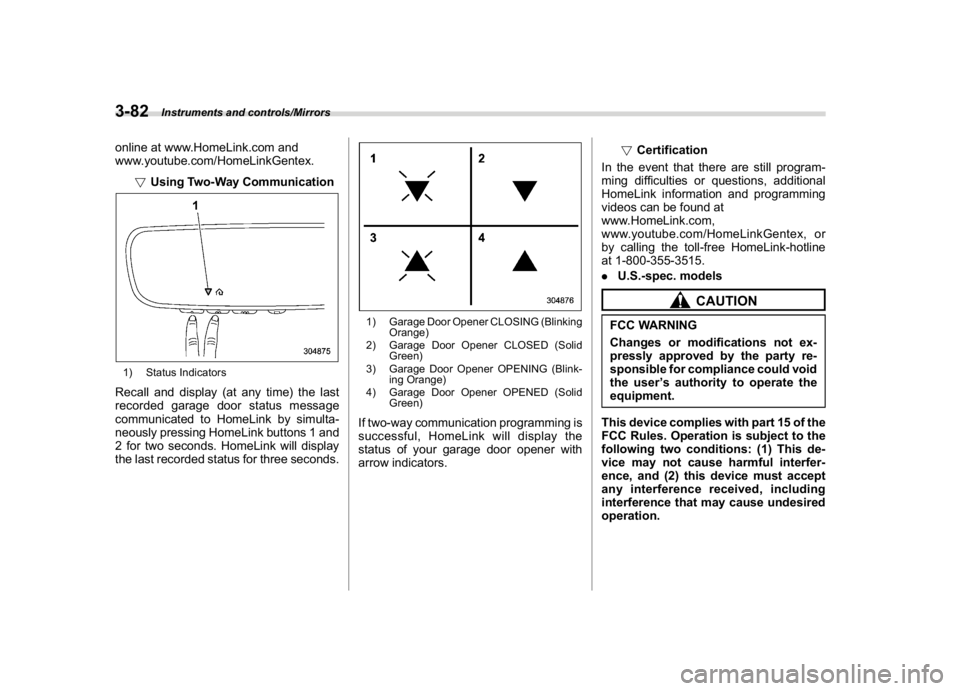
!Using Two-Way Communication1) Status IndicatorsRecall and display (at any time) the last
recorded garage door status message
communicated to HomeLink by simulta-
neously pressing HomeLink buttons 1 and
2 for two seconds. HomeLink will display
the last recorded status for three seconds.
1) Garage Door Opener CLOSING (Blinking
Orange)
2) Garage Door Opener CLOSED (Solid
Green)
3) Garage Door Opener OPENING (Blink-
ing Orange)
4) Garage Door Opener OPENED (Solid
Green)If two-way communication programming is
successful, HomeLink will display the
status of your garage door opener with
arrow indicators.!Certification
In the event that there are still program-
ming difficulties or questions, additional
HomeLink information and programming
videos can be found at
www.HomeLink.com,
www.youtube.com/HomeLinkGentex, or
by calling the toll-free HomeLink-hotline
at 1-800-355-3515.
.U.S.-spec. models
CAUTION
FCC WARNING
Changes or modifications not ex-
pressly approved by the party re-
sponsible for compliance could void
the user’s authority to operate the
equipment.
This device complies with part 15 of the
FCC Rules. Operation is subject to the
following two conditions: (1) This de-
vice may not cause harmful interfer-
ence, and (2) this device must accept
any interference received, including
interference that may cause undesired
operation.
Instruments and controls/Mirrors
3-82
Page 220 of 578
(225,1)
北米Model "A1700BE-B" EDITED: 2017/ 10/ 11
.Canada-spec. modelsHomeLink
®and the HomeLink
®house are
registered trademarks of Gentex Corpora-
tion.
WARNING
.When programming the
HomeLink
®Wireless Control Sys-
tem, you may be operating a
garage door opener or other
device. Make sure that people
and objects are out of the way of
the garage door or other device
to prevent potential harm or da-
mage.
.Do not use the HomeLink
®Wire-
less Control System with a gar-
age door opener that lacks the
safety stop and reverse feature
as required by applicable safety
standards. A garage door opener
which cannot detect an object,
signaling the door to stop and
reverse, does not meet these
safety standards. Using a garage
door opener without these fea-
tures increases risk of serious
injury or death. For more infor-
mation, consult the HomeLink
®
website at www.homelink.com or
call 1-800-355-3515.
&Outside mirrors!Convex mirror (passenger side)
WARNING
Objects look smaller in a convex
mirror and farther away than when
viewed in a flat mirror. Do not use the
convex mirror to judge the distance
of vehicles behind you when chan-
ging lanes. Use the inside mirror (or
glance backwards) to determine the
actual size and distance of objects
that you view in convex mirror.
–CONTINUED–
Instruments and controls/Mirrors
3-83
3
Page 222 of 578
(227,1)
北米Model "A1700BE-B" EDITED: 2017/ 10/ 11
outside mirrors have been cleared and the
windshield wiper blade rubbers have been
deiced completely before that time, press
the control switch to turn them off. If
defrosting, defogging or deicing is not
complete, you have to press the control
switch to turn them on again.
It is possible for the defogger and deicer
system to be set to continuous operation
mode by a SUBARU dealer. Consult your
SUBARU dealer for details. Also, you can
change the setting using the multi-function
display (color LCD). For details, refer to
“Defogger setting”F3-61.
If the battery voltage drops below the
permissible level, continuous operation of
the defogger and deicer system is can-
celed and the system stops operating.
CAUTION
.To prevent the battery from being
discharged, do not operate the
defogger and deicer system con-
tinuously for any longer than
necessary.
.Do not use sharp instruments or
window cleaner containing abra-
sives to clean the inner surface of
the rear window. They may da-
mage the conductors printed onthe window.
NOTE.Turn on the defogger and deicer
system if the wipers are frozen to the
windshield.
.If the windshield is covered with
snow, remove the snow so that the
windshield wiper deicer works effec-
tively.
.While the defogger and deicer sys-
tem is in the continuous operation
mode:
–If the vehicle speed remains at 9
mph (15 km/h) or lower for 15
minutes, the windshield wiper dei-
cer system automatically stops op-
erating. However, the rear window
defogger system and outside mirror
defogger system maintain continu-
ous operation in this condition.
–If the vehicle battery voltage
drops below the permissible level,
continuous operation of the defog-
ger system and deicer system is
canceled and the system stops
operating.
Tilt/telescopic steering wheel
WARNING
.Do not adjust the steering wheel
tilt/telescopic position while driv-
ing. This may cause loss of
vehicle control and result in per-
sonal injury.
.If the lever cannot be raised to the
fixed position, adjust the steering
wheel again. It is dangerous to
drive without locking the steering
wheel. This may cause loss of
vehicle control and result in per-
sonal injury.
–CONTINUED–
Instruments and controls/Tilt/telescopic steering wheel
3-85
3
Page 231 of 578
(238,1)
北米Model "A1700BE-B" EDITED: 2017/ 10/ 11
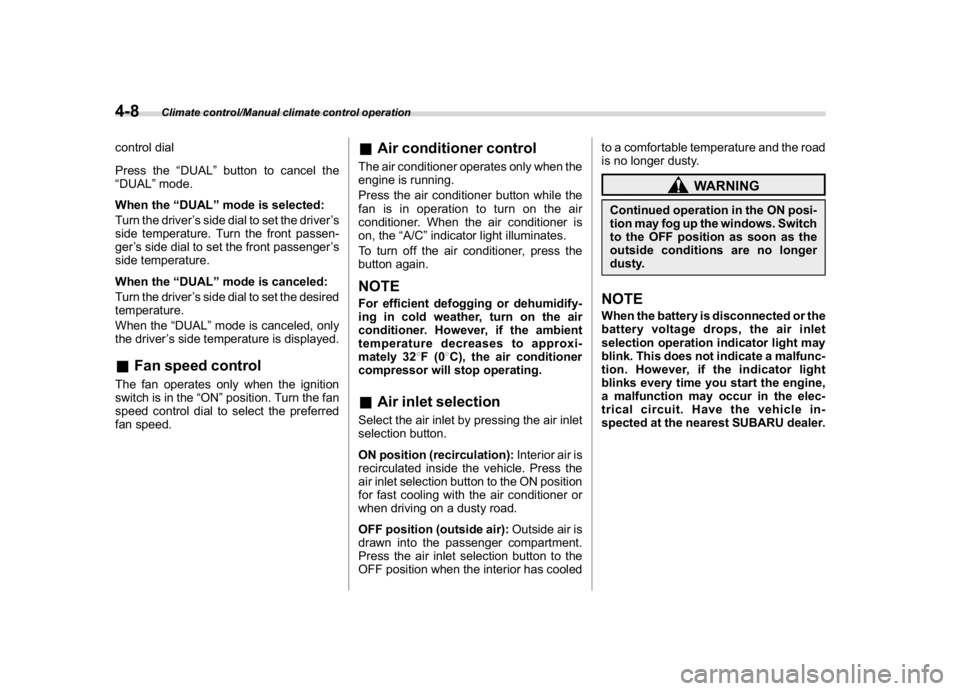
control dial
Press the“DUAL”button to cancel the
“DUAL”mode.
When the“DUAL”mode is selected:
Turn the driver’s side dial to set the driver’s
side temperature. Turn the front passen-
ger’s side dial to set the front passenger’s
side temperature.
When the“DUAL”mode is canceled:
Turn the driver’s side dial to set the desired
temperature.
When the“DUAL”mode is canceled, only
the driver’s side temperature is displayed.&Fan speed controlThe fan operates only when the ignition
switch is in the“ON”position. Turn the fan
speed control dial to select the preferred
fan speed.
&Air conditioner controlThe air conditioner operates only when the
engine is running.
Press the air conditioner button while the
fan is in operation to turn on the air
conditioner. When the air conditioner is
on, the“A/C”indicator light illuminates.
To turn off the air conditioner, press the
button again.NOTEFor efficient defogging or dehumidify-
ing in cold weather, turn on the air
conditioner. However, if the ambient
temperature decreases to approxi-
mately 328F(08C), the air conditioner
compressor will stop operating.&Air inlet selectionSelect the air inlet by pressing the air inlet
selection button.
ON position (recirculation):Interior air is
recirculated inside the vehicle. Press the
air inlet selection button to the ON position
for fast cooling with the air conditioner or
when driving on a dusty road.
OFF position (outside air):Outside air is
drawn into the passenger compartment.
Press the air inlet selection button to the
OFF position when the interior has cooledto a comfortable temperature and the road
is no longer dusty.
WARNING
Continued operation in the ON posi-
tion may fog up the windows. Switch
to the OFF position as soon as the
outside conditions are no longer
dusty.NOTEWhen the battery is disconnected or the
battery voltage drops, the air inlet
selection operation indicator light may
blink. This does not indicate a malfunc-
tion. However, if the indicator light
blinks every time you start the engine,
a malfunction may occur in the elec-
trical circuit. Have the vehicle in-
spected at the nearest SUBARU dealer.
Climate control/Manual climate control operation
4-8
Page 242 of 578
(251,1)
北米Model "A1700BE-B" EDITED: 2017/ 10/ 11
!CD player and disc
.This CD player is intended for use with
4.7 in. (12 cm) discs only.
.Extremely high temperatures can keep
the CD player from working. On hot days,
use the air conditioning system to cool the
inside of the vehicle before using the
player.
.Bumpy roads or other vibrations may
make the CD player skip.
.If moisture gets into the CD player, the
discs may not be able to be played.
Remove the discs from the player and
wait until it dries.
WARNING
CD players use an invisible laser
beam which could cause hazardous
radiation exposure if directed out-
side the unit. Be sure to operate the
player correctly.
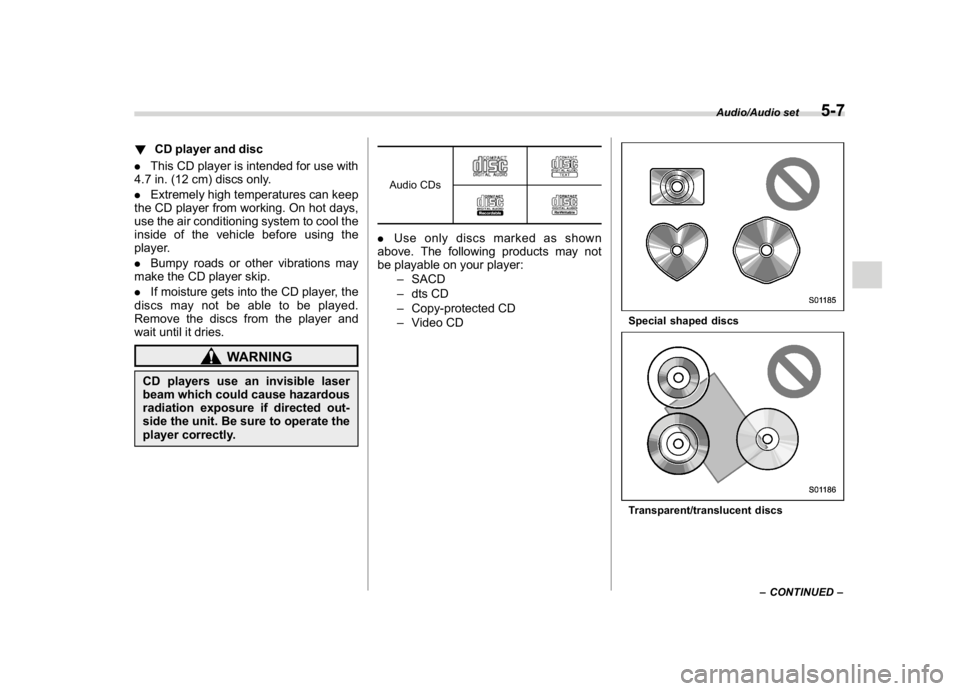
Audio CDs.Use only discs marked as shown
above. The following products may not
be playable on your player:
–SACD
–dts CD
–Copy-protected CD
–Video CD
Special shaped discsTransparent/translucent discs
–CONTINUED–
Audio/Audio set
5-7
5
Page 249 of 578
(258,1)
北米Model "A1700BE-B" EDITED: 2017/ 10/ 11
&Basic information before use
WARNING
When the vehicle is stopped with the
engine running, always apply the
parking brake for safety. Failure to
do so may result in loss of control of
your vehicle and cause an accident
or serious injury.
CAUTION
.To prevent damaging the screen,
touch the screen keys with your
finger lightly.
.Wipe off fingerprints using a
glass cleaning cloth. Do not use
chemical cleaners to clean the
screen, as they may damage the
touch screen.!Touch screen gestures
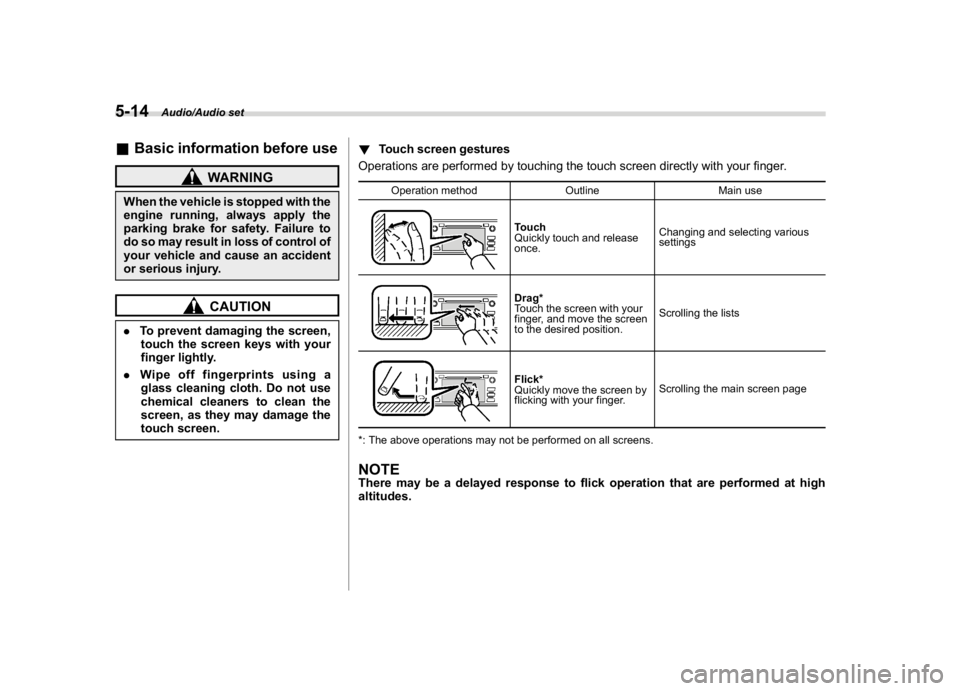
Operations are performed by touching the touch screen directly with your finger.
Operation method Outline Main use
Touch
Quickly touch and release
once.Changing and selecting various
settingsDrag*
Touch the screen with your
finger, and move the screen
to the desired position.Scrolling the listsFlick*
Quickly move the screen by
flicking with your finger.Scrolling the main screen page
*: The above operations may not be performed on all screens.
NOTEThere may be a delayed response to flick operation that are performed at high
altitudes.
Audio/Audio set
5-14
Page 259 of 578
(268,1)
北米Model "A1700BE-B" EDITED: 2017/ 10/ 11
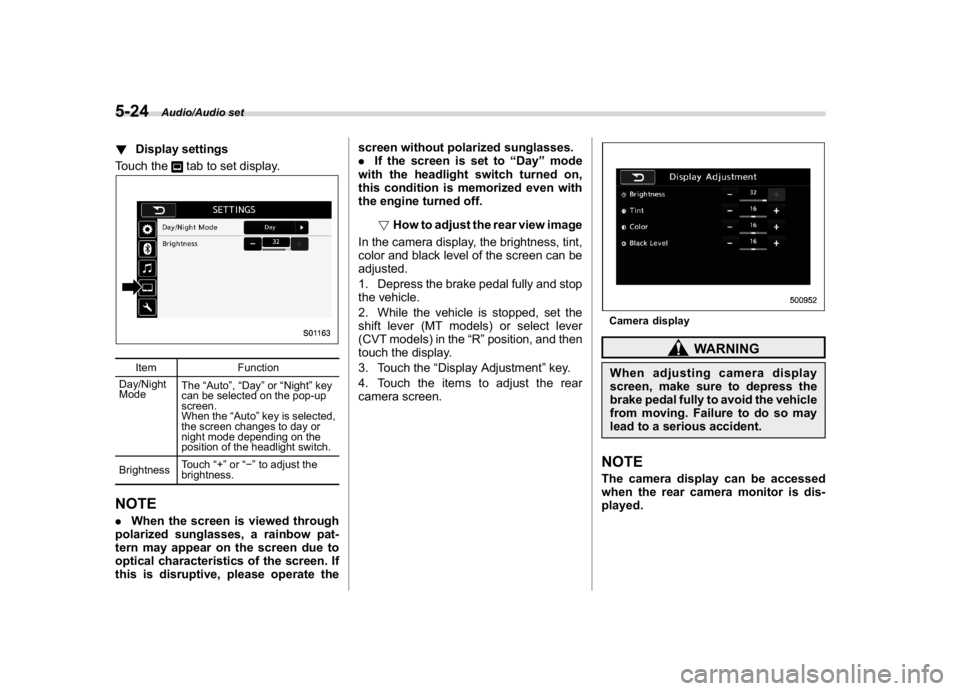
!Display settings
Touch the
tab to set display.
Item Function
Day/Night
ModeThe“Auto”,“Day”or“Night”key
can be selected on the pop-up
screen.
When the“Auto”key is selected,
the screen changes to day or
night mode depending on the
position of the headlight switch.
BrightnessTouch“+”or“”to adjust the
brightness.
NOTE.When the screen is viewed through
polarized sunglasses, a rainbow pat-
tern may appear on the screen due to
optical characteristics of the screen. If
this is disruptive, please operate thescreen without polarized sunglasses.
.If the screen is set to“Day”mode
with the headlight switch turned on,
this condition is memorized even with
the engine turned off.
!How to adjust the rear view image
In the camera display, the brightness, tint,
color and black level of the screen can be
adjusted.
1. Depress the brake pedal fully and stop
the vehicle.
2. While the vehicle is stopped, set the
shift lever (MT models) or select lever
(CVT models) in the“R”position, and then
touch the display.
3. Touch the“Display Adjustment”key.
4. Touch the items to adjust the rear
camera screen.
Camera display
WARNING
When adjusting camera display
screen, make sure to depress the
brake pedal fully to avoid the vehicle
from moving. Failure to do so may
lead to a serious accident.NOTEThe camera display can be accessed
when the rear camera monitor is dis-
played.
Audio/Audio set
5-24
Page 273 of 578
(282,1)
北米Model "A1700BE-B" EDITED: 2017/ 10/ 11
!How to subscribe to SiriusXM Sa-
tellite Radio
To listen to a satellite radio broadcast in the
vehicle, a subscription to the SiriusXM
Satellite Radio service is necessary.
A SiriusXM Satellite Radio is a tuner
designed exclusively to receive broad-
casts provided under a separate subscrip-
tion.
!How to subscribe
It is necessary to enter into a separate
service agreement with SiriusXM Satellite
Radio in order to receive satellite broad-
cast programming in the vehicle. Addi-
tional activation and service subscription
fees apply that are not included in the
purchase price of the vehicle and digital
satellite tuner.
For complete information on subscription
rates and terms, or to subscribe to
SiriusXM Satellite Radio:
.U.S. customers:
Refer to www.siriusxm.com or call
1-866-635-2349
.Canadian customers:
Refer to www.siriusxm.ca or call
1-877-209-0079
WARNING
.SiriusXM Satellite Radio Services
—Legal Disclaimers and Warn-
ings
–Fees and Taxes—Subscrip-
tion fee, taxes, one time acti-
vation fee, and other fees may
apply. Subscription fee is con-
sumer only. All fees and pro-
gramming subject to change.
Subscriptions subject to Cus-
tomer Agreement available at
www.siriusxm.com (U.S.) or
www.siriusxm.ca (Canada).
SiriusXM U.S. satellite and
data services are available
only in the contiguous USA
and DC. SiriusXM satellite
service is also available in
Canada: see
www.siriusxm.ca.
Explicit Language Notice—
Channels with frequent expli-
cit language are indicated with
an“XL”preceding the chan-
nel name. Channel blocking is
available for SiriusXM Satel-
lite Radio receivers by notify-
ing SiriusXM at:.U.S. customers:
Visit www.siriusxm.com or call
1-866-635-2349
.Canadian customers:
Visit www.siriusxm.ca or call
1-877-209-0079
CAUTION
.It is prohibited to copy, decom-
pile, disassemble, reverse engi-
neer, hack, manipulate or other-
wise make available any technol-
ogy or software incorporated in
receivers compatible with the
SiriusXM Satellite Radio System
or that support the XM website,
the Online Service or any of its
content. Furthermore, the
AMBE
®voice compression soft-
ware included in this product is
protected by intellectual property
rights including patent rights,
copyrights, and trade secrets of
Digital Voice Systems, Inc.
.Note: this applies to SiriusXM
Satellite Radio receivers only
and not XM Ready devices.
Audio/Audio set
5-38
Page 277 of 578
(286,1)
北米Model "A1700BE-B" EDITED: 2017/ 10/ 11
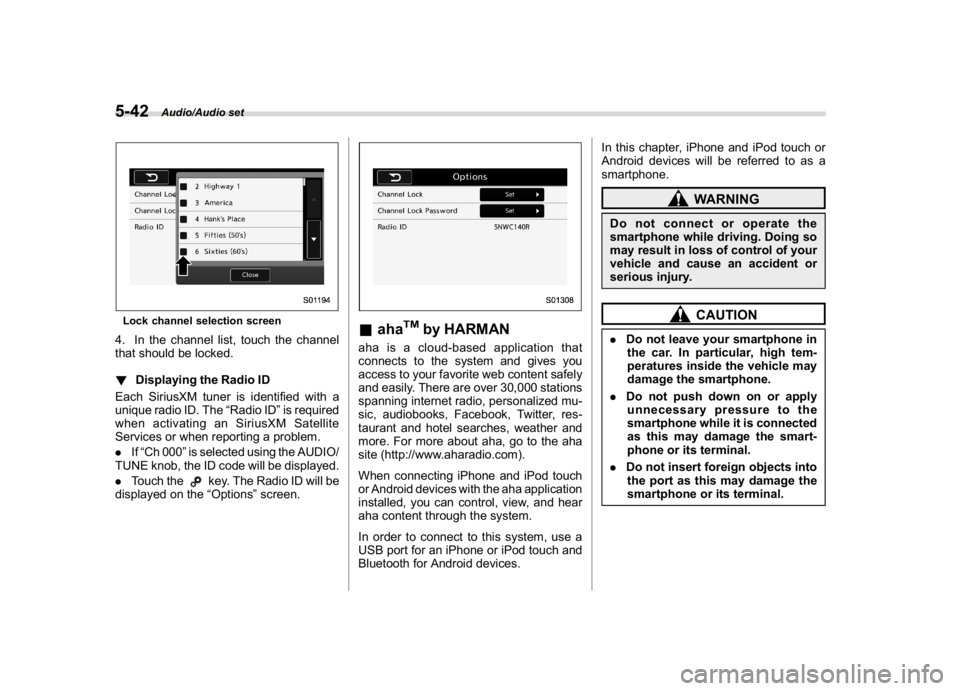
Lock channel selection screen4. In the channel list, touch the channel
that should be locked.
!Displaying the Radio ID
Each SiriusXM tuner is identified with a
unique radio ID. The“Radio ID”is required
when activating an SiriusXM Satellite
Services or when reporting a problem.
.If“Ch 000”is selected using the AUDIO/
TUNE knob, the ID code will be displayed.
.Touch the
key. The Radio ID will be
displayed on the“Options”screen.
&aha
TM
by HARMAN
aha is a cloud-based application that
connects to the system and gives you
access to your favorite web content safely
and easily. There are over 30,000 stations
spanning internet radio, personalized mu-
sic, audiobooks, Facebook, Twitter, res-
taurant and hotel searches, weather and
more. For more about aha, go to the aha
site (http://www.aharadio.com).
When connecting iPhone and iPod touch
or Android devices with the aha application
installed, you can control, view, and hear
aha content through the system.
In order to connect to this system, use a
USB port for an iPhone or iPod touch and
Bluetooth for Android devices.In this chapter, iPhone and iPod touch or
Android devices will be referred to as a
smartphone.
WARNING
Do not connect or operate the
smartphone while driving. Doing so
may result in loss of control of your
vehicle and cause an accident or
serious injury.
CAUTION
.Do not leave your smartphone in
the car. In particular, high tem-
peratures inside the vehicle may
damage the smartphone.
.Do not push down on or apply
unnecessary pressure to the
smartphone while it is connected
as this may damage the smart-
phone or its terminal.
.Do not insert foreign objects into
the port as this may damage the
smartphone or its terminal.
Audio/Audio set
5-42