wheel SUZUKI CELERIO 2015 User Guide
[x] Cancel search | Manufacturer: SUZUKI, Model Year: 2015, Model line: CELERIO, Model: SUZUKI CELERIO 2015Pages: 201, PDF Size: 5.82 MB
Page 75 of 201

3-5
OPERATING YOUR VEHICLE
76MH1-74E
76MH1-74E
NOTE: (For Auto Gear Shift Model)For details on how to use the gearshift lever to park the vehicle, refer to “Parking” in “Auto Gear Shift” in this section.
Parking Brake Reminder Buzzer (if
equipped)A buzzer sounds intermittently to remind you to release the parking brake if youstart the vehicle without releasing the park- ing brake. Make sure that the parking brake is fully released and the brake sys-tem warning light turns off.
Pedal
Manual transaxle
80J2121
Auto Gear Shift
80J2122
Clutch Pedal (1)
(For manual transaxle)The clutch pedal is used to disengage the drive to the wheels when starting theengine, stopping, or shifting the gearshift lever. Depressing the pedal disengages the clutch.
Brake Pedal (2)Your MARUTI SUZUKI vehicle is equipped with front disc brakes and rear drum brakes. Depressing the brake pedalapplies both sets of brakes.
You may hear occasional brake squeal when you apply the brakes. This is a nor- mal condition caused by environmental factors such as co ld, wet, snow, etc.
WA R N I N G
When parking the vehicle in extremely cold weather, the followingprocedure should be used: 1) Set the parking brake. 2) Manual transaxl e - turn off the engine, then shift into reverse or first gear. Auto Gear Shift – shift into reverseor first gear and check the gear position indicato r in the instru- ment cluster to ma ke sure that the transaxle is engaged in 1st or reverse, then turn off the engine. 3) Get out of the vehicle and putchocks under the wheels. 4) Release the parking brake. When you return to your vehicle,you must remember to first set the parking brake, then remove the wheel chocks.
(2)(1)
(3)
EXAMPLE
(3)
(2)
EXAMPLE
WA R N I N G
Do not drive with your foot resting onthe clutch pedal. It could result inexcessive clutch wear, clutch dam- age, or unexpected loss of engine braking.
WA R N I N G
If brake squeal is excessive andoccurs each time the brakes areapplied, you should have the brakes checked by your MARUTI SUZUKI dealer.
64
Page 86 of 201
3-16
OPERATING YOUR VEHICLE
76MH1-74E
76MH1-74E
Brake Assist System (if equipped)When you slam the brakes on, the brake assist system judges as an emergencystop and provides more powerful braking for a driver who cannot hold down the brake pedal firmly.
NOTE: If you quickly and forcefully depress thebrakes, you may hear a clicking sound in the brake pedal. This is normal and indi- cates that the brake a ssist system is acti- vated properly.
Anti-Lock Brake System (ABS)
(if equipped)ABS will help you avoid skidding by elec- tronically controlling braking pressure. It will also help you maintain steering controlwhen braking on slippery surfaces or when braking hard. The ABS works automatically, so you donot need any special braking technique. Just push the brake pedal down without pumping. The ABS will operate whenever itsenses that the wheels are locking up. You
may feel the brake pedal moves a little while the ABS is operating.
NOTE: The ABS will not work if vehicle speed is under about 10 km/h (6 mph).
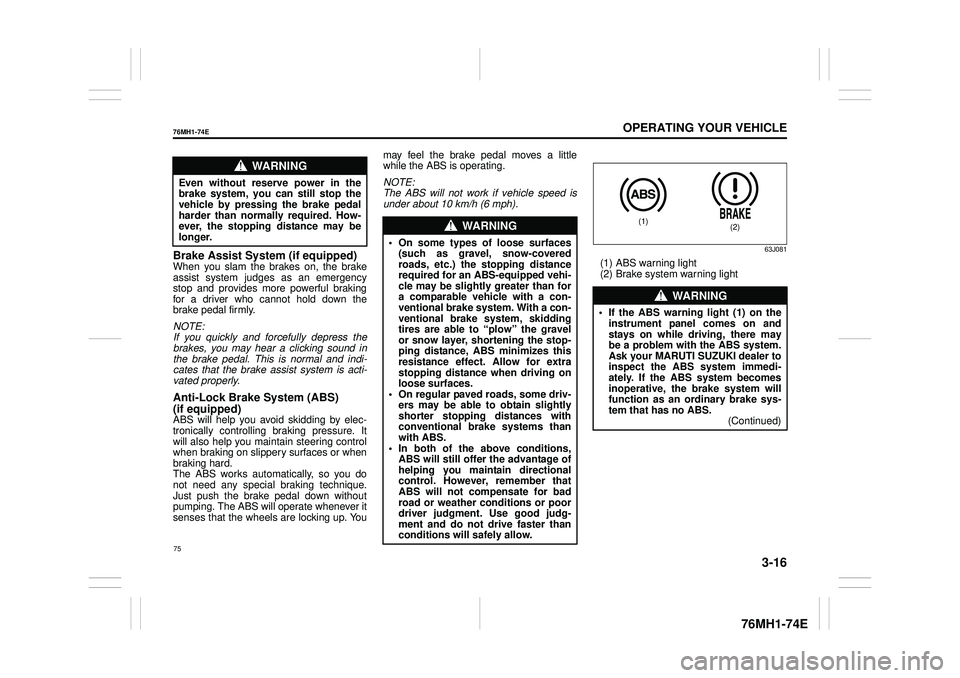
63J081
(1) ABS warning light (2) Brake system warning light
WA R N I N G
Even without reserve power in the brake system, you can still stop thevehicle by pressing the brake pedal harder than normally required. How- ever, the stopping distance may belonger.WA R N I N G
• On some types of loose surfaces(such as gravel, snow-coveredroads, etc.) the stopping distance required for an ABS-equipped vehi- cle may be slightly greater than fora comparable vehicle with a con- ventional brake system. With a con- ventional brake system, skiddingtires are able to “plow” the gravel or snow layer, shortening the stop- ping distance, ABS minimizes thisresistance effect. Allow for extra stopping distance when driving on loose surfaces.• On regular paved roads, some driv- ers may be able to obtain slightly shorter stopping distances withconventional brake systems than with ABS. • In both of the above conditions,ABS will still offer the advantage of helping you maintain directional control. However, remember thatABS will not compensate for bad road or weather conditions or poor driver judgment. Use good judg-ment and do not drive faster than conditions will safely allow.
WA R N I N G
• If the ABS warning light (1) on the instrument panel comes on and stays on while driving, there maybe a problem with the ABS system. Ask your MARUTI SUZUKI dealer to inspect the ABS system immedi-ately. If the ABS system becomes inoperative, the brake system will function as an ordinary brake sys-tem that has no ABS. (Continued)
(1)(2)
75
Page 87 of 201
3-17
OPERATING YOUR VEHICLE
76MH1-74E
76MH1-74E
How the ABS WorksA computer continuously monitors wheel speed. The computer compares the changes in wheel speed when braking. If the wheels slow suddenly, indicating askidding situation, the computer will change braking pressure several times each second to prevent the wheels fromlocking. When you start your vehicle after a stop you may hear a momentary motor noise as the system checks itself.
WA R N I N G
(Continued)• If the ABS warning light (1) and theBrake system warning light (2) on the instrument panel simultane- ously stays on or comes on whendriving, both anti-lock function and rear brake force control function (proportioning val ve function) of the ABS system may have failed. If so, the rear wheels may easily skid or the vehicle can even spin in theworst case when braking on a slip- pery road or when hard braking even on a dry paved road. Ask yourMARUTI SUZUKI dealer to inspect the ABS system immediately. Drive carefully, avoiding hard braking asmuch as possible.
WA R N I N G
The ABS may not work properly iftires or wheels other than thosespecified in the owner’s manual are used. This is because the ABS works by comparing changes in wheelspeed. When replacing tires or wheels, use only the size and type specified in this owner’s manual.
76
Page 92 of 201
4-4
DRIVING TIPS
76MH1-74E
76MH1-74E
are the correct size for your vehicle’s tires. Also make sure that there is enough clear- ance between the fenders and the chainsas installed on the tires.
Install the chains on the front tires tightly, according to the chain manufacturer’s instructions. Retight en the chains after driving about 1.0 km (1/2 mile) if neces-sary. With the chains installed, drive slowly.
If Your Vehicle Gets StuckIf your vehicle gets stuck in snow, mud, orsand, follow the directions below:
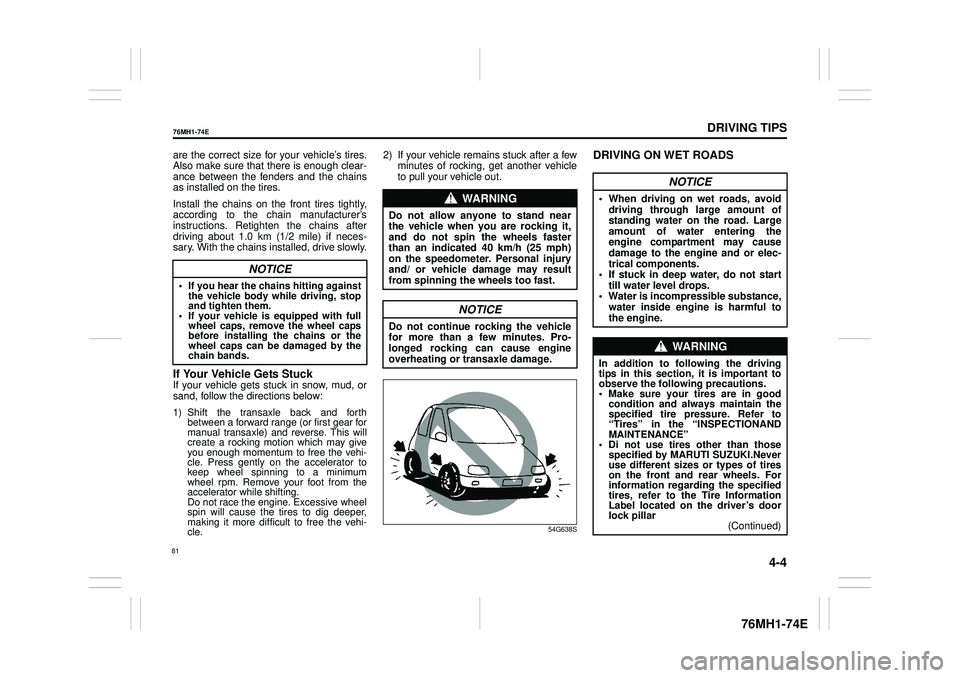
1) Shift the transaxle back and forth between a forward range (or first gear formanual transaxle) and reverse. This willcreate a rocking motion which may giveyou enough momentum to free the vehi- cle. Press gently on the accelerator to keep wheel spinning to a minimumwheel rpm. Remove your foot from theaccelerator while shifting. Do not race the engine. Excessive wheelspin will cause the tires to dig deeper,making it more difficult to free the vehi- cle.
2) If your vehicle remains stuck after a few minutes of rocking, get another vehicle to pull your vehicle out.
54G638S
DRIVING ON WET ROADS
NOTICE
• If you hear the chains hitting against the vehicle body while driving, stopand tighten them.• If your vehicle is equipped with fullwheel caps, remove the wheel caps before installing the chains or the wheel caps can be damaged by thechain bands.
WA R N I N G
Do not allow anyone to stand near the vehicle when you are rocking it,and do not spin the wheels faster than an indicated 40 km/h (25 mph) on the speedometer. Personal injuryand/ or vehicle damage may result from spinning the wheels too fast.
NOTICE
Do not continue rocking the vehicle for more than a few minutes. Pro-longed rocking can cause engine overheating or transaxle damage.
NOTICE
• When driving on wet roads, avoid driving through large amount of standing water on the road. Large amount of water entering theengine compartment may cause damage to the engine and or elec- trical components.• If stuck in deep water, do not start till water level drops. • Water is incompressible substance,water inside engine is harmful to the engine.
WA R N I N G
In addition to following the driving tips in this section, it is important to observe the following precautions. • Make sure your tires are in good condition and always maintain the specified tire pressure. Refer to“Tires” in the “INSPECTIONAND MAINTENANCE” • Di not use tires other than thosespecified by MARUTI SUZUKI.Never use different sizes or types of tires on the front and rear wheels. Forinformation regard ing the specified tires, refer to the Tire Information Label located on the driver’s doorlock pillar(Continued)
81
Page 133 of 201
5-37
OTHER CONTROLS AND EQUIPMENT
76MH1-74E
76MH1-74E
NOTE: When selecting “Go Back”, the previous menu will be displayed.
Deletion of audio device information (Delete Audio)Follow the instructions below to delete the registered information of audio device. 1) Press the Bluetooth® setup button (6). The Bluetooth® setup menu will be dis- played. 2) Turn the TUNE FOLDER PUSHSOUND knob (2) to select “Setup Blue- tooth”, and press the knob (2) to deter- mine the selection.3) Turn the TUNE FOLDER PUSH SOUND knob (2) to select “List Audio”, and press the knob (2) to determine theselection. 4) Turn the TUNE FOLDER PUSH SOUND knob (2) to select an audiodevice to be deleted, and press the knob (2) to determine the selection. 5) Turn the TUNE FOLDER PUSHSOUND knob (2) to select “Delete”, and press the knob (2) to determine the selection.6) Turn the TUNE FOLDER PUSH SOUND knob (2) to select “Delete?”, and press the knob (2) to determine theselection. 7) Turn the TUNE FOLDER PUSH SOUND knob (2) to select “Confirm”,and press the knob (2) to complete the deletion.
NOTE: When selecting “Go Back”, the previous menu will be displayed.
Disclaimer for Bluetooth® function Depending on the mobile phone models, some phones may not be compatible fully or partially (some function may berestricted). Connectivity or voice quality may get affected depending on circumstances. After the ignition switch is turned to the “ON” position, the audio system takes few seconds to detect and connect to theBluetooth® device (if already paired). Make sure that you are aware of all applicable local laws and accordinglyuse Bluetooth device.
Remote Audio Controls
(if equipped)Controlling of basic functions of the audio system is available us ing the switches on the steering wheel.
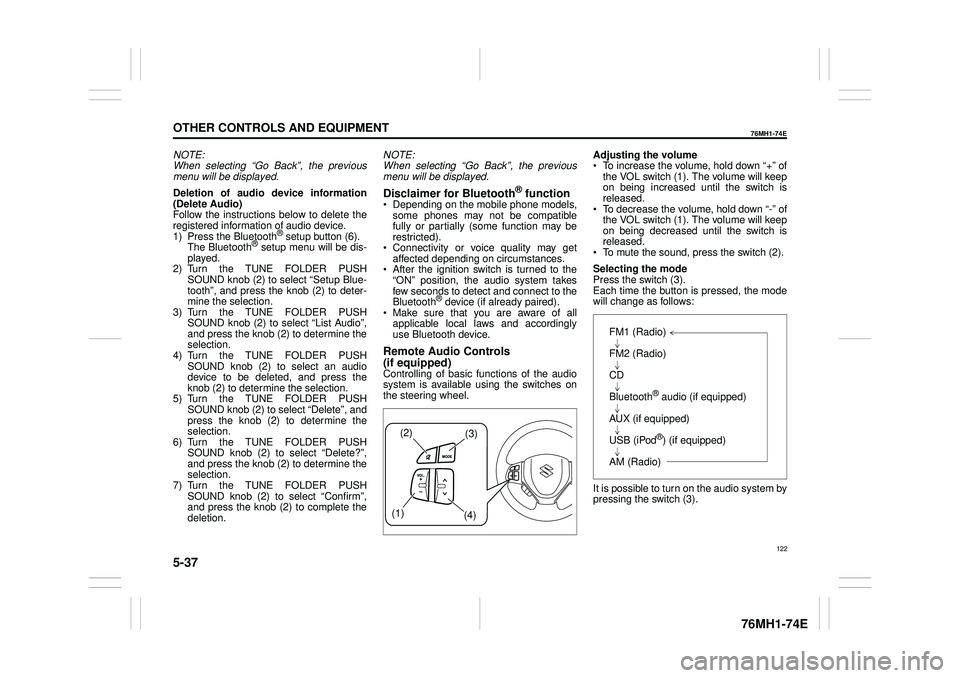
Adjusting the volume To increase the volume, hold down “+” of the VOL switch (1). The volume will keepon being increased until the switch is released. To decrease the volume, hold down “-” ofthe VOL switch (1). The volume will keep on being decreased until the switch is released. To mute the sound, press the switch (2).
Selecting the mode Press the switch (3). Each time the button is pressed, the mode will change as follows:
It is possible to turn on the audio system by pressing the switch (3).
(2)(3)
(1) (4)
FM1 (Radio)
FM2 (Radio)
CD
Bluetooth® audio (if equipped)
AUX (if equipped)
USB (iPod®) (if equipped)
AM (Radio)
122
Page 135 of 201
5-39
OTHER CONTROLS AND EQUIPMENT
76MH1-74E
76MH1-74E
NOTE: To change your PIN, first delete your cur- rent PIN, then set a new one.
Confirming the Personal Identification Number (PIN)When the main power source is discon- nected such as when the battery is replaced, etc, it is required to enter the PINto make the unit operable again. 1) Set the ignition switch to the “ACC” position. “SECURITY” will be displayed. 2) Press the Up button (3) and the button numbered [1] of the Preset buttons (2)simultaneously. 3) Enter a 4-digit number to be registered as PIN using the buttons numbered [1] -[4] of the Preset buttons (2). 4) Hold down TUNE FOLDER PUSH SOUND knob (4) for 1 second or lon-ger. When the PIN same as registered is entered, the power of the audio systemwill be turned off automatically and it will become operable again.
NOTE: If an incorrect PIN is entered, “ERROR” and the total number of incorrect entryattempts will be displayed. If an incorrect PIN is entered 10 times, “HELP” will be displayed and the audiosystem will become inoperable.
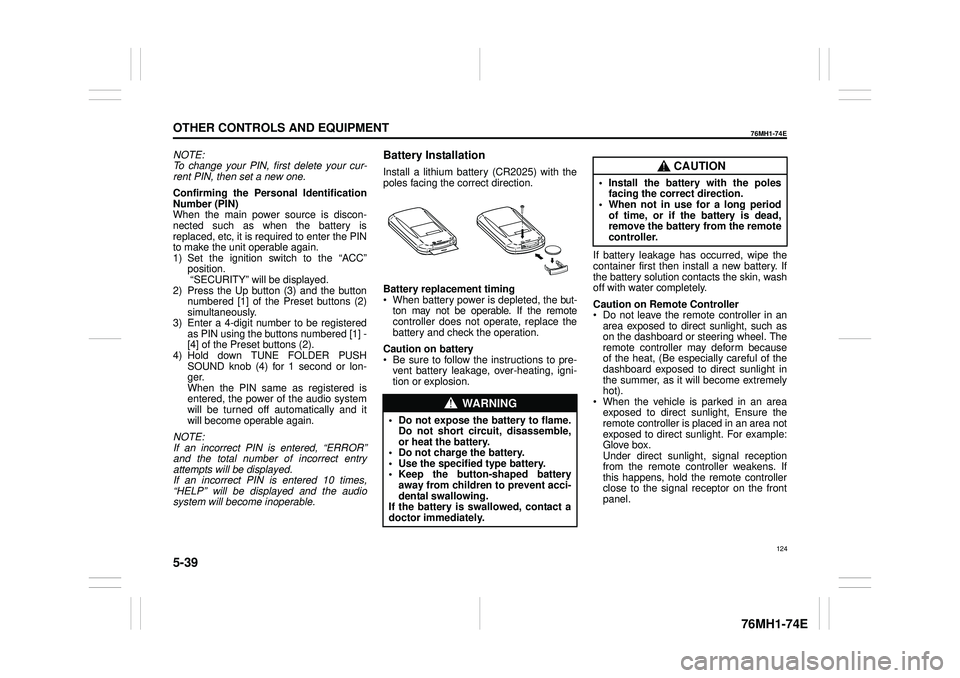
Battery Installation
Install a lithium battery (CR2025) with the poles facing the correct direction.
Battery replacement timing When battery power is depleted, the but-ton may not be operable. If the remote controller does not operate, replace the battery and check the operation.
Caution on battery Be sure to follow the instructions to pre- vent battery leakage, over-heating, igni- tion or explosion.
If battery leakage has occurred, wipe the container first then install a new battery. If the battery solution contacts the skin, wash off with water completely.
Caution on Remote Controller Do not leave the remote controller in anarea exposed to direct sunlight, such as on the dashboard or steering wheel. The remote controller may deform becauseof the heat, (Be especially careful of the dashboard exposed to direct sunlight in the summer, as it will become extremelyhot). When the vehicle is parked in an area exposed to direct sunlight, Ensure theremote controller is placed in an area not exposed to direct sunlight. For example: Glove box.Under direct sunlight , signal reception from the remote controller weakens. If this happens, hold the remote controllerclose to the signal receptor on the front panel.
WA R N I N G
• Do not expose the battery to flame. Do not short circuit, disassemble,or heat the battery. • Do not charge the battery. • Use the specified type battery.• Keep the button-shaped battery away from children to prevent acci- dental swallowing.If the battery is swallowed, contact a doctor immediately.
CAUTION
• Install the battery with the poles facing the correct direction.• When not in use for a long period of time, or if the battery is dead, remove the battery from the remotecontroller.
124
Page 147 of 201
6-1
VEHICLE LOADING AND TOWING
76MH1-74E
76MH1-74E
Vehicle Loading
Your vehicle was designed for specific weight capacities. The weight capacities ofyour vehicle are indicated by the Gross Vehicle Weight Rating (GVWR) and the Permissible maximum Axle Weight (PAW,front and rear). The GVWR and PAW (front and rear) are listed in the “SPECIFICA- TIONS” section.
GVWR – Maximum permissible overall weight of the fully loaded vehicle (includingall the occupants, accessories and cargo plus the trailer nose weight if towing a trailer).PAW – (Front and Rear) Maximum permis- sible weight on an individual axle.
Actual weight of the loaded vehicle and actual loads at the front and rear axles can only be determined by weighing the vehi-cle. Compare these weights to the GVWR and PAW (front and rear). If the gross vehi- cle weight or the load on either axleexceeds these ratings, you must remove enough weight to bring the load down to the rated capacity.
Trailer Towing
Your MARUTI SUZUKI was originallydesigned to carry people and a normal amount of cargo, not to tow a trailer.MAR- UTI SUZUKI does not recommend you useyour vehicle to tow a trailer. Towing a trailer can adversely affect handling, durability, and fuel economy.
Towing Your Vehicle
Your vehicle may be towed behind anothervehicle (such as a motorhome), providedyour vehicle is 2 wheel drive (2WD) and you use the proper towing method speci- fied for your vehicle. The towing methodyou must use depends on the specifica- tions of your vehicle: whether it is a manual transaxle vehicle or an Auto Gear Shiftvehicle.
Use the towing instruction table to select the proper towing method for your vehicle, and carefully follow the corresponding instructions. Be sure to use proper towingequipment designed for recreational tow- ing and make sure that towing speed does not exceed 90 km/h (55 mph).
WA R N I N G
Never overload your vehicle. Thegross vehicle weight (sum of theweights of the vehicle, all the occu- pants, accessories, cargo plus trailer nose weight if towing a trailer) mustnever exceed the Gross Vehicle Weight Rating (GVWR). In addition, never distribute a load so that theweight on either th e front or rear axle exceeds the Permissible maximum Axle Weight (PAW).
WA R N I N G
Always distribute cargo evenly. Toavoid personal injury or damage to your vehicle, always secure cargo to prevent it from shifting if the vehiclemoves suddenly. Place heavier objects on the floor and as far for- ward in the cargo area as possible.Never pile cargo higher than the top of the seat backs.
WA R N I N G
When you tow your vehicle, follow the instructions below to avoid acci-dents and damage to your vehicle. In addition, be sure to observe govern- ment and local requirements regard-ing vehicle lighting and trailer hitches or tow bars.
WA R N I N G
A safety chain should always be used when you tow your vehicle.
136
Page 148 of 201

6-2
VEHICLE LOADING AND TOWING
76MH1-74E
76MH1-74E
TOWING INSTRUCTION TABLE
76MH022
A: 2WD VEHICLES WITH MANUAL TRANSAXLE OR AUTO GEAR SHIFT 1) Secure the front wheels on a towingdolly according to the instructions pro- vided by the dolly manufacturer. 2) Release the parking brake.
76MH023
B: 2WD VEHICLES WITH MANUAL TRANSAXLE OR AUTO GEAR SHIFT 1) Shift the gearshift lever into neutral. 2) Turn the ignition key to the
Page 153 of 201
7-4
INSPECTION AND MAINTENANCE
76MH1-74E
76MH1-74E
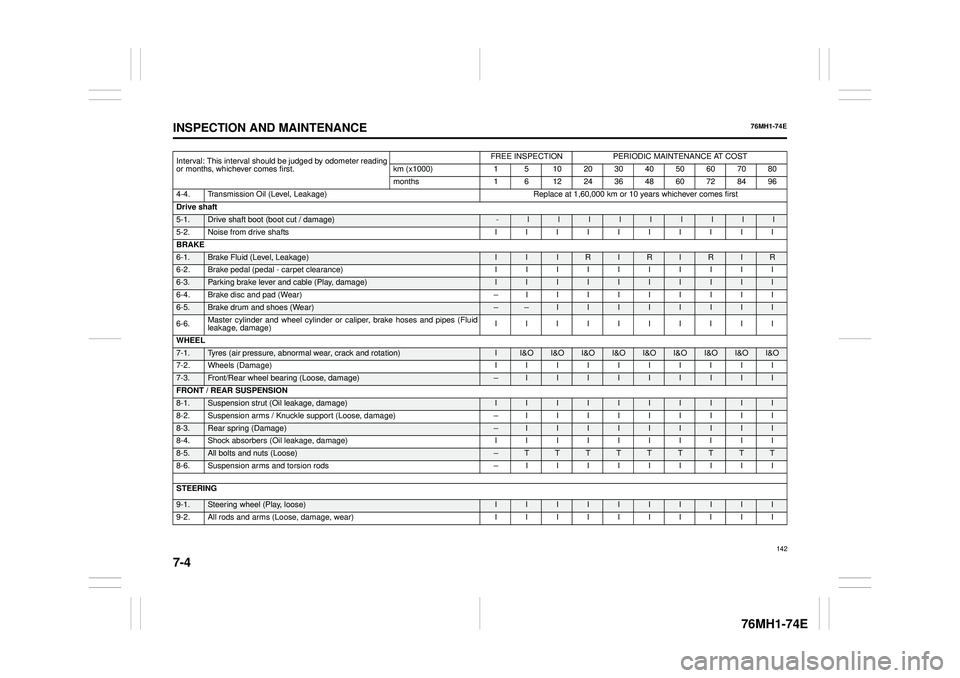
Interval: This interval should be judged by odometer reading or months, whichever comes first.
FREE INSPECTIONPERIODIC MAINTENANCE AT COST
km (x1000) 1 5 10 20 30 40 50 60 70 80
months 1 6 12 24 36 48 60 72 84 96
4-4. Transmission Oil (Level, Leakage)Replace at 1,60,000 km or 10 years whichever comes first
Drive shaft
5-1.Drive shaft boot (boot cut / damage)-lllllllll
5-2. Noise from drive shafts I I I I I I I I I I
BRAKE
6-1. Brake Fluid (Level, Leakage) I I I R I R I R I R
6-2. Brake pedal (pedal - carpet clearance) I I I I I I I I I I
6-3. Parking brake lever and cable (Play, damage) I I I I I I I I I I
6-4. Brake disc and pad (Wear) – I I I I I I I I I
6-5.Brake drum and shoes (Wear) – – I I I I I I I I
6-6. Master cylinder and wheel cylinder or caliper, brake hoses and pipes (Fluid leakage, damage) IIIIIIIIII
WHEEL
7-1. Tyres (air pressure, abnormal wear, crack and rotation) II&O I&OI&OI&OI&OI&OI&O I&OI&O
7-2. Wheels (Damage) I I I I I I I I I I
7-3. Front/Rear wheel bearing (Loose, damage) –I I I I I I I I I
FRONT / REAR SUSPENSION
8-1. Suspension strut (Oil leakage, damage) I I I I I I I I I I
8-2. Suspension arms / Knuckle supp ort (Loose, damage) – I I I I I I I I I
8-3. Rear spring (Damage) – I I I I I I I I I
8-4. Shock absorbers (Oil leakage, damage) I I I I I I I I I I
8-5.All bolts and nuts (Loose)– T T T T T T T T T
8-6. Suspension arms and torsion rods – I I I I I I I I I
STEERING 9-1.Steering wheel (Play, loose) I I I I I I I I I I
9-2. All rods and arms (Loose, damage, wear) I I I I I I I I I I
142
Page 166 of 201
7-17
INSPECTION AND MAINTENANCE
76MH1-74E
76MH1-74E
NOTE: When measuring the distance between the brake pedal and floor wall, be sure not toinclude the floor mat or rubber on the floor wall in your measurement.
60G104S
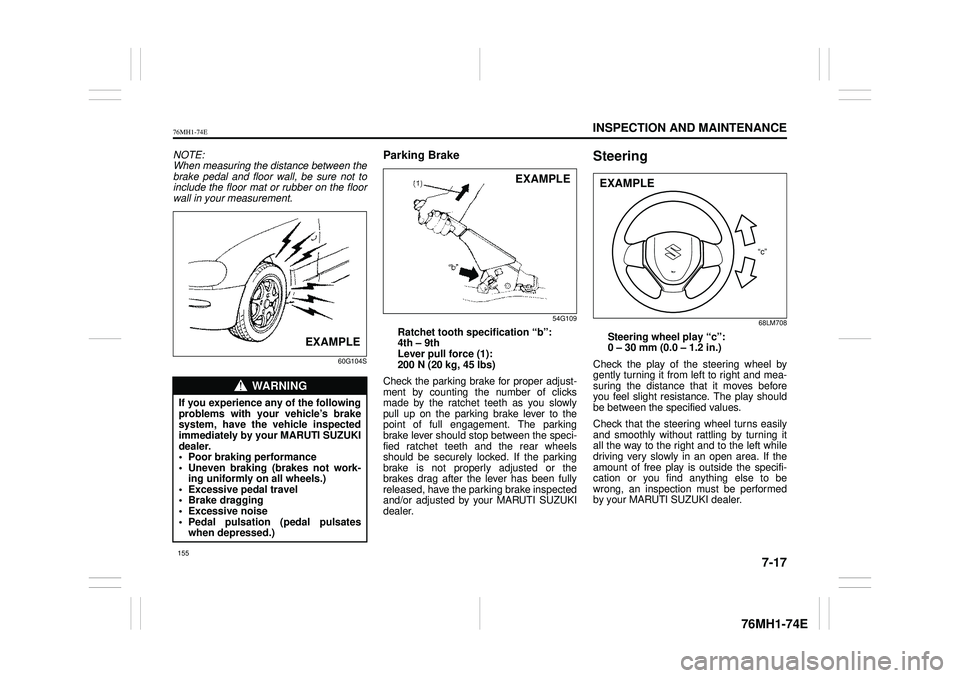
Parking Brake
54G109
Ratchet tooth speci fication “b”: 4th – 9th Lever pull force (1): 200 N (20 kg, 45 lbs)
Check the parking brake for proper adjust- ment by counting the number of clicksmade by the ratchet teeth as you slowly pull up on the parking brake lever to the point of full engagement. The parkingbrake lever should stop between the speci- fied ratchet teeth and the rear wheels should be securely locked. If the parkingbrake is not properly adjusted or the brakes drag after the lever has been fully released, have the parking brake inspectedand/or adjusted by your MARUTI SUZUKI dealer.
Steering
68LM708
Steering wheel play “c”: 0 – 30 mm (0.0 – 1.2 in.)
Check the play of the steering wheel by gently turning it from left to right and mea-suring the distance that it moves before you feel slight resistance. The play should be between the specified values.
Check that the steering wheel turns easily and smoothly without rattling by turning itall the way to the right and to the left while driving very slowly in an open area. If the amount of free play is outside the specifi-cation or you find anything else to be wrong, an inspection must be performed by your MARUTI SUZUKI dealer.
WA R N I N G
If you experience any of the following problems with your vehicle’s brake system, have the vehicle inspectedimmediately by your MARUTI SUZUKI dealer. • Poor braking performance• Uneven braking (brakes not work- ing uniformly on all wheels.) • Excessive pedal travel• Brake dragging • Excessive noise • Pedal pulsation (pedal pulsateswhen depressed.)
EXAMPLE
EXAMPLE
“c”
EXAMPLE
155