air SUZUKI CELERIO 2019 Owner's Guide
[x] Cancel search | Manufacturer: SUZUKI, Model Year: 2019, Model line: CELERIO, Model: SUZUKI CELERIO 2019Pages: 201, PDF Size: 5.82 MB
Page 132 of 201
5-36
OTHER CONTROLS AND EQUIPMENT
76MH1-74E
76MH1-74E
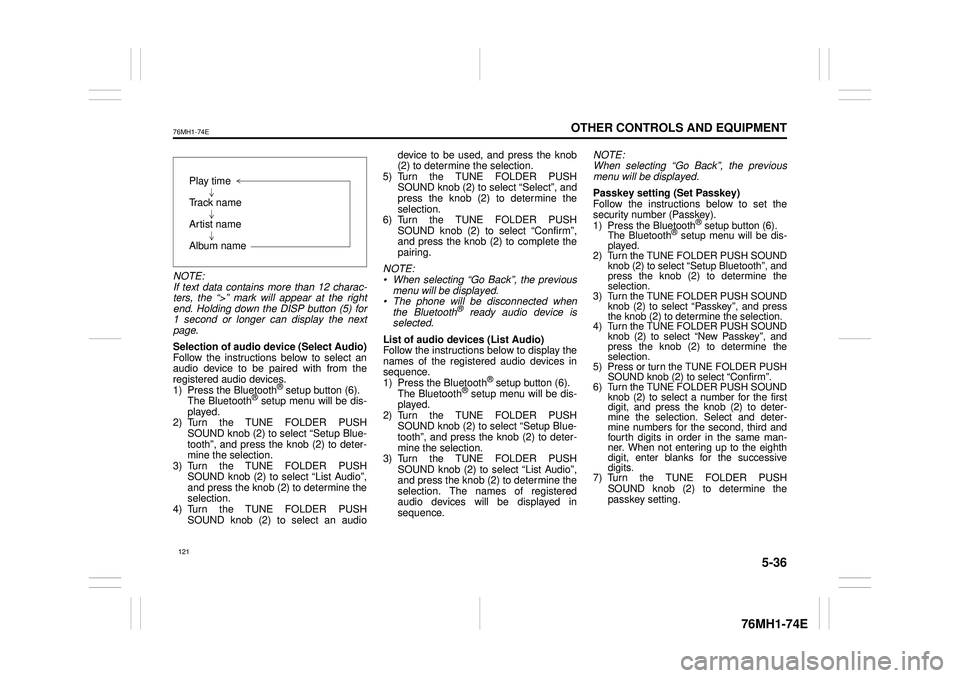
NOTE: If text data contains more than 12 charac- ters, the “>” mark will appear at the rightend. Holding down the DISP button (5) for 1 second or longer can display the next page.
Selection of audio device (Select Audio) Follow the instructions below to select anaudio device to be paired with from the registered audio devices. 1) Press the Bluetooth® setup button (6). The Bluetooth® setup menu will be dis- played. 2) Turn the TUNE FOLDER PUSHSOUND knob (2) to select “Setup Blue- tooth”, and press the knob (2) to deter- mine the selection.3) Turn the TUNE FOLDER PUSH SOUND knob (2) to select “List Audio”, and press the knob (2) to determine theselection. 4) Turn the TUNE FOLDER PUSH SOUND knob (2) to select an audio
device to be used, and press the knob (2) to determine the selection. 5) Turn the TUNE FOLDER PUSHSOUND knob (2) to select “Select”, and press the knob (2) to determine the selection.6) Turn the TUNE FOLDER PUSH SOUND knob (2) to select “Confirm”, and press the knob (2) to complete thepairing.
NOTE: • When selecting “Go Back”, the previous menu will be displayed. • The phone will be disconnected whenthe Bluetooth® ready audio device is selected.
List of audio devices (List Audio) Follow the instructions below to display the names of the registered audio devices insequence. 1) Press the Bluetooth® setup button (6). The Bluetooth® setup menu will be dis-played. 2) Turn the TUNE FOLDER PUSH SOUND knob (2) to select “Setup Blue-tooth”, and press the knob (2) to deter- mine the selection. 3) Turn the TUNE FOLDER PUSHSOUND knob (2) to select “List Audio”, and press the knob (2) to determine the selection. The na mes of registered audio devices will be displayed in sequence.
NOTE: When selecting “Go Back”, the previous menu will be displayed.
Passkey setting (Set Passkey) Follow the instructions below to set thesecurity number (Passkey).1) Press the Bluetooth® setup button (6). The Bluetooth® setup menu will be dis- played. 2) Turn the TUNE FOLDER PUSH SOUND knob (2) to select
Page 133 of 201
5-37
OTHER CONTROLS AND EQUIPMENT
76MH1-74E
76MH1-74E
NOTE: When selecting “Go Back”, the previous menu will be displayed.
Deletion of audio device information (Delete Audio)Follow the instructions below to delete the registered information of audio device. 1) Press the Bluetooth® setup button (6). The Bluetooth® setup menu will be dis- played. 2) Turn the TUNE FOLDER PUSHSOUND knob (2) to select “Setup Blue- tooth”, and press the knob (2) to deter- mine the selection.3) Turn the TUNE FOLDER PUSH SOUND knob (2) to select “List Audio”, and press the knob (2) to determine theselection. 4) Turn the TUNE FOLDER PUSH SOUND knob (2) to select an audiodevice to be deleted, and press the knob (2) to determine the selection. 5) Turn the TUNE FOLDER PUSHSOUND knob (2) to select “Delete”, and press the knob (2) to determine the selection.6) Turn the TUNE FOLDER PUSH SOUND knob (2) to select “Delete?”, and press the knob (2) to determine theselection. 7) Turn the TUNE FOLDER PUSH SOUND knob (2) to select “Confirm”,and press the knob (2) to complete the deletion.
NOTE: When selecting “Go Back”, the previous menu will be displayed.
Disclaimer for Bluetooth® function Depending on the mobile phone models, some phones may not be compatible fully or partially (some function may berestricted). Connectivity or voice quality may get affected depending on circumstances. After the ignition switch is turned to the “ON” position, the audio system takes few seconds to detect and connect to theBluetooth® device (if already paired). Make sure that you are aware of all applicable local laws and accordinglyuse Bluetooth device.
Remote Audio Controls
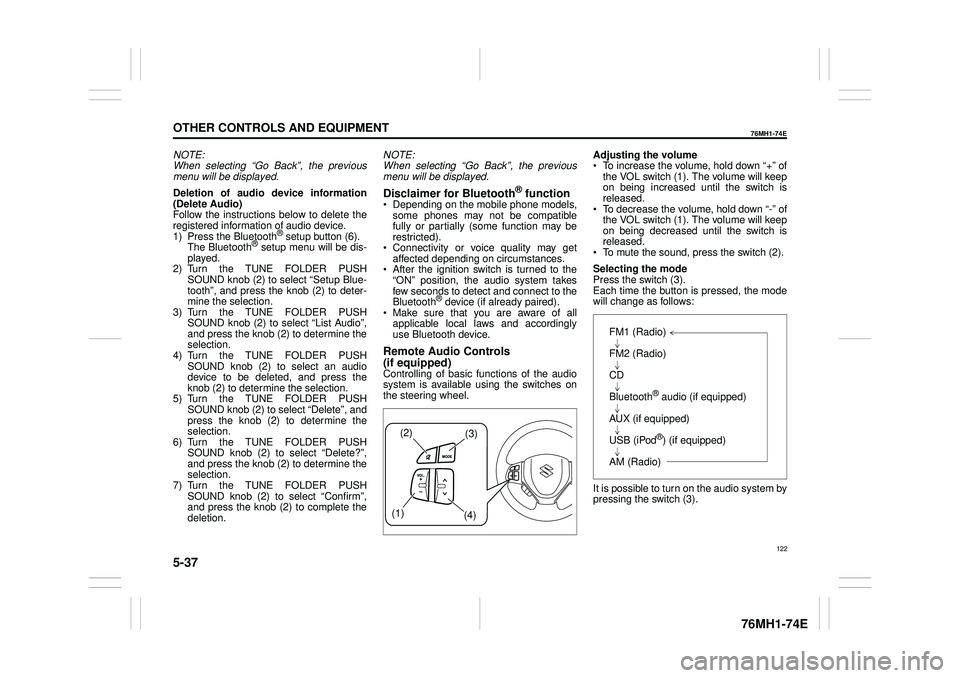
(if equipped)Controlling of basic functions of the audio system is available us ing the switches on the steering wheel.
Adjusting the volume To increase the volume, hold down “+” of the VOL switch (1). The volume will keepon being increased until the switch is released. To decrease the volume, hold down “-” ofthe VOL switch (1). The volume will keep on being decreased until the switch is released. To mute the sound, press the switch (2).
Selecting the mode Press the switch (3). Each time the button is pressed, the mode will change as follows:
It is possible to turn on the audio system by pressing the switch (3).
(2)(3)
(1) (4)
FM1 (Radio)
FM2 (Radio)
CD
Bluetooth® audio (if equipped)
AUX (if equipped)
USB (iPod®) (if equipped)
AM (Radio)
122
Page 143 of 201
5-47
OTHER CONTROLS AND EQUIPMENT
76MH1-74E
76MH1-74E
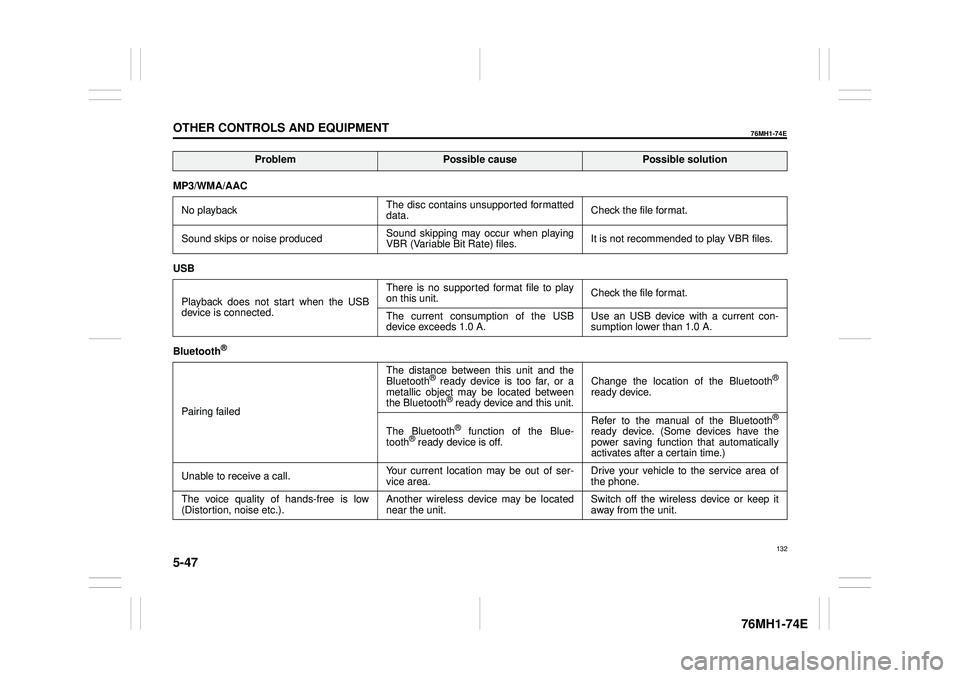
MP3/WMA/AAC
No playback The disc contains unsupported formatted data. Check the file format.
Sound skips or noise produced Sound skipping may occur when playing VBR (Variable Bit Rate) files. It is not recommended to play VBR files.
USB
Playback does not start when the USB device is connected.
There is no supported format file to play on this unit. Check the file format.
The current consumption of the USB device exceeds 1.0 A. Use an USB device with a current con- sumption lower than 1.0 A.
Bluetooth®
Pairing failed
The distance between this unit and the Bluetooth® ready device is too far, or a metallic object may be located between the Bluetooth® ready device and this unit.
Change the location of the Bluetooth®
ready device.
The Bluetooth® function of the Blue- tooth® ready device is off.
Refer to the manual of the Bluetooth®
ready device. (Some devices have the power saving function that automatically activates after a certain time.)
Unable to receive a call. Your current location may be out of ser- vice area. Drive your vehicle to the service area of the phone.
The voice quality of hands-free is low (Distortion, noise etc.). Another wireless device may be located near the unit. Switch off the wireless device or keep it away from the unit.
ProblemPossible causePossible solution
132
Page 145 of 201
5-49
OTHER CONTROLS AND EQUIPMENT
76MH1-74E
76MH1-74E
Bluetooth®
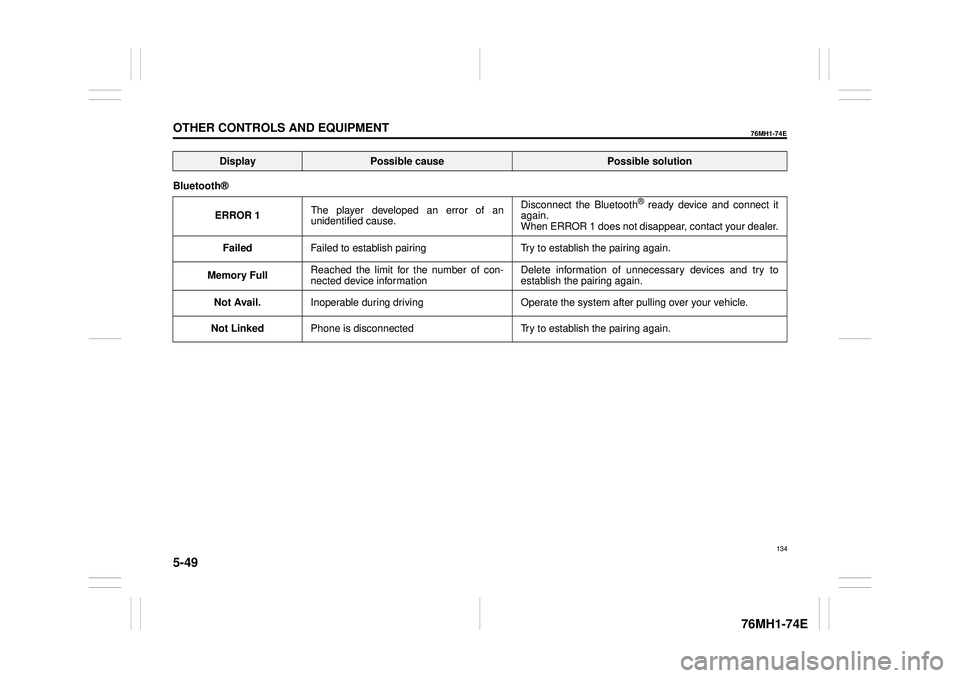
ERROR 1 The player developed an error of an unidentified cause.
Disconnect the Bluetooth® ready device and connect it again. When ERROR 1 does not disappear, contact your dealer.
Failed Failed to establish pairing Try to establish the pairing again.
Memory Full Reached the limit for the number of con- nected device information Delete information of unnecessary devices and try to establish the pairing again.
Not Avail. Inoperable during driving Operate the system after pulling over your vehicle.
Not Linked Phone is disconnected Try to establish the pairing again.
DisplayPossible causePossible solution
134
Page 149 of 201
INSPECTION AND MAINTENANCE
76MH1-74E
76MH1-74E
138
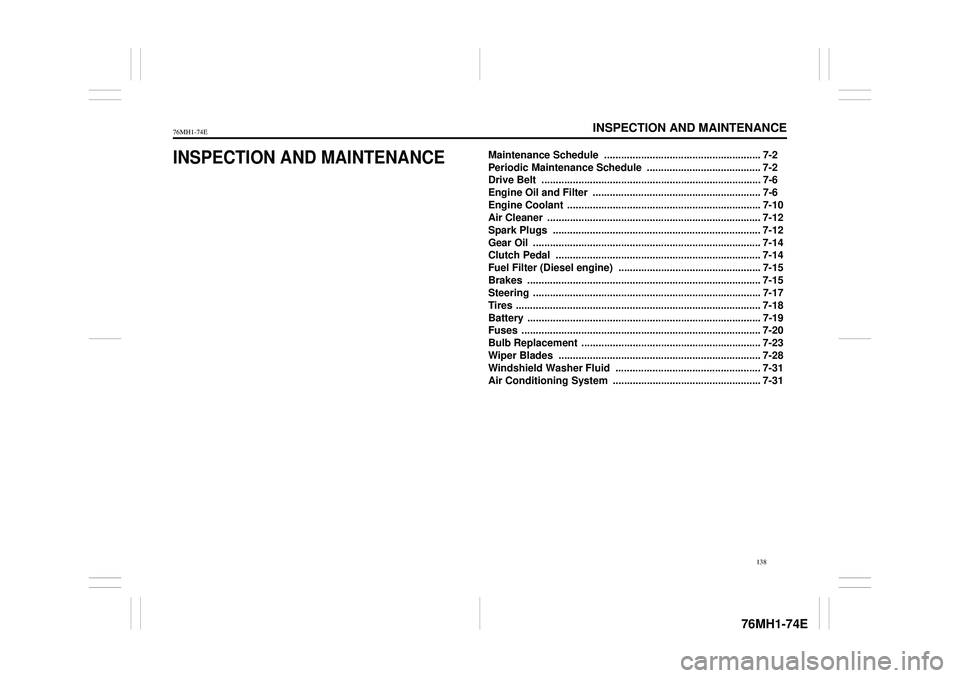
INSPECTION AND MAINTENANCEMaintenance Schedule ....................................................... 7-2
Periodic Maintenance Schedule . ....................................... 7-2
Drive Belt ............................................................................. 7-6
Engine Oil and Filter ........................................................... 7-6
Engine Coolant .................................................................... 7-10
Air Cleaner ........................................................................... 7-12
Spark Plugs ......................................................................... 7-12
Gear Oil ................................................................................ 7-14
Clutch Pedal ........................................................................ 7-14
Fuel Filter (Diesel engine) .................................................. 7-15
Brakes .......... ........................................................................ 7-15
Steering ................................................................................ 7-17
Tires ...................................................................................... 7-18
Battery .................................................................................. 7-19
Fuses .................................................................................... 7-20
Bulb Replacement ............................................................... 7-23
Wiper Blades ....................................................................... 7-28
Windshield Washer Fluid ................................................... 7-31
Air Conditioning System .................................................... 7-31
Page 150 of 201
7-1
INSPECTION AND MAINTENANCE
76MH1-74E
76MH1-74E
60A187S
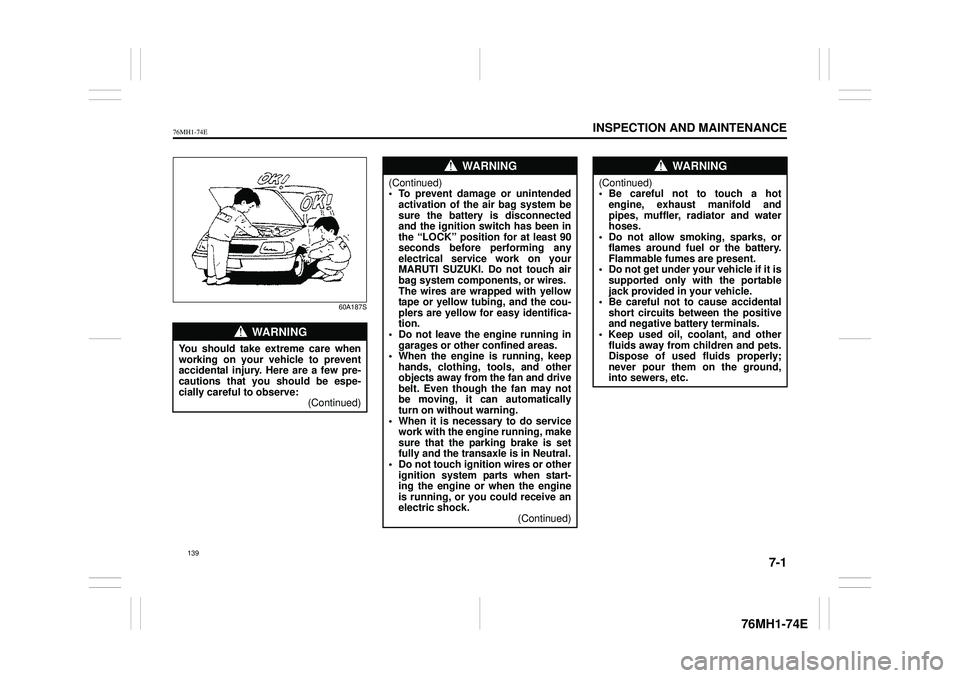
WA R N I N G
You should take extreme care when working on your vehicle to preventaccidental injury. Here are a few pre- cautions that you should be espe- cially careful to observe:(Continued)
WA R N I N G
(Continued)• To prevent damage or unintendedactivation of the air bag system be sure the battery is disconnected and the ignition switch has been inthe “LOCK” position for at least 90 seconds before performing any electrical service work on yourMARUTI SUZUKI. Do not touch air bag system components, or wires. The wires are wrapped with yellowtape or yellow tubing, and the cou- plers are yellow for easy identifica- tion.• Do not leave the engine running in garages or other confined areas. • When the engine is running, keephands, clothing, tools, and other objects away from the fan and drive belt. Even though the fan may notbe moving, it can automatically turn on without warning. • When it is necessary to do servicework with the engine running, make sure that the parking brake is set fully and the transaxle is in Neutral.• Do not touch ignition wires or other ignition system parts when start- ing the engine or when the engineis running, or you could receive an electric shock. (Continued)
WA R N I N G
(Continued)• Be careful not to touch a hotengine, exhaust manifold and pipes, muffler, radiator and water hoses.• Do not allow smoking, sparks, or flames around fuel or the battery. Flammable fumes are present.• Do not get under your vehicle if it is supported only with the portable jack provided in your vehicle.• Be careful not to cause accidental short circuits be tween the positive and negative battery terminals.• Keep used oil, coolant, and other fluids away from children and pets. Dispose of used fluids properly;never pour them on the ground, into sewers, etc.
139
Page 152 of 201
7-3
INSPECTION AND MAINTENANCE
76MH1-74E
76MH1-74E
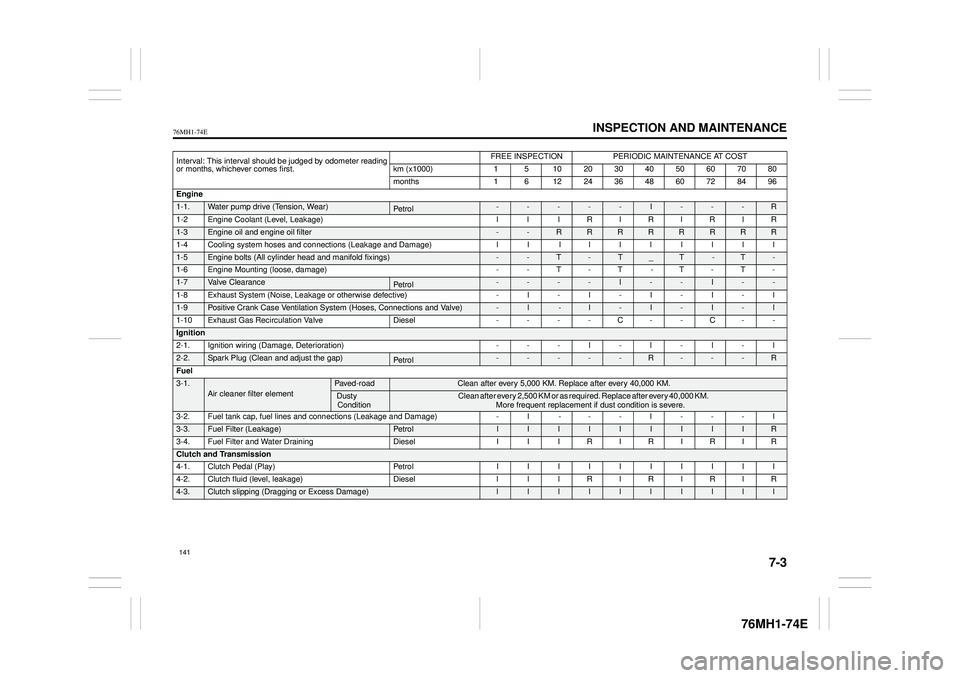
Interval: This interval should be judged by odometer reading or months, whichever comes first.
FREE INSPECTIONPERIODIC MAINTENANCE AT COST
km (x1000) 1 5 10 20 30 40 50 60 70 80
months 1 6 12 24 36 48 60 72 84 96
Engine
1-1.Water pump drive (Tension, Wear)Pe tro l-----I---R
1-2Engine Coolant (Level, Leakage) l l lRlRlRlR
1-3Engine oil and engine oil filter --RRRRRRRR
1-4 Cooling system hoses and connections (Leakage and Damage) l l l l llllll
1-5Engine bolts (All cylinder head and manifold fixings)--T-T_T -T-
1-6 Engine Mounting (loose, damage) - - T - T - T - T -
1-7Valve ClearancePe tro l----I--I--
1-8Exhaust System (Noise, Leakage or otherwise defective)
-l -l-I-I-l
1-10 Exhaust Gas Recirculation Valve Diesel - - - - C - - C - -
Ignition
2-1.Ignition wiring (Damage, Deterioration)---l-l-l-l
2-2.Spark Plug (Clean and adjust the gap)-----R---R
Fuel
3-1.Air cleaner filter elementPaved-road Clean after every 5,000 KM. Replace after every 40,000 KM.
Dusty Condition C l e a n a f t e r e v e r y 2 , 5 0 0 K M o r a s r e q u i r e d . R e p l a c e a f t e r e v e r y 4 0 , 0 0 0 K M . More frequent replacement if dust condition is severe.
3-2.Fuel tank cap, fuel lines and connections (Leakage and Damage)-l ---l---l
3-3.Fuel Filter (Leakage)Pe tro lIIIIIIIIIR
3-4.Fuel Filter and Water DrainingDieselIIIRIRIRIR
Clutch and Transmission
4-1.Clutch Pedal (Play)IIIIIIIIII
4-2.Clutch fluid (level, leakage)DiesellllRlRlRlR
4-3.Clutch slipping (Dragging or Excess Damage)llllllllll
141
Page 153 of 201
7-4
INSPECTION AND MAINTENANCE
76MH1-74E
76MH1-74E
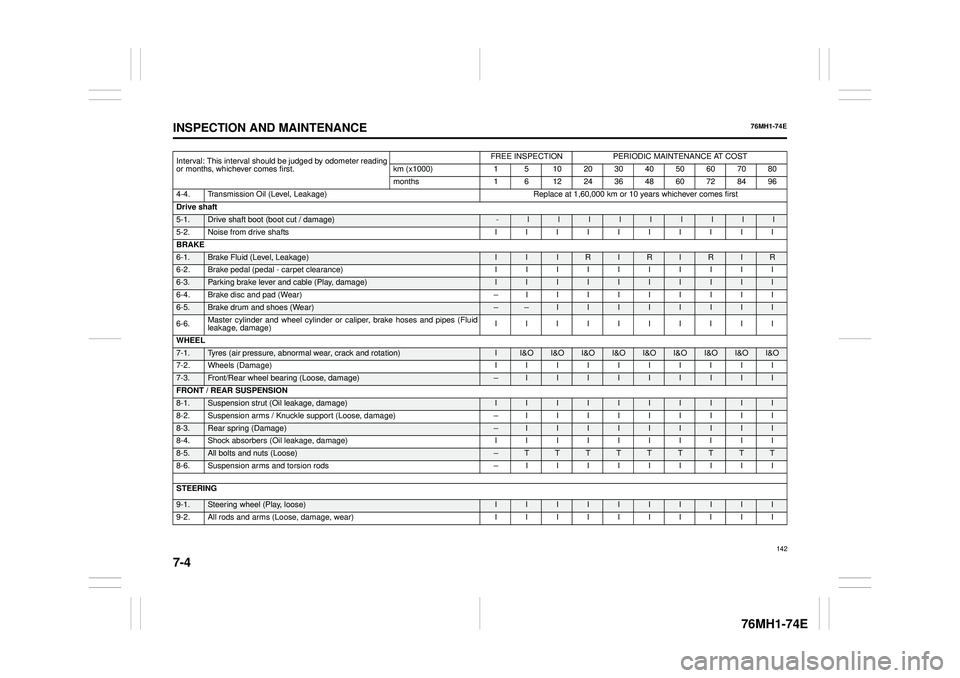
Interval: This interval should be judged by odometer reading or months, whichever comes first.
FREE INSPECTIONPERIODIC MAINTENANCE AT COST
km (x1000) 1 5 10 20 30 40 50 60 70 80
months 1 6 12 24 36 48 60 72 84 96
4-4. Transmission Oil (Level, Leakage)Replace at 1,60,000 km or 10 years whichever comes first
Drive shaft
5-1.Drive shaft boot (boot cut / damage)-lllllllll
5-2. Noise from drive shafts I I I I I I I I I I
BRAKE
6-1. Brake Fluid (Level, Leakage) I I I R I R I R I R
6-2. Brake pedal (pedal - carpet clearance) I I I I I I I I I I
6-3. Parking brake lever and cable (Play, damage) I I I I I I I I I I
6-4. Brake disc and pad (Wear) – I I I I I I I I I
6-5.Brake drum and shoes (Wear) – – I I I I I I I I
6-6. Master cylinder and wheel cylinder or caliper, brake hoses and pipes (Fluid leakage, damage) IIIIIIIIII
WHEEL
7-1. Tyres (air pressure, abnormal wear, crack and rotation) II&O I&OI&OI&OI&OI&OI&O I&OI&O
7-2. Wheels (Damage) I I I I I I I I I I
7-3. Front/Rear wheel bearing (Loose, damage) –I I I I I I I I I
FRONT / REAR SUSPENSION
8-1. Suspension strut (Oil leakage, damage) I I I I I I I I I I
8-2. Suspension arms / Knuckle supp ort (Loose, damage) – I I I I I I I I I
8-3. Rear spring (Damage) – I I I I I I I I I
8-4. Shock absorbers (Oil leakage, damage) I I I I I I I I I I
8-5.All bolts and nuts (Loose)– T T T T T T T T T
8-6. Suspension arms and torsion rods – I I I I I I I I I
STEERING 9-1.Steering wheel (Play, loose) I I I I I I I I I I
9-2. All rods and arms (Loose, damage, wear) I I I I I I I I I I
142
Page 154 of 201
7-5
INSPECTION AND MAINTENANCE
76MH1-74E
76MH1-74E
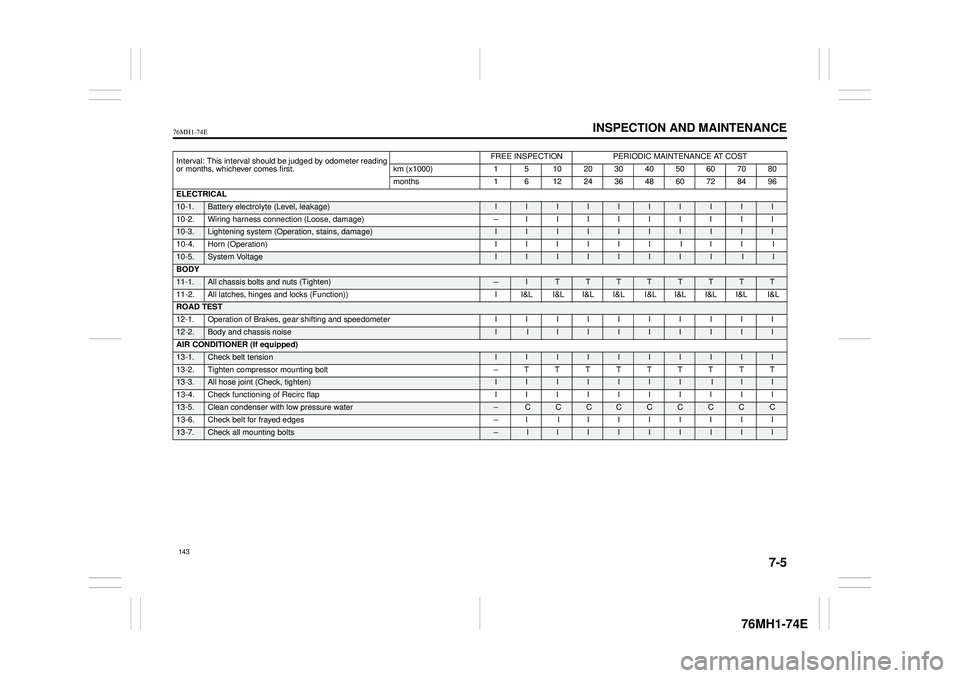
Interval: This interval should be judged by odometer reading or months, whichever comes first.
FREE INSPECTIONPERIODIC MAINTENANCE AT COST
km (x1000) 1 5 10 20 30 40 50 60 70 80
months 1 6 12 24 36 48 60 72 84 96
ELECTRICAL
10-1. Battery electrolyte (Level, leakage) I I I I I I I I I I
10-2. Wiring harness connection (Loose, damage) – I I I I I I I I I
10-3. Lightening system (Operat ion, stains, damage) I I I I I I I I I I
10-4. Horn (Operation) I I I I I I I I I I
10-5.System Voltage II I I I I I I I I
BODY
11-1. All chassis bolts and nuts (Tighten) – I T T T T T T T T
11-2. All latches, hinges and locks (Function)) I I&L I&L I&L I&L I&L I&L I&L I&L I&L
ROAD TEST
12-1. Operation of Brakes, gear shifting and speedometer I I I I I I I I I I
12-2.Body and chassis noise I I I I I I I I I I
AIR CONDITIONER (If equipped)
13-1. Check belt tension I I I I I I I I I I
13-2. Tighten compressor mounting bolt – T T T T T T T T T
13-3. All hose joint (Check, tighten) I I I I II I I I I
13-4. Check functioning of Recirc flap I I I I I I I I I I
13-5. Clean condenser with low pressure water – C C CCC C C C C
13-6. Check belt for frayed edges – I I I I I I I I I
13-7.Check all mounting bolts – I I I I I I I I I
143
Page 155 of 201
7-6
INSPECTION AND MAINTENANCE
76MH1-74E
76MH1-74E
Drive Belt
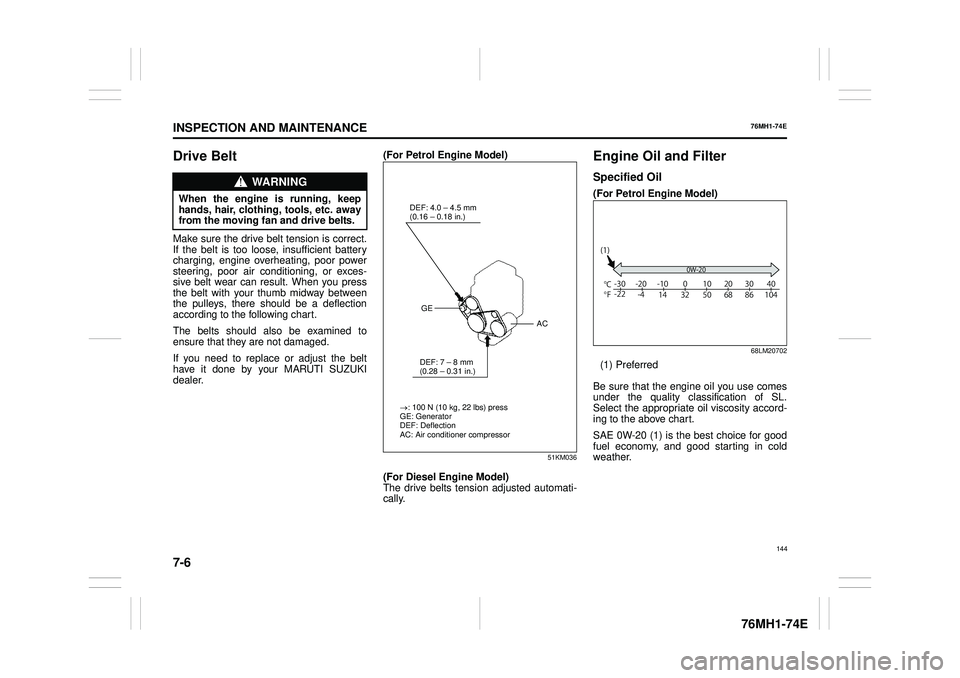
Make sure the drive belt tension is correct. If the belt is too loos e, insufficient battery charging, engine overheating, poor powersteering, poor air conditioning, or exces- sive belt wear can result. When you press the belt with your thumb midway betweenthe pulleys, there should be a deflection according to the following chart.
The belts should also be examined to ensure that they are not damaged.
If you need to replace or adjust the belt have it done by your MARUTI SUZUKI dealer.
(For Petrol Engine Model)
51KM036
(For Diesel Engine Model) The drive belts tens ion adjusted automati- cally.
Engine Oil and Filter
Specified Oil
(For Petrol Engine Model)
68LM20702
(1) Preferred
Be sure that the engine oil you use comes under the quality classification of SL.Select the appropriate oil viscosity accord- ing to the above chart.
SAE 0W-20 (1) is the best choice for good fuel economy, and good starting in cold weather.
WA R N I N G
When the engine is running, keephands, hair, clothing, tools, etc. away from the moving fan and drive belts.
: 100 N (10 kg, 22 lbs) press GE: Generator DEF: DeflectionAC: Air conditioner compressor
DEF: 4.0 – 4.5 mm (0.16