light SUZUKI GRAND VITARA 2008 3.G Owner's Manual
[x] Cancel search | Manufacturer: SUZUKI, Model Year: 2008, Model line: GRAND VITARA, Model: SUZUKI GRAND VITARA 2008 3.GPages: 290, PDF Size: 4.99 MB
Page 67 of 290
3-6
STEERING COLUMN CONTROLS
66J22-03E
Lighting Operation
66J024
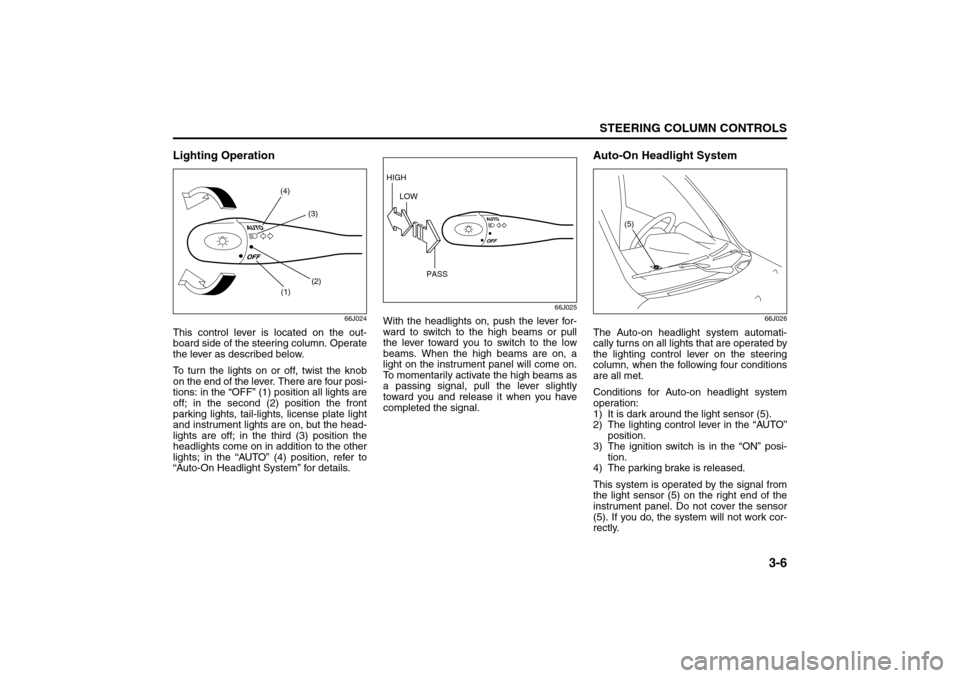
This control lever is located on the out-
board side of the steering column. Operate
the lever as described below.
To turn the lights on or off, twist the knob
on the end of the lever. There are four posi-
tions: in the “OFF” (1) position all lights are
off; in the second (2) position the front
parking lights, tail-lights, license plate light
and instrument lights are on, but the head-
lights are off; in the third (3) position the
headlights come on in addition to the other
lights; in the “AUTO” (4) position, refer to
“Auto-On Headlight System” for details.
66J025
With the headlights on, push the lever for-
ward to switch to the high beams or pull
the lever toward you to switch to the low
beams. When the high beams are on, a
light on the instrument panel will come on.
To momentarily activate the high beams as
a passing signal, pull the lever slightly
toward you and release it when you have
completed the signal.
Auto-On Headlight System
66J026
The Auto-on headlight system automati-
cally turns on all lights that are operated by
the lighting control lever on the steering
column, when the following four conditions
are all met.
Conditions for Auto-on headlight system
operation:
1) It is dark around the light sensor (5).
2) The lighting control lever in the “AUTO”
position.
3) The ignition switch is in the “ON” posi-
tion.
4) The parking brake is released.
This system is operated by the signal from
the light sensor (5) on the right end of the
instrument panel. Do not cover the sensor
(5). If you do, the system will not work cor-
rectly.
(1)(2) (3) (4)
HIGH
LOW
PASS
(5)
Lighting/Turn Signal Control Lever: 7, 8
Page 68 of 290
3-7STEERING COLUMN CONTROLS
66J22-03E
NOTE:
This system does not react to all types of
ambient light. As the sensor is infrared
type, it will not work correctly with ambient
lights that do not contain infrared rays.
Daytime Running Light (D.R.L.)
SystemThe headlights light, but are dimmer than
the low beam, when the following three
conditions are all met. Also, the D.R.L. indi-
cator light on the instrument panel comes
on.
Conditions for D.R.L. system operation:
1) The engine is running.
2) The parking brake is released.
3) The lighting switch is in either the “OFF”
or the “Second” position: or The lighting
switch is in the “AUTO” position and it is
light around the light sensor.
NOTE:
Be sure to turn the lighting switch to the
third position at night or at any time of the
day when driving or weather conditions
require the headlights to operate at full
brightness and the taillights to be on.
Lights “On” reminder
A buzzer sounds to remind you to turn off
the lights if they are left on when the igni-
tion key is removed and the driver’s door is
opened.
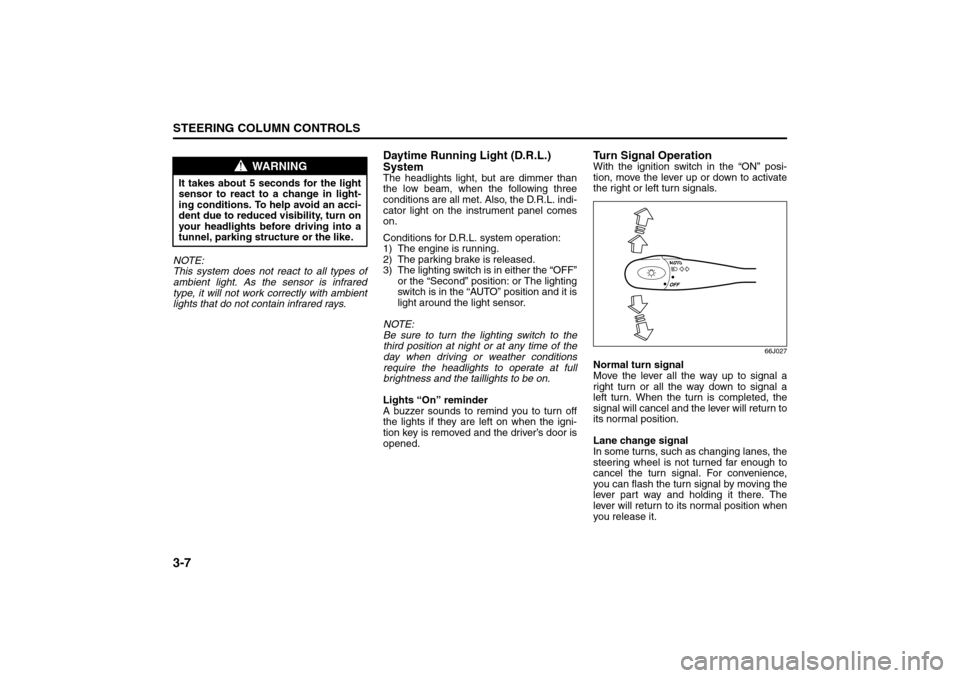
Turn Signal OperationWith the ignition switch in the “ON” posi-
tion, move the lever up or down to activate
the right or left turn signals.
66J027
Normal turn signal
Move the lever all the way up to signal a
right turn or all the way down to signal a
left turn. When the turn is completed, the
signal will cancel and the lever will return to
its normal position.
Lane change signal
In some turns, such as changing lanes, the
steering wheel is not turned far enough to
cancel the turn signal. For convenience,
you can flash the turn signal by moving the
lever part way and holding it there. The
lever will return to its normal position when
you release it.
WARNING
It takes about 5 seconds for the light
sensor to react to a change in light-
ing conditions. To help avoid an acci-
dent due to reduced visibility, turn on
your headlights before driving into a
tunnel, parking structure or the like.
Lighting/Turn Signal Control Lever: 7, 8
Page 69 of 290
3-8
STEERING COLUMN CONTROLS
66J22-03E
Windshield Wiper and Washer
LeverWindshield Wipers
63J283
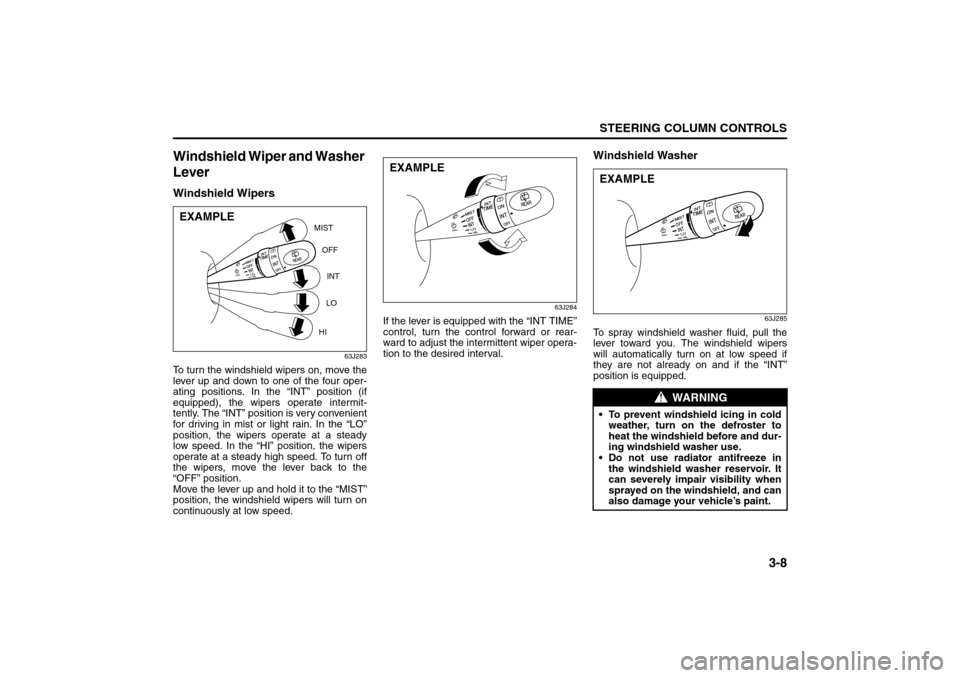
To turn the windshield wipers on, move the
lever up and down to one of the four oper-
ating positions. In the “INT” position (if
equipped), the wipers operate intermit-
tently. The “INT” position is very convenient
for driving in mist or light rain. In the “LO”
position, the wipers operate at a steady
low speed. In the “HI” position, the wipers
operate at a steady high speed. To turn off
the wipers, move the lever back to the
“OFF” position.
Move the lever up and hold it to the “MIST”
position, the windshield wipers will turn on
continuously at low speed.
63J284
If the lever is equipped with the “INT TIME”
control, turn the control forward or rear-
ward to adjust the intermittent wiper opera-
tion to the desired interval.
Windshield Washer
63J285
To spray windshield washer fluid, pull the
lever toward you. The windshield wipers
will automatically turn on at low speed if
they are not already on and if the “INT”
position is equipped.
MIST
OFF
INT
LO
HI
EXAMPLE
EXAMPLE
WARNING
To prevent windshield icing in cold
weather, turn on the defroster to
heat the windshield before and dur-
ing windshield washer use.
Do not use radiator antifreeze in
the windshield washer reservoir. It
can severely impair visibility when
sprayed on the windshield, and can
also damage your vehicle’s paint.EXAMPLE
Windshield Wiper and Washer Lever: 8
Page 71 of 290
3-10
STEERING COLUMN CONTROLS
66J22-03E
Tilt Steering Lock Lever
64J037
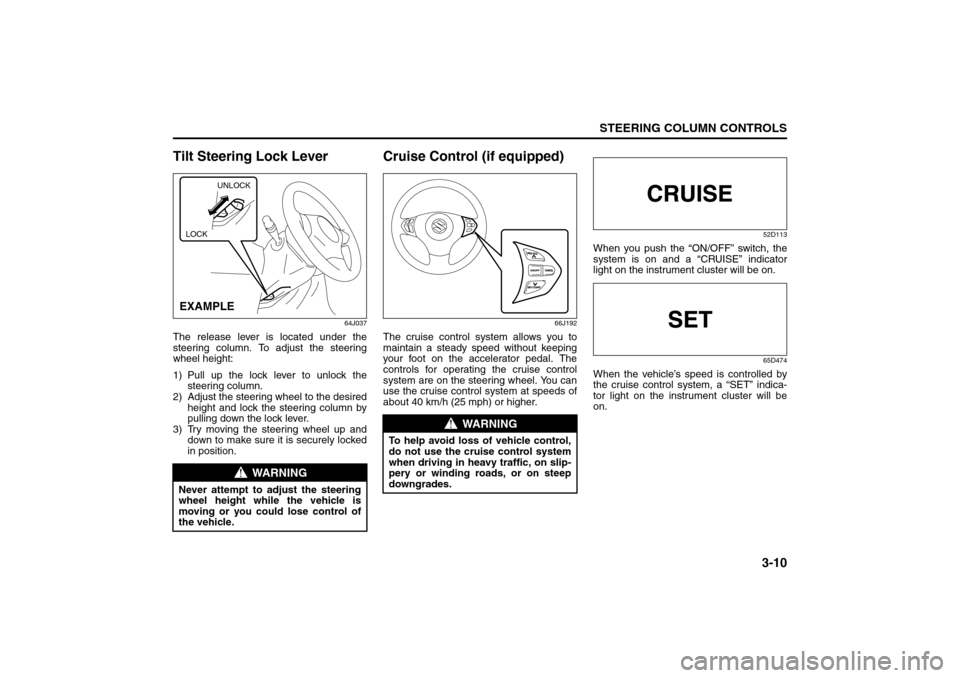
The release lever is located under the
steering column. To adjust the steering
wheel height:
1) Pull up the lock lever to unlock the
steering column.
2) Adjust the steering wheel to the desired
height and lock the steering column by
pulling down the lock lever.
3) Try moving the steering wheel up and
down to make sure it is securely locked
in position.
Cruise Control (if equipped)
66J192
The cruise control system allows you to
maintain a steady speed without keeping
your foot on the accelerator pedal. The
controls for operating the cruise control
system are on the steering wheel. You can
use the cruise control system at speeds of
about 40 km/h (25 mph) or higher.
52D113
When you push the “ON/OFF” switch, the
system is on and a “CRUISE” indicator
light on the instrument cluster will be on.
65D474
When the vehicle’s speed is controlled by
the cruise control system, a “SET” indica-
tor light on the instrument cluster will be
on.
WARNING
Never attempt to adjust the steering
wheel height while the vehicle is
moving or you could lose control of
the vehicle.
UNLOCK
EXAMPLELOCK
WARNING
To help avoid loss of vehicle control,
do not use the cruise control system
when driving in heavy traffic, on slip-
pery or winding roads, or on steep
downgrades.
Tilt Steering Lock Lever: 6
Cruise Control: 7, 8
Page 72 of 290
3-11STEERING COLUMN CONTROLS
66J22-03E
66J193
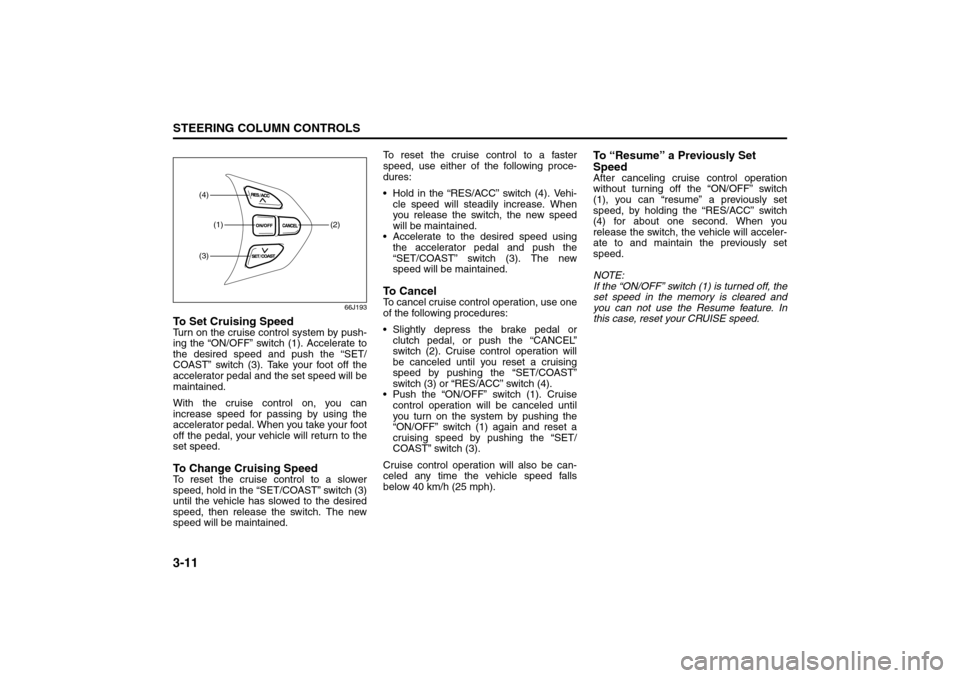
To Set Cruising SpeedTurn on the cruise control system by push-
ing the “ON/OFF” switch (1). Accelerate to
the desired speed and push the “SET/
COAST” switch (3). Take your foot off the
accelerator pedal and the set speed will be
maintained.
With the cruise control on, you can
increase speed for passing by using the
accelerator pedal. When you take your foot
off the pedal, your vehicle will return to the
set speed.To Change Cruising SpeedTo reset the cruise control to a slower
speed, hold in the “SET/COAST” switch (3)
until the vehicle has slowed to the desired
speed, then release the switch. The new
speed will be maintained.To reset the cruise control to a faster
speed, use either of the following proce-
dures:
Hold in the “RES/ACC” switch (4). Vehi-
cle speed will steadily increase. When
you release the switch, the new speed
will be maintained.
Accelerate to the desired speed using
the accelerator pedal and push the
“SET/COAST” switch (3). The new
speed will be maintained.
To C a n c e lTo cancel cruise control operation, use one
of the following procedures:
Slightly depress the brake pedal or
clutch pedal, or push the “CANCEL”
switch (2). Cruise control operation will
be canceled until you reset a cruising
speed by pushing the “SET/COAST”
switch (3) or “RES/ACC” switch (4).
Push the “ON/OFF” switch (1). Cruise
control operation will be canceled until
you turn on the system by pushing the
“ON/OFF” switch (1) again and reset a
cruising speed by pushing the “SET/
COAST” switch (3).
Cruise control operation will also be can-
celed any time the vehicle speed falls
below 40 km/h (25 mph).
To “Resume” a Previously Set
SpeedAfter canceling cruise control operation
without turning off the “ON/OFF” switch
(1), you can “resume” a previously set
speed, by holding the “RES/ACC” switch
(4) for about one second. When you
release the switch, the vehicle will acceler-
ate to and maintain the previously set
speed.
NOTE:
If the “ON/OFF” switch (1) is turned off, the
set speed in the memory is cleared and
you can not use the Resume feature. In
this case, reset your CRUISE speed.
(1) (2)
(4)(3)
Cruise Control: 7, 8
Page 75 of 290
INSTRUMENT PANEL
4
66J22-03E
60G406
INSTRUMENT PANELInstrument Panel ................................................................. 4-1
Instrument Cluster .............................................................. 4-2
Warning and Indicator Lights ............................................ 4-3
A/T Selector Position Indicator (if equipped) ................... 4-11
Speedometer/Odometer/Tripmeter/Brightness
Control ................................................................................. 4-11
Tachometer .......................................................................... 4-13
Fuel Gauge ........................................................................... 4-13
Temperature Gauge ............................................................ 4-14
“PASS AIR BAG OFF” Indicator ........................................ 4-14
Hazard Warning Switch ...................................................... 4-15
Rear Window Defroster and Outside Rearview Mirrors
Defroster (if equipped) Switch ........................................... 4-15
Front Fog Light Switch (if equipped) ................................ 4-16
“ESP OFF” Switch ............................................................... 4-16
Transfer Switch (if equipped) ............................................. 4-17
Glove Box ............................................................................ 4-17
Information Display ............................................................. 4-17
Theft Deterrent Light ........................................................... 4-21
Automatic Heating and Air Conditioning System
(Climate Control) ................................................................. 4-21
Audio Systems .................................................................... 4-28
Page 76 of 290
4-1INSTRUMENT PANEL
66J22-03E
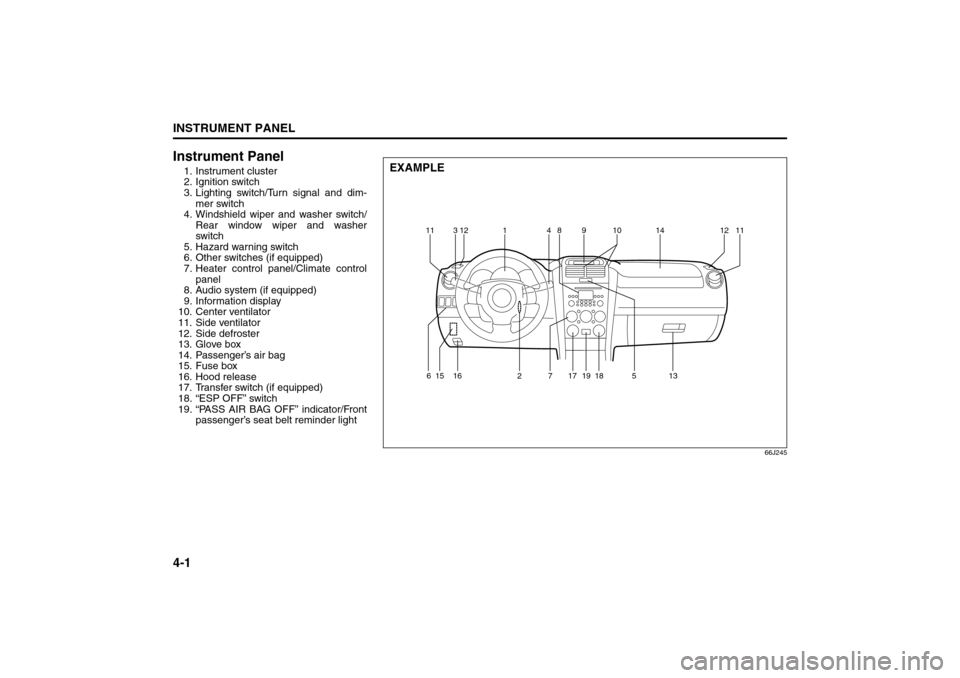
Instrument Panel1. Instrument cluster
2. Ignition switch
3. Lighting switch/Turn signal and dim-
mer switch
4. Windshield wiper and washer switch/
Rear window wiper and washer
switch
5. Hazard warning switch
6. Other switches (if equipped)
7. Heater control panel/Climate control
panel
8. Audio system (if equipped)
9. Information display
10. Center ventilator
11. Side ventilator
12. Side defroster
13. Glove box
14. Passenger’s air bag
15. Fuse box
16. Hood release
17. Transfer switch (if equipped)
18. “ESP OFF” switch
19. “PASS AIR BAG OFF” indicator/Front
passenger’s seat belt reminder light
66J245
EXAMPLE
11 12314891014 1211
615 16 2 17
18
19
7513
Instrument Panel: 3, 8
Page 77 of 290
4-2
INSTRUMENT PANEL
66J22-03E
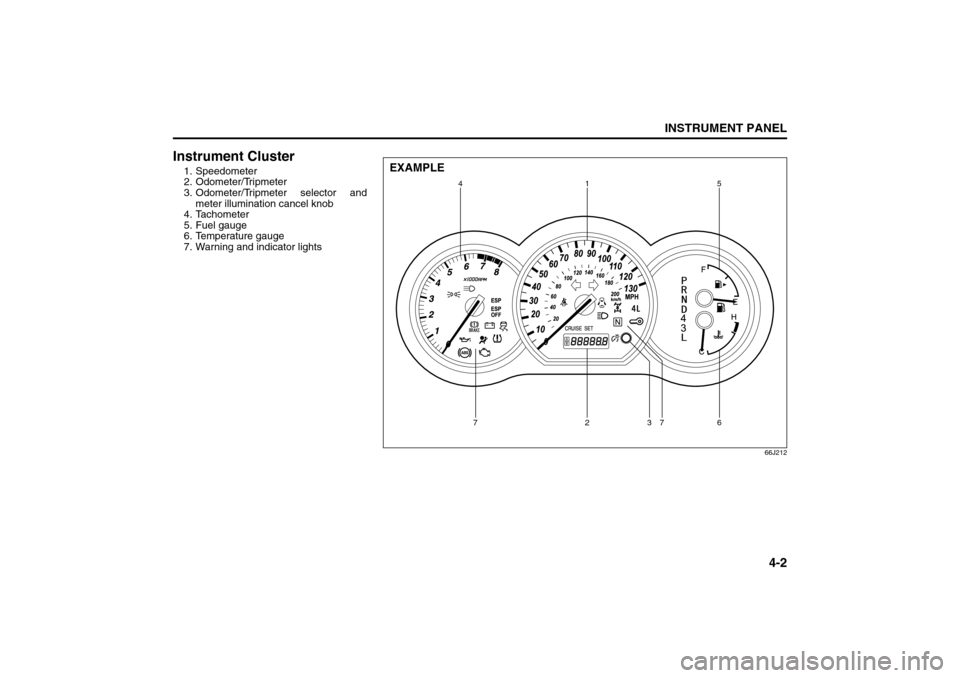
Instrument Cluster1. Speedometer
2. Odometer/Tripmeter
3. Odometer/Tripmeter selector and
meter illumination cancel knob
4. Tachometer
5. Fuel gauge
6. Temperature gauge
7. Warning and indicator lights
66J212
4
72736 15
EXAMPLE
Instrument Cluster: 8
Page 78 of 290
4-3INSTRUMENT PANEL
66J22-03E
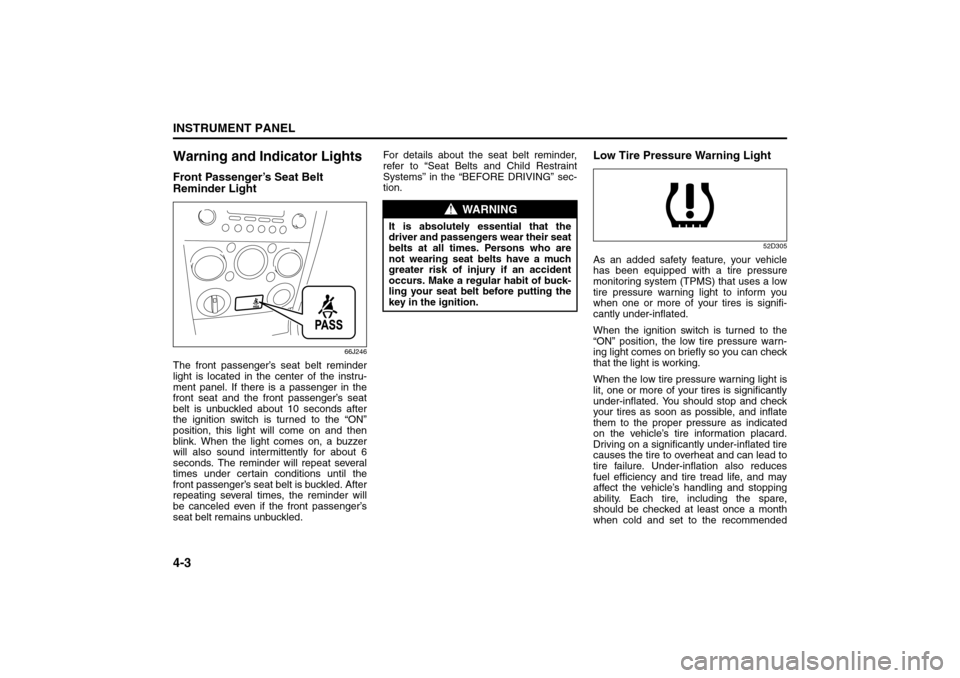
Warning and Indicator LightsFront Passenger’s Seat Belt
Reminder Light
66J246
The front passenger’s seat belt reminder
light is located in the center of the instru-
ment panel. If there is a passenger in the
front seat and the front passenger’s seat
belt is unbuckled about 10 seconds after
the ignition switch is turned to the “ON”
position, this light will come on and then
blink. When the light comes on, a buzzer
will also sound intermittently for about 6
seconds. The reminder will repeat several
times under certain conditions until the
front passenger’s seat belt is buckled. After
repeating several times, the reminder will
be canceled even if the front passenger’s
seat belt remains unbuckled.For details about the seat belt reminder,
refer to “Seat Belts and Child Restraint
Systems” in the “BEFORE DRIVING” sec-
tion.
Low Tire Pressure Warning Light
52D305
As an added safety feature, your vehicle
has been equipped with a tire pressure
monitoring system (TPMS) that uses a low
tire pressure warning light to inform you
when one or more of your tires is signifi-
cantly under-inflated.
When the ignition switch is turned to the
“ON” position, the low tire pressure warn-
ing light comes on briefly so you can check
that the light is working.
When the low tire pressure warning light is
lit, one or more of your tires is significantly
under-inflated. You should stop and check
your tires as soon as possible, and inflate
them to the proper pressure as indicated
on the vehicle’s tire information placard.
Driving on a significantly under-inflated tire
causes the tire to overheat and can lead to
tire failure. Under-inflation also reduces
fuel efficiency and tire tread life, and may
affect the vehicle’s handling and stopping
ability. Each tire, including the spare,
should be checked at least once a month
when cold and set to the recommended
WARNING
It is absolutely essential that the
driver and passengers wear their seat
belts at all times. Persons who are
not wearing seat belts have a much
greater risk of injury if an accident
occurs. Make a regular habit of buck-
ling your seat belt before putting the
key in the ignition.
Warning and Indicator Lights: 8
Page 79 of 290
4-4
INSTRUMENT PANEL
66J22-03E
inflation pressure as specified in the vehi-
cle placard and owner’s manual.
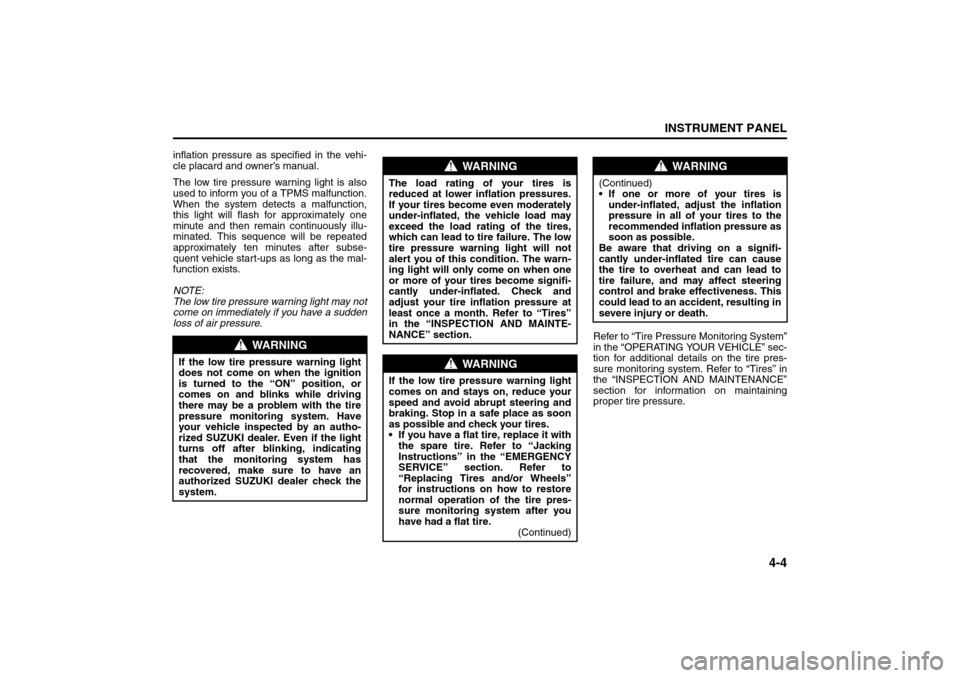
The low tire pressure warning light is also
used to inform you of a TPMS malfunction.
When the system detects a malfunction,
this light will flash for approximately one
minute and then remain continuously illu-
minated. This sequence will be repeated
approximately ten minutes after subse-
quent vehicle start-ups as long as the mal-
function exists.
NOTE:
The low tire pressure warning light may not
come on immediately if you have a sudden
loss of air pressure.
Refer to “Tire Pressure Monitoring System”
in the “OPERATING YOUR VEHICLE” sec-
tion for additional details on the tire pres-
sure monitoring system. Refer to “Tires” in
the “INSPECTION AND MAINTENANCE”
section for information on maintaining
proper tire pressure.
WARNING
If the low tire pressure warning light
does not come on when the ignition
is turned to the “ON” position, or
comes on and blinks while driving
there may be a problem with the tire
pressure monitoring system. Have
your vehicle inspected by an autho-
rized SUZUKI dealer. Even if the light
turns off after blinking, indicating
that the monitoring system has
recovered, make sure to have an
authorized SUZUKI dealer check the
system.
WARNING
The load rating of your tires is
reduced at lower inflation pressures.
If your tires become even moderately
under-inflated, the vehicle load may
exceed the load rating of the tires,
which can lead to tire failure. The low
tire pressure warning light will not
alert you of this condition. The warn-
ing light will only come on when one
or more of your tires become signifi-
cantly under-inflated. Check and
adjust your tire inflation pressure at
least once a month. Refer to “Tires”
in the “INSPECTION AND MAINTE-
NANCE” section.
WARNING
If the low tire pressure warning light
comes on and stays on, reduce your
speed and avoid abrupt steering and
braking. Stop in a safe place as soon
as possible and check your tires.
If you have a flat tire, replace it with
the spare tire. Refer to “Jacking
Instructions” in the “EMERGENCY
SERVICE” section. Refer to
“Replacing Tires and/or Wheels”
for instructions on how to restore
normal operation of the tire pres-
sure monitoring system after you
have had a flat tire.
(Continued)
WARNING
(Continued)
If one or more of your tires is
under-inflated, adjust the inflation
pressure in all of your tires to the
recommended inflation pressure as
soon as possible.
Be aware that driving on a signifi-
cantly under-inflated tire can cause
the tire to overheat and can lead to
tire failure, and may affect steering
control and brake effectiveness. This
could lead to an accident, resulting in
severe injury or death.
Warning and Indicator Lights: 8