SELECT SUZUKI GRAND VITARA 2012 Owners Manual
[x] Cancel search | Manufacturer: SUZUKI, Model Year: 2012, Model line: GRAND VITARA, Model: SUZUKI GRAND VITARA 2012Pages: 337, PDF Size: 6.21 MB
Page 34 of 337
2-17BEFORE DRIVING
79K21-03E
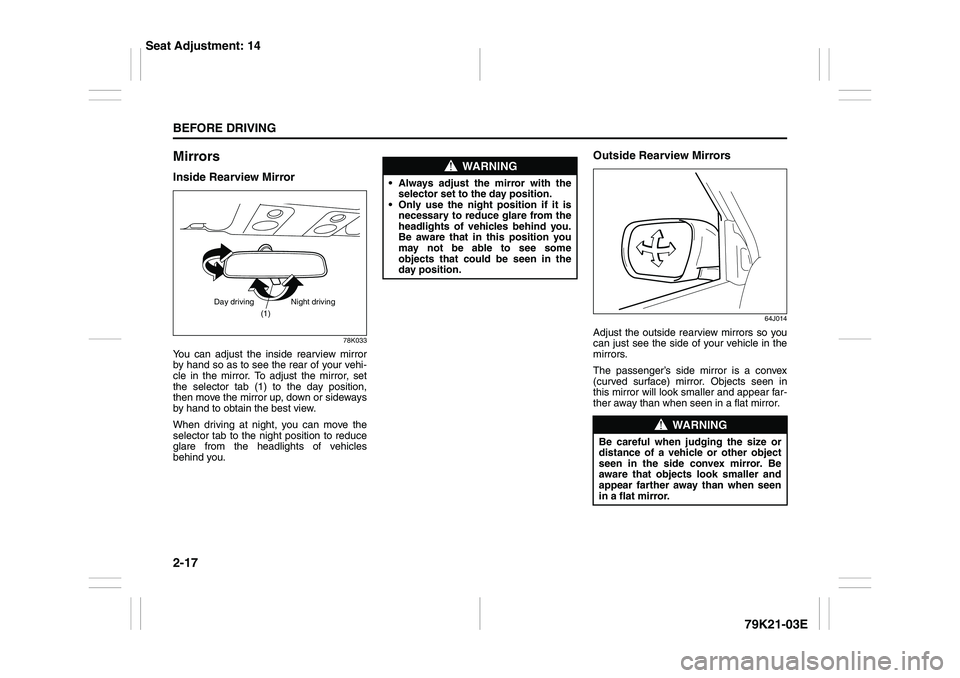
MirrorsInside Rearview Mirror
78K033
You can adjust the inside rearview mirror
by hand so as to see the rear of your vehi-
cle in the mirror. To adjust the mirror, set
the selector tab (1) to the day position,
then move the mirror up, down or sideways
by hand to obtain the best view.
When driving at night, you can move the
selector tab to the night position to reduce
glare from the headlights of vehicles
behind you.
Outside Rearview Mirrors
64J014
Adjust the outside rearview mirrors so you
can just see the side of your vehicle in the
mirrors.
The passenger’s side mirror is a convex
(curved surface) mirror. Objects seen in
this mirror will look smaller and appear far-
ther away than when seen in a flat mirror.
(1)
Day driving Night driving
WARNING
Always adjust the mirror with the
selector set to the day position.
Only use the night position if it is
necessary to reduce glare from the
headlights of vehicles behind you.
Be aware that in this position you
may not be able to see some
objects that could be seen in the
day position.
WARNING
Be careful when judging the size or
distance of a vehicle or other object
seen in the side convex mirror. Be
aware that objects look smaller and
appear farther away than when seen
in a flat mirror.
Seat Adjustment: 14
Page 35 of 337
2-18
BEFORE DRIVING
79K21-03E
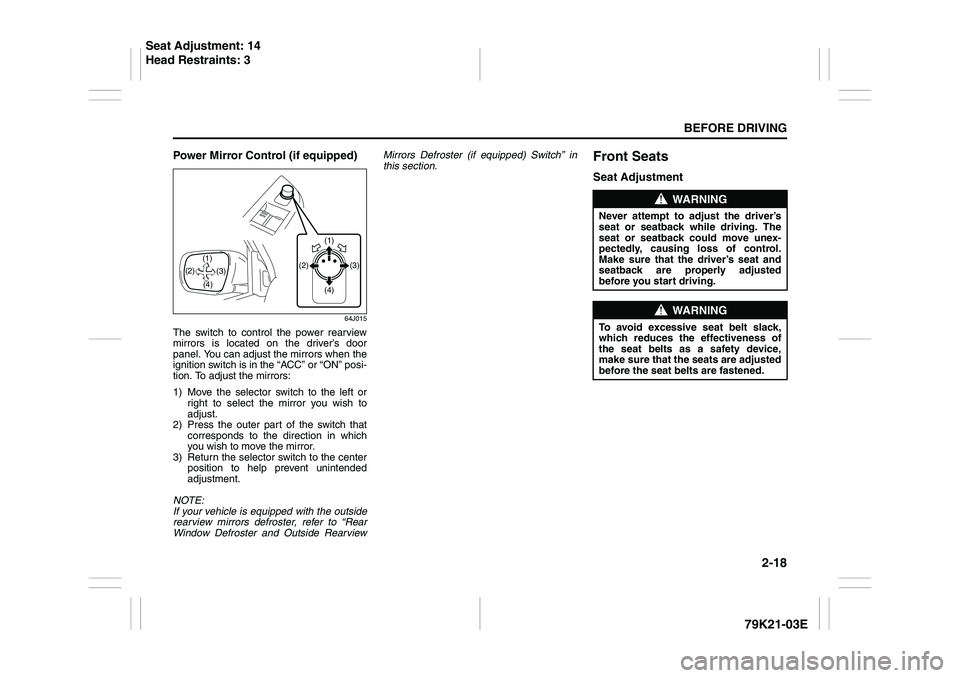
Power Mirror Control (if equipped)
64J015
The switch to control the power rearview
mirrors is located on the driver’s door
panel. You can adjust the mirrors when the
ignition switch is in the “ACC” or “ON” posi-
tion. To adjust the mirrors:
1) Move the selector switch to the left or
right to select the mirror you wish to
adjust.
2) Press the outer part of the switch that
corresponds to the direction in which
you wish to move the mirror.
3) Return the selector switch to the center
position to help prevent unintended
adjustment.
NOTE:
If your vehicle is equipped with the outside
rearview mirrors defroster, refer to “Rear
Window Defroster and Outside RearviewMirrors Defroster (if equipped) Switch” in
this section.
Front SeatsSeat Adjustment
(1)
(3) (2)
(4) (2)
(4)(3) (1)
WARNING
Never attempt to adjust the driver’s
seat or seatback while driving. The
seat or seatback could move unex-
pectedly, causing loss of control.
Make sure that the driver’s seat and
seatback are properly adjusted
before you start driving.
WARNING
To avoid excessive seat belt slack,
which reduces the effectiveness of
the seat belts as a safety device,
make sure that the seats are adjusted
before the seat belts are fastened.
Seat Adjustment: 14
Head Restraints: 3
Page 51 of 337
2-34
BEFORE DRIVING
79K21-03E
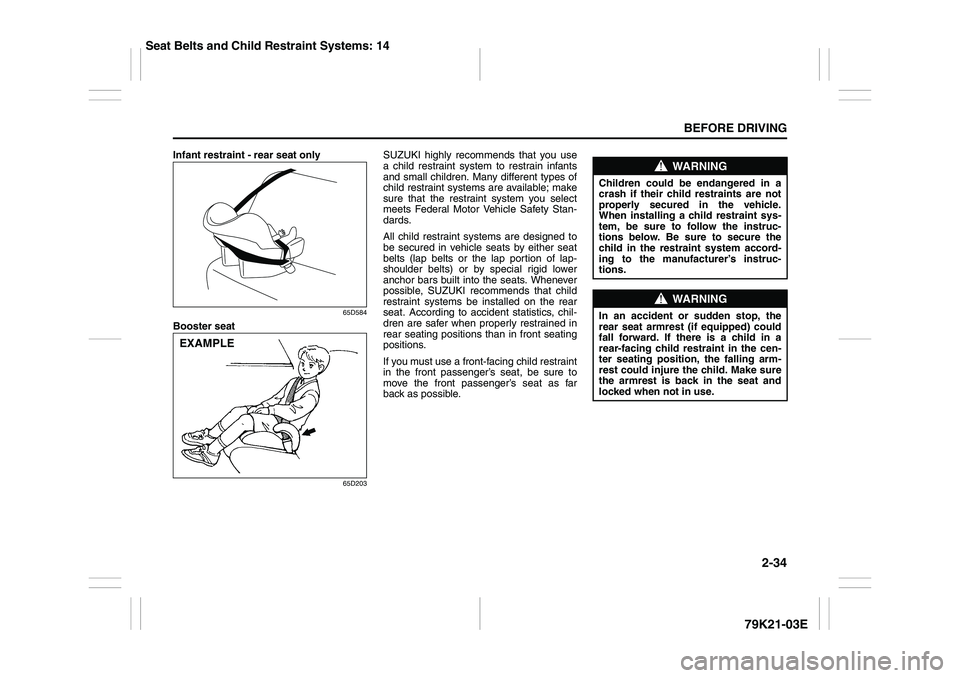
Infant restraint - rear seat only
65D584
Booster seat
65D203
SUZUKI highly recommends that you use
a child restraint system to restrain infants
and small children. Many different types of
child restraint systems are available; make
sure that the restraint system you select
meets Federal Motor Vehicle Safety Stan-
dards.
All child restraint systems are designed to
be secured in vehicle seats by either seat
belts (lap belts or the lap portion of lap-
shoulder belts) or by special rigid lower
anchor bars built into the seats. Whenever
possible, SUZUKI recommends that child
restraint systems be installed on the rear
seat. According to accident statistics, chil-
dren are safer when properly restrained in
rear seating positions than in front seating
positions.
If you must use a front-facing child restraint
in the front passenger’s seat, be sure to
move the front passenger’s seat as far
back as possible.
EXAMPLE
WARNING
Children could be endangered in a
crash if their child restraints are not
properly secured in the vehicle.
When installing a child restraint sys-
tem, be sure to follow the instruc-
tions below. Be sure to secure the
child in the restraint system accord-
ing to the manufacturer’s instruc-
tions.
WARNING
In an accident or sudden stop, the
rear seat armrest (if equipped) could
fall forward. If there is a child in a
rear-facing child restraint in the cen-
ter seating position, the falling arm-
rest could injure the child. Make sure
the armrest is back in the seat and
locked when not in use.
Seat Belts and Child Restraint Systems: 14
Page 58 of 337
2-41BEFORE DRIVING
79K21-03E
not attach the top strap to the luggage
restraint loops (if equipped).
86G032
4) When routing the top strap, be sure to
pass it between the head restraint and
the rear seatback as shown. (Refer to
“Head Restraints” section for details onhow to raise or lower the head
restraint.)
5) Make sure that cargo does not interfere
with routing of the top strap.
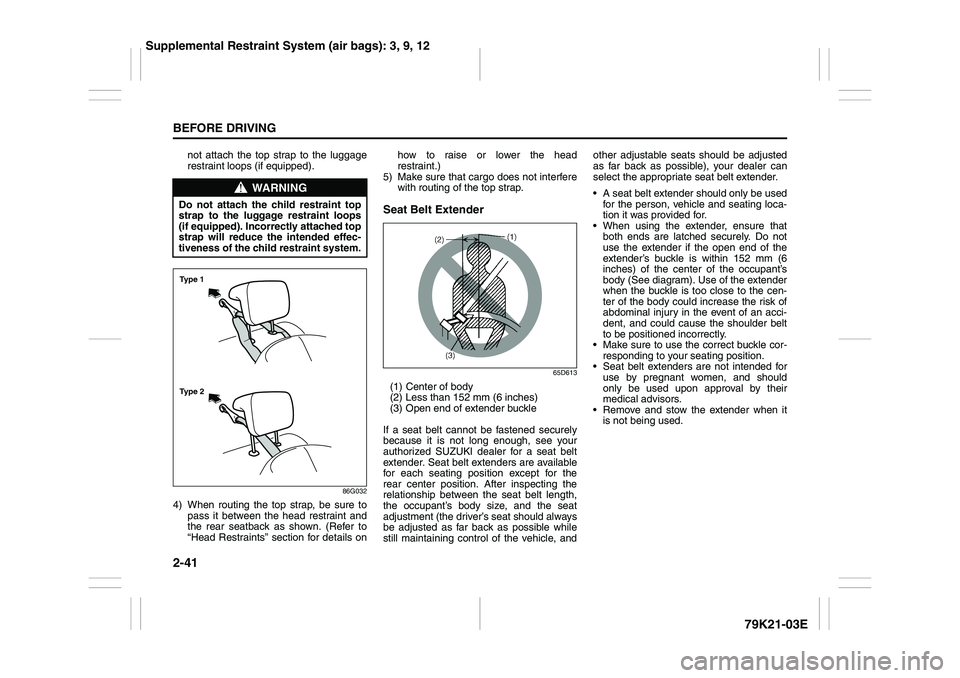
Seat Belt Extender
65D613
(1) Center of body
(2) Less than 152 mm (6 inches)
(3) Open end of extender buckle
If a seat belt cannot be fastened securely
because it is not long enough, see your
authorized SUZUKI dealer for a seat belt
extender. Seat belt extenders are available
for each seating position except for the
rear center position. After inspecting the
relationship between the seat belt length,
the occupant’s body size, and the seat
adjustment (the driver’s seat should always
be adjusted as far back as possible while
still maintaining control of the vehicle, andother adjustable seats should be adjusted
as far back as possible), your dealer can
select the appropriate seat belt extender.
A seat belt extender should only be used
for the person, vehicle and seating loca-
tion it was provided for.
When using the extender, ensure that
both ends are latched securely. Do not
use the extender if the open end of the
extender’s buckle is within 152 mm (6
inches) of the center of the occupant’s
body (See diagram). Use of the extender
when the buckle is too close to the cen-
ter of the body could increase the risk of
abdominal injury in the event of an acci-
dent, and could cause the shoulder belt
to be positioned incorrectly.
Make sure to use the correct buckle cor-
responding to your seating position.
Seat belt extenders are not intended for
use by pregnant women, and should
only be used upon approval by their
medical advisors.
Remove and stow the extender when it
is not being used.
WARNING
Do not attach the child restraint top
strap to the luggage restraint loops
(if equipped). Incorrectly attached top
strap will reduce the intended effec-
tiveness of the child restraint system.Ty p e 2 Ty p e 1
Supplemental Restraint System (air bags): 3, 9, 12
Page 84 of 337
2-67BEFORE DRIVING
79K21-03E
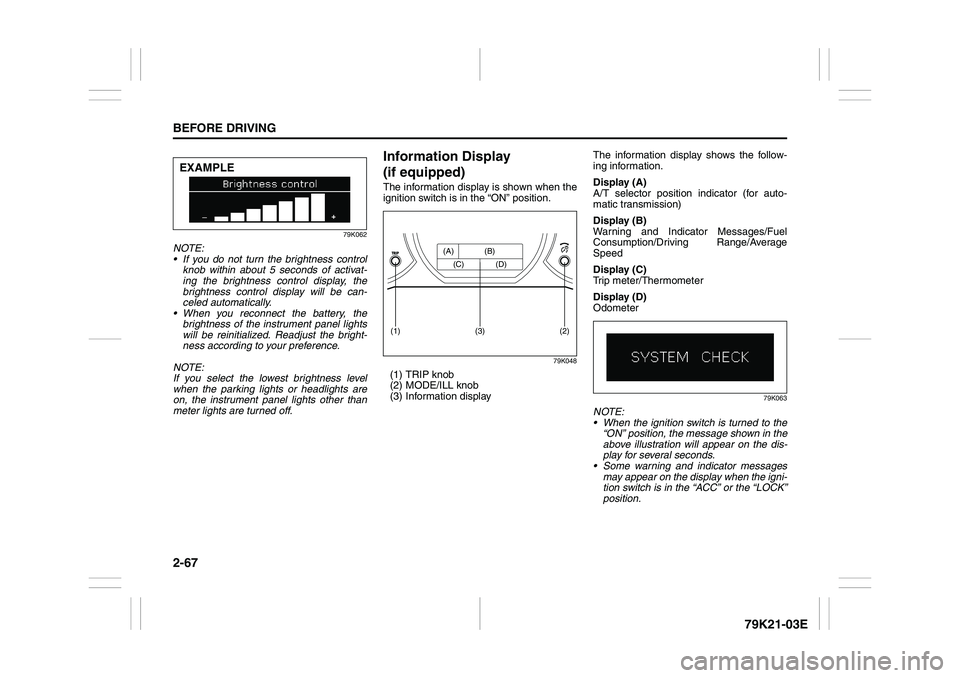
79K062
NOTE:
If you do not turn the brightness control
knob within about 5 seconds of activat-
ing the brightness control display, the
brightness control display will be can-
celed automatically.
When you reconnect the battery, the
brightness of the instrument panel lights
will be reinitialized. Readjust the bright-
ness according to your preference.
NOTE:
If you select the lowest brightness level
when the parking lights or headlights are
on, the instrument panel lights other than
meter lights are turned off.
Information Display
(if equipped)The information display is shown when the
ignition switch is in the “ON” position.
79K048
(1) TRIP knob
(2) MODE/ILL knob
(3) Information displayThe information display shows the follow-
ing information.
Display (A)
A/T selector position indicator (for auto-
matic transmission)
Display (B)
Warning and Indicator Messages/Fuel
Consumption/Driving Range/Average
Speed
Display (C)
Trip meter/Thermometer
Display (D)
Odometer
79K063
NOTE:
When the ignition switch is turned to the
“ON” position, the message shown in the
above illustration will appear on the dis-
play for several seconds.
Some warning and indicator messages
may appear on the display when the igni-
tion switch is in the “ACC” or the “LOCK”
position.
EXAMPLE
(2)
(1)
(3)
(A) (B)
(C) (D)
Page 85 of 337
2-68
BEFORE DRIVING
79K21-03E
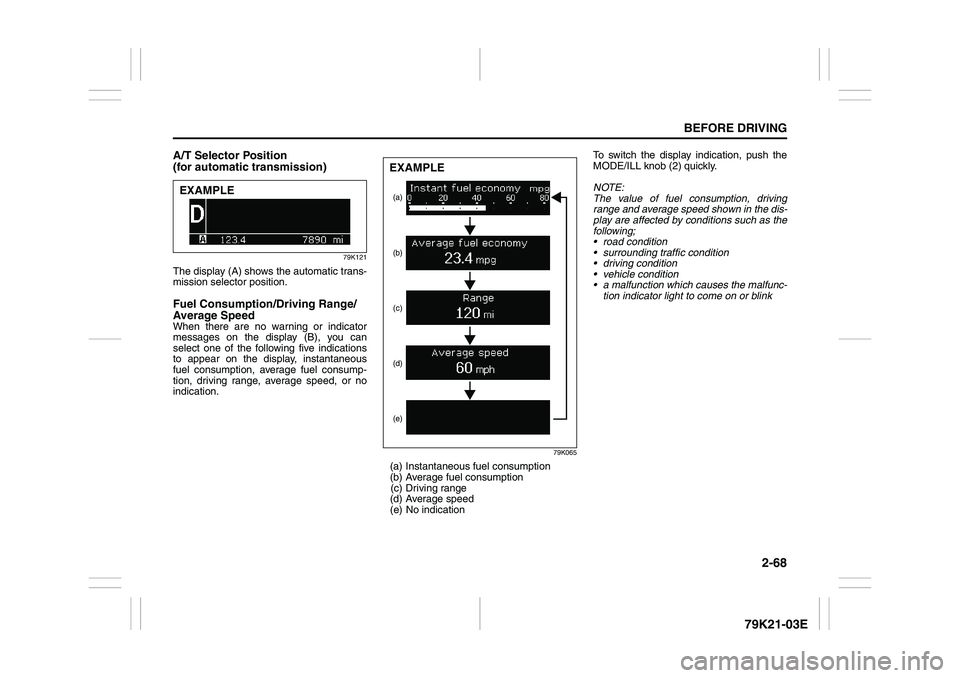
A/T Selector Position
(for automatic transmission)
79K121
The display (A) shows the automatic trans-
mission selector position. Fuel Consumption/Driving Range/
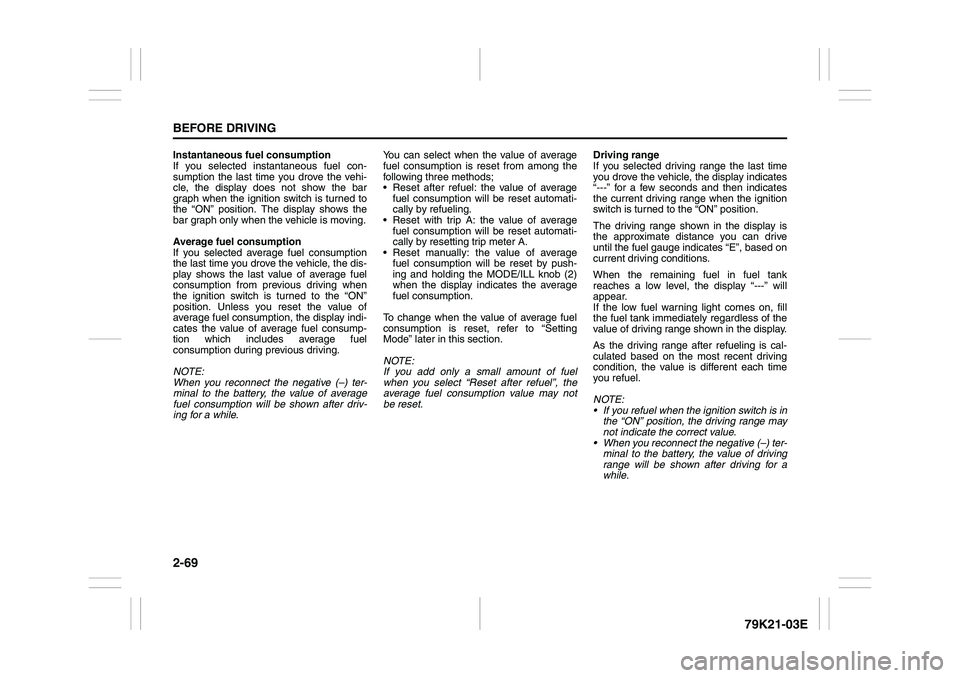
Average SpeedWhen there are no warning or indicator
messages on the display (B), you can
select one of the following five indications
to appear on the display, instantaneous
fuel consumption, average fuel consump-
tion, driving range, average speed, or no
indication.
79K065
(a) Instantaneous fuel consumption
(b) Average fuel consumption
(c) Driving range
(d) Average speed
(e) No indicationTo switch the display indication, push the
MODE/ILL knob (2) quickly.
NOTE:
The value of fuel consumption, driving
range and average speed shown in the dis-
play are affected by conditions such as the
following;
road condition
surrounding traffic condition
driving condition
vehicle condition
a malfunction which causes the malfunc-
tion indicator light to come on or blink
EXAMPLE
(a)
(e) (d)(c) (b)EXAMPLE
Page 86 of 337
2-69BEFORE DRIVING
79K21-03E
Instantaneous fuel consumption
If you selected instantaneous fuel con-
sumption the last time you drove the vehi-
cle, the display does not show the bar
graph when the ignition switch is turned to
the “ON” position. The display shows the
bar graph only when the vehicle is moving.
Average fuel consumption
If you selected average fuel consumption
the last time you drove the vehicle, the dis-
play shows the last value of average fuel
consumption from previous driving when
the ignition switch is turned to the “ON”
position. Unless you reset the value of
average fuel consumption, the display indi-
cates the value of average fuel consump-
tion which includes average fuel
consumption during previous driving.
NOTE:
When you reconnect the negative (–) ter-
minal to the battery, the value of average
fuel consumption will be shown after driv-
ing for a while.You can select when the value of average
fuel consumption is reset from among the
following three methods;
Reset after refuel: the value of average
fuel consumption will be reset automati-
cally by refueling.
Reset with trip A: the value of average
fuel consumption will be reset automati-
cally by resetting trip meter A.
Reset manually: the value of average
fuel consumption will be reset by push-
ing and holding the MODE/ILL knob (2)
when the display indicates the average
fuel consumption.
To change when the value of average fuel
consumption is reset, refer to “Setting
Mode” later in this section.
NOTE:
If you add only a small amount of fuel
when you select “Reset after refuel”, the
average fuel consumption value may not
be reset.Driving range
If you selected driving range the last time
you drove the vehicle, the display indicates
“---” for a few seconds and then indicates
the current driving range when the ignition
switch is turned to the “ON” position.
The driving range shown in the display is
the approximate distance you can drive
until the fuel gauge indicates “E”, based on
current driving conditions.
When the remaining fuel in fuel tank
reaches a low level, the display “---” will
appear.
If the low fuel warning light comes on, fill
the fuel tank immediately regardless of the
value of driving range shown in the display.
As the driving range after refueling is cal-
culated based on the most recent driving
condition, the value is different each time
you refuel.
NOTE:
If you refuel when the ignition switch is in
the “ON” position, the driving range may
not indicate the correct value.
When you reconnect the negative (–) ter-
minal to the battery, the value of driving
range will be shown after driving for a
while.
Page 87 of 337
2-70
BEFORE DRIVING
79K21-03E
Average speed
If you selected average speed the last time
you drove the vehicle, the display indicates
the last value of average speed from previ-
ous driving when the ignition switch is
turned to the “ON” position. Unless you
reset the value of average speed, the dis-
play indicates the value of average speed
which includes average speed during pre-
vious driving.
To reset the value of average speed, push
and hold the MODE/ILL knob (2) for about
2 seconds when the display indicates an
average speed. The display shows “---”
and then indicates a new average speed
after driving for a short time.
NOTE:
When you reconnect the negative (–) ter-
minal to the battery, the value of average
speed will be shown after driving for a
while.
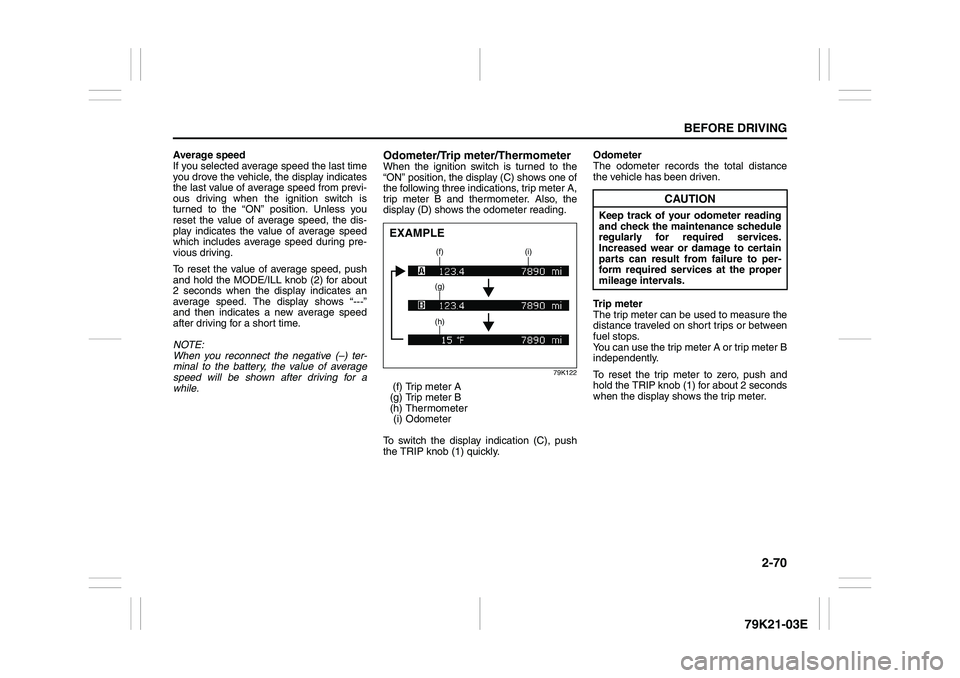
Odometer/Trip meter/ThermometerWhen the ignition switch is turned to the
“ON” position, the display (C) shows one of
the following three indications, trip meter A,
trip meter B and thermometer. Also, the
display (D) shows the odometer reading.
79K122
(f) Trip meter A
(g) Trip meter B
(h) Thermometer
(i) Odometer
To switch the display indication (C), push
the TRIP knob (1) quickly.Odometer
The odometer records the total distance
the vehicle has been driven.
Trip meter
The trip meter can be used to measure the
distance traveled on short trips or between
fuel stops.
You can use the trip meter A or trip meter B
independently.
To reset the trip meter to zero, push and
hold the TRIP knob (1) for about 2 seconds
when the display shows the trip meter.EXAMPLE
(f) (i)
(g)
(h)
CAUTION
Keep track of your odometer reading
and check the maintenance schedule
regularly for required services.
Increased wear or damage to certain
parts can result from failure to per-
form required services at the proper
mileage intervals.
Page 88 of 337
2-71BEFORE DRIVING
79K21-03E
Thermometer
The thermometer indicates the outside
temperature.
79K067
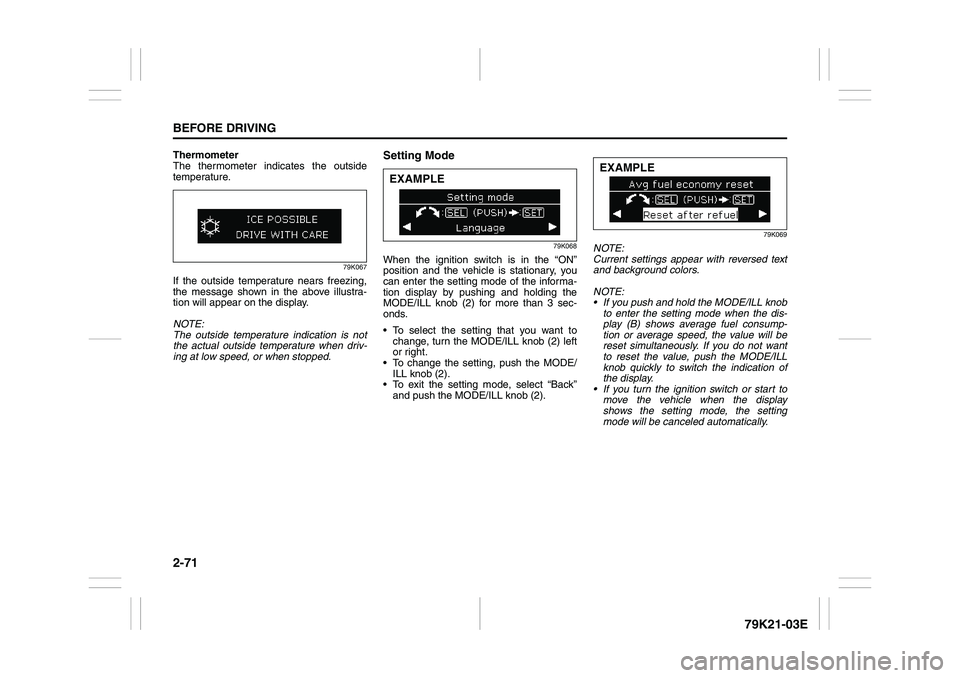
If the outside temperature nears freezing,
the message shown in the above illustra-
tion will appear on the display.
NOTE:
The outside temperature indication is not
the actual outside temperature when driv-
ing at low speed, or when stopped.
Setting Mode
79K068
When the ignition switch is in the “ON”
position and the vehicle is stationary, you
can enter the setting mode of the informa-
tion display by pushing and holding the
MODE/ILL knob (2) for more than 3 sec-
onds.
To select the setting that you want to
change, turn the MODE/ILL knob (2) left
or right.
To change the setting, push the MODE/
ILL knob (2).
To exit the setting mode, select “Back”
and push the MODE/ILL knob (2).
79K069
NOTE:
Current settings appear with reversed text
and background colors.
NOTE:
If you push and hold the MODE/ILL knob
to enter the setting mode when the dis-
play (B) shows average fuel consump-
tion or average speed, the value will be
reset simultaneously. If you do not want
to reset the value, push the MODE/ILL
knob quickly to switch the indication of
the display.
If you turn the ignition switch or start to
move the vehicle when the display
shows the setting mode, the setting
mode will be canceled automatically.
EXAMPLE
EXAMPLE
Page 89 of 337
2-72
BEFORE DRIVING
79K21-03E
Distance units
You can change the units odo/trip meter
distance is displayed in.
NOTE:
When you change the units odo/trip meter
distance is displayed in, the trip meter will
be reset automatically.
Fuel economy units
You can change the units that fuel con-
sumption is displayed in.
Language
You can change the language of the infor-
mation display.
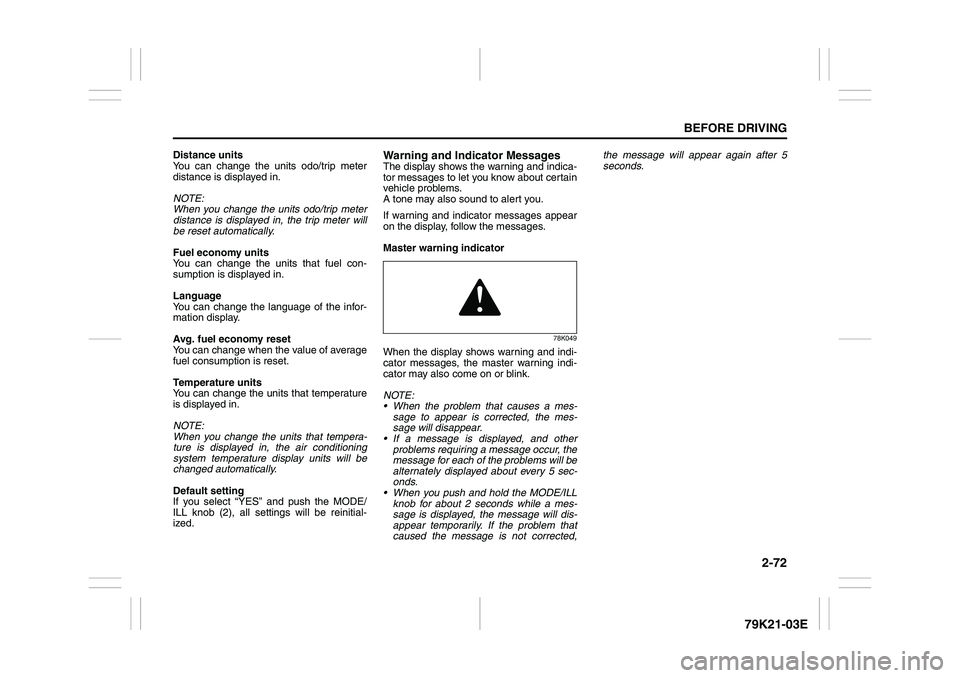
Avg. fuel economy reset
You can change when the value of average
fuel consumption is reset.
Temperature units
You can change the units that temperature
is displayed in.
NOTE:
When you change the units that tempera-
ture is displayed in, the air conditioning
system temperature display units will be
changed automatically.
Default setting
If you select “YES” and push the MODE/
ILL knob (2), all settings will be reinitial-
ized.
Warning and Indicator MessagesThe display shows the warning and indica-
tor messages to let you know about certain
vehicle problems.
A tone may also sound to alert you.
If warning and indicator messages appear
on the display, follow the messages.
Master warning indicator
78K049
When the display shows warning and indi-
cator messages, the master warning indi-
cator may also come on or blink.
NOTE:
When the problem that causes a mes-
sage to appear is corrected, the mes-
sage will disappear.
If a message is displayed, and other
problems requiring a message occur, the
message for each of the problems will be
alternately displayed about every 5 sec-
onds.
When you push and hold the MODE/ILL
knob for about 2 seconds while a mes-
sage is displayed, the message will dis-
appear temporarily. If the problem that
caused the message is not corrected,the message will appear again after 5
seconds.