qt switch SUZUKI GRAND VITARA 2015 Owner's Guide
[x] Cancel search | Manufacturer: SUZUKI, Model Year: 2015, Model line: GRAND VITARA, Model: SUZUKI GRAND VITARA 2015Pages: 482, PDF Size: 21 MB
Page 73 of 482
2-51
BEFORE DRIVING
54P00-01E
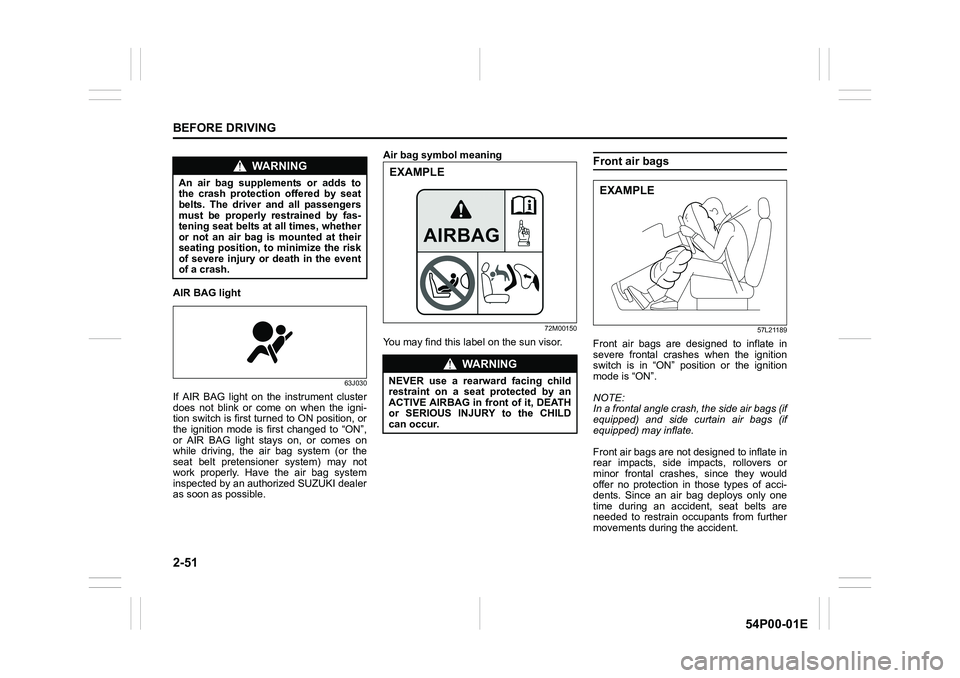
AIR BAG light
63J030
If AIR BAG light on the instrument cluster
does not blink or come on when the igni-
tion switch is first turned to ON position, or
the ignition mode is first changed to “ON”,
or AIR BAG light stays on, or comes on
while driving, the air bag system (or the
seat belt pretensioner system) may not
work properly. Have the air bag system
inspected by an authorized SUZUKI dealer
as soon as possible.Air bag symbol meaning
72M00150
You may find this label on the sun visor.
Front air bags
57L21189
Front air bags are designed to inflate in
severe frontal crashes when the ignition
switch is in “ON” position or the ignition
mode is “ON”.
NOTE:
In a frontal angle crash, the side air bags (if
equipped) and side curtain air bags (if
equipped) may inflate.
Front air bags are not designed to inflate in
rear impacts, side impacts, rollovers or
minor frontal crashes, since they would
offer no protection in those types of acci-
dents. Since an air bag deploys only one
time during an accident, seat belts are
needed to restrain occupants from further
movements during the accident.
WA R N I N G
An air bag supplements or adds to
the crash protection offered by seat
belts. The driver and all passengers
must be properly restrained by fas-
tening seat belts at all times, whether
or not an air bag is mounted at their
seating position, to minimize the risk
of severe injury or death in the event
of a crash.
WA R N I N G
NEVER use a rearward facing child
restraint on a seat protected by an
ACTIVE AIRBAG in front of it, DEATH
or SERIOUS INJURY to the CHILD
can occur.
EXAMPLE
EXAMPLE
Page 77 of 482
2-55
BEFORE DRIVING
54P00-01E
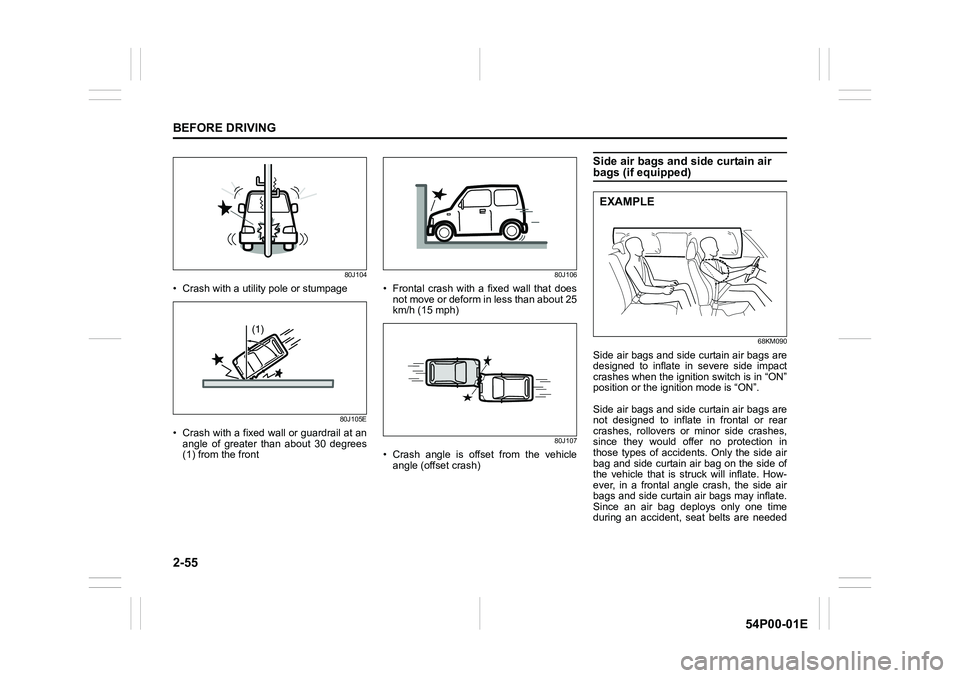
80J104
• Crash with a utility pole or stumpage
80J105E
• Crash with a fixed wall or guardrail at an
angle of greater than about 30 degrees
(1) from the front
80J106
• Frontal crash with a fixed wall that does
not move or deform in less than about 25
km/h (15 mph)
80J107
• Crash angle is offset from the vehicle
angle (offset crash)
Side air bags and side curtain air bags (if equipped)
68KM090
Side air bags and side curtain air bags are
designed to inflate in severe side impact
crashes when the ignition switch is in “ON”
position or the ignition mode is “ON”.
Side air bags and side curtain air bags are
not designed to inflate in frontal or rear
crashes, rollovers or minor side crashes,
since they would offer no protection in
those types of accidents. Only the side air
bag and side curtain air bag on the side of
the vehicle that is struck will inflate. How-
ever, in a frontal angle crash, the side air
bags and side curtain air bags may inflate.
Since an air bag deploys only one time
during an accident, seat belts are needed
(1)
EXAMPLE
Page 82 of 482
2-60
BEFORE DRIVING
54P00-01E
pens, ask your SUZUKI dealer to check
the air bag system as soon as possible.
Special procedures are required for servic-
ing or replacing an air bag. For that rea-
son, only an authorized SUZUKI dealer
should be allowed to service or replace
your air bags. Remind anyone who ser-
vices your SUZUKI vehicle that it has air
bags.
Service on or around air bag components
or wiring must be performed only by an
authorized SUZUKI dealer. Improper ser-
vice could result in unintended air bag
deployment or could render the air bag
inoperative. Either of these two conditions
may result in severe injury.
To prevent damage or unintended inflation
of the air bag system, check that the bat-
tery is disconnected and the ignition switch
has been in “LOCK” position or the ignition
mode has been “LOCK” (OFF) for at least
90 seconds before performing any electri-
cal service work on your SUZUKI vehicle.
Do not touch air bag system components
or wires. The wires are wrapped with yel-
low tape or yellow tubing, and the couplers
are yellow for easy identification.
Scrapping a vehicle that has an uninflated
air bag can be hazardous. Ask your dealer,
body repair shop or scrap yard for help
with disposal.Front passenger air bag deactiva-tion system (if equipped)
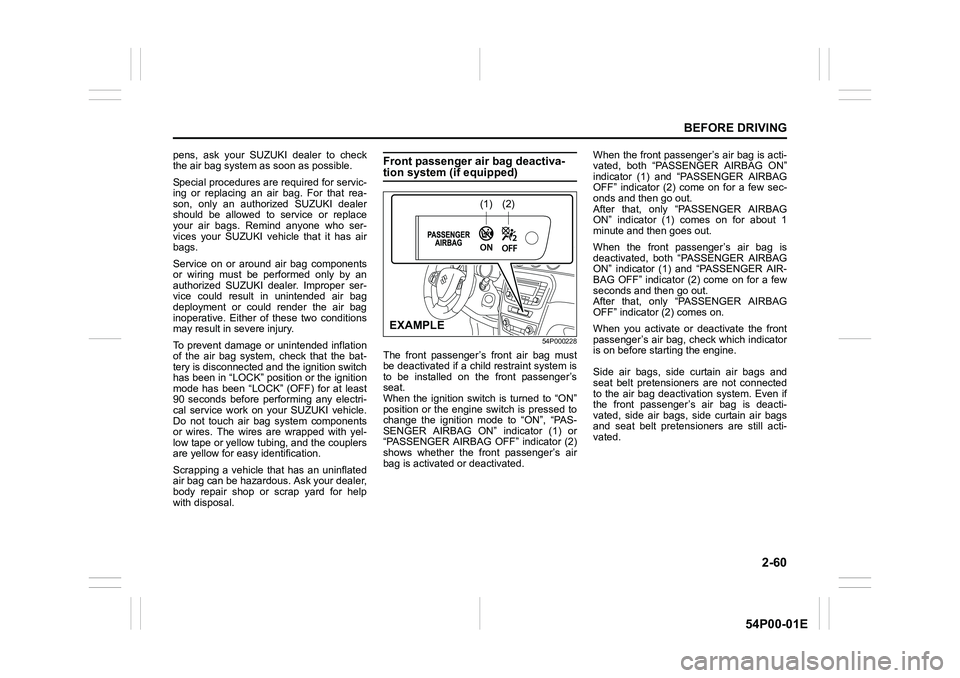
54P000228
The front passenger’s front air bag must
be deactivated if a child restraint system is
to be installed on the front passenger’s
seat.
When the ignition switch is turned to “ON”
position or the engine switch is pressed to
change the ignition mode to “ON”, “PAS-
SENGER AIRBAG ON” indicator (1) or
“PASSENGER AIRBAG OFF” indicator (2)
shows whether the front passenger’s air
bag is activated or deactivated.When the front passenger’s air bag is acti-
vated, both “PASSENGER AIRBAG ON”
indicator (1) and “PASSENGER AIRBAG
OFF” indicator (2) come on for a few sec-
onds and then go out.
After that, only “PASSENGER AIRBAG
ON” indicator (1) comes on for about 1
minute and then goes out.
When the front passenger’s air bag is
deactivated, both “PASSENGER AIRBAG
ON” indicator (1) and “PASSENGER AIR-
BAG OFF” indicator (2) come on for a few
seconds and then go out.
After that, only “PASSENGER AIRBAG
OFF” indicator (2) comes on.
When you activate or deactivate the front
passenger’s air bag, check which indicator
is on before starting the engine.
Side air bags, side curtain air bags and
seat belt pretensioners are not connected
to the air bag deactivation system. Even if
the front passenger’s air bag is deacti-
vated, side air bags, side curtain air bags
and seat belt pretensioners are still acti-
vated.
(1)(2)
EXAMPLE
Page 83 of 482
2-61
BEFORE DRIVING
54P00-01E
58MS030
According to accident statistics, children
are safer when properly restrained in rear
seating positions than front seating posi-
tions. Whenever possible, SUZUKI recom-
mends that child restraint systems be
installed on the rear seat.
Air bag deactivation switch
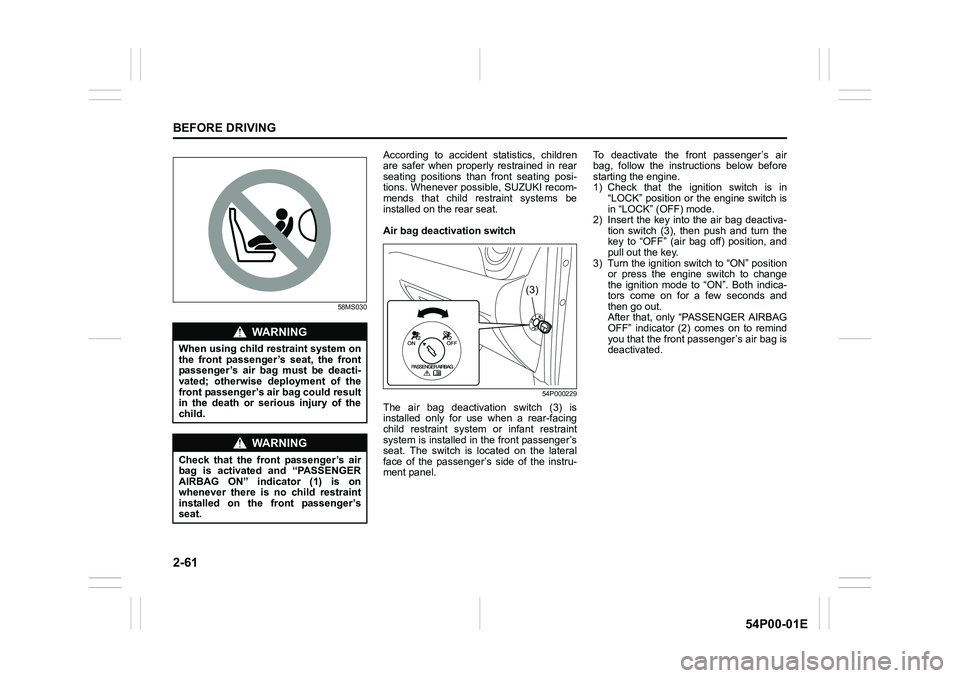
54P000229
The air bag deactivation switch (3) is
installed only for use when a rear-facing
child restraint system or infant restraint
system is installed in the front passenger’s
seat. The switch is located on the lateral
face of the passenger’s side of the instru-
ment panel.To deactivate the front passenger’s air
bag, follow the instructions below before
starting the engine.
1) Check that the ignition switch is in
“LOCK” position or the engine switch is
in “LOCK” (OFF) mode.
2) Insert the key into the air bag deactiva-
tion switch (3), then push and turn the
key to “OFF” (air bag off) position, and
pull out the key.
3) Turn the ignition switch to “ON” position
or press the engine switch to change
the ignition mode to “ON”. Both indica-
tors come on for a few seconds and
then go out.
After that, only “PASSENGER AIRBAG
OFF” indicator (2) comes on to remind
you that the front passenger’s air bag is
deactivated.
WA R N I N G
When using child restraint system on
the front passenger’s seat, the front
passenger’s air bag must be deacti-
vated; otherwise deployment of the
front passenger’s air bag could result
in the death or serious injury of the
child.
WA R N I N G
Check that the front passenger’s air
bag is activated and “PASSENGER
AIRBAG ON” indicator (1) is on
whenever there is no child restraint
installed on the front passenger’s
seat.
(3)
Page 84 of 482
2-62
BEFORE DRIVING
54P00-01E
To activate the front passenger’s air bag,
follow the instructions below before start-
ing the engine.
1) Check that the ignition switch is in
“LOCK” position or the engine switch is
in “LOCK” (OFF) mode.
2) Insert the key into the air bag deactiva-
tion switch (3), then push and turn the
key to “ON” (air bag on) position, and
pull out the key.
3) Turn the ignition switch to “ON” position
or press the engine switch to change
the ignition mode to “ON”. Both indica-
tors come on for a few seconds and
then go out.
After that, only “PASSENGER AIRBAG
ON” indicator (1) comes on for about 1
minute and then goes out to remind you
that the front passenger’s air bag is
activated.
Page 86 of 482
2-64
BEFORE DRIVING
54P00-01E
Speedometer
The speedometer indicates vehicle speed.
Tachometer
The tachometer indicates engine speed in
revolutions per minute.
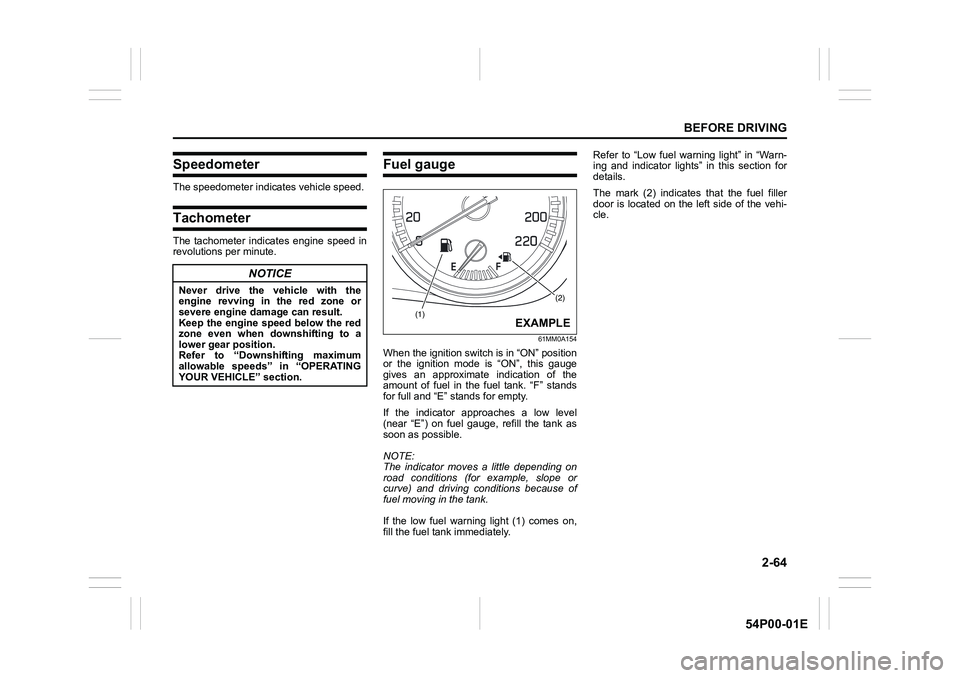
Fuel gauge
61MM0A154
When the ignition switch is in “ON” position
or the ignition mode is “ON”, this gauge
gives an approximate indication of the
amount of fuel in the fuel tank. “F” stands
for full and “E” stands for empty.
If the indicator approaches a low level
(near “E”) on fuel gauge, refill the tank as
soon as possible.
NOTE:
The indicator moves a little depending on
road conditions (for example, slope or
curve) and driving conditions because of
fuel moving in the tank.
If the low fuel warning light (1) comes on,
fill the fuel tank immediately.Refer to “Low fuel warning light” in “Warn-
ing and indicator lights” in this section for
details.
The mark (2) indicates that the fuel filler
door is located on the left side of the vehi-
cle.
NOTICE
Never drive the vehicle with the
engine revving in the red zone or
severe engine damage can result.
Keep the engine speed below the red
zone even when downshifting to a
lower gear position.
Refer to “Downshifting maximum
allowable speeds” in “OPERATING
YOUR VEHICLE” section.(2)
(1)EXAMPLE
Page 87 of 482
2-65
BEFORE DRIVING
54P00-01E
Temperature gauge
61MM0A155
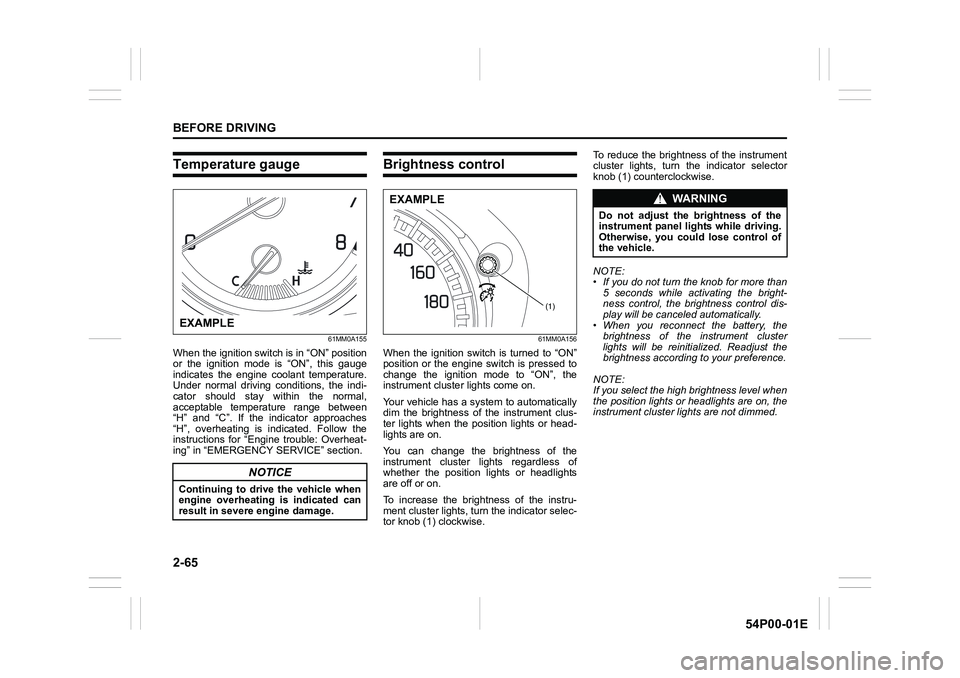
When the ignition switch is in “ON” position
or the ignition mode is “ON”, this gauge
indicates the engine coolant temperature.
Under normal driving conditions, the indi-
cator should stay within the normal,
acceptable temperature range between
“H” and “C”. If the indicator approaches
“H”, overheating is indicated. Follow the
instructions for “Engine trouble: Overheat-
ing” in “EMERGENCY SERVICE” section.
Brightness control
61MM0A156
When the ignition switch is turned to “ON”
position or the engine switch is pressed to
change the ignition mode to “ON”, the
instrument cluster lights come on.
Your vehicle has a system to automatically
dim the brightness of the instrument clus-
ter lights when the position lights or head-
lights are on.
You can change the brightness of the
instrument cluster lights regardless of
whether the position lights or headlights
are off or on.
To increase the brightness of the instru-
ment cluster lights, turn the indicator selec-
tor knob (1) clockwise. To reduce the brightness of the instrument
cluster lights, turn the indicator selector
knob (1) counterclockwise.
NOTE:
• If you do not turn the knob for more than
5 seconds while activating the bright-
ness control, the brightness control dis-
play will be canceled automatically.
• When you reconnect the battery, the
brightness of the instrument cluster
lights will be reinitialized. Readjust the
brightness according to your preference.
NOTE:
If you select the high brightness level when
the position lights or headlights are on, the
instrument cluster lights are not dimmed.
NOTICE
Continuing to drive the vehicle when
engine overheating is indicated can
result in severe engine damage.
EXAMPLE
(1)
EXAMPLEWA R N I N G
Do not adjust the brightness of the
instrument panel lights while driving.
Otherwise, you could lose control of
the vehicle.
Page 88 of 482
2-66
BEFORE DRIVING
54P00-01E
Information display
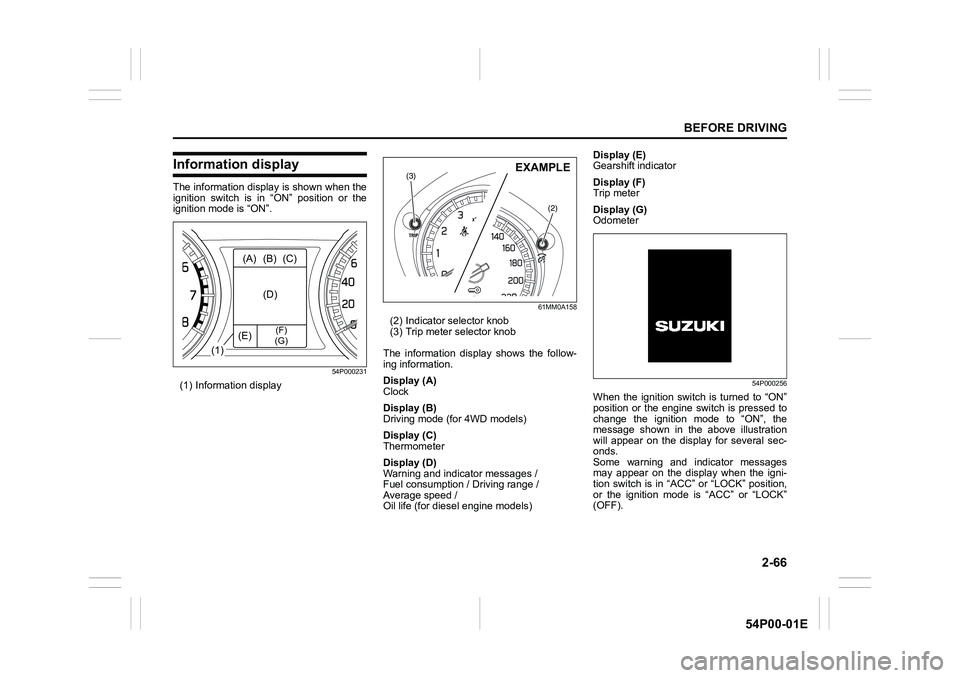
The information display is shown when the
ignition switch is in “ON” position or the
ignition mode is “ON”.
54P000231
(1) Information display
61MM0A158
(2) Indicator selector knob
(3) Trip meter selector knob
The information display shows the follow-
ing information.
Display (A)
Clock
Display (B)
Driving mode (for 4WD models)
Display (C)
Thermometer
Display (D)
Warning and indicator messages /
Fuel consumption / Driving range /
Average speed /
Oil life (for diesel engine models)Display (E)
Gearshift indicator
Display (F)
Trip meter
Display (G)
Odometer
54P000256
When the ignition switch is turned to “ON”
position or the engine switch is pressed to
change the ignition mode to “ON”, the
message shown in the above illustration
will appear on the display for several sec-
onds.
Some warning and indicator messages
may appear on the display when the igni-
tion switch is in “ACC” or “LOCK” position,
or the ignition mode is “ACC” or “LOCK”
(OFF).
(1)(A) (B) (C)
(D)
(E)
(F)
(G)
(3)
(2)
EXAMPLE
Page 90 of 482
2-68
BEFORE DRIVING
54P00-01E
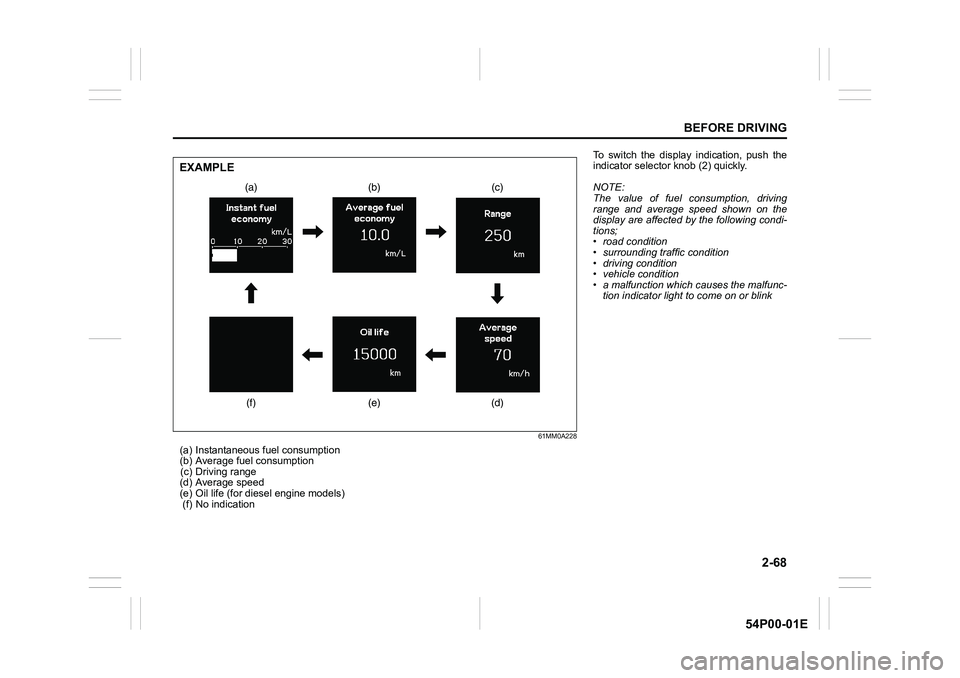
61MM0A228
(a) Instantaneous fuel consumption
(b) Average fuel consumption
(c) Driving range
(d) Average speed
(e) Oil life (for diesel engine models)
(f) No indication
(a) (b) (c)
(d) (e) (f)
EXAMPLE
To switch the display indication, push the
indicator selector knob (2) quickly.
NOTE:
The value of fuel consumption, driving
range and average speed shown on the
display are affected by the following condi-
tions;
• road condition
• surrounding traffic condition
• driving condition
• vehicle condition
• a malfunction which causes the malfunc-
tion indicator light to come on or blink
Page 91 of 482
2-69
BEFORE DRIVING
54P00-01E
Instantaneous fuel consumption
The display shows instantaneous fuel con-
sumption with a bar graph only when the
vehicle is moving.
NOTE:
• The display does not show the bar graph
unless the vehicle is moving.
• Depending on the vehicle’s specification,
the fuel consumption units of initial set-
ting are indicated as L/100km, km/L or
MPG.
• For L/100km or km/L setting, the indi-
cated maximum value of instantaneous
fuel consumption is 30. No more than 30
will be indicated on the display even if
the actual instantaneous fuel consump-
tion is higher.
• For MPG setting, the indicated maxi-
mum value of instantaneous fuel con-
sumption is 80. No more than 80 will be
indicated on the display even if the
actual instantaneous fuel consumption is
higher.
• The indication on the display may be
delayed if fuel consumption is greatly
affected by driving conditions.
• The display shows estimated values.
Indications may not be the same as
actual values.
Average fuel consumption
If you selected average fuel consumption
the last time you drove the vehicle, the dis-
play shows the last value of average fuel
consumption from previous driving whenthe ignition switch is turned to “ON” posi-
tion or the engine switch is pressed to
change the ignition mode to “ON”. Unless
you reset the value of average fuel con-
sumption, the display indicates the value of
average fuel consumption based on the
average fuel consumption during previous
driving.
NOTE:
When you reconnect the negative (–) ter-
minal to the battery, the value of average
fuel consumption will be shown after driv-
ing for a period of time.
You can select when the value of average
fuel consumption is reset from among the
following three methods;
• Reset after refuel: the value of average
fuel consumption will be reset automati-
cally by refueling.
• Reset with trip meter A: the value of
average fuel consumption will be reset
automatically by resetting trip meter A.
• Reset manually: the value of average
fuel consumption will be reset by push-
ing and holding the indicator selector
knob (2) when the display indicates the
average fuel consumption.
To change when the value of average fuel
consumption is reset, refer to “Setting
mode” in this section. NOTE:
If you add only a small amount of fuel
when you select “Reset after refuel”, the
average fuel consumption value may not
be reset.
Driving range
If you selected driving range the last time
you drove the vehicle, the display indicates
“---” for a few seconds and then indicates
the current driving range when the ignition
switch is turned to “ON” position or the
engine switch is pressed to change the
ignition mode to “ON”.
The driving range shown in the display is
the approximate distance you can drive
until the fuel gauge indicates “E”, based on
current driving conditions.
When the low fuel warning light comes on,
the display “---” will appear.
If the low fuel warning light comes on, fill
the fuel tank immediately regardless of the
value of driving range shown in the display.
As the driving range after refueling is cal-
culated based on the most recent driving
condition, the value is different each time
you refuel.
NOTE:
• If you refuel when the ignition switch is in
“ON” position or the ignition mode is
“ON”, the driving range may not indicate
the correct value.