2d high SUZUKI GRAND VITARA 2016 Repair Manual
[x] Cancel search | Manufacturer: SUZUKI, Model Year: 2016, Model line: GRAND VITARA, Model: SUZUKI GRAND VITARA 2016Pages: 482, PDF Size: 21 MB
Page 272 of 482
5-30
OTHER CONTROLS AND EQUIPMENT
54P00-01E
Head cooled/Feet warmed heating
Select BI-LEVEL and FRESH AIR, the
temperature selector to the desired tem-
perature position, and the blower speed
selector to the desired blower speed posi-
tion. Unless the temperature selector is in
the fully cold position or fully hot position,
the air that comes out of the center and
side outlets will be cooler than the air that
comes out of the floor outlets.
Normal cooling
Set the air flow selector to VENTILATION,
the temperature selector to the desired tem-
perature position and the blower speed
selector to the desired blower speed posi-
tion, and turn on “A/C” switch. Setting the
blower speed selector to a higher blower
speed position increases cooling efficiency.
You can switch the air intake selector to
either FRESH AIR or RECIRCULATED
AIR as you desire. Choosing RECIRCU-
LATED AIR increases cooling efficiency.
Quick cooling (using recirculated air)
The control settings are the same as for
normal cooling except you select RECIR-
CULATED AIR and the highest blower
speed.NOTE:
• If you select RECIRCULATED AIR for an
extended period of time, the air in the
vehicle can become contaminated.
Therefore, you should occasionally
select FRESH AIR.
• If your vehicle has been left in the sun
with the windows closed, it will cool
faster if you open the windows briefly
while you operate the air conditioner with
the air intake selector at FRESH AIR and
the blower at high speed.
Dehumidifying
Set the air flow selector to a desired air
flow selector position, the temperature
selector to the desired temperature posi-
tion and the blower speed selector to the
desired blower speed position. Also select
FRESH AIR and turn on “A/C” switch.
NOTE:
Because the air conditioner dehumidifies
the air, turning it on will help keep the win-
dows clear, even when blowing heated air
using DEFROST or HEAT & DEFROST
functions.
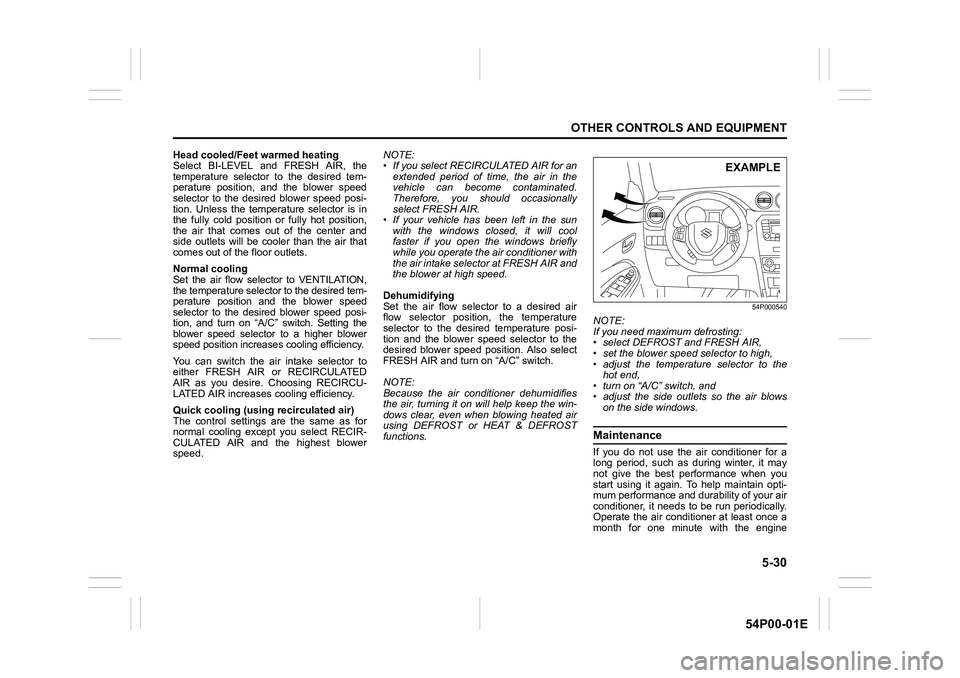
54P000540
NOTE:
If you need maximum defrosting:
• select DEFROST and FRESH AIR,
• set the blower speed selector to high,
• adjust the temperature selector to the
hot end,
• turn on “A/C” switch, and
• adjust the side outlets so the air blows
on the side windows.
Maintenance
If you do not use the air conditioner for a
long period, such as during winter, it may
not give the best performance when you
start using it again. To help maintain opti-
mum performance and durability of your air
conditioner, it needs to be run periodically.
Operate the air conditioner at least once a
month for one minute with the engine
EXAMPLE
Page 279 of 482
5-37
OTHER CONTROLS AND EQUIPMENT
54P00-01E
You can use the air conditioning switch (6)
to manually turn the air conditioner on or off
according to your preference. When you
turn the air conditioning switch off, the cli-
mate control system cannot lower the inside
temperature below outside temperature.
To turn the climate control system off, push
“OFF” switch (7).
NOTE:
If “AUTO” on the display blinks, there is a
problem in the heating system and/or air
conditioning system. You should have the
system inspected by an authorized
SUZUKI dealer.
NOTE:
• To find the temperature at which you are
most comfortable, start with the 22°C
(72°F) or 25°C (75°F) setting. (the tem-
perature vary depending on vehicle
specifications.).
• If you turn the temperature selector (1)
until “HI” or “LO” appears on the display,
the climate control system will operate at
maximum heating or cooling and the
blower will run at full speed.
• To avoid blowing cold air in cold weather
or hot air in hot weather, the system will
delay turning on the blower until warmed
or chilled air is available.
• If your vehicle has been left in the sun
with the windows closed, it will cool
faster if you open the windows briefly.
• Even under the automatic operation, you
can set individual selectors to the manualmode. The manually selected functions
are maintained, and the other functions
remain under automatic operation.
• If the windshield and/or the front door
windows are fogged, push the defrost
switch (5) to turn on the defroster, or
push the air flow selector (4) to change
the air flow to HEAT & DEFROST posi-
tion to defog the windows.
• To return the blower speed selector (2),
air intake selector (3), and air flow selec-
tor (4) to automatic operation, push
“AUTO” switch (8).
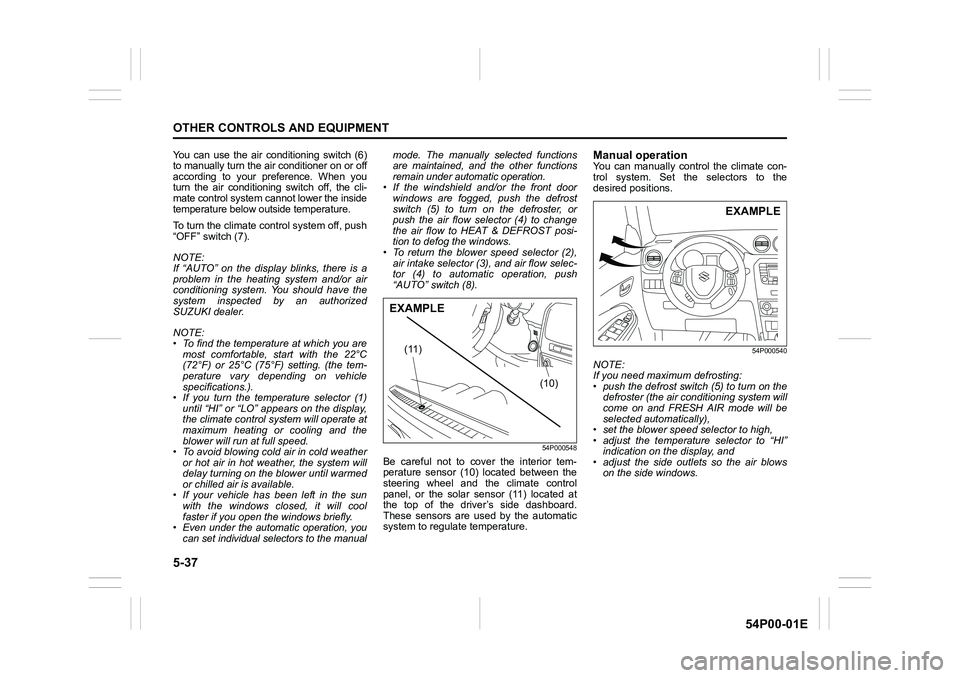
54P000548
Be careful not to cover the interior tem-
perature sensor (10) located between the
steering wheel and the climate control
panel, or the solar sensor (11) located at
the top of the driver’s side dashboard.
These sensors are used by the automatic
system to regulate temperature.
Manual operationYou can manually control the climate con-
trol system. Set the selectors to the
desired positions.
54P000540
NOTE:
If you need maximum defrosting:
• push the defrost switch (5) to turn on the
defroster (the air conditioning system will
come on and FRESH AIR mode will be
selected automatically),
• set the blower speed selector to high,
• adjust the temperature selector to “HI”
indication on the display, and
• adjust the side outlets so the air blows
on the side windows.
(10) (11)
EXAMPLE
EXAMPLE
Page 293 of 482
5-51
OTHER CONTROLS AND EQUIPMENT
54P00-01E
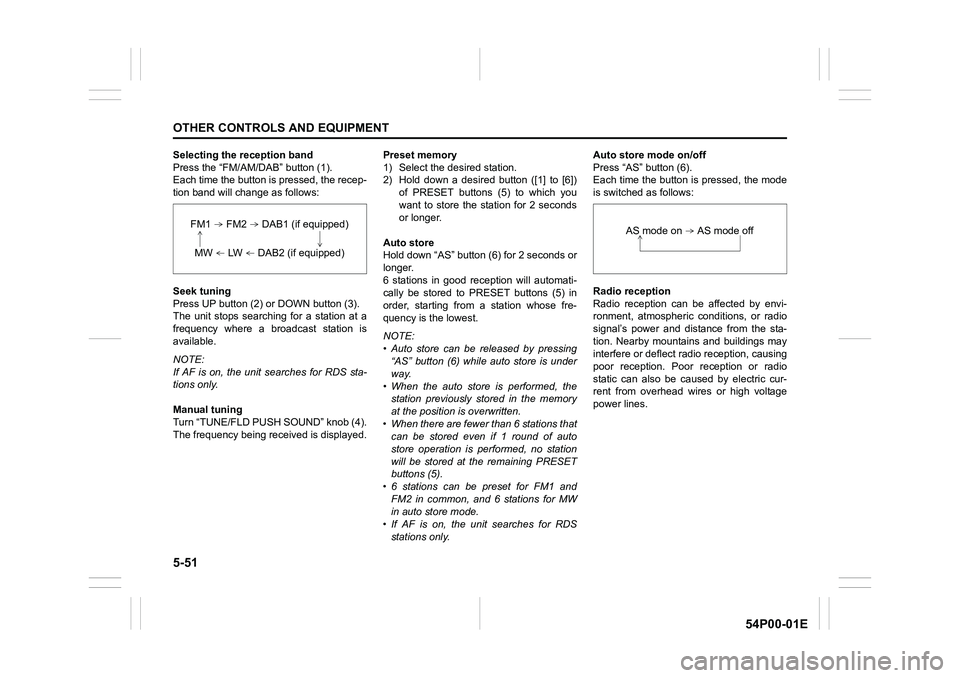
Selecting the reception band
Press the “FM/AM/DAB” button (1).
Each time the button is pressed, the recep-
tion band will change as follows:
Seek tuning
Press UP button (2) or DOWN button (3).
The unit stops searching for a station at a
frequency where a broadcast station is
available.
NOTE:
If AF is on, the unit searches for RDS sta-
tions only.
Manual tuning
Turn “TUNE/FLD PUSH SOUND” knob (4).
The frequency being received is displayed.Preset memory
1) Select the desired station.
2) Hold down a desired button ([1] to [6])
of PRESET buttons (5) to which you
want to store the station for 2 seconds
or longer.
Auto store
Hold down “AS” button (6) for 2 seconds or
longer.
6 stations in good reception will automati-
cally be stored to PRESET buttons (5) in
order, starting from a station whose fre-
quency is the lowest.
NOTE:
• Auto store can be released by pressing
“AS” button (6) while auto store is under
way.
• When the auto store is performed, the
station previously stored in the memory
at the position is overwritten.
• When there are fewer than 6 stations that
can be stored even if 1 round of auto
store operation is performed, no station
will be stored at the remaining PRESET
buttons (5).
• 6 stations can be preset for FM1 and
FM2 in common, and 6 stations for MW
in auto store mode.
• If AF is on, the unit searches for RDS
stations only.Auto store mode on/off
Press “AS” button (6).
Each time the button is pressed, the mode
is switched as follows:
Radio reception
Radio reception can be affected by envi-
ronment, atmospheric conditions, or radio
signal’s power and distance from the sta-
tion. Nearby mountains and buildings may
interfere or deflect radio reception, causing
poor reception. Poor reception or radio
static can also be caused by electric cur-
rent from overhead wires or high voltage
power lines.
FM1 FM2 DAB1 (if equipped)
MW LW DAB2 (if equipped)
AS mode on AS mode off
Page 295 of 482
5-53
OTHER CONTROLS AND EQUIPMENT
54P00-01E
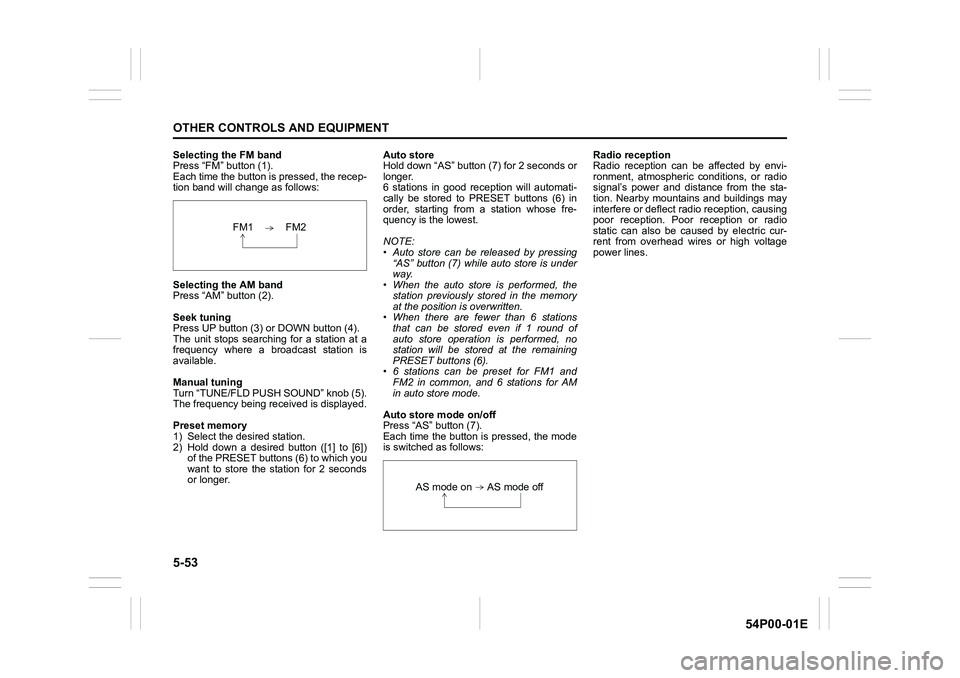
Selecting the FM band
Press “FM” button (1).
Each time the button is pressed, the recep-
tion band will change as follows:
Selecting the AM band
Press “AM” button (2).
Seek tuning
Press UP button (3) or DOWN button (4).
The unit stops searching for a station at a
frequency where a broadcast station is
available.
Manual tuning
Turn “TUNE/FLD PUSH SOUND” knob (5).
The frequency being received is displayed.
Preset memory
1) Select the desired station.
2) Hold down a desired button ([1] to [6])
of the PRESET buttons (6) to which you
want to store the station for 2 seconds
or longer.Auto store
Hold down “AS” button (7) for 2 seconds or
longer.
6 stations in good reception will automati-
cally be stored to PRESET buttons (6) in
order, starting from a station whose fre-
quency is the lowest.
NOTE:
• Auto store can be released by pressing
“AS” button (7) while auto store is under
way.
• When the auto store is performed, the
station previously stored in the memory
at the position is overwritten.
• When there are fewer than 6 stations
that can be stored even if 1 round of
auto store operation is performed, no
station will be stored at the remaining
PRESET buttons (6).
• 6 stations can be preset for FM1 and
FM2 in common, and 6 stations for AM
in auto store mode.
Auto store mode on/off
Press “AS” button (7).
Each time the button is pressed, the mode
is switched as follows:Radio reception
Radio reception can be affected by envi-
ronment, atmospheric conditions, or radio
signal’s power and distance from the sta-
tion. Nearby mountains and buildings may
interfere or deflect radio reception, causing
poor reception. Poor reception or radio
static can also be caused by electric cur-
rent from overhead wires or high voltage
power lines.
FM1 FM2
AS mode on AS mode off
Page 304 of 482
5-62
OTHER CONTROLS AND EQUIPMENT
54P00-01E
Display change
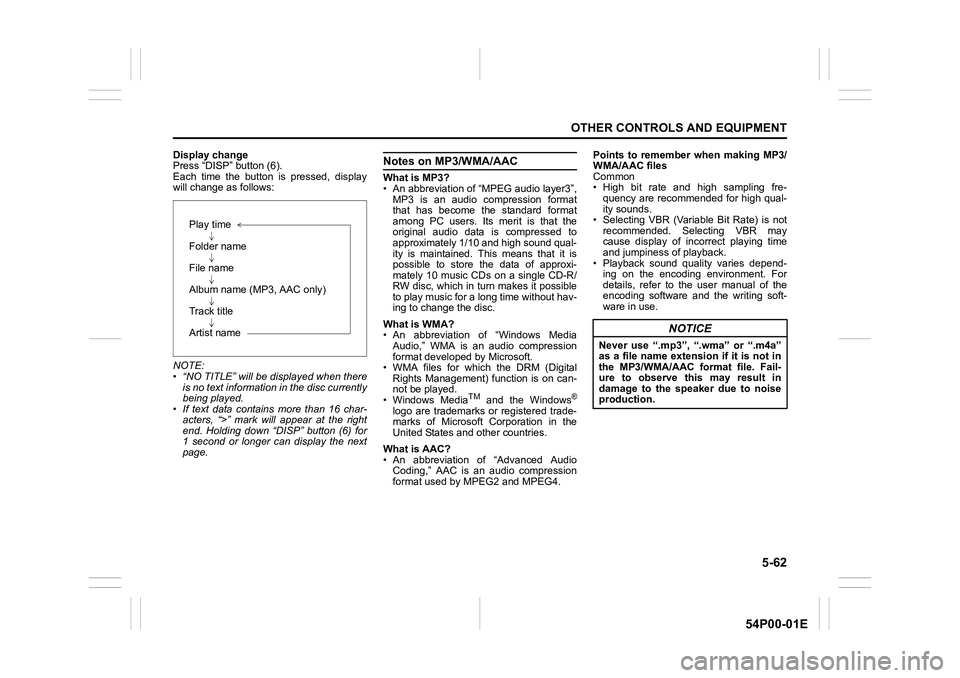
Press “DISP” button (6).
Each time the button is pressed, display
will change as follows:
NOTE:
• “NO TITLE” will be displayed when there
is no text information in the disc currently
being played.
• If text data contains more than 16 char-
acters, “>” mark will appear at the right
end. Holding down “DISP” button (6) for
1 second or longer can display the next
page.Notes on MP3/WMA/AAC
What is MP3?
• An abbreviation of “MPEG audio layer3”,
MP3 is an audio compression format
that has become the standard format
among PC users. Its merit is that the
original audio data is compressed to
approximately 1/10 and high sound qual-
ity is maintained. This means that it is
possible to store the data of approxi-
mately 10 music CDs on a single CD-R/
RW disc, which in turn makes it possible
to play music for a long time without hav-
ing to change the disc.
What is WMA?
• An abbreviation of “Windows Media
Audio,” WMA is an audio compression
format developed by Microsoft.
• WMA files for which the DRM (Digital
Rights Management) function is on can-
not be played.
• Windows Media
TM and the Windows®
logo are trademarks or registered trade-
marks of Microsoft Corporation in the
United States and other countries.
What is AAC?
• An abbreviation of “Advanced Audio
Coding,” AAC is an audio compression
format used by MPEG2 and MPEG4.Points to remember when making MP3/
WMA/AAC files
Common
• High bit rate and high sampling fre-
quency are recommended for high qual-
ity sounds.
• Selecting VBR (Variable Bit Rate) is not
recommended. Selecting VBR may
cause display of incorrect playing time
and jumpiness of playback.
• Playback sound quality varies depend-
ing on the encoding environment. For
details, refer to the user manual of the
encoding software and the writing soft-
ware in use.
Play time
Folder name
File name
Album name (MP3, AAC only)
Track title
Artist name
NOTICE
Never use “.mp3”, “.wma” or “.m4a”
as a file name extension if it is not in
the MP3/WMA/AAC format file. Fail-
ure to observe this may result in
damage to the speaker due to noise
production.
Page 308 of 482
5-66
OTHER CONTROLS AND EQUIPMENT
54P00-01E
Notes on USB device
Compatible USB devices
• USB mass storage class
For details as to whether your USB
memory/USB audio is compatible with
USB mass storage class, please contact
the USB memory/USB audio manufac-
turer.
• USB standard compatibility 1.1/2.0 full
speed
• File system FAT12/16/32, VFAT
• Maximum current less than 1.0 A
• If devices such as USB hub, extension
cable are connected to the audio sys-
tem, it may not be recognized. In such
case, connect the USB device directly to
the audio system.
• Devices such as MP3 player/mobile
phone/digital camera may not be recog-
nized by the audio system for playing
music.USB device connection
• When connecting a USB device, check
that the connector is pushed all the way
into the port.
• Do not leave the USB device for long
periods of time inside the vehicle where
the temperature can rise too high.
• Back up any important data beforehand.
We cannot accept responsibility for any
lost data.
• It is recommended not to connect a USB
device that contains data files other than
MP3/WMA/AAC format.
Recording MP3/WMA/AAC files on a
USB device
• Playback or display may not be possible
depending on the type of USB device in
use or the condition of the recording.
• Depending on the connected USB mem-
ory, the files may be played in different
order from the stored one.Compression formats
MP3
•Bit rate:
MPEG1 Audio Layer III: 32 k - 320 kbps
MPEG2 Audio Layer III: 8 k - 160 kbps
MPEG2.5 Audio Layer III: 8 k - 160 kbps
• Sampling frequency:MPEG1 Audio Layer III: 32 k/44.1 k/48 kHz
MPEG2 Audio Layer III: 16 k/22.05 k/24 kHz
MPEG2.5 Audio Layer III: 8 k/11.025 k/12 kHz
WMA (Ver. 7, Ver. 8, Ver. 9*)
• Bit rate: CBR 32 k - 320 kbps
• Sampling frequency: 32 k/44.1 k/48 kHz
* WMA 9 Professional/LossLess/Voice are
not supported.
AAC*
• Bit rate: ABR 16 k - 320 kbps
• Sampling frequency: 32 k/44.1 k/48 kHz
* Apple Lossless is not supported.
Maximum number of files/folders
• Maximum number of files: 2500
• Maximum number of files in a folder: 255
• Maximum depth of tree structure: 8
• Maximum number of folders: 255
(Root folder is included.)
Page 324 of 482
5-82
OTHER CONTROLS AND EQUIPMENT
54P00-01E
Adjusting the volume
To increase the volume, hold down “+” of
“VOL” switch (1). The volume will con-
tinue to increase until the switch is
released.
To decrease the volume, hold down “-” of
“VOL” switch (1). The volume will con-
tinue to decrease until the switch is
released.
To mute the sound, press the switch (2).
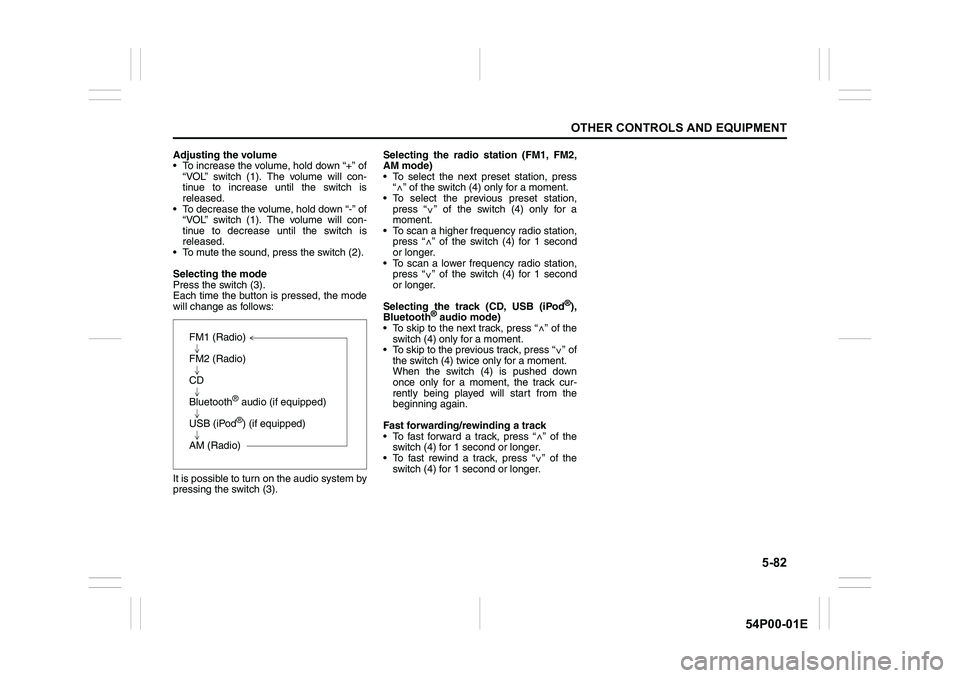
Selecting the mode
Press the switch (3).
Each time the button is pressed, the mode
will change as follows:
It is possible to turn on the audio system by
pressing the switch (3).Selecting the radio station (FM1, FM2,
AM mode)
To select the next preset station, press
“ ” of the switch (4) only for a moment.
To select the previous preset station,
press “ ” of the switch (4) only for a
moment.
To scan a higher frequency radio station,
press “ ” of the switch (4) for 1 second
or longer.
To scan a lower frequency radio station,
press “ ” of the switch (4) for 1 second
or longer.
Selecting the track (CD, USB (iPod
®),
Bluetooth® audio mode)
To skip to the next track, press “ ” of the
switch (4) only for a moment.
To skip to the previous track, press “ ” of
the switch (4) twice only for a moment.
When the switch (4) is pushed down
once only for a moment, the track cur-
rently being played will start from the
beginning again.
Fast forwarding/rewinding a track
To fast forward a track, press “ ” of the
switch (4) for 1 second or longer.
To fast rewind a track, press “ ” of the
switch (4) for 1 second or longer.
FM1 (Radio)
FM2 (Radio)
CD
Bluetooth
® audio (if equipped)
USB (iPod
®) (if equipped)
AM (Radio)
<
<
<
<
<
<
<
<
Page 333 of 482
6-1
VEHICLE LOADING AND TOWING
54P00-01E
Vehicle loading
Your vehicle was designed for specific
weight capacities. The weight capacities of
your vehicle are indicated by the Gross
Vehicle Weight Rating (GVWR) and the
Permissible maximum Axle Weight (PAW,
front and rear). The GVWR and PAW (front
and rear) are listed in “SPECIFICATIONS”
section.
GVWR – Maximum permissible overall
weight of the fully loaded vehicle (including
all the occupants, accessories and cargo
plus the trailer nose weight if towing a
trailer).
PAW (front and rear) – Maximum permissi-
ble weight on an individual axle.
Actual weight of the loaded vehicle and
actual loads at the front and rear axles can
only be determined by weighing the vehi-
cle. Compare these weights to the GVWR
and PAW (front and rear). If the gross vehi-
cle weight or the load on either axle
exceeds these ratings, you must remove
enough weight to bring the load down to
the rated capacity.
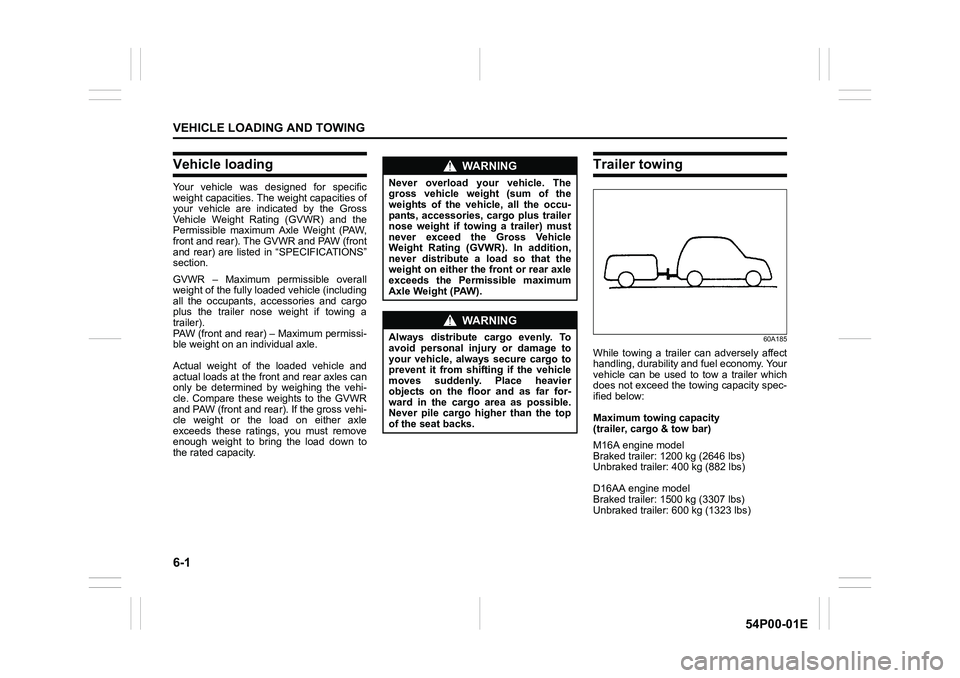
Trailer towing
60A185
While towing a trailer can adversely affect
handling, durability and fuel economy. Your
vehicle can be used to tow a trailer which
does not exceed the towing capacity spec-
ified below:
Maximum towing capacity
(trailer, cargo & tow bar)
M16A engine model
Braked trailer: 1200 kg (2646 lbs)
Unbraked trailer: 400 kg (882 lbs)
D16AA engine model
Braked trailer: 1500 kg (3307 lbs)
Unbraked trailer: 600 kg (1323 lbs)
WA R N I N G
Never overload your vehicle. The
gross vehicle weight (sum of the
weights of the vehicle, all the occu-
pants, accessories, cargo plus trailer
nose weight if towing a trailer) must
never exceed the Gross Vehicle
Weight Rating (GVWR). In addition,
never distribute a load so that the
weight on either the front or rear axle
exceeds the Permissible maximum
Axle Weight (PAW).
WA R N I N G
Always distribute cargo evenly. To
avoid personal injury or damage to
your vehicle, always secure cargo to
prevent it from shifting if the vehicle
moves suddenly. Place heavier
objects on the floor and as far for-
ward in the cargo area as possible.
Never pile cargo higher than the top
of the seat backs.
Page 340 of 482
7-2
INSPECTION AND MAINTENANCE
54P00-01E
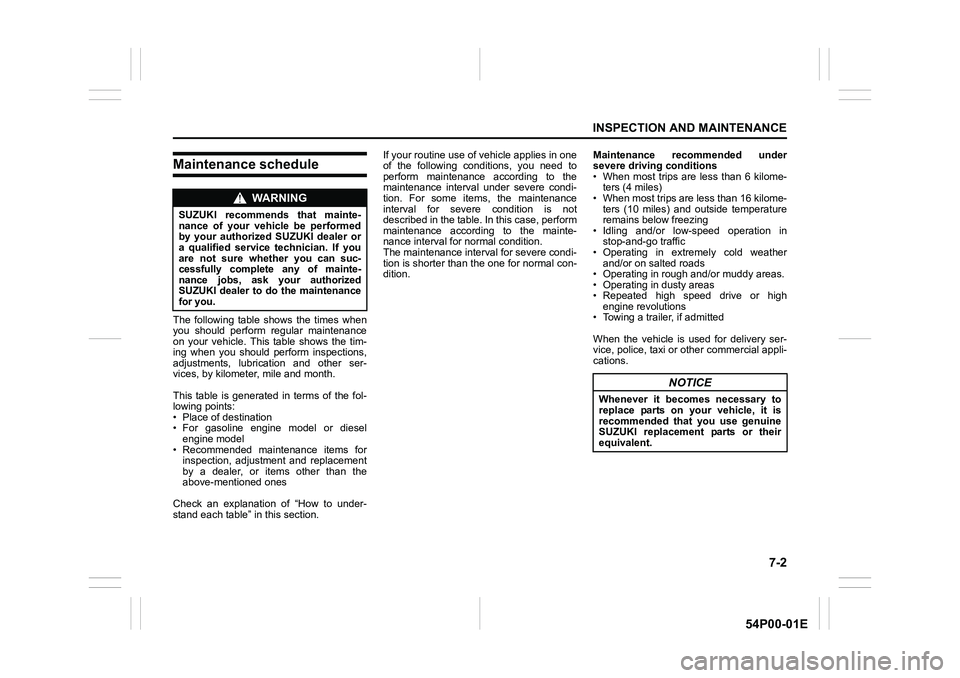
Maintenance schedule
The following table shows the times when
you should perform regular maintenance
on your vehicle. This table shows the tim-
ing when you should perform inspections,
adjustments, lubrication and other ser-
vices, by kilometer, mile and month.
This table is generated in terms of the fol-
lowing points:
• Place of destination
• For gasoline engine model or diesel
engine model
• Recommended maintenance items for
inspection, adjustment and replacement
by a dealer, or items other than the
above-mentioned ones
Check an explanation of “How to under-
stand each table” in this section.If your routine use of vehicle applies in one
of the following conditions, you need to
perform maintenance according to the
maintenance interval under severe condi-
tion. For some items, the maintenance
interval for severe condition is not
described in the table. In this case, perform
maintenance according to the mainte-
nance interval for normal condition.
The maintenance interval for severe condi-
tion is shorter than the one for normal con-
dition.Maintenance recommended under
severe driving conditions
• When most trips are less than 6 kilome-
ters (4 miles)
• When most trips are less than 16 kilome-
ters (10 miles) and outside temperature
remains below freezing
• Idling and/or low-speed operation in
stop-and-go traffic
• Operating in extremely cold weather
and/or on salted roads
• Operating in rough and/or muddy areas.
• Operating in dusty areas
• Repeated high speed drive or high
engine revolutions
• Towing a trailer, if admitted
When the vehicle is used for delivery ser-
vice, police, taxi or other commercial appli-
cations.
WA R N I N G
SUZUKI recommends that mainte-
nance of your vehicle be performed
by your authorized SUZUKI dealer or
a qualified service technician. If you
are not sure whether you can suc-
cessfully complete any of mainte-
nance jobs, ask your authorized
SUZUKI dealer to do the maintenance
for you.
NOTICE
Whenever it becomes necessary to
replace parts on your vehicle, it is
recommended that you use genuine
SUZUKI replacement parts or their
equivalent.
Page 344 of 482
7-6
INSPECTION AND MAINTENANCE
54P00-01E
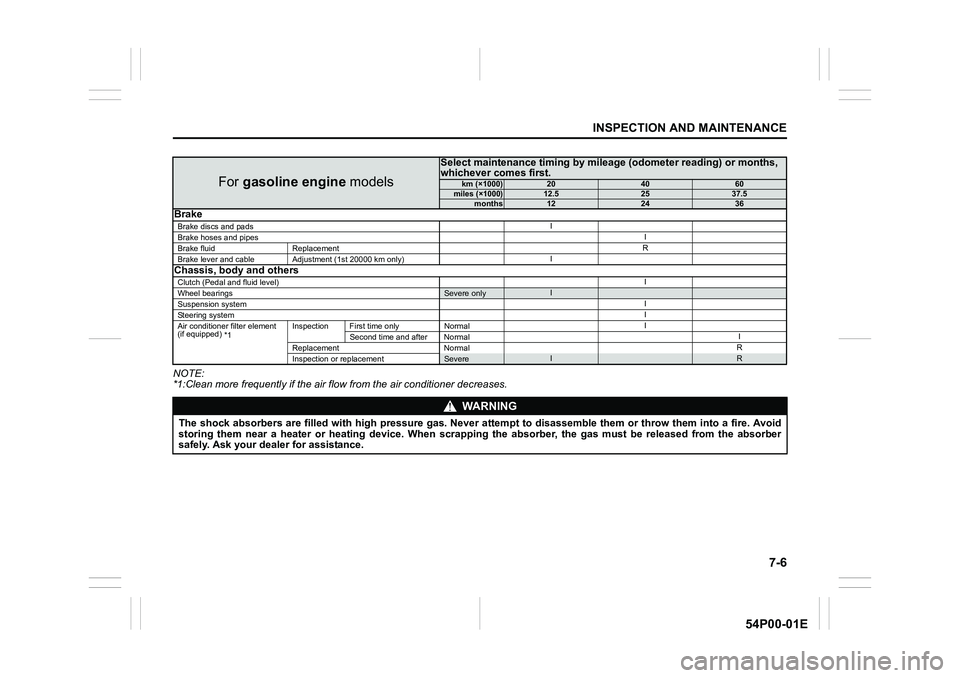
NOTE:
*1:Clean more frequently if the air flow from the air conditioner decreases.
For gasoline engine models
Select maintenance timing by mileage (odometer reading) or months,
whichever comes first.
km (×1000)204060miles (×1000)12.52537.5months122436Brake
Brake discs and padsI
Brake hoses and pipesI
Brake fluid ReplacementR
Brake lever and cable Adjustment (1st 20000 km only)I
Chassis, body and others
Clutch (Pedal and fluid level)I
Wheel bearingsSevere onlyI
Suspension systemI
Steering systemI
Air conditioner filter element
(if equipped)
*1Inspection First time only NormalI
Second time and after NormalI
Replacement NormalR
Inspection or replacement
SevereIR
WA R N I N G
The shock absorbers are filled with high pressure gas. Never attempt to disassemble them or throw them into a fire. Avoid
storing them near a heater or heating device. When scrapping the absorber, the gas must be released from the absorber
safely. Ask your dealer for assistance.