Gear SUZUKI GRAND VITARA 2022 User Guide
[x] Cancel search | Manufacturer: SUZUKI, Model Year: 2022, Model line: GRAND VITARA, Model: SUZUKI GRAND VITARA 2022Pages: 482, PDF Size: 21 MB
Page 162 of 482
3-22
OPERATING YOUR VEHICLE
54P00-01E
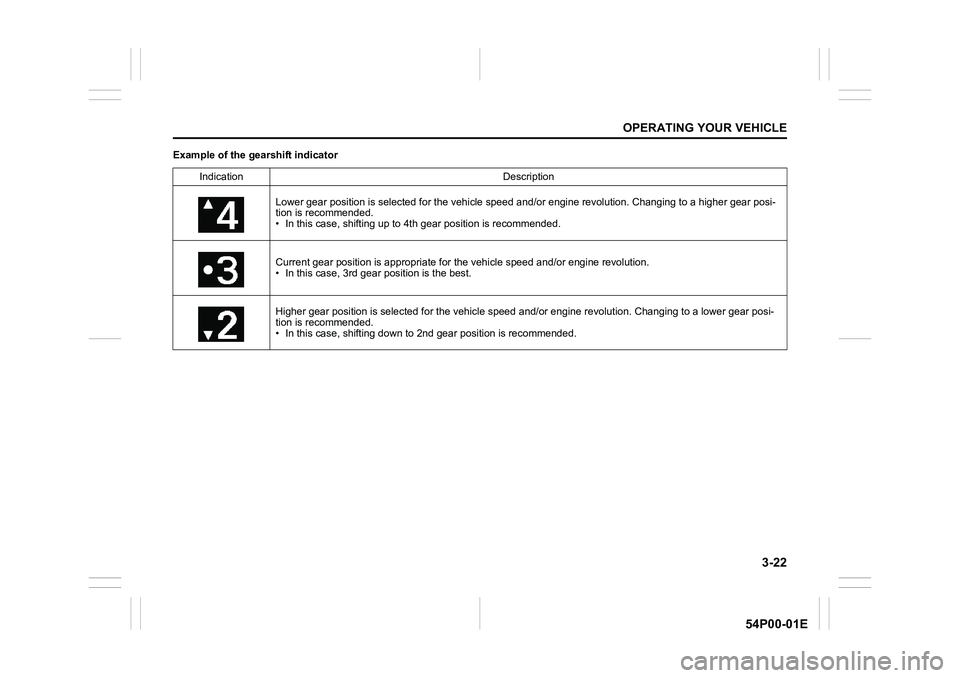
Example of the gearshift indicator
Indication Description
Lower gear position is selected for the vehicle speed and/or engine revolution. Changing to a higher gear posi-
tion is recommended.
• In this case, shifting up to 4th gear position is recommended.
Current gear position is appropriate for the vehicle speed and/or engine revolution.
• In this case, 3rd gear position is the best.
Higher gear position is selected for the vehicle speed and/or engine revolution. Changing to a lower gear posi-
tion is recommended.
• In this case, shifting down to 2nd gear position is recommended.
Page 170 of 482
3-30
OPERATING YOUR VEHICLE
54P00-01E
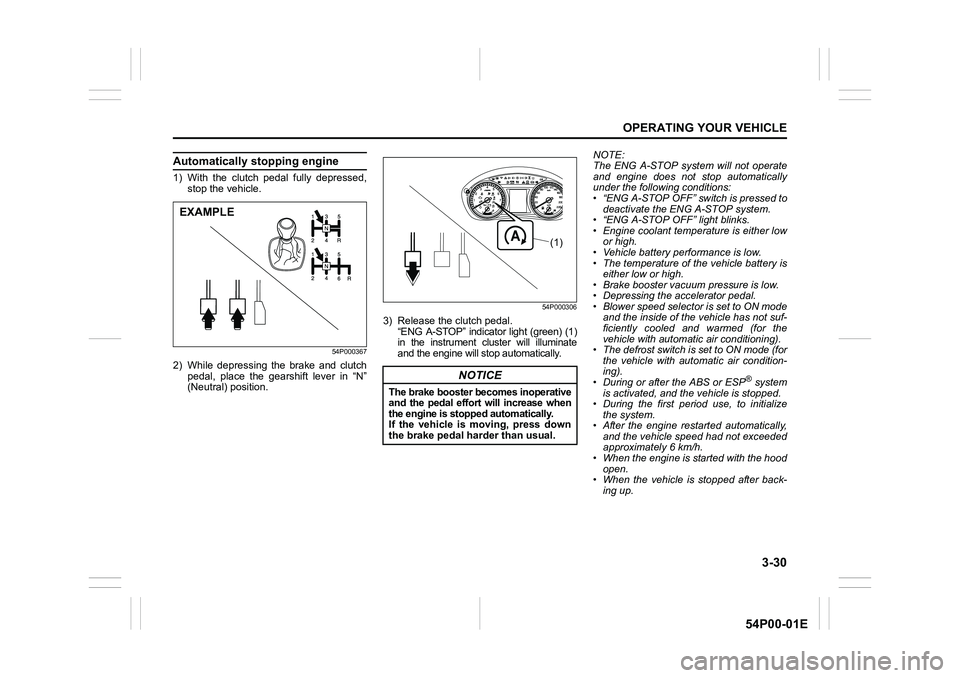
Automatically stopping engine
1) With the clutch pedal fully depressed,
stop the vehicle.
54P000367
2) While depressing the brake and clutch
pedal, place the gearshift lever in “N”
(Neutral) position.
54P000306
3) Release the clutch pedal.
“ENG A-STOP” indicator light (green) (1)
in the instrument cluster will illuminate
and the engine will stop automatically.NOTE:
The ENG A-STOP system will not operate
and engine does not stop automatically
under the following conditions:
• “ENG A-STOP OFF” switch is pressed to
deactivate the ENG A-STOP system.
• “ENG A-STOP OFF” light blinks.
• Engine coolant temperature is either low
or high.
• Vehicle battery performance is low.
• The temperature of the vehicle battery is
either low or high.
• Brake booster vacuum pressure is low.
• Depressing the accelerator pedal.
• Blower speed selector is set to ON mode
and the inside of the vehicle has not suf-
ficiently cooled and warmed (for the
vehicle with automatic air conditioning).
• The defrost switch is set to ON mode (for
the vehicle with automatic air condition-
ing).
• During or after the ABS or ESP
® system
is activated, and the vehicle is stopped.
• During the first period use, to initialize
the system.
• After the engine restarted automatically,
and the vehicle speed had not exceeded
approximately 6 km/h.
• When the engine is started with the hood
open.
• When the vehicle is stopped after back-
ing up.
EXAMPLE
NOTICE
The brake booster becomes inoperative
and the pedal effort will increase when
the engine is stopped automatically.
If the vehicle is moving, press down
the brake pedal harder than usual.
(1)
Page 171 of 482
3-31
OPERATING YOUR VEHICLE
54P00-01E
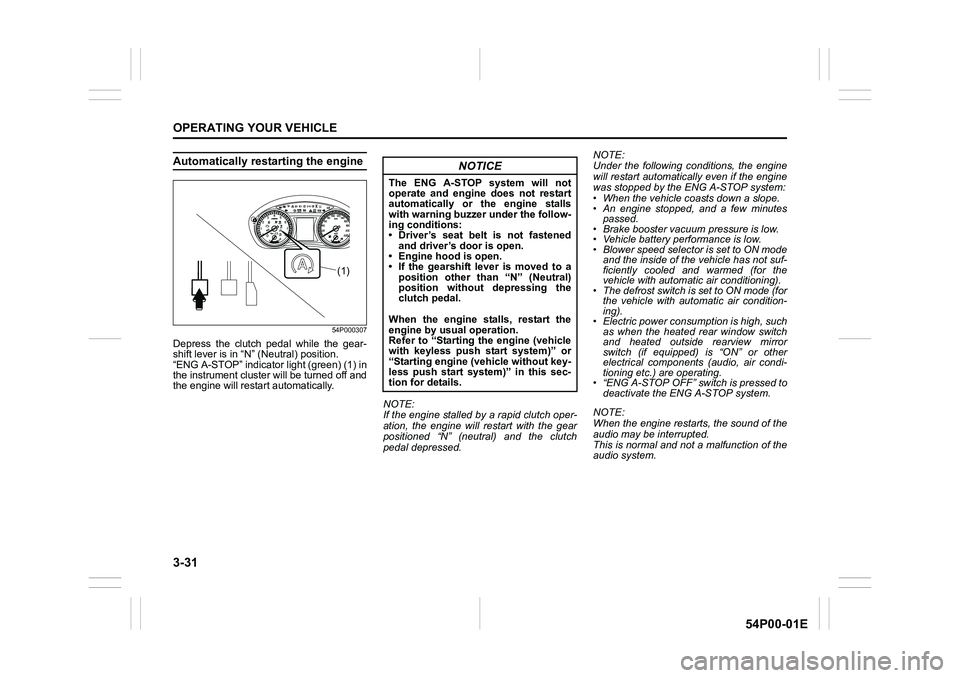
Automatically restarting the engine
54P000307
Depress the clutch pedal while the gear-
shift lever is in “N” (Neutral) position.
“ENG A-STOP” indicator light (green) (1) in
the instrument cluster will be turned off and
the engine will restart automatically.
NOTE:
If the engine stalled by a rapid clutch oper-
ation, the engine will restart with the gear
positioned “N” (neutral) and the clutch
pedal depressed.NOTE:
Under the following conditions, the engine
will restart automatically even if the engine
was stopped by the ENG A-STOP system:
• When the vehicle coasts down a slope.
• An engine stopped, and a few minutes
passed.
• Brake booster vacuum pressure is low.
• Vehicle battery performance is low.
• Blower speed selector is set to ON mode
and the inside of the vehicle has not suf-
ficiently cooled and warmed (for the
vehicle with automatic air conditioning).
• The defrost switch is set to ON mode (for
the vehicle with automatic air condition-
ing).
• Electric power consumption is high, such
as when the heated rear window switch
and heated outside rearview mirror
switch (if equipped) is “ON” or other
electrical components (audio, air condi-
tioning etc.) are operating.
• “ENG A-STOP OFF” switch is pressed to
deactivate the ENG A-STOP system.
NOTE:
When the engine restarts, the sound of the
audio may be interrupted.
This is normal and not a malfunction of the
audio system.
(1)
NOTICE
The ENG A-STOP system will not
operate and engine does not restart
automatically or the engine stalls
with warning buzzer under the follow-
ing conditions:
• Driver’s seat belt is not fastened
and driver’s door is open.
• Engine hood is open.
• If the gearshift lever is moved to a
position other than “N” (Neutral)
position without depressing the
clutch pedal.
When the engine stalls, restart the
engine by usual operation.
Refer to “Starting the engine (vehicle
with keyless push start system)” or
“Starting engine (vehicle without key-
less push start system)” in this sec-
tion for details.
Page 172 of 482
3-32
OPERATING YOUR VEHICLE
54P00-01E
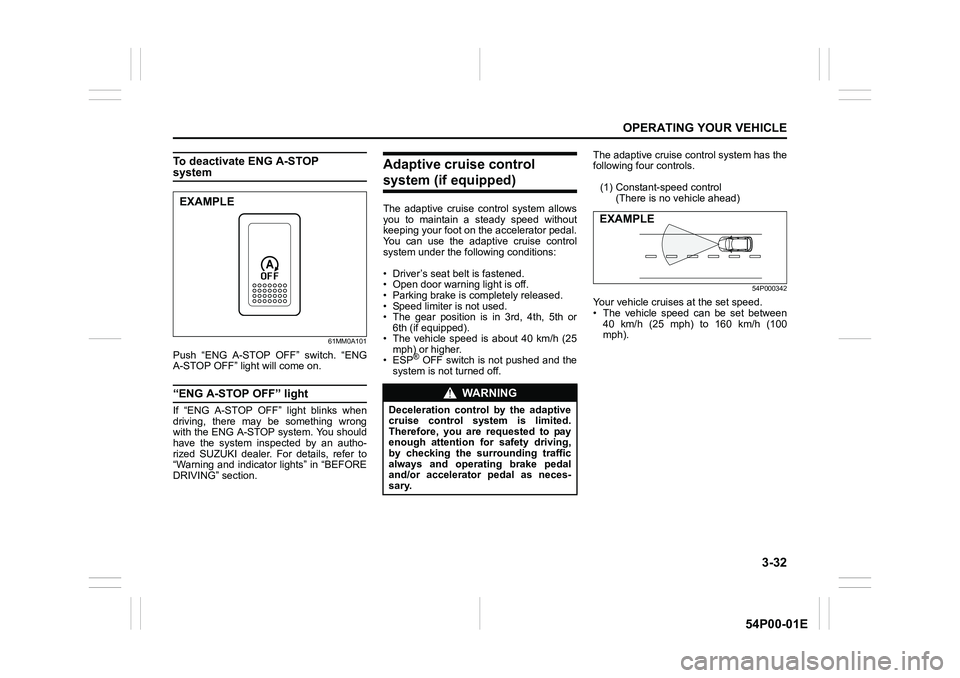
To deactivate ENG A-STOP system
61MM0A101
Push “ENG A-STOP OFF” switch. “ENG
A-STOP OFF” light will come on.
“ENG A-STOP OFF” light
If “ENG A-STOP OFF” light blinks when
driving, there may be something wrong
with the ENG A-STOP system. You should
have the system inspected by an autho-
rized SUZUKI dealer. For details, refer to
“Warning and indicator lights” in “BEFORE
DRIVING” section.
Adaptive cruise control
system (if equipped)
The adaptive cruise control system allows
you to maintain a steady speed without
keeping your foot on the accelerator pedal.
You can use the adaptive cruise control
system under the following conditions:
• Driver’s seat belt is fastened.
• Open door warning light is off.
• Parking brake is completely released.
• Speed limiter is not used.
• The gear position is in 3rd, 4th, 5th or
6th (if equipped).
• The vehicle speed is about 40 km/h (25
mph) or higher.
• ESP
® OFF switch is not pushed and the
system is not turned off.The adaptive cruise control system has the
following four controls.
(1) Constant-speed control
(There is no vehicle ahead)
54P000342
Your vehicle cruises at the set speed.
• The vehicle speed can be set between
40 km/h (25 mph) to 160 km/h (100
mph).
EXAMPLE
WA R N I N G
Deceleration control by the adaptive
cruise control system is limited.
Therefore, you are requested to pay
enough attention for safety driving,
by checking the surrounding traffic
always and operating brake pedal
and/or accelerator pedal as neces-
sary.
EXAMPLE
Page 178 of 482
3-38
OPERATING YOUR VEHICLE
54P00-01E
NOTE:
• You can adjust the set speed by 1 km/h
(or 1 mph) by pushing “RES +” switch (4)
or “SET –” switch (5) quickly.
• You can adjust the set speed by 5 km/h
(or 5 mph) by pushing and holding “RES
+” switch (4) or “SET –” switch (5).
• While deceleration control or following
control is activated, the vehicle is not
accelerated even though resetting to
higher cruising speed by continuous
pushing “RES +” switch (4) is operated.
However, if the vehicle ahead disap-
pears, the vehicle is accelerated auto-
matically to the set speed.Cancelling adaptive cruise control
“SET” indicator (8) will disappear and the
adaptive cruise control system will be can-
celed temporarily under the following con-
ditions:
• When “CANCEL” switch (3) is pushed
• When brake pedal is depressed
• When clutch pedal is continuously
depressed
• When vehicle speed falls below about 40
km/h (25 mph)
• When a vehicle skids and ESP
® is acti-
vated
• When radar sensor cover is covered in
snow, water or dirt
• When engine speed is too high or too
low
• When gear position is changed to “N”
(Neutral)
• When gear position is changed to 1st or
2nd
• When driver’s door is open
• When driver’s seat belt is unfastened
• When parking brake is applied
• When “LIMIT” switch is pressed
• When ESP
® OFF switch is pressedTo resume the previously set speed, push
“RES +” switch (4) and show “SET” indica-
tor (8). The vehicle speed must be above
about 40 km/h (25 mph) when the vehicle
is not under the above conditions.
To turn off the adaptive cruise control sys-
tem, push “CRUISE” switch (2) and check
that the cruise indicator (7) disappears.
Also, if any warning indication or message
related to the adaptive cruise control sys-
tem is displayed on the instrument cluster,
the adaptive cruise control system will be
turned off.
NOTE:
If you turn off the adaptive cruise control
system, the previously set speed in the
memory is cleared. Reset your cruising
speed again.
Page 182 of 482
3-42
OPERATING YOUR VEHICLE
54P00-01E
Cruise control (if equipped)
The cruise control system allows you to
maintain a steady speed without keeping
your foot on the accelerator pedal. The
controls for operating the cruise control
system are on the steering wheel.
You can use the cruise control system
under the following conditions:
• The gear position is in 3rd, 4th, 5th or
6th (if equipped).
• The vehicle speed is about 40 km/h (25
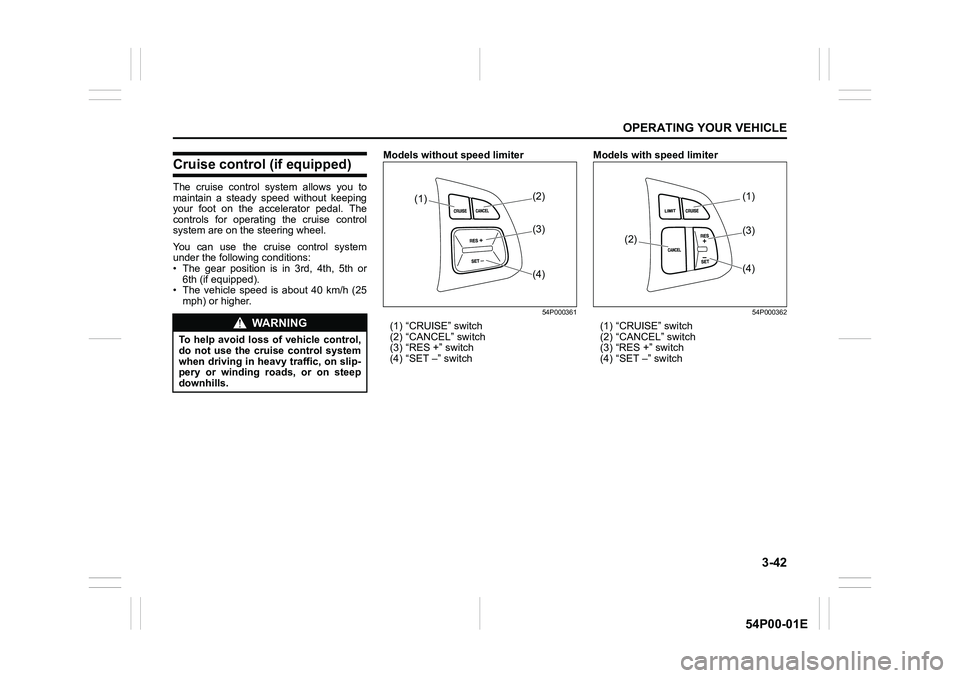
mph) or higher.Models without speed limiter
54P000361
(1) “CRUISE” switch
(2) “CANCEL” switch
(3) “RES +” switch
(4) “SET –” switchModels with speed limiter
54P000362
(1) “CRUISE” switch
(2) “CANCEL” switch
(3) “RES +” switch
(4) “SET –” switchWA R N I N G
To help avoid loss of vehicle control,
do not use the cruise control system
when driving in heavy traffic, on slip-
pery or winding roads, or on steep
downhills.
(1)(2)
(4) (3)
(1)
(2)
(4) (3)
Page 192 of 482
3-52
OPERATING YOUR VEHICLE
54P00-01E
Situations where radar will not acti-vate properly
Under the following situations, there is a
high possibility that the system will not acti-
vate.
• When the engine is off (except when the
engine is automatically stopped by the
ENG A-STOP system)
• When the gearshift lever is in the reverse
gear
• When facing an oncoming vehicle
• When the following switches are pushed
and the system is turned off:
– Radar brake support OFF switch
– ESP
® OFF switch
• When the system is temporarily stopped
or malfunctioning, some of the following
indicator and messages will come on:
– The radar brake support system warn-
ing light
– “RADAR BRAKE SUPPORT SYS
INSPECTION REQUIRED” message
– “RADAR BRAKE SUPPORT FCN
TEMPORARILY DISABLED” message
– “RADAR BRAKE SUPPORT: NOT
ACTIVE BY SENSOR.” message
Situations where radar may not activate properly
Under the following situations, the radar
may not detect a vehicle in front of you cor-
rectly and the system may not activate.
• When the radar sensor cover is covered
in snow, water or dirt
• When there is bad weather such as
heavy rain or fog, a blizzard or sand-
storm or when the vehicle in front of you
is surrounded by water, snow or sand
• When you are operating on a narrow
road
• When another vehicle jumps out sud-
denly
• When you suddenly accelerate and
approach the vehicle in front of you,
such as when you overtake the vehicle
in front of you
• When swerving
• When the vehicle cannot move in a
straight manner without consistently
steering, due to an accident or break-
down
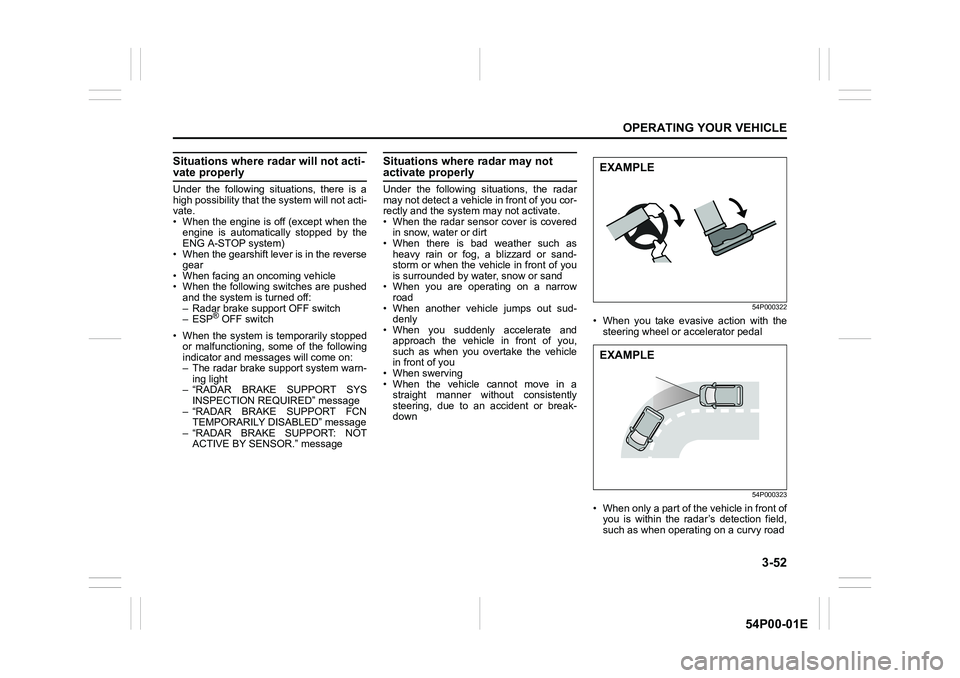
54P000322
• When you take evasive action with the
steering wheel or accelerator pedal
54P000323
• When only a part of the vehicle in front of
you is within the radar’s detection field,
such as when operating on a curvy road
EXAMPLE
EXAMPLE
Page 206 of 482
3-66
OPERATING YOUR VEHICLE
54P00-01E
Working sensors
The sensors work depending on the gearshift lever position and parking brake lever posi-
tion as follows:
Gearshift lever position R N, 1st – 5th or 6th Parking brake lever
Front sensors
(if equipped)Center Off On Release
Corner On On No relation
Rear sensorsCenter On Off No relation
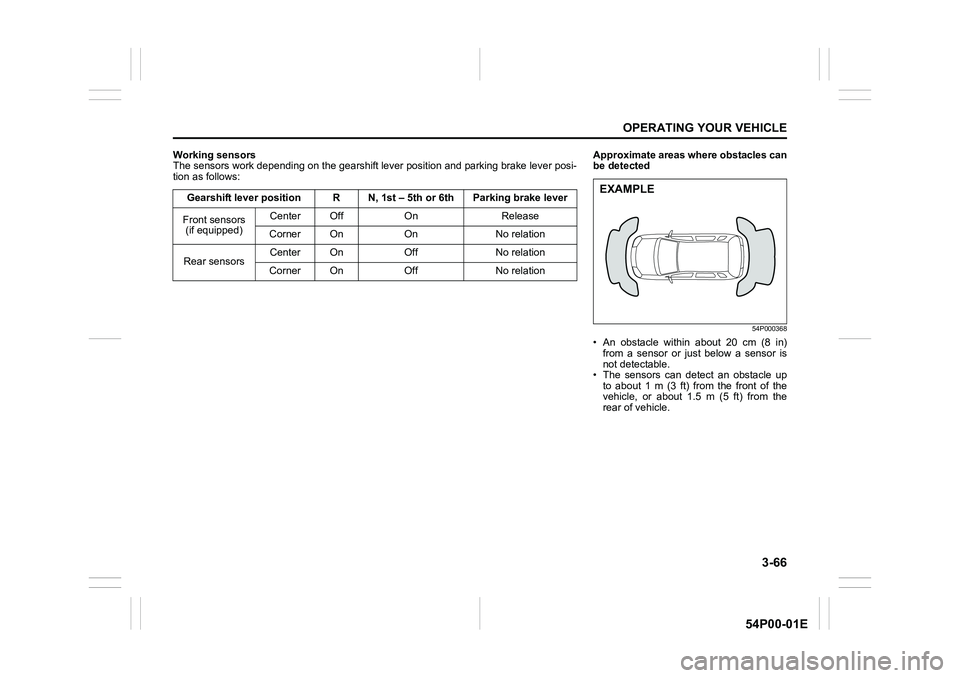
Corner On Off No relationApproximate areas where obstacles can
be detected
54P000368
• An obstacle within about 20 cm (8 in)
from a sensor or just below a sensor is
not detectable.
• The sensors can detect an obstacle up
to about 1 m (3 ft) from the front of the
vehicle, or about 1.5 m (5 ft) from the
rear of vehicle.
EXAMPLE
Page 211 of 482
3-71
OPERATING YOUR VEHICLE
54P00-01E
Rearview camera
(if equipped)
When the gearshift lever is shifted to “R”
position while the ignition switch is in “ON”
position or the ignition mode is “ON”, the
rearview camera system automatically
shows the view behind the vehicle on the
display.
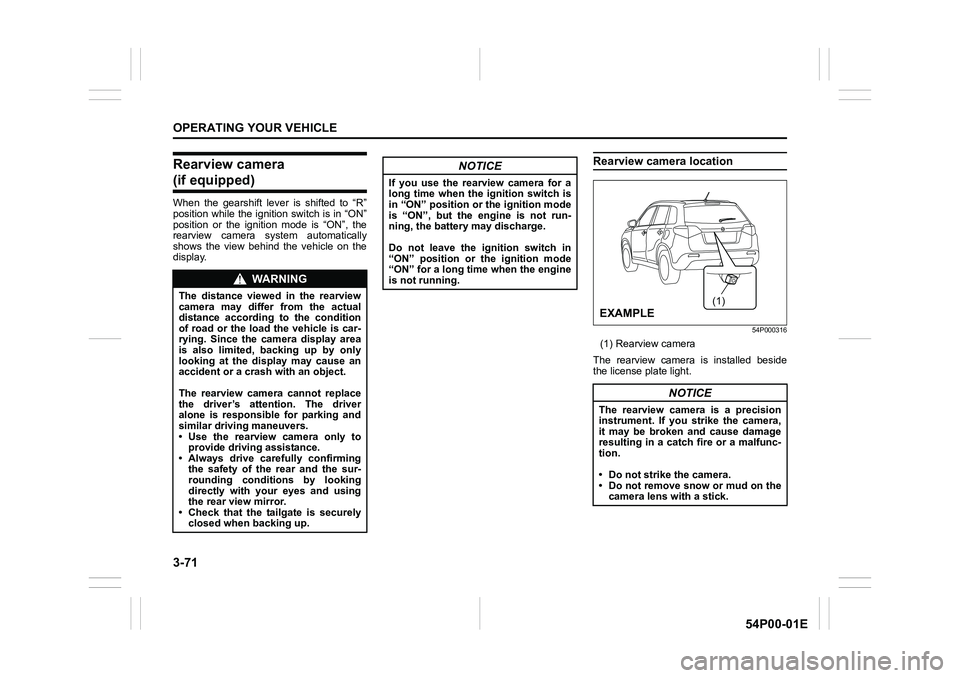
Rearview camera location
54P000316
(1) Rearview camera
The rearview camera is installed beside
the license plate light.
WA R N I N G
The distance viewed in the rearview
camera may differ from the actual
distance according to the condition
of road or the load the vehicle is car-
rying. Since the camera display area
is also limited, backing up by only
looking at the display may cause an
accident or a crash with an object.
The rearview camera cannot replace
the driver’s attention. The driver
alone is responsible for parking and
similar driving maneuvers.
• Use the rearview camera only to
provide driving assistance.
• Always drive carefully confirming
the safety of the rear and the sur-
rounding conditions by looking
directly with your eyes and using
the rear view mirror.
• Check that the tailgate is securely
closed when backing up.
NOTICE
If you use the rearview camera for a
long time when the ignition switch is
in “ON” position or the ignition mode
is “ON”, but the engine is not run-
ning, the battery may discharge.
Do not leave the ignition switch in
“ON” position or the ignition mode
“ON” for a long time when the engine
is not running.
NOTICE
The rearview camera is a precision
instrument. If you strike the camera,
it may be broken and cause damage
resulting in a catch fire or a malfunc-
tion.
• Do not strike the camera.
• Do not remove snow or mud on the
camera lens with a stick.
(1)
EXAMPLE
Page 212 of 482
3-72
OPERATING YOUR VEHICLE
54P00-01E
NOTE:
If body wax gets on the camera lens, wipe
off the wax with a clean cloth dampened
with mild detergent diluted with water, and
then wipe the lens with a dry cloth.
How to use rearview camera
1) Turn the ignition switch to “ON” position
or press the engine switch to change
the ignition mode to “ON”.
2) Shift the gearshift lever in “R” position.
• The display automatically shows the
view behind the vehicle.
• When the gearshift lever is shifted
from “R” to another gearshift lever
position, the display returns to the
previous display.
NOTE:
The rearview camera display has first pri-
ority in any display mode. However, the
rearview camera display does not show
the rear view while the system is initializ-
ing.
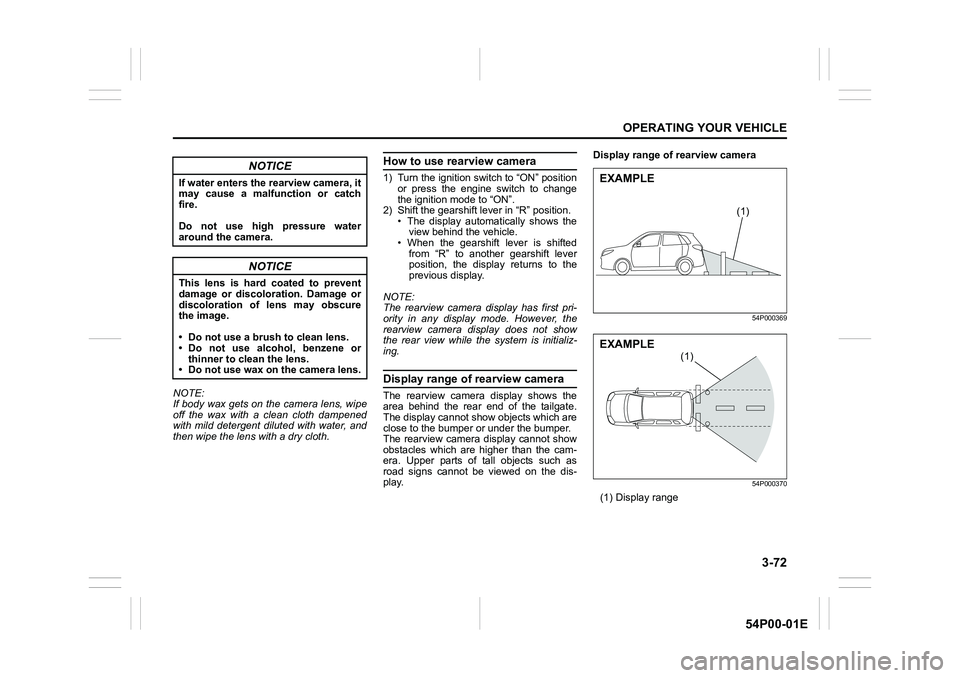
Display range of rearview camera
The rearview camera display shows the
area behind the rear end of the tailgate.
The display cannot show objects which are
close to the bumper or under the bumper.
The rearview camera display cannot show
obstacles which are higher than the cam-
era. Upper parts of tall objects such as
road signs cannot be viewed on the dis-
play.Display range of rearview camera
54P000369
54P000370
(1) Display range
NOTICE
If water enters the rearview camera, it
may cause a malfunction or catch
fire.
Do not use high pressure water
around the camera.
NOTICE
This lens is hard coated to prevent
damage or discoloration. Damage or
discoloration of lens may obscure
the image.
• Do not use a brush to clean lens.
• Do not use alcohol, benzene or
thinner to clean the lens.
• Do not use wax on the camera lens.
(1)
EXAMPLE
(1)
EXAMPLE