information display SUZUKI GRAND VITARA 2022 Owner's Manual
[x] Cancel search | Manufacturer: SUZUKI, Model Year: 2022, Model line: GRAND VITARA, Model: SUZUKI GRAND VITARA 2022Pages: 482, PDF Size: 21 MB
Page 131 of 482
2-109
BEFORE DRIVING
54P00-01E
Turn signal operation
With the ignition switch in “ON” position or
the ignition mode “ON”, move the lever
upward or downward to activate the right
or left turn signals.
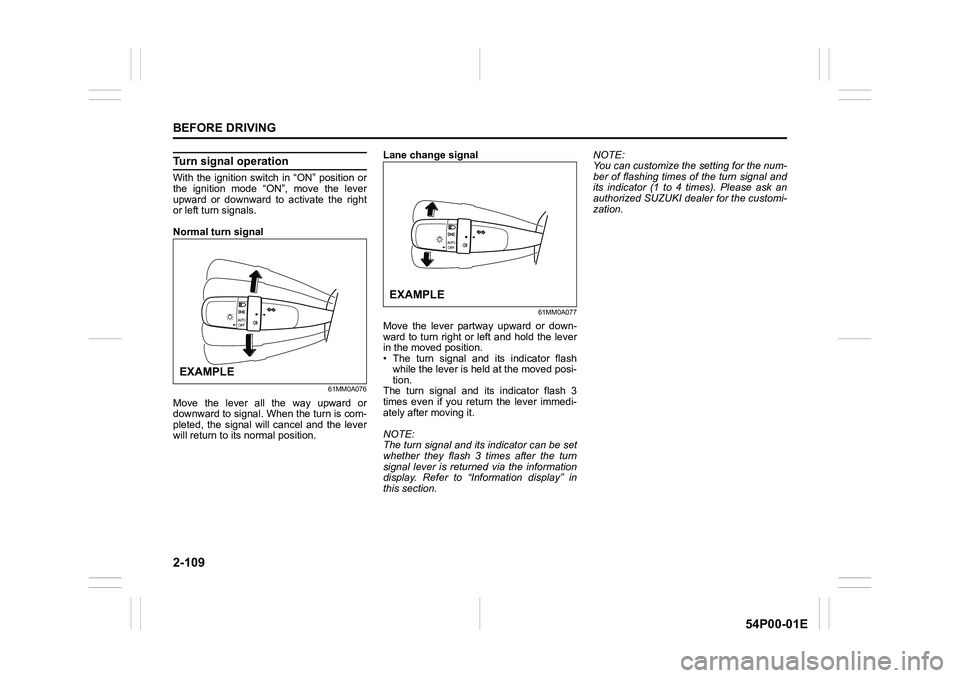
Normal turn signal
61MM0A076
Move the lever all the way upward or
downward to signal. When the turn is com-
pleted, the signal will cancel and the lever
will return to its normal position.Lane change signal
61MM0A077
Move the lever partway upward or down-
ward to turn right or left and hold the lever
in the moved position.
• The turn signal and its indicator flash
while the lever is held at the moved posi-
tion.
The turn signal and its indicator flash 3
times even if you return the lever immedi-
ately after moving it.
NOTE:
The turn signal and its indicator can be set
whether they flash 3 times after the turn
signal lever is returned via the information
display. Refer to “Information display” in
this section.NOTE:
You can customize the setting for the num-
ber of flashing times of the turn signal and
its indicator (1 to 4 times). Please ask an
authorized SUZUKI dealer for the customi-
zation.
EXAMPLE
EXAMPLE
Page 145 of 482
3-5
OPERATING YOUR VEHICLE
54P00-01E
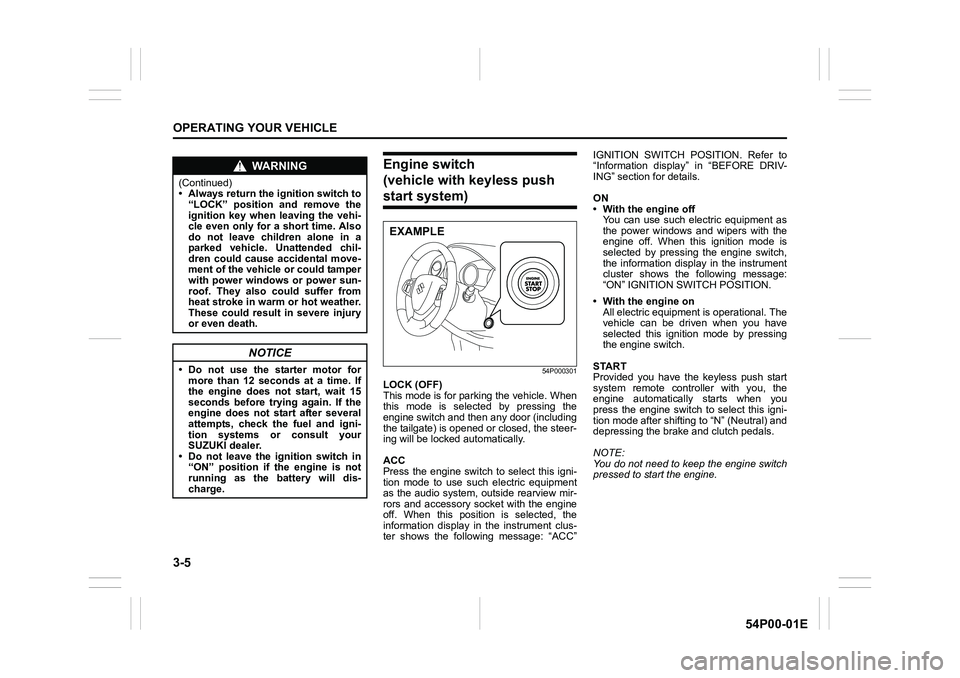
Engine switch
(vehicle with keyless push
start system)
54P000301
LOCK (OFF)
This mode is for parking the vehicle. When
this mode is selected by pressing the
engine switch and then any door (including
the tailgate) is opened or closed, the steer-
ing will be locked automatically.
ACC
Press the engine switch to select this igni-
tion mode to use such electric equipment
as the audio system, outside rearview mir-
rors and accessory socket with the engine
off. When this position is selected, the
information display in the instrument clus-
ter shows the following message: “ACC”IGNITION SWITCH POSITION. Refer to
“Information display” in “BEFORE DRIV-
ING” section for details.
ON
• With the engine off
You can use such electric equipment as
the power windows and wipers with the
engine off. When this ignition mode is
selected by pressing the engine switch,
the information display in the instrument
cluster shows the following message:
“ON” IGNITION SWITCH POSITION.
• With the engine on
All electric equipment is operational. The
vehicle can be driven when you have
selected this ignition mode by pressing
the engine switch.
START
Provided you have the keyless push start
system remote controller with you, the
engine automatically starts when you
press the engine switch to select this igni-
tion mode after shifting to “N” (Neutral) and
depressing the brake and clutch pedals.
NOTE:
You do not need to keep the engine switch
pressed to start the engine.
WA R N I N G
(Continued)
• Always return the ignition switch to
“LOCK” position and remove the
ignition key when leaving the vehi-
cle even only for a short time. Also
do not leave children alone in a
parked vehicle. Unattended chil-
dren could cause accidental move-
ment of the vehicle or could tamper
with power windows or power sun-
roof. They also could suffer from
heat stroke in warm or hot weather.
These could result in severe injury
or even death.
NOTICE
• Do not use the starter motor for
more than 12 seconds at a time. If
the engine does not start, wait 15
seconds before trying again. If the
engine does not start after several
attempts, check the fuel and igni-
tion systems or consult your
SUZUKI dealer.
• Do not leave the ignition switch in
“ON” position if the engine is not
running as the battery will dis-
charge.
EXAMPLE
Page 146 of 482
3-6
OPERATING YOUR VEHICLE
54P00-01E
NOTE:
In the presence of strong radio signals or
noise, you may not be able to change the
ignition mode to “ACC” or “ON” or to start
the engine using the engine switch. In this
case, the information display in the instru-
ment cluster will show the following mes-
sage: KEY FOB NOT DETECTED.
Unreleased steering lock warning
If the steering lock remains engaged when
you press the engine switch to change the
ignition mode to “ON”, the information dis-
play in the instrument cluster shows the
message: “TRN. STEERING WHEEL TO
RELEASE LOCK”. Refer to “Information
display” in “BEFORE DRIVING” section for
details.
NOTE:
The steering lock may not be released if
some load is acting on the steering wheel.
If this happens, turn the steering wheel to
the right or left to relieve it from the load
before you press the engine switch again
to change to the desired ignition mode.
Keyless push start system
(if equipped)
Provided the keyless push start system
remote controller is within the interior work-
able area (refer to the related explanation
in this section), you can use the engine
switch for starting the engine and selecting
an ignition mode (“ACC” or “ON”). In addi-
tion, the following functions can be used:
• Keyless entry function. Refer to “Keyless
push start system remote controller /
keyless entry system transmitter” in
“BEFORE DRIVING” section for details.
• Locking and unlocking doors (including
the tailgate) using a request switch.
Refer to “Keyless push start system
remote controller / keyless entry system
transmitter” in “BEFORE DRIVING” sec-
tion for details.
• Immobilizer (anti-theft) function. Refer to
“Immobilizer system” in “BEFORE DRIV-
ING” section for details.
Engine switch illumination
The engine switch is illuminated (lit) in the
following situations:
• When the engine is off and the driver’s
door is open, or for 15 seconds after the
driver’s door is closed. The illumination
will fade out after 15 seconds passed.
NOTICE
Do not leave the engine switch in
“ACC” or “ON” mode when the
engine is not running. Avoid using
the radio or other electric accesso-
ries for a long time when the engine
switch is in “ACC” or “ON” mode
when the engine is not running, oth-
erwise the battery may discharge.
Page 148 of 482
3-8
OPERATING YOUR VEHICLE
54P00-01E
NOTE:
When selecting the ignition modes, the
information display in the instrument clus-
ter shows certain messages. Refer to
“Information display” in “BEFORE DRIV-
ING” section for details.
If the master warning indicator light
blinks and the ignition modes cannot
be selected
Your keyless push start system remote con-
troller may not be sensed as being within the
interior workable area (refer to the related
explanation in this section). Try again after
checking that you have the remote controller
with you. If the ignition modes still cannot be
selected, the battery of the remote controller
may be discharged. To select an ignition
mode, you must then use the following
method:
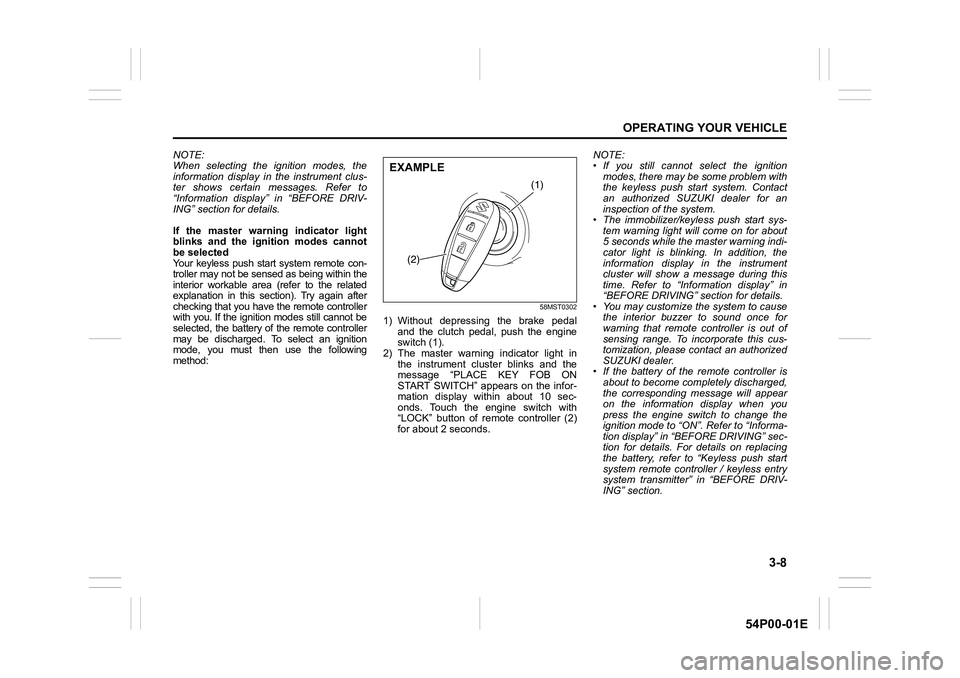
58MST0302
1) Without depressing the brake pedal
and the clutch pedal, push the engine
switch (1).
2) The master warning indicator light in
the instrument cluster blinks and the
message “PLACE KEY FOB ON
START SWITCH” appears on the infor-
mation display within about 10 sec-
onds. Touch the engine switch with
“LOCK” button of remote controller (2)
for about 2 seconds.NOTE:
• If you still cannot select the ignition
modes, there may be some problem with
the keyless push start system. Contact
an authorized SUZUKI dealer for an
inspection of the system.
• The immobilizer/keyless push start sys-
tem warning light will come on for about
5 seconds while the master warning indi-
cator light is blinking. In addition, the
information display in the instrument
cluster will show a message during this
time. Refer to “Information display” in
“BEFORE DRIVING” section for details.
• You may customize the system to cause
the interior buzzer to sound once for
warning that remote controller is out of
sensing range. To incorporate this cus-
tomization, please contact an authorized
SUZUKI dealer.
• If the battery of the remote controller is
about to become completely discharged,
the corresponding message will appear
on the information display when you
press the engine switch to change the
ignition mode to “ON”. Refer to “Informa-
tion display” in “BEFORE DRIVING” sec-
tion for details. For details on replacing
the battery, refer to “Keyless push start
system remote controller / keyless entry
system transmitter” in “BEFORE DRIV-
ING” section.
(1)
(2)
EXAMPLE
Page 149 of 482
3-9
OPERATING YOUR VEHICLE
54P00-01E
REMOTE CONTROLLER OUTSIDE warning
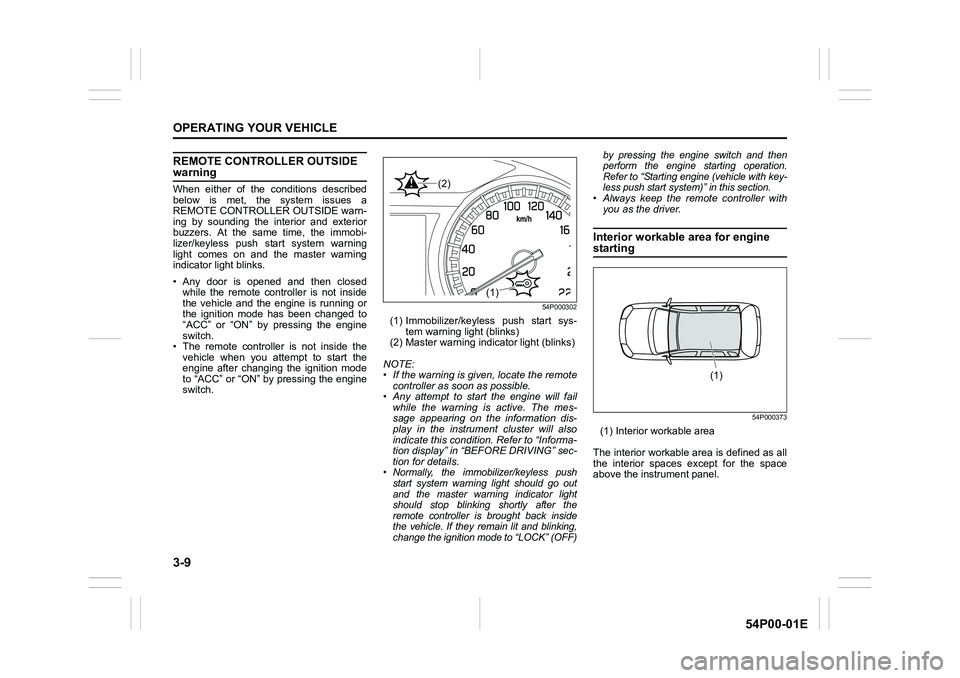
When either of the conditions described
below is met, the system issues a
REMOTE CONTROLLER OUTSIDE warn-
ing by sounding the interior and exterior
buzzers. At the same time, the immobi-
lizer/keyless push start system warning
light comes on and the master warning
indicator light blinks.
• Any door is opened and then closed
while the remote controller is not inside
the vehicle and the engine is running or
the ignition mode has been changed to
“ACC” or “ON” by pressing the engine
switch.
• The remote controller is not inside the
vehicle when you attempt to start the
engine after changing the ignition mode
to “ACC” or “ON” by pressing the engine
switch.
54P000302
(1) Immobilizer/keyless push start sys-
tem warning light (blinks)
(2) Master warning indicator light (blinks)
NOTE:
• If the warning is given, locate the remote
controller as soon as possible.
• Any attempt to start the engine will fail
while the warning is active. The mes-
sage appearing on the information dis-
play in the instrument cluster will also
indicate this condition. Refer to “Informa-
tion display” in “BEFORE DRIVING” sec-
tion for details.
• Normally, the immobilizer/keyless push
start system warning light should go out
and the master warning indicator light
should stop blinking shortly after the
remote controller is brought back inside
the vehicle. If they remain lit and blinking,
change the ignition mode to “LOCK” (OFF)by pressing the engine switch and then
perform the engine starting operation.
Refer to “Starting engine (vehicle with key-
less push start system)” in this section.
• Always keep the remote controller with
you as the driver.
Interior workable area for engine
starting
54P000373
(1) Interior workable area
The interior workable area is defined as all
the interior spaces except for the space
above the instrument panel.
(1)
(2)
(1)
Page 154 of 482
3-14
OPERATING YOUR VEHICLE
54P00-01E
Restarting diesel engine after fuel-
empty stop
If the engine stops and the low fuel warn-
ing light and the malfunction indicator light
come on, use the following procedure:
1) Fill the fuel tank.
2) Hold the ignition key in “ON” position for
5-10 seconds to feed fuel.
3) Perform above engine starting proce-
dure.
If the malfunction indicator light still comes
on after the engine started, there may be
some problem with the engine. Ask your
SUZUKI dealer to have the engine
inspected.Starting engine
(vehicle with keyless push
start system)
Before starting engine
54P000304
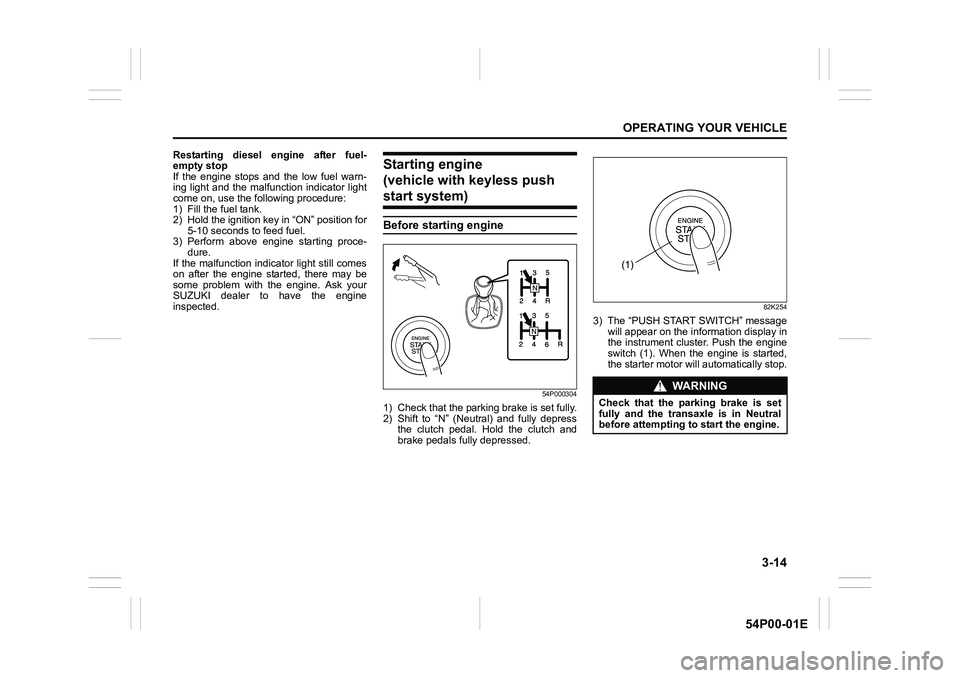
1) Check that the parking brake is set fully.
2) Shift to “N” (Neutral) and fully depress
the clutch pedal. Hold the clutch and
brake pedals fully depressed.
82K254
3) The “PUSH START SWITCH” message
will appear on the information display in
the instrument cluster. Push the engine
switch (1). When the engine is started,
the starter motor will automatically stop.
WA R N I N G
Check that the parking brake is set
fully and the transaxle is in Neutral
before attempting to start the engine.
(1)
Page 155 of 482
3-15
OPERATING YOUR VEHICLE
54P00-01E
NOTE:
• You do not need to keep the engine
switch pressed to start the engine.
• The engine will not start unless the
clutch pedal is depressed.
• During the engine starting procedure,
messages on the information display will
help you. Refer to “Information display”
in “BEFORE DRIVING” section for
details.
• You should turn off such loads as the
headlights and air conditioning system to
facilitate starting of the engine.
• Even if you fail to start the engine, the
starter motor will stop turning automati-
cally after a short time. After the starter
motor has stopped or if there is some
problem with the system, the starter
motor will rotate only while the engine
switch is being pressed.
Stopping engine
• Depress the engine switch to stop the
engine after the vehicle stopped com-
pletely.
• In case of emergency, you can stop the
engine by quickly pushing the engine
switch more than 3 times, or pushing
and holding the engine switch for more
than 2 seconds while the vehicle is in
motion.
NOTE:
Except in cases of emergency, do not stop
the engine while the vehicle is in motion.
The steering and braking operation will
require more effort when the engine is
stopped.
Refer to “Braking” in this section.
• If the engine remains stopped for while
after it was stopped unexpectedly or was
raced before stopping, a clicking sound
may be heard from around the engine
when it is restarted. This is not a mal-
function. Always let the engine idle
before stopping it.
Starting a cold and warm engine
(For gasoline engine model)
With your foot taken off the accelerator
pedal, crank the engine by pressing the
engine switch to change the ignition mode
to “START”.
After pressing the engine switch to change
the ignition mode to “START”, the starter
cranks the engine for about 12 seconds
before it can start the engine. If the engine
fails to start at the first attempt, wait about
15 seconds, and then try again while keep-
ing the engine switch pressed while press-
ing down the accelerator pedal 1/3 of full
capacity. Release the accelerator pedal
when the engine starts.
If the engine still does not start, try holding
the accelerator pedal all the way to the
floor while cranking. This should clear the
engine if it is flooded.
If you are unable to start the engine using
this procedure, consult your SUZUKI
dealer.NOTICE
• Do not depress the accelerator
during the engine starting proce-
dure.
• If the engine does not respond
when you try to start it with the
engine switch or if the engine
switch repeats cycling through
“LOCK” (OFF) - “ACC” - “ON”
mode, the vehicle battery may be
discharged. Check the voltage of
the vehicle battery before trying
again.
NOTICE
Do not crank the engine for more
than 12 seconds at a time.
If the engine does not start on the
first try, wait about 15 seconds before
trying again.
Page 156 of 482
3-16
OPERATING YOUR VEHICLE
54P00-01E
(For diesel engine model)
Cold engine
Depress the clutch and brake pedals fully
and press the engine switch to crank the
engine. If the glow plug indicator light
comes on, the engine will start automati-
cally after the glow plug indicator light goes
off up to 10 seconds afterward.
Warm engine
Crank the engine by pressing the engine
switch to change the ignition mode to
“START”.
Caution when stopping the engine with
turbocharger
When stopping the engine after climbing or
high speed driving, let the engine idle for
about one minute or more (if it is not pro-
hibited) to cool down the turbocharger and
engine oil. This is to prevent the engine oil
from over-deteriorating. Deteriorated
engine oil will damage the bearings of the
turbocharger.Restarting diesel engine after fuel-
empty stop
If the engine stops and the low fuel warn-
ing light and the malfunction indicator light
come on, use the following procedure:
1) Fill the fuel tank.
2) Press the engine switch to change the
ignition mode to “ON” for 5-10 seconds
to feed fuel.
3) Perform the above engine starting pro-
cedure to start the engine.
If the malfunction indicator light still comes
on after the engine started, there may be
some problem with the engine. Ask your
SUZUKI dealer to have the engine
inspected.
If the master warning indicator light
blinks and the engine cannot be started
Your keyless push start system remote
controller may not be sensed as being
within the interior workable area. Try again
after checking that you have the remote
controller with you. If the engine still can-
not be started, the battery of the remote
controller may be discharged. To start the
engine, use the following method:
58MST0302
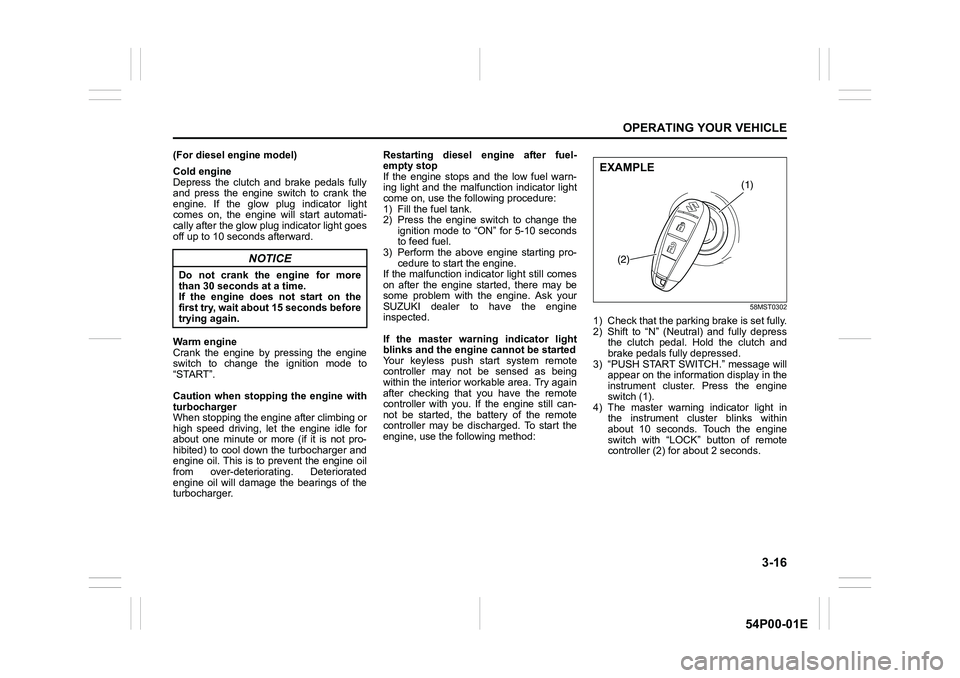
1) Check that the parking brake is set fully.
2) Shift to “N” (Neutral) and fully depress
the clutch pedal. Hold the clutch and
brake pedals fully depressed.
3) “PUSH START SWITCH.” message will
appear on the information display in the
instrument cluster. Press the engine
switch (1).
4) The master warning indicator light in
the instrument cluster blinks within
about 10 seconds. Touch the engine
switch with “LOCK” button of remote
controller (2) for about 2 seconds.
NOTICE
Do not crank the engine for more
than 30 seconds at a time.
If the engine does not start on the
first try, wait about 15 seconds before
trying again.
(1)
(2)
EXAMPLE
Page 157 of 482
3-17
OPERATING YOUR VEHICLE
54P00-01E
NOTE:
• If you still cannot start the engine after
several attempts using the above
method, there may be a problem else-
where, such as a low battery. Contact
your SUZUKI dealer for inspection.
• The immobilizer/keyless push start sys-
tem warning light will come on for about
5 seconds while the master warning indi-
cator light is blinking. In addition, the
information display will show a certain
message during this time. Refer to
“Information display” in “BEFORE DRIV-
ING” section for details.
• You may customize the system to cause
the interior buzzer to sound once for
warning that remote controller is out of
sensing range. Please contact an autho-
rized SUZUKI dealer for the customiza-
tion.
• If the battery of the remote controller is
about to become completely discharged,
the corresponding message will appear
on the information display when you
press the engine switch to change the
ignition mode to “ON”. For details on
replacing the battery, refer to “Keyless
push start system remote controller /
keyless entry system transmitter” in
“BEFORE DRIVING” section.Returning ignition mode to “LOCK” (OFF)
NOTE:
Certain problems such as a fault in engine
system may prevent the engine switch
from going back to “LOCK” (OFF) mode. If
this happens, have the vehicle inspected
by an authorized SUZUKI dealer after
doing the following:
• Lock the doors using the key to prevent
theft. (The request switches and the key-
less push start system remote controller
cannot be used to lock them.)
• Disconnect the negative cable from the
battery to prevent discharge.“LOCK” (OFF) mode reminder buzzer
The buzzer will stop sounding if you then
push the engine switch twice, thus bringing
back the ignition mode to “LOCK” (OFF).
• If you open the driver’s door after press-
ing the engine switch to change the igni-
tion mode to “ACC”, the interior buzzer
beeps intermittently.
• The buzzer will stop sounding if you then
push the engine switch twice, thus bring-
ing it back the ignition mode to “LOCK”
(OFF).
NOTE:
Whenever you leave the vehicle, check
that you have returned the ignition mode to
“LOCK” (OFF) using the engine switch and
then lock the doors. Without returning the
ignition mode to “LOCK” (OFF), you can-
not use a request switch or keyless push
start system remote controller to lock the
doors.
Steering lock warning buzzer
If the steering lock fails to engage due to a
fault in the system when the ignition mode
is turned to “LOCK” (OFF) by pressing the
engine switch and any door (including the
tailgate) is opened or closed, the interior
buzzer will warn you of this condition with
repeated short beeps. If this happens,
have the vehicle inspected by an autho-
rized SUZUKI dealer.
Page 161 of 482
3-21
OPERATING YOUR VEHICLE
54P00-01E
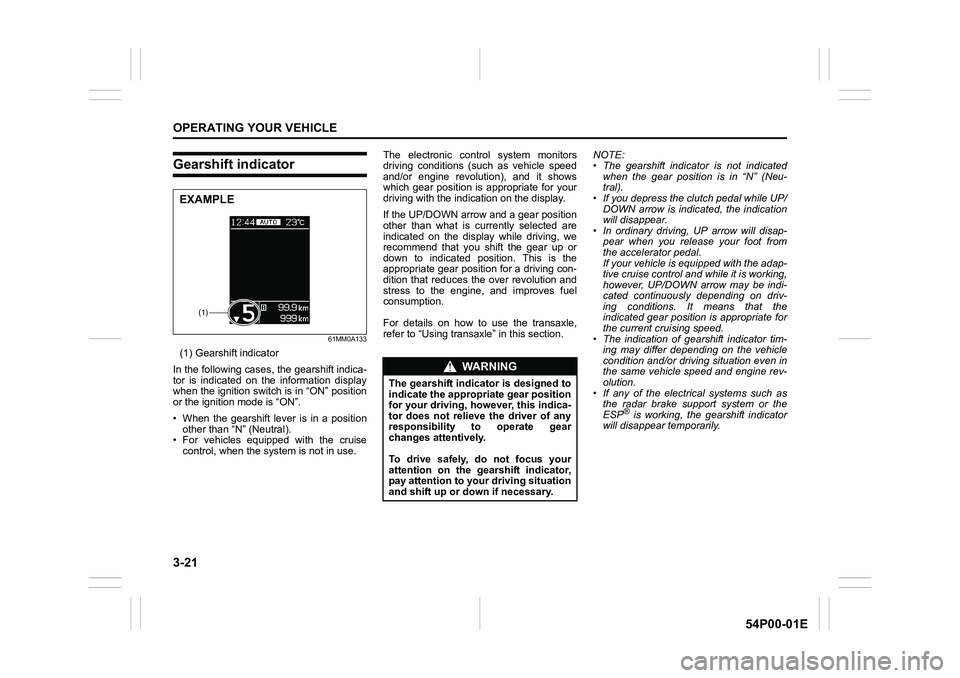
Gearshift indicator
61MM0A133
(1) Gearshift indicator
In the following cases, the gearshift indica-
tor is indicated on the information display
when the ignition switch is in “ON” position
or the ignition mode is “ON”.
• When the gearshift lever is in a position
other than “N” (Neutral).
• For vehicles equipped with the cruise
control, when the system is not in use.The electronic control system monitors
driving conditions (such as vehicle speed
and/or engine revolution), and it shows
which gear position is appropriate for your
driving with the indication on the display.
If the UP/DOWN arrow and a gear position
other than what is currently selected are
indicated on the display while driving, we
recommend that you shift the gear up or
down to indicated position. This is the
appropriate gear position for a driving con-
dition that reduces the over revolution and
stress to the engine, and improves fuel
consumption.
For details on how to use the transaxle,
refer to “Using transaxle” in this section.NOTE:
• The gearshift indicator is not indicated
when the gear position is in “N” (Neu-
tral).
• If you depress the clutch pedal while UP/
DOWN arrow is indicated, the indication
will disappear.
• In ordinary driving, UP arrow will disap-
pear when you release your foot from
the accelerator pedal.
If your vehicle is equipped with the adap-
tive cruise control and while it is working,
however, UP/DOWN arrow may be indi-
cated continuously depending on driv-
ing conditions. It means that the
indicated gear position is appropriate for
the current cruising speed.
• The indication of gearshift indicator tim-
ing may differ depending on the vehicle
condition and/or driving situation even in
the same vehicle speed and engine rev-
olution.
• If any of the electrical systems such as
the radar brake support system or the
ESP
® is working, the gearshift indicator
will disappear temporarily.
(1)
EXAMPLE
WA R N I N G
The gearshift indicator is designed to
indicate the appropriate gear position
for your driving, however, this indica-
tor does not relieve the driver of any
responsibility to operate gear
changes attentively.
To drive safely, do not focus your
attention on the gearshift indicator,
pay attention to your driving situation
and shift up or down if necessary.