battery SUZUKI IGNIS 2021 User Guide
[x] Cancel search | Manufacturer: SUZUKI, Model Year: 2021, Model line: IGNIS, Model: SUZUKI IGNIS 2021Pages: 505, PDF Size: 8.36 MB
Page 50 of 505
2-27BEFORE DRIVING
75RM4-01E
Front seatsSeat adjustment
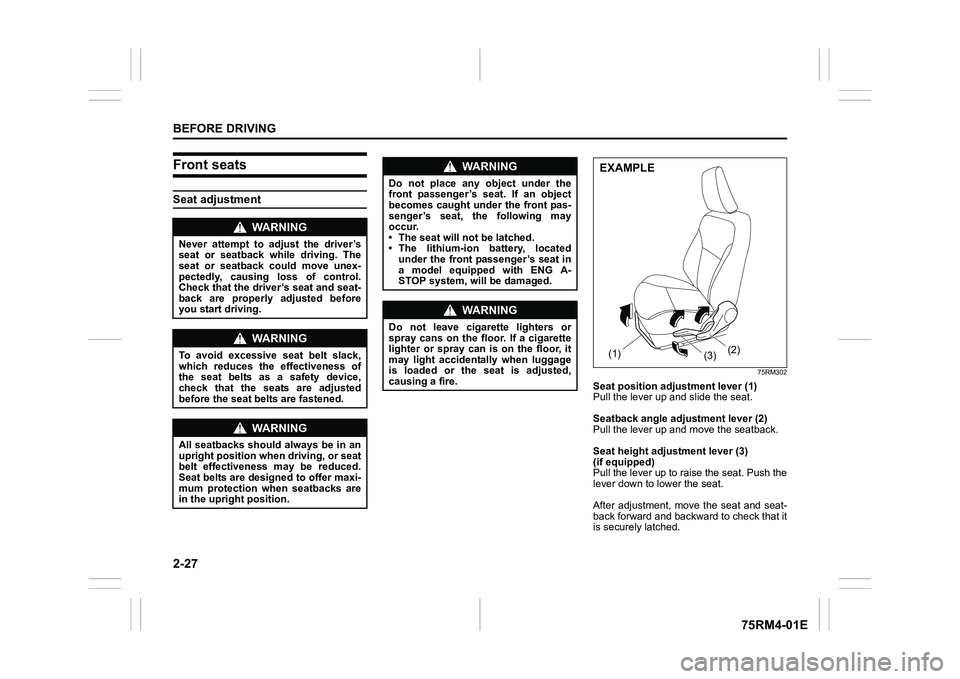
75RM302
Seat position adjustment lever (1)
Pull the lever up and slide the seat.
Seatback angle adju stment lever (2)
Pull the lever up and move the seatback.
Seat height adjustment lever (3)
(if equipped)
Pull the lever up to raise the seat. Push the
lever down to lower the seat.
After adjustment, move the seat and seat-
back forward and backward to check that it
is securely latched.
WA R N I N G
Never attempt to adjust the driver’s
seat or seatback while driving. The
seat or seatback could move unex-
pectedly, causing loss of control.
Check that the driver’s seat and seat-
back are properly adjusted before
you start driving.
WA R N I N G
To avoid excessive seat belt slack,
which reduces the effectiveness of
the seat belts as a safety device,
check that the seats are adjusted
before the seat belts are fastened.
WA R N I N G
All seatbacks should always be in an
upright position when driving, or seat
belt effectiveness may be reduced.
Seat belts are designed to offer maxi-
mum protection when seatbacks are
in the upright position.
WA R N I N G
Do not place any object under the
front passenger’s seat. If an object
becomes caught under the front pas-
senger’s seat, the following may
occur.
• The seat will not be latched.
• The lithium-ion battery, located under the front passenger’s seat in
a model equipped with ENG A-
STOP system, will be damaged.
WA R N I N G
Do not leave cigarette lighters or
spray cans on the floor. If a cigarette
lighter or spray can is on the floor, it
may light accidentally when luggage
is loaded or the seat is adjusted,
causing a fire.
(1) (2)
(3)EXAMPLE
Page 58 of 505
2-35BEFORE DRIVING
75RM4-01E
Lap-shoulder beltEmergency locking retractor (ELR)
The seat belt has an emergency locking
retractor (ELR), which is designed to lock
the seat belt only during a sudden stop or
impact. It also may lock if you pull the belt
across your body very quickly. If this hap-
pens, let the belt go back to unlock it, and
then pull the belt across your body more
slowly.
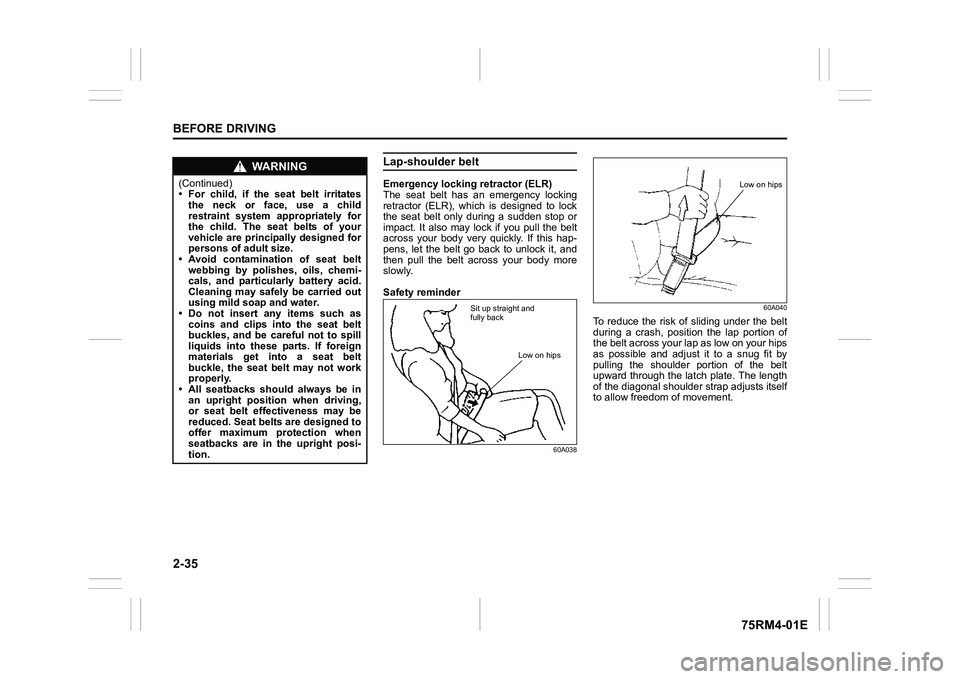
Safety reminder
60A03860A040
To reduce the risk of sliding under the belt
during a crash, position the lap portion of
the belt across your lap as low on your hips
as possible and adjust it to a snug fit by
pulling the shoulder portion of the belt
upward through the latch plate. The length
of the diagonal shoulder s
trap adjusts itself
to allow freedom of movement.
WA R N I N G
(Continued)
• For child, if the seat belt irritates
the neck or face, use a child
restraint system appropriately for
the child. The seat belts of your
vehicle are principally designed for
persons of adult size.
• Avoid contamination of seat belt
webbing by polishes, oils, chemi-
cals, and particularly battery acid.
Cleaning may safely be carried out
using mild soap and water.
• Do not insert any items such as
coins and clips into the seat belt
buckles, and be careful not to spill
liquids into these parts. If foreign
materials get into a seat belt
buckle, the seat belt may not work
properly.
• All seatbacks should always be in an upright position when driving,
or seat belt effectiveness may be
reduced. Seat belts are designed to
offer maximum protection when
seatbacks are in the upright posi-
tion.
Sit up straight and
fully back
Low on hips
Low on hips
Page 76 of 505
2-53BEFORE DRIVING
75RM4-01E
ignition mode to ON, stays on for more
than 10 seconds, or comes on while driv-
ing, the pretensioner system or the air bag
system may not work properly. Have both
systems inspected by an authorized
SUZUKI dealer as soon as possible.
Service on or around the pretensioner sys-
tem components or wiring must be per-
formed only by an authorized SUZUKI
dealer who is specially trained. Improper
service could result in unintended activa-
tion of pretensioners or could render the
pretensioner inoperative. Either of these
two conditions may result in personal
injury.
To prevent damage or unintended activa-
tion of the pretensioners, check that the
lead-acid battery is disconnected and the
ignition switch has been in “LOCK” position
or the ignition mode has been LOCK
(OFF) for at least 90 seconds before per-
forming any electrical service work on your
SUZUKI vehicle.
Do not touch preten sioner system compo-
nents or wiring. The wires are wrapped
with yellow tape or yellow tubing, and the
couplers are yellow. When scrapping your
SUZUKI vehicle, ask your SUZUKI dealer,
body repair shop, or scrap yard for assis-
tance.
Page 88 of 505
2-65BEFORE DRIVING
75RM4-01E
Your vehicle is equipped with a diagnostic
module which records information about
the air bag system if the air bags deploy in
a crash. The module records information
about overall system status, and which
sensors activated the deployment.
Servicing the air bag system
If the air bags inflate, have the air bags
and related components replaced by an
authorized SUZUKI dealer as soon as pos-
sible.
If your vehicle ever gets in deep water and
the driver’s floor is submerged, the air bag
controller could be damaged. If this hap-
pens, ask your SUZUKI dealer to check
the air bag system as soon as possible.
Special procedures are required for servic-
ing or replacing an air bag. For that rea-
son, only an authorized SUZUKI dealer
should be allowed to service or replace
your air bags. Remind anyone who ser-
vices your SUZUKI vehicle that it has air
bags.
Service on or around air bag components
or wiring must be performed only by an
authorized SUZUKI dealer. Improper ser-
vice could result in unintended air bag
deployment or could render the air bag
inoperative. Either of these two conditions
may result in severe injury. To prevent damage or unintended inflation
of the air bag system, check that the lead-
acid battery is disconnected and the igni-
tion switch has been in “LOCK” position or
the ignition mode has been LOCK (OFF)
for at least 90 seconds before performing
any electrical service work on your
SUZUKI vehicle. Do not touch air bag sys-
tem components or wires. The wires are
wrapped with yellow tape or yellow tubing,
and the couplers are yellow for easy identi-
fication.
Scrapping a vehicle that has an uninflated
air bag can be hazardous. Ask your dealer,
body repair shop or scrap yard for help
with disposal.
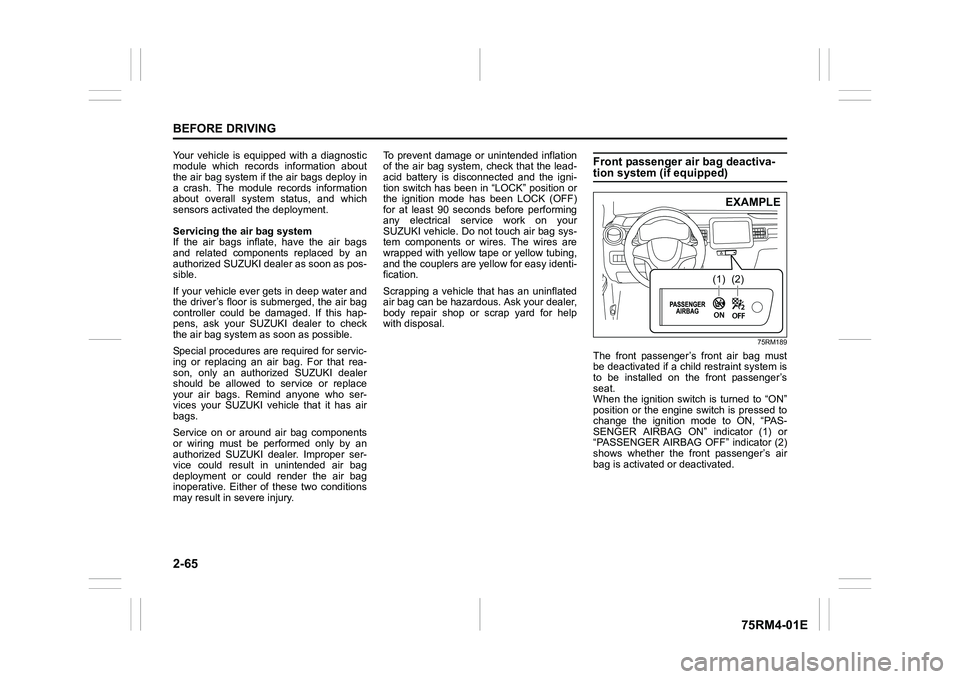
Front passenger air bag deactiva-tion system (if equipped)
75RM189
The front passenger’s front air bag must
be deactivated if a child restraint system is
to be installed on the front passenger’s
seat.
When the ignition switch is turned to “ON”
position or the engine switch is pressed to
change the ignition mode to ON, “PAS-
SENGER AIRBAG ON” indicator (1) or
“PASSENGER AIRBAG OFF” indicator (2)
shows whether the front passenger’s air
bag is activated or deactivated.
(1)
(2)EXAMPLE
Page 98 of 505
2-75BEFORE DRIVING
75RM4-01E
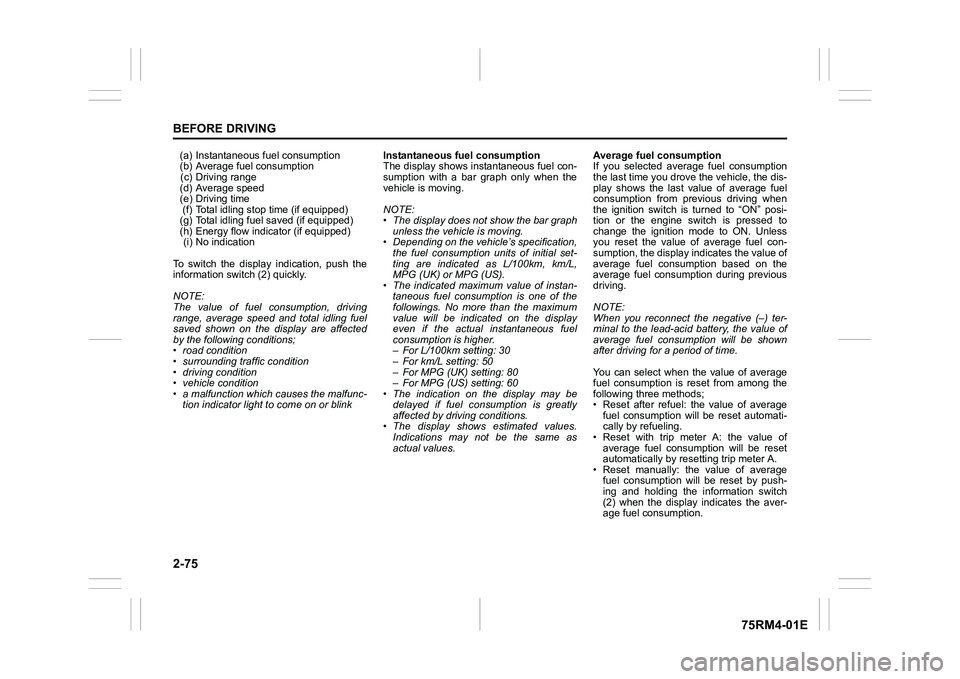
(a) Instantaneous fuel consumption
(b) Average fuel consumption(c) Driving range
(d) Average speed
(e) Driving time (f) Total idling stop time (if equipped)
(g) Total idling fuel saved (if equipped)
(h) Energy flow indicator (if equipped) (i) No indication
To switch the display indication, push the
information switch (2) quickly.
NOTE:
The value of fuel consumption, driving
range, average speed and total idling fuel
saved shown on the display are affected
by the following conditions;
• road condition
• surrounding traffic condition
• driving condition
• vehicle condition
• a malfunction which causes the malfunc- tion indicator light to come on or blink Instantaneous fuel consumption
The display shows instantaneous fuel con-
sumption with a bar graph only when the
vehicle is moving.
NOTE:
• The display does not show the bar graph
unless the vehicle is moving.
• Depending on the vehicle’s specification,
the fuel consumption units of initial set-
ting are indicated as L/100km, km/L,
MPG (UK) or MPG (US).
• The indicated maximum value of instan- taneous fuel consumption is one of the
followings. No more than the maximum
value will be indicated on the display
even if the actual instantaneous fuel
consumption is higher.
– For L/100km setting: 30
– For km/L setting: 50
– For MPG (UK) setting: 80
– For MPG (US) setting: 60
• The indication on the display may be
delayed if fuel consumption is greatly
affected by driving conditions.
• The display shows estimated values.
Indications may not be the same as
actual values. Average fuel consumption
If you selected average fuel consumption
the last time you drove
the vehicle, the dis-
play shows the last value of average fuel
consumption from previous driving when
the ignition switch is turned to “ON” posi-
tion or the engine switch is pressed to
change the ignition mode to ON. Unless
you reset the value of average fuel con-
sumption, the display indicates the value of
average fuel consumption based on the
average fuel consumption during previous
driving.
NOTE:
When you reconnect the negative (–) ter-
minal to the lead-acid battery, the value of
average fuel consumption will be shown
after driving for a period of time.
You can select when the value of average
fuel consumption is reset from among the
following three methods;
• Reset after refuel: the value of average fuel consumption will be reset automati-
cally by refueling.
• Reset with trip meter A: the value of average fuel consumption will be reset
automatically by resetting trip meter A.
• Reset manually: the value of average fuel consumption will be reset by push-
ing and holding the information switch
(2) when the display indicates the aver-
age fuel consumption.
Page 99 of 505
2-76
BEFORE DRIVING
75RM4-01E
To change when the value of average fuel
consumption is reset, refer to “Setting
mode” in this section.
NOTE:
If you add only a small amount of fuel
when you select “Reset after refuel”, the
average fuel consumption value may not
be reset.
Driving range
If you selected driving range the last time
you drove the vehicle, the display indicates
“---” for a few seconds and then indicates
the current driving range when the ignition
switch is turned to “ON” position or the
engine switch is pressed to change the
ignition mode to ON.
The driving range shown in the display is
the approximate distance you can drive
until the fuel gauge indicates “E”, based on
current driving conditions.
When the low fuel warning light comes on,
the display “---” will appear.
If the low fuel warning light comes on, fill
the fuel tank immediately regardless of the
value of driving range shown in the display.
As the driving range after refueling is cal-
culated based on the most recent driving
condition, the value is different each time
you refuel. NOTE:
• If you refuel when the ignition switch is in
“ON” position or the i gnition mode is ON,
the driving range may not indicate the
correct value.
• When you reconnect the negative (–)
terminal to the lead-acid battery, the
value of driving range will be shown after
driving for a period of time.
Average Speed
If you selected average speed the last time
you drove the vehicle, the display indicates
the last value of average speed from previ-
ous driving when the ignition switch is
turned to “ON” position or the engine
switch is pressed to change the ignition
mode to ON. Unless you reset the value of
average speed, the display indicates the
value of average speed which includes
average speed during previous driving.
To reset the value of average speed, push
and hold the information switch (2) for a
while when the display indicates an aver-
age speed. The display shows “---” and
then indicates a new average speed after
driving for a short time.
NOTE:
When you reconnect the negative (–) ter-
minal to the lead-acid battery, the value of
average speed will be shown after driving
for a period of time. Driving time
The display shows the total amount of driv-
ing time since the indication was reset.
• To reset the driving time to zero, push
and hold the information switch (2) for a
while when the display shows the driving
time.
NOTE:
When you reset the indication or reconnect
the negative (–) terminal to the lead-acid
battery, the driving time will be shown after
driving for a while.
Total idling stop time (if equipped)
The display shows the total length (in
hours, minutes and seconds) of engine
stopping time by ENG A-STOP system
since the indication was reset.
• To reset the total idling stop time to zero, push and hold the information switch (2)
for a while when the display shows the
total idling stop time.
NOTE:
• The indicated maximum value of the total idling stop time is 99:59:59.
• When you reconnect the negative (–) terminal to the lead-acid battery, the
value of the total idling stop time will be
reset.
Page 100 of 505
2-77BEFORE DRIVING
75RM4-01E
Total idling fuel saved (if equipped)
The display shows the total amount (in mil-
liliters) of fuel conservation by ENG A-
STOP system since the indication was
reset.
• To reset the total idling fuel saved tozero, push and hold the information
switch (2) for a while when the display
shows the total idling fuel saved.
NOTE:
When you reconnect the negative (–) ter-
minal to the lead-acid battery, the value of
the total idling fuel saved will be reset.
Energy flow indicator (if equipped)
Refer to “ENG A-ST OP system (engine
auto stop start system)” in the “OPERAT-
ING YOUR VEHICLE” section.
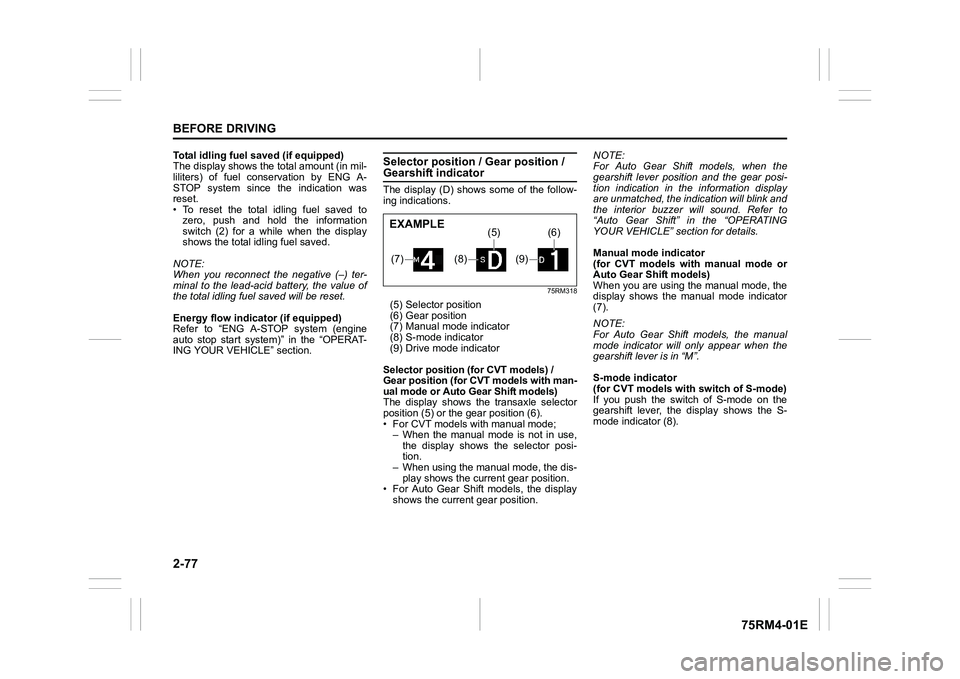
Selector position / Gear position / Gearshift indicatorThe display (D) shows some of the follow-
ing indications.
75RM318
(5) Selector position
(6) Gear position
(7) Manual mode indicator
(8) S-mode indicator
(9) Drive mode indicator
Selector position (for CVT models) /
Gear position (for CVT models with man-
ual mode or Auto Gear Shift models)
The display shows th e transaxle selector
position (5) or the gear position (6).
• For CVT models with manual mode; – When the manual mode is not in use,
the display shows the selector posi-
tion.
– When using the manual mode, the dis-
play shows the current gear position.
• For Auto Gear Shift models, the display shows the current gear position. NOTE:
For Auto Gear Shif
t models, when the
gearshift lever position and the gear posi-
tion indication in the information display
are unmatched, the indication will blink and
the interior buzzer will sound. Refer to
“Auto Gear Shift” in the “OPERATING
YOUR VEHICLE” section for details.
Manual mode indicator
(for CVT models with manual mode or
Auto Gear Shift models)
When you are using the manual mode, the
display shows the manual mode indicator
(7).
NOTE:
For Auto Gear Shift models, the manual
mode indicator will only appear when the
gearshift lever is in “M”.
S-mode indicator
(for CVT models with switch of S-mode)
If you push the switch of S-mode on the
gearshift lever, the display shows the S-
mode indicator (8).(7)
(8)
(5)
(9)
(6)
EXAMPLE
Page 109 of 505
2-86
BEFORE DRIVING
75RM4-01E
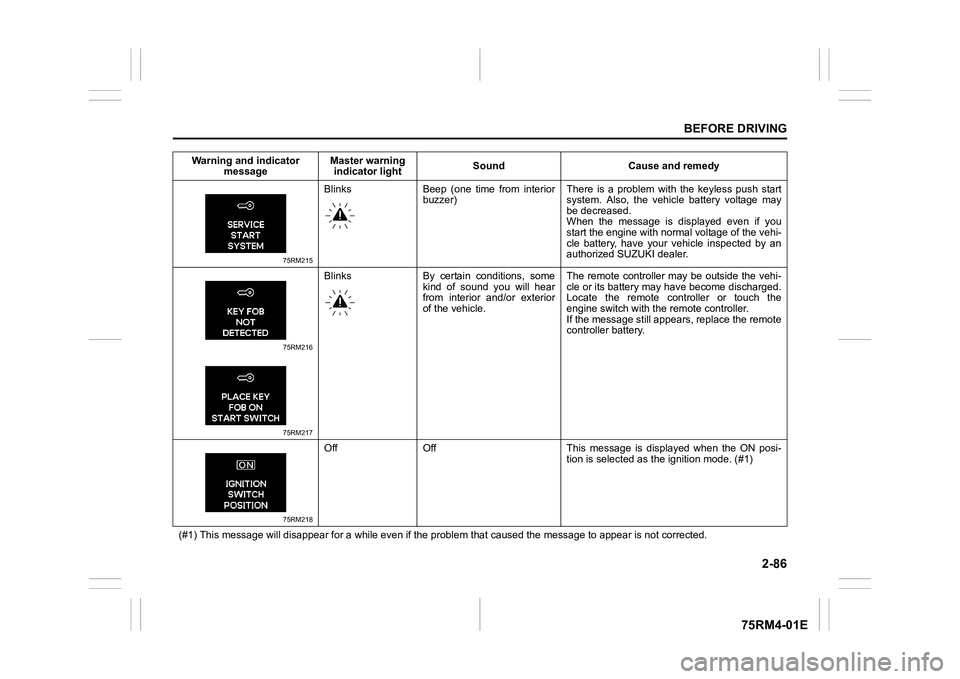
75RM215
Blinks Beep (one time from interiorbuzzer) There is a problem with the keyless push start
system. Also, the vehicl
e battery voltage may
be decreased.
When the message is displayed even if you
start the engine with normal voltage of the vehi-
cle battery, have your vehicle inspected by an
authorized SUZUKI dealer.
75RM216
75RM217
Blinks By certain conditions, some
kind of sound you will hear
from interior and/or exterior
of the vehicle. The remote controller may be outside the vehi-
cle or its battery may have become discharged.
Locate the remote controller or touch the
engine switch with the
remote controller.
If the message still appears, replace the remote
controller battery.
75RM218
Off Off This message is displayed when the ON posi- tion is selected as the ignition mode. (#1)
(#1) This message will disappear for a while even if the proble m that caused the message to appear is not corrected.
Warning and indicator
message Master warning
indicator light Sound Cause and remedy
Page 110 of 505
2-87BEFORE DRIVING
75RM4-01E
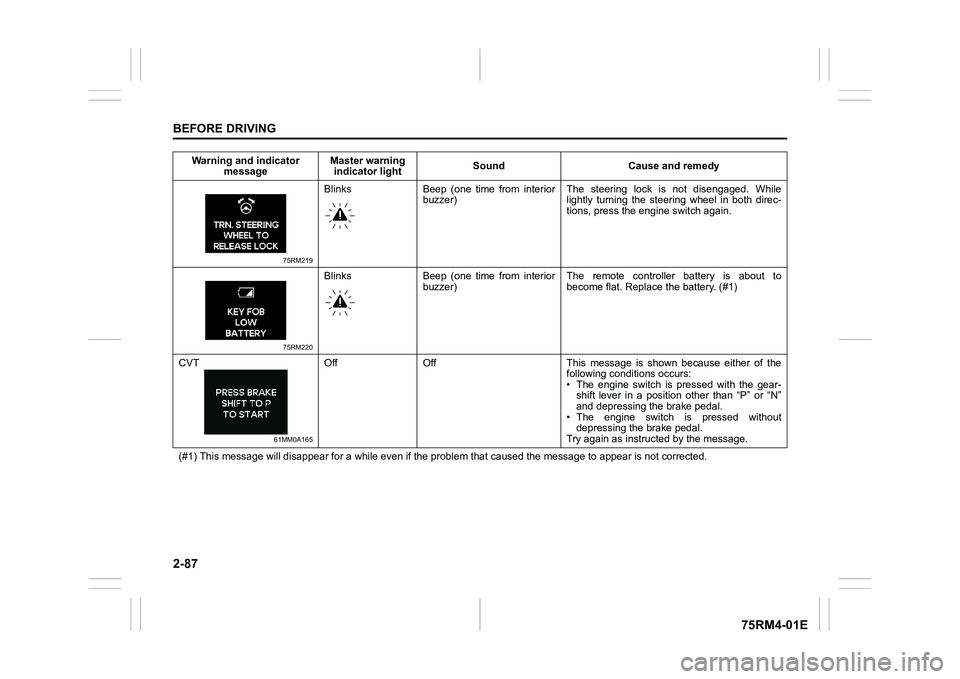
75RM219
Blinks Beep (one time from interiorbuzzer) The steering lock is not disengaged. While
lightly turning the steering wheel in both direc-
tions, press the engine switch again.
75RM220
Blinks Beep (one time from interior
buzzer) The remote controller battery is about to
become flat. Repla
ce the battery. (#1)
CVT
61MM0A165
Off Off This message is shown because either of the following conditions occurs:
• The engine switch is pressed with the gear-shift lever in a position other than “P” or “N”
and depressing the brake pedal.
• The engine switch is pressed without depressing the brake pedal.
Try again as instruct ed by the message.
(#1) This message will disappear for a while even if the proble m that caused the message to appear is not corrected.
Warning and indicator
message Master warning
indicator light Sound Cause and remedy
Page 118 of 505
2-95BEFORE DRIVING
75RM4-01E
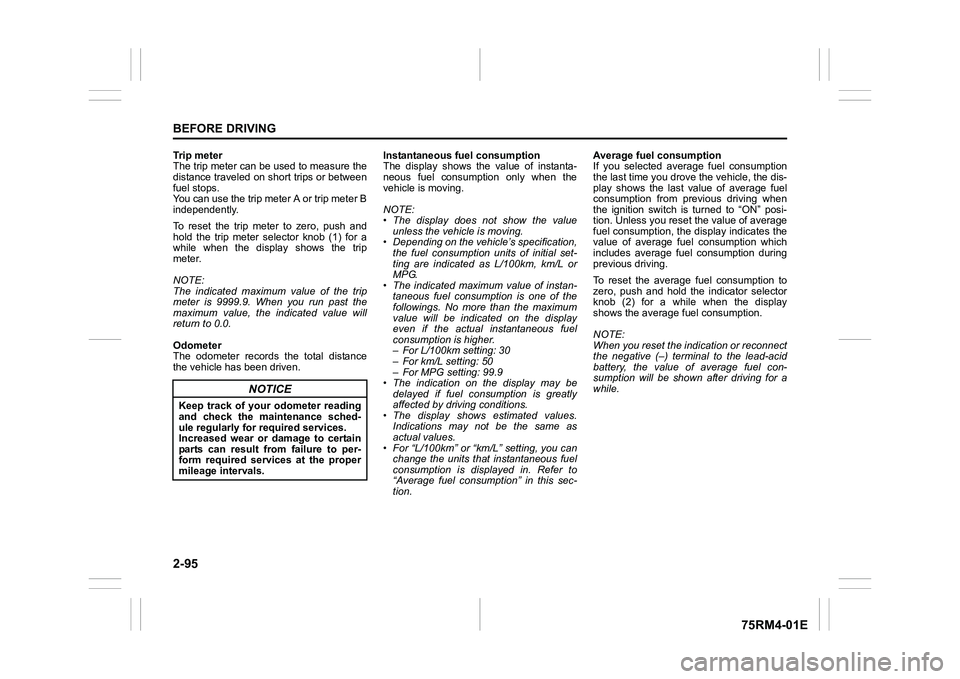
Trip meter
The trip meter can be used to measure the
distance traveled on short trips or between
fuel stops.
You can use the trip meter A or trip meter B
independently.
To reset the trip meter to zero, push and
hold the trip meter selector knob (1) for a
while when the display shows the trip
meter.
NOTE:
The indicated maximum value of the trip
meter is 9999.9. When you run past the
maximum value, the indicated value will
return to 0.0.
Odometer
The odometer records the total distance
the vehicle has been driven. Instantaneous fuel consumption
The display shows the value of instanta-
neous fuel consumption only when the
vehicle is moving.
NOTE:
• The display does not show the value
unless the vehicle is moving.
• Depending on the vehicle’s specification,
the fuel consumption units of initial set-
ting are indicated as L/100km, km/L or
MPG.
• The indicated maximum value of instan- taneous fuel consumption is one of the
followings. No more than the maximum
value will be indicated on the display
even if the actual instantaneous fuel
consumption is higher.
– For L/100km setting: 30
– For km/L setting: 50
– For MPG setting: 99.9
• The indication on the display may be delayed if fuel consumption is greatly
affected by driving conditions.
• The display shows estimated values. Indications may not be the same as
actual values.
• For “L/100km” or “km/L” setting, you can change the units that instantaneous fuel
consumption is displayed in. Refer to
“Average fuel consumption” in this sec-
tion. Average fuel consumption
If you selected average fuel consumption
the last time you drove
the vehicle, the dis-
play shows the last value of average fuel
consumption from previous driving when
the ignition switch is turned to “ON” posi-
tion. Unless you reset the value of average
fuel consumption, the display indicates the
value of average fuel consumption which
includes average fuel consumption during
previous driving.
To reset the average fuel consumption to
zero, push and hold the indicator selector
knob (2) for a while when the display
shows the average fuel consumption.
NOTE:
When you reset the indication or reconnect
the negative (–) terminal to the lead-acid
battery, the value of average fuel con-
sumption will be shown after driving for a
while.
NOTICE
Keep track of your odometer reading
and check the maintenance sched-
ule regularly for required services.
Increased wear or damage to certain
parts can result from failure to per-
form required services at the proper
mileage intervals.