Information SUZUKI IGNIS 2022 Owners Manual
[x] Cancel search | Manufacturer: SUZUKI, Model Year: 2022, Model line: IGNIS, Model: SUZUKI IGNIS 2022Pages: 505, PDF Size: 8.36 MB
Page 328 of 505

5-73OTHER CONTROLS AND EQUIPMENT
75RM4-01E
Deletion of phone information (Delete
Phone)
Follow the instructions below to delete the
registered phone information.
1) Press the Bluetooth
® setup button (5)
or (6).
The Bluetooth
® setup menu will be dis-
played.
2) Turn “TUNE/FLD PUSH SOUND” knob
(1) to select “Setup Bluetooth”, and
press the knob (1) to determine the
selection.
3) Turn “TUNE/FLD PUSH SOUND” knob (1) to select “List Phone”, and press the
knob (1) to determine the selection.
4) Turn “TUNE/FLD PUSH SOUND” knob (1) to select a phone to be deleted, and
press the knob (1) to determine the
selection.
5) Turn “TUNE/FLD PUSH SOUND” knob
(1) to select “Delete”, and press the
knob (1) to determine the selection.
6) Turn “TUNE/FLD PUSH SOUND” knob
(1) to select “Delete?”, and press the
knob (1) to determine the selection.
7) Turn “TUNE/FLD PUSH SOUND” knob
(1) to select “Confirm”, and press the
knob (1) to determine the selection.
NOTE:
When selecting “Go Back” or pressing
BACK button (4), the previous menu will
be displayed. BT function on/off (BT Power)
Follow the instructions below to turn on/off
the Bluetooth
® function.
1) Press the Bluetooth
® setup button (5)
or (6).
The Bluetooth
® setup menu will be dis-
played.
2) Turn “TUNE/FLD PUSH SOUND” knob (1) to select “Setup Bluetooth”, and
press the knob (1) to determine the
selection.
3) Turn “TUNE/FLD PUSH SOUND” knob
(1) to select “BT Power”, and press the
knob (1) to determine the selection.
4) Press “TUNE/FLD PUSH SOUND”
knob (1) to select “BT Power On” or “BT
Power Off”.
NOTE:
• When the BT function is turned off, the connection between this unit and the
registered phone in use will be discon-
nected.
• When selecting “Go Back” or pressing BACK button (4), the previous menu will
be displayed.
Page 330 of 505
5-75OTHER CONTROLS AND EQUIPMENT
75RM4-01E
Registration of audio devices
NOTE:
• To set up a new audio player, disconnectthe phone from the unit. Connect the
phone after audio player setup is com-
pleted if necessary.
• When attempts to establish the pairing fail within 60 seconds, the connecting
operation will be canceled. Try to estab-
lish the pairing again or refer to the audio
player manual for assistance with the
pairing process.
1) Press the Bluetooth
® setup button (7)
or (8).
The Bluetooth
® setup menu will be dis-
played.
2) Turn “TUNE/FLD PUSH SOUND” knob
(2) to select “Setup Bluetooth”, and
press the knob (2) to determine the
selection.
3) Turn “TUNE/FLD PUSH SOUND” knob (2) to select “Pairi ng”, and press the
knob (2) to determine the selection.
4) Select “My Car” from the Bluetooth
®
menu of the audio player and establish
the pairing.
Refer to the manual of the audio player
in use for further information.
5) Enter the passkey displayed on the unit
to the audio player. NOTE:
• When selecting “Go Back” or pressing
BACK button (6), the previous menu will
be displayed.
• When registering additional audio devices, repeat Step from 1).
Selecting Bluetooth
® audio mode
Press “MEDIA” button (1).
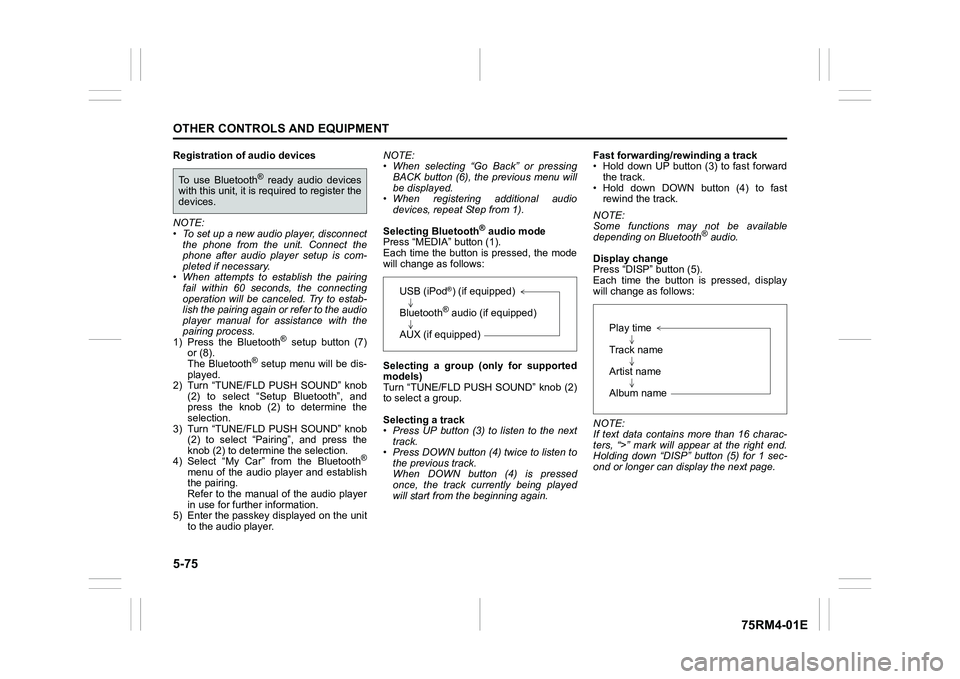
Each time the button is pressed, the mode
will change as follows:
Selecting a group (only for supported
models)
Turn “TUNE/FLD PUSH SOUND” knob (2)
to select a group.
Selecting a track
• Press UP button (3) to listen to the next track.
• Press DOWN button (4) twice to listen to the previous track.
When DOWN button (4) is pressed
once, the track currently being played
will start from the beginning again. Fast forwarding/rewinding a track
• Hold down UP button (3) to fast forward
the track.
• Hold down DOWN button (4) to fast rewind the track.
NOTE:
Some functions may not be available
depending on Bluetooth
® audio.
Display change
Press “DISP” button (5).
Each time the button is pressed, display
will change as follows:
NOTE:
If text data contains more than 16 charac-
ters, “>” mark will appear at the right end.
Holding down “DISP” button (5) for 1 sec-
ond or longer can display the next page.
To use Bluetooth
® ready audio devices
with this unit, it is r equired to register the
devices.
USB (iPod
®) (if equipped)
Bluetooth® audio (if equipped)
AUX (if equipped)
Play time
Track name
Artist name
Album name
Page 332 of 505

5-77OTHER CONTROLS AND EQUIPMENT
75RM4-01E
Deletion of audio device information
(Delete Audio)
Follow the instructions below to delete the
registered audio device information.
1) Press the Bluetooth
® setup button (7)
or (8).
The Bluetooth
® setup menu will be dis-
played.
2) Turn “TUNE/FLD PUSH SOUND” knob
(2) to select “Setup Bluetooth”, and
press the knob (2) to determine the
selection.
3) Turn “TUNE/FLD PUSH SOUND” knob (2) to select “List Audio”, and press the
knob (2) to determine the selection.
4) Turn “TUNE/FLD PUSH SOUND” knob (2) to select an audio device to be
deleted, and press the knob (2) to
determine the selection.
5) Turn “TUNE/FLD PUSH SOUND” knob
(2) to select “Delete”, and press the
knob (2) to determine the selection.
6) Turn “TUNE/FLD PUSH SOUND” knob
(2) to select “Delete?”, and press the
knob (2) to determine the selection.
7) Turn “TUNE/FLD PUSH SOUND” knob
(2) to select “Confirm”, and press the
knob (2) to complete the deletion.
NOTE:
When selecting “Go Back” or pressing
BACK button (6), the previous menu will
be displayed.
Disclaimer for Bluetooth
® function
• Depending on compatibility of mobile phone models, no Bluetooth
® function
can be used, or some Bluetooth® func-
tions may be restricted.
• Connectivity or voice quality may get
affected depending on circumstances.
• After the ignition switch is turned to “ON” position or the engine switch is pressed
to change the ignition mode to ON, the
audio system takes few seconds to
detect and connect to the Bluetooth
®
device (if already paired).
Remote audio controls (if equipped)Controlling basic functions of the audio
system is available us ing the switches on
the steering wheel.
75RM063
(4) (4)
(2)
(1) (3)
Page 344 of 505
6-3VEHICLE LOADING AND TOWING
75RM4-01E
TiresMirrorsCheck if your vehicle’s mirrors meet local
requirements for mirrors used on towing
vehicles. If they do not, you must install the
required mirrors before you tow.Vehicle/trailer loadingTo load your vehicle and trailer properly,
you must know how to measure gross
trailer weight and trailer nose weight.
Gross trailer weight is the weight of the
trailer plus all the cargo in it. You can mea-
sure gross trailer weight by putting the fully
loaded trailer on a vehicle scale.
Nose weight is the downward force
exerted on the tow bar by the trailer cou- pler, with the trailer fully loaded and the
coupler at its normal towing height. This
weight can be measured using a bathroom
scale.
The weight of your loaded trailer (gross
trailer weight) should never exceed towing
capacity.
Distribute cargo in your trailer so that nose
weight is about 10% of gross trailer weight,
but does not exceed “Maximum vertical
load” of 50 kg (110 lbs), and does not fall
below 25 kg (55 lbs) or 4%, whichever is
heavier, on trailer hitch point. You should
measure gross trailer weight and nose
weight before towing to check that your
load is properly distributed.
NOTE:
For 4WD model in Europe, in the Member
States where the road traffic legislation
allows it, as it is also stated in COMMIS-
SION REGULATION (EU) 1230/2012, the
technically permissi
ble maximum laden
mass (GVWR) of the vehicle may be
exceeded by not more than 40 kg (88 lbs)
in case of towing a trailer.
WA R N I N G
When towing a trailer, it is very
important for your vehicle and trailer
to have properly inflated tires. Your
vehicle’s tires should be inflated to
the pressures listed on your vehicles
tire information label. If laden pres-
sures are listed on the label, the tires
should be inflated to the laden pres-
sures. Inflate trailer tires according to
the specifications provided by the
trailer manufacturer.
WA R N I N G
Improper weight distribution of your
trailer may result in poor vehicle han-
dling and swaying of the trailer.
Always check that trailer nose weight
is about 10% of gross trailer weight,
but does not exceed “Maximum verti-
cal load” of 50 kg (110 lbs), and does
not fall below 25 kg (55 lbs) or 4%,
whichever is heavier, on trailer hitch
point. Also check that the cargo is
properly secured. Failure to observe
this requirement may result in an
accident.
WA R N I N G
Never overload cargo on your trailer
or your vehicle. Gross trailer weight
must never exceed towing capacity.
Gross vehicle weight (sum of the
weights of the vehicle, all the occu-
pants, accessories including tow
bars and a trailer hitch, cargo and
trailer nose weight) must never
exceed the Gross Vehicle Weight Rat-
ing (GVWR) listed in the “SPECIFICA-
TIONS” section.
Page 375 of 505
7-26
INSPECTION AND MAINTENANCE
75RM4-01E
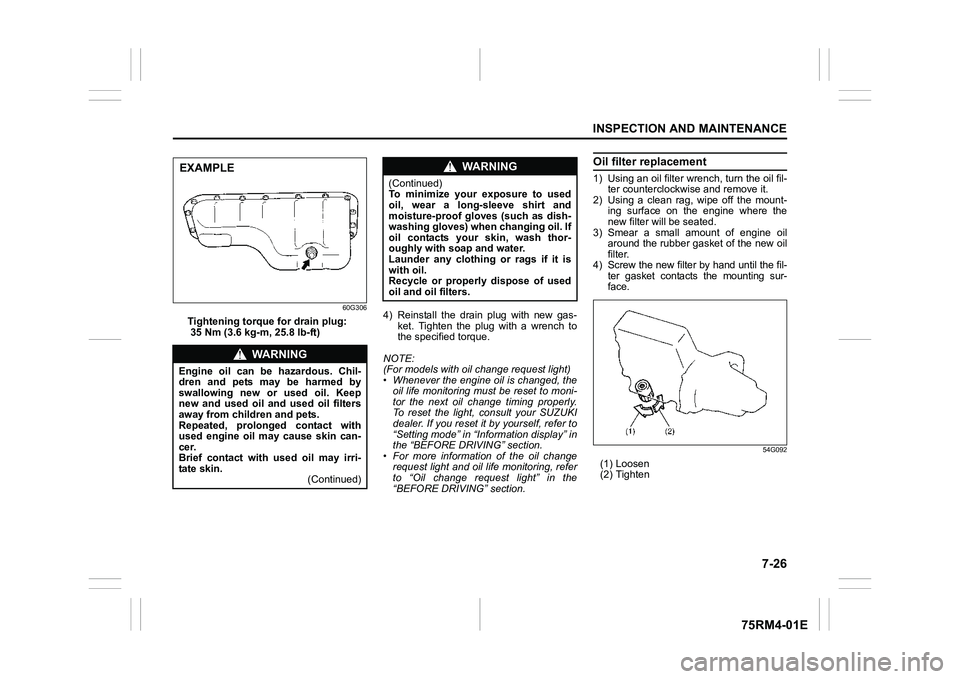
60G306
Tightening torque for drain plug:
35 Nm (3.6 kg-m, 25.8 lb-ft)4) Reinstall the drain plug with new gas-
ket. Tighten the plug with a wrench to
the specif ied torque.
NOTE:
(For models with oil change request light)
• Whenever the engine oil is changed, the oil life monitoring must be reset to moni-
tor the next oil change timing properly.
To reset the light, consult your SUZUKI
dealer. If you reset it by yourself, refer to
“Setting mode” in “Inf ormation display” in
the “BEFORE DRIVING” section.
• For more information of the oil change request light and oil life monitoring, refer
to “Oil change request light” in the
“BEFORE DRIVING” section.
Oil filter replacement1) Using an oil filter wr ench, turn the oil fil-
ter counterclockwise and remove it.
2) Using a clean rag, wipe off the mount- ing surface on the engine where the
new filter will be seated.
3) Smear a small amount of engine oil around the rubber gasket of the new oil
filter.
4) Screw the new filter by hand until the fil- ter gasket contacts the mounting sur-
face.
54G092
(1) Loosen
(2) Tighten
WA R N I N G
Engine oil can be hazardous. Chil-
dren and pets may be harmed by
swallowing new or used oil. Keep
new and used oil and used oil filters
away from children and pets.
Repeated, prolonged contact with
used engine oil may cause skin can-
cer.
Brief contact with used oil may irri-
tate skin. (Continued)EXAMPLE
WA R N I N G
(Continued)
To minimize your exposure to used
oil, wear a long-sleeve shirt and
moisture-proof gloves (such as dish-
washing gloves) when changing oil. If
oil contacts your skin, wash thor-
oughly with soap and water.
Launder any clothing or rags if it is
with oil.
Recycle or properly dispose of used
oil and oil filters.
Page 387 of 505
7-38
INSPECTION AND MAINTENANCE
75RM4-01E
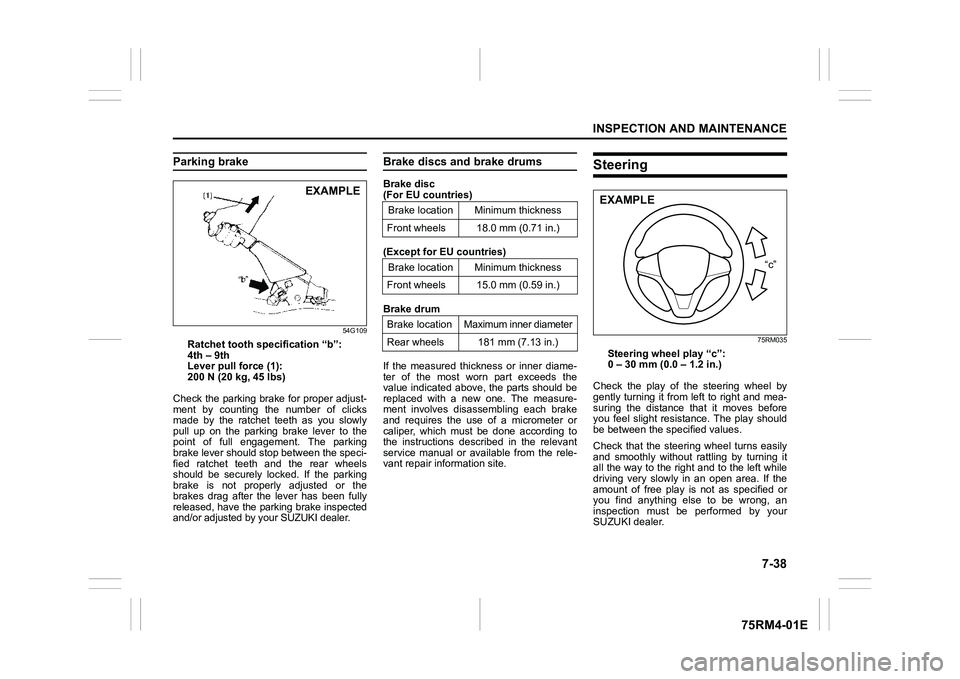
Parking brake
54G109
Ratchet tooth specification “b”:
4th – 9th
Lever pull force (1):
200 N (20 kg, 45 lbs)
Check the parking brake for proper adjust-
ment by counting the number of clicks
made by the ratchet teeth as you slowly
pull up on the parking brake lever to the
point of full engagement. The parking
brake lever should stop between the speci-
fied ratchet teeth and the rear wheels
should be securely locked. If the parking
brake is not properly adjusted or the
brakes drag after the lever has been fully
released, have the park ing brake inspected
and/or adjusted by your SUZUKI dealer.
Brake discs and brake drumsBrake disc
(For EU countries)
(Except for EU countries)
Brake drum
If the measured thickness or inner diame-
ter of the most worn part exceeds the
value indicated above, the parts should be
replaced with a new one. The measure-
ment involves disassembling each brake
and requires the use of a micrometer or
caliper, which must be done according to
the instructions described in the relevant
service manual or available from the rele-
vant repair information site.
Steering
75RM035
Steering wheel play “c”:
0 – 30 mm (0.0 – 1.2 in.)
Check the play of the steering wheel by
gently turning it from left to right and mea-
suring the distance that it moves before
you feel slight resistance. The play should
be between the specified values.
Check that the steering wheel turns easily
and smoothly without r attling by turning it
all the way to the right and to the left while
driving very slowly in an open area. If the
amount of free play is not as specified or
you find anything else to be wrong, an
inspection must be performed by your
SUZUKI dealer.
EXAMPLE
Brake location Minimum thickness
Front wheels 18.0 mm (0.71 in.)
Brake location Minimum thickness
Front wheels 15.0 mm (0.59 in.)
Brake location Maximum inner diameter
Rear wheels 181 mm (7.13 in.)
“c”
EXAMPLE
Page 388 of 505
7-39INSPECTION AND MAINTENANCE
75RM4-01E
Tires
80JS025
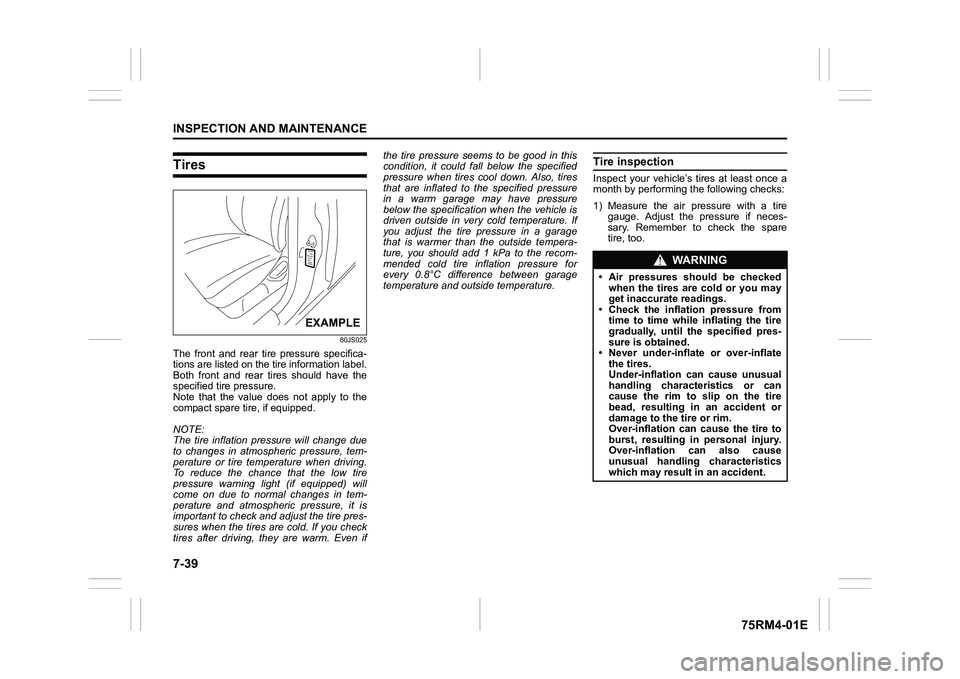
The front and rear tire pressure specifica-
tions are listed on the tire information label.
Both front and rear tires should have the
specified tire pressure.
Note that the value does not apply to the
compact spare tire, if equipped.
NOTE:
The tire inflation pressure will change due
to changes in atmospheric pressure, tem-
perature or tire temperature when driving.
To reduce the chance that the low tire
pressure warning light (if equipped) will
come on due to normal changes in tem-
perature and atmospheric pressure, it is
important to check and adjust the tire pres-
sures when the tires are cold. If you check
tires after driving, they are warm. Even ifthe tire pressure seems to be good in this
condition, it could fall below the specified
pressure when tires co
ol down. Also, tires
that are inflated to the specified pressure
in a warm garage may have pressure
below the specification when the vehicle is
driven outside in very cold temperature. If
you adjust the tire pressure in a garage
that is warmer than the outside tempera-
ture, you should add 1 kPa to the recom-
mended cold tire inflation pressure for
every 0.8°C difference between garage
temperature and outside temperature.
Tire inspectionInspect your vehicle’s tires at least once a
month by performing the following checks:
1) Measure the air pressure with a tire gauge. Adjust the pressure if neces-
sary. Remember to check the spare
tire, too.
EXAMPLE
WA R N I N G
• Air pressures should be checkedwhen the tires are cold or you may
get inaccurate readings.
• Check the inflation pressure from time to time while inflating the tire
gradually, until the specified pres-
sure is obtained.
• Never under-inflate or over-inflate the tires.
Under-inflation can cause unusual
handling characteristics or can
cause the rim to slip on the tire
bead, resulting in an accident or
damage to the tire or rim.
Over-inflation can cause the tire to
burst, resulting in personal injury.
Over-inflation c an also cause
unusual handling characteristics
which may result in an accident.
Page 390 of 505
7-41INSPECTION AND MAINTENANCE
75RM4-01E
Tire rotation4-tire rotation
54G114
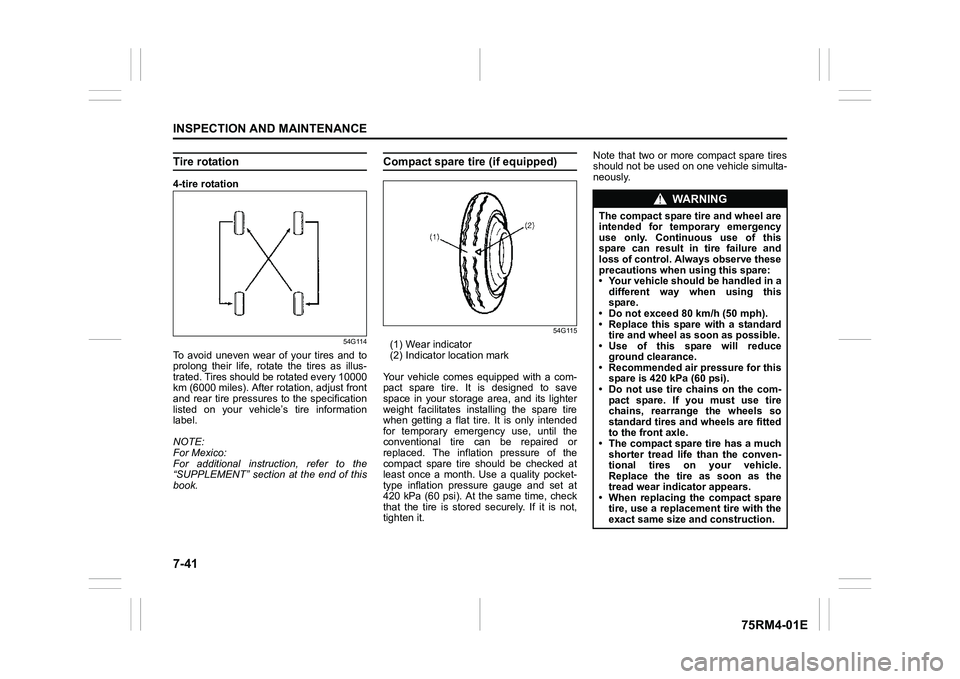
To avoid uneven wear of your tires and to
prolong their life, rotate the tires as illus-
trated. Tires should be rotated every 10000
km (6000 miles). After rotation, adjust front
and rear tire pressures to the specification
listed on your vehicle’s tire information
label.
NOTE:
For Mexico:
For additional instruction, refer to the
“SUPPLEMENT” section at the end of this
book.
Compact spare tire (if equipped)
54G115
(1) Wear indicator
(2) Indicator location mark
Your vehicle comes equipped with a com-
pact spare tire. It is designed to save
space in your storage area, and its lighter
weight facilitates installing the spare tire
when getting a flat tire. It is only intended
for temporary emergency use, until the
conventional tire can be repaired or
replaced. The inflation pressure of the
compact spare tire should be checked at
least once a month. Use a quality pocket-
type inflation pressure gauge and set at
420 kPa (60 psi). At the same time, check
that the tire is stored securely. If it is not,
tighten it. Note that two or more compact spare tires
should not be used on one vehicle simulta-
neously.
WA R N I N G
The compact spare tire and wheel are
intended for temporary emergency
use only. Continuous use of this
spare can result in tire failure and
loss of control. Always observe these
precautions when using this spare:
• Your vehicle should be handled in a
different way when using this
spare.
• Do not exceed 80 km/h (50 mph).
• Replace this spare with a standard tire and wheel as soon as possible.
• Use of this spare will reduce
ground clearance.
• Recommended air pressure for this spare is 420 kPa (60 psi).
• Do not use tire chains on the com- pact spare. If you must use tire
chains, rearrange the wheels so
standard tires and wheels are fitted
to the front axle.
• The compact spare tire has a much
shorter tread life than the conven-
tional tires on your vehicle.
Replace the tire as soon as the
tread wear indicator appears.
• When replacing the compact spare tire, use a replacement tire with the
exact same size and construction.
Page 426 of 505
9-1APPEARANCE CARE
75RM4-01E
Corrosion preventionIt is important to take good care of your
vehicle to protect it from corrosion. Listed
below are instructions for how to maintain
your vehicle to prevent corrosion. Please
read and follow these instructions carefully.Important information about corro-sionCommon causes of corrosion
1) Accumulation of road salt, dirt, moisture or chemicals in hard-to-reach areas of
the vehicle und erbody or frame.
2) Chipping, scratches and any damage to treated or painted metal surfaces
resulting from minor accidents or abra-
sion by stones and gravel.
Environmental conditions which accel-
erate corrosion
1) Road salt, dust control chemicals, sea air or industrial pollution will all acceler-
ate the corrosion of metal.
2) High humidity will increase the rate of
corrosion particularly when the tem-
perature range is just above the freez-
ing point.
3) Moisture in certain areas of a vehicle for an extended period of time may pro-
mote corrosion even though other body
sections may be completely dry. 4) High temperatures will cause an accel-
erated rate of corrosion to parts of the
vehicle which are not well-ventilated to
permit quick drying.
This information illustrates the necessity of
keeping your vehicle (particularly the
underbody) as clean and dry as possible. It
is equally important to repair any damage
to the paint or protective coatings as soon
as possible.
How to help prevent corrosionWash your vehicle frequently
The best way to preserve the finish on your
vehicle and to help avoid corrosion is to
keep it clean with frequent washing.
Wash your vehicle at least once during the
winter and once immediately after the win-
ter. Keep your vehicle, particularly the
underside, as clean and dry as possible.
If you frequently drive on salted roads,
your vehicle should be washed at least
once a month during the winter. If you live
near the ocean, your vehicle should be
washed at least once a month throughout
the year.
For washing instructi ons, refer to “Vehicle
cleaning” section. Remove foreign ma
terial deposits
Foreign material such as salts, chemicals,
road oil or tar, tree sap, bird droppings and
industrial fall-out may damage the finish of
your vehicle if it is left on painted surfaces.
Remove these types of deposits as quickly
as possible. If these deposits are difficult to
wash off, an additional cleaner may be
required. Check that any cleaner you use
is not harmful to painted surfaces and is
specifically intended for your purposes.
Follow the manufacturer’s directions when
using these special cleaners.
Repair finish damage
Carefully examine your vehicle for damage
to the painted surfaces. Should you find
any chips or scratches in the paint, touch
them up immediately to prevent corrosion
from starting. If the chips or scratches have
gone through to the bare metal, have a
qualified body shop make the repair.
Keep passenger and luggage compart-
ments clean
Moisture, dirt or mud can accumulate
under the floor mats and may cause corro-
sion. Occasionally, check under these
mats to ensure that this area is clean and
dry. More frequent checks are necessary if
the vehicle is used for off-road driving or in
wet weather.
Certain cargos such as chemicals, fertiliz-
ers, cleaners, salts, etc. are extremely cor-
rosive by nature. These products should
be transported in sealed containers. If they
Page 431 of 505
GENERAL INFORMATION
10
75RM4-01E
84MM01001
GENERAL INFORMATIONVehicle identification .......................................................... 10-1