battery SUZUKI JIMNY 2019 Owner's Manual
[x] Cancel search | Manufacturer: SUZUKI, Model Year: 2019, Model line: JIMNY, Model: SUZUKI JIMNY 2019Pages: 421, PDF Size: 6.35 MB
Page 152 of 421
OPERATING YOUR VEHICLE
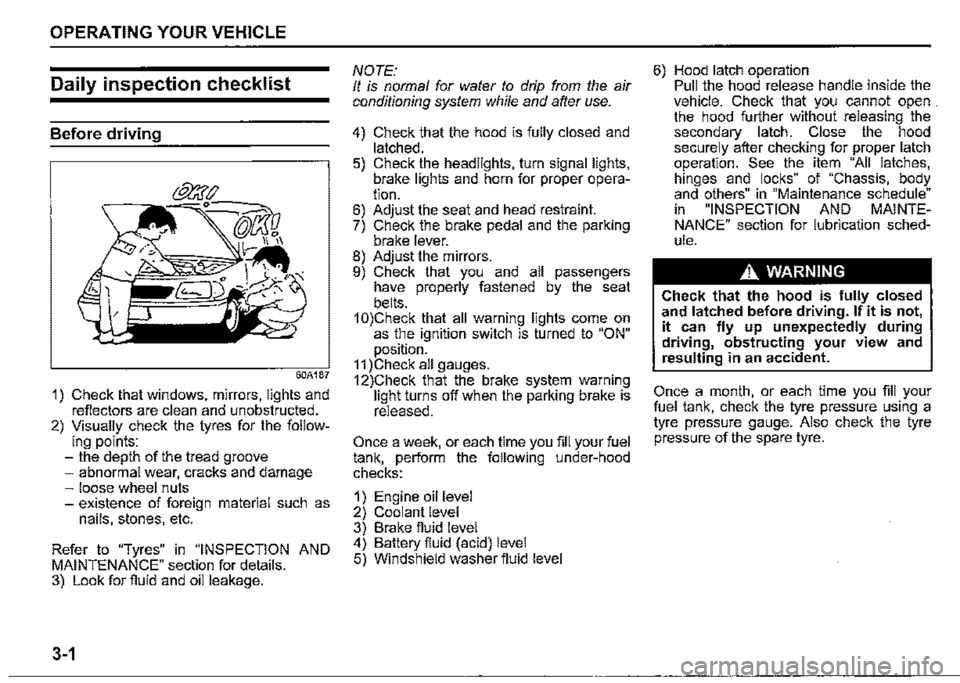
Daily inspection checklist
Before driving
60A187
1) Check that windows, mirrors, lights and reflectors are clean and unobstructed. 2) Visually check the tyres for the follow-ing points: -the depth of the tread groove -abnormal wear, cracks and damage -loose wheel nuts -existence of foreign material such as nails, stones, etc.
Refer to "Tyres" in "INSPECTION AND MAINTENANCE" section for details. 3) Look for fluid and oil leakage.
3-1
NOTE: It is normal for water to drip from the air conditioning system while and after use.
4) Check that the hood is fully closed and latched. 5) Check the headlights, turn signal lights, brake lights and horn for proper operation. 6) Adjust the seat and head restraint. 7) Check the brake pedal and the parking brake lever. 8) Adjust the mirrors. 9) Check that you and all passengers have properly fastened by the seat belts. 1 0)Check that all warning lights come on as the ignition switch is turned to "ON" position. 11 )Check all gauges. 12)Check that the brake system warning light turns off when the parking brake is released.
Once a week, or each time you fill your fuel tank, perform the following under-hood checks:
1) Engine oil level 2) Coolant level 3) Brake fluid level 4) Battery fluid (acid) level 5) Windshield washer fluid level
6) Hood latch operation Pull the hood release handle inside the vehicle. Check that you cannot open . the hood further without releasing the secondary latch. Close the hood securely after checking for proper latch operation. See the item "All latches, hinges and locks" of "Chassis, body and others" in "Maintenance schedule" in "INSPECTION AND MAINTENANCE" section for lubrication schedule.
A WARNING
Check that the hood is fully closed and latched before driving. If it is not, it can fly up unexpectedly during driving, obstructing your view and resulting in an accident.
Once a month, or each time you fill your fuel tank, check the tyre pressure using a tyre pressure gauge. Also check the tyre pressure of the spare tyre.
Page 155 of 421

A. WARNING
Never return the ignition switch to "LOCK" position and remove the ignition key while the vehicle is moving. The steering wheel will lock and you will not be able to steer the vehicle. (Continued)
A. WARNING
(Continued) Always return the ignition switch to "LOCK" position and remove the ignition key when leaving the vehicle even only for a short time. Also do not leave children alone in a parked vehicle. Unattended children may be able to start the vehicle or shift the transmission into neutral, which could result in an accident. There is also a danger that children may injure themselves by playing with the power windows or other moving features of the vehicle. In addition, heat build-up or extremely cold temperatures inside the vehicle can be fatal to children.
OPERATING YOUR VEHICLE
NOTICE
For protection of a lead-acid battery and a starter motor, do not use the starter motor by turning the key to "START" for more than 12 seconds at a time. If the engine dose not start, turn the key to "LOCK" position and wait for more than 30 seconds before trying again. If the engine does not start after several attempts, consult a SUZUKI dealer or a qualified workshop. Do not leave the ignition switch in "ON" position if the engine is not running as the lead-acid battery will discharge.
3-4
Page 163 of 421
The transmission is a 4-speed (3-speed plus overdrive) automatic transmission. By operating the overdrive off switch, the transmission can be converted to a 3-speed automatic transmission that will not move to the overdrive position. To convert the transmission to the 3-speed mode, push in the overdrive off switch and release it.
To return the transmission to the 4-speed mode, push in the overdrive off switch again:
When the ignition switch is turned to the "ACC" position, the transmission in the 3-speed mode is converted to the 4-speed mode automatically. The 3-speed mode is suitable for the following driving conditions: Driving on hilly, winding roads -You can drive more smoothly with less frequent gear changing Going down a steep hill -Some engine braking is provided
If you cannot shift automatic trans
mission gearshift lever out of "P"
(PARK)
Left hand drive vehicle
(1)
□
78RB03005
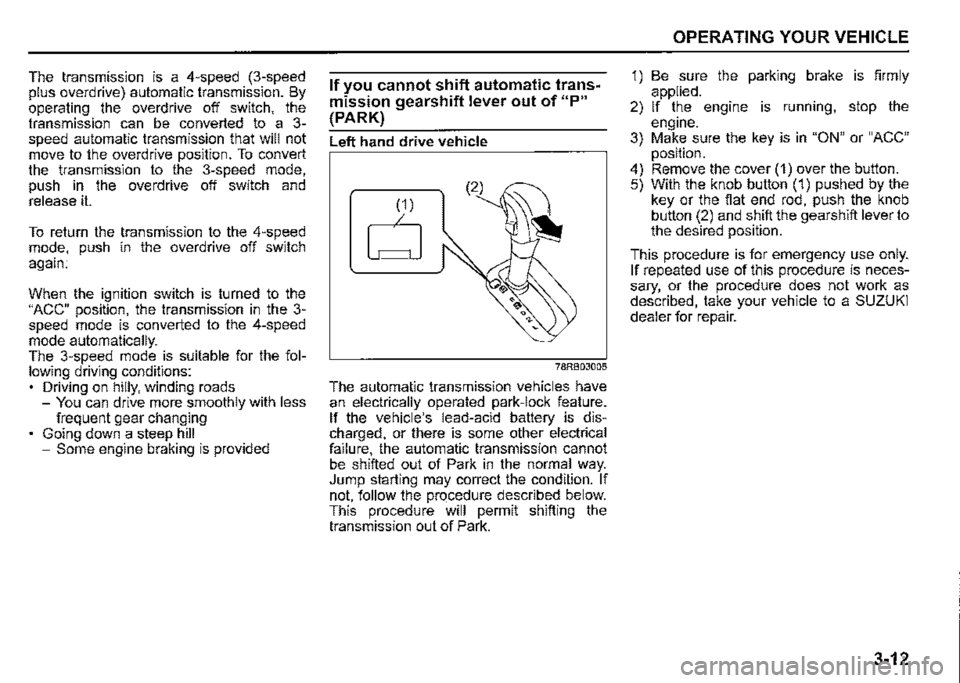
The automatic transmission vehicles have an electrically operated park-lock feature. If the vehicle's lead-acid battery is discharged, or there is some other electrical failure, the automatic transmission cannot be shifted out of Park in the normal way. Jump starting may correct the condition. If not, follow the procedure described below. This procedure will permit shifting the transmission out of Park.
OPERATING YOUR VEHICLE
1) Be sure the parking brake is firmly applied. 2) If the engine is running, stop the engine. 3) Make sure the key is in "ON" or "ACC" position. 4) Remove the cover (1) over the button. 5) With the knob button (1) pushed by the key or the flat end rod, push the knob button (2) and shift the gearshift lever to the desired position.
This procedure is for emergency use only. If repeated use of this procedure is necessary, or the procedure does not work as described, take your vehicle to a SUZUKI dealer for repair.
3-12
Page 164 of 421
OPERATING YOUR VEHICLE
Right hand drive vehicle
(2)
78RB03006
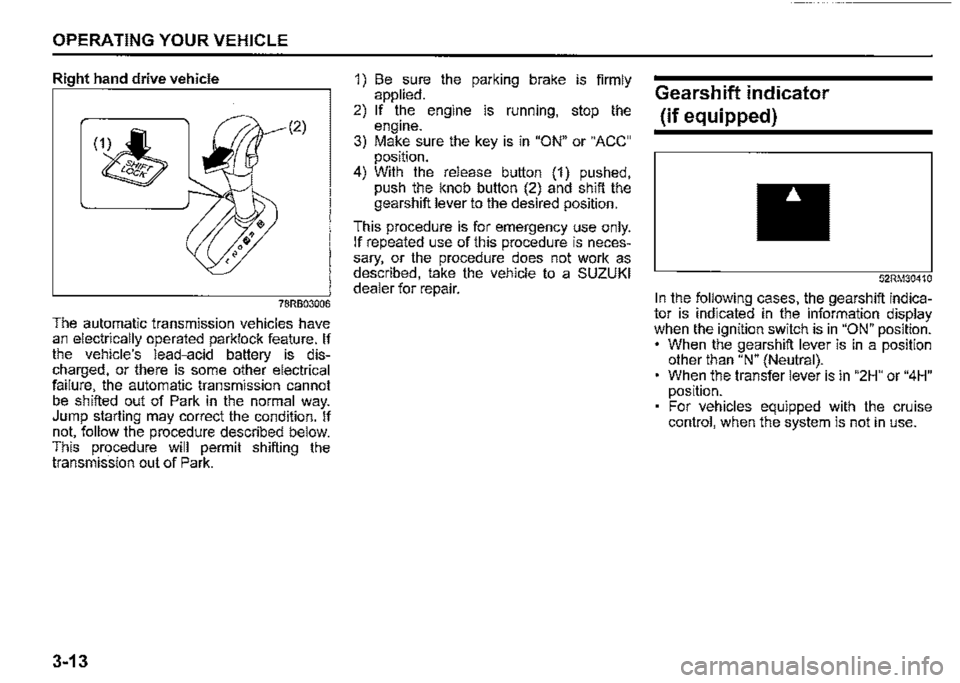
The automatic transmission vehicles have an electrically operated parklock feature. If the vehicle's lead-acid battery is discharged, or there is some other electrical failure, the automatic transmission cannot be shifted out of Park in the normal way. Jump starting may correct the condition. If not, follow the procedure described below. This procedure will permit shifting the transmission out of Park.
3-13
1) Be sure the parking brake is firmly applied. 2) If the engine is running, stop the engine. 3) Make sure the key is in "ON" or "ACC" position. 4) With the release button (1) pushed, push the knob button (2) and shift the gearshift lever to the desired position.
This procedure is for emergency use only. If repeated use of this procedure is necessary, or the procedure does not work as described, take the vehicle to a SUZUKI dealer for repair.
Gearshift indicator
(if equipped)
52RM30410
In the following cases, the gearshift indicator is indicated in the information display when the ignition switch is in "ON" position. • When the gearshift lever is in a position other than "N" (Neutral). When the transfer lever is in "2H" or "4H" position. For vehicles equipped with the cruise control, when the system is not in use.
Page 199 of 421

NOTE: When the function of the dual sensor is temporarily stopped or malfunctioning, all of following functions will be turned off. Dual sensor brake support Lane departure warning Vehicle swaying warning High beam assist Traffic sign recognition
Temporary stop of the dual sensor Under the following situations, the function of the dual sensor stops temporarily. When the situations are improved, the temporary stop of the function will be canceled. When the visibility of the dual sensor is poor Refer to "Situations where the dual sensor may not activate properly" in this section for details. When the temperature of the body of dual sensor is high When the systems related to the dual sensor brake support are stopped temporarily When the battery has a voltage abnormality
Failure of the dual sensor When the dual sensor is faulty, the function of the dual sensor is stopped until the ignition switch is turned to "LOCK". Find a safe place to park and turn the ignition switch to "LOCK". Restart the engine, and check that the dual sensor brake support indicator light, lane departure warning indicator light, and high beam assist warning light go off. If all of the indicators stay on after restarting the engine, there may be a failure of the dual sensor. Ask a SUZUKI dealer to have the dual sensor inspected.
NOTE: Under the following situations, the dual sensor brake support indicator light, lane departure warning indicator light, and high beam assist warning light come on after the engine has been started, it does not indicate a malfunction. Once the ignition switch to is turned to "LOCK" position and then the engine is restarted, these indicators will go off. -When the automatic brake system has been operating 3 times -When the automatic brake system has been operating for long periods
OPERATING YOUR VEHICLE
The function of the dual sensor is stopped if the dual sensor brake support indicator light, lane departure warning indicator light, and high beam assist warning light come on and there may be a failure of the dual sensor, but it r}oes not hinder normal driving.
Pedestrian detection The dual sensor detects pedestrians by whose size, shape or motion.
•
•
T
(1)
75RM238
(1) About 1 -2 m (3.3 -6.6 ft)
3-48
Page 240 of 421

OTHER CONTROLS AND EQUIPMENT
Interior light
Front
52RM50070
This light switch has three positions which function as described below:
ON (1) The light comes on and stays on regardless of whether the door is open or closed.
NOTE: The light will automatically be turned off to prevent the lead-acid battery from discharging when the following conditions are simultaneously met: The ignition switch is in "LOCK" position. The hazard warning lights, the position lights and the headlights are off.
5-5
• After 15 minutes from the light on.
DOOR (2) The light comes on when the door is opened. After closing all doors, the light will remain on for about 15 seconds and then fade out. If you insert the key to change the ignition mode to "ACC" or "ON" during this time, the light will start to fade out immediately. After removing the key from the ignition switch, the light will turn on for about 15 seconds and then fade out.
NOTE: The light will automatically be turned off to prevent the lead-acid battery from discharging when the following conditions are simultaneously met: • The ignition switch is in "LOCK" position. • After about 15 minutes of the light on.
OFF (3) The light remains off even when the door is opened.
Luggage compartment
(if equipped)
ON @l) o @i OFF
(1) (2)
78RB05010
This light switch has three positions which function as described below:
ON (1) The light comes on and stays on regardless of whether the tailgate is open or closed.
NOTE: The light will automatically be turned off to prevent the lead-acid battery from discharging when the following conditions are simultaneously met: The ignition switch is in "LOCK" position. The hazard warning lights, the position lights and the headlights are off. After 15 minutes from the light on.
Page 241 of 421

DOOR (2) The light comes on when the tailgate is opened. After closing the tailgate, the light will remain on for about 15 seconds and then fade out. If you insert the key to change the ignition mode to "ACC" or "ON" during this time, the light will start to fade out immediately. After removing the key from the ignition switch, the light will turn on for about 15 seconds and then fade out.
NOTE: The light will automatically be turned off to prevent the lead-acid battery from discharging when the following conditions are
simultaneously met: • The ignition switch is in "LOCK" position. • After about 15 minutes of the light on.
OFF (3) The light remains off even when the tailgate is opened.
NOTICE
Do not leave the tailgate open with the luggage · compartment light switch in ON position for a long time, or the lead-acid battery will discharge.
OTHER CONTROLS AND EQUIPMENT
NOTE: The light will automatically be turned off to prevent the lead-acid battery from discharging when after 15 minutes of the tail
gate open.
78RB05011
NOTE: The number of doors involved in the lighting operation of the interior light depends on the vehicle specification. If there is a switch (rubber protrusion) at the door opening as shown, the door is involved in the lighting operation. The tailgate is also involved in this operation even without the rubber protrusion.
Accessory socket
Luggage compartment (if equipped)
5-6
Page 296 of 421
OTHER CONTROLS AND EQUIPMENT
iPod connection Make sure to detach the iPod after turning the ignition switch to "LOCK" position. The iPod may not be shut down when it is being connected and may result in battery depletion. Do not connect iPod accessories such as an iPod remote control or headphones while connecting the iPod with the unit. The unit may not operate correctly.
5-61
Page 311 of 421
![SUZUKI JIMNY 2019 Owners Manual Anti-theft feature
Type A ,,,-.,--------,-,
(1)
(2)
Type B -...------------,,~
(1)
(2)
(1) VOL PUSH PWR" knob (2) PRESET buttons ([1] to [6]) (3) UP button (4) "TUNE/FLO PUSH SOUND" knob
(3)](/img/20/43483/w960_43483-310.png "SUZUKI JIMNY 2019 Owners Manual Anti-theft feature
Type A ,,,-.,--------,-,
(1)
(2)
Type B -...------------,,~
(1)
(2)
(1) VOL PUSH PWR\" knob (2) PRESET buttons ([1] to [6]) (3) UP button (4) \"TUNE/FLO PUSH SOUND\" knob
(3)")
Anti-theft feature
Type A ,,,-.,--------,-,
(1)
(2)
Type B -...------------,,~
(1)
(2)
(1) VOL PUSH PWR" knob (2) PRESET buttons ([1] to [6]) (3) UP button (4) "TUNE/FLO PUSH SOUND" knob
(3)
(4)
TypeC -...----------,-
(3)
(4) (1)
(2)
OTHER CONTROLS AND EQUIPMENT
78RB05067
The anti-theft function is intended to dis
courage thefts. For example, when the
audio system is installed in another vehi
cle, it will become unable to operate.
This function works by entering a Personal
Identification Number (PIN).
When the unit is disconnected from its
power source, such as when the audio
system is removed or the lead-acid battery
is disconnected, the unit will become inop
erable until the PIN is reentered.
5-76
Page 312 of 421
![SUZUKI JIMNY 2019 Owners Manual OTHER CONTROLS AND EQUIPMENT
Setting the anti-theft function
1) Press "VOL PUSH PWR" knob (1) to
power off.
2) Hold down the buttons numbered [1]
and [6] of PRESET buttons (2) and
press "VOL PUS](/img/20/43483/w960_43483-311.png "SUZUKI JIMNY 2019 Owners Manual OTHER CONTROLS AND EQUIPMENT
Setting the anti-theft function
1) Press \"VOL PUSH PWR\" knob (1) to
power off.
2) Hold down the buttons numbered [1]
and [6] of PRESET buttons (2) and
press \"VOL PUS")
OTHER CONTROLS AND EQUIPMENT
Setting the anti-theft function
1) Press "VOL PUSH PWR" knob (1) to
power off.
2) Hold down the buttons numbered [1]
and [6] of PRESET buttons (2) and
press "VOL PUSH PWR" knob (1).
"SECURITY" will be displayed.
3) Press UP button (3) and the button
numbered [1] of PRESET buttons (2)
simultaneously.
4) Enter a 4-digit number to be registered
as PIN using the buttons numbered [1]
-[4] of PRESET buttons (2).
5) Hold down "TUNE/FLO PUSH
SOUND" knob (4) for 1 second or lon
ger to set the anti-theft function.
NOTE:
Take a note of the registered PIN and keep
it for the future use.
5-77
Canceling the anti-theft feature
To cancel the anti-theft function, delete the
registered PIN.
1) Press "VOL PUSH PWR" knob (1) to
power off.
2) Hold down the buttons numbered [1]
and [6] of PRESET buttons (2) and
press "VOL PUSH PWR" knob (1).
"PIN ENTRY" will be displayed.
3) Press UP button (3) and the button
numbered [1] of PRESET buttons (2)
simultaneously.
4) Enter a 4-digit number to be registered
as PIN using the buttons numbered [1]
-[4] of PRESET buttons (2).
5) Hold down "TUNE/FLO PUSH
SOUND" knob (4) for 1 second or lon
ger to delete the registered PIN. The
indication "---" will be displayed and
the anti-theft function will be canceled.
NOTE:
To change your PIN, first delete your cur
rent PIN, and then set a new one.
Confirming the Personal Identification
Number (PIN)
When the main power source is discon
nected such as when the lead-acid battery
is replaced, etc. it is required to enter the
PIN to operate the unit again.
1) Set the ignition switch to "ACC" posi
tion.
"SECURITY" will be displayed.
2) Press UP button (3) and the button
numbered [1] of PRESET buttons (2)
simultaneously.
3) Enter a 4-digit number to be registered
as PIN using the buttons numbered [1]
-[4] of PRESET buttons (2).
4) Hold down "TUNE/FLO PUSH
SOUND" knob (4) for 1 second or lon
ger.
When the same PIN as registered is
entered, the power of the audio system
will be turned off automatically and it
will become operable again.
NOTE:
If an incorrect PIN is entered, "ERROR"
and the total number of incorrect entry
attempts will be displayed.
If an incorrect PIN is entered 10 times or
more, "HELP" will be displayed and the
audio system will become inoperable.