gear SUZUKI JIMNY 2019 Owners Manual
[x] Cancel search | Manufacturer: SUZUKI, Model Year: 2019, Model line: JIMNY, Model: SUZUKI JIMNY 2019Pages: 421, PDF Size: 6.35 MB
Page 17 of 421
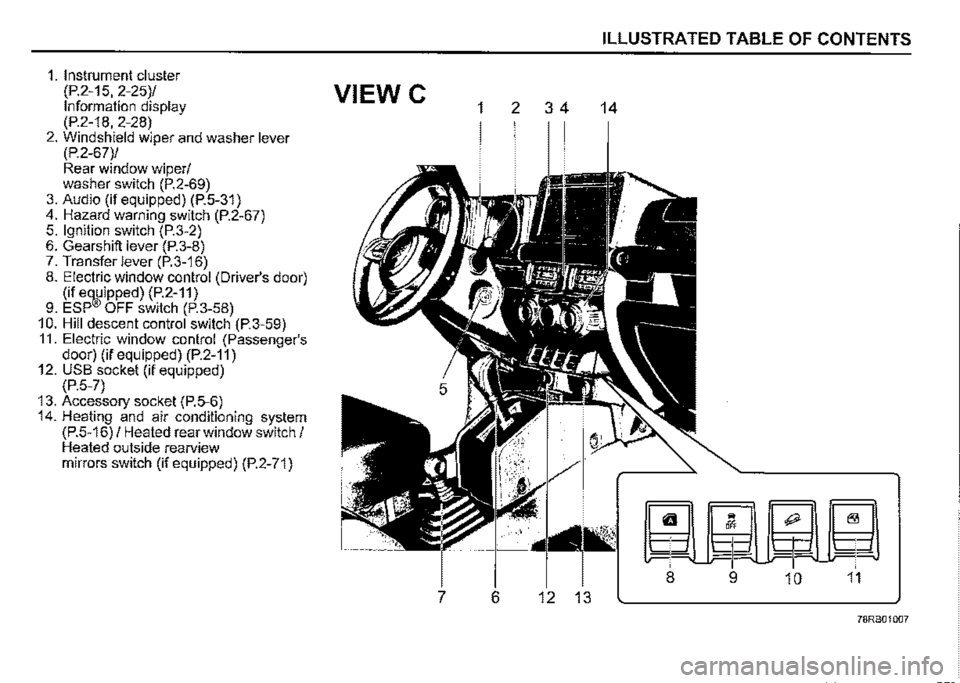
1. Instrument cluster
(P.2-15, 2-25)/ VIEW C Information display (P.2-18, 2-28) 2. Windshield wiper and washer lever (P.2-67)/ Rear window wiper/ washer switch (P.2-69) 3. Audio (if equipped) (P.5-31) 4. Hazard warning switch (P.2-67) 5. Ignition switch (P.3-2) 6. Gearshift lever (P.3-8) 7. Transfer lever (P.3-16) 8. Electric window control (Driver's door) (if e~ipped) (P.2-11) 9. ESP OFF switch (P.3-58) 10. Hill descent control switch (P.3-59) 11. Electric window control (Passenger's door) (if equipped) (P.2-11) 12. USB socket (if equipped) (P.5-7) 13. Accessory socket (P.5-6) 14. Heating and air conditioning system (P.5-16) / Heated rear window switch/ Heated outside rearview mirrors switch (if equipped) (P.2-71)
1 2 3 4
7 6 12 13
ILLUSTRATED TABLE OF CONTENTS
14
~m0~
-P-~ ¥ -1-
8 9 10 11
78RB01007
Page 87 of 421

Speedometer
The speedometer indicates vehicle speed.
Tachometer
The tachometer indicates engine speed in revolutions per minute.
NOTICE
Never drive the vehicle with the engine revving in the red zone or severe engine damage can result. Keep the engine speed below the red zone even when downshifting to a lower gear position.
Refer to 11Downshifting maximum allowable speeds" in "OPERATING YOUR VEHICLE" section.
Fuel gauge
' (1)
"
~
I
)
ill•E-F
(2)
78RB02030
When the ignition switch is "ON", this gauge gives an approximate indication of the amount of fuel in the fuel tank. "F" stands for full and "E" stands for empty. If the indicator shows only one segment to "E", refill the tank as soon as possible.
BEFORE DRIVING
If the last segment blinks, it means that the fuel is almost empty. If the low fuel warning light (1) comes on, fill the fuel tank immediately. Refer to "Low fuel warning light" in "Warning and indicator lights" in this section for details. The mark (2) indicates that the fuel filler door is located on the right side of the vehicle.
2-16
Page 89 of 421
Information display
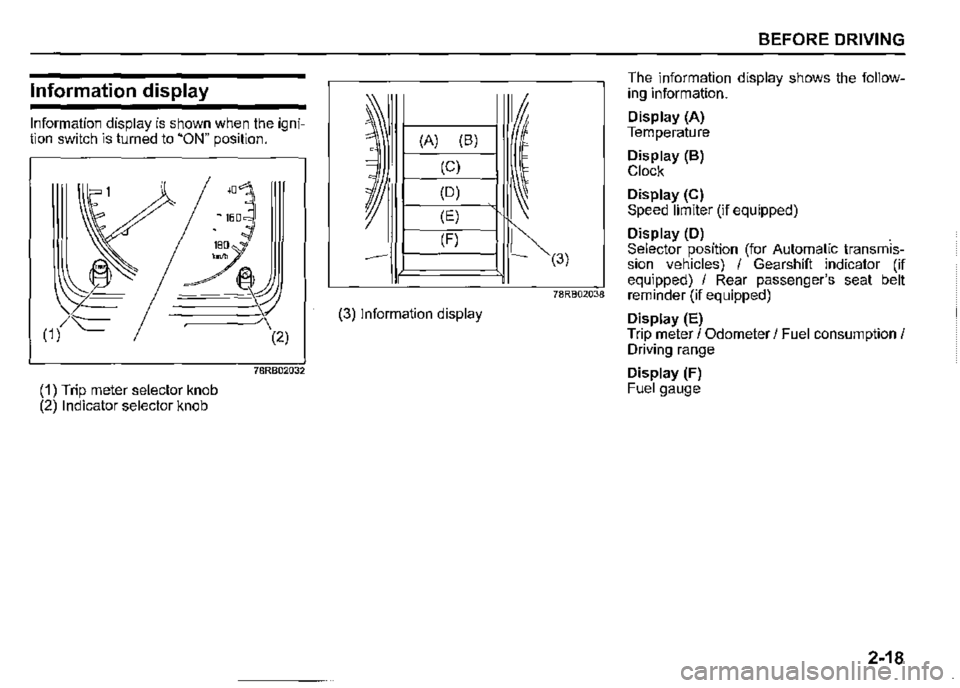
Information display is shown when the ignition switch is turned to "ON" position.
,□
~
~ 160
(1) t=
(1) Trip meter selector knob (2) Indicator selector knob
(2)
78RB02032
~ I (A) (B) 0
= (C)
~
(D)
(E)
(F)
(3) Information display
~(3)
BEFORE DRIVING
The information display shows the following information.
Display (A) Temperature
Display (B) Clock
Display (C) Speed limiter (if equipped)
Display (D) . Selector position (for Automatic transmission vehicles) I Gearshift indicator (if equipped) I Rear passenger's seat belt 1asso20,a reminder (if equipped)
Display (E) Trip meter I Odometer I Fuel consumption I Driving range
Display (F) Fuel gauge
2-18
Page 90 of 421
BEFORE DRIVING
Clock
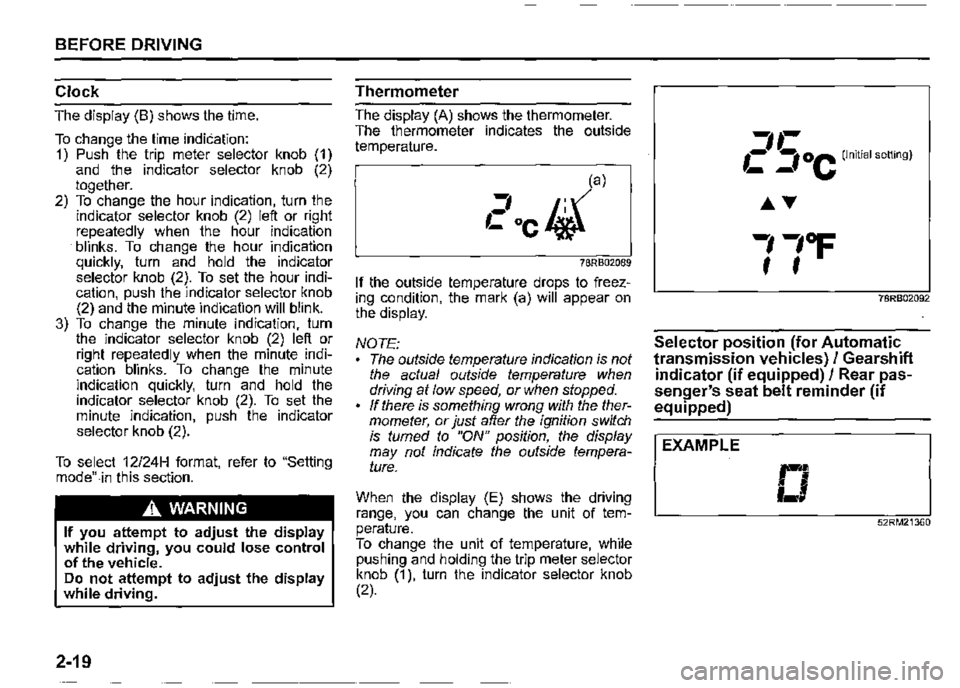
The display (B) shows the time.
To change the lime indication: 1) Push the trip meter selector knob (1) and the indicator selector knob (2) together. 2) To change the hour indication, turn _the indicator selector knob (2) left or nght repeatedly when the hour indication · blinks. To change the hour indication quickly, turn and hold the indicator selector knob (2). To set the hour indication, push the indicator selector knob (2) and the minute indication will blink. 3) To change the minute indication, turn the indicator selector knob (2) left or right repeatedly when the minute indication blinks. To change the minute indication quickly, turn and hold the indicator selector knob (2). To set the minute indication, push the indicator selector knob (2).
To select 12124H format, refer to "Setting mode"-in this section.
A WARNING
If you attempt to adjust the display while driving, you could lose control of the vehicle. Do not attempt to adjust the display while driving.
2-19
Thermometer
The display (A) shows the thermometer. The thermometer indicates the outside temperature.
, ,:la)
Cocl#}
78RB02089
If the outside temperature drops to freezing condition, the mark (a) will appear on the display.
NOTE: The outside temperature indication is not the actual outside temperature when driving at low speed, or when stopped. If there is something wrong with the thermometer, or just after the ignition switch is tumed to "ON" position, the display may not indicate the outside temperature.
When the display (E) shows the driving range, you can change the unit of temperature. To change the unit of temperature, while pushing and holding the trip meter selector knob (1 ), turn the indicator selector knob (2).
-----------
2 5 oc (Initial setting)
78RB02092
Selector position (for Automatic
transmission vehicles)/ Gearshift
indicator (if equipped)/ Rear pas
senger's seat belt reminder (if equipped)
I EXAMPLE
□ 52RM21360
Page 91 of 421

Selector position (for Automatic transmission vehicles) When the ignition switch is turned "ON"; the display (D) indicates the gear position. For details on how to use the transmission, refer to "Using transmission" in "OPERATING YOUR VEHICLE" section.
Gearshifl indicator (if equipped) Refer to "Gearshift indicator" in "OPERATING YOUR VEHICLE" section.
Rear passenger's seat belt reminder (if equipped) Refer to "Seat belts and child restraint systems" in the "BEFORE DRIVING" section for details.
Trip meter/ Odometer/ Fuel con
sumption / Driving range
The display (E) shows one of the following indications; trip meter A, trip meter B, odometer, instantaneous fuel consumption, average fuel consumption or driving range. To switch the display indication (E), push the trip meter selector knob (1) or the indicator selector knob (2) quickly.
,-------------------------~ I (.,{1 t
(b)
Ill (c)
1,,-,,-,
1CC1 u:1km
,!}
.--,., Cl U_lkm
,!}
(d) 1-1-1111 , :1,:1ci1-1km __________ i} _-0, __________ ,
(e)
(f)
I 11:, I U_lkm/L
,!}
AVG. 1,,-
1c.:1km/L
,!}
RANGE ' (g) ,,-11 I C =f1-fkm 1 _________________________ _
78RB02034
BEFORE DRIVING
D--0-Push the trip meter knob (1 ).
D--0-Push the knob (2).
(b) Trip meter A (c) Trip meter B (d) Odometer
indicator
selector
selector
(e) Instantaneous fuel consumption (f) Average fuel consumption (g) Driving range
A WARNING
If you attempt to adjust the display while driving, you could lose control of the vehicle. Do not attempt to adjust the display while driving.
NOTE: Indications will change when you push and release a knob. The display shows estimated values. Indications may not be the same as actual values.
2-20
Page 97 of 421

Speedometer
The speedometer indicates vehicle speed.
Tachometer
The tachometer indicates engine speed in revolutions per minute.
NOTICE
Never drive the vehicle with the engine revving in the red zone or severe engine damage can result. Keep the engine speed below the red zone even when downshifting to a lower gear position. Refer to 11Downshifting maximum allowable speeds" in "OPERATING YOUR VEHICLE" section.
Fuel gauge
(1) ' I
~
~
I
1
-'
(2)
78RB02036
When the ignition switch is "ON", this gauge gives an approximate indication of the amount of fuel in the fuel tank. "F" stands for full and "E" stands for empty. • If the indicator shows only one segment to "E", refill the tank as soon as possible.
If the last segment blinks, it means that the fuel is almost empty. If the low fuel warning light (1) comes on, fill the fuel tank immediately. Refer to "Low fuel warning light" in "Warning and indicator lights" in this section for details. The mark (2) indicates that the fuel filler door is located on the right side of the vehicle.
BEFORE DRIVING
Brightness control
Brightness
.11111
LO\"/ Hi
52RS20160
~ 10'·16□ MPH ~
(1)
78RB02037
2-26
Page 99 of 421
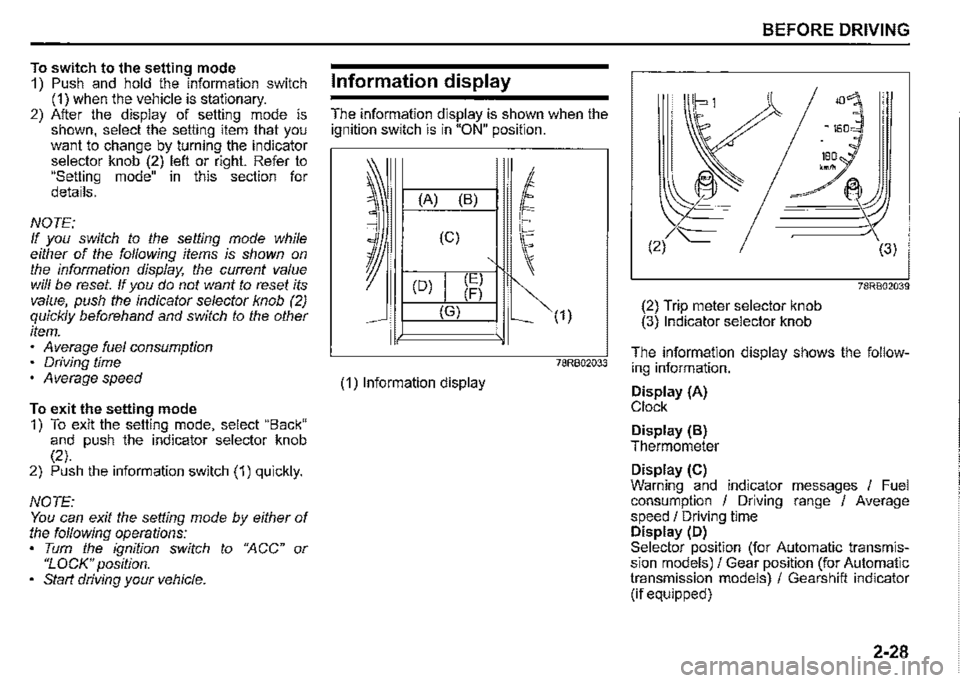
To switch to the setting mode 1) Push and hold the information switch (1) when the vehicle is stationary. 2) After the display of setting mode is shown, select the setting item that you want to change by turning the indicator selector knob (2) left or right. Refer to "Setting mode" in this section for details.
NOTE: If you switch to the setting mode while either of the following items is shown on the information display, the current value will be reset. If you do not want to reset its value, push the indicator selector knob (2) quickly beforehand and switch to the other item. Average fuel consumption • Driving time • Average speed
To exit the setting mode 1) To exit the setting mode, select "Back" and push the indicator selector knob (2). 2) Push the information switch (1) quickly.
NOTE: You can exit the setting mode by either of the following operations: Tum the ignition switch to ';,'\CC" or "LOCK" position. • Start driving your vehicle.
Information display
The information display is shown when the ignition switch is in "ON" position.
(A) (B)
(C)
(D) (E) (F)
(G)
(1) Information display
(1)
78RB02033
BEFORE DRIVING
78RB02039
(2) Trip meter selector knob (3) Indicator selector knob
The information display shows the following information.
Display (A) Clock
Display (B) Thermometer
Display (C) Warning and indicator messages I Fuel consumption / Driving range / Average speed / Driving time Display (D) Selector position (for Automatic transmission models)/ Gear position (for Automatic transmission models) / Gearshift indicator (if equipped)
2-28
Page 103 of 421

NOTE: If you refuel when the ignition switch is "ON", the driving range may not indicate the correct value. When you reconnect the terminals to the lead-acid battery, the value of driving range will be shown after driving for a period of time.
Average speed If you selected average speed the last time you drove the vehicle, the display indicates the last value of average speed from previous driving when the ignition switch is turned "ON". Unless you reset the value of average speed, the display indicates the value of average speed which includes average speed during previous driving.
To reset the value of average speed, push and hold the indicator selector knob (3) for a while when the display indicates an average speed. The display shows "---" and then indicates a new average speed after driving for a short time.
NOTE: When you reconnect the terminals to the lead-acid battery, the value of average speed will be shown after driving for a period of time.
Driving time The display shows the total amount of driving time since the indication was reset. To reset the driving time, push and hold the indicator selector knob (3) for a while when the display shows the driving time.
NOTE: When you reset the indication or reconnect the terminals to the lead-acid battery, the driving time will be shown after driving for a while. The indicated maximum value of driving time is 99:59:59. No more than the maximum value will be indicated on the display until you reset the driving time.
Gearshift indicator
The display (D) shows the gearshift indicator.
Refer to "Gearshift indicator" in "OPERATING YOUR VEHICLE" section.
BEFORE DRIVING
Trip meter
The display (E) shows the trip meter.
The trip meter can be used to measure the distance traveled on short trips or between fuel stops. You can use trip meter A or trip meter B independently.
To reset the trip meter, push and hold the trip meter selector knob (2) for a while.
NOTE: The indicated maximum value of the trip meter is 9999.9. When you run past the maximum value, the indicated value will return to 0.0.
Odometer
The display (F) shows the odometer.
The odometer records the total distance the vehicle has been driven.
NOTICE
Keep track of your odometer reading and check the maintenance schedule regularly for required services. Increased wear or damage to certain parts can result from failure to perform required services at the proper mileage intervals.
2-32
Page 125 of 421

Master warning indicator light
(if equipped)
68PM00278
When the ignition switch is turned "ON", this light comes on briefiy so you can check that the light is working.
When the information display shows warning and indicator messages, this indicator light may also blink.
For details, refer to "Information display" in this section.
4WD indicator light
78RB02078
· This indicator light comes on when the transfer gear and the air locking hubs are switched to 4-wheel drive condition ("4H" or "4L").
When the ignition switch is turned "ON", this 4WD indicator light will come on for a while and then this light will turned on or off according to the drive condition.
If 4WD indicator light continues to blink, there may be a malfunction of the system. If so, have the system inspected by your SUZUKI dealer.
When you shift the transfer lever from "2H" position to "4H" position at a speed of 100 km/h (60 mph) or more, this indicator light blinks.
When you shift transfer lever again while changing the drive condition, this indicator blinks.
BEFORE DRIVING
NOTE: When the drive condition is 4-wheel drive condition and the engine is not running with the ignition switch turned "ON", this 4WD indicator light will come on for a while and then blink. In this situation, when you start the engine and this indicator light comes on, the system does not indicate a malfunction.
Cruise indicator light (if equipped)
81P40090
When the cruise control system is activated, this light comes on.
2-54
Page 147 of 421
A WARNING
Your vehicle should be handled in a different way when towing a trailer. For the safety of yourself and others, observe the following precautions: Practice turning, stopping, and reversing before you begin towing a trailer in traffic. Do not tow a trailer in traffic until you are confident that you can handle the vehicle and trailer safely. Never exceed local towing speed limits or 80 km/h (50 mph), whichever is lower. Never drive at a speed that causes shaking or swaying of the trailer. If you notice even the slightest sign of shaking or swaying, slow down. • When roads are wet, slippery or rough, drive at a slower speed than you would on dry or smooth roads. Failure to slow down when road conditions are bad can result in loss of control. Always have someone guide you when reversing. (Continued)
A WARNING
(Continued) Always admit greater stopping distance. Stopping distance is increased when you tow a trailer. For each 16 km/h (10 mph) of speed, allow at least one vehicle and trailer length between you and the vehicle ahead. Allow a greater stopping distance if roads are wet or slippery. If the trailer has over-run brakes, apply the brakes gradually to avoid snatching caused by the trailer wheels locking. Slow down before corners and maintain a steady speed while cornering. Deceleration or acceleration while cornering can result in loss of control. Remember that a larger than normal turning radius is needed because the trailer wheels will go inside than vehicle's wheels. Avoid sudden acceleration and stopping of the vehicle. Do not make quick maneuvers unless they are necessary. Slow down in cross winds and be prepared for gusts of wind from large passing vehicles. (Continued)
BEFORE DRIVING
A WARNING
(Continued) Be careful when overtaking other vehicles. Allow enough room for your trailer before changing lanes, and use turn signal lights properly in advance. Slow down and shift into a lower gear for better engine braking before you reach long or steep downhill grades. It is hazardous to attempt downshifting while you are descending a hill. Do not step on the brake pedal excessively. This could cause the brakes to over-heat resulting in reduced braking efficiency. Use engine braking as much as possible. Because of the added trailer weight, your engine may overheat on hot days when going up long or steep hills. Pay attention to your engine coolant temperature. If it indicates overheating, pull off the road and stop the vehicle in a safe place. Refer to "Engine trouble: Overheating" in "EMERGENCY SERVICE" section.
2-76