lights SUZUKI JIMNY 2020 User Guide
[x] Cancel search | Manufacturer: SUZUKI, Model Year: 2020, Model line: JIMNY, Model: SUZUKI JIMNY 2020Pages: 421, PDF Size: 6.35 MB
Page 96 of 421

BEFORE DRIVING
Instrument cluster (Type B) (if equipped)
1. Speedometer 2. Tachometer 3. Information display 4. Trip meter selector knob 5. Indicator selector knob 6. Warning and indicator lights
2
4 6
2-25
6
~~ *DID~@ +lAil+
3 6 5
78RB02098
Page 97 of 421

Speedometer
The speedometer indicates vehicle speed.
Tachometer
The tachometer indicates engine speed in revolutions per minute.
NOTICE
Never drive the vehicle with the engine revving in the red zone or severe engine damage can result. Keep the engine speed below the red zone even when downshifting to a lower gear position. Refer to 11Downshifting maximum allowable speeds" in "OPERATING YOUR VEHICLE" section.
Fuel gauge
(1) ' I
~
~
I
1
-'
(2)
78RB02036
When the ignition switch is "ON", this gauge gives an approximate indication of the amount of fuel in the fuel tank. "F" stands for full and "E" stands for empty. • If the indicator shows only one segment to "E", refill the tank as soon as possible.
If the last segment blinks, it means that the fuel is almost empty. If the low fuel warning light (1) comes on, fill the fuel tank immediately. Refer to "Low fuel warning light" in "Warning and indicator lights" in this section for details. The mark (2) indicates that the fuel filler door is located on the right side of the vehicle.
BEFORE DRIVING
Brightness control
Brightness
.11111
LO\"/ Hi
52RS20160
~ 10'·16□ MPH ~
(1)
78RB02037
2-26
Page 98 of 421
BEFORE DRIVING
When the ignition switch is turned "ON", the instrument panel lights come on.
Your vehicle has a system to automatically dim the brightness of the instrument panel lights when the position lights or headlights are on.
When the position lights and/or headlights are on, you can adjust the meter illumination brightness.
To increase the brightness of the instrument panel lights, turn the indicator selector knob (1) clockwise.
2-27
To reduce the brightness of the instrument panel lights, turn the indicator selector knob (1) counterclockwise.
A WARNING
Do not adjust the brightness of the instrument panel lights while driving. Otherwise, you could lose control of the vehicle.
NOTE: If you do not turn the knob within several seconds, the brightness control display will be cance!ed automatically. When you reconnect the lead-acid battery, the brightness of the instrument panel lights will be reinitialized. Readjust the brightness according to your preference.
NOTE: If you adjust to the maximum brightness level when the position lights or headlights are on, the following functions will be cancelled. The function which automatically dims the brightness of instrument panel lights The function which operates with the brightness control, except maximum brightness level
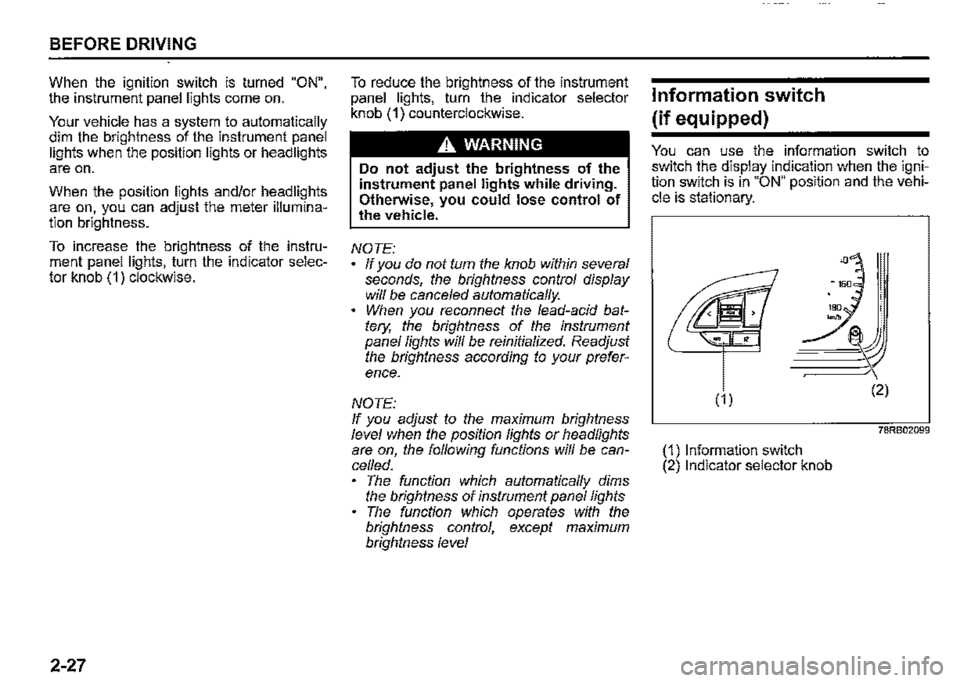
Information switch
(if equipped)
You can use the information switch to switch the display indication when the ignition switch is in "ON" position and the vehicle is stationary.
78RB02099
(1) Information switch (2) Indicator selector knob
Page 105 of 421
(Selecting 12H/24H format) Switch the time indication between 12-hour and 24-hour format by selecting "Clock setting" in "Setting mode". Then, select "12H" or "24H".
Door lock (Door unlock setting) You can choose either once or twice operation(s) to unlock all doors (including the tailgate) by turning the key or operating the keyless entry system transmitter.
You can also turn off or on the buzzer sound when the door(s) is (are) locked or unlocked.
Lights (Lane change setting) The turn signal and its indicator can be set whether they flash three times even if you return the turn signal control lever shortly after operating it. To change the lane change setting, select "Lane change" in "Setting mode". Then, select "ON" or "OFF" If you want to change the number of flashing, consult a SUZUKI dealer.
Guide me light setting (Light setting) (if equipped) You can change the lighting time of "To car" function or "To home" function.
Oil change (Oil life monitoring system reset setting) (if equipped) The oil life monitoring system must be reset after changing the engine oil and oil filter. To reset the system, push and hold the indicator selector knob (3) for a while.
TPMS (Tyre pressure monitoring system setting) (if equipped) You can check the current tyre pressure on the information display. You can set one of the initial values of tyre pressure below that are indicated on the tyre information label. -Comfort Mode -Load Mode
Refer to "Tyre pressure monitoring system (TPMS)" in the "OPERATING YOUR VEHICLE" section for details.
Traffic sign recognition (Traffic sign recognition setting) (if equipped) If you select "ON" the traffic sign recognition function can be activated.
Refer to "Traffic sign recognition" in the "OPERATING YOUR VEHICLE" section for details.
BEFORE DRIVING
Default (Initialization setting) If you select "YES" and push the indicator selector knob (3), all settings will be reinitialized.
2-34
Page 107 of 421

Warning and indicator messages
All models
Warning and indicator message
■ 78RB02043
78RB02044
;DO~
LIGHTS ON
78RB02045
Master warning indicator light
Blinks (only while vehicle is in motion)
Blinks
Blinks
Sound
Beep (one time from interior buzzer; only while vehicle is in motion)
Continuous beep (from interior buzzer)
BEFORE DRIVING
Cause and remedy
A door or tailgate is not properly closed. Stop the vehicle in a safe place and close the door or tailgate properly. (#1)
The parking brake is not released. Stop the vehicle in a safe place and release the parking brake.
Continuous beep (from inte-The headlights and/or the position lights are left rior buzzer) on. Turn them off.
(#1) This message will disappear after a while even if the problem that caused the message to appear is not corrected.
2-36
Page 110 of 421
BEFORE DRIVING
Warning and indicator lights
NOTE: If warning and indicator lights blink or come on, the corresponding messages may be shown on the information display. If your vehicle is equipped with the "Emergency road assistance -global navigation satellite system (ERA-GLONASS)", the information display also indicates warning and indicator message related to the system. For information on this message, refer to "Emergency Road Assistance -Global Navigation Satellite System (ERA-GLONASS)" in "For Russia and other countries adopting ERAGLONASS" in the "SUPPLEMENT" section.
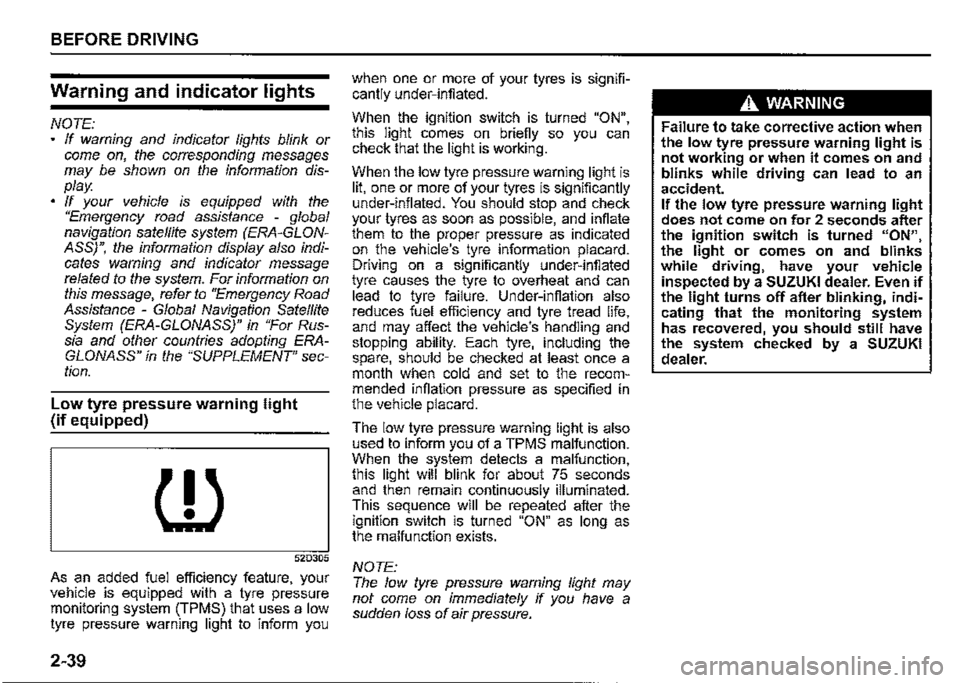
Low tyre pressure warning light {if equipped)
{l)
52D305
As an added fuel efficiency feature, your vehicle is equipped with a tyre pressure monitoring system (TPMS) that uses a low tyre pressure warning light to inform you
2-39
when one or more of your tyres is significantly under-inflated.
When the ignition switch is turned "ON", this light comes on briefly so you can check that the light is working.
When the low tyre pressure warning light is lit, one or more of your tyres is significantly under-inflated. You should stop and check your tyres as soon as possible, and inflate them to the proper pressure as indicated on the vehicle's tyre information placard. Driving on a significantly under-inflated tyre causes the tyre to overheat and can lead to tyre failure. Under-inflation also reduces fuel efficiency and tyre tread life, and may affect the vehicle's handling and stopping ability. Each tyre, including the spare, should be checked at least once a month when cold and set to the recommended inflation pressure as specified in the vehicle placard.
The low tyre pressure warning light is also used to inform you of a TPMS malfunction. When the system detects a malfunction, this light will blink for about 75 seconds and then remain continuously illuminated. This sequence will be repeated after the ignition switch is turned "ON" as long as the malfunction exists.
NOTE: The low tyre pressure warning light may not come on immediately if you have a sudden loss of air pressure.
A WARNING
Failure to take corrective action when the low tyre pressure warning light is not working or when it comes on and blinks while driving can lead to an accident. If the low tyre pressure warning light does not come on for 2 seconds after the ignition switch is turned "ON", the light or comes on and blinks while driving, have your vehicle inspected by a SUZUKI dealer. Even if the light turns off after blinking, indicating that the monitoring system has recovered, you should still have the system checked by a SUZUKI dealer.
Page 123 of 421
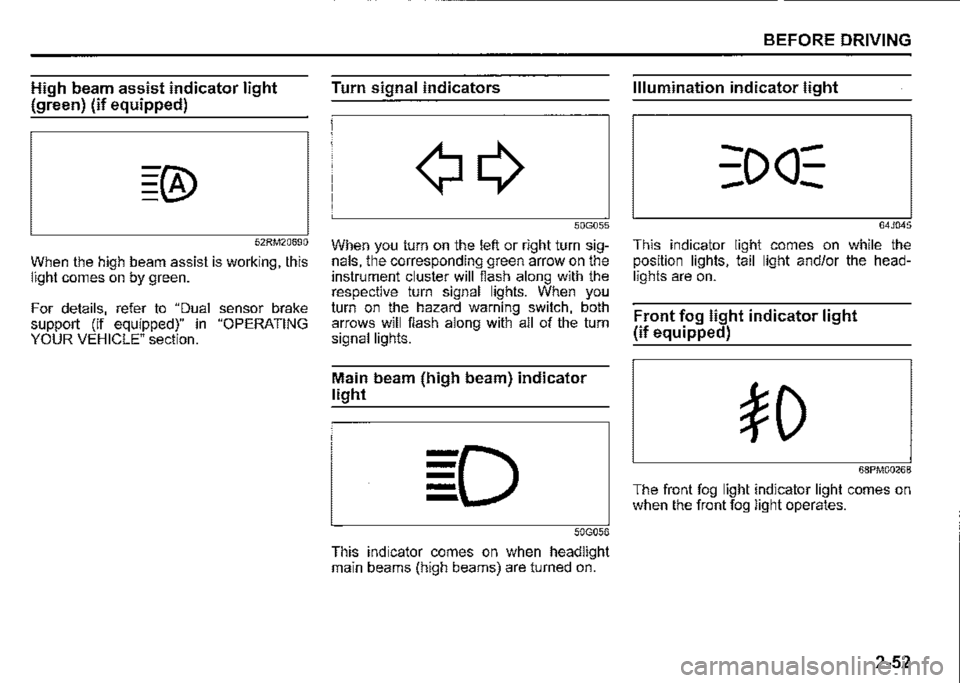
High beam assist indicator light
(green) (if equipped)
52RM20690
When the high beam assist is working, this light comes on by green.
For details, refer to "Dual sensor brake support (if equipped)" in "OPERATING YOUR VEHICLE" section.
Turn signal indicators
50G055
When you turn on the left or right turn signals, the corresponding green arrow on the instrument cluster will flash along with the respective turn signal lights. When you turn on the hazard warning switch, both arrows will flash along with all of the turn signal lights.
Main beam (high beam) indicator
light
50G056
This indicator comes on when headlight main beams (high beams) are turned on.
BEFORE DRIVING
Illumination indicator light
64J045
This indicator light comes on while the position lights, tail light and/or the headlights are on.
Front fog light indicator light
(if equipped)
68PM00268
The front fog light indicator light comes on when the front fog light operates.
2-52
Page 127 of 421

Automatic light operation
(if equipped)
(4) (3)
(1) (2)
68PM00228
78RB02093
BEFORE DRIVING
Your vehicle's lighting system is controlled by two main systems: the lighting switch and the auto-on headlight system (when the lighting switch is in "AUTO" position). The two systems work together to operate your lights as shown in the following chart:
ON: Lights ON LIGHT: When it is light around the light sensor (5). DARK: When it is dark around the light sensor (5).
Lighting Ignition switch in the
Main lights to be 11LOCK11 or "ACC" switch posi-operated position tion LIGHT DARK
Position lights, --(1) OFF Tail lights
Headlights --
Position lights, --(2)AUTO Tail lights
Headlights --
Position lights, ON ON (3) :Otlc Tail lights
Headlights --
Position lights, ON ON (4) ,o Tail lights
Headlights ON ON
Ignition switch in the "ON" position
LIGHT DARK
--
--
-ON
-ON
ON ON
--
ON ON
ON ON
2-56
Page 128 of 421

BEFORE DRIVING
To turn the lights on or off, twist the knob on the end of the lever. There are four positions:
OFF (1) All lights are off.
AUTO (2) This function works when the ignition switch is turned "ON". The headlights and position lights are turned on and off automatically according to the amount of outside light detected by the sensor. They go out automatically when you turn the ignition switch to "ACC" or "LOCK" position.
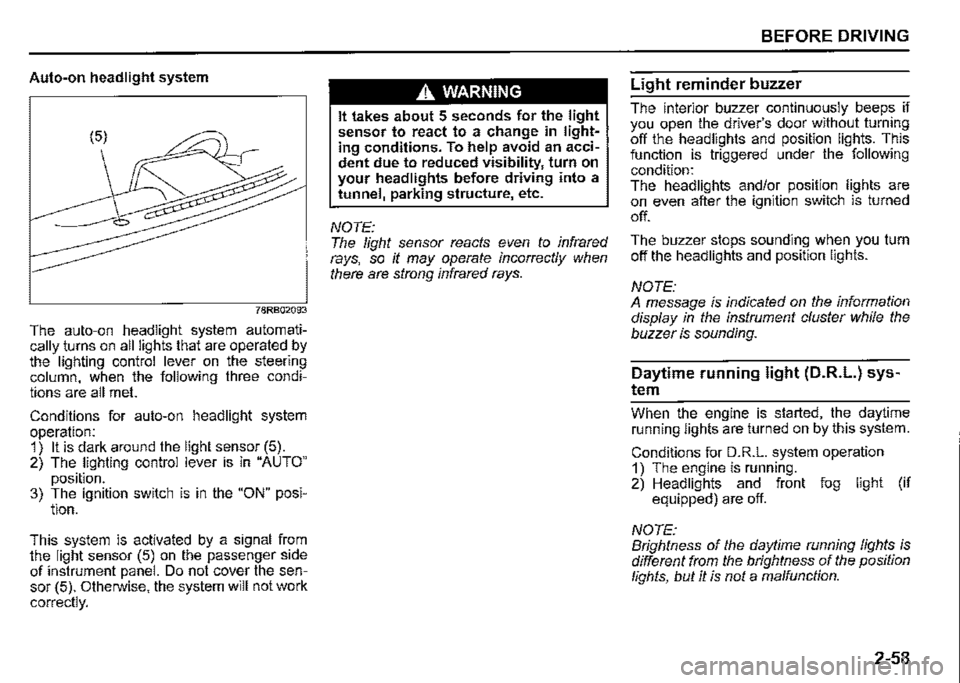
The light sensor (5) for sensing the amount of outside light is installed on the passenger's seat side instrument panel.
When headlights are turned on and the lighting control lever is in "AUTO" position, you can use the high beam assist (if equipped). For details, refer to "High beam assist" in "OPERATING YOUR VEHICLE" section.
2-57
A CAUTION
If the light sensor area of the windshield is covered with mud, ice1 or other similar substances, the headlights and position lights may be turned on even when it is still light outside.
NOTE: Avoid covering the light sensor area of the windshield with a sticker. The sticker may impair the performance of the sensor and make the system unable to control operation of the lights correctly. If you turned the ignition switch to "ON" position and "AUTO" position remains selected, the headlights and position lights come on automatically as it gets dark outside, even with the engine not running. Leaving the lights lit for a long time may lead to a completely discharged battery.
oOO~ (3) Front position lights, tail lights, license plate lights and instrument lights are on, but headlights are off.
~D (4) Front position lights, tail lights, license plate lights, instrument lights and headlights are on.
= IO · OFF 01
f,
68PM00230
With the headlights on, push the lever forward to switch to the high beams (main beams) or pull the lever toward you to switch to the low beams. When the high beams (main beams) are on, a light on the instrument cluster will come on. To momentarily activate the high beams (main beams) as a passing signal, pull the lever slightly toward you and release it when you have completed the signal.
Page 129 of 421
Auto-on headlight system
78RB02093
The auto-on headlight system automatically _turns on all lights that are operated by the lighting control lever on the steering column, when the following three conditions are all met.
Conditions for auto-on headlight system operation: 1) It is dark around the light sensor (5). 2) The lighting control lever is in "AUTO"
position. 3) The ignition switch is in the "ON" posi-tion.
This. system is activated by a signal from the light sensor (5) on the passenger side of instrument panel. Do not cover the sensor (5). Otherwise, the system will not work
correctly.
A WARNING
It takes about 5 seconds for the light sensor to react to a change in lighting conditions. To help avoid an accident due to reduced visibility, turn on your headlights before driving into a tunnel, parking structure, etc.
NOTE: The light sensor reacts even to infrared rays, so it may operate incorrectly when there are strong infrared rays.
BEFORE DRIVING
Light reminder buzzer
The interior buzzer continuously beeps if you open the driver's door without turning off the headlights and position lights. This function is triggered under the following condition: The headlights and/or position lights are on even after the ignition switch is turned
off.
The buzzer stops sounding when you turn off the headlights and position lights.
NOTE: A message is indicated on the information display in the instrument cluster while the buzzer is sounding.
Daytime running light (D.R.L.) sys
tem
Whe_n th_e engine is started, the daytime running lights are turned on by this system.
Conditions for D.R.L. system operation 1) The engine is running. 2) Headlights and front fog light (if equipped) are off.
NOTE: Brightness of the daytime running lights is different from the brightness of the position lights, but it is not a malfunction.
2-58