AC CON SUZUKI JIMNY 2020 Owners Manual
[x] Cancel search | Manufacturer: SUZUKI, Model Year: 2020, Model line: JIMNY, Model: SUZUKI JIMNY 2020Pages: 421, PDF Size: 6.35 MB
Page 264 of 421
OTHER CONTROLS AND EQUIPMENT
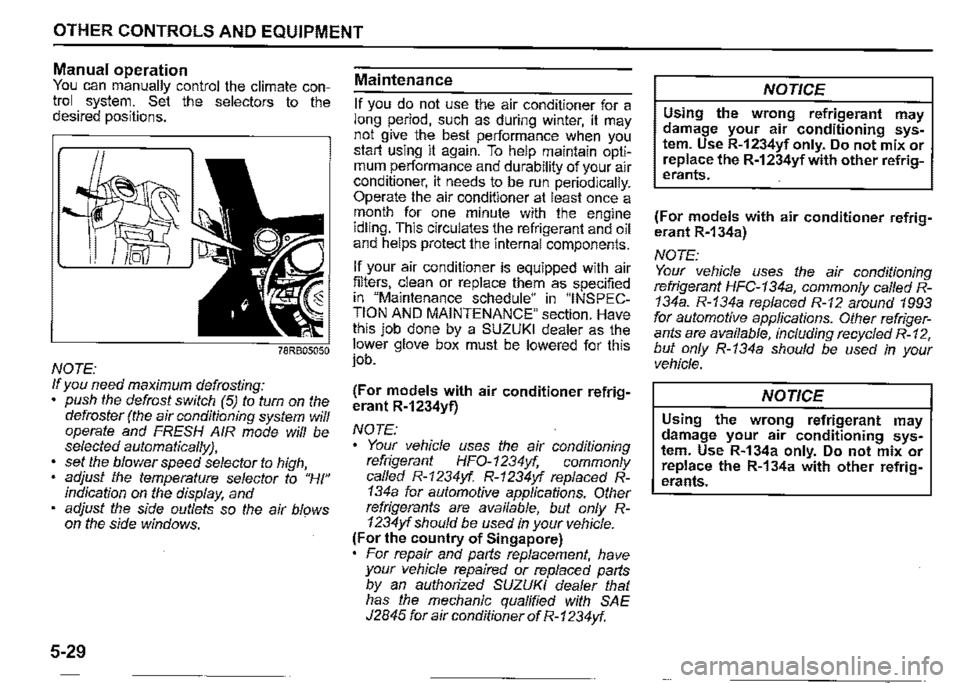
Manual operation You can manually control the climate control system. Set the selectors to the desired positions.
NOTE: If you need maximum defrosting: push the defrost switch (5) to turn on the defroster (the air conditioning system will operate and FRESH AIR mode will be selected automatically},
set the blower speed selector to high, adjust the temperature selector to "HI" indication on the display, and adjust the side outlets so the air blows on the side windows.
5-29
Maintenance
If you do not use the air conditioner for a long period, such as during winter, it may not give the best performance when you start using it again. To help maintain optimum performance and durability of your air conditioner, it needs to be run periodically. Operate the air conditioner at least once a month for one minute with the engine idling. This circulates the refrigerant and oil and helps protect the internal components.
If your air conditioner is equipped with air filters, clean or replace them as specified in "Maintenance schedule" in "INSPECTION AND MAINTENANCE" section. Have this job done by a SUZUKI dealer as the lower glove box must be lowered for this job.
(For models with air conditioner refrigerant R-1234yf)
NOTE:
Your vehicle uses the air conditioning refrigerant HFO-1234yf, commonly called R-1234yf. R-1234yf replaced R-134a for automotive applications. Other refrigerants are available, but only R-1234yf should be used in your vehicle. (For the country of Singapore) For repair and parts replacement, have your vehicle repaired or replaced parts by an authorized SUZUKI dealer that has the mechanic qualified with SAE J2845 for air conditioner of R-1234yf.
NOTICE
Using the wrong refrigerant may damage your air conditioning system. Use R-1234yf only. Do not mix or replace the R-1234yfwith other refrigerants.
(For models with air conditioner refrigerant R-134a)
NOTE: Your vehicle uses the air conditioning refrigerant HFC-134a, commonly called R-134a. R-134a replaced R-12 around 1993 for automotive applications. Other refrigerants are available, including recycled R-12, but only R-134a should be used in your vehicle.
NOTICE
Using the wrong refrigerant may damage your air conditioning system. Use R-134a only. Do not mix or replace the R-134a with other refrigerants.
Page 265 of 421

Radio antenna
Type A
63J055
Type B
61MMOA113
OTHER CONTROLS AND EQUIPMENT
The radio antenna on the roof is removable. To remove the antenna, turn it counterclockwise. To reinstall the antenna, turn it clockwise firmly by hand.
NOTICE
To avoid damage to the radio antenna: Remove the antenna when using an automatic car wash. • Remove the antenna when the antenna hits anything such as a low ceiling in a parking garage or putting a car cover over your vehicle.
Installation of radio frequency
transmitters
NOTE: When you intend to use Radio Frequency (RF) transmitting equipment in your vehicle, refer to "Installation of Radio Frequency (RF) Transmitting Equipment" in the end of this book.
NOTICE
Improper installation of mobile communication equipment such as cellular telephones, CB (Citizen's Band) radios or any other wireless transmitters may cause electronic interference with your vehicle's ignition system or any other electrical systems resulting in vehicle performance problems. Consult a SUZUKI dealer or qualified service technician for advice.
5-30
Page 266 of 421
OTHER CONTROLS AND EQUIPMENT
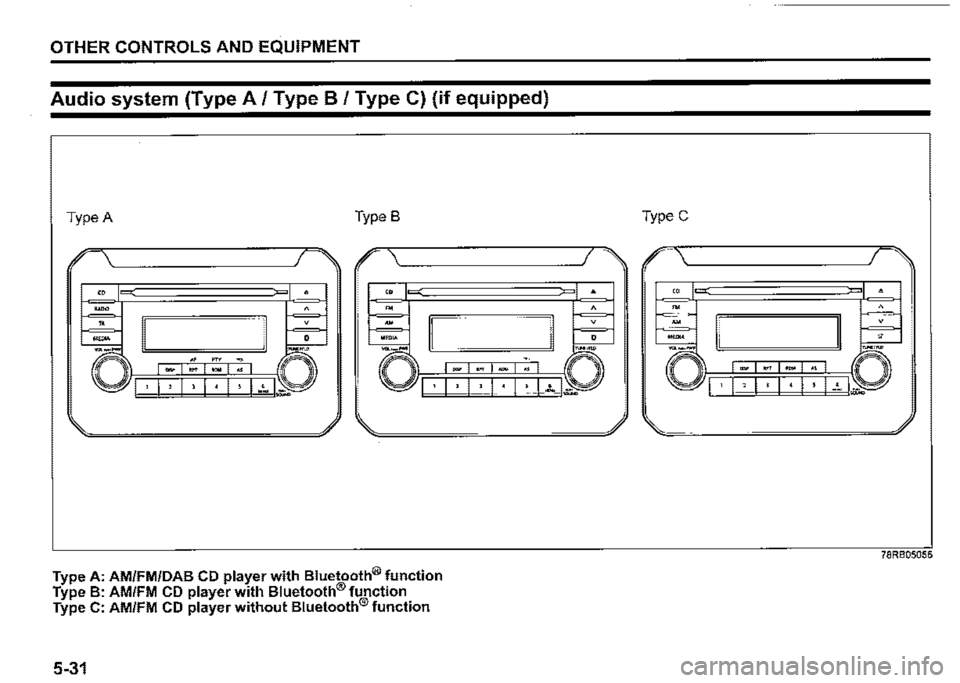
Audio system (Type A/ Type B / Type C) (if equipped)
Type A Type B
I .-------------. I
Type A: AM/FM/DAB CD player with Bluetooth® function Type B: AM/FM CD player with Bluetooth® function Type C: AM/FM CD player without Bluetooth® function
5-31
-.,.,. "°" .,
TypeC
-·--· □ I · 1 , I I I • I ! I-~ I~
78RB05056
Page 267 of 421
Safety information
,A WARNING
If you pay too much attention to operating the audio system or viewing the audio system display while driving, an accident can occur. If you set the sound volume too loud, it could prevent you from being aware of road and traffic conditions. • Keep your eyes on the road and your mind on the drive. Avoid paying too much attention to operating the audio system or viewing the audio system display. Familiarize yourself with the audio system controls and operation of the audio system before driving. • Preset your favorite radio stations before driving so that you can quickly tune to them using the presets. Set the sound volume to a level that will allow you to continue to be aware of road and traffic conditions while driving.
OTHER CONTROLS AND EQUIPMENT
Notes on discs
Precautions
When the inside of the vehicle is very
cold and the player is used soon after
switching on the heater, condensation
may form on the disc or the optical
parts of the player and proper playback
may not be possible. If condensation
forms on the disc, wipe it off with a soft
cloth. If condensation forms on the opti
cal parts of the player, do not use the
player for about one hour. This will
allow the condensation to disappear
normally.
Driving on extremely bumpy roads
which cause severe vibrations may
cause sound to skip.
This unit uses a precision mechanism.
Even in the event that trouble arises,
never open the case, disassemble the
unit, or lubricate the rotating parts.
Bring the unit to a SUZUKI dealer.
Cautions on handling
[rr]oiL DIGITAL AUDIO (A)
52D274
This unit has been designed specifically for
playback of compact discs bearing mark
(A) shown above.
No other discs can be played.
5-32
Page 268 of 421

OTHER CONTROLS AND EQUIPMENT
Removing the disc Proper way to hold ~
thecomz '------~-, ©j-O--~---__J
~ 52D347
~~~~ To remove fingermarks and dust, use a
soft cloth, and wipe in a straight line from
52D275
To remove the compact disc from its stor
age case, press down on the canter of the
case and lift the disc out, holding it care
fully by the edges.
Always handle the compact disc by the
edges.
Never touch the surface.
5-33
the center of the compact disc to the cir
cumference.
52D277
New discs may have some roughness
around the edges. The unit may not work
or the sound may skip if such discs are
used. Use a ball-point pen (B), etc. to
remove the roughness (C) from edges of
the disc before inserting it into the unit.
52D348
Never stick labels on the surface of the
compact disc or write on the surface with a
pencil or pen.
52D349
Do not use any solvents such as commer
cially available cleaners, anti-static spray,
or thinner to clean compact discs.
Page 269 of 421

520350
Do not use compact discs that have large
scratches, are misshaped, or cracked, etc.
Use of such discs will cause damage or
prevent the system from operating prop
erly.
OTHER CONTROLS AND EQUIPMENT
r
52D351
Do not expose compact discs to direct
sunlight or any heat source.
NOTE:
• Do not use commercially available CD
protection sheets or discs equipped with
stabilizers, etc.
These may get caught in the internal
mechanism and damage the disc.
• II may be impossible to play CD-R discs
with this unit due to the recording condi
tions.
• CD-RW discs cannot be played with this
unit.
A WARNING
This is a class I laser product. Use
of controls or adjustments or perfor
mance of procedures other than
those specified herein may result in
hazardous radiation exposure.
Do not open covers and do not
attempt to repair this unit by your
self.
Ask an authorized dealer for the
repair.
5-34
Page 270 of 421
OTHER CONTROLS AND EQUIPMENT
0 Bluetooth"
The Bluetooth® word mark and logo are
registered trademarks and are owned by
the Bluetooth SIG, Ink.
Stop using this unit and a Bluetooth®
ready device whenever requested.
This unit shares the communication fre
quency with other private or public wireless
communication equipment such as a wire
less LAN and other wireless communica
tion radios.
You should stop using this unit whenever
you are notified that your unit disturbs
other wireless communication immediately.
5-35
CE:
Access to http://www.ptc.panasonic.eu/,
enter the below
Model No. into the keyword search box,
you can download the latest "DECLARA
TION of CONFORMITY" (DoC).
Set No. AZ1601
Page 271 of 421

OTHER CONTROLS AND EQUIPMENT
Information on disposal for users of waste electrical & electronic equip
ment (private households)
68LM560
This symbol on the products and/or accompanying documents
means that used electrical and electronic products should not be
mixed with general household waste.
For proper treatment, recovery and recycling, please take these products to designated collection points, where they will be accepted
on a free of charge basis. Alternatively, in some countries you may
be able to return your products to your local retailer upon the pur
chase of an equivalent new product.
Disposing of this product correctly will help to save valuable
resources and prevent any potential negative effects on human health and the environment which could otherwise arise from inap
propriate waste handling. Please contact your local authority for fur
ther details of your nearest designated collection point.
Penalties may be applicable for incorrect disposal of this waste, in accordance with national legislation.
For business users in the European Union
If you wish to discard electrical and electronic equipment, please contact your dealer or
supplier for further information.
Information on disposal in other countries outside the European Union
This symbol is only valid in the European Union.
If you wish to discard this product, please contact your local authorities or dealer and ask
for the correct method of disposal.
5-36
Page 272 of 421
OTHER CONTROLS AND EQUIPMENT
Part 15 of the FCC Rules
FCC ID: ACJ932AZ1601
NOTE: Properly shielded and grounded cables and connectors must be used for connection to host computers and/or peripherals in order to meet FCC emission limits.
.A. WARNING
RF Exposure This equipment complies with FCC radiation exposure limits set forth for an uncontrolled environment and meets the FCC radio frequency (RF) Exposure Guidelines. This equipment has very low levels of RF energy that it deemed to comply without maximum permissive exposure evaluation (MPE). [But it is desirable that it should be installed and operated keeping the radiator at least 20 cm or more away from person's body.]
.A. CAUTION
Changes or modifications not expressly approved by the party responsible for compliance could void the user's authority to operate the equipment.
5-37
.A. WARNING
This is a class I laser product. Use of controls or adjustments or performance of procedures other than those specified herein may result in hazardous radiation exposure. Do not open covers and do not attempt to repair this unit by yourself. Ask an authorized dealer for the repair.
0 Bluetooth'
The Bluetooth® word mark and logo are
registered trademarks and are owned by
the Bluetooth SIG, Ink.
NOTE:
This equipment complies with FCC radiation exposure limits set forth for uncontrolled equipment and meets the FCC radio frequency (RF) Exposure Guidelines in Supplement C to OET65. This equipment has very low level of RF energy which does not comply with maximum permissive exposure (MPE) evaluation. But it is desirable that it should be installed and operated with at least 20cm and more between the radiator and person's body (excluding extremities: hands, wrists, feet and ankles).
Page 273 of 421
Stop using this unit and a Bluetooth®
ready device whenever requested.
This unit shares the communication fre
quency with other private or public wireless
communication equipment such as a wire
less LAN and other wireless communica
tion radios.
You should stop using this unit whenever
you are notified that your unit disturbs
other wireless communication immediately.
OTHER CONTROLS AND EQUIPMENT
NOTE:
These limits are designed to provide rea
sonable protection against harmful interfer
ence in a residential installation. This
equipment generates, uses and can radi
ate radio frequency energy and, if not
installed and used in accordance with the
instructions, may cause harmful interfer
ence to radio communications. However,
there is no guarantee that interference will
not occur in a particular installation. If this
equipment does cause harmful interfer
ence to radio or television reception, which
can be determined by turning the equip
ment off and on, the user is encouraged to
try to correct the interference by one or
more of the following measures:
Reorient or relocate the receiving anten
na.
Increase the separation between the
equipment and receiver.
Connect the equipment into an outlet on
a circuit different from that to which the
receiver is connected.
Consult the dealer or an experienced
radio/TV technician for help.
This transmitter must not be co-located
or operated in conjunction with any other
antenna or transmitter.
5-38