AC CON SUZUKI JIMNY 2020 Owners Manual
[x] Cancel search | Manufacturer: SUZUKI, Model Year: 2020, Model line: JIMNY, Model: SUZUKI JIMNY 2020Pages: 421, PDF Size: 6.35 MB
Page 294 of 421
OTHER CONTROLS AND EQUIPMENT
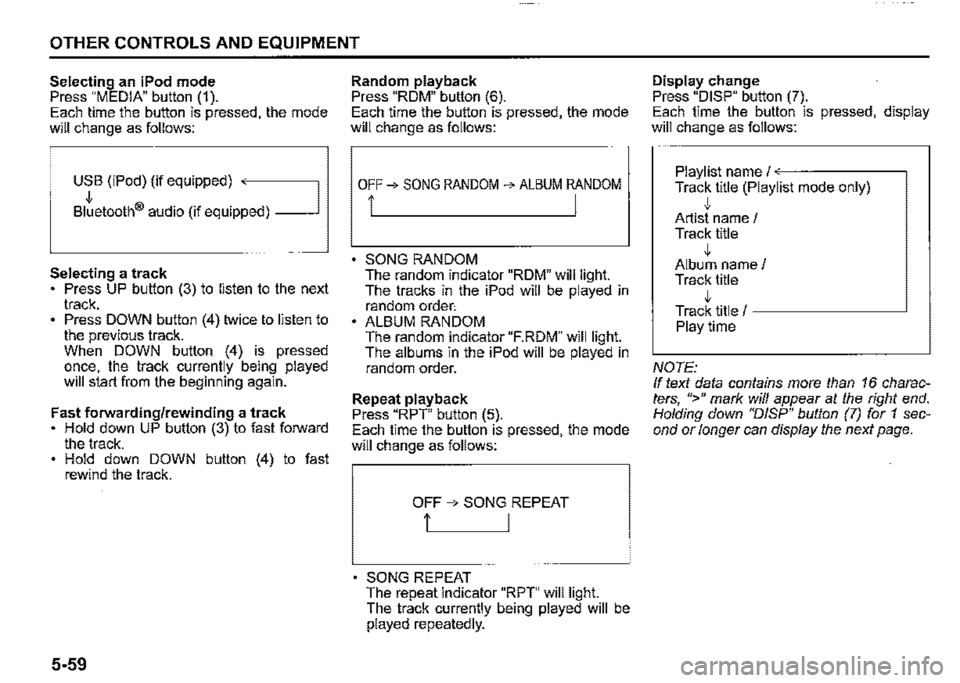
Selecting an iPod mode Press "MEDIA" button (1 ). Each time the button is pressed, the mode will change as follows:
USB (iPod) (if equipped) ,
Bltetooth® audio (if equipped) _J
Selecting a track Press UP button (3) to listen to the next track. Press DOWN button (4) twice to listen to the previous track. When DOWN button (4) is pressed once, the track currently being played will start from the beginning again.
Fast forwarding/rewinding a track Hold down UP button (3) to fast forward the track. Hold down DOWN button (4) to fast rewind the track.
5-59
Random playback Press "ROM" button (6). Each time the button is pressed, the mode will change as follows:
OFF➔ SONG RANDOM ➔ ALBUM RANDOM
i I
SONG RANDOM The random indicator "ROM" will light. The tracks in the iPod will be played in random order: ALBUM RANDOM The random indicator "F.RDM" will light. The albums in the iPod will be played in random order.
Repeat playback Press "RPT" button (5). Each time the button is pressed, the mode will change as follows:
OFF ➔ SONG REPEAT
t I
SONG REPEAT The repeat indicator "RPT" will light. The track currently being played will be played repeatedly.
Display change Press "DISP" button (7). Each time the button is pressed, display will change as follows:
Playlist name/<---·-----~
Track title (Playlist mode only) ,j, Artist name / Track title ,j, Album name/ Track title ,j, Track title / -----------'
Playtime
NOTE: If text data contains more than 16 characters, ">" mark will appear at the right end. Holding down "DISP" button (7) for 1 second or longer can display the next page.
Page 295 of 421
![SUZUKI JIMNY 2020 Owners Manual Playing mode selection 1) Press the button numbered [6] of PRESET buttons (8) for 1 second or longer. 2) Turn TUNE/FLD PUSH SOUND" knob (2). Each time the knob is turned, the mode will change as fo](/img/20/43483/w960_43483-294.png "SUZUKI JIMNY 2020 Owners Manual Playing mode selection 1) Press the button numbered [6] of PRESET buttons (8) for 1 second or longer. 2) Turn TUNE/FLD PUSH SOUND\" knob (2). Each time the knob is turned, the mode will change as fo")
Playing mode selection 1) Press the button numbered [6] of PRESET buttons (8) for 1 second or longer. 2) Turn 'TUNE/FLD PUSH SOUND" knob (2). Each time the knob is turned, the mode will change as follows:
PLAYLIST<--·-~
,J, ARTIST ,J, ALBUM
,I, SONGS
,I, PODCAST ,I, GENRE ,I, AUDIOBOOK
3) Press "TUNE/FLD PUSH SOUND" knob (2) to select the desired mode.
NOTE: When the button numbered [6] of PRESET buttons /8) is pressed, the previous mode will be displayed.
OTHER CONTROLS AND EQUIPMENT
Notes on iPod
Made for iPod iPod touch (6th generation) iPod touch (5th generation) iPod touch (4th generation) iPod touch (3rd generation) iPod touch (2nd generation) iPod touch (1 st generation) iPod classic iPod nano (7th generation) iPod nano (6th generation) iPod nano (5th generation) iPod nano (4th generation) iPod nano (3rd generation) iPod nano (2nd generation) iPod nano (1st generation) iPod (5th generation) iPhone 6S Plus iPhone 6S iPhone 6 Plus iPhone 6 iPhone 5S iPhone 5C iPhone 5 iPhone 4S iPhone 4 iPhone 3GS iPhone 3G • iPhone • Some functions may not be available depending on the model of iPod.
iPod
Made for
• iPhone I iPod
53S610504
Use of the Made for Apple badge means that an accessory has been designed to connect specifically to the Apple product(s) identified in the badge, and has been certified by the developer to meet Apple performance standards. Apple is not responsible for the operation of this device or its compliance with safety and regulatory standards. Please note that the use of this accessory with an Apple product may affect wireless performance. Apple, iPod touch, iPod classic, iPod nano, iPhone, and Lightning are trademarks of Apple Inc., registered in the U.S. and other countries.
5-60
Page 296 of 421
OTHER CONTROLS AND EQUIPMENT
iPod connection Make sure to detach the iPod after turning the ignition switch to "LOCK" position. The iPod may not be shut down when it is being connected and may result in battery depletion. Do not connect iPod accessories such as an iPod remote control or headphones while connecting the iPod with the unit. The unit may not operate correctly.
5-61
Page 297 of 421
Bluetooth® hands-free (Type A/ Type B) (if equipped)
Type A
. -.
-m -" (2)
I · I , I • I · I • I ~t 1.. ...
(3)
Type B
"" '" -.. (2) ·□ I· I, I, I· I· 1~1.-
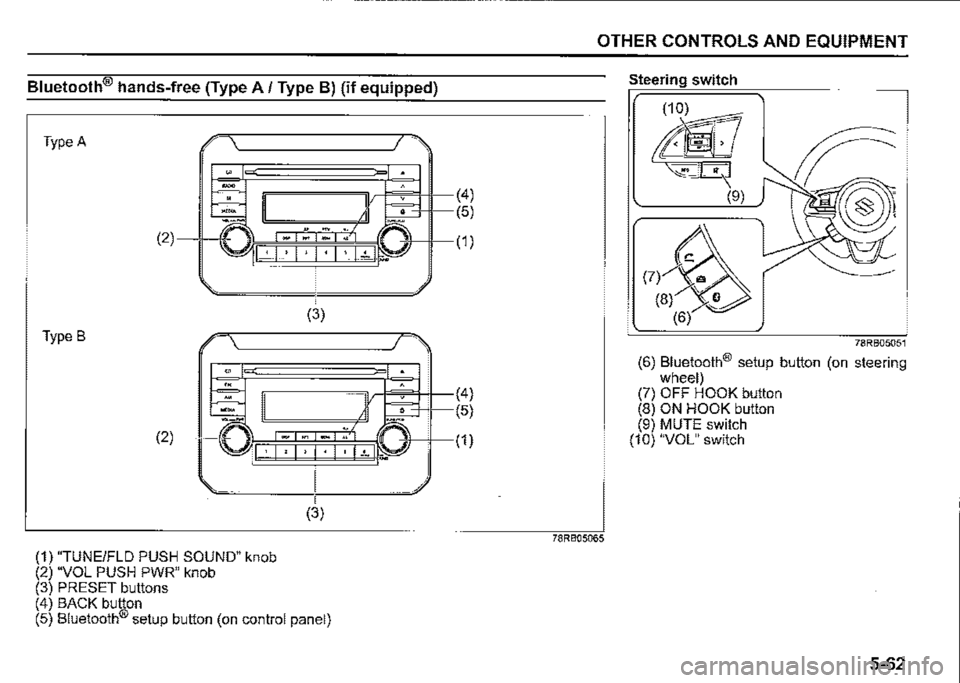
(1) "TUNEIFLD PUSH SOUND" knob (2) "VOL PUSH PWR" knob (3) PRESET buttons
(3)
(4) BACK button (5) Bluetooth® setup button (on control panel)
(4)
(5)
(1)
(4)
(5)
(1)
OTHER CONTROLS AND EQUIPMENT
78RB05065
Steering switch
78RB05051
(6) Bluetooth® setup button (on steering wheel) (7) OFF HOOK button (8) ON HOOK button (9) MUTE switch (10) "VOL" switch
5-62
Page 298 of 421
OTHER CONTROLS AND EQUIPMENT
Phone registration
To use the hands-free function with this unit, it is required to register the phone in advance.
NOTE: Up to 5 phones can be registered. To set up a new phone, disconnect the audio player from the unit. Connect the audio player again after phone setup is completed if necessary. When attempts to establish the pairing fail within 60 seconds, the connecting operation will be cance/ed. Try to establish the pairing again or refer to the manual of the phone in use for how to establish the pairing with the phone. 1) Press the Bluetooth® setup button (5)
or (6). The Bluetooth® setup menu will be dis
played. 2) Turn "TUNE/FLO PUSH SOUND" knob (1) to select "Setup Bluetooth", and press the knob (1) to determine the selection. 3) Turn "TUNE/FLO PUSH SOUND" knob (1) to select "Pairing", and press the knob (1) to determine the selection. 4) Select "CAR AUDIO" from the Bluetooth® menu of the phone and establish the pairing. Refer to the manual of the phone in use for further information. 5) Enter the passkey displayed on the unit to the phone.
5-63
6) When the pamng with the phone is established, automatic transfer of the phonebook and the call history becomes selectable. The automatic transfer starts with "Yes" and it does not with "No". 7) Press ON HOOK button (8).
NOTE: When selecting "Go Back" or pressing BACK button (4), the previous menu will be displayed. When registering an additional phone, repeat Step from 1).
Receiving a call Press OFF HOOK button (7) to receive a call.
Ending a call Press ON HOOK button (8) to end a call.
Rejecting a call (only for supported models) Press ON HOOK button (8) to reject a incoming call.
Mute of hands-free microphone Press MUTE switch (9) to mute the microphone. To cancel the mute, press MUTE switch (9) again.
Adjusting the listening volume Turn "VOL PUSH PWR" knob (2) during a call. Turning it clockwise increases the volume; turning it counterclockwise decreases the volume. Press "VOL" switch (10) during a call. Pressing the switch up increases the volume; pressing the switch down decreases the volume.
Adjusting the ring volume Turn "VOL PUSH PWR" knob (2) while a call is coming in. Turning it clockwise increases the volume; turning it counterclockwise decreases the volume. Press "VOL" switch (10) during a call. Pressing the switch up increases the volume; pressing the switch down decreases the volume.
Page 299 of 421
Adjusting the call or ringtone volume Follow the instructions below to adjust the call or ringtone volume. 1) Press the Bluetooth® setup button (5)
or (6). The Bluetooth® setup menu will be dis
played. 2) Turn "TUNE/FLD PUSH SOUND" knob (1) to select "Setup Telephone", and press the knob (1) to determine the
selection. 3) Turn "TUNE/FLD PUSH SOUND" knob (1) to select "Sound Setting", and press the knob (1) to determine the selection. 4) Turn "TUNE/FLD PUSH SOUND" knob (1) to select "Call Volume" or "Ringtone Volume", and press the knob (1) to determine the selection. The current call or ringtone volume will be displayed. 5) Turn "TUNE/FLD PUSH SOUND" knob (1) to select the desired call or ringtone volume, and press the knob (1) to determine the selection.
NOTE: When selecting "Go Back" or pressing BACK button (4), the previous menu will
be displayed.
OTHER CONTROLS AND EQUIPMENT
Dialing using missed/incoming/ outgoing calls Follow the instructions below to dial to the previously dialed number again.
NOTE: Up to 30 phone numbers of the latest calls can be stored. (30 calls including missed, received and dia/ed call)
1) Press OFF HOOK button (7). The Bluetooth® phonebook menu will
be displayed. 2) Turn "TUNE/FLD PUSH SOUND" knob (1) to select "All Calls", "Missed Calls", "Incoming Calls" or "Outgoing Calls", and press the knob (1) to determine the selection. To dial from the dialed history or the received history, select "All Calls", "Missed Calls", "Incoming Calls" or "Outgoing Calls" respectively. 3) Turn "TUNE/FLD PUSH SOUND" knob (1) to select the desired number, and press the knob (1) to determine the
selection. 4) Turn "TUNE/FLD PUSH SOUND" knob (1) to select "Dial", and press the knob (1) or OFF HOOK button (7) to dial to the selected number.
NOTE: When selecting "Go Back" or pressing BACK button (4), the previous menu will be displayed.
Pressing "Confirm" after selecting ''Add Speed Dial" can register the selected number in the speed dial. Pressing "Confirm" after selecting "Delete" can delete the selected number from the call history.
Deletion of call history Follow the instructions below to delete a missed/incoming/outgoing call history. 1) Press the Bluetooth® setup button (5)
or (6). The Bluetooth® setup menu will be dis
played. 2) Turn "TUNE/FLD PUSH SOUND" knob (1) to select "Setup Telephone", and press the knob (1) to determine the
selection. 3) Turn "TUNE/FLO PUSH SOUND" knob (1) to select "Setup Phonebook", and press the knob (1) to determine the
selection. 4) Turn "TUNE/FLD PUSH SOUND" knob (1) to select "Delete History", and press the knob (1) to determine the selection. 5) Turn "TUNE/FLD PUSH SOUND" knob (1) to select "Missed Calls", "Incoming Calls", or "Outgoing Calls", and press the knob (1) to determine the selection. 6) Turn "TUNE/FLD PUSH SOUND" knob (1) to select a number to be deleted or "ALL", and press the knob (1) to determine the selection.
5-64
Page 300 of 421
OTHER CONTROLS AND EQUIPMENT
7) Turn "TUNE/FLO PUSH SOUND" knob (1) to select "Delete?" or "Delete All?", and press the knob (1) to determine the selection. 8) Turn "TUNE/FLO PUSH SOUND" knob (1) to select "Confirm", and press the knob (1) to complete the deletion.
NOTE: When selecting "Go Back" or pressing BACK button (4), the previous menu will be displayed.
Registration in Phonebook Follow the instructions below to register phone numbers in the Phonebook of the unit. 1) Press the Bluetooth® setup button (5) or (6). The Bluetooth® setup menu will be displayed. 2) Turn "TUNE/FLO PUSH SOUND" knob (1) to select "Setup Telephone", and press the knob (1) to determine the selection. 3) Turn "TUNE/FLO PUSH SOUND" knob (1) to select "Setup Phonebook", and press the knob (1) to determine the selection. 4) Turn "TUNE/FLO PUSH SOUND" knob (1) to select "Add Contacts", and press the knob (1) to determine the selection.
5-65
5) Turn "TUNE/FLO PUSH SOUND" knob (1) to select "Overwrite All" or "Add One Contact", and press the knob (1) to determine the selection. "Rewrite All (MAX1000): Ok?" or "Rest of Memory XXXX: Ok?" will be displayed. 6) Press or turn "TUNE/FLO PUSH SOUND" knob (1) to select "Confirm", and press the knob (1) to determine the selection. 7) Transfer contacts from the phone. When the registration is completed, the "Setup Phonebook" will be displayed.
NOTE: When selecting "Go Back" or pressing BACK button (4), the previous menu will be displayed.
Up to 1000 numbers can be registered in Phonebook.
Transfer of call history (Call History) Follow the instructions below to transfer call history of the registered phone. 1) Press the Bluetooth® setup button (5) or (6). The Bluetooth® setup menu will be displayed. 2) Turn "TUNE/FLO PUSH SOUND" knob (1) to select "Setup Telephone", and press the knob (1) to determine the selection. 3) Turn "TUNE/FLO PUSH SOUND" knob (1) to select "Call History", and press the knob (1) to determine.the selection. 4) Turn "TUNE/FLO PUSH SOUND" knob (1) to select "Overwrite Call History?", and press the knob (1) to determine the selection. 5) Turn "TUNE/FLO PUSH SOUND" knob (1) to select "Confirm", and press the knob (1) to transfer the call history from the phone.
NOTE: When selecting "Go Back" or pressing BACK button (4), the previous menu will be displayed.
Page 301 of 421
Automatic transfer of phonebook/call history You can select whether or not the device transfers the phonebook and the call history automatically when the phone is regis
tered. Follow the instructions below to select. 1) Press the Bluetooth® setup button (5)
or (6). The Bluetooth® setup menu will be dis
played. 2) Turn "TUNE/FLO PUSH SOUND" knob (1) to select "Setup Telephone", and press the knob (1) to determine the
selection. 3) Turn "TUNE/FLO PUSH SOUND" knob (1) to select "A.Transfer", and press the knob (1) to determine the selection. 4) Pressing "TUNE/FLO PUSH SOUND" knob (1) switches between "A.transfer On" and "A.transfer Off'. 5) Selecting "Go Back" or pressing the BACK button (4) stores displayed setting and the previous menu is displayed.
OTHER CONTROLS AND EQUIPMENT
Making a call by phonebook Follow the instructions below to dial a number registered in phonebook. 1) Press OFF HOOK button (7). The Bluetooth® phonebook menu will
be displayed. 2) Turn "TUNE/FLO PUSH SOUND" knob (1) to select "Phonebook", and press the knob (1) to determine the selection. 3) Turn "TUNE/FLO PUSH SOUND" knob (1) to select the initial of the name you would like to make a call, and press the knob (1) to determine the selection. The registered numbers will be displayed in sequence. If names have been registered together with numbers, the names will be displayed. Turn "TUNE/FLO PUSH SOUND" knob (1) to select the name you would like to make a call, and press the knob (1) to determine the selection. 4) Turn "TUNE/FLO PUSH SOUND" knob (1) to select "Dial", and press the knob (1) or OFF HOOK button (7). The displayed number or the number registered with the displayed name will be dialed.
Deletion of registered data (Delete
Entry) Follow the instructions below to delete a number registered in phonebook. 1) Press the Bluetooth® setup button (5) or (6). The Bluetooth® setup menu will be dis
played. 2) Turn "TUNE/FLO PUSH SOUND" knob (1) to select "Setup Telephone", and press the knob (1) to determine the
selection. 3) Turn "TUNE/FLO PUSH SOUND" knob (1) to select "Setup Phonebook", and press the knob (1) to determine the
selection. 4) Turn "TUNE/FLO PUSH SOUND" knob (1) to select "Delete Contacts", and press the knob (1) to determine the selection. 5) Turn "TUNE/FLO PUSH SOUND" knob (1) to select the initial of the name you would like to delete or "ALL", and press the knob (1) to determine the selection. Turn "TUNE/FLO PUSH SOUND" knob (1) to select the name you would like to delete, and press the knob (1) to determine the selection. 6) Turn "TUNE/FLO PUSH SOUND" knob (1) to select "Delete?" or "Delete All?", and press the knob (1) to determine the selection. 7) Turn "TUNE/FLO PUSH SOUND" knob (1) to select "Confirm", and press the knob (1) to complete the deletion.
5-66
Page 302 of 421
OTHER CONTROLS AND EQUIPMENT
NOTE: When selecting "Go Back" or pressing BACK button (4), the previous menu will be displayed.
Registration in speed dial Follow the instructions below to assign a number to one of PRESET buttons (3) to use as the speed dial. 1) Press the Bluetooth® setup button (5) or (6). The Bluetooth® setup menu will be displayed. 2) Turn "TUNEIFLD PUSH SOUND" knob (1) to select "Setup Telephone", and press the knob (1) to determine the selection. 3) Turn "TUNEIFLD PUSH SOUND" knob (1) to select "Setup Phonebook", and press the knob (1) to determine the selection. 4) Turn "TUNEIFLD PUSH SOUND" knob (1) to select "Add Speed Dial", and press the knob (1) to determine the selection.
5-67
5) Turn "TUNEIFLD PUSH SOUND" knob (1) to select the initial of the name you would like to register in speed dial, and press the knob (1) to determine the selection. The registered numbers will be displayed in sequence. If names have been registered together with numbers, the names will be displayed. Turn "TUNEIFLD PUSH SOUND" knob (1) to select the name you would like to register in speed dial, and press the knob (1) to determine the selection. 6) Turn "TUNEIFLD PUSH SOUND" knob (1) to select "Choose Preset", and press one of PRESET buttons (3) to which the selected number is to be assigned. If a number is already assigned to the selected button, a confirmation message will be displayed. Turn "TUNEIFLD PUSH SOUND" knob (1) to select a confirmation message, and press the knob (1) to complete the assignment. Turn "TUNEIFLD PUSH SOUND" knob (1) to select "Confirm", and press the knob (1) to complete the assignment. When the assignment is completed, the "Setup Phonebook" will be displayed.
NOTE: When selecting "Go Back" or pressing BACK button (4), the previous menu will be displayed.
One-touch call (Speed dial) Follow the instructions below to dial the . number assigned to each of the PRESET buttons (3). 1) Press OFF HOOK button (7). The Bluetooth® phonebook menu will be displayed. Pressing one of PRESET buttons (3) can skip step 2) and the 1 st line of step 3). 2) Turn "TUNEIFLD PUSH SOUND" knob (1) to select "Speed Dials", and press the knob (1) to determine the selection. 3) Press one of PRESET buttons (3). The assigned number will be displayed. If no number is assigned, "No Entry" is displayed. 4) Press OFF HOOK button (7). The selected number will be dialed.
Page 303 of 421
Deletion of speed dial (Del Speed Dial) Follow the instructions below to delete the number assigned for the speed dial. 1) Press OFF HOOK button (7). The Bluetooth® phonebook menu will be displayed. 2) Turn "TUNE/FLO PUSH SOUND" knob (1) to select "Speed Dials", and press the knob (1) to determine the selection. 3) Press one of PRESET buttons (3) to which the number to be deleted is
assigned. If the number is not registered, "No
Entry" is displayed. 4) Turn "TUNE/FLO PUSH SOUND" knob (1) to select "Delete", and press the knob (1) to determine the selection. 5) Turn "TUNE/FLD PUSH SOUND" knob (1) to select "Del Speed Dial", and press the knob (1) to determine the
selection. 6) Turn "TUNE/FLO PUSH SOUND" knob (1) to select "Confirm", and press the knob (1) to complete the deletion.
NOTE: When selecting "Go Back" or pressing BACK button /4), the previous menu will be displayed.
OTHER CONTROLS AND EQUIPMENT
Display of device data (Device Name) Follow the instructions below to display the BD (Bluetooth® Device) address and
device name. 1) Press the Bluetooth® setup button (5)
or (6). The Bluetooth® setup menu will be dis
played. 2) Turn "TUNE/FLD PUSH SOUND" knob (1) to select "Setup Bluetooth", and press the knob (1) to determine the selection. 3) Turn "TUNE/FLD PUSH SOUND" knob (1) to select "Bluetooth Info", and press the knob (1) to determine the selection. 4) Turn "TUNE/FLD PUSH SOUND" knob (1) to select "Device Name" or "Device Address", and press the knob (1) to display the device name or the BD (Bluetooth® Device) address.
NOTE: When selecting "Go Back" or pressing BACK button /4), the previous menu will
be displayed.
Reset to the factory defaults Follow the instructions below to reset all the settings to the facto\¥ defaults. 1) Press the Bluetooth setup button (5)
or (6). The Bluetooth® setup menu will be dis
played. 2) Turn "TUNE/FLD PUSH SOUND" knob (1) to select "Setup Bluetooth", and press the knob (1) to determine the
selection. 3) Turn "TUNE/FLD PUSH SOUND" knob (1) to select "Initialize", and press the knob (1) to determine the selection. 4) Turn "TUNE/FLD PUSH SOUND" knob (1) to select "All Initialize", and press the knob (1) to determine the selection. 5) Turn "TUNE/FLD PUSH SOUND" knob (1) to select "Confirm", and press the knob (1) to start the reset.
NOTE: When selecting "Go Back" or pressing BACK button /4), the previous menu will
be displayed.
5-68