wheel SUZUKI JIMNY 2020 Workshop Manual
[x] Cancel search | Manufacturer: SUZUKI, Model Year: 2020, Model line: JIMNY, Model: SUZUKI JIMNY 2020Pages: 421, PDF Size: 6.35 MB
Page 226 of 421

DRIVING TIPS
Know Your Vehicle
Take time to familiarize yourself with the unique handling characteristics of your vehicle by first driving around in an area away from traffic. Practice turning the vehicle at a variety of speeds and in different directions. Get a feel for the greater steering response that your vehicle has over a conventional car.
Wear Your Seat Belts at All Times
The driver and all passengers should be properly restrained at all times, using the seat belts provided. Refer to the "SEAT BELTS" section for instructions on proper use of the seat belts.
Don't Make Sharp Turns
As mentioned before, small multipurpose vehicles have specific design characteristics that allow them to perform in a wide variety of applications. These characteristics also change the cornering behavior relative to conventional passenger cars. Remember, small multipurpose vehicles have more responsive steering and a higher center of gravity than conventional passenger cars. If at all possible, avoid making sharp turns in your vehicle.
4-3
Slow Down on Curves
Learn to approach curves cautiously and at a conservative speed. Do not attempt to take curves at the same speeds that you would in a vehicle with a lower center of gravity. Just as you would not drive a sports car on a trail, you should not attempt to drive your vehicle around curves like a sports car.
Slow Down and Use Caution on
Slippery Roads
60G089A
Under wet road conditions you should drive at a lower speed than on dry roads due to possible slippage of tyres during braking. When driving on icy, snow-covered, or muddy roads, reduce your speed and avoid sudden acceleration, abrupt braking, or sharp steering movements. Use 4-wheel drive high range (4H) for better traction.
Page 227 of 421
NOTICE
Never operate your vehicle in 114H" or 114L11 on dry pavement and, as much as possible, avoid using 114H" or 114L" on wet pavement, as this puts severe stress on the drive train, especially during tight cornering, and can d~mage it. Also, you may have some d1ff1~ culty in steering.
Off-Road Driving
Your vehicle has specific design characteristics for off-road driving. When you leave the paved road, you will encounter driving surfaces of all kinds which may change continually as you drive. In most cases, offroad driving requires the use of 4-wheel drive.
Use Caution on Steep Inclines
Always inspect hills before you attempt to drive up them. Know what is on the other side and how you will get back down. If you have any doubt that it. is safe, do not attempt to drive over a hill. Nev".r d_nve your vehicle up an extremely steep incline. Coming down a steep hill can be trickier than getting up one. Keep the vehicle heading straight down the hill and use low gear. Do not lock the brake~. If the vehicle begins to slide, accelerate slightly to regain steering control.
DRIVING TIPS
Do not Drive Across the Side of
Hills
Driving across the side of a hill can be extremely hazardous. Most of the vehicle'.s weight will be transferred to the downhill tyres, which could result in the vehicle rolling sideways. Whenever possible, avoid this potential hazard. Also, 1f you have to exit your vehicle on a side-hill, always get out on the uphill side.
Wear Your Seat Belts at All Times
You and your passengers should use the seat belts at all times when driving offroad. For proper seat belt use, refer to the "Seat Belts" section in this manual.
Avoid Sudden Reactions in Mud,
Ice, or Snow
Be careful when off-road conditions are slippery. Reduce your speed and avoid sudden movements of the vehicle. Be aware that driving in deep snow or mud can cause a loss of traction and an increase in the resistance to the vehicle's forward motion. Use 4WD low gear (4L) and maintain a steady but moderate speed with a light touch on the steering wheel and brakes.
4-4
Page 228 of 421
DRIVING TIPS
Snow chains
Snow chains should only be used if they are needed to increase traction or are required by law. Check that the chains you use are the correct size for your vehicle's tyres. Also check that there is enough clearance between the fenders and the chains as installed on the tyres. Install the chains on the rear tyres tightly, according to the chain manufacturer's instructions. Retighten the chains after driving about 1.0 km (1/2 mile) if necessary. With the chains installed, drive slowly.
NOTICE
If you hear the chains hitting against the vehicle body while driving, stop and tighten them.
4-5
Do not drive in the field covered
with grown grass
If you drive in the field covered with grass, it may cause accident or vehicle damage by getting caught in grown grass.
If Your Vehicle Gets Stuck
If your vehicle gets stuck in snow, mud, or sand, follow the directions below:
1) Shift the transfer shift lever into the "4L"
position. 2) Shift the transmission back and forth between a forward range (or first gear for manual transmission) and reverse. This will create a rocking motion which may give you enough momentum to free the vehicle. Press gently on the accelerator to keep wheel spin to a minimum. Remove your foot from the accelerator while shifting. Do not race the engine. Excessive wheel spin will cause the tyres to dig deeper, making it more difficult to free the vehicle. 3) If your vehicle remains stuck after a few minutes of rocking, get another vehicle to pull you out.
A WARNING
Do not allow anyone to stand near the vehicle when you are rocking it, and do not spin the wheels faster than an indicated 40 km/h (25 mph) on the speedometer. Personal injury and/or vehicle damage may result from spinning the wheels too fast.
NOTICE
• Release the accelerator pedal when operating the gearshift lever or the transfer lever. Operating the gearshift lever or the transfer lever with the engine racing can damage the gears and the free axle mechanism. • Do not continue rocking the vehicle for more than a few minutes. Prolonged rocking can cause engine overheating, transmission, transfer case, axles, propeller shaft or differential damage, or tyre damage.
Page 229 of 421
A WARNING
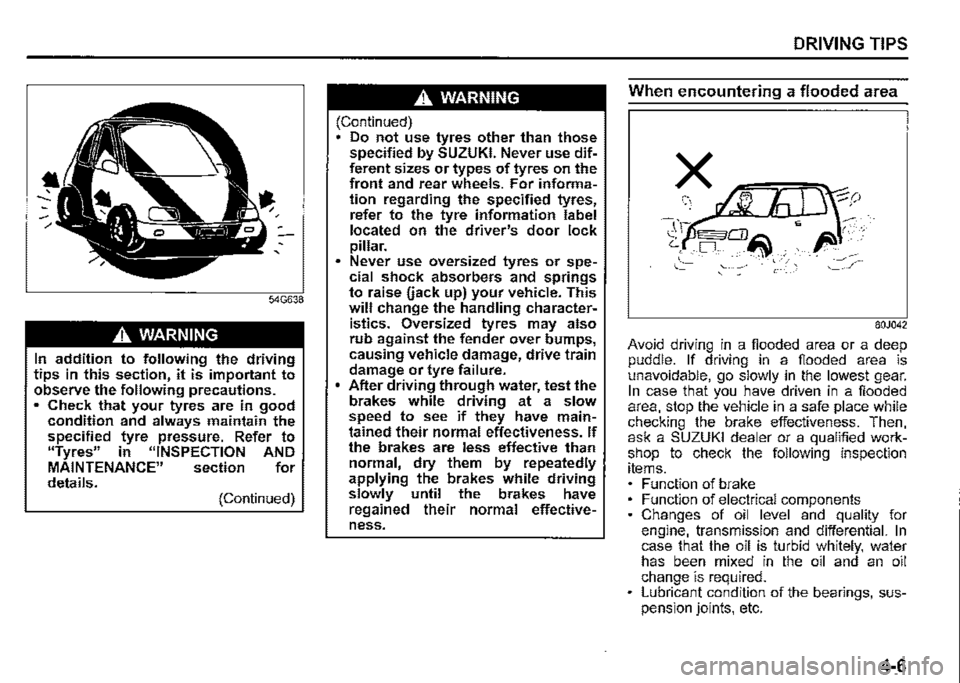
In addition to following the driving tips in this section, it is important to observe the following precautions. • Check that your tyres are in good condition and always maintain the specified tyre pressure. Refer to "Tyres" in "INSPECTION AND MAINTENANCE" section for details. (Continued)
A WARNING
(Continued) Do not use tyres other than those specified by SUZUKI. Never use different sizes or types of tyres on the front and rear wheels. For information regarding the specified tyres, refer to the tyre information label located on the driver's door lock pillar. Never use oversized tyres or spe~ cial shock absorbers and springs to raise uack up) your vehicle. This will change the handling characteristics. Oversized tyres may also rub against the fender over bumps, causing vehicle damage, drive train damage or tyre failure. After driving through water, test the brakes while driving at a slow speed to see if they have maintained their normal effectiveness. If the brakes are less effective than normal, dry them by repeatedly applying the brakes while driving slowly until the brakes have regained their normal effectiveness.
DRIVING TIPS
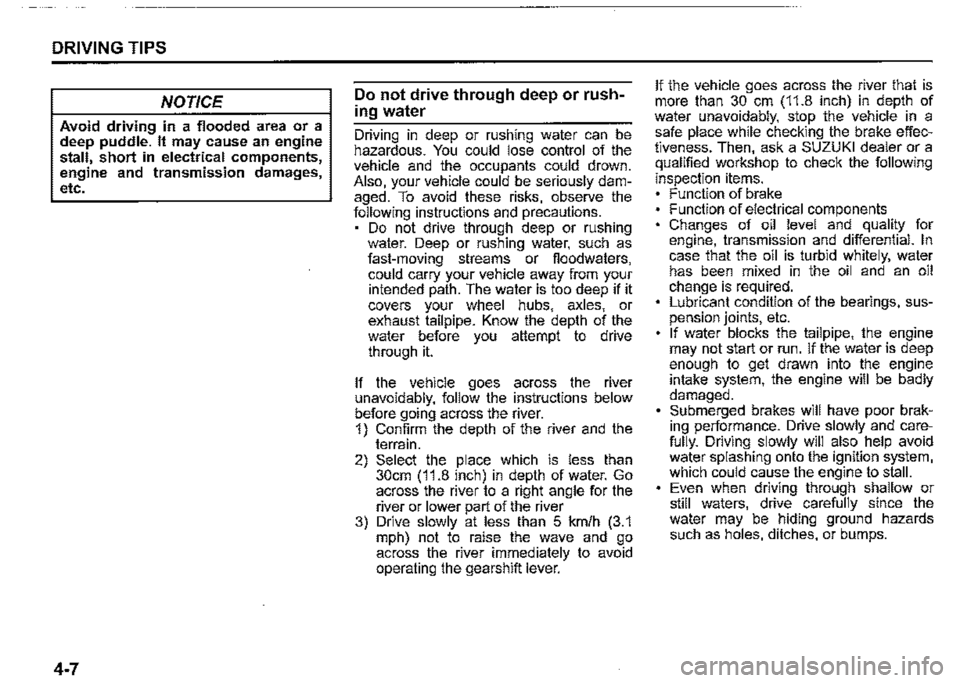
When encountering a flooded area
80J042
Avoid driving in a flooded area or a deep puddle. If driving in a flooded area is unavoidable, go slowly in the lowest gear. In case that you have driven in a flooded area, stop the vehicle in a safe place while checking the brake effectiveness. Then, ask a SUZUKI dealer or a qualified workshop to check the following inspection items. Function of brake Function of electrical components Changes of oil level and quality for engine, transmission and differential. In case that the oil is turbid whitely, water has been mixed in the oil and an oil change is required. Lubricant condition of the bearings, suspension joints, etc.
4-6
Page 230 of 421
DRIVING TIPS
NOTICE
Avoid driving in a flooded area or a deep puddle. It may cause an engine stall, short in electrical components, engine and transmission damages, etc.
4-7
Do not drive through deep or rush
ing water
Driving in deep or rushing water can be hazardous. You could lose control of the vehicle and the occupants could drown. Also, your vehicle could be seriously damaged. To avoid these risks, observe the following instructions and precautions. Do not drive through deep or rushing water. Deep or rushing water, such as fast-moving streams or fioodwaters, could carry your vehicle away from your intended path. The water is too deep if it covers your wheel hubs, axles, or exhaust tailpipe. Know the depth of the water before you attempt to drive through it.
If the vehicle goes across the river unavoidably, follow the instructions below before going across the river. 1) Confirm the depth of the river and the terrain. 2) Select the place which is less than 30cm (11.8 inch) in depth of water. Go across the river to a right angle for the river or lower part of the river 3) Drive slowly at less than 5 km/h (3.1 mph) not to raise the wave and go across the river immediately to avoid operating the gearshift lever.
If the vehicle goes across the river that is more than 30 cm (11.8 inch) in depth of water unavoidably, stop the vehicle in a safe place while checking the brake effectiveness. Then, ask a SUZUKI dealer or a qualified workshop to check the following
inspection items. Function of brake Function of electrical components Changes of oil level and quality for engine, transmission and differential. In case that the oil is turbid whitely, water has been mixed in the oil and an oil change is required. Lubricant condition of the bearings, suspension joints, etc. If water blocks the tailpipe, the engine may not start or run. If the water is deep enough to get drawn into the engine intake system, the engine will be badly damaged. Submerged brakes will have poor braking performance. Drive slowly and carefully. Driving slowly will also help avoid water splashing onto the ignition system, which could cause the engine to stall. Even when driving through shallow or still waters, drive carefully since the water may be hiding ground hazards such as holes, ditches, or bumps.
Page 231 of 421

A WARNING
In addition to following the driving tips in this section, it is important to observe the following precautions for on-road and off-road driving. Driver and passengers should wear seat belts at all times. Do not let anyone else drive your vehicle unless they are also aware of the vehicle characteristics and handling differences described in this section. Avoid loaning your vehicle to any• one unless you accompany them. Make sure your tyres are in good condition and always maintain the specified tyre pressure. Refer to "Tyres" in the "INSPECTION AND MAINTENANCE" section for details. Do not use tyres other than those specified by SUZUKI. Never use dif• ferent sizes or types of tyres on the front and rear wheels. For informa• lion regarding the specified tyres, refer to the "SPECIFICATIONS" section. Never use oversized tyres or special shock absorbers and springs to raise uack up) your vehicle. This will raise the center of gravity of the vehicle and change its handling characteristics. (Continued)
A WARNING
(Continued) After driving through water, mud, or sandy ground, test the brakes while driving at a slow speed to see if they have maintained their nor• mal effectiveness. If the brakes are less effective than normal, dry them by repeatedly applying the brakes while driving slowly until the brakes have regained their nor• mal effectiveness. After extended operation in mud, sand, or water, have the brakes, bearings and joint parts etc. inspected by a SUZUKI dealer as soon as possible.
DRIVING TIPS
Running-in
NOTICE
The future performance and reliabil• ity of the engine depends on the care and restraint exercised during its early life. It is especially important to observe the following precautions during the first 960 km (600 miles) of vehicle operation. • After starting, do not race the engine. Warm ii up gradually. • Avoid prolonged vehicle operation at a constant speed. Moving parts will break in better if you vary your speed. Start off from a stop slowly. Avoid full throttle starts. Avoid hard braking, especially during the first 320 km (200 miles) of driving. Do not drive slowly with the !rans• mission in a high gear. Drive the vehicle at moderate engine speeds. Do not tow a trailer during the first 960 km (600 miles) of vehicle oper• ation.
4-8
Page 263 of 421
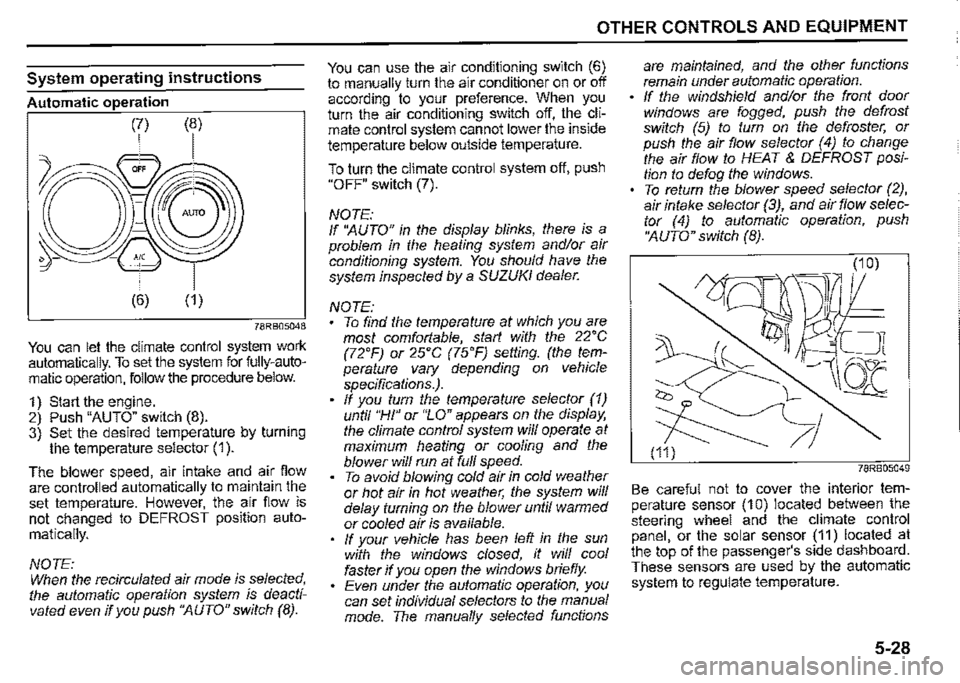
System operating instructions
Automatic operation
78RB05048
You can let the climate control system work automatically. To set the system for fully-automatic operation, follow the procedure below.
1) Start the engine. 2) Push "AUTO" switch (8). 3) Set the desired temperature by turning the temperature selector (1 ).
The blower speed, air intake and air flow are controlled automatically to maintain the set temperature. However, the air flow is not changed to DEFROST position auto
matically.
NOTE: When the recirculated air mode is selected, the automatic operation system is deactivated even if you push ''AUTO" switch (8).
OTHER CONTROLS AND EQUIPMENT
You can use the air conditioning switch (6) to manually turn the air conditioner on or off according to your preference. When you turn the air conditioning switch off, the climate control system cannot lower the inside temperature below outside temperature.
To turn the climate control system off, push "OFF" switch (7).
NOTE: If ''AUTO" in the display blinks, there is a problem in the heating system and/or air conditioning system. You should have the system inspected by a SUZUKI dealer.
NOTE: To find the temperature at which you are most comfortable, start with the 22'C (72'F) or 25'C (75'F) setting. (the temperature vary depending on vehicle specifications.). If you turn the temperature selector (1) until "HI" or "LO" appears on the display, the climate control system will operate at maximum heating or cooling and the blower will run at full speed. To avoid blowing cold air in cold weather or hot air in hot weather, the system will delay turning on the blower until warmed or cooled air is available. If your vehicle has been left in the sun with the windows closed, it will cool faster if you open the windows briefly. Even under the automatic operation, you can set individual selectors to the manual mode. The manually selected functions
are maintained, and the other functions remain under automatic operation. If the windshield and/or the front door windows are fogged, push the defrost switch (5) to turn on the defroster, or push the air flow selector (4) to change the air flow to HEAT & DEFROST position to defog the windows. To return the blower speed selector (2), air intake selector (3), and air flow selector (4) to automatic operation, push ''AUTO" switch (8).
78RB05049
Be careful not to cover the interior temperature sensor (10) located between the steering wheel and the climate control panel, or the solar sensor (11) located at the top of the passenger's side dashboard. These sensors are used by the automatic system to regulate temperature.
5-28
Page 297 of 421
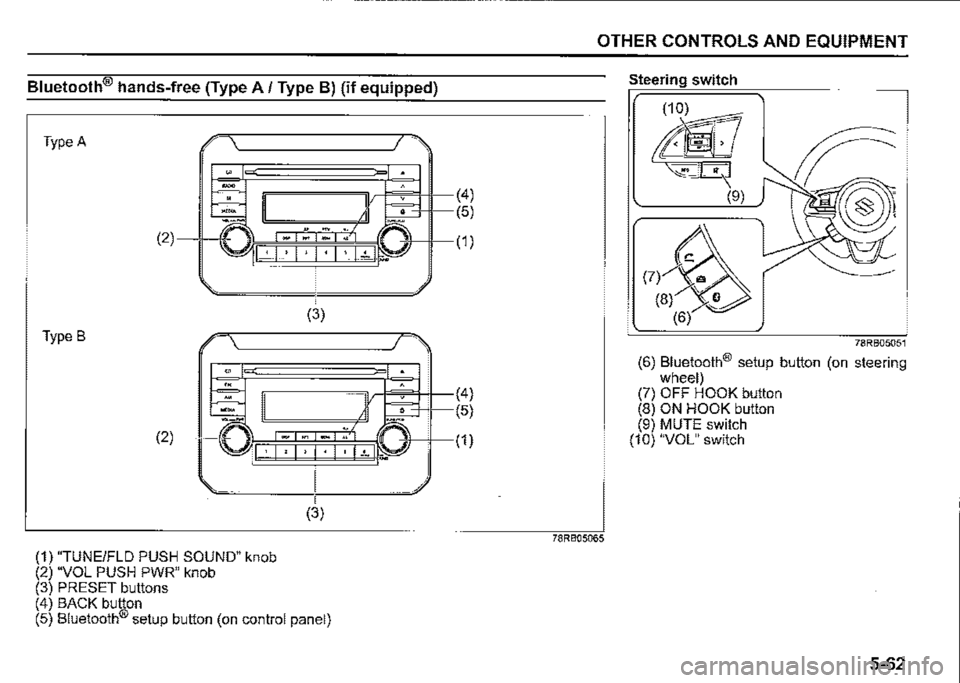
Bluetooth® hands-free (Type A/ Type B) (if equipped)
Type A
. -.
-m -" (2)
I · I , I • I · I • I ~t 1.. ...
(3)
Type B
"" '" -.. (2) ·□ I· I, I, I· I· 1~1.-
(1) "TUNEIFLD PUSH SOUND" knob (2) "VOL PUSH PWR" knob (3) PRESET buttons
(3)
(4) BACK button (5) Bluetooth® setup button (on control panel)
(4)
(5)
(1)
(4)
(5)
(1)
OTHER CONTROLS AND EQUIPMENT
78RB05065
Steering switch
78RB05051
(6) Bluetooth® setup button (on steering wheel) (7) OFF HOOK button (8) ON HOOK button (9) MUTE switch (10) "VOL" switch
5-62
Page 306 of 421
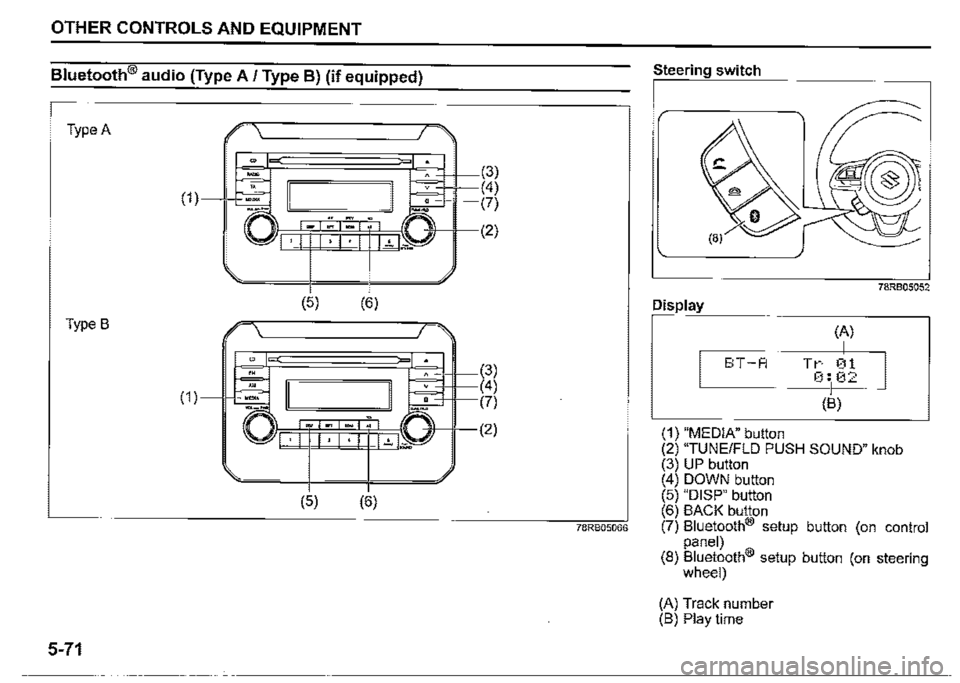
OTHER CONTROLS AND EQUIPMENT
Bluetooth® audio (Type A / Type BJ (if equipped)
Type A
(1)
Type B
5-71
E \'---------~/ >
-" (3)
~ I I . <4)
-□--" -. ~ (7) \\llr=:=Fi_*_~,~-*"~,(!',._;))-,1-(2) 'I •I 1•1•1 l..'..1--=
(5)
(5)
(6)
(6)
(3) (4) L:::.::=Hl----(7)
-'i!-11---(2)
78RB05066
Steering switch
Display
E:T-A
(1) "MEDIA" button
(A)
I Tr 01 0:102
(B)
78RB05052
(2) "TUNE/FLO PUSH SOUND" knob (3) UP button ( 4) DOWN button (5) "DISP" button (6) BACK button (7) Bluetooth® setup button (on control panel) (8) Bluetooth® setup button (on steering wheel)
(A) Track number (B) Play time
Page 309 of 421
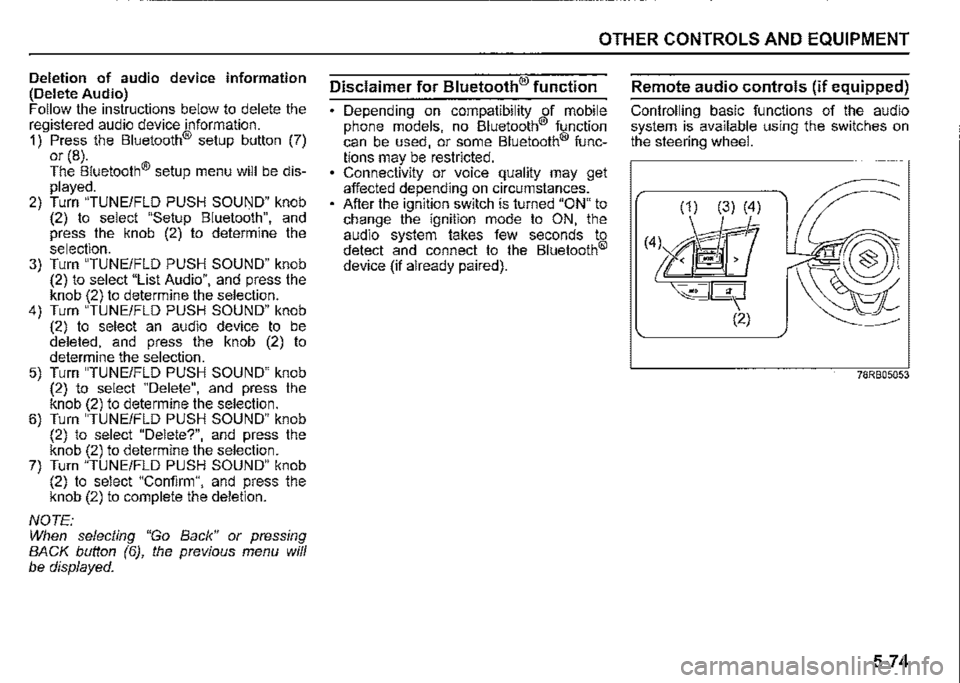
Deletion of audio device information (Delete Audio) Follow the instructions below to delete the registered audio device information. 1) Press the Bluetooth® setup button (7) or (8). The Bluetooth® setup menu will be displayed. 2) Turn "TUNE/FLD PUSH SOUND" knob (2) to select "Setup Bluetooth", and press the knob (2) to determine the selection. 3) Turn "TUNE/FLD PUSH SOUND" knob (2) to select "List Audio", and press the knob (2) to determine the selection. 4) Turn "TUNE/FLD PUSH SOUND" knob (2) to select an audio device to be deleted, and press the knob (2) to determine the selection. 5) Turn "TUNE/FLD PUSH SOUND" knob (2) to select "Delete", and press the knob (2) to determine the selection. 6) Turn "TUNE/FLD PUSH SOUND" knob (2) to select "Delete?", and press the knob (2) to determine the selection. 7) Turn "TUNE/FLD PUSH SOUND" knob (2) to select "Confirm", and press the knob (2) to complete the deletion.
NOTE: When selecting "Go Back" or pressing BACK button (6), the previous menu will be displayed.
OTHER CONTROLS AND EQUIPMENT
Disclaimer for Bluetooth® function
Depending on compatibility of mobile phone models, no Bluetooth® function can be used, or some Bluetooth® func
tions may be restricted. Connectivity or voice quality may get affected depending on circumstances. After the ignition switch is turned "ON" to change the ignition mode to ON, the audio system takes few seconds to detect and connect to the Bluetooth®
device (if already paired).
Remote audio controls (if equipped)
Controlling basic functions of the audio system is available using the switches on the steering wheel.
(1) (3) (4)
(4l M'r ~<@
~--- (2)
78RB05053
5-74