PPL SUZUKI SX4 2006 1.G Service Workshop Manual
[x] Cancel search | Manufacturer: SUZUKI, Model Year: 2006, Model line: SX4, Model: SUZUKI SX4 2006 1.GPages: 1556, PDF Size: 37.31 MB
Page 487 of 1556
Downloaded from www.Manualslib.com manuals search engine Drive Shaft / Axle: Front 3A-8
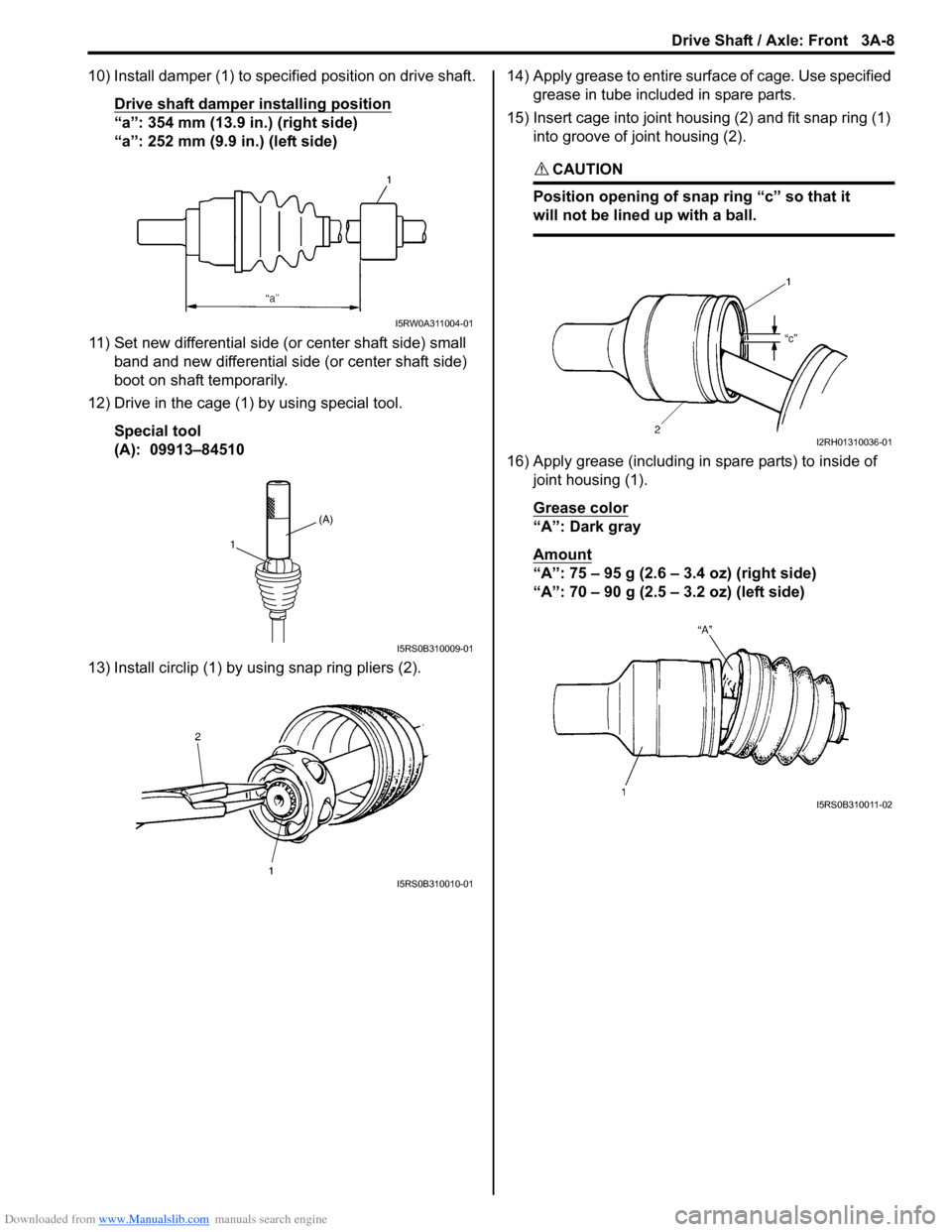
10) Install damper (1) to specified position on drive shaft.
Drive shaft damper installing position
“a”: 354 mm (13.9 in.) (right side)
“a”: 252 mm (9.9 in.) (left side)
11) Set new differential side (or center shaft side) small
band and new differential side (or center shaft side)
boot on shaft temporarily.
12) Drive in the cage (1) by using special tool.
Special tool
(A): 09913–84510
13) Install circlip (1) by using snap ring pliers (2).14) Apply grease to entire surface of cage. Use specified
grease in tube included in spare parts.
15) Insert cage into joint housing (2) and fit snap ring (1)
into groove of joint housing (2).
CAUTION!
Position opening of snap ring “c” so that it
will not be lined up with a ball.
16) Apply grease (including in spare parts) to inside of
joint housing (1).
Grease color
“A”: Dark gray
Amount
“A”: 75 – 95 g (2.6 – 3.4 oz) (right side)
“A”: 70 – 90 g (2.5 – 3.2 oz) (left side)
I5RW0A311004-01
(A)
1
I5RS0B310009-01
I5RS0B310010-01
I2RH01310036-01
I5RS0B310011-02
Page 489 of 1556
Downloaded from www.Manualslib.com manuals search engine Drive Shaft / Axle: Front 3A-10
For tripod joint type
Judging from abnormality noted before disassembly and
what is found through visual check of component parts
after disassembly, prepare replacing parts and proceed
to reassembly.
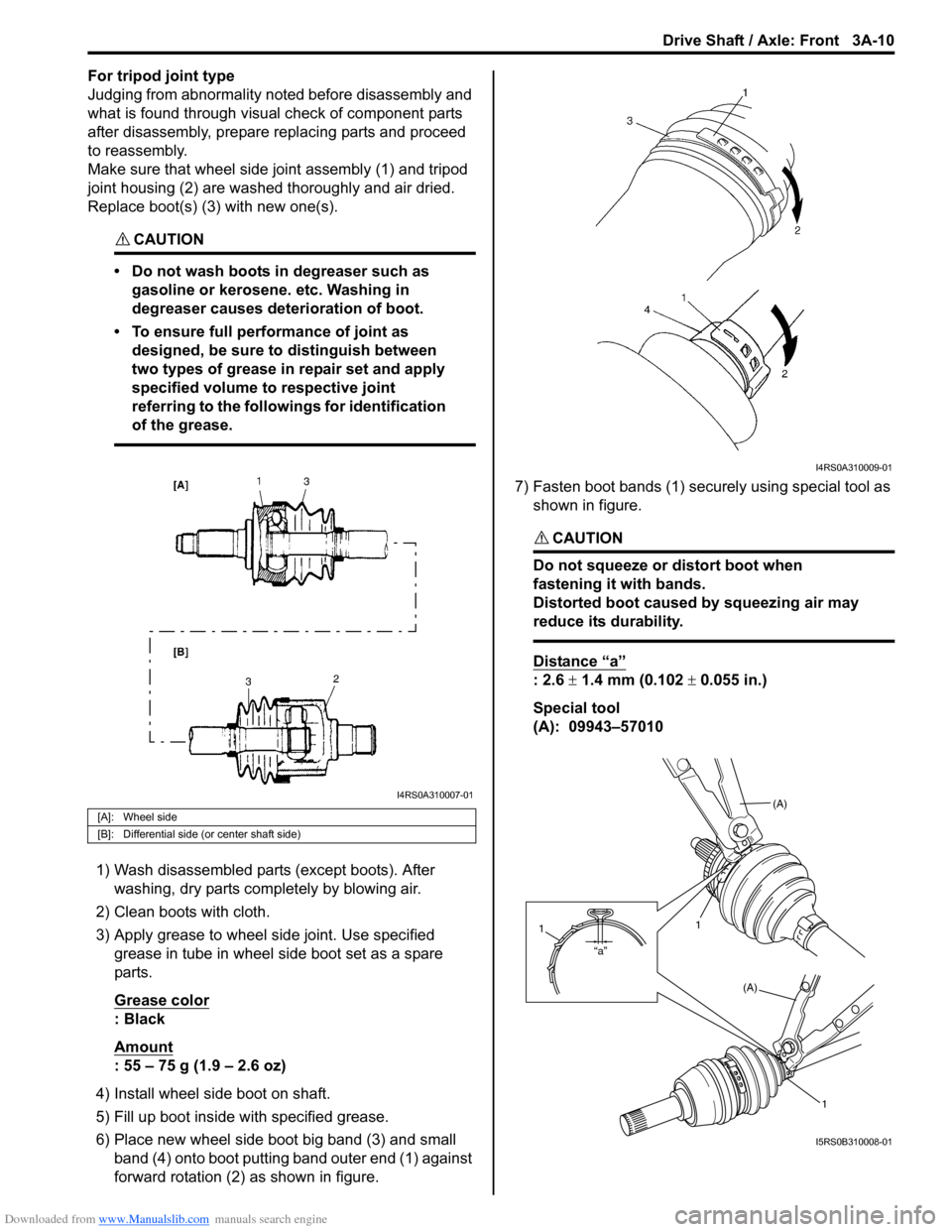
Make sure that wheel side joint assembly (1) and tripod
joint housing (2) are washed thoroughly and air dried.
Replace boot(s) (3) with new one(s).
CAUTION!
• Do not wash boots in degreaser such as
gasoline or kerosene. etc. Washing in
degreaser causes deterioration of boot.
• To ensure full performance of joint as
designed, be sure to distinguish between
two types of grease in repair set and apply
specified volume to respective joint
referring to the followings for identification
of the grease.
1) Wash disassembled parts (except boots). After
washing, dry parts completely by blowing air.
2) Clean boots with cloth.
3) Apply grease to wheel side joint. Use specified
grease in tube in wheel side boot set as a spare
parts.
Grease color
: Black
Amount
: 55 – 75 g (1.9 – 2.6 oz)
4) Install wheel side boot on shaft.
5) Fill up boot inside with specified grease.
6) Place new wheel side boot big band (3) and small
band (4) onto boot putting band outer end (1) against
forward rotation (2) as shown in figure.7) Fasten boot bands (1) securely using special tool as
shown in figure.
CAUTION!
Do not squeeze or distort boot when
fastening it with bands.
Distorted boot caused by squeezing air may
reduce its durability.
Distance “a”
: 2.6 ± 1.4 mm (0.102 ± 0.055 in.)
Special tool
(A): 09943–57010
[A]: Wheel side
[B]: Differential side (or center shaft side)
I4RS0A310007-01
I4RS0A310009-01
(A)
1
(A)
1
“a”
1
I5RS0B310008-01
Page 490 of 1556
Downloaded from www.Manualslib.com manuals search engine 3A-11 Drive Shaft / Axle: Front
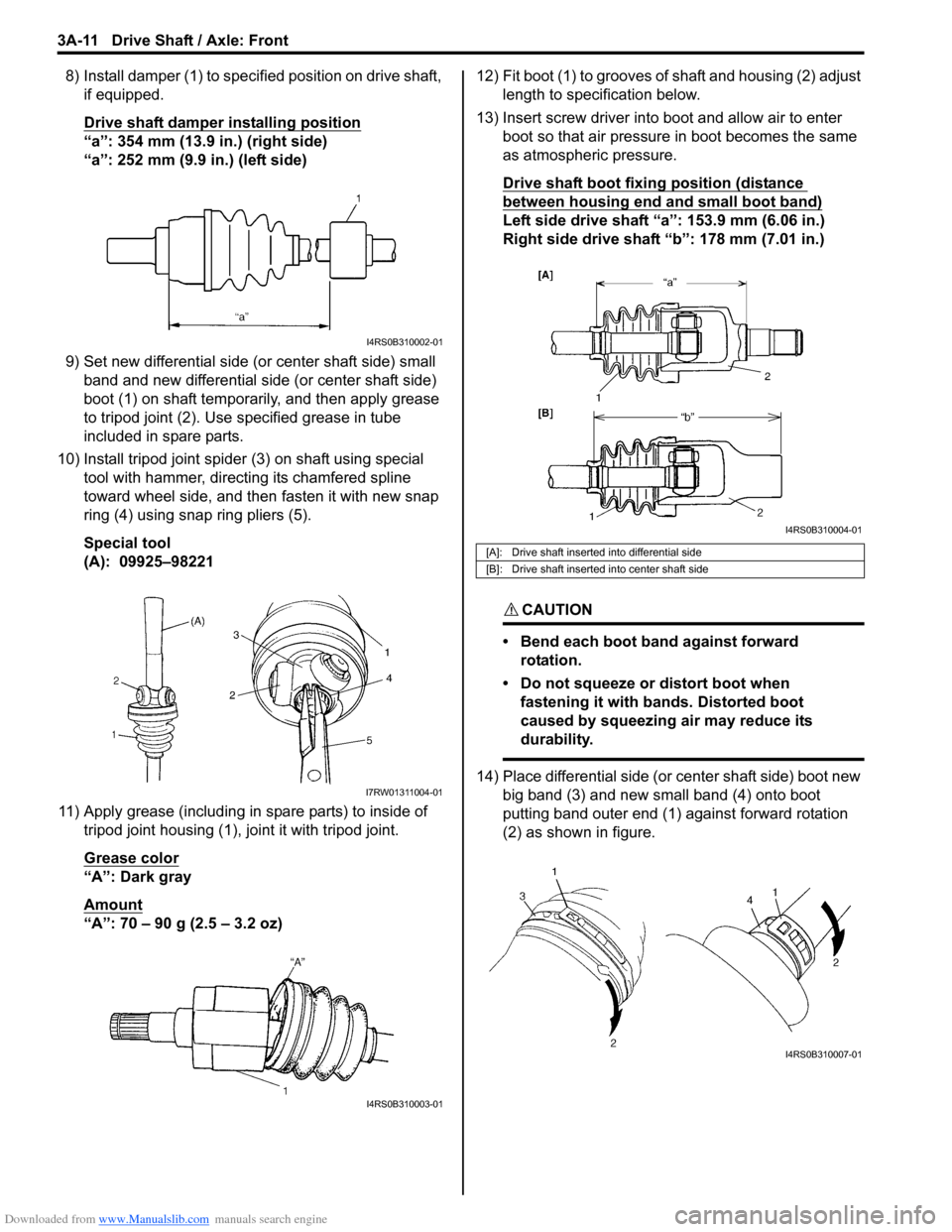
8) Install damper (1) to specified position on drive shaft,
if equipped.
Drive shaft damper installing position
“a”: 354 mm (13.9 in.) (right side)
“a”: 252 mm (9.9 in.) (left side)
9) Set new differential side (or center shaft side) small
band and new differential side (or center shaft side)
boot (1) on shaft temporarily, and then apply grease
to tripod joint (2). Use specified grease in tube
included in spare parts.
10) Install tripod joint spider (3) on shaft using special
tool with hammer, directing its chamfered spline
toward wheel side, and then fasten it with new snap
ring (4) using snap ring pliers (5).
Special tool
(A): 09925–98221
11) Apply grease (including in spare parts) to inside of
tripod joint housing (1), joint it with tripod joint.
Grease color
“A”: Dark gray
Amount
“A”: 70 – 90 g (2.5 – 3.2 oz)12) Fit boot (1) to grooves of shaft and housing (2) adjust
length to specification below.
13) Insert screw driver into boot and allow air to enter
boot so that air pressure in boot becomes the same
as atmospheric pressure.
Drive shaft boot fixing position (distance
between housing end and small boot band)
Left side drive shaft “a”: 153.9 mm (6.06 in.)
Right side drive shaft “b”: 178 mm (7.01 in.)
CAUTION!
• Bend each boot band against forward
rotation.
• Do not squeeze or distort boot when
fastening it with bands. Distorted boot
caused by squeezing air may reduce its
durability.
14) Place differential side (or center shaft side) boot new
big band (3) and new small band (4) onto boot
putting band outer end (1) against forward rotation
(2) as shown in figure.
I4RS0B310002-01
I7RW01311004-01
I4RS0B310003-01
[A]: Drive shaft inserted into differential side
[B]: Drive shaft inserted into center shaft side
I4RS0B310004-01
I4RS0B310007-01
Page 492 of 1556
Downloaded from www.Manualslib.com manuals search engine 3A-13 Drive Shaft / Axle: Front
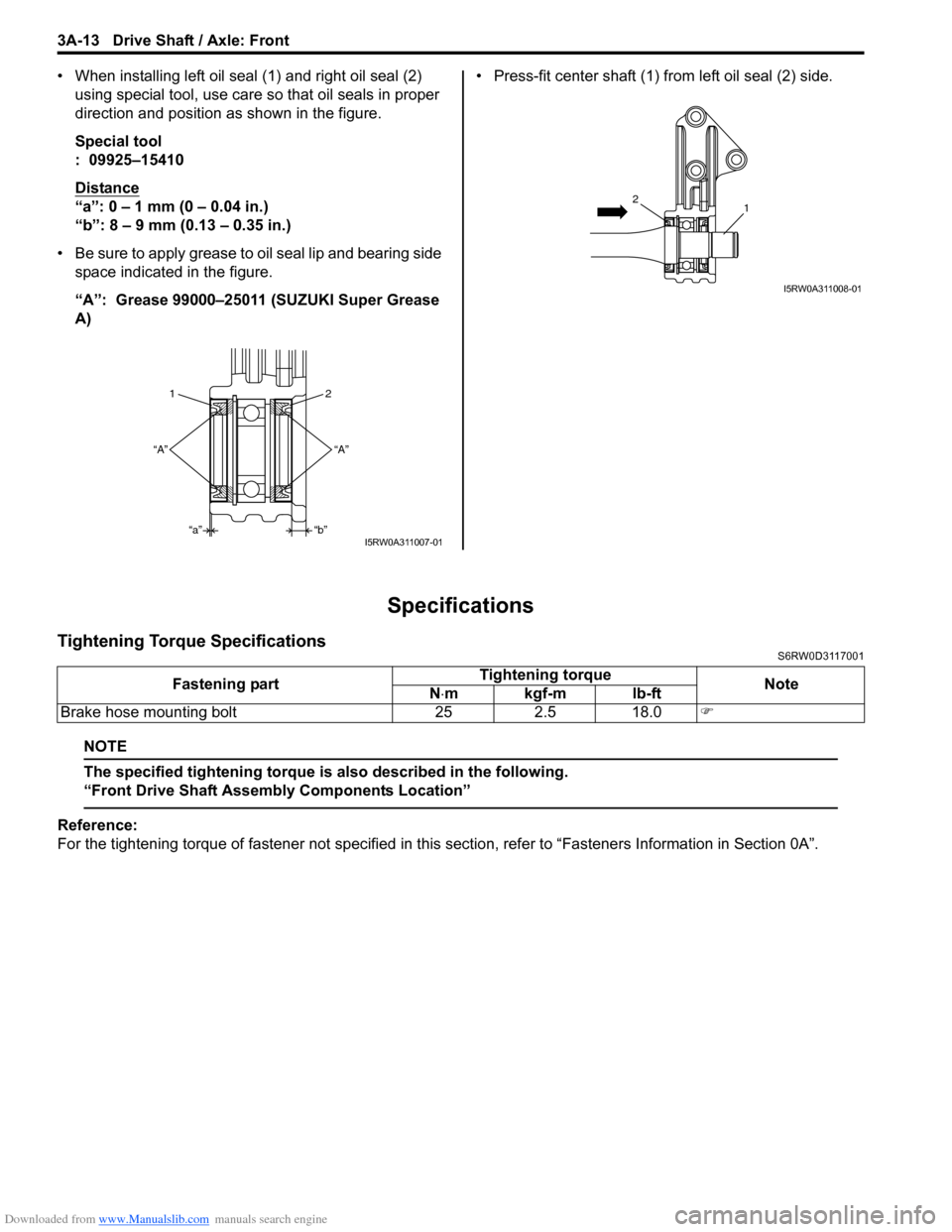
• When installing left oil seal (1) and right oil seal (2)
using special tool, use care so that oil seals in proper
direction and position as shown in the figure.
Special tool
: 09925–15410
Distance
“a”: 0 – 1 mm (0 – 0.04 in.)
“b”: 8 – 9 mm (0.13 – 0.35 in.)
• Be sure to apply grease to oil seal lip and bearing side
space indicated in the figure.
“A”: Grease 99000–25011 (SUZUKI Super Grease
A) • Press-fit center shaft (1) from left oil seal (2) side.
Specifications
Tightening Torque SpecificationsS6RW0D3117001
NOTE
The specified tightening torque is also described in the following.
“Front Drive Shaft Assembly Components Location”
Reference:
For the tightening torque of fastener not specified in this section, refer to “Fasteners Information in Section 0A”.
2 1
“A”
“b”
“a” “A”
I5RW0A311007-01
12
I5RW0A311008-01
Fastening partTightening torque
Note
N⋅mkgf-mlb-ft
Brake hose mounting bolt 25 2.5 18.0)
Page 494 of 1556
Downloaded from www.Manualslib.com manuals search engine 3A-15 Drive Shaft / Axle: Rear
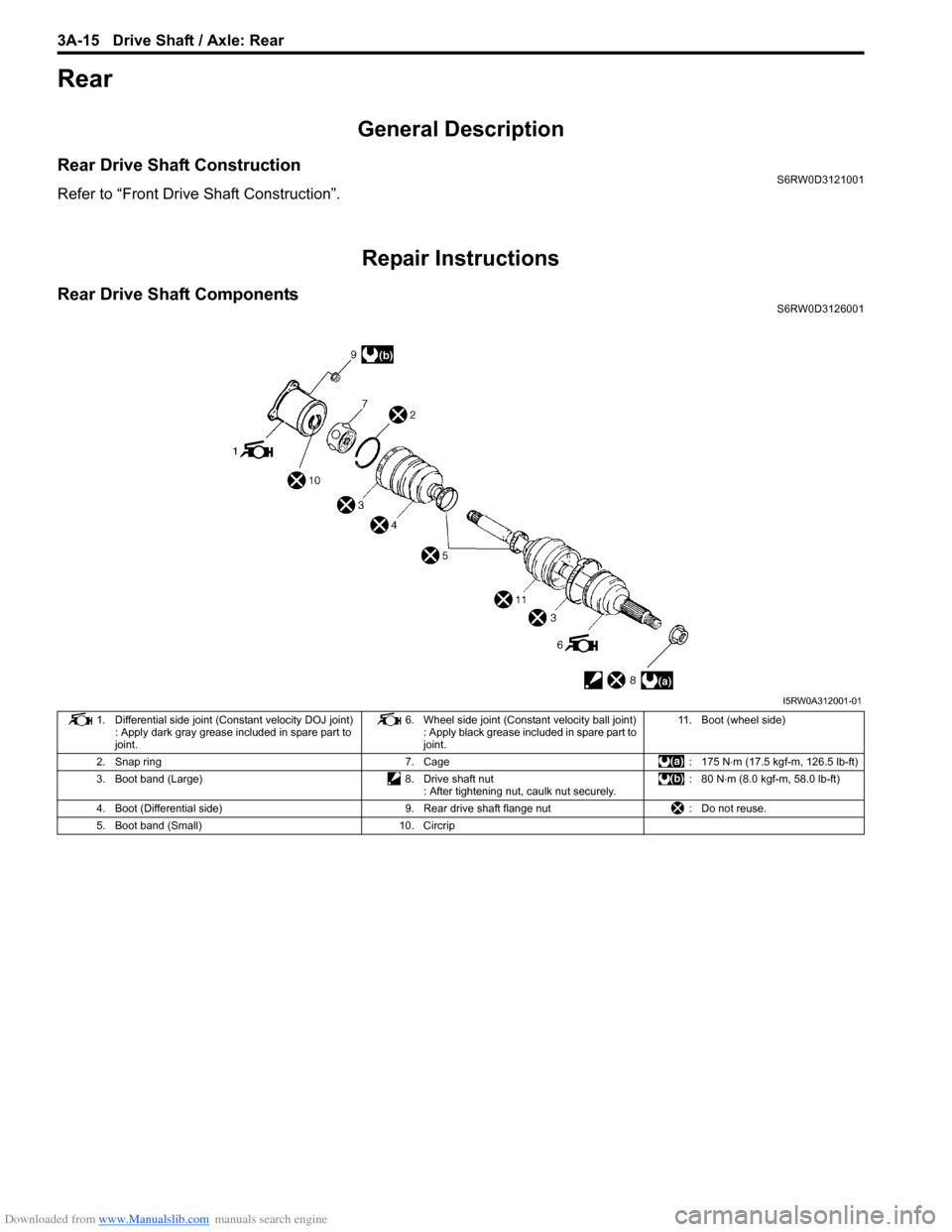
Rear
General Description
Rear Drive Shaft ConstructionS6RW0D3121001
Refer to “Front Drive Shaft Construction”.
Repair Instructions
Rear Drive Shaft ComponentsS6RW0D3126001
I5RW0A312001-01
1. Differential side joint (Constant velocity DOJ joint)
: Apply dark gray grease included in spare part to
joint.6. Wheel side joint (Constant velocity ball joint)
: Apply black grease included in spare part to
joint.11. Boot (wheel side)
2. Snap ring 7. Cage : 175 N⋅m (17.5 kgf-m, 126.5 lb-ft)
3. Boot band (Large) 8. Drive shaft nut
: After tightening nut, caulk nut securely.: 80 N⋅m (8.0 kgf-m, 58.0 lb-ft)
4. Boot (Differential side) 9. Rear drive shaft flange nut : Do not reuse.
5. Boot band (Small) 10. Circrip
Page 496 of 1556
Downloaded from www.Manualslib.com manuals search engine 3A-17 Drive Shaft / Axle: Rear
Reassembly
Refer to “Front Drive Shaft Disassembly and
Reassembly” note the following points which is different
from the front drive shaft is described.
• Apply grease to each joint.
Grease color
Wheel side: Black
Differential side: Dark gray
Amount
Wheel side: 50 – 70 g (1.8 – 2.5 oz)
Differential side: 70 – 90 g (2.5 – 3.2 oz)
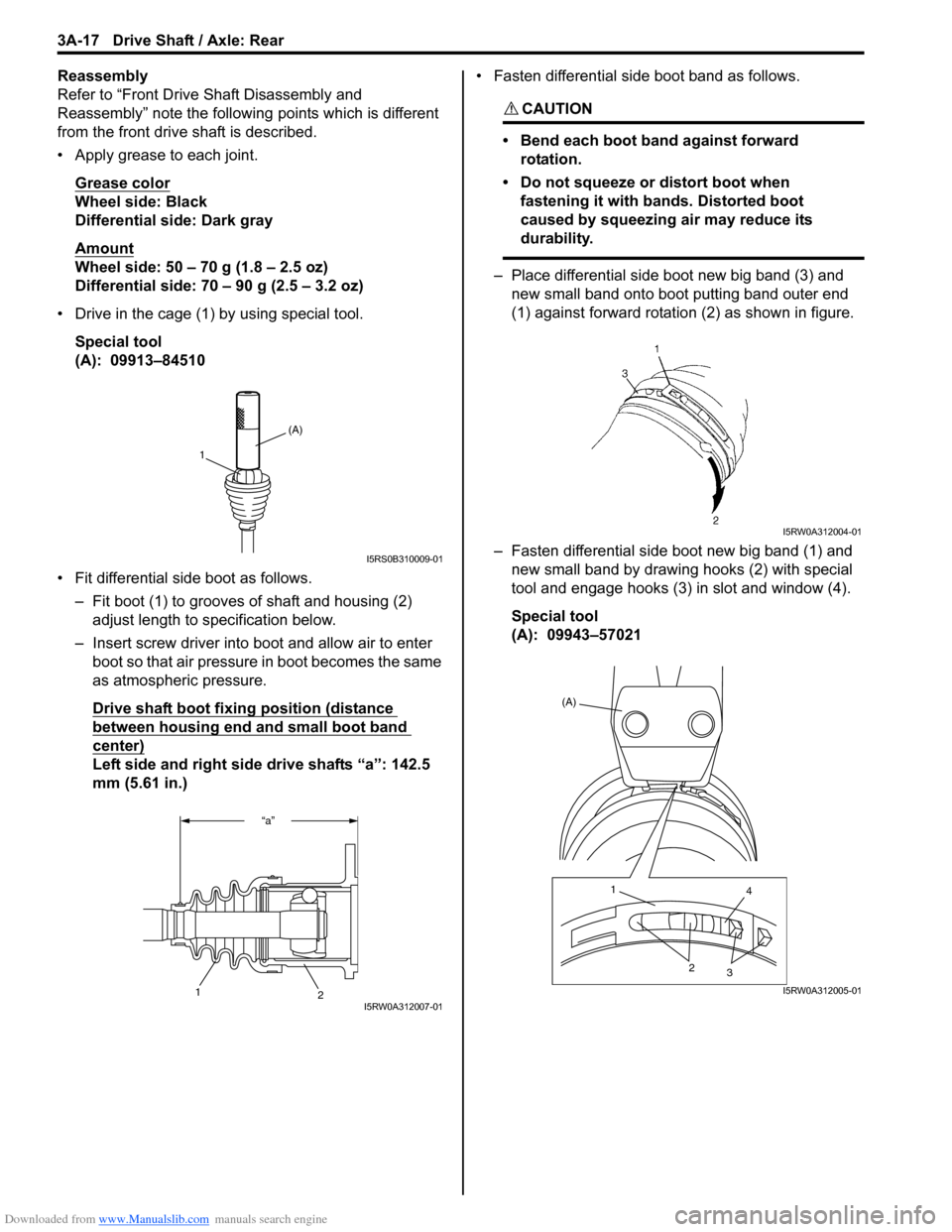
• Drive in the cage (1) by using special tool.
Special tool
(A): 09913–84510
• Fit differential side boot as follows.
– Fit boot (1) to grooves of shaft and housing (2)
adjust length to specification below.
– Insert screw driver into boot and allow air to enter
boot so that air pressure in boot becomes the same
as atmospheric pressure.
Drive shaft boot fixing position (distance
between housing end and small boot band
center)
Left side and right side drive shafts “a”: 142.5
mm (5.61 in.)• Fasten differential side boot band as follows.
CAUTION!
• Bend each boot band against forward
rotation.
• Do not squeeze or distort boot when
fastening it with bands. Distorted boot
caused by squeezing air may reduce its
durability.
– Place differential side boot new big band (3) and
new small band onto boot putting band outer end
(1) against forward rotation (2) as shown in figure.
– Fasten differential side boot new big band (1) and
new small band by drawing hooks (2) with special
tool and engage hooks (3) in slot and window (4).
Special tool
(A): 09943–57021
(A)
1
I5RS0B310009-01
“a”
2
1I5RW0A312007-01
I5RW0A312004-01
(A)
1
4
2
3
I5RW0A312005-01
Page 505 of 1556
Downloaded from www.Manualslib.com manuals search engine Differential: 3B-8
Diagnostic Information and Procedures
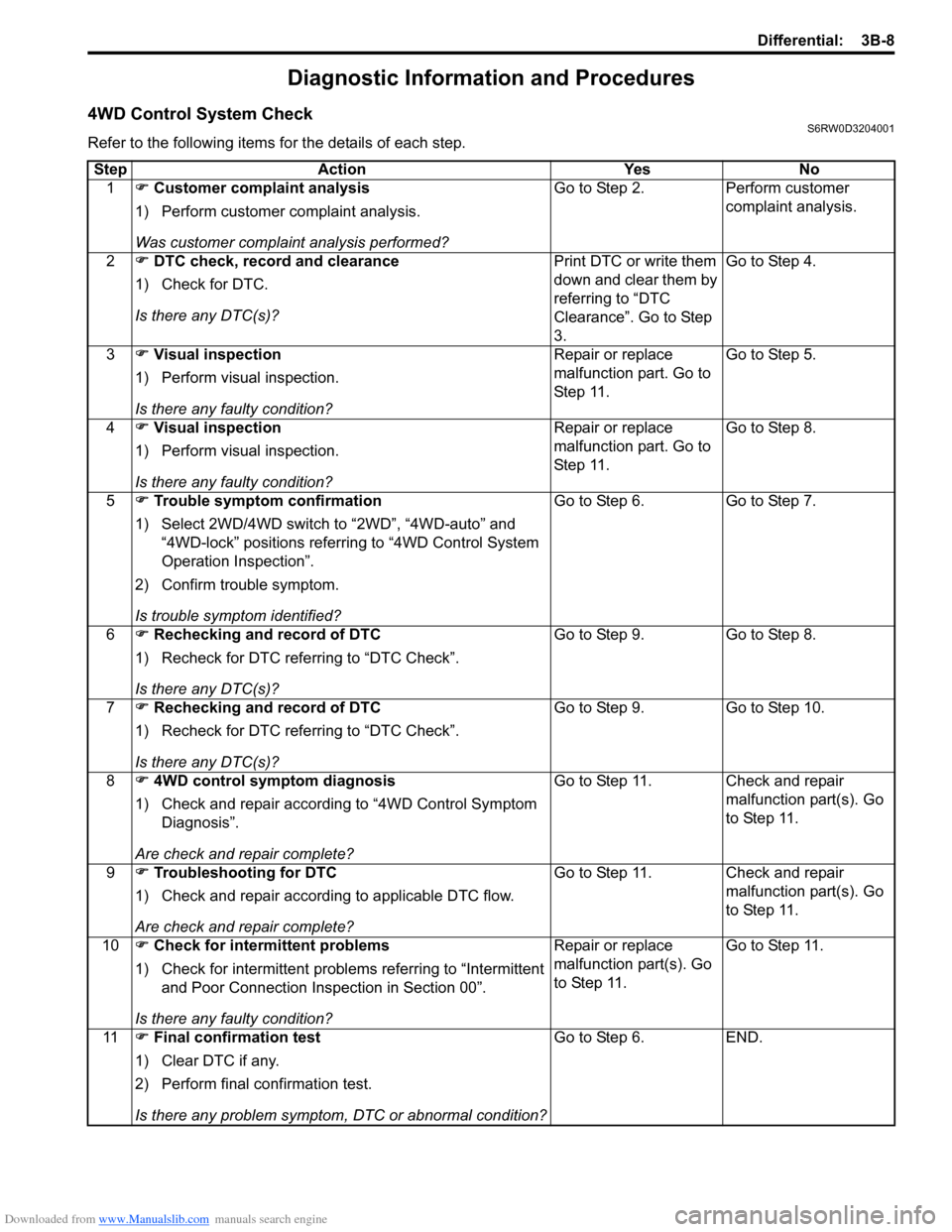
4WD Control System CheckS6RW0D3204001
Refer to the following items for the details of each step.
Step Action Yes No
1) Customer complaint analysis
1) Perform customer complaint analysis.
Was customer complaint analysis performed?Go to Step 2. Perform customer
complaint analysis.
2) DTC check, record and clearance
1) Check for DTC.
Is there any DTC(s)?Print DTC or write them
down and clear them by
referring to “DTC
Clearance”. Go to Step
3.Go to Step 4.
3) Visual inspection
1) Perform visual inspection.
Is there any faulty condition?Repair or replace
malfunction part. Go to
St ep 11 .Go to Step 5.
4) Visual inspection
1) Perform visual inspection.
Is there any faulty condition?Repair or replace
malfunction part. Go to
St ep 11 .Go to Step 8.
5) Trouble symptom confirmation
1) Select 2WD/4WD switch to “2WD”, “4WD-auto” and
“4WD-lock” positions referring to “4WD Control System
Operation Inspection”.
2) Confirm trouble symptom.
Is trouble symptom identified?Go to Step 6. Go to Step 7.
6) Rechecking and record of DTC
1) Recheck for DTC referring to “DTC Check”.
Is there any DTC(s)?Go to Step 9. Go to Step 8.
7) Rechecking and record of DTC
1) Recheck for DTC referring to “DTC Check”.
Is there any DTC(s)?Go to Step 9. Go to Step 10.
8) 4WD control symptom diagnosis
1) Check and repair according to “4WD Control Symptom
Diagnosis”.
Are check and repair complete?Go to Step 11. Check and repair
malfunction part(s). Go
to Step 11.
9) Troubleshooting for DTC
1) Check and repair according to applicable DTC flow.
Are check and repair complete?Go to Step 11. Check and repair
malfunction part(s). Go
to Step 11.
10) Check for intermittent problems
1) Check for intermittent problems referring to “Intermittent
and Poor Connection Inspection in Section 00”.
Is there any faulty condition?Repair or replace
malfunction part(s). Go
to Step 11.Go to Step 11.
11) Final confirmation test
1) Clear DTC if any.
2) Perform final confirmation test.
Is there any problem symptom, DTC or abnormal condition?Go to Step 6. END.
Page 507 of 1556
Downloaded from www.Manualslib.com manuals search engine Differential: 3B-10
Step 2. DTC check, record and clearance
First, referring to “DTC Check”, check DTC and pending
DTC. If DTC exists, print or write down DTC and then
clear malfunction DTC(s) by referring to “DTC
Clearance”. Malfunction DTC indicates malfunction in
the system but it is not possible to know from it whether
the malfunction is occurring now or it occurred in the
past and normal condition has been restored. In order to
know that, check symptom in question according to Step
5 and then recheck DTC according to Step 6.
Diagnosing a trouble based on the DTC in this step only
or failure to clear the DTC in this step may result in an
faulty diagnosis, trouble diagnosis of a normal circuit or
difficulty in troubleshooting which is otherwise
unnecessary.
Step 3 and 4. Visual inspection
As a preliminary step, be sure to perform visual check of
the items that support proper function of the 4WD control
system referring to “Visual Inspection”.
Step 5. Trouble symptom confirmation
Check trouble symptoms based on information obtained
in “Step 1. Customer complaint analysis: ” and “Step 2.
DTC check, record and clearance: ”.
Also, reconfirm DTC according to “DTC Confirmation
Procedure” described in each DTC flow.
Step 6 and 7. Rechecking and record of DTC
Refer to “DTC Check” for checking procedure.
Step 8. 4WD control symptom diagnosis
Check the parts of the system suspected as a possible
cause referring to “4WD Control Symptom Diagnosis”.
Step 9. Troubleshooting for DTC
Based on the DTC indicated in Step 6 / 7 and referring to
“applicable DTC flow”, locate the cause of the trouble,
namely in a sensor, switch, wire harness, connector,
coupling assembly, 4WD control module or other part
and repair or replace faulty parts.
Step 10. Check for intermittent problem
Check parts where an intermittent trouble is easy to
occur (e.g. wire harness, connector, etc.), referring to
“Intermittent and Poor Connection Inspection in Section
00” and related circuit of DTC recorded in Step 2.
Step 11. Final confirmation test
Confirm that the problem symptom has gone and the
vehicle is free from any abnormal conditions. If what has
been repaired is related to the malfunction DTC, clear
the DTC once and check to ensure that no malfunction
DTC is indicated.4WD Position Indicator Operation CheckS6RW0D3204002
1) Turn ignition switch to OFF position.
2) Check that 4WD position indicators turn on for about
2 seconds and then turns off.
If any faulty condition is found, proceed to “4WD
Position Indicator Does Not Come ON at Ignition
Switch ON but Engine Stops” or “4WD Position
Indicator Remains ON Steady at Ignition Switch ON”.
4WD Control System Operation InspectionS6RW0D3204003
NOTE
• It automatically changes into “4WD-auto”
position, when the vehicle speed becomes
specified speed or more at “4WD-lock”
position. It is “4WD-auto” position until
switch will be selected to “4WD-lock”
position at next time.
• When ABS operates while changed of each
position, it is discontinued of change. End
of the ABS operation, and then returned to
the position of before.
1) Inspect switch operation from “4WD-auto” to “2WD”
as follows.
a) Start engine.
b) Push 2WD/4WD switch to “2WD” position.
c) Check that 4WD AUTO indicator and 4WD
LOCK indicator not come ON.
2) Inspect switch operation from “2WD” to “4WD-auto”
as follows.
a) Start engine.
b) Push 2WD/4WD switch to “AUTO” position.
c) Check that 4WD AUTO indicator comes ON
steady and 4WD LOCK indicator not come ON.
3) Inspect switch operation from “4WD-auto” to “4WD-
lock” as follows.
a) Start engine.
b) Push 2WD/4WD switch to “LOCK” position, and
keep it for 3 seconds or more.
c) Check that 4WD AUTO indicator not come ON
and 4WD LOCK indicator comes ON steady.
4) Inspect switch operation from “4WD-lock” to “4WD-
auto” as follows.
a) Start engine.
b) Push 2WD/4WD switch to “AUTO” position.
c) Check that 4WD AUTO indicator comes ON
steady and 4WD LOCK indicator not come ON.
Page 509 of 1556
Downloaded from www.Manualslib.com manuals search engine Differential: 3B-12
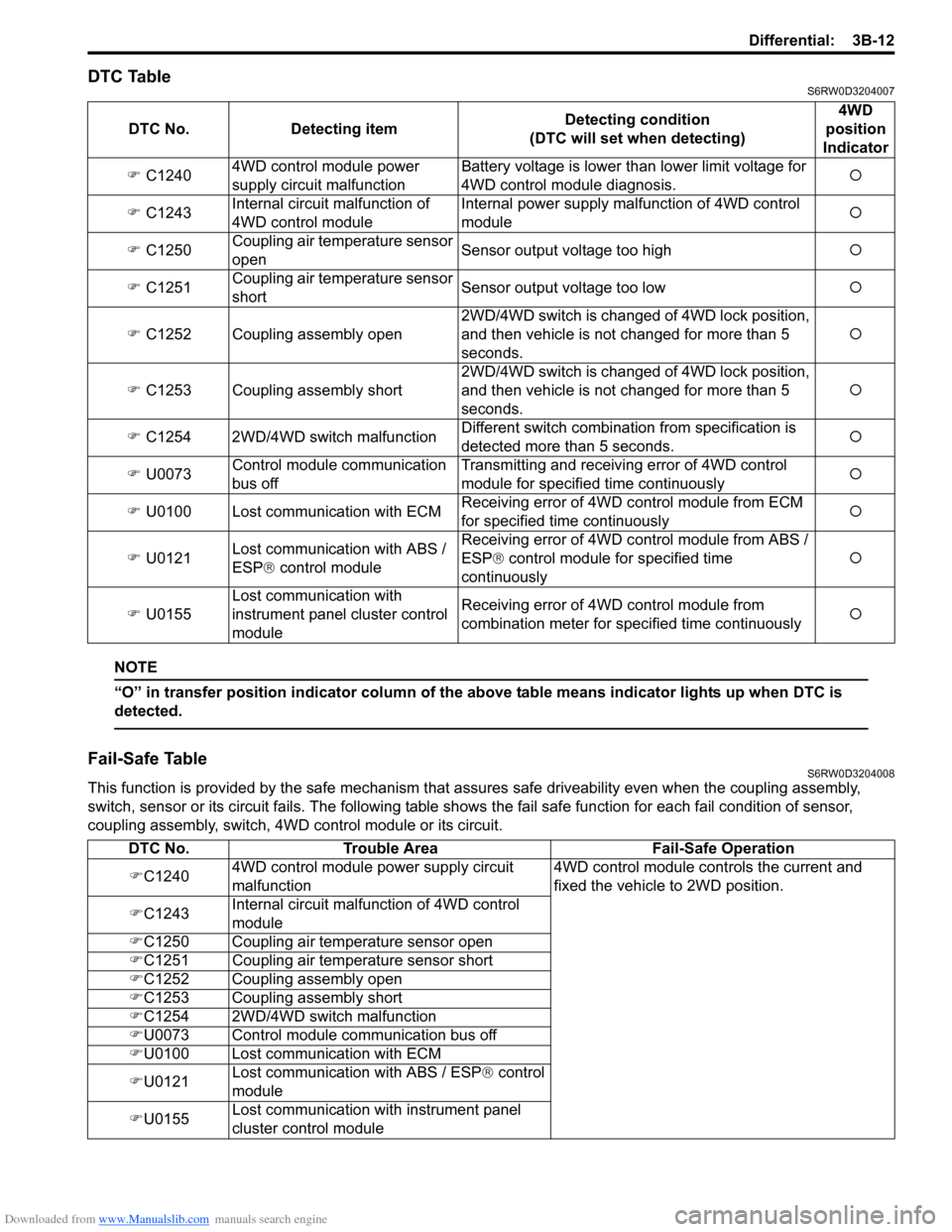
DTC TableS6RW0D3204007
NOTE
“O” in transfer position indicator column of the above table means indicator lights up when DTC is
detected.
Fail-Safe TableS6RW0D3204008
This function is provided by the safe mechanism that assures safe driveability even when the coupling assembly,
switch, sensor or its circuit fails. The following table shows the fail safe function for each fail condition of sensor,
coupling assembly, switch, 4WD control module or its circuit. DTC No. Detecting itemDetecting condition
(DTC will set when detecting)4WD
position
Indicator
) C12404WD control module power
supply circuit malfunctionBattery voltage is lower than lower limit voltage for
4WD control module diagnosis.{
) C1243Internal circuit malfunction of
4WD control moduleInternal power supply malfunction of 4WD control
module{
) C1250Coupling air temperature sensor
openSensor output voltage too high{
) C1251Coupling air temperature sensor
shortSensor output voltage too low{
) C1252 Coupling assembly open2WD/4WD switch is changed of 4WD lock position,
and then vehicle is not changed for more than 5
seconds.{
) C1253 Coupling assembly short2WD/4WD switch is changed of 4WD lock position,
and then vehicle is not changed for more than 5
seconds.{
) C1254 2WD/4WD switch malfunctionDifferent switch combination from specification is
detected more than 5 seconds.{
) U0073Control module communication
bus offTransmitting and receiving error of 4WD control
module for specified time continuously{
) U0100 Lost communication with ECMReceiving error of 4WD control module from ECM
for specified time continuously{
) U0121Lost communication with ABS /
ESP® control moduleReceiving error of 4WD control module from ABS /
ESP® control module for specified time
continuously{
) U0155Lost communication with
instrument panel cluster control
moduleReceiving error of 4WD control module from
combination meter for specified time continuously{
DTC No. Trouble Area Fail-Safe Operation
)C12404WD control module power supply circuit
malfunction4WD control module controls the current and
fixed the vehicle to 2WD position.
)C1243Internal circuit malfunction of 4WD control
module
)C1250 Coupling air temperature sensor open
)C1251 Coupling air temperature sensor short
)C1252 Coupling assembly open
)C1253 Coupling assembly short
)C1254 2WD/4WD switch malfunction
)U0073 Control module communication bus off
)U0100 Lost communication with ECM
)U0121Lost communication with ABS / ESP® control
module
)U0155Lost communication with instrument panel
cluster control module
Page 512 of 1556
Downloaded from www.Manualslib.com manuals search engine 3B-15 Differential:
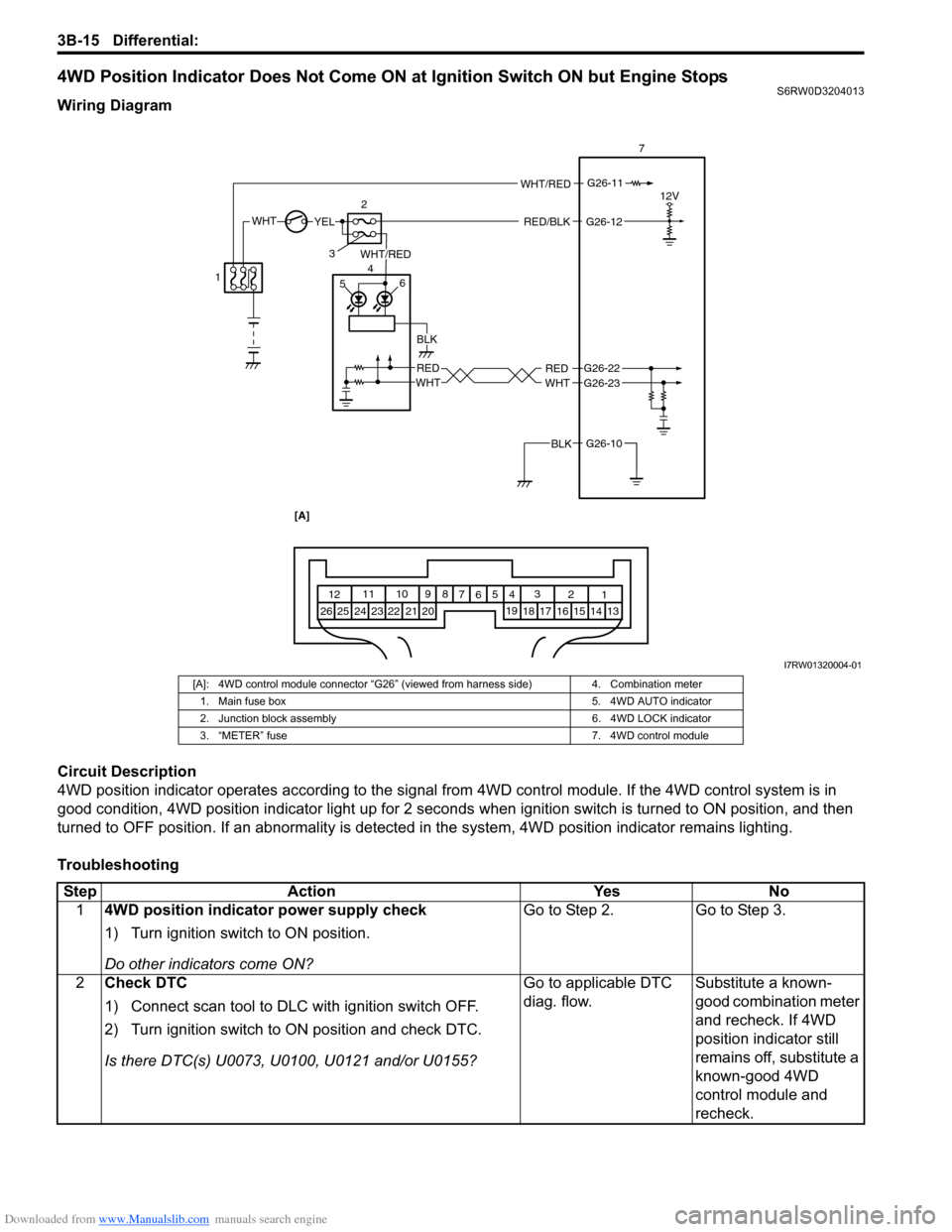
4WD Position Indicator Does Not Come ON at Ignition Switch ON but Engine StopsS6RW0D3204013
Wiring Diagram
Circuit Description
4WD position indicator operates according to the signal from 4WD control module. If the 4WD control system is in
good condition, 4WD position indicator light up for 2 seconds when ignition switch is turned to ON position, and then
turned to OFF position. If an abnormality is detected in the system, 4WD position indicator remains lighting.
Troubleshooting
WHTYELRED/BLK
12
WHT/RED
WHT/RED
G26-12
G26-11
RED
BLK
WHT 56 47
12V
G26-10BLK
G26-22
G26-23REDWHT
3
1 2 3
4 5
6 7 8 9 10 11
12
13
14 15 16
17 18 19
20
21 22
23
24 25 26
[A]
I7RW01320004-01
[A]: 4WD control module connector “G26” (viewed from harness side) 4. Combination meter
1. Main fuse box 5. 4WD AUTO indicator
2. Junction block assembly 6. 4WD LOCK indicator
3. “METER” fuse 7. 4WD control module
Step Action Yes No
14WD position indicator power supply check
1) Turn ignition switch to ON position.
Do other indicators come ON?Go to Step 2. Go to Step 3.
2Check DTC
1) Connect scan tool to DLC with ignition switch OFF.
2) Turn ignition switch to ON position and check DTC.
Is there DTC(s) U0073, U0100, U0121 and/or U0155?Go to applicable DTC
diag. flow.Substitute a known-
good combination meter
and recheck. If 4WD
position indicator still
remains off, substitute a
known-good 4WD
control module and
recheck.