steering SUZUKI SX4 2006 1.G Service Workshop Manual
[x] Cancel search | Manufacturer: SUZUKI, Model Year: 2006, Model line: SX4, Model: SUZUKI SX4 2006 1.GPages: 1556, PDF Size: 37.31 MB
Page 1370 of 1556
Downloaded from www.Manualslib.com manuals search engine 9C-18 Instrumentation / Driver Info. / Horn:
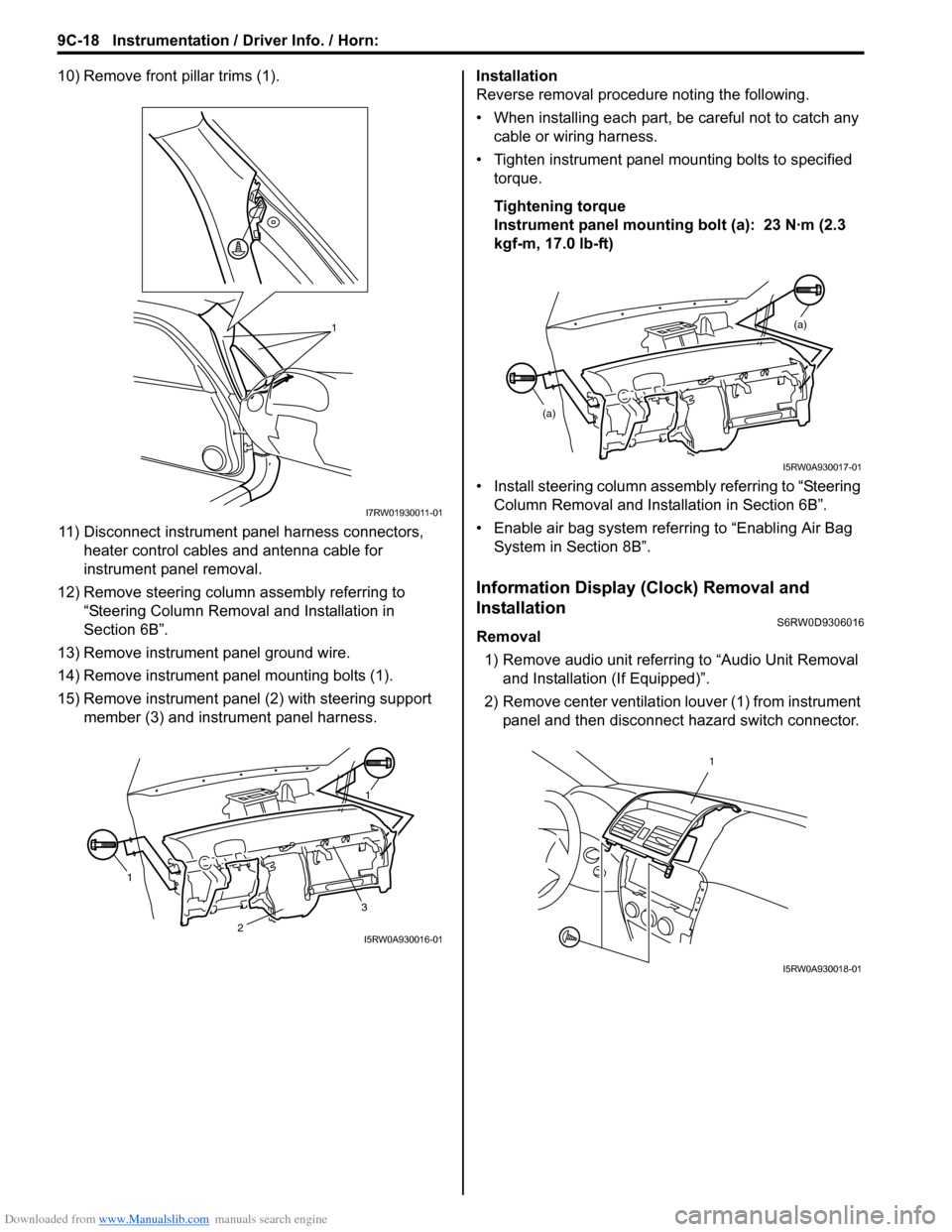
10) Remove front pillar trims (1).
11) Disconnect instrument panel harness connectors,
heater control cables and antenna cable for
instrument panel removal.
12) Remove steering column assembly referring to
“Steering Column Removal and Installation in
Section 6B”.
13) Remove instrument panel ground wire.
14) Remove instrument panel mounting bolts (1).
15) Remove instrument panel (2) with steering support
member (3) and instrument panel harness.Installation
Reverse removal procedure noting the following.
• When installing each part, be careful not to catch any
cable or wiring harness.
• Tighten instrument panel mounting bolts to specified
torque.
Tightening torque
Instrument panel mounting bolt (a): 23 N·m (2.3
kgf-m, 17.0 lb-ft)
• Install steering column assembly referring to “Steering
Column Removal and Installation in Section 6B”.
• Enable air bag system referring to “Enabling Air Bag
System in Section 8B”.
Information Display (Clock) Removal and
Installation
S6RW0D9306016
Removal
1) Remove audio unit referring to “Audio Unit Removal
and Installation (If Equipped)”.
2) Remove center ventilation louver (1) from instrument
panel and then disconnect hazard switch connector.
1
I7RW01930011-01
11
3
2I5RW0A930016-01
(a)
(a)
I5RW0A930017-01
1
I5RW0A930018-01
Page 1373 of 1556
Downloaded from www.Manualslib.com manuals search engine Instrumentation / Driver Info. / Horn: 9C-21
Antenna Base Removal and InstallationS6RW0D9306023
Removal
1) Remove head lining referring to “Head Lining
Removal and Installation in Section 9H”.
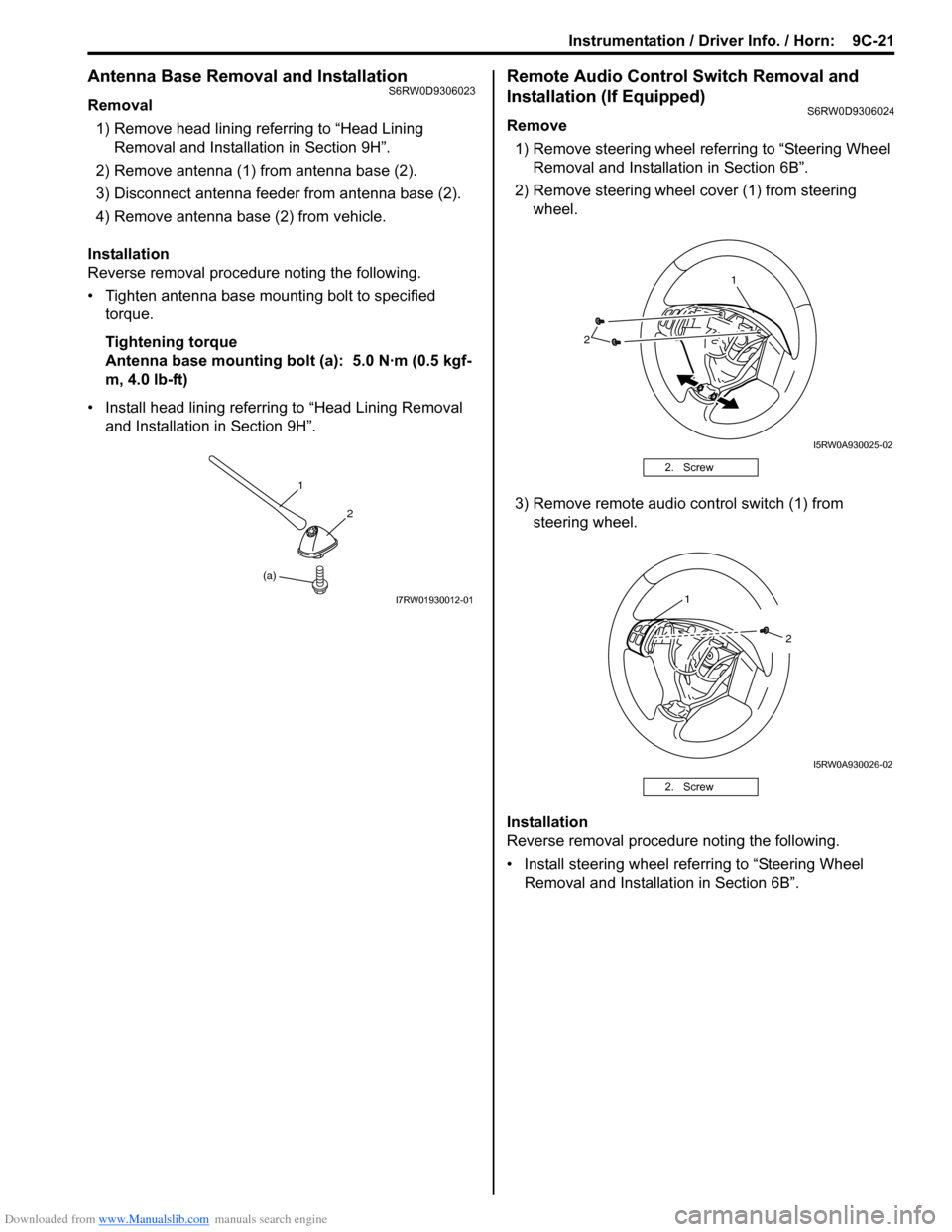
2) Remove antenna (1) from antenna base (2).
3) Disconnect antenna feeder from antenna base (2).
4) Remove antenna base (2) from vehicle.
Installation
Reverse removal procedure noting the following.
• Tighten antenna base mounting bolt to specified
torque.
Tightening torque
Antenna base mounting bolt (a): 5.0 N·m (0.5 kgf-
m, 4.0 lb-ft)
• Install head lining referring to “Head Lining Removal
and Installation in Section 9H”.
Remote Audio Control Switch Removal and
Installation (If Equipped)
S6RW0D9306024
Remove
1) Remove steering wheel referring to “Steering Wheel
Removal and Installation in Section 6B”.
2) Remove steering wheel cover (1) from steering
wheel.
3) Remove remote audio control switch (1) from
steering wheel.
Installation
Reverse removal procedure noting the following.
• Install steering wheel referring to “Steering Wheel
Removal and Installation in Section 6B”.
(a)1
2
I7RW01930012-01
2. Screw
2. Screw
2
1
I5RW0A930025-02
1
2
I5RW0A930026-02
Page 1382 of 1556
Downloaded from www.Manualslib.com manuals search engine 9D-8 Wipers / Washers:
Windshield Wiper and Washer Switch Removal
and Installation
S6RW0D9406008
Removal
1) Disconnect negative (–) cable at battery.
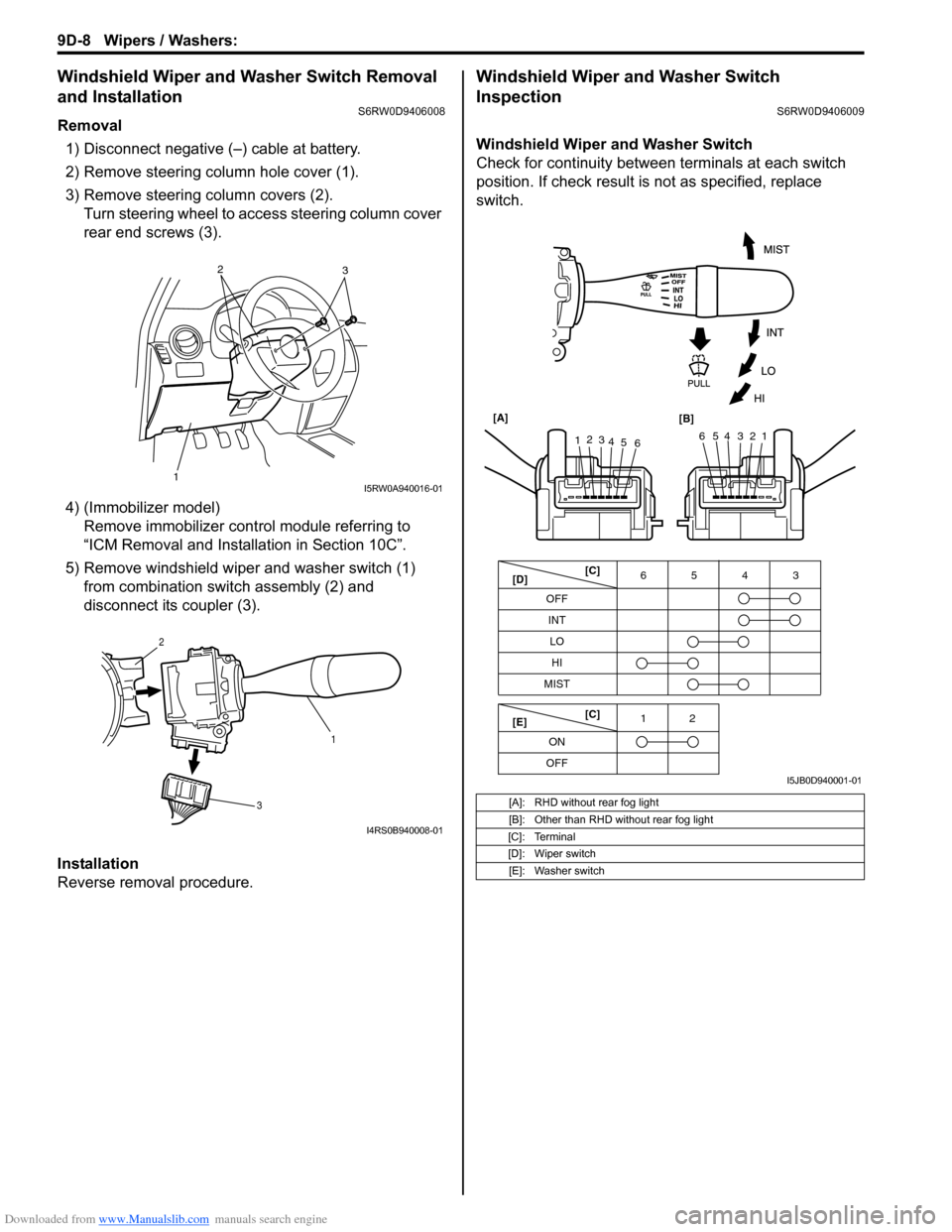
2) Remove steering column hole cover (1).
3) Remove steering column covers (2).
Turn steering wheel to access steering column cover
rear end screws (3).
4) (Immobilizer model)
Remove immobilizer control module referring to
“ICM Removal and Installation in Section 10C”.
5) Remove windshield wiper and washer switch (1)
from combination switch assembly (2) and
disconnect its coupler (3).
Installation
Reverse removal procedure.
Windshield Wiper and Washer Switch
Inspection
S6RW0D9406009
Windshield Wiper and Washer Switch
Check for continuity between terminals at each switch
position. If check result is not as specified, replace
switch.
12
3I5RW0A940016-01
1 2
3
I4RS0B940008-01
[A]: RHD without rear fog light
[B]: Other than RHD without rear fog light
[C]: Terminal
[D]: Wiper switch
[E]: Washer switch
OFF
INT6543
MIST
OFF12
ONLO
HI
65432112
3
4
5
6 [A]
[B]
[C]
[D]
[E][C]
I5JB0D940001-01
Page 1407 of 1556

Downloaded from www.Manualslib.com manuals search engine Glass / Windows / Mirrors: 9E-22
Switch for Other Window than Driver Side
1) Remove driver side door trim referring to step 1) to
3) of “Front Door Glass Removal and Installation”.
2) Remove power window main switch from door trim.
3) Check for continuity between terminals as shown
below.
If check result is not as specified, replace power window
main switch.Power Window Sub Switch InspectionS6RW0D9506022
1) Remove front door trim from door panel, refer to Step
1) to 3) of “Front Door Glass Removal and
Installation”.
2) Remove power window sub switch from door trim.
3) Check for continuity between terminals at each
switch condition.
If check result is not as specified, replace switch.
[A]: Left-hand steering vehicle
[B]: Right-hand steering vehicle
I5RW0A950036-02
I5JB0A950037-01
Page 1425 of 1556
Downloaded from www.Manualslib.com manuals search engine Security and Locks: 9F-14
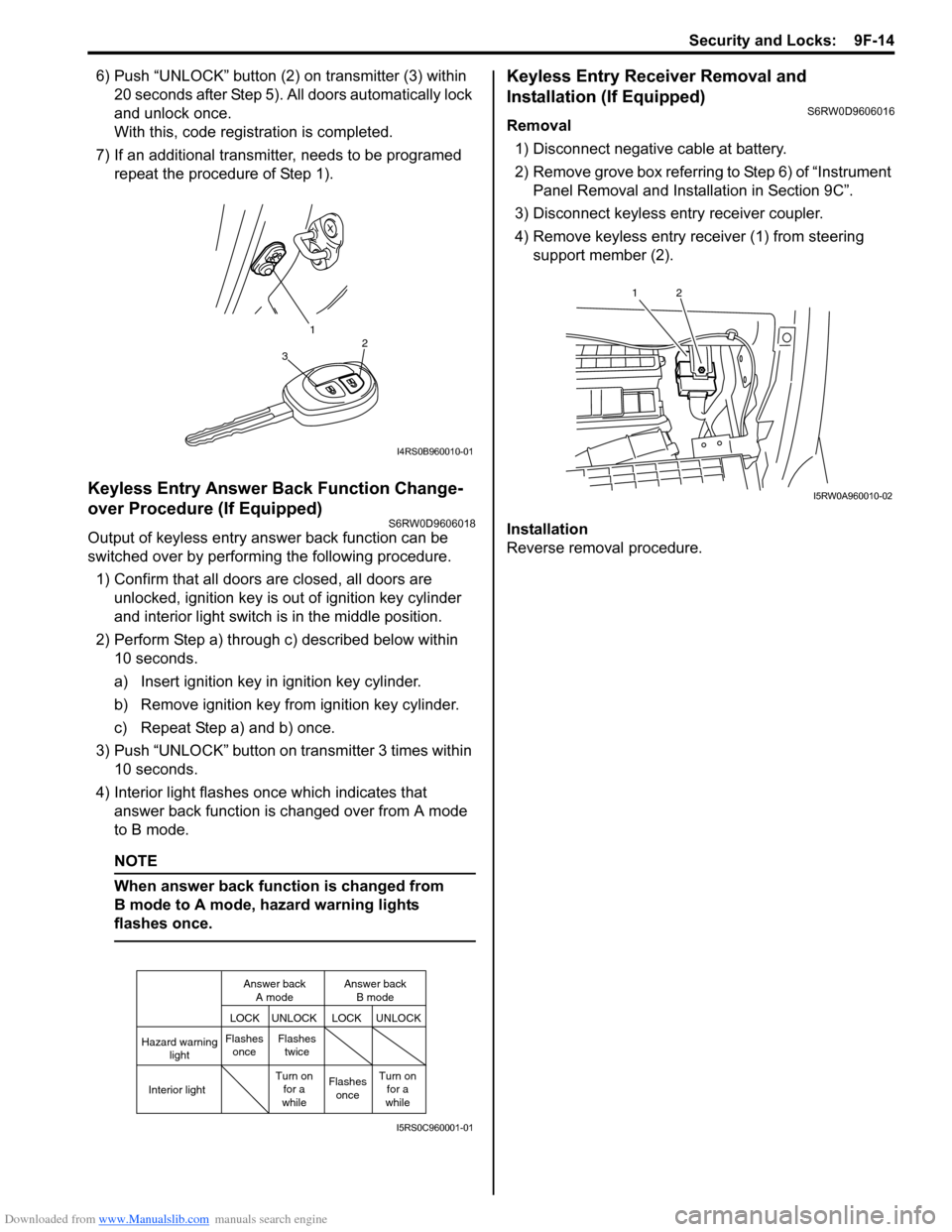
6) Push “UNLOCK” button (2) on transmitter (3) within
20 seconds after Step 5). All doors automatically lock
and unlock once.
With this, code registration is completed.
7) If an additional transmitter, needs to be programed
repeat the procedure of Step 1).
Keyless Entry Answer Back Function Change-
over Procedure (If Equipped)
S6RW0D9606018
Output of keyless entry answer back function can be
switched over by performing the following procedure.
1) Confirm that all doors are closed, all doors are
unlocked, ignition key is out of ignition key cylinder
and interior light switch is in the middle position.
2) Perform Step a) through c) described below within
10 seconds.
a) Insert ignition key in ignition key cylinder.
b) Remove ignition key from ignition key cylinder.
c) Repeat Step a) and b) once.
3) Push “UNLOCK” button on transmitter 3 times within
10 seconds.
4) Interior light flashes once which indicates that
answer back function is changed over from A mode
to B mode.
NOTE
When answer back function is changed from
B mode to A mode, hazard warning lights
flashes once.
Keyless Entry Receiver Removal and
Installation (If Equipped)
S6RW0D9606016
Removal
1) Disconnect negative cable at battery.
2) Remove grove box referring to Step 6) of “Instrument
Panel Removal and Installation in Section 9C”.
3) Disconnect keyless entry receiver coupler.
4) Remove keyless entry receiver (1) from steering
support member (2).
Installation
Reverse removal procedure.
1
32
I4RS0B960010-01
Hazard warning
light
LOCK LOCKUNLOCK UNLOCK
Interior lightFlashes
onceFlashes
twice
Flashes
once Turn on
for a
whileTurn on
for a
while Answer back
A modeAnswer back
B mode
I5RS0C960001-01
12
I5RW0A960010-02
Page 1472 of 1556
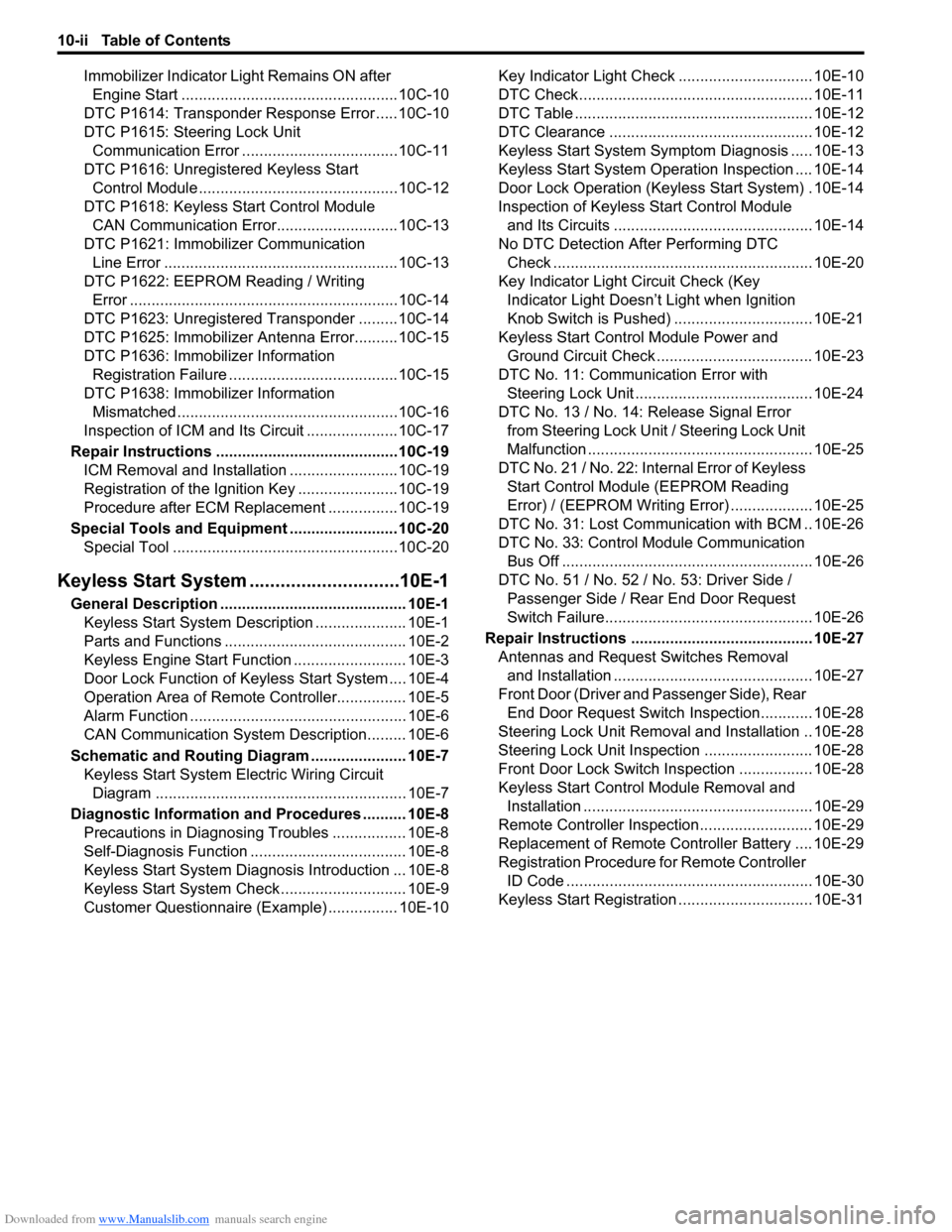
Downloaded from www.Manualslib.com manuals search engine 10-ii Table of Contents
Immobilizer Indicator Light Remains ON after
Engine Start ..................................................10C-10
DTC P1614: Transponder Response Error .....10C-10
DTC P1615: Steering Lock Unit
Communication Error ....................................10C-11
DTC P1616: Unregistered Keyless Start
Control Module ..............................................10C-12
DTC P1618: Keyless Start Control Module
CAN Communication Error............................10C-13
DTC P1621: Immobilizer Communication
Line Error ......................................................10C-13
DTC P1622: EEPROM Reading / Writing
Error ..............................................................10C-14
DTC P1623: Unregistered Transponder .........10C-14
DTC P1625: Immobilizer Antenna Error..........10C-15
DTC P1636: Immobilizer Information
Registration Failure .......................................10C-15
DTC P1638: Immobilizer Information
Mismatched ...................................................10C-16
Inspection of ICM and Its Circuit .....................10C-17
Repair Instructions ..........................................10C-19
ICM Removal and Installation .........................10C-19
Registration of the Ignition Key .......................10C-19
Procedure after ECM Replacement ................10C-19
Special Tools and Equipment .........................10C-20
Special Tool ....................................................10C-20
Keyless Start System .............................10E-1
General Description ........................................... 10E-1
Keyless Start System Description ..................... 10E-1
Parts and Functions .......................................... 10E-2
Keyless Engine Start Function .......................... 10E-3
Door Lock Function of Keyless Start System .... 10E-4
Operation Area of Remote Controller................ 10E-5
Alarm Function .................................................. 10E-6
CAN Communication System Description......... 10E-6
Schematic and Routing Diagram ...................... 10E-7
Keyless Start System Electric Wiring Circuit
Diagram .......................................................... 10E-7
Diagnostic Information and Procedures .......... 10E-8
Precautions in Diagnosing Troubles ................. 10E-8
Self-Diagnosis Function .................................... 10E-8
Keyless Start System Diagnosis Introduction ... 10E-8
Keyless Start System Check ............................. 10E-9
Customer Questionnaire (Example) ................ 10E-10Key Indicator Light Check ............................... 10E-10
DTC Check...................................................... 10E-11
DTC Table ....................................................... 10E-12
DTC Clearance ............................................... 10E-12
Keyless Start System Symptom Diagnosis ..... 10E-13
Keyless Start System Operation Inspection .... 10E-14
Door Lock Operation (Keyless Start System) . 10E-14
Inspection of Keyless Start Control Module
and Its Circuits .............................................. 10E-14
No DTC Detection After Performing DTC
Check ............................................................ 10E-20
Key Indicator Light Circuit Check (Key
Indicator Light Doesn’t Light when Ignition
Knob Switch is Pushed) ................................ 10E-21
Keyless Start Control Module Power and
Ground Circuit Check .................................... 10E-23
DTC No. 11: Communication Error with
Steering Lock Unit ......................................... 10E-24
DTC No. 13 / No. 14: Release Signal Error
from Steering Lock Unit / Steering Lock Unit
Malfunction .................................................... 10E-25
DTC No. 21 / No. 22: Internal Error of Keyless
Start Control Module (EEPROM Reading
Error) / (EEPROM Writing Error) ................... 10E-25
DTC No. 31: Lost Communication with BCM .. 10E-26
DTC No. 33: Control Module Communication
Bus Off .......................................................... 10E-26
DTC No. 51 / No. 52 / No. 53: Driver Side /
Passenger Side / Rear End Door Request
Switch Failure................................................ 10E-26
Repair Instructions .......................................... 10E-27
Antennas and Request Switches Removal
and Installation .............................................. 10E-27
Front Door (Driver and Passenger Side), Rear
End Door Request Switch Inspection............ 10E-28
Steering Lock Unit Removal and Installation .. 10E-28
Steering Lock Unit Inspection ......................... 10E-28
Front Door Lock Switch Inspection ................. 10E-28
Keyless Start Control Module Removal and
Installation ..................................................... 10E-29
Remote Controller Inspection.......................... 10E-29
Replacement of Remote Controller Battery .... 10E-29
Registration Procedure for Remote Controller
ID Code ......................................................... 10E-30
Keyless Start Registration ............................... 10E-31
Page 1501 of 1556
Downloaded from www.Manualslib.com manuals search engine Body Electrical Control System: 10B-28
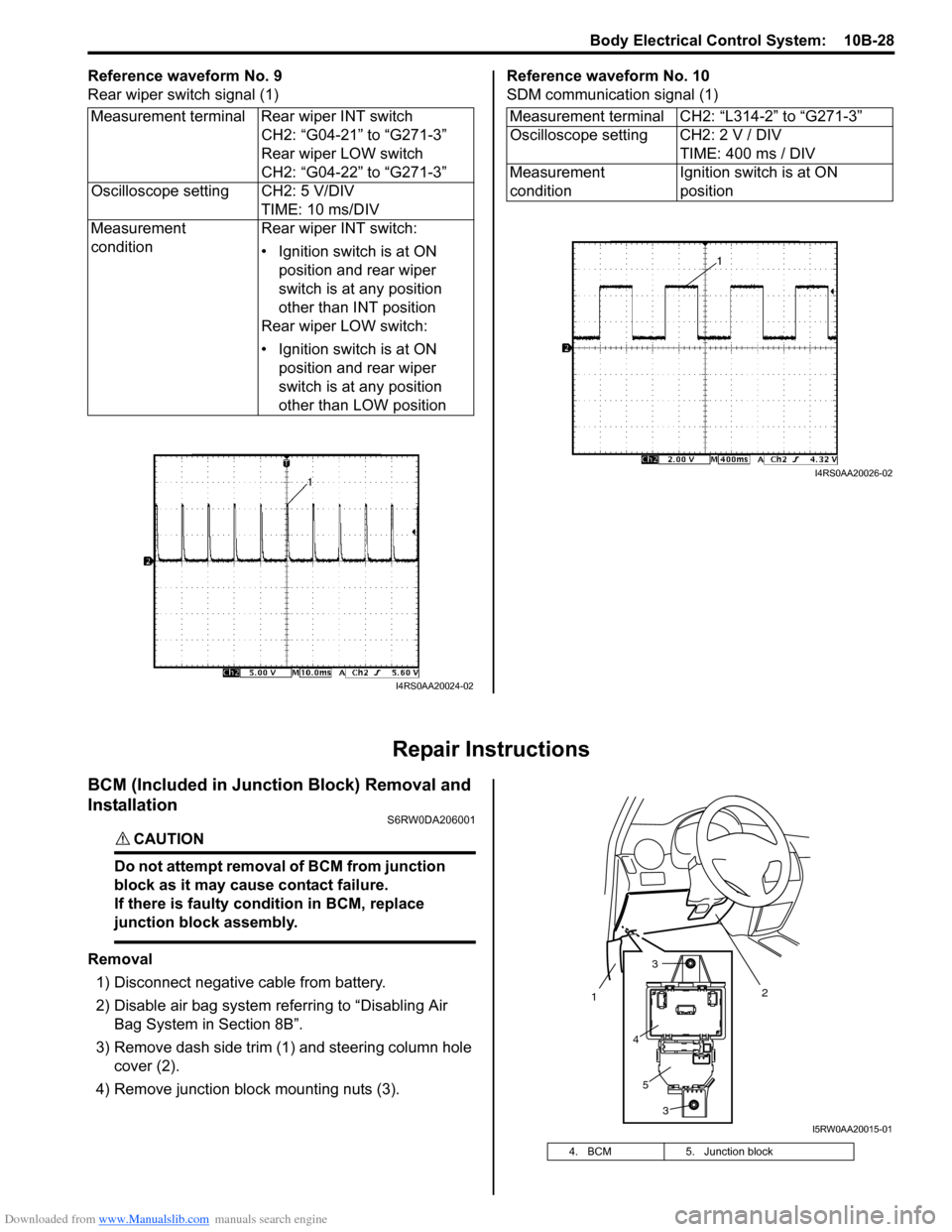
Reference waveform No. 9
Rear wiper switch signal (1)Reference waveform No. 10
SDM communication signal (1)
Repair Instructions
BCM (Included in Junction Block) Removal and
Installation
S6RW0DA206001
CAUTION!
Do not attempt removal of BCM from junction
block as it may cause contact failure.
If there is faulty condition in BCM, replace
junction block assembly.
Removal
1) Disconnect negative cable from battery.
2) Disable air bag system referring to “Disabling Air
Bag System in Section 8B”.
3) Remove dash side trim (1) and steering column hole
cover (2).
4) Remove junction block mounting nuts (3). Measurement terminal Rear wiper INT switch
CH2: “G04-21” to “G271-3”
Rear wiper LOW switch
CH2: “G04-22” to “G271-3”
Oscilloscope setting CH2: 5 V/DIV
TIME: 10 ms/DIV
Measurement
conditionRear wiper INT switch:
• Ignition switch is at ON
position and rear wiper
switch is at any position
other than INT position
Rear wiper LOW switch:
• Ignition switch is at ON
position and rear wiper
switch is at any position
other than LOW position
I4RS0AA20024-02
Measurement terminal CH2: “L314-2” to “G271-3”
Oscilloscope setting CH2: 2 V / DIV
TIME: 400 ms / DIV
Measurement
conditionIgnition switch is at ON
position
I4RS0AA20026-02
4. BCM 5. Junction block
2
1
3
3
4
5
I5RW0AA20015-01
Page 1506 of 1556
Downloaded from www.Manualslib.com manuals search engine 10C-4 Immobilizer Control System:
BLK/WHT
BLK/ORN12V
G17-1
G17-2
12V
5V
12V
12VYEL/RED
YEL/BLK
G17-4
G17-3
5V
BRNBRN/YELBLK/YEL
1 2
22
2 34
251014
15
1 2 3
4 G17
[A]
5
6
G16-20 G16-29 G16-30 G146-3 G146-7 G146-8
WHT/RED
5V
5V
9
G16-18G16-19 E01-13
E01-28
BLU
RED
WHTE08-12
E08-1E01-18
E01-3
RED
WHTE08-13
E08-2
WHT
RED
G05-4
G05-2
12V
G05-35 8
11
G17-5WHT 76
G17-6WHT/RED
17
REDWHT
REDWHT
G241-10 G241-7
IG1
18
WHT
REDG05-1
G05-3
16 [C]
I6RW0DA30002-01
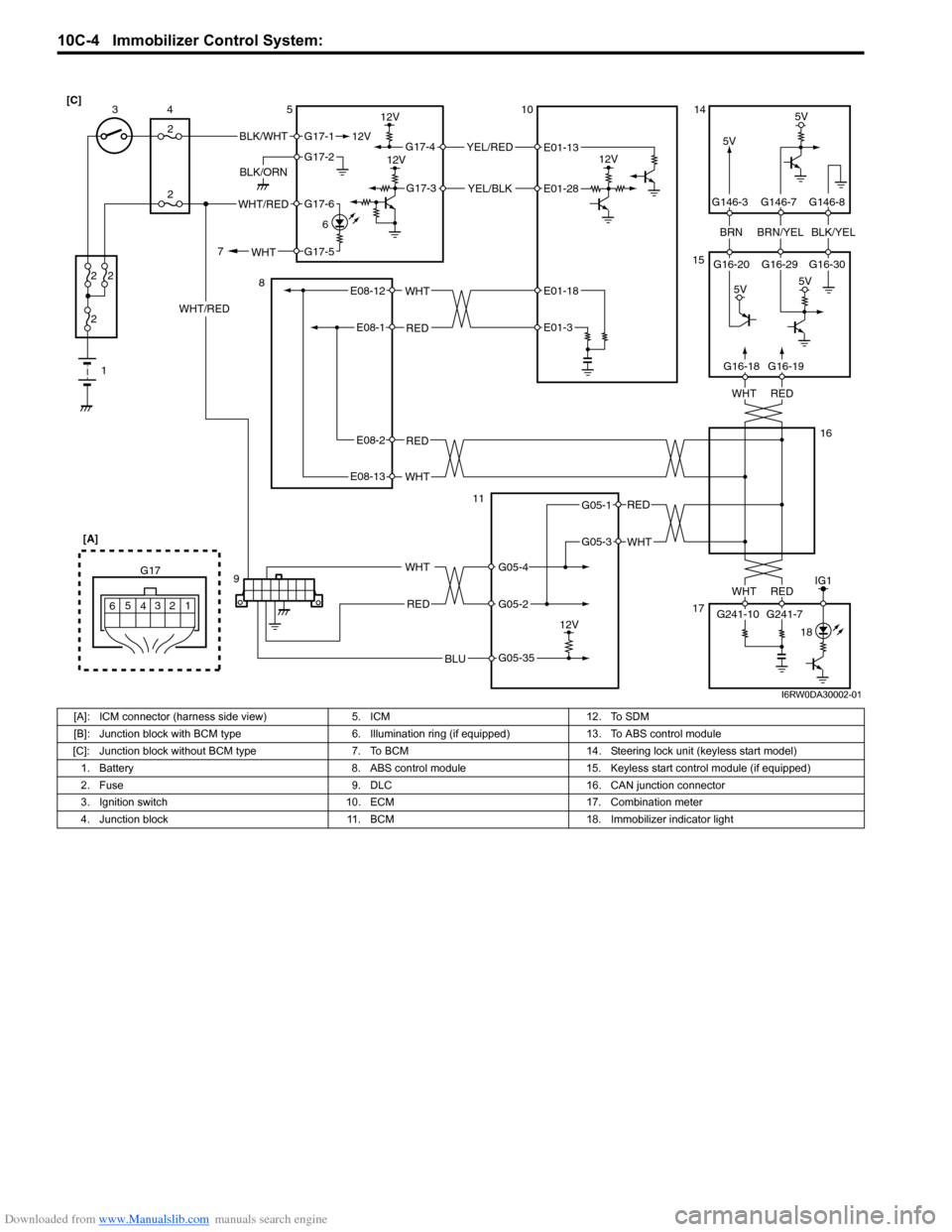
[A]: ICM connector (harness side view) 5. ICM 12. To SDM
[B]: Junction block with BCM type 6. Illumination ring (if equipped) 13. To ABS control module
[C]: Junction block without BCM type 7. To BCM 14. Steering lock unit (keyless start model)
1. Battery 8. ABS control module 15. Keyless start control module (if equipped)
2. Fuse 9. DLC 16. CAN junction connector
3. Ignition switch 10. ECM 17. Combination meter
4. Junction block 11. BCM 18. Immobilizer indicator light
Page 1509 of 1556
Downloaded from www.Manualslib.com manuals search engine Immobilizer Control System: 10C-7
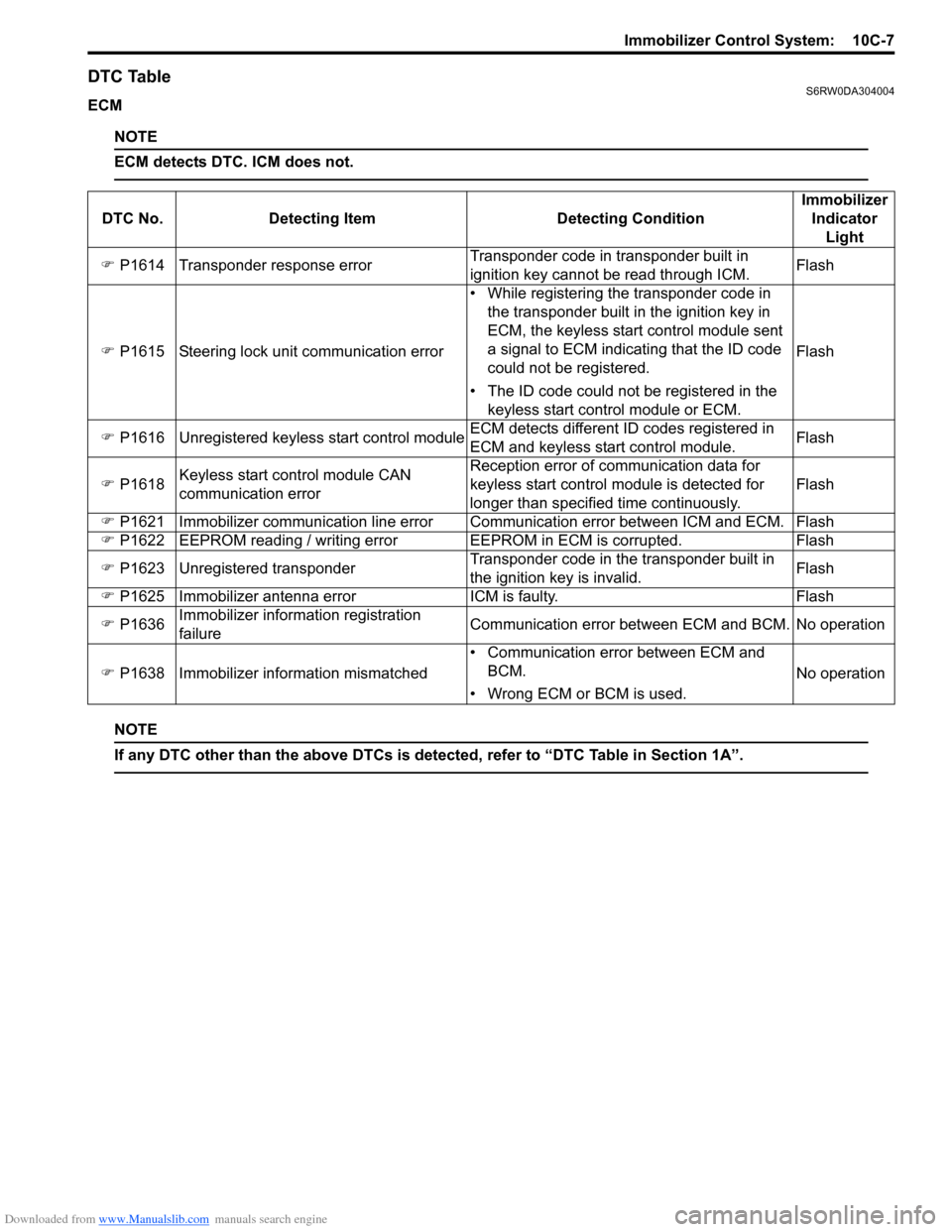
DTC TableS6RW0DA304004
ECM
NOTE
ECM detects DTC. ICM does not.
NOTE
If any DTC other than the above DTCs is detected, refer to “DTC Table in Section 1A”.
DTC No. Detecting Item Detecting ConditionImmobilizer
Indicator
Light
) P1614 Transponder response errorTransponder code in transponder built in
ignition key cannot be read through ICM.Flash
) P1615 Steering lock unit communication error• While registering the transponder code in
the transponder built in the ignition key in
ECM, the keyless start control module sent
a signal to ECM indicating that the ID code
could not be registered.
• The ID code could not be registered in the
keyless start control module or ECM.Flash
) P1616 Unregistered keyless start control moduleECM detects different ID codes registered in
ECM and keyless start control module.Flash
) P1618Keyless start control module CAN
communication errorReception error of communication data for
keyless start control module is detected for
longer than specified time continuously.Flash
) P1621 Immobilizer communication line error Communication error between ICM and ECM. Flash
) P1622 EEPROM reading / writing error EEPROM in ECM is corrupted. Flash
) P1623 Unregistered transponderTransponder code in the transponder built in
the ignition key is invalid.Flash
) P1625 Immobilizer antenna error ICM is faulty. Flash
) P1636Immobilizer information registration
failureCommunication error between ECM and BCM. No operation
) P1638 Immobilizer information mismatched• Communication error between ECM and
BCM.
• Wrong ECM or BCM is used.No operation
Page 1513 of 1556
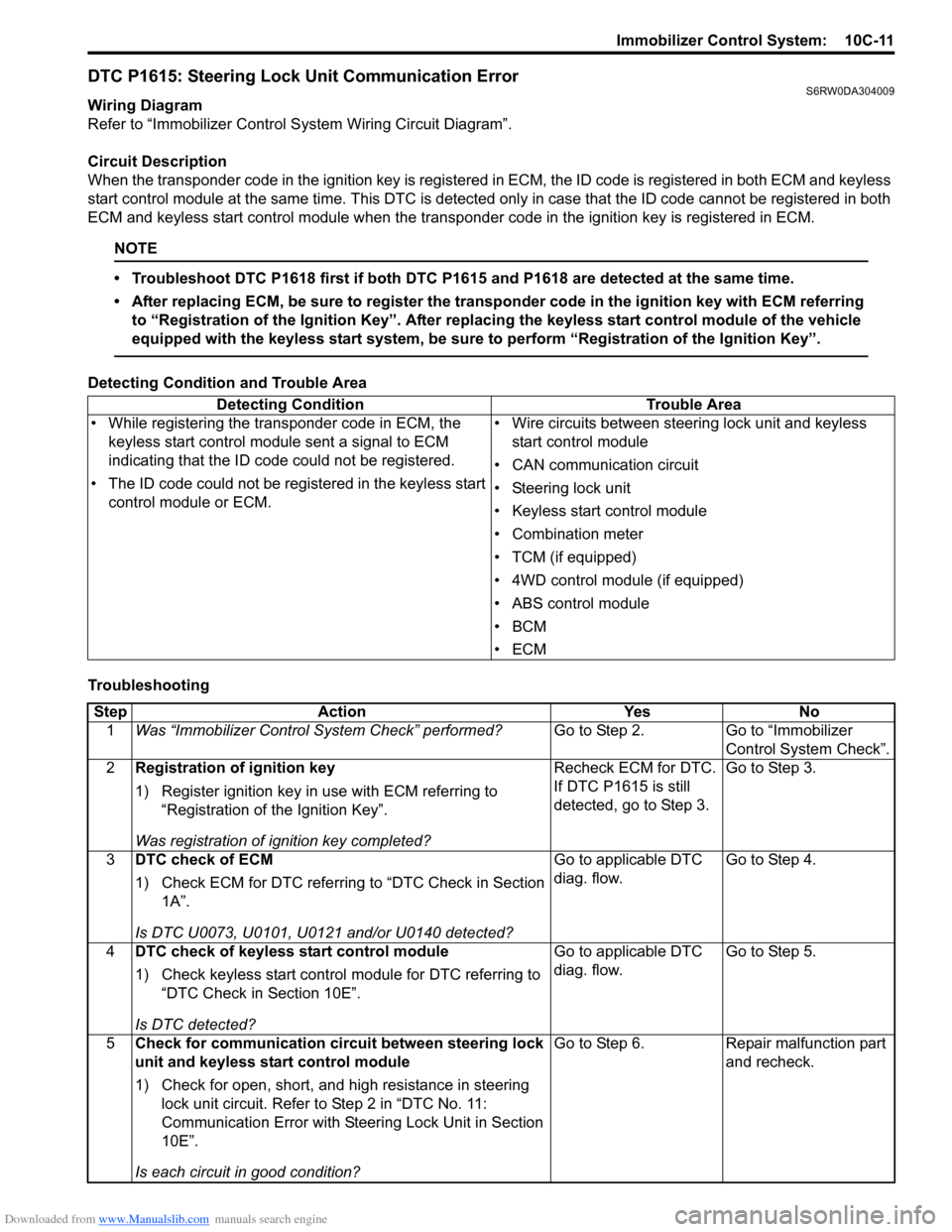
Downloaded from www.Manualslib.com manuals search engine Immobilizer Control System: 10C-11
DTC P1615: Steering Lock Unit Communication ErrorS6RW0DA304009
Wiring Diagram
Refer to “Immobilizer Control System Wiring Circuit Diagram”.
Circuit Description
When the transponder code in the ignition key is registered in ECM, the ID code is registered in both ECM and keyless
start control module at the same time. This DTC is detected only in case that the ID code cannot be registered in both
ECM and keyless start control module when the transponder code in the ignition key is registered in ECM.
NOTE
• Troubleshoot DTC P1618 first if both DTC P1615 and P1618 are detected at the same time.
• After replacing ECM, be sure to register the transponder code in the ignition key with ECM referring
to “Registration of the Ignition Key”. After replacing the keyless start control module of the vehicle
equipped with the keyless start system, be sure to perform “Registration of the Ignition Key”.
Detecting Condition and Trouble Area
TroubleshootingDetecting Condition Trouble Area
• While registering the transponder code in ECM, the
keyless start control module sent a signal to ECM
indicating that the ID code could not be registered.
• The ID code could not be registered in the keyless start
control module or ECM.• Wire circuits between steering lock unit and keyless
start control module
• CAN communication circuit
• Steering lock unit
• Keyless start control module
• Combination meter
• TCM (if equipped)
• 4WD control module (if equipped)
• ABS control module
•BCM
•ECM
Step Action Yes No
1Was “Immobilizer Control System Check” performed?Go to Step 2. Go to “Immobilizer
Control System Check”.
2Registration of ignition key
1) Register ignition key in use with ECM referring to
“Registration of the Ignition Key”.
Was registration of ignition key completed?Recheck ECM for DTC.
If DTC P1615 is still
detected, go to Step 3.Go to Step 3.
3DTC check of ECM
1) Check ECM for DTC referring to “DTC Check in Section
1A”.
Is DTC U0073, U0101, U0121 and/or U0140 detected?Go to applicable DTC
diag. flow.Go to Step 4.
4DTC check of keyless start control module
1) Check keyless start control module for DTC referring to
“DTC Check in Section 10E”.
Is DTC detected?Go to applicable DTC
diag. flow.Go to Step 5.
5Check for communication circuit between steering lock
unit and keyless start control module
1) Check for open, short, and high resistance in steering
lock unit circuit. Refer to Step 2 in “DTC No. 11:
Communication Error with Steering Lock Unit in Section
10E”.
Is each circuit in good condition?Go to Step 6. Repair malfunction part
and recheck.