page 20 TESLA MODEL 3 2019 Owner's Manual (Europe)
[x] Cancel search | Manufacturer: TESLA, Model Year: 2019, Model line: MODEL 3, Model: TESLA MODEL 3 2019Pages: 179, PDF Size: 9.18 MB
Page 3 of 179
Overview
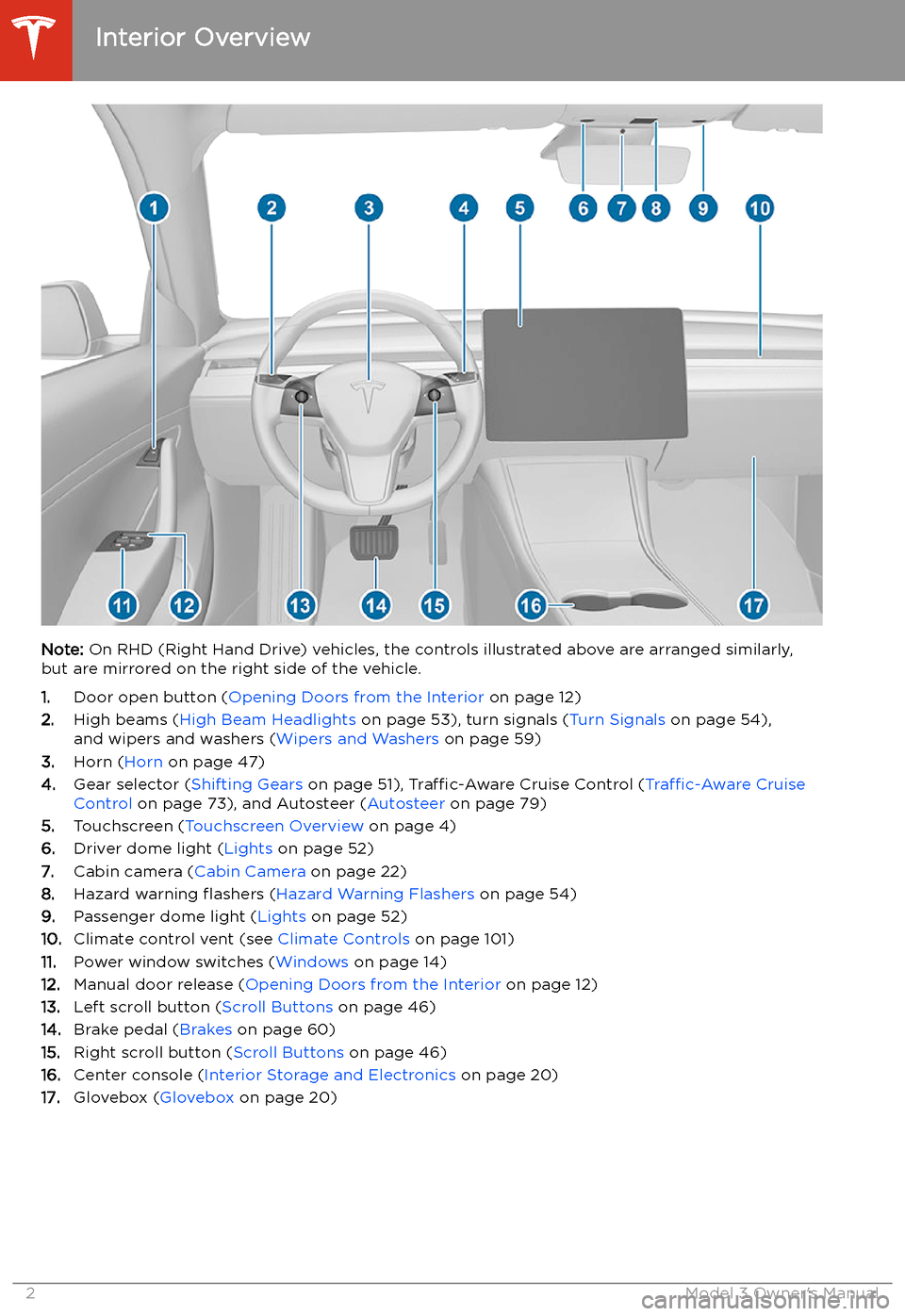
Interior Overview
Note: On RHD (Right Hand Drive) vehicles, the controls illustrated above are arranged similarly,
but are mirrored on the right side of the vehicle.
1. Door open button ( Opening Doors from the Interior on page 12)
2. High beams ( High Beam Headlights on page 53), turn signals ( Turn Signals on page 54),
and wipers and washers ( Wipers and Washers on page 59)
3. Horn ( Horn on page 47)
4. Gear selector ( Shifting Gears on page 51), Traffic-Aware Cruise Control ( Traffic-Aware Cruise
Control on page 73), and Autosteer ( Autosteer on page 79)
5. Touchscreen ( Touchscreen Overview on page 4)
6. Driver dome light ( Lights on page 52)
7. Cabin camera ( Cabin Camera on page 22)
8. Hazard warning
Page 4 of 179
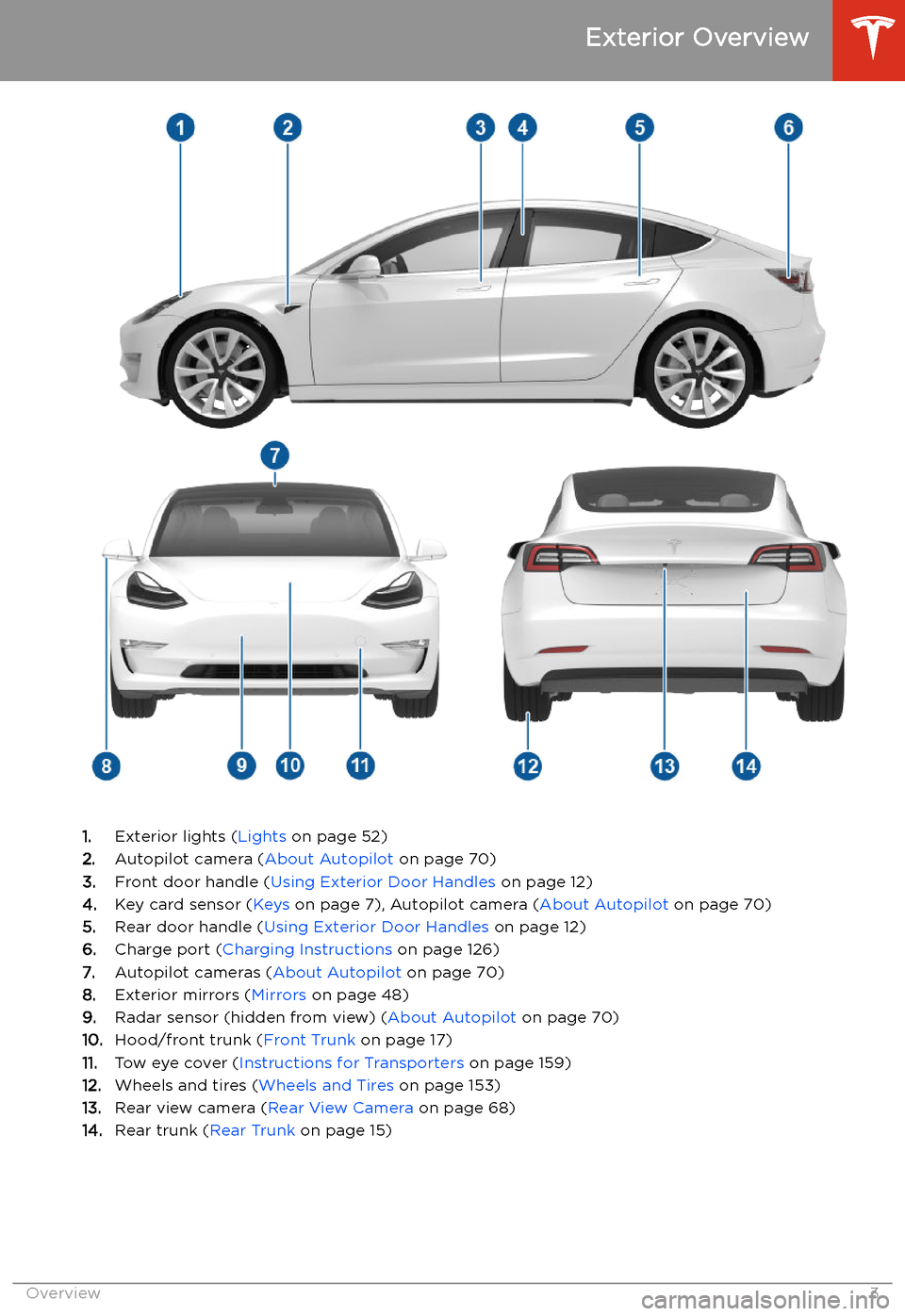
Exterior Overview
1.Exterior lights ( Lights on page 52)
2. Autopilot camera ( About Autopilot on page 70)
3. Front door handle ( Using Exterior Door Handles on page 12)
4. Key card sensor ( Keys on page 7), Autopilot camera ( About Autopilot on page 70)
5. Rear door handle ( Using Exterior Door Handles on page 12)
6. Charge port ( Charging Instructions on page 126)
7. Autopilot cameras ( About Autopilot on page 70)
8. Exterior mirrors ( Mirrors on page 48)
9. Radar sensor (hidden from view) ( About Autopilot on page 70)
10. Hood/front trunk ( Front Trunk on page 17)
11. Tow eye cover ( Instructions for Transporters on page 159)
12. Wheels and tires ( Wheels and Tires on page 153)
13. Rear view camera ( Rear View Camera on page 68)
14. Rear trunk ( Rear Trunk on page 15)
Exterior Overview
Overview3
Page 5 of 179
Touchscreen Overview
The features and information you need to drive Model 3 are displayed on the touchscreen. When
driving, the touchscreen displays driving-related information such as driving speed, vehicle range,
warnings, etc. The touchscreen is used to control many features that, in traditional cars, are controlled using physical buttons (for example, adjusting mirrors). You can also use the
touchscreen to customize Model 3 to suit your preferences.
Warning: Always pay attention to road and traffic conditions when driving. To minimize driver
distraction and ensure the safety of vehicle occupants as well as other road users, avoid using
the touchscreen to adjust settings while the vehicle is in motion.
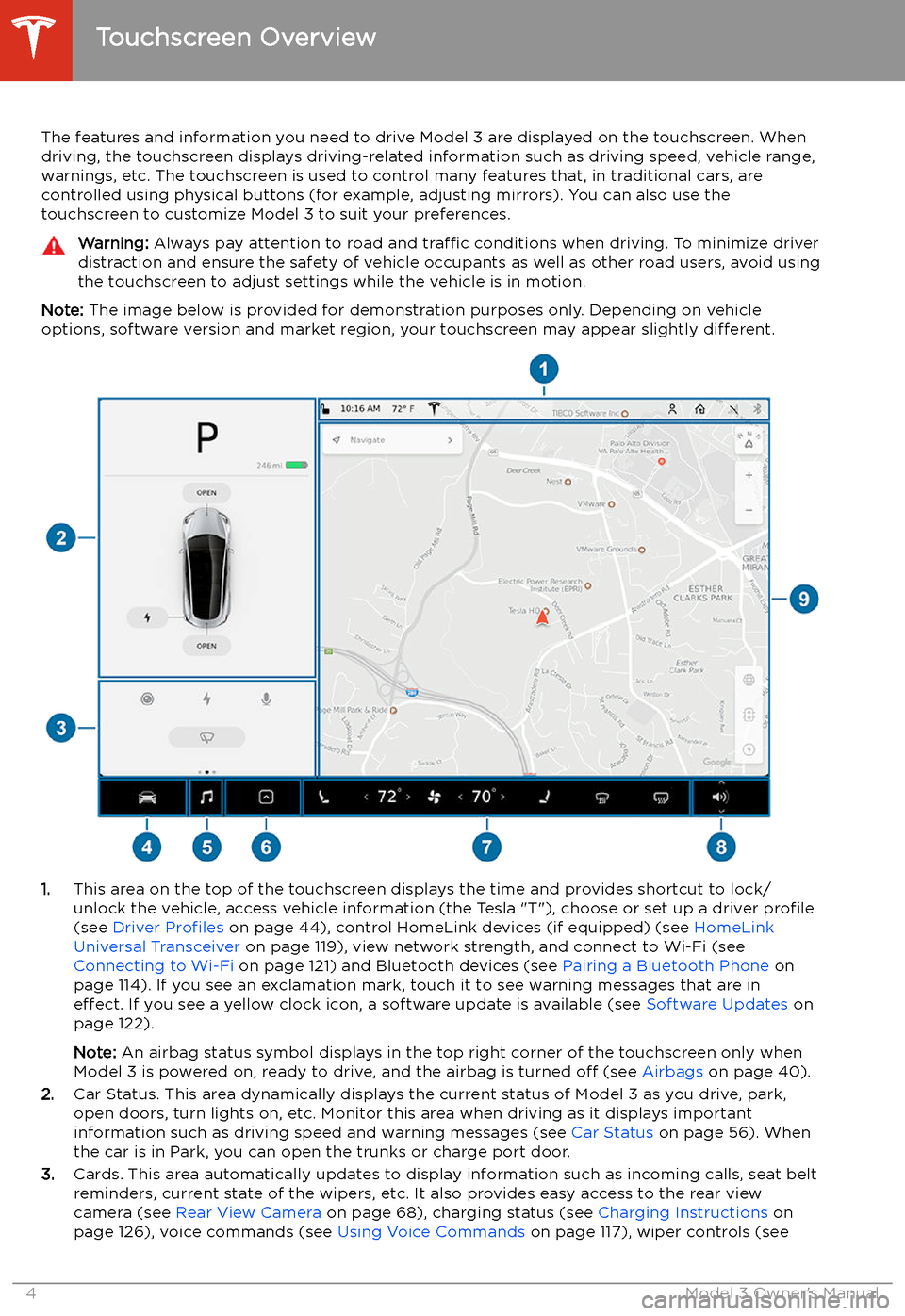
Note: The image below is provided for demonstration purposes only. Depending on vehicle
options, software version and market region, your touchscreen may appear slightly different.
1.This area on the top of the touchscreen displays the time and provides shortcut to lock/
unlock the vehicle, access vehicle information (the Tesla "T"), choose or set up a driver profile
(see Driver Profiles on page 44), control HomeLink devices (if equipped) (see HomeLink
Universal Transceiver on page 119), view network strength, and connect to Wi-Fi (see
Connecting to Wi-Fi on page 121) and Bluetooth devices (see Pairing a Bluetooth Phone on
page 114). If you see an exclamation mark, touch it to see warning messages that are in effect. If you see a yellow clock icon, a software update is available (see Software Updates on
page 122).
Note: An airbag status symbol displays in the top right corner of the touchscreen only when
Model 3 is powered on, ready to drive, and the airbag is turned off (see Airbags on page 40).
2. Car Status. This area dynamically displays the current status of Model 3 as you drive, park,
open doors, turn lights on, etc. Monitor this area when driving as it displays important
information such as driving speed and warning messages (see Car Status on page 56). When
the car is in Park, you can open the trunks or charge port door.
3. Cards. This area automatically updates to display information such as incoming calls, seat belt
reminders, current state of the wipers, etc. It also provides easy access to the rear view camera (see Rear View Camera on page 68), charging status (see Charging Instructions on
page 126), voice commands (see Using Voice Commands on page 117), wiper controls (see
Touchscreen Overview
4Model 3 Owner
Page 6 of 179
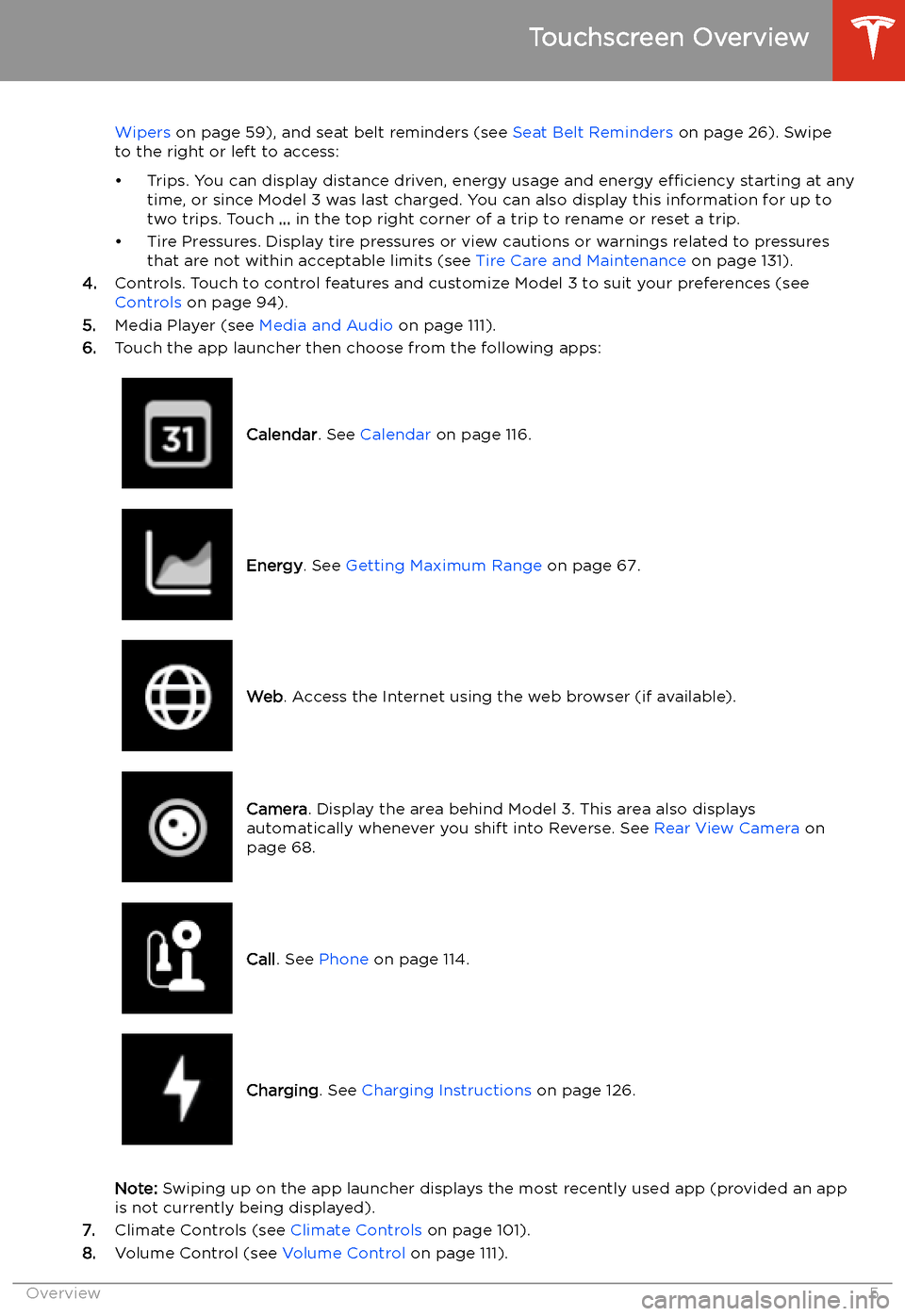
Wipers on page 59), and seat belt reminders (see Seat Belt Reminders on page 26). Swipe
to the right or left to access:
Page 7 of 179
9.The map displays on the touchscreen at all times (see Maps and Navigation on page 106).
Note: When you touch Controls, choose an app, or expand Media Player, the window displays
on top of the map. To close the Controls window, touch Controls again or touch the X in the
top corner of the window. To close an app, touch the X in the top corner of the window. To
close Media Player, drag it all the way down to the bottom of the touchscreen or touch the icon again.
The Tesla "T"
Touch the Tesla "T" at the top center of the touchscreen to display:
Page 10 of 179
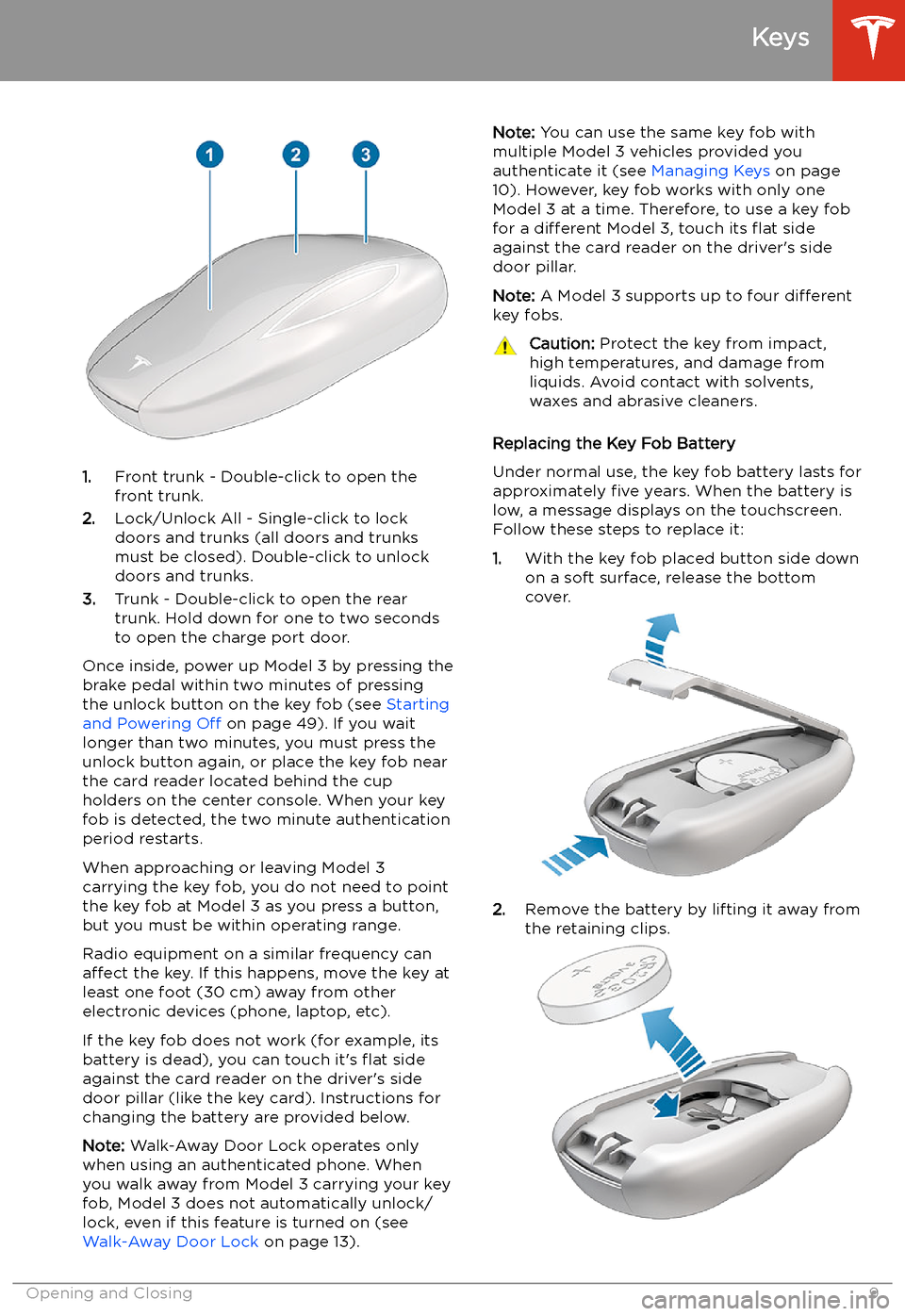
1.Front trunk - Double-click to open the
front trunk.
2. Lock/Unlock All - Single-click to lock
doors and trunks (all doors and trunks
must be closed). Double-click to unlock doors and trunks.
3. Trunk - Double-click to open the rear
trunk. Hold down for one to two seconds
to open the charge port door.
Once inside, power up Model 3 by pressing the
brake pedal within two minutes of pressing
the unlock button on the key fob (see Starting
and Powering Off on page 49). If you wait
longer than two minutes, you must press the
unlock button again, or place the key fob near
the card reader located behind the cup holders on the center console. When your key
fob is detected, the two minute authentication period restarts.
When approaching or leaving Model 3
carrying the key fob, you do not need to point the key fob at Model 3 as you press a button,
but you must be within operating range.
Radio equipment on a similar frequency can
affect the key. If this happens, move the key at
least one foot (30 cm) away from other electronic devices (phone, laptop, etc).
If the key fob does not work (for example, its
battery is dead), you can touch it
Page 13 of 179
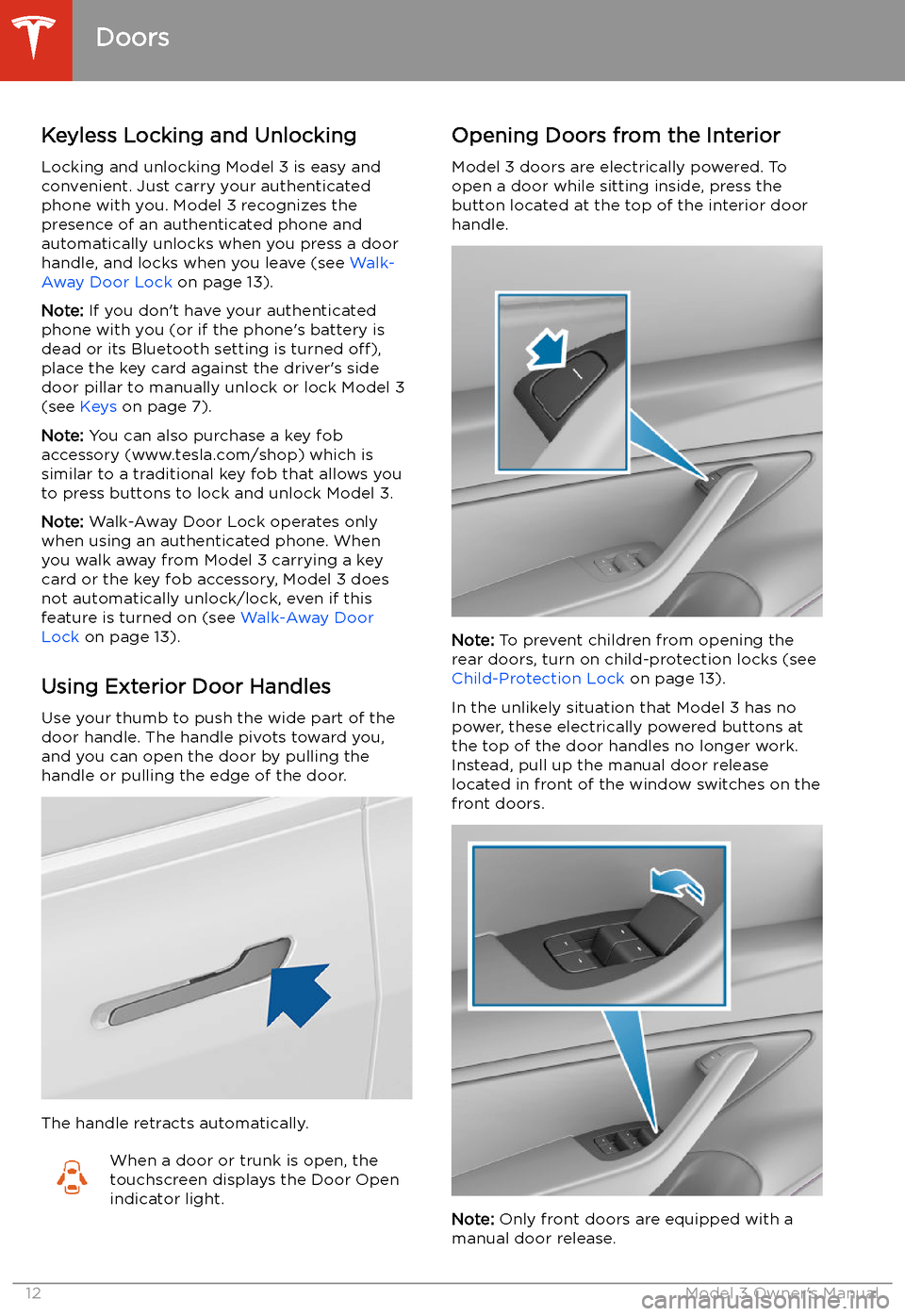
Doors
Keyless Locking and Unlocking Locking and unlocking Model 3 is easy andconvenient. Just carry your authenticated
phone with you. Model 3 recognizes the presence of an authenticated phone and
automatically unlocks when you press a door
handle, and locks when you leave (see Walk-
Away Door Lock on page 13).
Note: If you don
Page 18 of 179
Front Trunk
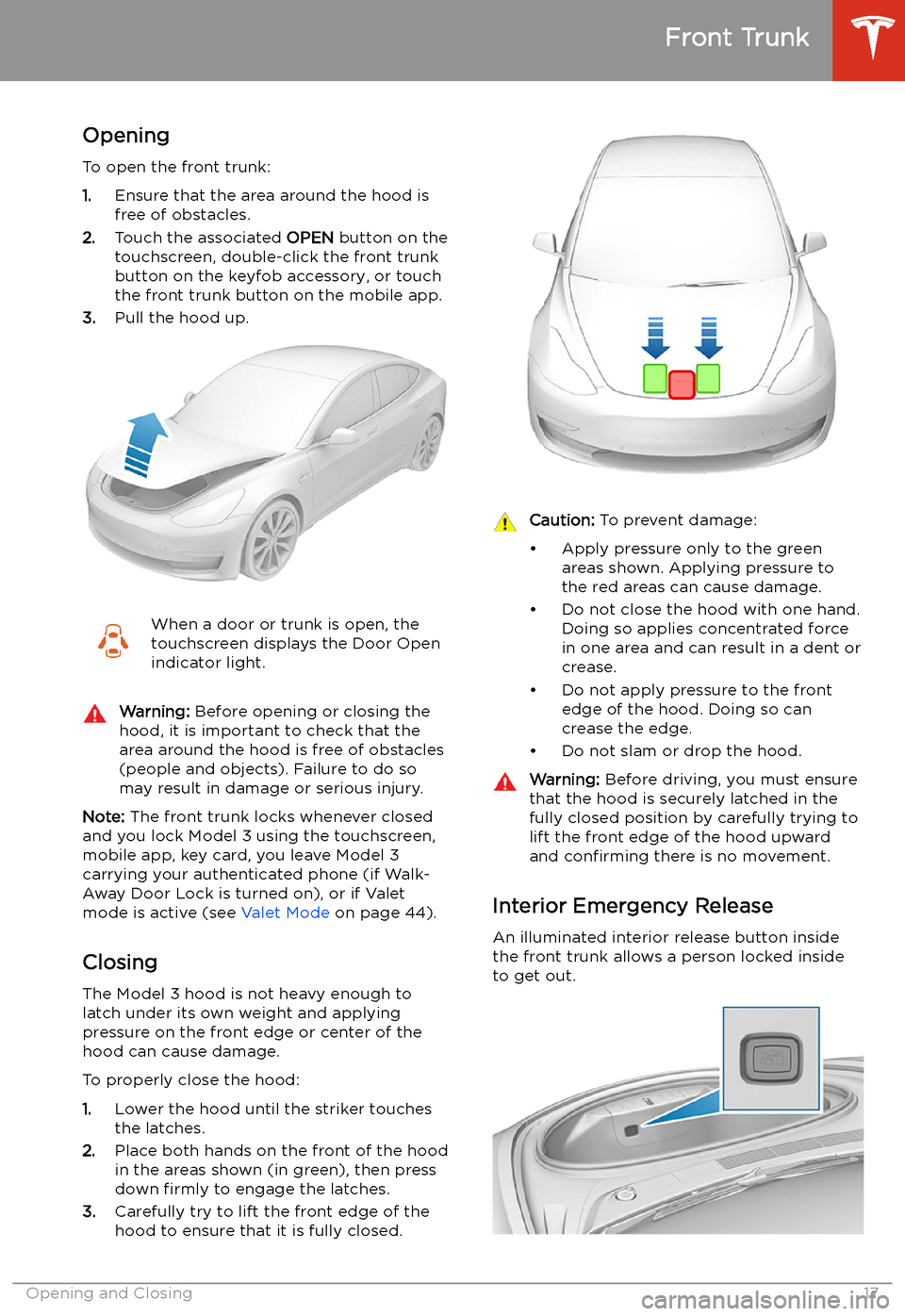
Opening
To open the front trunk:
1. Ensure that the area around the hood is
free of obstacles.
2. Touch the associated OPEN button on the
touchscreen, double-click the front trunk
button on the keyfob accessory, or touch
the front trunk button on the mobile app.
3. Pull the hood up.
When a door or trunk is open, the
touchscreen displays the Door Open indicator light.Warning: Before opening or closing the
hood, it is important to check that the area around the hood is free of obstacles
(people and objects). Failure to do so
may result in damage or serious injury.
Note: The front trunk locks whenever closed
and you lock Model 3 using the touchscreen,
mobile app, key card, you leave Model 3
carrying your authenticated phone (if Walk-
Away Door Lock is turned on), or if Valet
mode is active (see Valet Mode on page 44).
Closing
The Model 3 hood is not heavy enough to
latch under its own weight and applying
pressure on the front edge or center of the
hood can cause damage.
To properly close the hood:
1. Lower the hood until the striker touches
the latches.
2. Place both hands on the front of the hood
in the areas shown (in green), then press
down firmly to engage the latches.
3. Carefully try to lift the front edge of the
hood to ensure that it is fully closed.
Caution: To prevent damage:
Page 21 of 179
Interior Storage and Electronics
Glovebox
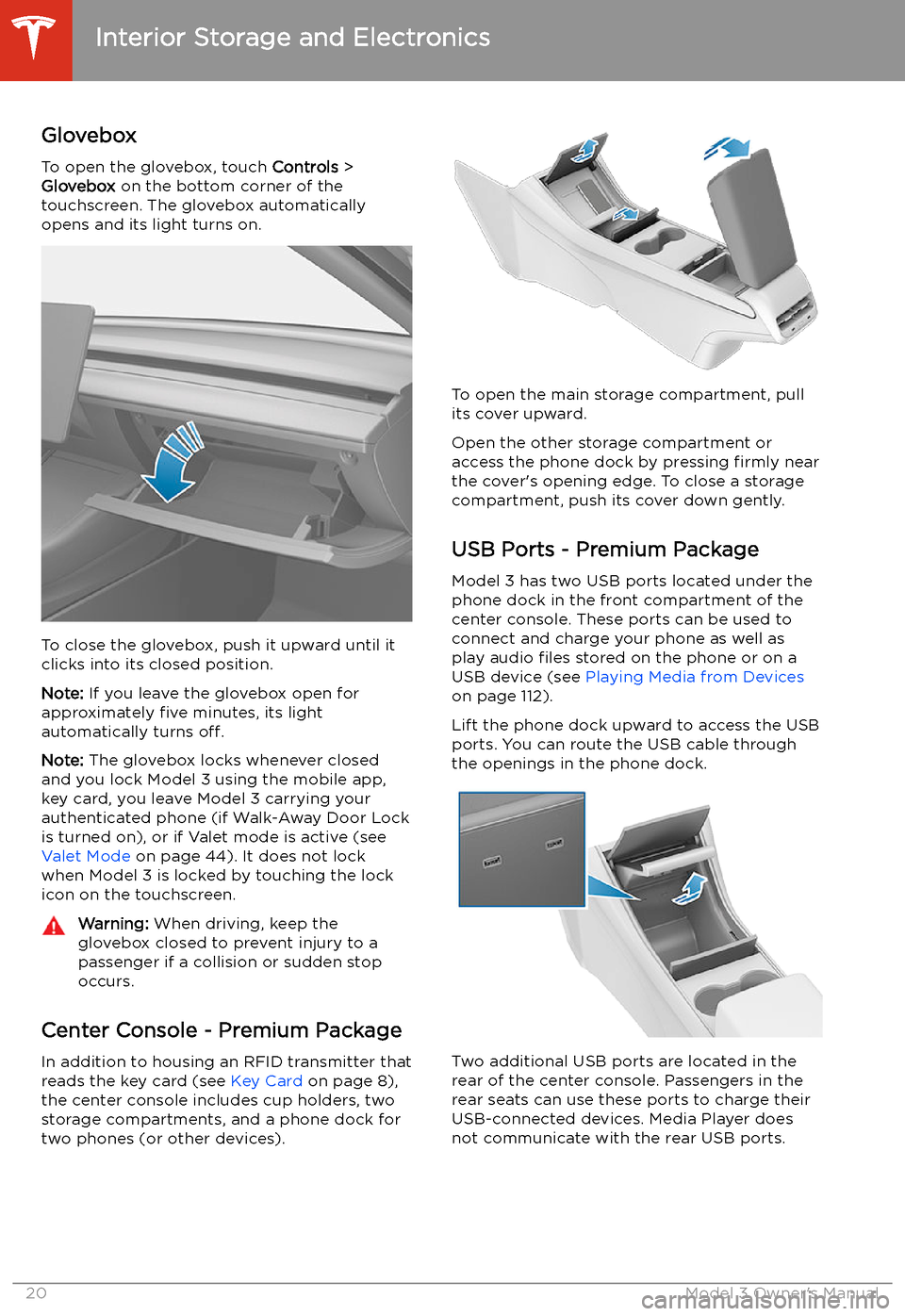
To open the glovebox, touch Controls >
Glovebox on the bottom corner of the
touchscreen. The glovebox automatically
opens and its light turns on.
To close the glovebox, push it upward until it
clicks into its closed position.
Note: If you leave the glovebox open for
approximately five minutes, its light
automatically turns off.
Note: The glovebox locks whenever closed
and you lock Model 3 using the mobile app,
key card, you leave Model 3 carrying your authenticated phone (if Walk-Away Door Lock
is turned on), or if Valet mode is active (see Valet Mode on page 44). It does not lock
when Model 3 is locked by touching the lock
icon on the touchscreen.
Warning: When driving, keep the
glovebox closed to prevent injury to a
passenger if a collision or sudden stop occurs.
Center Console - Premium Package
In addition to housing an RFID transmitter that reads the key card (see Key Card on page 8),
the center console includes cup holders, two storage compartments, and a phone dock for
two phones (or other devices).
To open the main storage compartment, pull its cover upward.
Open the other storage compartment or
access the phone dock by pressing firmly near
the cover
Page 29 of 179
2.With the belt unfastened, unreel the
webbing to its limit. Check that unreeling
is free from snags, and visually check the
webbing for wear. Allow the webbing to retract, checking that retraction is smooth
and complete.
3. With the webbing half unreeled, hold the
tongue plate and pull forward quickly. The
mechanism should lock automatically and
prevent further unreeling.
If a seat belt fails any of these tests, contact
Tesla immediately.
For information about cleaning seat belts, see
Seat Belts on page 138.
Seat Belt WarningsWarning: Seat belts should be worn by all
occupants at all times, even if driving for
a very short distance. Failure to do so
increases the risk of injury or death if a collision occurs.Warning: Secure small children in a
suitable child safety seat (see Child
Safety Seats ). Always follow the child
safety seat manufacturer