ECU TESLA MODEL S 2014 (Europe) User Guide
[x] Cancel search | Manufacturer: TESLA, Model Year: 2014, Model line: MODEL S, Model: TESLA MODEL S 2014Pages: 152, PDF Size: 17.5 MB
Page 34 of 152
Tesla Built In Rear Facing Child SeatsTesla Built In Rear Facing Child Seats
3.12MODEL S OWNERS MANUAL
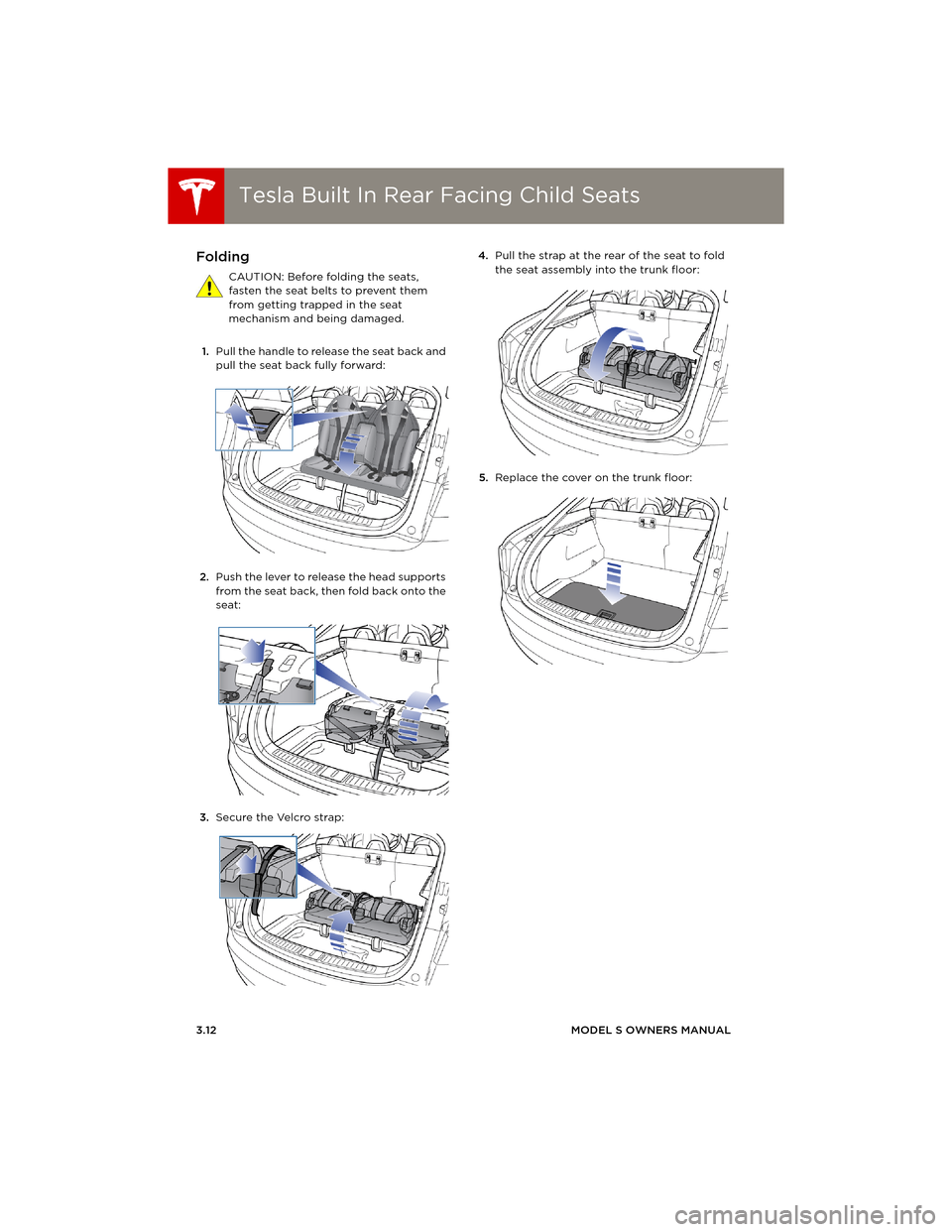
Folding
CAUTION: Before folding the seats,
fasten the seat belts to prevent them
from getting trapped in the seat
mechanism and being damaged.
1.Pull the handle to release the seat back and
pull the seat back fully forward:
2.Push the lever to release the head supports
from the seat back, then fold back onto the
seat:
3.Secure the Velcro strap:4.Pull the strap at the rear of the seat to fold
the seat assembly into the trunk floor:
5.Replace the cover on the trunk floor:
book.book Page 12 Friday, July 19, 2013 12:53 PM
Page 35 of 152
Tesla Built In Rear Facing Child Seats
SEATING AND SAFETY RESTRAINTS 3.13
Seating a Child
The Tesla built in rear facing child seats are child
restraint systems and are approved to United
Nations ECE Regulation R44.04 standards for
use by children in Mass Groups II and III,
weighing 15 - 36 kg. These seats must only be
used for children who are between 3 and 12
years old, and 98 - 135 cm tall.
Always ensure the top of the child’s head
cannot contact the vehicle and that the child is
seated comfortably with the seat belts
positioned and latched correctly. Follow all
instructions provided and do not use
supplemental child safety seats in these seats.
NOTE: To draw more air into the rear seating
areas, it is recommended that whenever a child
is seated in the Tesla built in rear facing child
seats, you set the climate control system to
draw outside air into Model S, instead of
recirculating the air. See page 5.9.
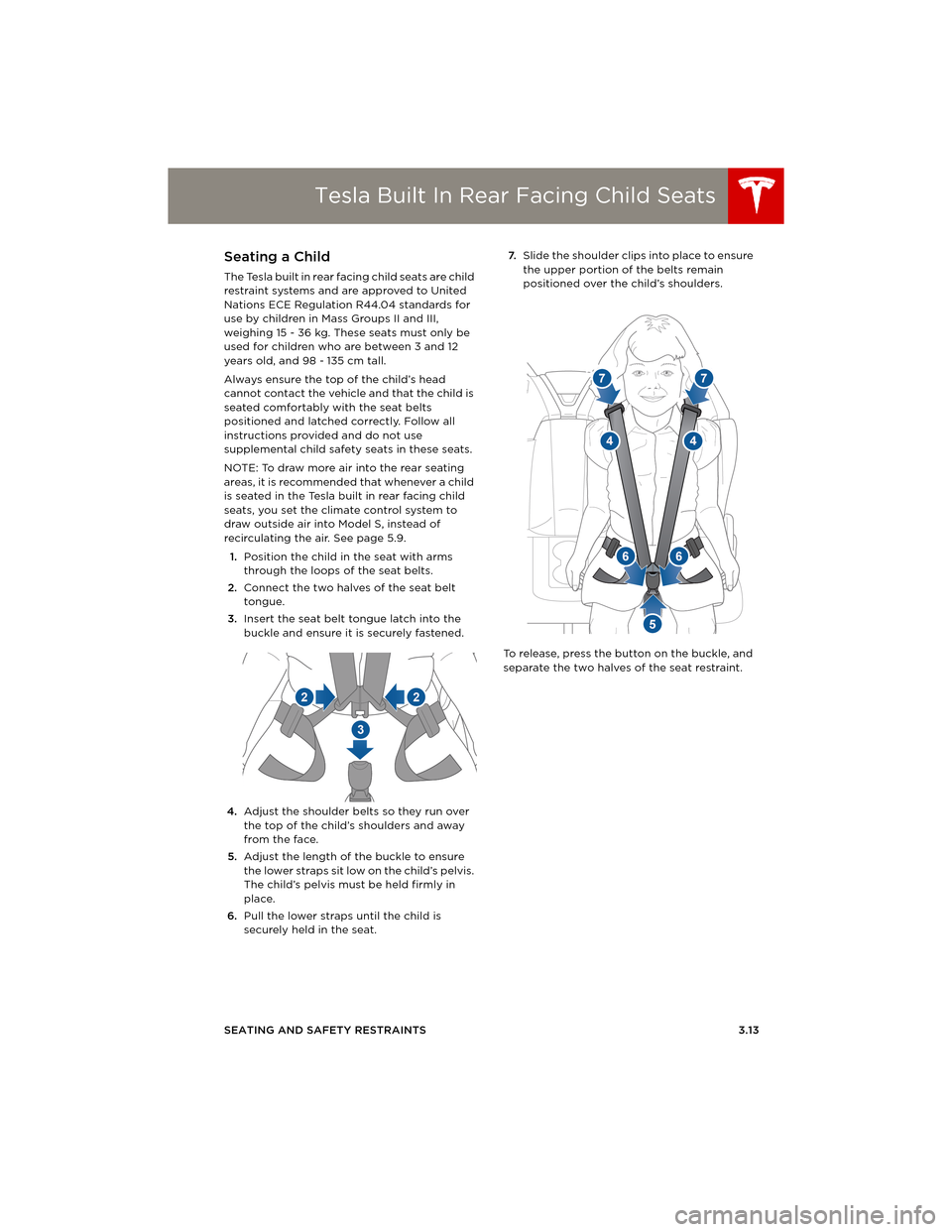
1.Position the child in the seat with arms
through the loops of the seat belts.
2.Connect the two halves of the seat belt
tongue.
3.Insert the seat belt tongue latch into the
buckle and ensure it is securely fastened.
4.Adjust the shoulder belts so they run over
the top of the child’s shoulders and away
from the face.
5.Adjust the length of the buckle to ensure
the lower straps sit low on the child’s pelvis.
The child’s pelvis must be held firmly in
place.
6.Pull the lower straps until the child is
securely held in the seat.7.Slide the shoulder clips into place to ensure
the upper portion of the belts remain
positioned over the child’s shoulders.
To release, press the button on the buckle, and
separate the two halves of the seat restraint.
book.book Page 13 Friday, July 19, 2013 12:53 PM
Page 36 of 152

Tesla Built In Rear Facing Child SeatsTesla Built In Rear Facing Child Seats
3.14MODEL S OWNERS MANUAL
Warnings - Tesla Child Seats
WARNING: The Tesla built in rear facing
seats are child restraint systems and are
approved to United Nations ECE Regulation
R44.04 standards for use by children in Mass
Groups II and III, weighing 15 - 36 kg. These
seats must only be used for children who are
between 3 and 12 years old, and
98 - 135 cm tall, provided the top of the child’s
head cannot contact the interior.
WARNING: Do not use supplemental
child restraint systems, including booster
seats, in the Tesla built in rear facing child seats.
WA R N I N G : A l ways e n s u re t h at t h e to p o f
the child’s head cannot touch the
headliner and that the child is seated
comfortably with the seat belts correctly
fastened.
WARNING: Follow all instructions and
heed all warnings related to the Tesla
built in rear facing child seats. Failure to do so
can compromise occupant safety.
WARNING: Read all safety warnings and
labels attached to the seats.
WARNING: Do not leave children
unattended in Model S, even if the child is
secured in a child safety seat or a Tesla built in
rear facing child seat. In hot weather, the
interior temperature can reach dangerous
levels that can result in dehydration, serious
injury or death.
WARNING: Do not remove o r replace the
fabric on a Tesla built in rear facing child
seat. The covers are an integral part of the
restraint’s performance and should not be
removed or replaced with any other type than
those supplied by Tesla.
WARNING: If the Tesla built in rear facing
child seats have been worn in an
accident, they must be inspected or replaced
by Tesla, even if damage is not obvious.
WARNING: Before allowing a child to ride
in the Tesla built in rear facing child seats,
check that the seat is securely held in the
upright position by trying to pull the seat back
toward you.WARNING: Do not remove the built in
rear facing child seats for any reason,
including cleaning. To ensure safety of
occupants, removal and installation must be
performed by qualified Tesla service
technicians.
WARNING: Do not make modifications or
additions that can interfere with the
operation of the Tesla built in rear facing child
seats.
WARNING: To prevent injury, ensure all
loose items (bags, luggage, etc) are
secured. In an accident, or during hard braking
and sharp turns, loose items could cause injury.
book.book Page 14 Friday, July 19, 2013 12:53 PM
Page 39 of 152
Airbags
SEATING AND SAFETY RESTRAINTS 3.17
Disabling the Front Passenger
Airbag
When a child is seated in the front passenger
seat (even though the child is seated in a child
safety seat or booster seat), you must ensure
the front passenger airbag is turned off. This
prevents the airbag from injuring the child if a
collision occurs.
NOTE: Rear seats are the preferred location for
seating children in child safety seats.
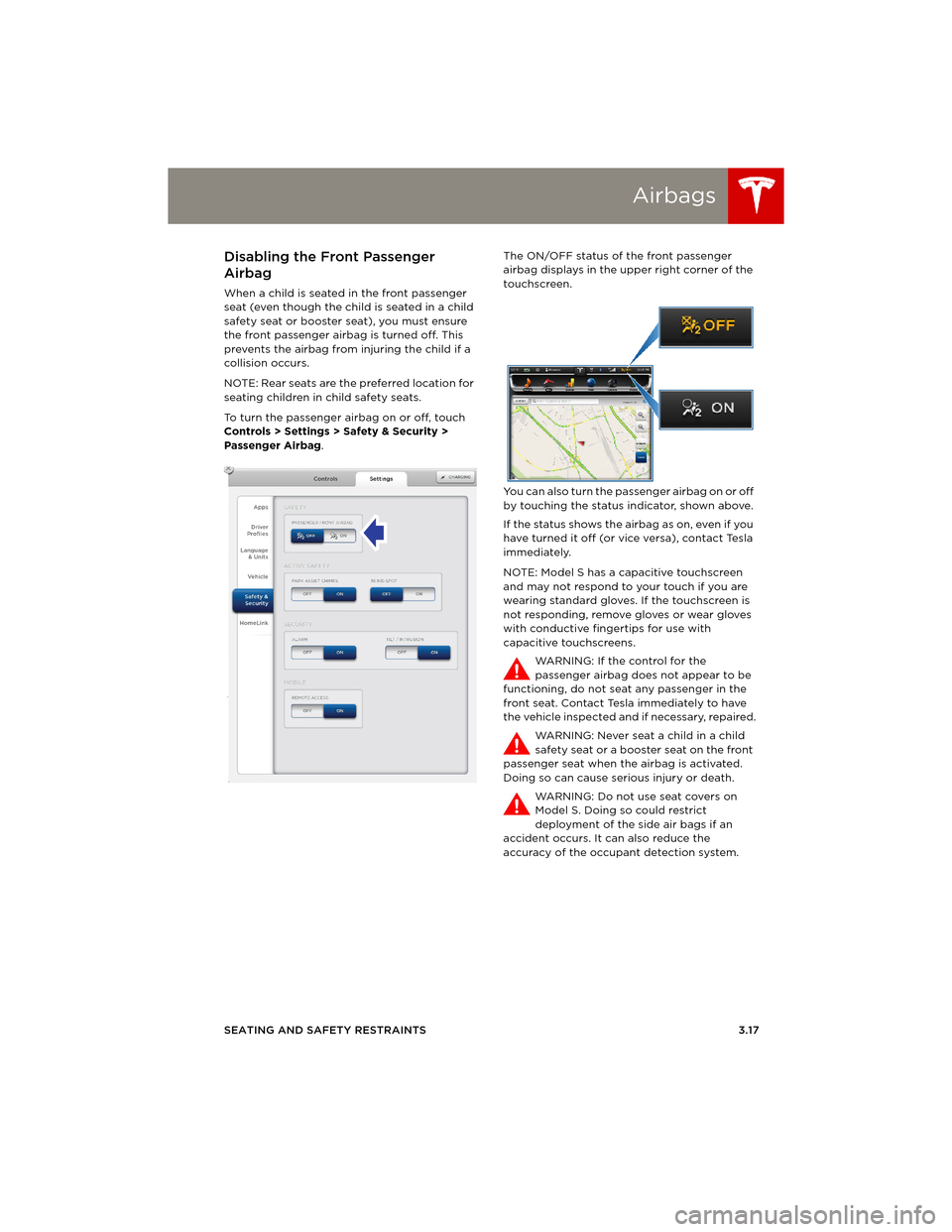
To turn the passenger airbag on or off, touch
Controls > Settings > Safety & Security >
Passenger Airbag.The ON/OFF status of the front passenger
airbag displays in the upper right corner of the
touchscreen.
You can also turn the passenger airbag on or off
by touching the status indicator, shown above.
If the status shows the airbag as on, even if you
have turned it off (or vice versa), contact Tesla
immediately.
NOTE: Model S has a capacitive touchscreen
and may not respond to your touch if you are
wearing standard gloves. If the touchscreen is
not responding, remove gloves or wear gloves
with conductive fingertips for use with
capacitive touchscreens.
WARNING: If the control for the
passenger airbag does not appear to be
functioning, do not seat any passenger in the
front seat. Contact Tesla immediately to have
the vehicle inspected and if necessary, repaired.
WARNING: Never seat a child in a child
safety seat or a booster seat on the front
passenger seat when the airbag is activated.
Doing so can cause serious injury or death.
WARNING: Do not use seat covers on
Model S. Doing so could restrict
deployment of the side air bags if an
accident occurs. It can also reduce the
accuracy of the occupant detection system.
book.book Page 17 Friday, July 19, 2013 12:53 PM
Page 57 of 152
Park Assist
DRIVING4.17 CAUTION: Keep sensors clean from dirt,
debris, snow, and ice. Avoid using a high
pressure power washer on the sensors
and do not clean a sensor with a sharp or
abrasive object that can scratch or
damage its surface.
CAUTION: Do not install accessories or
stickers on or near the parking sensors.
Controlling Audible Feedback
You can use Park Assist with or without audible
feedback. To turn chimes on or off, touch
Controls > Settings > Safety & Security > Park
Assist Chimes.
You can also mute the chimes temporarily by
pressing the scroll wheel on the left side of the
steering wheel. The chimes are muted until you
shift into a different gear or drive over
4.8 km/h.
Limitations and False Warnings
The parking sensors may not function correctly
in these situations:
•One or more of the parking sensors is
damaged, dirty, or covered (such as mud,
ice, or snow).
•Object is located below approximately
20 cm (such as a curb or low barrier).
•Weather conditions (heavy rain, snow, or
fog) are interfering with sensor operation.
•Object is thin (such as a sign post).
•A sensor’s operating range has been
exceeded.
•Object is sound-absorbing or soft (such as
powder snow).
•Object is sloped (such as a sloped
embankment).
•Model S has been parked in, or is being
driven in, extremely hot or cold
temperatures.
•The sensors are affected by other electrical
equipment or devices that generate
ultrasonic waves.
•Object is located too close to the bumper.
•A bumper is misaligned or damaged.
•An object that is mounted to Model S is
interfering with and/or obstructing the
sensor (such as a bike rack or a bumper
sticker).
Other Parking Aids
In addition to Park Assist, when shifted into
Reverse gear, the backup camera displays a
view of the area behind Model S. See
page 4.24.
book.book Page 17 Friday, July 19, 2013 12:53 PM
Page 65 of 152
5.1
USING THE TOUCHSCREEN
Touchscreen Overview
The Big Picture .................................................. 5.2
Touchscreen - Controls
Controlling Model S Features ..................... 5.4
Touchscreen - SettingsCustomizing Model S ..................................... 5.6
Climate Controls
Overview of Climate Controls ..................... 5.8
Customizing Climate Control...................... 5.9
Ventilation ......................................................... 5.10
Climate Control Operating Tips................ 5.10
Active Air Suspension
Automatic Height Adjustments ................. 5.11
Manual Height Adjustments ........................ 5.11
Jack Mode .......................................................... 5.11
Media and Audio
Overview............................................................ 5.12
AM and FM Radio Services ......................... 5.13
DAB Radio Services ...................................... 5.13
Internet Radio .................................................. 5.14
Media Settings ................................................. 5.14
Favorites ............................................................ 5.15
My Music & Devices ....................................... 5.15
USB Connections ............................................ 5.16
12V Power Socket........................................... 5.16
PhoneBluetooth® Compatibility ............................. 5.17
Pairing a Bluetooth Phone .......................... 5.17
Importing Contacts........................................ 5.17
Unpairing a Bluetooth Phone .................... 5.17
Connecting to a Paired Phone .................. 5.18
Making a Phone Call ...................................... 5.18
Receiving a Phone Call................................. 5.18
In Call Options ................................................. 5.18
Maps
Using Maps........................................................ 5.19
NavigationNavigation Overview ................................... 5.20
Starting Navigation....................................... 5.20
During Navigation .......................................... 5.21
Security Settings
About the Security System........................ 5.22
HomeLink® Universal Transceiver
About HomeLink® .......................................... 5.23
Programming HomeLink ............................. 5.23
Software Updates
Loading New Software ................................ 5.24
Viewing Release Notes ................................ 5.24
Mobile AppModel S Mobile App...................................... 5.25
book.book Page 1 Friday, July 19, 2013 12:53 PM
Page 71 of 152
Touchscreen - Settings
USING THE TOUCHSCREEN5.7 1.Adjust settings associated with installed
apps (applications). Apps that have no
settings that you can adjust at this time are
grayed out.
2.Create driver profiles (see page 4.2)
3.Language & Units
Adjust how Model S displays:
•Language: Set the language used when
Model S displays alerts, notification
messages, and navigation instructions (if
equipped).
NOTE: When you change the language,
you experience a brief delay as Model S
shuts down and restarts the touchscreen.
•Region: Choose a region to define the
formatting convention used to display
dates (mm dd yy/dd-mm-yy, etc) and
decimal separators (5.123, 5,123, etc).
•Distance: Miles or kms can be shown on
the range display, speedometer, energy
chart, trip meters, Google map searches
and navigation routes.
•Time: 12 or 24 hour format.
•Temperature:
oF or oC.
•Charging Units: Display energy (kWh) or
distance (miles/kms).
•Range: Rated range (based on ECE R101
testing), or Ideal range (based on the
assumption of driving in ideal conditions
at a steady speed of 89 km/h on a flat
road, and using no additional energy
(seat heaters, air conditioning, etc).
4.Ve h i c l e
•Drive-away Door Lock: If on, all doors
automatically lock whenever you drive
Model S over 8 km/h (see page 2.5).
•Walk-away Door Lock: If on, all doors
automatically lock when you walk away
from Model S, carrying the key with you
(see page 2.5). Available only if Model S is
equipped with the optional tech package.
•Child-Protection Locks: If on, safety locks
prevent the rear doors and the liftgate
from being opened from inside Model S.
•Auto-Present Handles: If on, door handles
extend automatically whenever you
approach Model S carrying a key,
whether locked or unlocked (see
page 2.4.•Mirror Auto-Tilt: If on, exterior mirrors tilt
downward when reversing (see
page 4.5). Available only if Model S is
equipped with the optional tech package.
•Headlights After Exit: If on, headlights
stay on for two minutes after you exit, or
until you lock Model S (see page 4.13).
•Range Mode: If on, Model S conserves
energy by limiting the power of the
climate control system. Cabin heating and
cooling may be less effective.
5.Safety & Security
Turn various safety and security features on
and off:
•Passenger Airbag (see page 3.17).
•Alarm, and security options Model S is
equipped with (see page 5.22).
•Remote access by Tesla’s mobile
applications (see page 5.25).
6.HomeLink
Use HomeLink to control RF-enabled
garage doors, lights, or security systems
(see page 5.23).
WARNING: Do not read the touchscreen
while driving. Doing so increases the
likelihood of a collision. Everything you need to
know when driving is displayed on the
instrument panel.
book.book Page 7 Friday, July 19, 2013 12:53 PM
Page 86 of 152
Security SettingsSecurity Settings
5.22MODEL S OWNERS MANUAL
Security SettingsAbout the Security System
If Model S does not detect a key nearby and a
locked door or trunk is opened, the horn beeps
and headlights and turn signals flash. To
deactivate the alarm, press any button on the
key.
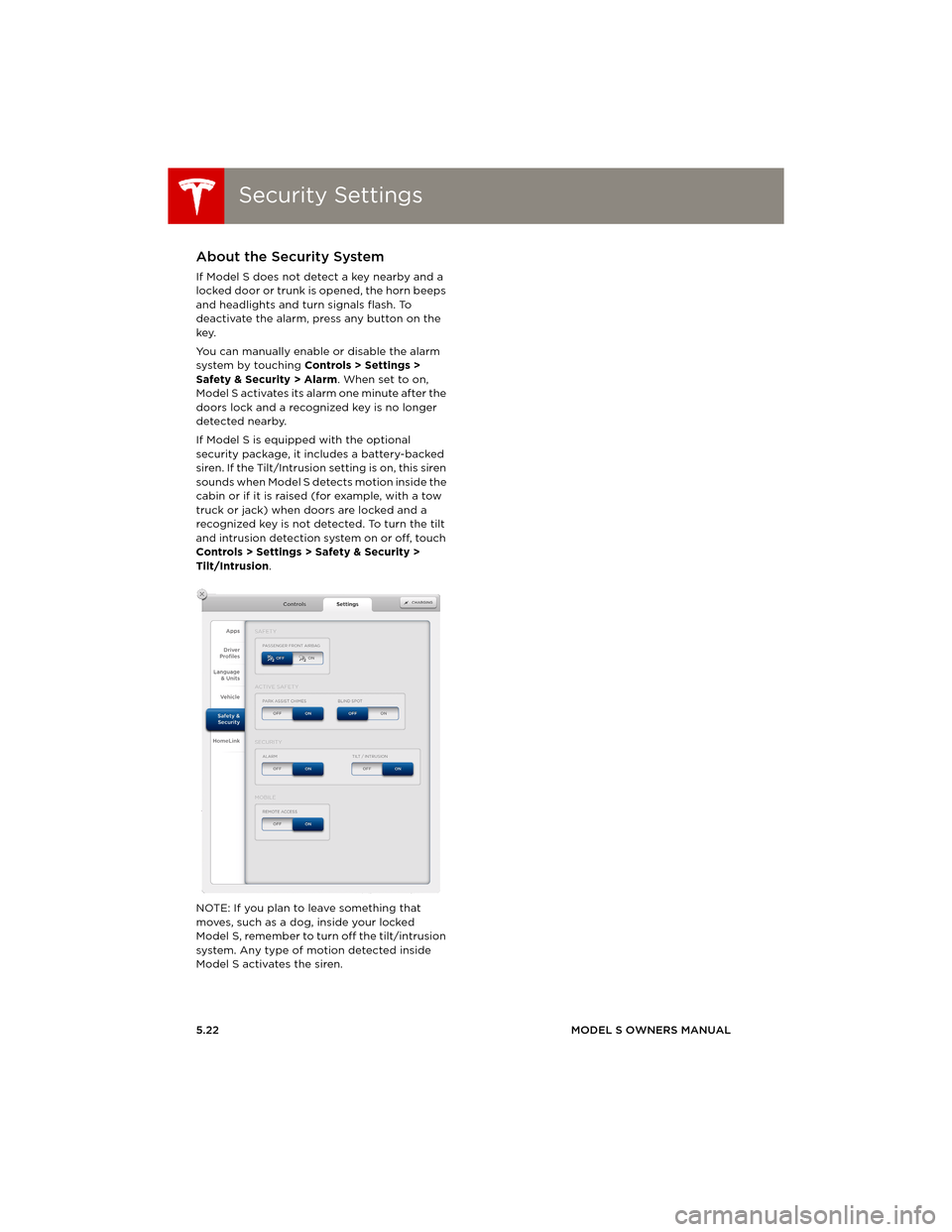
You can manually enable or disable the alarm
system by touching Controls > Settings >
Safety & Security > Alarm. When set to on,
Model S activates its alarm one minute after the
doors lock and a recognized key is no longer
detected nearby.
If Model S is equipped with the optional
security package, it includes a battery-backed
siren. If the Tilt/Intrusion setting is on, this siren
sounds when Model S detects motion inside the
cabin or if it is raised (for example, with a tow
truck or jack) when doors are locked and a
recognized key is not detected. To turn the tilt
and intrusion detection system on or off, touch
Controls > Settings > Safety & Security >
Tilt/Intrusion.
NOTE: If you plan to leave something that
moves, such as a dog, inside your locked
Model S, remember to turn off the tilt/intrusion
system. Any type of motion detected inside
Model S activates the siren.
book.book Page 22 Friday, July 19, 2013 12:53 PM
Page 87 of 152
HomeLink® Universal Transceiver
USING THE TOUCHSCREEN5.23
HomeLink® Universal TransceiverAbout HomeLink®
If Model S is equipped with the optional
tech package, you can program the
HomeLink® Universal Transceiver to operate up
to three garage doors, gates, lights, and
security systems that can transmit Radio
Frequency (RF) signals.
Programming HomeLink
1.Park in front of the device you want to
program, and have the device’s remote
control ready.
2.To u c h Controls > Settings > HomeLink on
the touchscreen.
3.To u c h Enter Name, then use the onscreen
keyboard to enter a name for your
HomeLink device.
4.To u c h Create HomeLink.
5.Follow the onscreen instructions.
Once programmed, you can operate the device
by touching its corresponding HomeLink icon
on the touchscreen’s status bar. HomeLink
remembers the location of your programmed
devices. When you approach a known location,
the HomeLink control on the touchscreen
automatically drops down. When you drive
away, it disappears.
NOTE: For security reasons, erase your
HomeLink settings if you sell Model S.
WARNING: Your device might open or
close during programming. Before
programming, make sure that the device
is clear of any people or objects.
WARNING: Do not use the HomeLink
Universal Transceiver with a garage door
that does not meet federal safety
standards. A garage door opener that
cannot detect an object in its path and
then automatically stop and reverse,
does not meet these standards. Using a
garage door opener without these
features increases the risk of injury or
death.
book.book Page 23 Friday, July 19, 2013 12:53 PM
Page 89 of 152
Mobile App
USING THE TOUCHSCREEN5.25
Mobile AppModel S Mobile App
The Tesla Model S mobile app allows you to
communicate with Model S remotely using your
iPhone
® or Android™ phone. With this app, you
can check charging progress, start and stop
charging, heat or cool Model S, locate Model S
or track its movement, flash lights, honk the
horn, lock and unlock, and more.
Simply download the app to your phone and
enter your login credentials. You must also
ensure that Model S is ready to communicate
with the mobile app by turning on its remote
access setting. Touch Controls > Settings >
Safety & Security > Remote Access > On.
book.book Page 25 Friday, July 19, 2013 12:53 PM