warning TESLA MODEL S 2014 (Europe) User Guide
[x] Cancel search | Manufacturer: TESLA, Model Year: 2014, Model line: MODEL S, Model: TESLA MODEL S 2014Pages: 152, PDF Size: 17.5 MB
Page 28 of 152
Seat BeltsSeat Belts
3.6MODEL S OWNERS MANUAL
Seat Belt Warnings
WARNING: Seat belts should be worn by
all occupants for every journey no matter
how short. Failure to do so increases the risk of
injury or death if an accident occurs.
WARNING: Secure small children in a
suitable child safety seat (see page 3.7).
Always follow the child safety seat
manufacturer's instructions when installing.
WARNING: Ensure that all seat belts are
worn correctly. An improperly worn seat
belt increases the risk of injury or death if an
accident occurs (see page 3.4).
WARNING: Do not wear seat belts over
hard, fragile or sharp items in clothing,
such as pens, keys, eyeglasses, etc. The
pressure from the seat belt on such items can
cause injury.
WARNING: Seat belts should not be worn
with any part of the strap twisted.
WARNING: Each seat belt assembly must
be used by one occupant only. It is
dangerous to put a seat belt around a child
being carried on an occupant’s lap.
WARNING: Seat belts that have been
w o r n i n a n a c c i d e n t m u s t b e i n s p e c t e d o r
replaced by Tesla, even if damage to the
assembly is not obvious.
WARNING: Seat belts that show signs of
wear (such as fraying) or have been cut
or damaged in any way, must be replaced by
Te s l a .
WARNING: Avoid contaminating a seat
belt’s components with any chemicals,
liquids, grit, dirt or cleaning products. If a seat
belt fails to retract or latch into the buckle, it
must be replaced immediately. Contact Tesla.
WARNING: Do not make modifications or
additions that can prevent a seat belt
mechanism from taking up slack, or that can
prevent a seat belt from being adjusted to
remove slack. A slack belt greatly reduces
occupant protection.
WARNING: Do not make modifications
that can interfere with the operation of a
seat belt, or that can cause a seat belt to
become inoperable. WARNING: When seat belts are not in
use, they should be fully retracted and
not hanging loose. If a seat belt does not fully
retract, contact Tesla.
book.book Page 6 Friday, July 19, 2013 12:53 PM
Page 32 of 152
Child Safety SeatsChild Safety Seats
3.10MODEL S OWNERS MANUAL
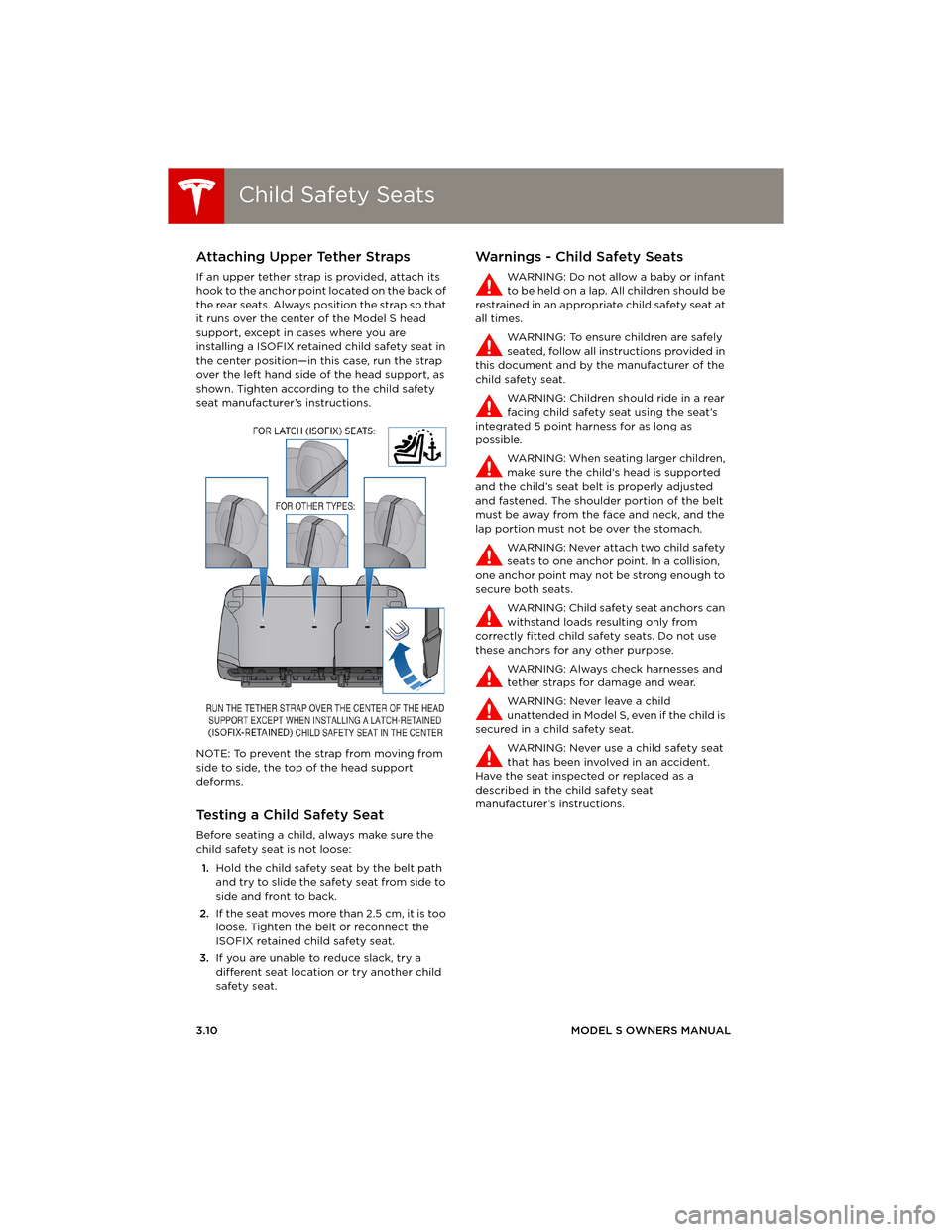
Attaching Upper Tether Straps
If an upper tether strap is provided, attach its
hook to the anchor point located on the back of
the rear seats. Always position the strap so that
it runs over the center of the Model S head
support, except in cases where you are
installing a ISOFIX retained child safety seat in
the center position—in this case, run the strap
over the left hand side of the head support, as
shown. Tighten according to the child safety
seat manufacturer’s instructions.
NOTE: To prevent the strap from moving from
side to side, the top of the head support
deforms.
Testing a Child Safety Seat
Before seating a child, always make sure the
child safety seat is not loose:
1.Hold the child safety seat by the belt path
and try to slide the safety seat from side to
side and front to back.
2.If the seat moves more than 2.5 cm, it is too
loose. Tighten the belt or reconnect the
ISOFIX retained child safety seat.
3.If you are unable to reduce slack, try a
different seat location or try another child
safety seat.
Warnings - Child Safety Seats
WARNING: Do not allow a baby or infant
to be held on a lap. All children should be
restrained in an appropriate child safety seat at
all times.
WARNING: To ensure children are safely
seated, follow all instructions provided in
this document and by the manufacturer of the
child safety seat.
WARNING: Children should ride in a rear
facing child safety seat using the seat’s
integrated 5 point harness for as long as
possible.
WARNING: When seating larger children,
make sure the child's head is supported
and the child’s seat belt is properly adjusted
and fastened. The shoulder portion of the belt
must be away from the face and neck, and the
lap portion must not be over the stomach.
WARNING: Never attach two child safety
seats to one anchor point. In a collision,
one anchor point may not be strong enough to
secure both seats.
WARNING: Child safety seat anchors can
withstand loads resulting only from
correctly fitted child safety seats. Do not use
these anchors for any other purpose.
WARNING: Always check harnesses and
tether straps for damage and wear.
WARNING: Never leave a child
unattended in Model S, even if the child is
secured in a child safety seat.
WARNING: Never use a child safety seat
that has been involved in an accident.
Have the seat inspected or replaced as a
described in the child safety seat
manufacturer’s instructions.
book.book Page 10 Friday, July 19, 2013 12:53 PM
Page 36 of 152

Tesla Built In Rear Facing Child SeatsTesla Built In Rear Facing Child Seats
3.14MODEL S OWNERS MANUAL
Warnings - Tesla Child Seats
WARNING: The Tesla built in rear facing
seats are child restraint systems and are
approved to United Nations ECE Regulation
R44.04 standards for use by children in Mass
Groups II and III, weighing 15 - 36 kg. These
seats must only be used for children who are
between 3 and 12 years old, and
98 - 135 cm tall, provided the top of the child’s
head cannot contact the interior.
WARNING: Do not use supplemental
child restraint systems, including booster
seats, in the Tesla built in rear facing child seats.
WA R N I N G : A l ways e n s u re t h at t h e to p o f
the child’s head cannot touch the
headliner and that the child is seated
comfortably with the seat belts correctly
fastened.
WARNING: Follow all instructions and
heed all warnings related to the Tesla
built in rear facing child seats. Failure to do so
can compromise occupant safety.
WARNING: Read all safety warnings and
labels attached to the seats.
WARNING: Do not leave children
unattended in Model S, even if the child is
secured in a child safety seat or a Tesla built in
rear facing child seat. In hot weather, the
interior temperature can reach dangerous
levels that can result in dehydration, serious
injury or death.
WARNING: Do not remove o r replace the
fabric on a Tesla built in rear facing child
seat. The covers are an integral part of the
restraint’s performance and should not be
removed or replaced with any other type than
those supplied by Tesla.
WARNING: If the Tesla built in rear facing
child seats have been worn in an
accident, they must be inspected or replaced
by Tesla, even if damage is not obvious.
WARNING: Before allowing a child to ride
in the Tesla built in rear facing child seats,
check that the seat is securely held in the
upright position by trying to pull the seat back
toward you.WARNING: Do not remove the built in
rear facing child seats for any reason,
including cleaning. To ensure safety of
occupants, removal and installation must be
performed by qualified Tesla service
technicians.
WARNING: Do not make modifications or
additions that can interfere with the
operation of the Tesla built in rear facing child
seats.
WARNING: To prevent injury, ensure all
loose items (bags, luggage, etc) are
secured. In an accident, or during hard braking
and sharp turns, loose items could cause injury.
book.book Page 14 Friday, July 19, 2013 12:53 PM
Page 37 of 152
Airbags
SEATING AND SAFETY RESTRAINTS 3.15
AirbagsLocation of Airbags
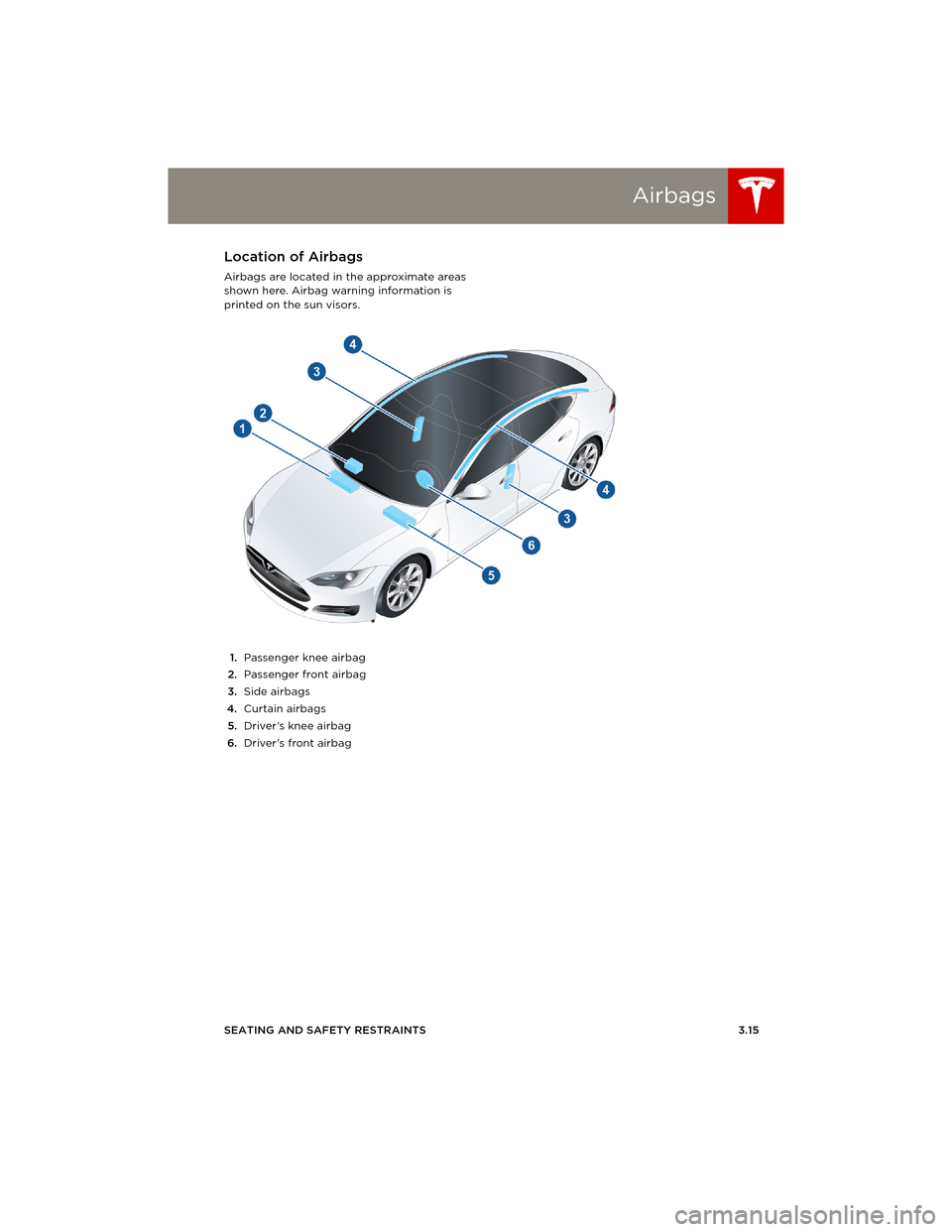
Airbags are located in the approximate areas
shown here. Airbag warning information is
printed on the sun visors.
1.Passenger knee airbag
2.Passenger front airbag
3.Side airbags
4.Curtain airbags
5.Driver’s knee airbag
6.Driver’s front airbag
book.book Page 15 Friday, July 19, 2013 12:53 PM
Page 39 of 152
Airbags
SEATING AND SAFETY RESTRAINTS 3.17
Disabling the Front Passenger
Airbag
When a child is seated in the front passenger
seat (even though the child is seated in a child
safety seat or booster seat), you must ensure
the front passenger airbag is turned off. This
prevents the airbag from injuring the child if a
collision occurs.
NOTE: Rear seats are the preferred location for
seating children in child safety seats.
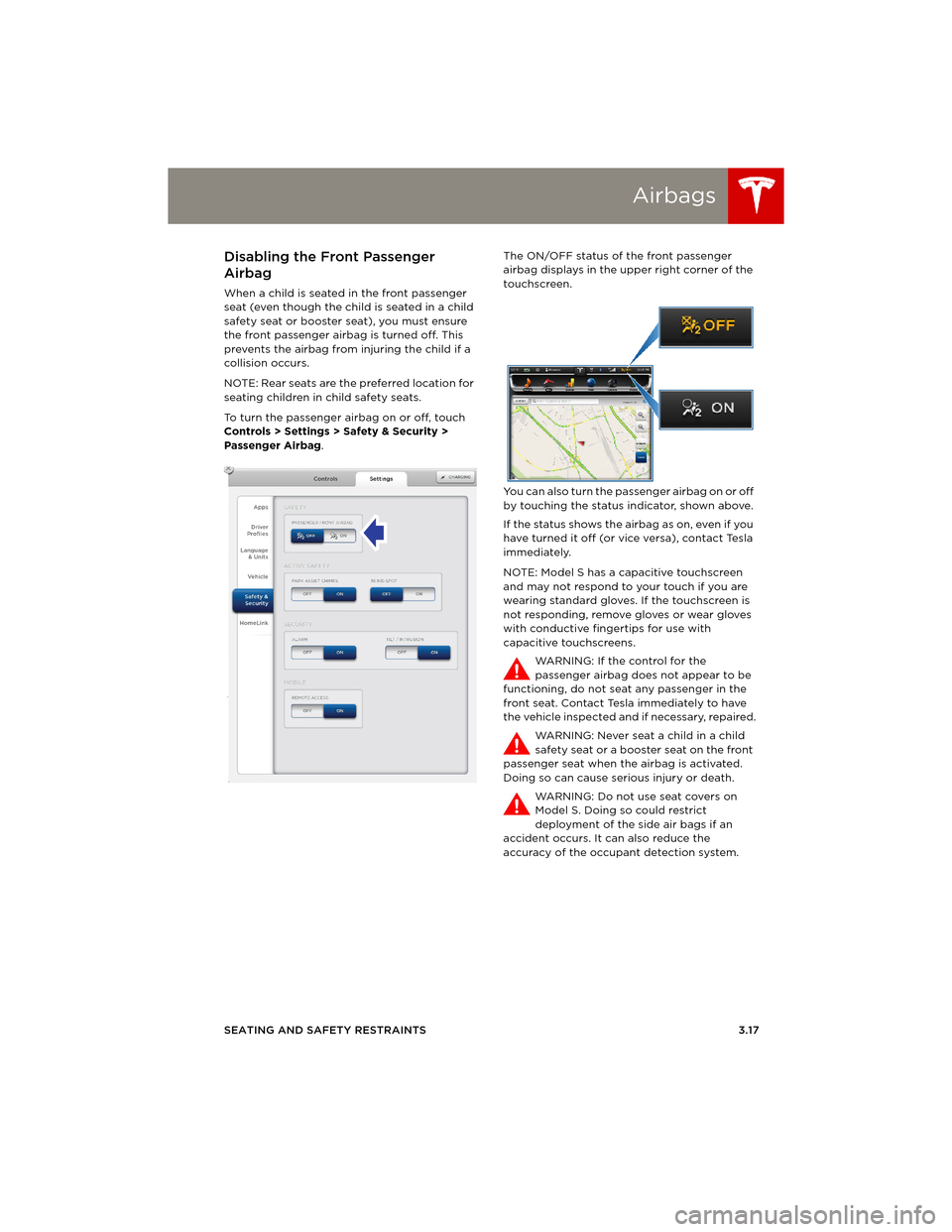
To turn the passenger airbag on or off, touch
Controls > Settings > Safety & Security >
Passenger Airbag.The ON/OFF status of the front passenger
airbag displays in the upper right corner of the
touchscreen.
You can also turn the passenger airbag on or off
by touching the status indicator, shown above.
If the status shows the airbag as on, even if you
have turned it off (or vice versa), contact Tesla
immediately.
NOTE: Model S has a capacitive touchscreen
and may not respond to your touch if you are
wearing standard gloves. If the touchscreen is
not responding, remove gloves or wear gloves
with conductive fingertips for use with
capacitive touchscreens.
WARNING: If the control for the
passenger airbag does not appear to be
functioning, do not seat any passenger in the
front seat. Contact Tesla immediately to have
the vehicle inspected and if necessary, repaired.
WARNING: Never seat a child in a child
safety seat or a booster seat on the front
passenger seat when the airbag is activated.
Doing so can cause serious injury or death.
WARNING: Do not use seat covers on
Model S. Doing so could restrict
deployment of the side air bags if an
accident occurs. It can also reduce the
accuracy of the occupant detection system.
book.book Page 17 Friday, July 19, 2013 12:53 PM
Page 40 of 152
AirbagsAirbags
3.18MODEL S OWNERS MANUAL
Inflation Effects
When airbags inflate, a fine powder is released.
This powder can irritate the skin and should be
thoroughly flushed from the eyes and from any
cuts or abrasions.
After inflation, the airbags deflate to provide a
gradual cushioning effect for the occupants
and to ensure the driver’s forward vision is not
obscured.
If airbags have inflated, or if your vehicle has
been in an accident, always have the airbags,
seat belt pre-tensioners and any associated
components checked and, if necessary,
replaced by Tesla.
In a collision, in addition to the airbags inflating:
•Doors unlock and the door handles extend.
•Hazard warning lights turn on.
•Interior lights turn on.
•High voltage is disabled.
To restore Battery power, use the touchscreen
to manually power off Model S (see page 4.6),
then press the brake to power it back on again.
Airbag Warning Indicator
The airbag indicator on the instrument
panel remains lit if the airbag system is
malfunctioning. The only time this
indicator should light up is briefly when
Model S first starts up, in which case it turns off
within a few seconds. If it remains lit, contact
Tesla immediately and do not drive.
Airbag Warnings
All occupants, including the driver,
should always wear their seat belts
whether or not an airbag is also provided at
their seating position to minimize the risk of
severe injury or death in the event of a crash.
Front seat occupants should not place
their arms over the airbag module, as an
inflating bag can cause fractures or other
injuries.
WARNING: Do not use seat covers on
Model S. Doing so could restrict
deployment of the side air bags if an
accident occurs. It can also reduce the
accuracy of the occupant detection system.
WARNING: Airbags inflate with
considerable speed and force, which can
cause injury. To limit injuries, ensure that
occupants are wearing seat belts and are
correctly seated, with the seat positioned as far
back as possible.
WARNING: Do not use a child safety seat
or seat young children on a seat with an
operational airbag in front of it. Doing so can
cause injury or death if the airbag inflates.
WARNING: To ensure correct inflation of
the side airbags, maintain an
unobstructed gap between an occupant’s torso
and the side of Model S.
WARNING: Passengers should not lean
their heads against the doors. Doing so
can cause injury if a curtain airbag inflates.
WARNING: Do not allow passengers to
obstruct the operation of an airbag by
placing feet, knees or any other part of the
body on or near an airbag.
WARNING: Do not attach or place objects
on or near the front airbags, the side of
the front seats, the headliner at the side of the
vehicle, or any other airbag cover that could
interfere with inflation of an airbag. Objects can
cause serious injury if the vehicle is in a crash
severe enough to cause the airbag to inflate.
WARNING: Following inflation, some
airbag components are hot. Do not touch
until they have cooled.
book.book Page 18 Friday, July 19, 2013 12:53 PM
Page 41 of 152
4.1
DRIVING
Driver Profiles
Creating a Driver Profile ............................... 4.2
Restoring a Driver’s Profile .......................... 4.2
Saved Driver Settings .................................... 4.2
Steering Wheel
Adjusting Position ........................................... 4.3
Adjusting Sensitivity ...................................... 4.3
Using Left Steering Wheel Buttons.......... 4.3
Using Right Steering Wheel Buttons ....... 4.4
Horn ...................................................................... 4.4
MirrorsAdjusting Exterior Side Mirrors.................. 4.5
Rear View Mirror .............................................. 4.5
Starting and Powering Off
Starting Model S .............................................. 4.6
Powering Off ..................................................... 4.6
Gears
Shifting Gears ................................................... 4.7
Leaving Model S in Neutral (Tow Mode) 4.7
Instrument Panel
Instrument Panel Overview ......................... 4.8
Indicator Lights ................................................ 4.9
LightsControlling Lights ............................................ 4.11
Headlight High Beams .................................. 4.12
Headlights After Exit..................................... 4.13
Cornering Lights ............................................. 4.13
Turn Signals ...................................................... 4.14
Hazard Warning Flashers ............................ 4.14
Wipers and WashersWipers................................................................. 4.15
Washers ............................................................. 4.15
Park Assist
How Park Assist Works ................................ 4.16
Visual and Audio Feedback ....................... 4.16
Controlling Audible Feedback .................. 4.17
Limitations and False Warnings ............... 4.17
Other Parking Aids ........................................ 4.17
Trip Information
Displaying Trip Information ....................... 4.18
Energy Usage
Displaying Energy Usage ............................ 4.19
Driving Tips to Maximize Range .............. 4.19
Brakes
Braking Systems............................................ 4.20
Brake Wear ..................................................... 4.20
Regenerative Braking.................................... 4.21
Parking Brake ................................................... 4.21
Traction Control
How It Works................................................... 4.22
Cruise ControlOperating Cruise Control ........................... 4.23
Changing the Cruising Speed ................... 4.23
Canceling and Resuming ............................ 4.23
Rear View CameraCamera Location ........................................... 4.24
book.book Page 1 Friday, July 19, 2013 12:53 PM
Page 43 of 152
Steering Wheel
DRIVING4.3
Steering WheelAdjusting Position
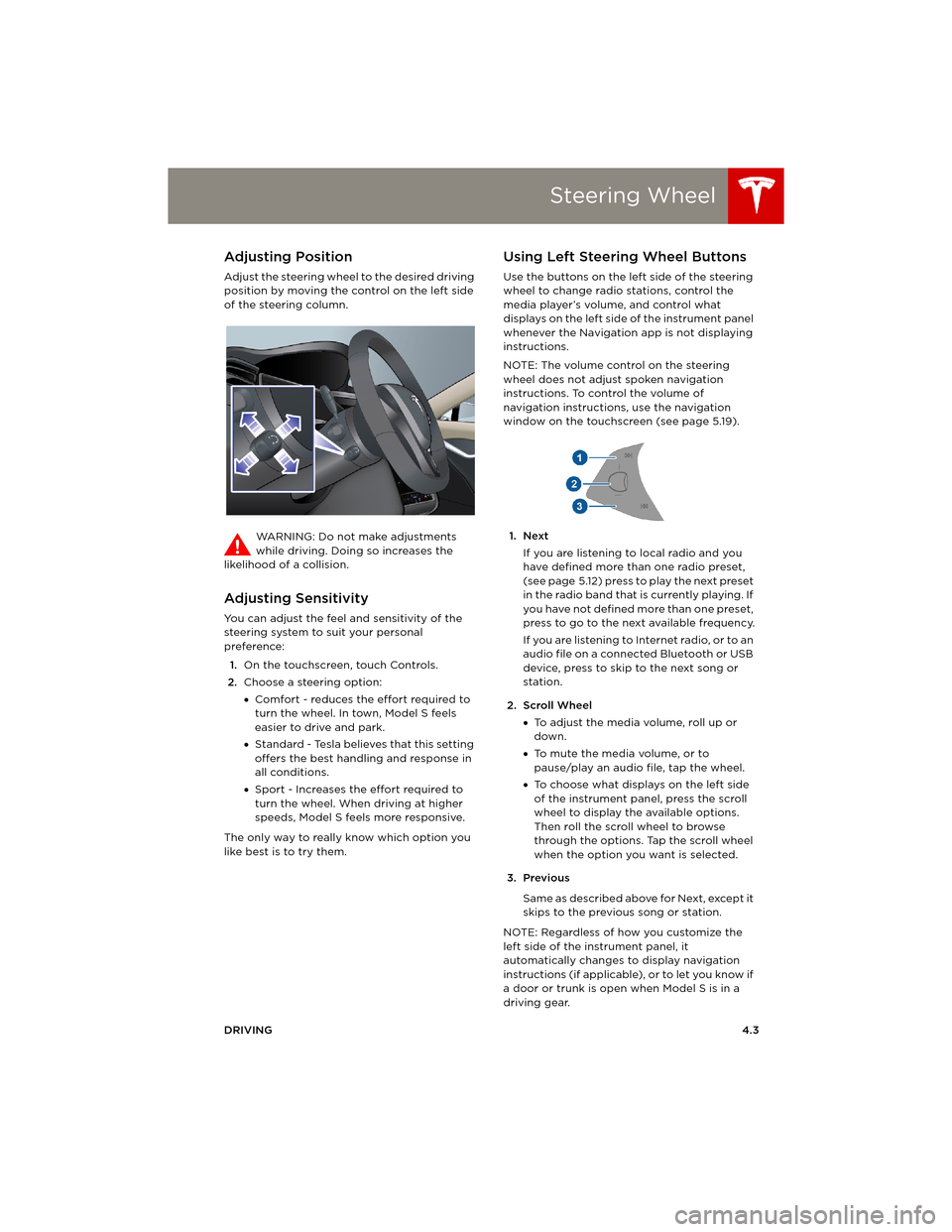
Adjust the steering wheel to the desired driving
position by moving the control on the left side
of the steering column.
WARNING: Do not make adjustments
while driving. Doing so increases the
likelihood of a collision.
Adjusting Sensitivity
You can adjust the feel and sensitivity of the
steering system to suit your personal
preference:
1.On the touchscreen, touch Controls.
2.Choose a steering option:
•Comfort - reduces the effort required to
turn the wheel. In town, Model S feels
easier to drive and park.
•Standard - Tesla believes that this setting
offers the best handling and response in
all conditions.
•Sport - Increases the effort required to
turn the wheel. When driving at higher
speeds, Model S feels more responsive.
The only way to really know which option you
like best is to try them.
Using Left Steering Wheel Buttons
Use the buttons on the left side of the steering
wheel to change radio stations, control the
media player’s volume, and control what
displays on the left side of the instrument panel
whenever the Navigation app is not displaying
instructions.
NOTE: The volume control on the steering
wheel does not adjust spoken navigation
instructions. To control the volume of
navigation instructions, use the navigation
window on the touchscreen (see page 5.19).
1. Next
If you are listening to local radio and you
have defined more than one radio preset,
(see page 5.12) press to play the next preset
in the radio band that is currently playing. If
you have not defined more than one preset,
press to go to the next available frequency.
If you are listening to Internet radio, or to an
audio file on a connected Bluetooth or USB
device, press to skip to the next song or
station.
2. Scroll Wheel
•To adjust the media volume, roll up or
down.
•To mute the media volume, or to
pause/play an audio file, tap the wheel.
•To choose what displays on the left side
of the instrument panel, press the scroll
wheel to display the available options.
Then roll the scroll wheel to browse
through the options. Tap the scroll wheel
when the option you want is selected.
3. Previous
Same as described above for Next, except it
skips to the previous song or station.
NOTE: Regardless of how you customize the
left side of the instrument panel, it
automatically changes to display navigation
instructions (if applicable), or to let you know if
a door or trunk is open when Model S is in a
driving gear.
book.book Page 3 Friday, July 19, 2013 12:53 PM
Page 50 of 152
Instrument PanelInstrument Panel
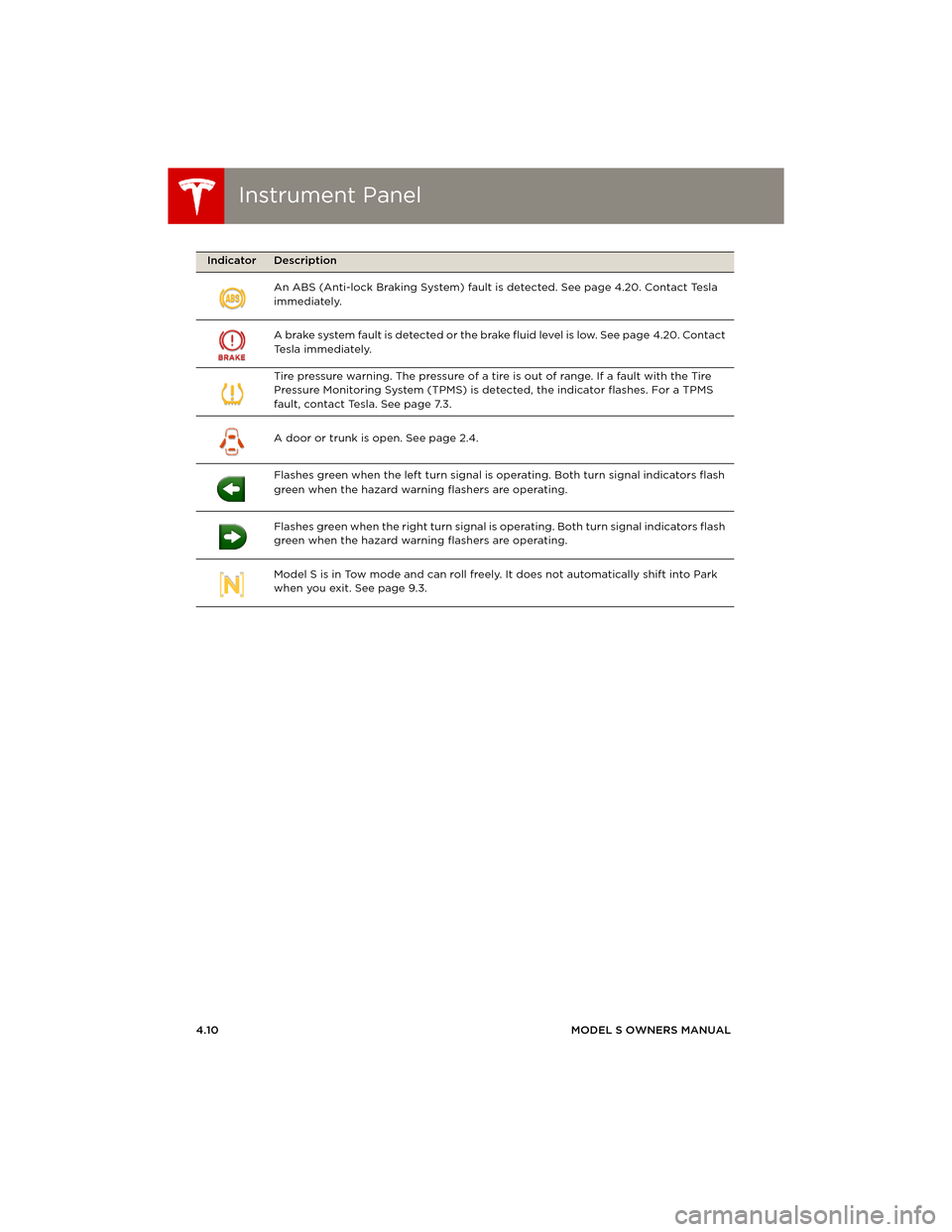
4.10MODEL S OWNERS MANUAL An ABS (Anti-lock Braking System) fault is detected. See page 4.20. Contact Tesla
immediately.
A brake system fault is detected or the brake fluid level is low. See page 4.20. Contact
Tesla immediately.
Tire pressure warning. The pressure of a tire is out of range. If a fault with the Tire
Pressure Monitoring System (TPMS) is detected, the indicator flashes. For a TPMS
fault, contact Tesla. See page 7.3.
A door or trunk is open. See page 2.4.
Flashes green when the left turn signal is operating. Both turn signal indicators flash
green when the hazard warning flashers are operating.
Flashes green when the right turn signal is operating. Both turn signal indicators flash
green when the hazard warning flashers are operating.
Model S is in Tow mode and can roll freely. It does not automatically shift into Park
when you exit. See page 9.3.
Indicator Description
book.book Page 10 Friday, July 19, 2013 12:53 PM
Page 54 of 152
LightsLights
4.14MODEL S OWNERS MANUAL
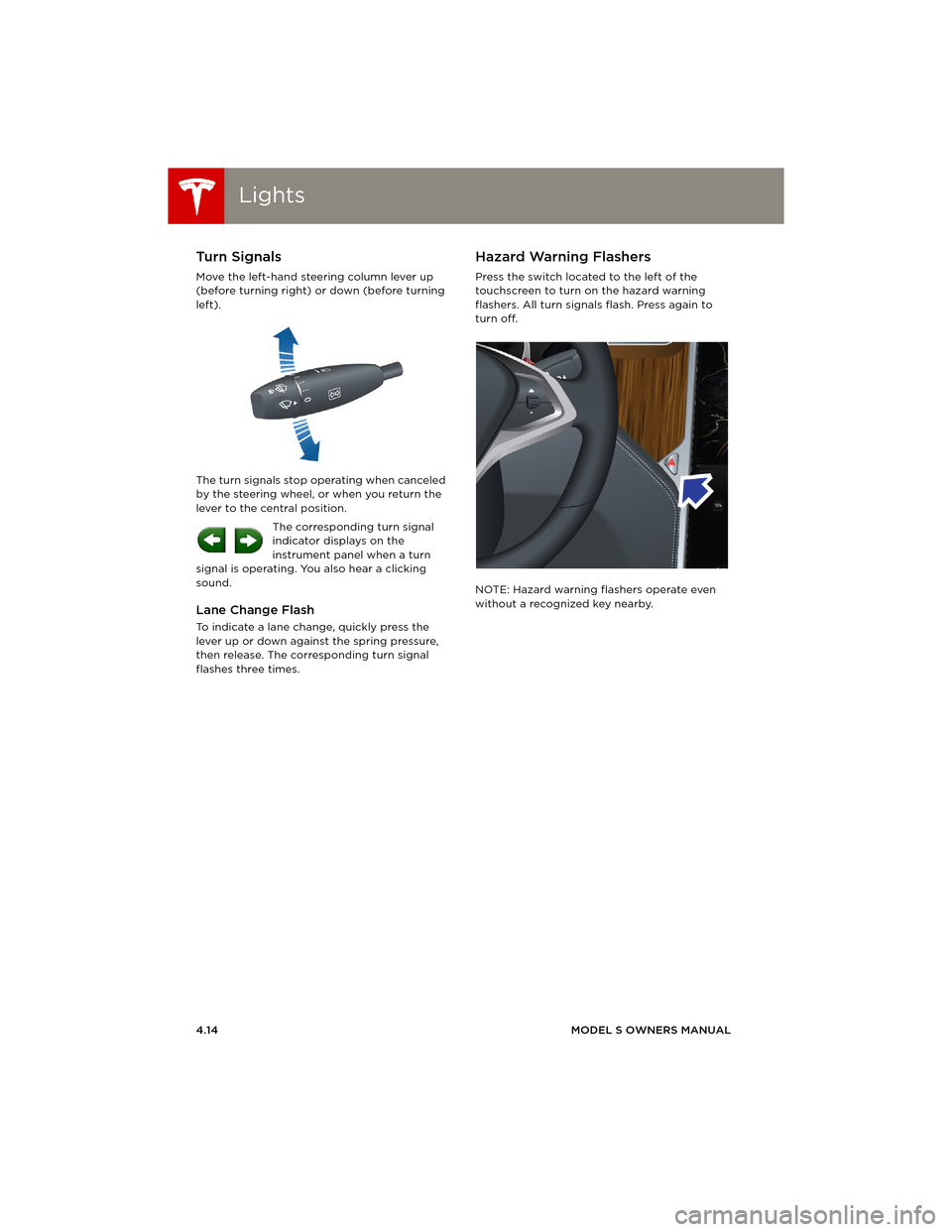
Turn Signals
Move the left-hand steering column lever up
(before turning right) or down (before turning
left).
The turn signals stop operating when canceled
by the steering wheel, or when you return the
lever to the central position.
The corresponding turn signal
indicator displays on the
instrument panel when a turn
signal is operating. You also hear a clicking
sound.
Lane Change Flash
To indicate a lane change, quickly press the
lever up or down against the spring pressure,
then release. The corresponding turn signal
flashes three times.
Hazard Warning Flashers
Press the switch located to the left of the
touchscreen to turn on the hazard warning
flashers. All turn signals flash. Press again to
turn off.
NOTE: Hazard warning flashers operate even
without a recognized key nearby.
book.book Page 14 Friday, July 19, 2013 12:53 PM