lock TESLA MODEL S 2014 (North America) User Guide
[x] Cancel search | Manufacturer: TESLA, Model Year: 2014, Model line: MODEL S, Model: TESLA MODEL S 2014Pages: 159, PDF Size: 6.14 MB
Page 20 of 159
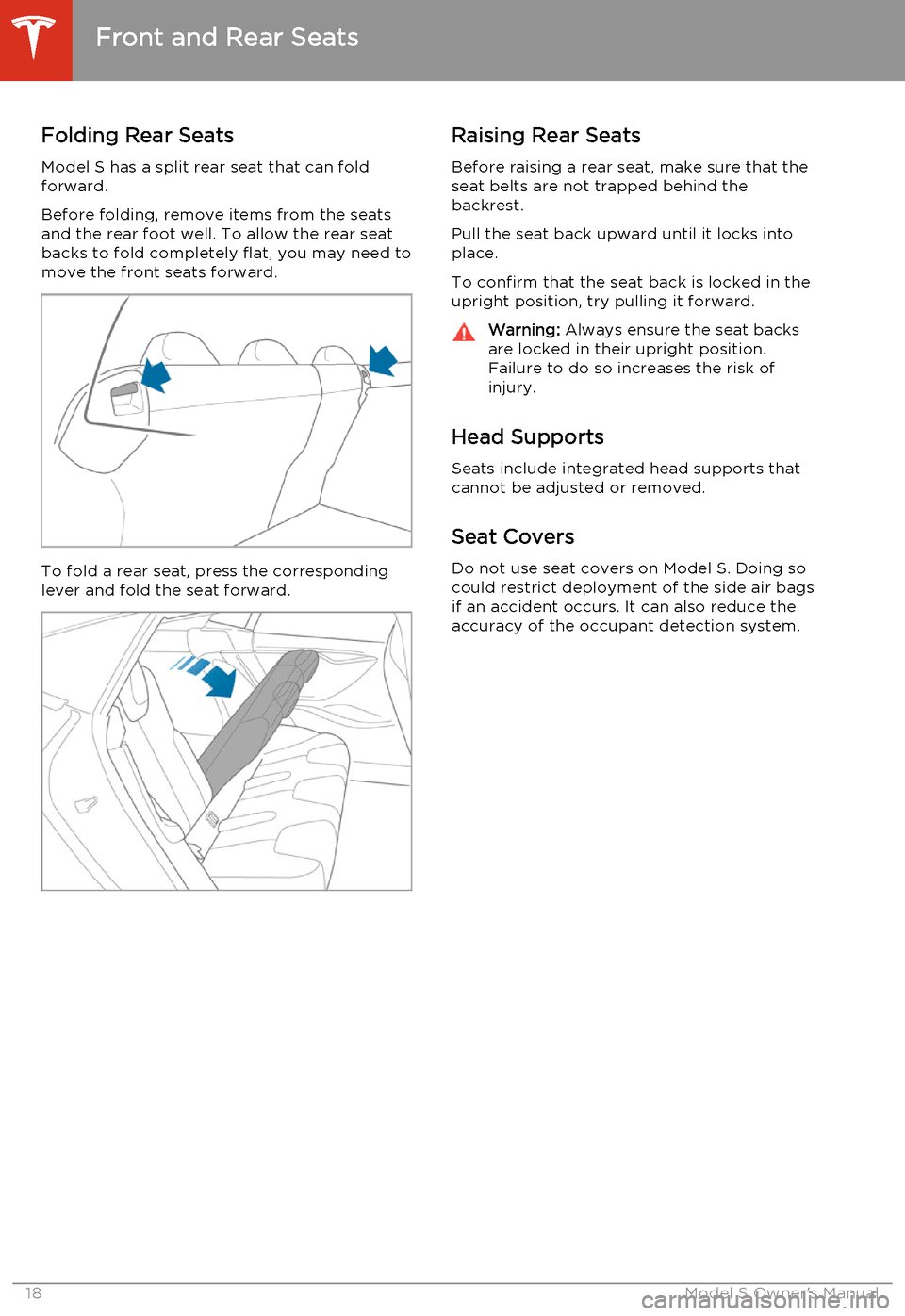
Folding Rear SeatsModel S has a split rear seat that can fold
forward.
Before folding, remove items from the seats and the rear foot well. To allow the rear seat
backs to fold completely flat, you may need to
move the front seats forward.
To fold a rear seat, press the corresponding lever and fold the seat forward.
Raising Rear Seats
Before raising a rear seat, make sure that the
seat belts are not trapped behind the
backrest.
Pull the seat back upward until it locks into
place.
To confirm that the seat back is locked in the upright position, try pulling it forward.Warning: Always ensure the seat backs
are locked in their upright position.
Failure to do so increases the risk of
injury.
Head Supports
Seats include integrated head supports thatcannot be adjusted or removed.
Seat Covers
Do not use seat covers on Model S. Doing so could restrict deployment of the side air bagsif an accident occurs. It can also reduce theaccuracy of the occupant detection system.
Front and Rear Seats
18Model S Owner's Manual
Page 21 of 159
Wearing Seat Belts
Using seat belts and child safety seats is the most effective way to protect occupants if a
collision occurs. Therefore, wearing a seat belt
is required by law in most jurisdictions.
Both the driver and passenger seats are
equipped with three-point inertia reel seat
belts. Inertia reel belts are automatically
tensioned to allow occupants to move
comfortably during normal driving conditions.
To securely hold child safety seats, all
passenger seating positions are equipped with
an automatic locking retractor (ALR) that, by pulling the seat belt beyond the length
needed for a typical adult occupant, locks the
belt into place until the seat belt is unbuckled
(see Installing Seat Belt Retained Child Seats
on page 24).
The seat belt reel automatically locks to prevent movement of occupants if Model Sexperiences a force associated with hard
acceleration, braking, cornering, or an impact in a collision.The seat belt reminder on the
instrument panel alerts you if a seat
belt for an occupied front seat is not
fastened. If the belt remains
unfastened, the reminder flashes and
an intermittent chime sounds. If all
occupants are buckled up and the
reminder stays on, re-fasten seat
belts to ensure they are correctly
latched. Also remove any heavy
objects (such as a briefcase) from an
unoccupied seat. If the reminder
light continues to stay on, contact
Tesla.
To Fasten a Belt
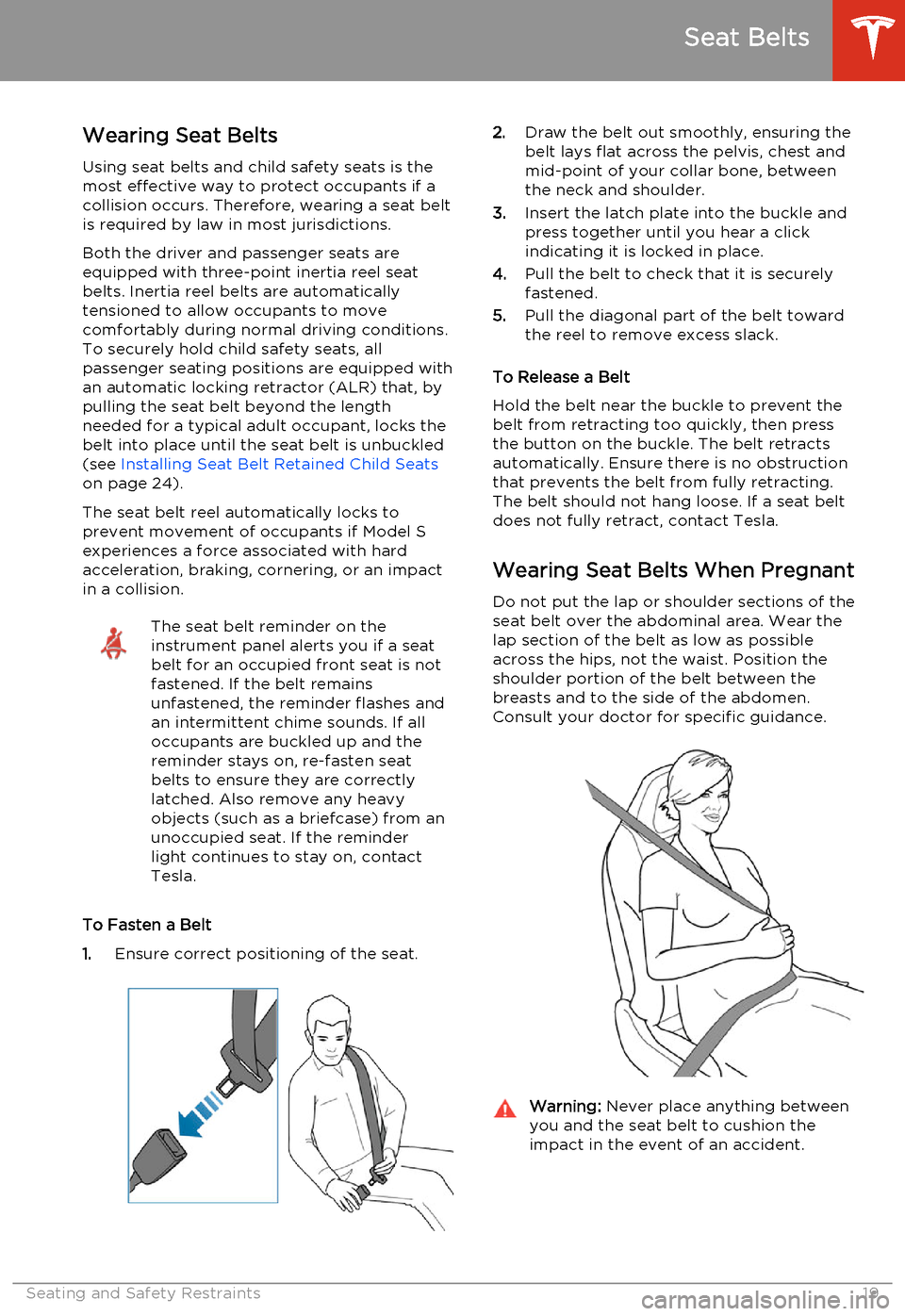
1. Ensure correct positioning of the seat.
2.
Draw the belt out smoothly, ensuring the
belt lays flat across the pelvis, chest and
mid-point of your collar bone, between
the neck and shoulder.
3. Insert the latch plate into the buckle and
press together until you hear a click indicating it is locked in place.
4. Pull the belt to check that it is securely
fastened.
5. Pull the diagonal part of the belt toward
the reel to remove excess slack.
To Release a Belt
Hold the belt near the buckle to prevent the
belt from retracting too quickly, then press
the button on the buckle. The belt retracts
automatically. Ensure there is no obstruction
that prevents the belt from fully retracting.
The belt should not hang loose. If a seat belt does not fully retract, contact Tesla.
Wearing Seat Belts When Pregnant Do not put the lap or shoulder sections of the
seat belt over the abdominal area. Wear the
lap section of the belt as low as possible across the hips, not the waist. Position theshoulder portion of the belt between thebreasts and to the side of the abdomen.
Consult your doctor for specific guidance.Warning: Never place anything between
you and the seat belt to cushion the
impact in the event of an accident.
Seat Belts
Seating and Safety Restraints19
Page 22 of 159
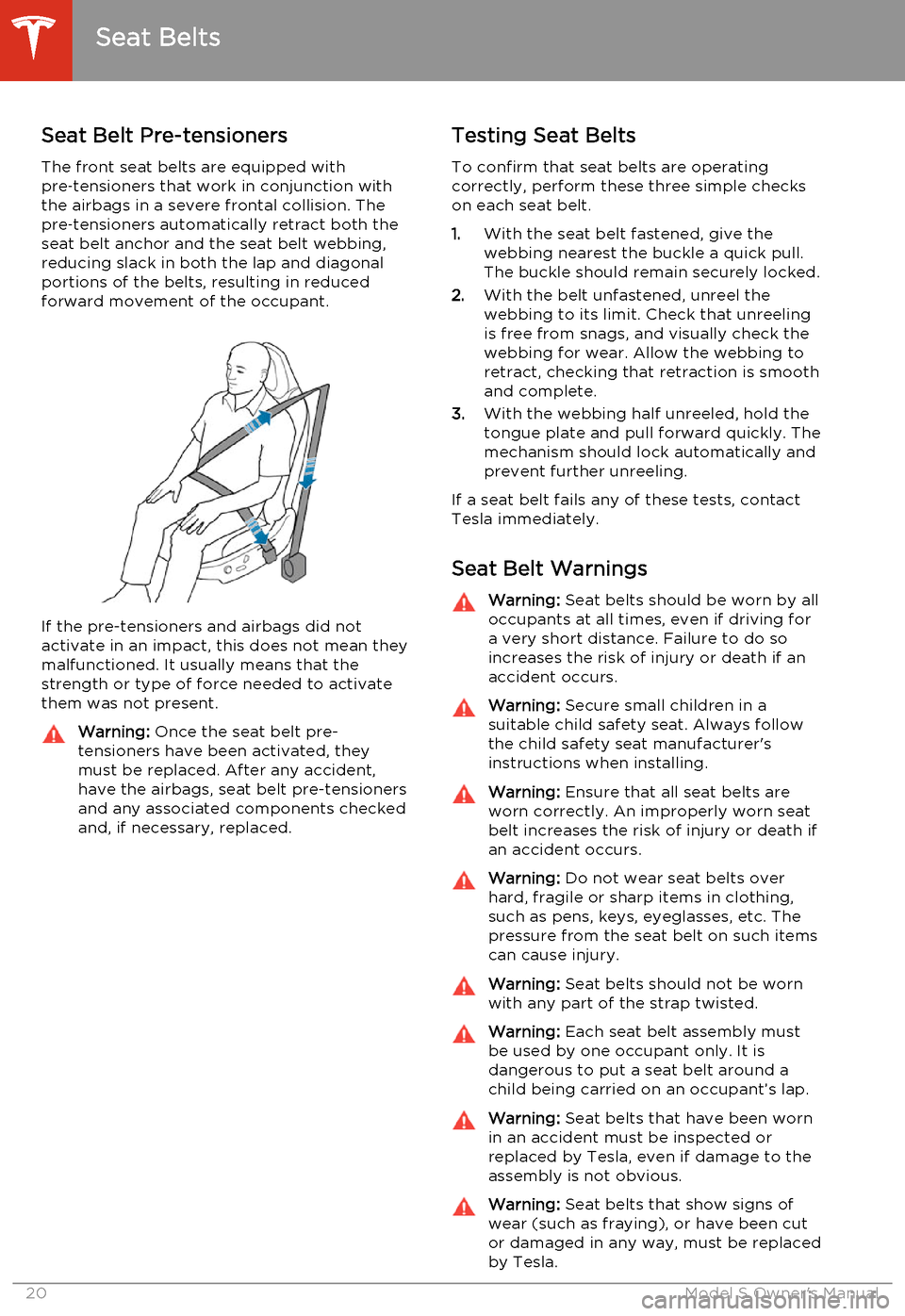
Seat Belt Pre-tensionersThe front seat belts are equipped with
pre ‑tensioners that work in conjunction with
the airbags in a severe frontal collision. The
pre ‑tensioners automatically retract both the
seat belt anchor and the seat belt webbing, reducing slack in both the lap and diagonalportions of the belts, resulting in reducedforward movement of the occupant.
If the pre-tensioners and airbags did notactivate in an impact, this does not mean they
malfunctioned. It usually means that the
strength or type of force needed to activate them was not present.
Warning: Once the seat belt pre-
tensioners have been activated, they
must be replaced. After any accident,
have the airbags, seat belt pre-tensioners and any associated components checkedand, if necessary, replaced.Testing Seat Belts
To confirm that seat belts are operating
correctly, perform these three simple checks
on each seat belt.
1. With the seat belt fastened, give the
webbing nearest the buckle a quick pull. The buckle should remain securely locked.
2. With the belt unfastened, unreel the
webbing to its limit. Check that unreeling is free from snags, and visually check thewebbing for wear. Allow the webbing toretract, checking that retraction is smoothand complete.
3. With the webbing half unreeled, hold the
tongue plate and pull forward quickly. The
mechanism should lock automatically and
prevent further unreeling.
If a seat belt fails any of these tests, contact Tesla immediately.
Seat Belt WarningsWarning: Seat belts should be worn by all
occupants at all times, even if driving for a very short distance. Failure to do so
increases the risk of injury or death if an
accident occurs.Warning: Secure small children in a
suitable child safety seat. Always follow
the child safety seat manufacturer's
instructions when installing.Warning: Ensure that all seat belts are
worn correctly. An improperly worn seat
belt increases the risk of injury or death if
an accident occurs.Warning: Do not wear seat belts over
hard, fragile or sharp items in clothing, such as pens, keys, eyeglasses, etc. The
pressure from the seat belt on such items can cause injury.Warning: Seat belts should not be worn
with any part of the strap twisted.Warning: Each seat belt assembly must
be used by one occupant only. It is
dangerous to put a seat belt around a
child being carried on an occupant’s lap.Warning: Seat belts that have been worn
in an accident must be inspected or
replaced by Tesla, even if damage to the
assembly is not obvious.Warning: Seat belts that show signs of
wear (such as fraying), or have been cut or damaged in any way, must be replacedby Tesla.
Seat Belts
20Model S Owner's Manual
Page 26 of 159
Seating Larger ChildrenIf a child is too large to fit into a child safety
seat, but too small to safely fit into the standard seat belts, use a booster seat
appropriate for the child’s age and size. Carefully follow the manufacturer’sinstructions to secure the booster seat usingthe seat belts. Do not use the LATCH systemto secure booster seats, even in situationswhere the booster seat is equipped with the
LATCH system.
Installing Child Safety Seats There are two general methods used to install
child safety seats:
• Seat belt retained - these seats are secured using the vehicle’s seat belts (see
Installing Seat Belt Retained Child Seats on page 24).
• LATCH retained - these seats can attach to anchor bars built into the vehicle’s rear
seats (see Installing LATCH Child Seats on
page 25).
Check the child safety seat manufacturer’s
instructions and the table on Child Safety
Seats on page 22 to determine which
installation method to use. Some child safety
seats can be installed using either method.
Always follow the child safety seat
manufacturer’s instructions.
Installing Seat Belt Retained Child
Seats
First, make sure that the child falls into the
correct weight range for the seat.
Avoid dressing the child in bulky clothing anddo not place any objects between the childand the restraint system.
Adjust harnesses for every child, every trip.To securely hold child safety seats, all
passenger seating positions are equipped with an automatic locking retractor (ALR) that, by
pulling the seat belt beyond the length
needed for a typical adult occupant, locks the belt into place until the seat belt is unbuckled
and the webbing is fully retracted. The ALR mechanism operates as a ratchet, winding in
slack and preventing the seat belt from
extending any further until it has been
completely rewound. When installing a child
safety seat, engage the belt's automatic locking retractor by pulling the seat belt
webbing until it is fully extended. The ALR
system engages only when the seat belt is at
its maximum extension point.
Note: An automatic locking retractor
disengages only when the seat belt is
unbuckled and fully retracted. The belt can
then be worn as a normal belt, sliding freely in
and out and locking tight only in an
emergency. Once disengaged, the belt must
be fully extended to re-engage the locking
mechanism whenever you install a child safety seat.
Always follow the detailed instructions provided by the child safety seat
manufacturer. General guidelines are provided
below.
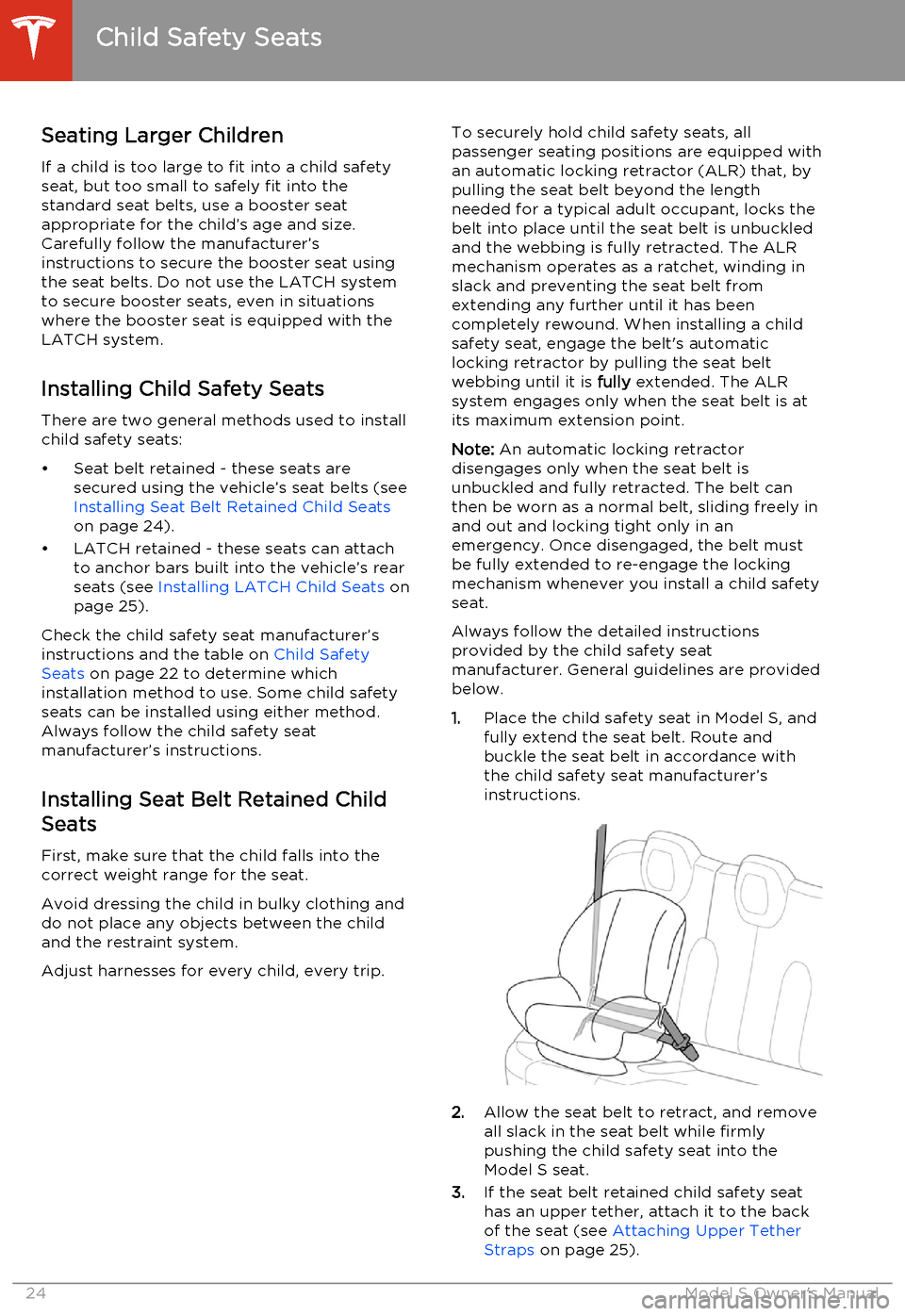
1. Place the child safety seat in Model S, and
fully extend the seat belt. Route and
buckle the seat belt in accordance with the child safety seat manufacturer’s
instructions.
2. Allow the seat belt to retract, and remove
all slack in the seat belt while firmly
pushing the child safety seat into the Model S seat.
3. If the seat belt retained child safety seat
has an upper tether, attach it to the back of the seat (see Attaching Upper Tether
Straps on page 25).
Child Safety Seats
24Model S Owner's Manual
Page 29 of 159
Usage Restrictions
The optional Tesla built-in rear facing child
seats are child restraint systems and must
only be used for children over 37" (94 cm) tall
and weighing between 35 and 77 lbs (16.2 to
35.2 kg).
Always ensure the top of the child’s head
cannot contact the vehicle and that the child
is seated comfortably with the seat belts positioned and latched correctly. The child’spelvis must be held securely in place by thelap belt. Follow all instructions provided anddo not use supplemental child safety seats inthese seats.
Note: Whenever a child is seated in the Tesla
built-in rear facing child seats, it is
recommended that you set the climate control
system to draw outside air into Model S
instead of recirculating the air. This draws
more air into the rear seating areas.
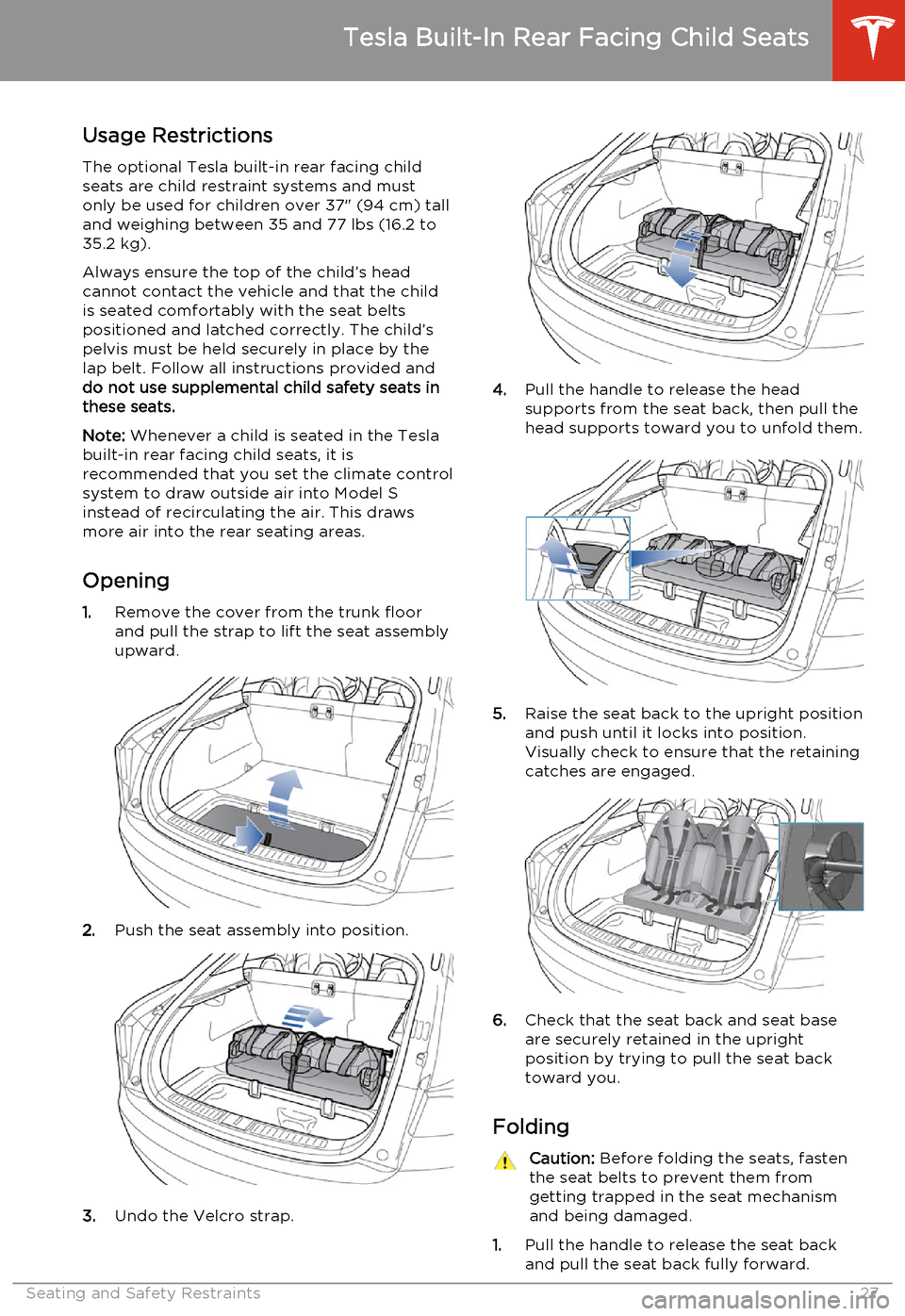
Opening 1. Remove the cover from the trunk floor
and pull the strap to lift the seat assembly
upward.
2. Push the seat assembly into position.
3.Undo the Velcro strap.
4.Pull the handle to release the head
supports from the seat back, then pull the
head supports toward you to unfold them.
5. Raise the seat back to the upright position
and push until it locks into position.
Visually check to ensure that the retaining catches are engaged.
6. Check that the seat back and seat base
are securely retained in the upright
position by trying to pull the seat back toward you.
Folding
Caution: Before folding the seats, fasten
the seat belts to prevent them from
getting trapped in the seat mechanism and being damaged.
1. Pull the handle to release the seat back
and pull the seat back fully forward.
Tesla Built-In Rear Facing Child Seats
Seating and Safety Restraints27
Page 36 of 159
Inflation Effects
When airbags inflate, a fine powder is
released. This powder can irritate the skin and should be thoroughly flushed from the eyes
and from any cuts or abrasions.
After inflation, the airbags deflate to provide a
gradual cushioning effect for the occupants and to ensure the driver’s forward vision is notobscured.
If airbags have inflated, or if your vehicle has been in an accident, always have the airbags,
seat belt pre-tensioners and any associated
components checked and, if necessary,
replaced by Tesla.
In a collision, in addition to the airbags
inflating:
• Doors unlock and the door handles extend.
• Hazard warning lights turn on.
• Interior lights turn on.
• High voltage is disabled.
To restore Battery power, use the touchscreen
to manually power off Model S, then press the
brake to power it back on again.
Airbag Warning IndicatorThe airbag indicator on the
instrument panel remains lit if the
airbag system is malfunctioning. The
only time this indicator should light
up is briefly when Model S first starts
up, in which case it turns off within a few seconds. If it remains lit, contact
Tesla immediately and do not drive.
Airbag Warnings
Warning: All occupants, including the
driver, should always wear their seat
belts, whether or not an airbag is also
provided at their seating position, to
minimize the risk of severe injury or death
in the event of a collision.Warning: Front seat occupants should
not place their arms over the airbag
module, as an inflating bag can cause
fractures or other injuries.Warning: Do not use seat covers on
Model S. Doing so could restrict
deployment of the side air bags if an
accident occurs. It can also reduce theaccuracy of the occupant detection
system.Warning: Airbags inflate with
considerable speed and force, which can
cause injury. To limit injuries, ensure that
occupants are wearing seat belts and are
correctly seated, with the seat positioned
as far back as possible. The National
Highway Traffic Safety Administration (NHTSA) recommends a minimum
distance of 10" (25 cm) between an occupant’s chest and an airbag.Warning: Do not use a child safety seat or
seat young children on a seat with an operational airbag in front of it. Doing socan cause injury or death if the airbaginflates.Warning: To ensure correct inflation of
the side airbags, maintain an
unobstructed gap between an occupant’s
torso and the side of Model S.Warning: Passengers should not lean their
heads against the doors. Doing so can cause injury if a curtain airbag inflates.Warning: Do not allow passengers to
obstruct the operation of an airbag by
placing feet, knees or any other part of the body on or near an airbag.Warning: Do not attach or place objects
on or near the front airbags, the side of
the front seats, the headliner at the side of the vehicle, or any other airbag coverthat could interfere with inflation of an
airbag. Objects can cause serious injury if the vehicle is in a collision severe enoughto cause the airbag to inflate.Warning: Following inflation, some airbag
components are hot. Do not touch until
they have cooled.
Airbags
34Model S Owner's Manual
Page 42 of 159
Starting Model S
When you open a door, Model S powers on the instrument panel and touchscreen. Thecenter circle on the instrument panel displaysthe status of doors and the charge level, and
you can operate all controls.
To drive:
• PRESS THE BRAKE - the center circle on
the instrument panel changes to display
the speedometer, power meter, charge level, and selected gear (P, R, N, or D).
• SELECT A GEAR - all the way down for
Drive and all the way up for Reverse.
Everything you need to know when driving
Model S displays on the instrument panel.
Key Not Inside
If Model S does not detect a key when you
press the brake, the instrument panel displays
a message telling you that a key was not
detected.
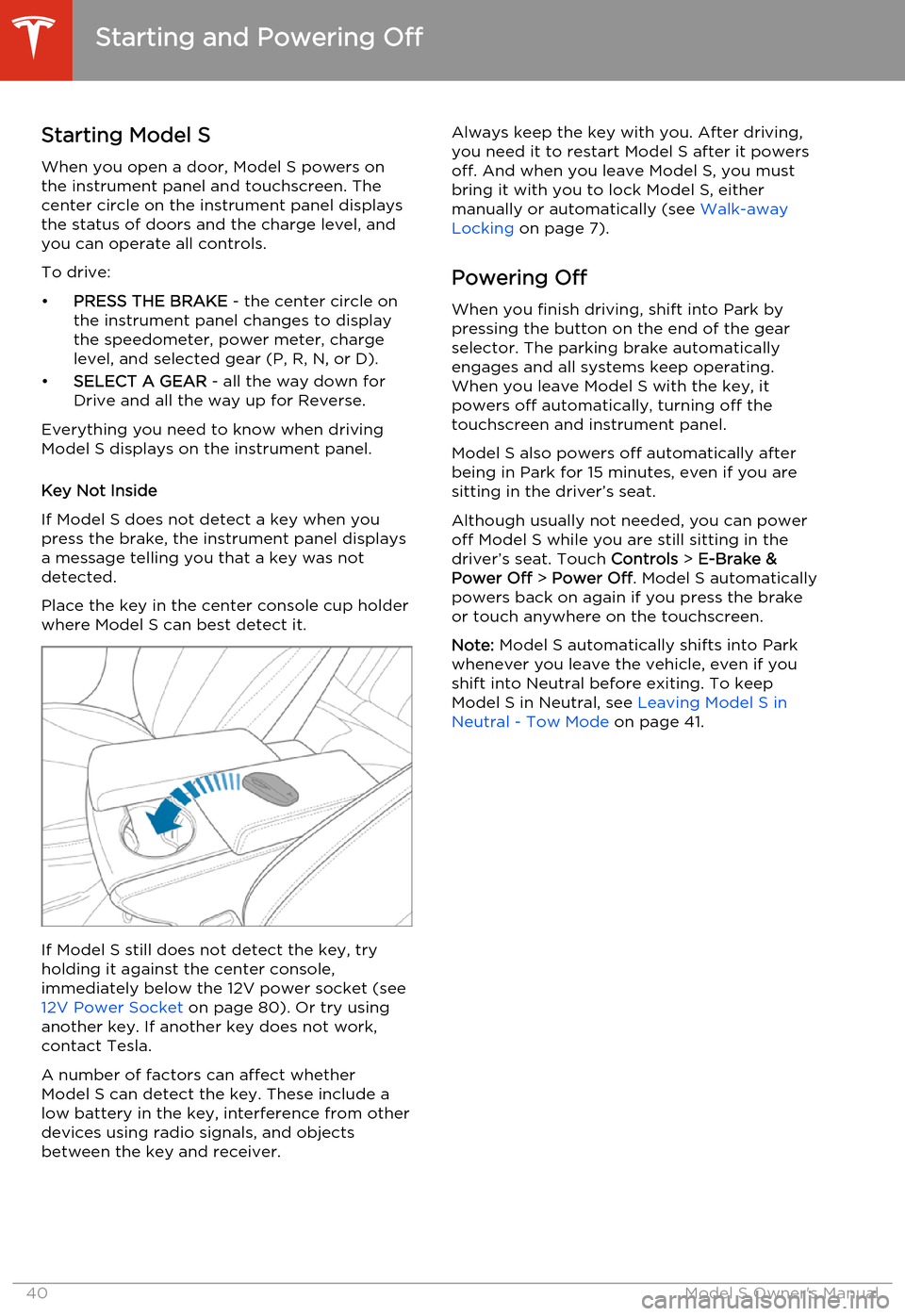
Place the key in the center console cup holder
where Model S can best detect it.
If Model S still does not detect the key, try
holding it against the center console,
immediately below the 12V power socket (see 12V Power Socket on page 80). Or try using
another key. If another key does not work,
contact Tesla.
A number of factors can affect whether
Model S can detect the key. These include a
low battery in the key, interference from other
devices using radio signals, and objects
between the key and receiver.
Always keep the key with you. After driving,
you need it to restart Model S after it powers
off. And when you leave Model S, you must
bring it with you to lock Model S, either manually or automatically (see Walk-away
Locking on page 7).
Powering Off When you finish driving, shift into Park by
pressing the button on the end of the gear
selector. The parking brake automatically
engages and all systems keep operating.
When you leave Model S with the key, it
powers off automatically, turning off the
touchscreen and instrument panel.
Model S also powers off automatically after
being in Park for 15 minutes, even if you are
sitting in the driver’s seat.
Although usually not needed, you can power
off Model S while you are still sitting in the
driver’s seat. Touch Controls > E-Brake &
Power Off > Power Off . Model S automatically
powers back on again if you press the brake or touch anywhere on the touchscreen.
Note: Model S automatically shifts into Park
whenever you leave the vehicle, even if you
shift into Neutral before exiting. To keep
Model S in Neutral, see Leaving Model S in
Neutral - Tow Mode on page 41.
Starting and Powering Off
40Model S Owner's Manual
Page 44 of 159
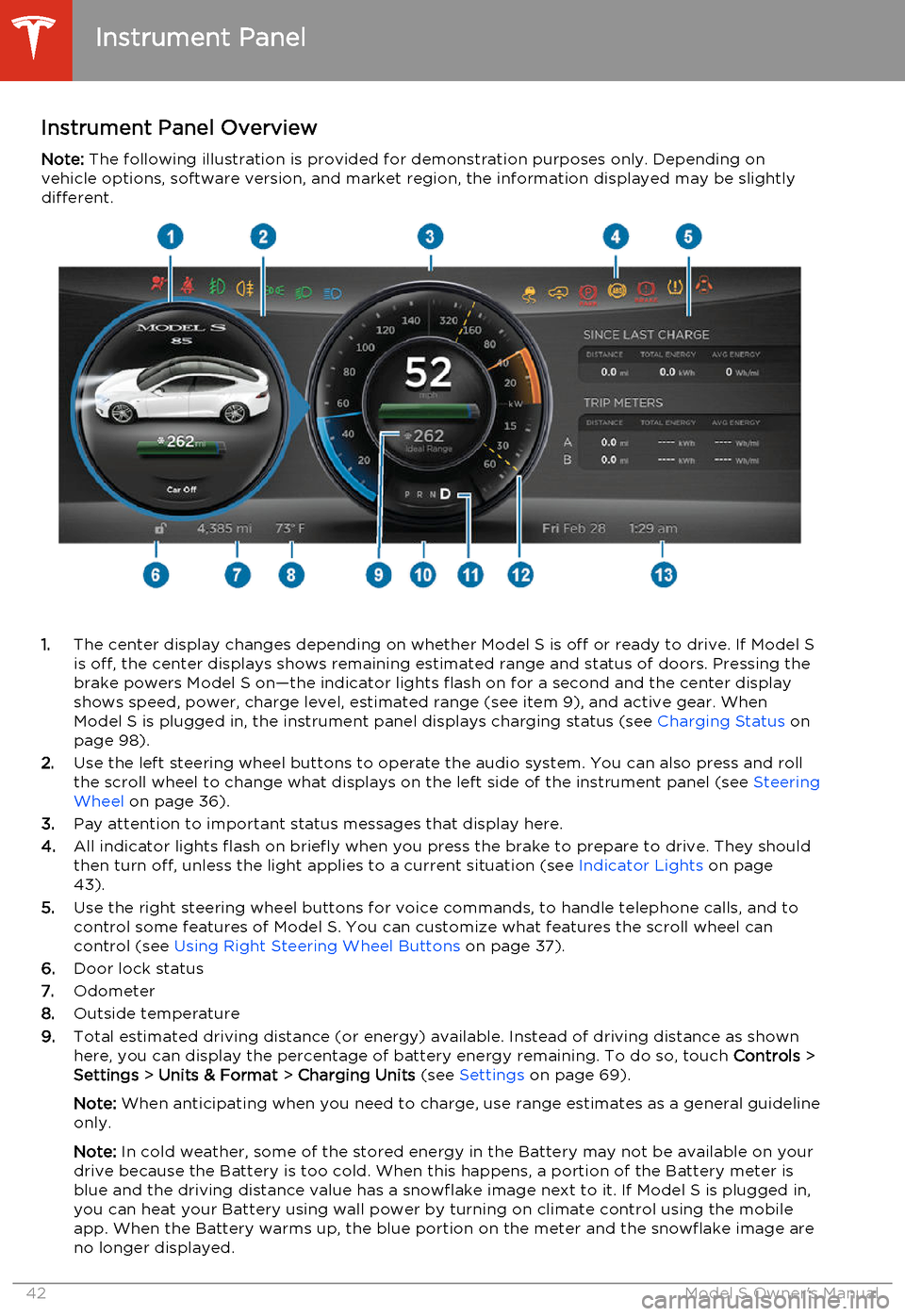
Instrument Panel OverviewNote: The following illustration is provided for demonstration purposes only. Depending on
vehicle options, software version, and market region, the information displayed may be slightly different.
1. The center display changes depending on whether Model S is off or ready to drive. If Model S
is off, the center displays shows remaining estimated range and status of doors. Pressing thebrake powers Model S on—the indicator lights flash on for a second and the center display
shows speed, power, charge level, estimated range (see item 9), and active gear. When
Model S is plugged in, the instrument panel displays charging status (see Charging Status on
page 98).
2. Use the left steering wheel buttons to operate the audio system. You can also press and roll
the scroll wheel to change what displays on the left side of the instrument panel (see Steering
Wheel on page 36).
3. Pay attention to important status messages that display here.
4. All indicator lights flash on briefly when you press the brake to prepare to drive. They should
then turn off, unless the light applies to a current situation (see Indicator Lights on page
43).
5. Use the right steering wheel buttons for voice commands, to handle telephone calls, and to
control some features of Model S. You can customize what features the scroll wheel can control (see Using Right Steering Wheel Buttons on page 37).
6. Door lock status
7. Odometer
8. Outside temperature
9. Total estimated driving distance (or energy) available. Instead of driving distance as shown
here, you can display the percentage of battery energy remaining. To do so, touch Controls >
Settings > Units & Format > Charging Units (see Settings on page 69).
Note: When anticipating when you need to charge, use range estimates as a general guideline
only.
Note: In cold weather, some of the stored energy in the Battery may not be available on your
drive because the Battery is too cold. When this happens, a portion of the Battery meter is
blue and the driving distance value has a snowflake image next to it. If Model S is plugged in,
you can heat your Battery using wall power by turning on climate control using the mobile
app. When the Battery warms up, the blue portion on the meter and the snowflake image are
no longer displayed.
Instrument Panel
42Model S Owner's Manual
Page 46 of 159
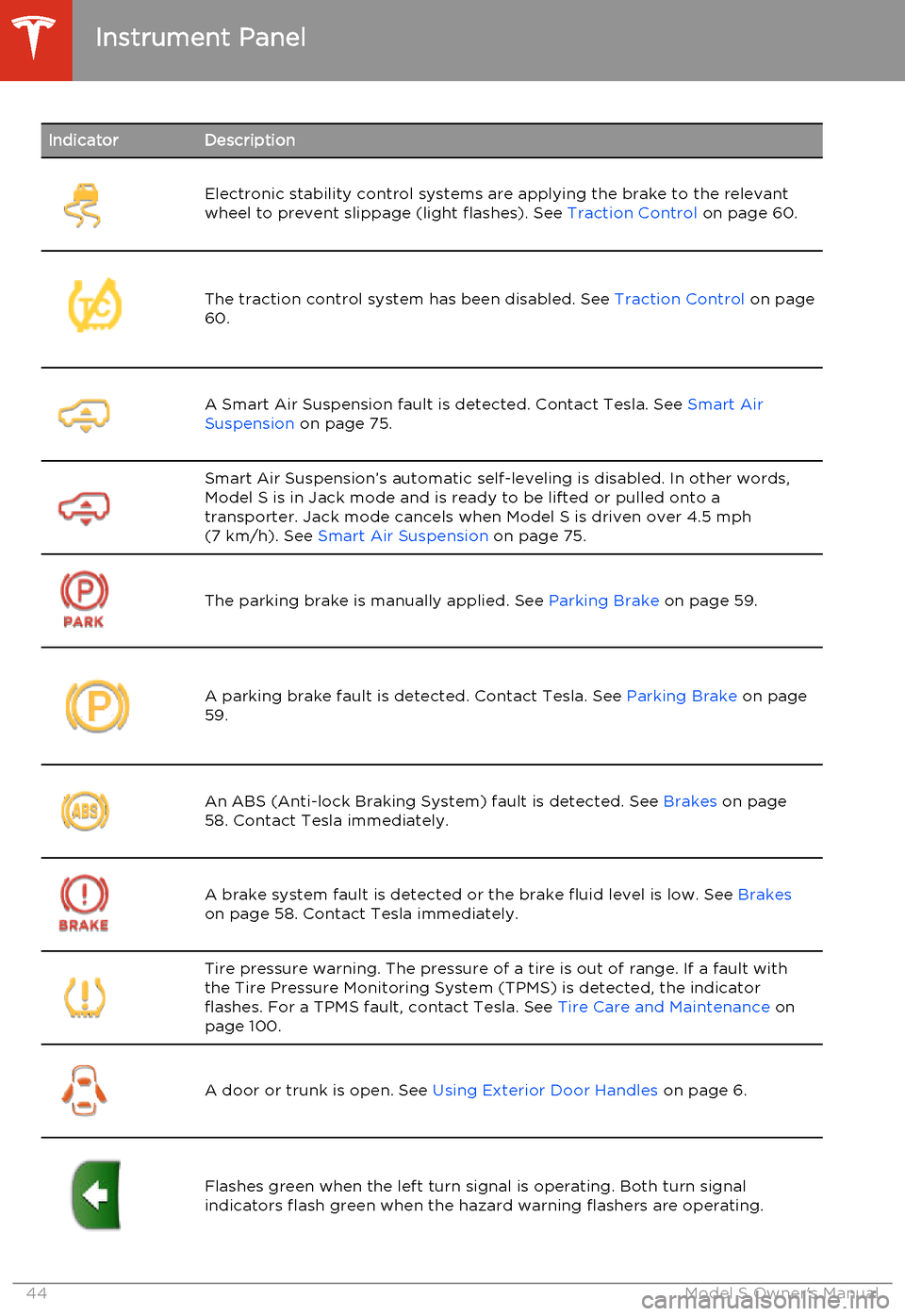
IndicatorDescriptionElectronic stability control systems are applying the brake to the relevant
wheel to prevent slippage (light flashes). See Traction Control on page 60.The traction control system has been disabled. See Traction Control on page
60.A Smart Air Suspension fault is detected. Contact Tesla. See Smart Air
Suspension on page 75.Smart Air Suspension’s automatic self-leveling is disabled. In other words,
Model S is in Jack mode and is ready to be lifted or pulled onto a transporter. Jack mode cancels when Model S is driven over 4.5 mph(7 km/h). See Smart Air Suspension on page 75.
The parking brake is manually applied. See Parking Brake on page 59.A parking brake fault is detected. Contact Tesla. See Parking Brake on page
59.An ABS (Anti-lock Braking System) fault is detected. See Brakes on page
58. Contact Tesla immediately.A brake system fault is detected or the brake fluid level is low. See Brakes
on page 58. Contact Tesla immediately.Tire pressure warning. The pressure of a tire is out of range. If a fault with
the Tire Pressure Monitoring System (TPMS) is detected, the indicator
flashes. For a TPMS fault, contact Tesla. See Tire Care and Maintenance on
page 100.
A door or trunk is open. See Using Exterior Door Handles on page 6.Flashes green when the left turn signal is operating. Both turn signal
indicators flash green when the hazard warning flashers are operating.Instrument Panel
44Model S Owner's Manual
Page 48 of 159
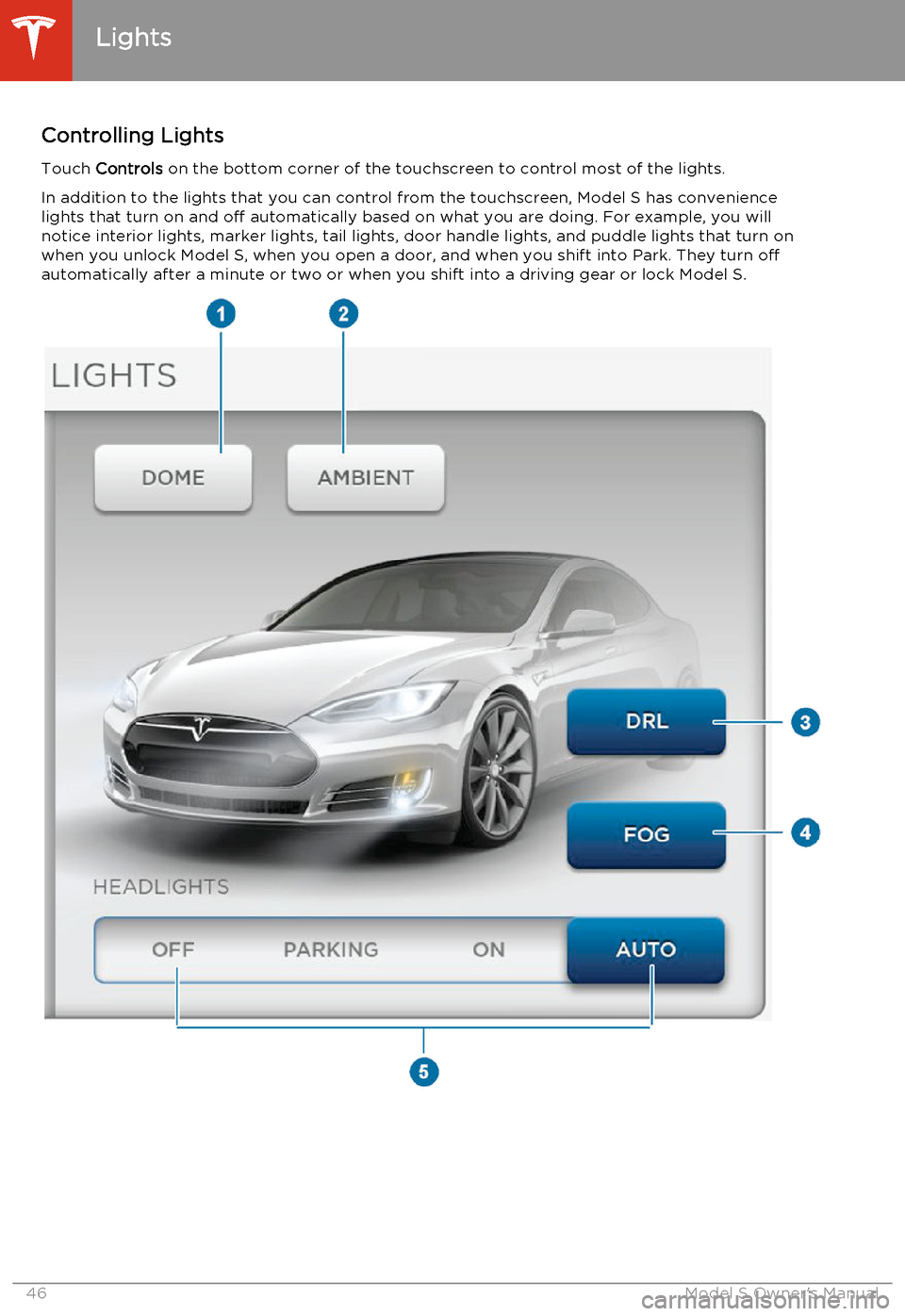
Controlling LightsTouch Controls on the bottom corner of the touchscreen to control most of the lights.
In addition to the lights that you can control from the touchscreen, Model S has convenience lights that turn on and off automatically based on what you are doing. For example, you will
notice interior lights, marker lights, tail lights, door handle lights, and puddle lights that turn on
when you unlock Model S, when you open a door, and when you shift into Park. They turn off
automatically after a minute or two or when you shift into a driving gear or lock Model S.
Lights
46Model S Owner's Manual