lock TESLA MODEL S 2014 (North America) Owner's Guide
[x] Cancel search | Manufacturer: TESLA, Model Year: 2014, Model line: MODEL S, Model: TESLA MODEL S 2014Pages: 159, PDF Size: 6.14 MB
Page 93 of 159
Model S Mobile AppThe Tesla Model S mobile app allows you tocommunicate with Model S remotely using
your iPhone ®
or Android ™
phone. With this app,
you can:
• Check charging progress and receive notifications when charging has started,
has been interrupted, or is complete.
• Heat or cool Model S before driving (even if it's in a garage).
• Locate Model S with directions, or track its movement across a map.
• Flash lights or honk the horn to find Model S when parked.
• Vent or close the sunroof.
• Lock or unlock Model S from afar. • Start Model S.
• Support the Model S Calendar app by allowing the mobile app to send your
phone's calendar data to Model S.
• Receive notifications when the car alarm has been triggered, or a new Model S
software update is available.
Simply download the Tesla Model S mobile
app to your phone and enter your MY TESLA
login credentials. You must also ensure that Model S is ready to communicate with the
mobile app by turning on its remote access
setting. Touch Controls > Settings > Safety &
Security > Remote Access > On (see Settings
on page 69).
Mobile App
Using the Touchscreen91
Page 97 of 159
Opening the Charge Port
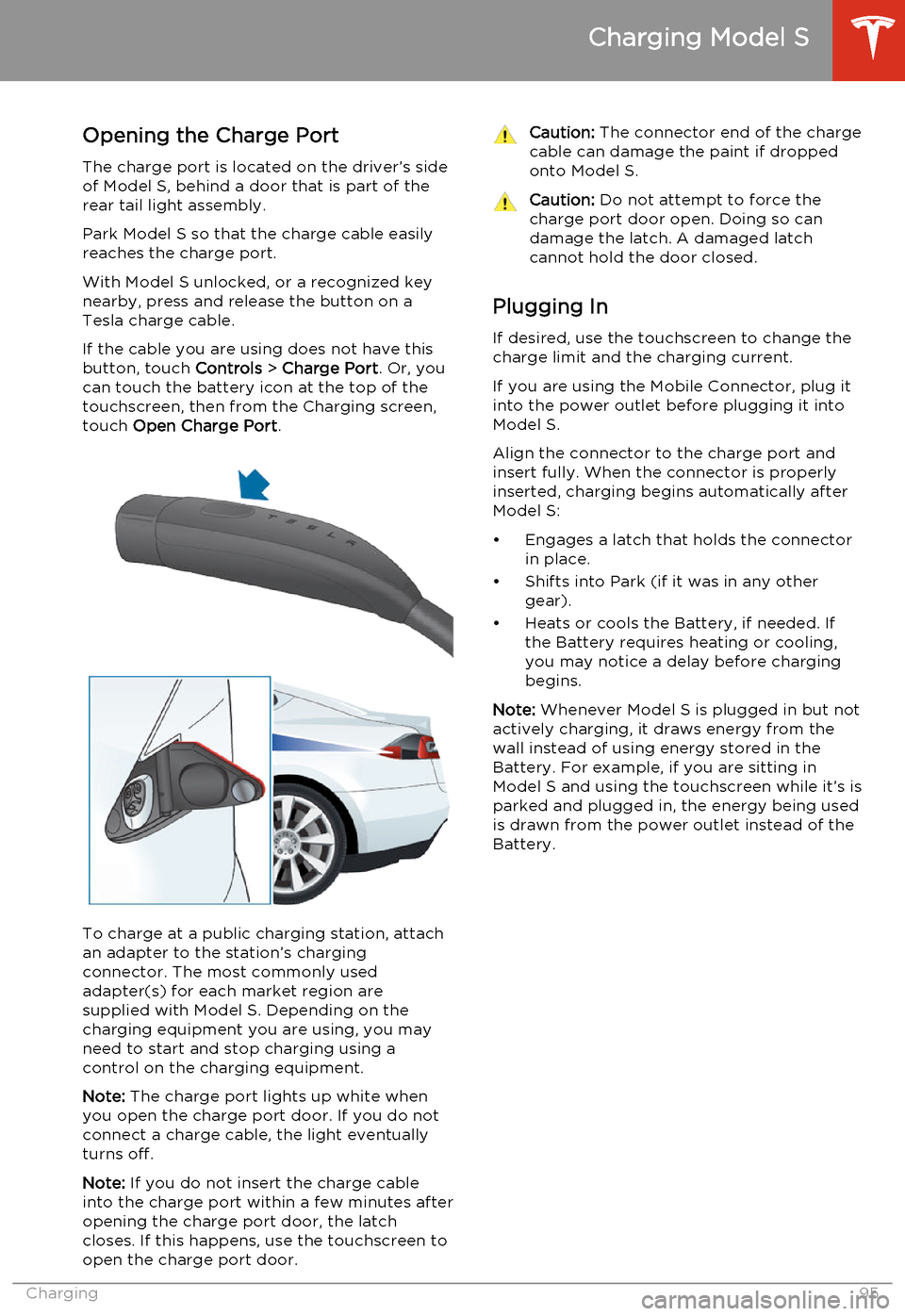
The charge port is located on the driver’s side of Model S, behind a door that is part of therear tail light assembly.
Park Model S so that the charge cable easily
reaches the charge port.
With Model S unlocked, or a recognized key
nearby, press and release the button on a
Tesla charge cable.
If the cable you are using does not have this
button, touch Controls > Charge Port . Or, you
can touch the battery icon at the top of the
touchscreen, then from the Charging screen,
touch Open Charge Port .
To charge at a public charging station, attach
an adapter to the station’s chargingconnector. The most commonly usedadapter(s) for each market region aresupplied with Model S. Depending on thecharging equipment you are using, you may
need to start and stop charging using a control on the charging equipment.
Note: The charge port lights up white when
you open the charge port door. If you do not
connect a charge cable, the light eventually
turns off.
Note: If you do not insert the charge cable
into the charge port within a few minutes after
opening the charge port door, the latch
closes. If this happens, use the touchscreen to
open the charge port door.
Caution: The connector end of the charge
cable can damage the paint if dropped onto Model S.Caution: Do not attempt to force the
charge port door open. Doing so can
damage the latch. A damaged latch
cannot hold the door closed.
Plugging In
If desired, use the touchscreen to change the
charge limit and the charging current.
If you are using the Mobile Connector, plug it into the power outlet before plugging it into
Model S.
Align the connector to the charge port and
insert fully. When the connector is properly
inserted, charging begins automatically after Model S:
• Engages a latch that holds the connector in place.
• Shifts into Park (if it was in any other gear).
• Heats or cools the Battery, if needed. If the Battery requires heating or cooling,
you may notice a delay before charging begins.
Note: Whenever Model S is plugged in but not
actively charging, it draws energy from the wall instead of using energy stored in the
Battery. For example, if you are sitting in
Model S and using the touchscreen while it’s is
parked and plugged in, the energy being used
is drawn from the power outlet instead of the
Battery.
Charging Model S
Charging95
Page 98 of 159
During ChargingDuring charging, the charge port pulses green
and charging status displays on the instrument panel. The frequency at which thecharge port’s light pulses slows down as thecharge level approaches full. When charging iscomplete, the light stops pulsing and is solid
green.
Note: If Model S is locked, the light around the
charge port does not light up.
If the light around the charge port lights up
red while charging, a fault is detected. Check
the instrument panel or touchscreen for a
message describing the fault. A fault can
occur due to something as common as a
power outage. If a power outage occurs,
charging resumes automatically when power
is restored.
Note: When charging, particularly at high
currents, the refrigerant compressor and the
fan operate as needed to keep the Battery cool. Therefore, it is normal to hear sounds
during charging.
Stopping Charging You can stop charging at any time by
disconnecting the charge cable or touching
Stop Charging on the touchscreen.
To disconnect the charge cable:
1. Press and hold the button on a Tesla
connector to release the latch.
2. Pull the connector from the charge port.
3. Push the charge port door closed.
Note: To prevent unauthorized unplugging of
the charge cable, Model S must be unlocked
or able to recognize a key before you can
disconnect the charge cable.
Note: Model S stops charging whenever you
double-click the key. If you do not unplug
within 60 seconds, charging resumes.Caution: Tesla strongly recommends
leaving Model S plugged in when not in
use. This maintains the Battery at the optimum level of charge.Charge Port LightWhiteThe light is white when you open
the charge port door and charge
mode is initiated.GreenThe light pulses green when
charging is in progress and is solid
green when charging is complete.RedThe light flashes red when a fault is detected and charging has
stopped. Check the instrument
panel or touchscreen for a
message describing the fault.
Charging Model S
96Model S Owner's Manual
Page 114 of 159
Checking and Replacing Wiper
BladesCaution: Wiper blades do not lock into a
lifted position. When cleaning or
replacing a wiper blade, lift the wiper arm
only a short distance from the windshield,
just far enough to access the blade. Do not lift a wiper arm beyond its intendedposition. Doing so can cause damage thatis not covered by the warranty.
To make wiper blades easy to access, turn offthe wipers, shift Model S into Park, then use
the touchscreen to move them to the service
position. Touch Controls > Settings >
Vehicle > Service Mode > ON .
Note: Wipers automatically return to their
normal position when you shift Model S out of
Park.
Periodically check and clean the edge of the wiper blade and check the rubber for cracks,splits and roughness. If damaged, replace the
blade immediately to prevent damage to the glass.
Contaminants on the windshield, or on the wiper blades, can reduce the effectiveness of
the wiper blades. Contaminants include ice,
wax spray from car washes, washer fluid with
bug and/or water repellent, bird droppings,
tree sap, and other organic substances.
Follow these guidelines for cleaning:
• Clean the windshield using non-abrasive glass cleaner.
• Lift the wiper arm a short distance away from the windshield, just far enough toaccess the wiper blade, then wipe the
blade clean using isopropyl (rubbing)
alcohol or washer fluid.
If the wipers remain ineffective after cleaning,
replace the wiper blades.
For optimum performance, wiper blades
should be replaced at least once a year.
To replace wiper blades:
1. Turn off the wipers, shift Model S into
Park, then use the touchscreen to move
the wipers to the service position. Touch
Controls > Settings > Vehicle > Service
Mode > ON .
Note: Wipers must be in the OFF position
before turning on Service Mode.
2. Lift the wiper arm a short distance away
from the windshield, just far enough to access the wiper blade.
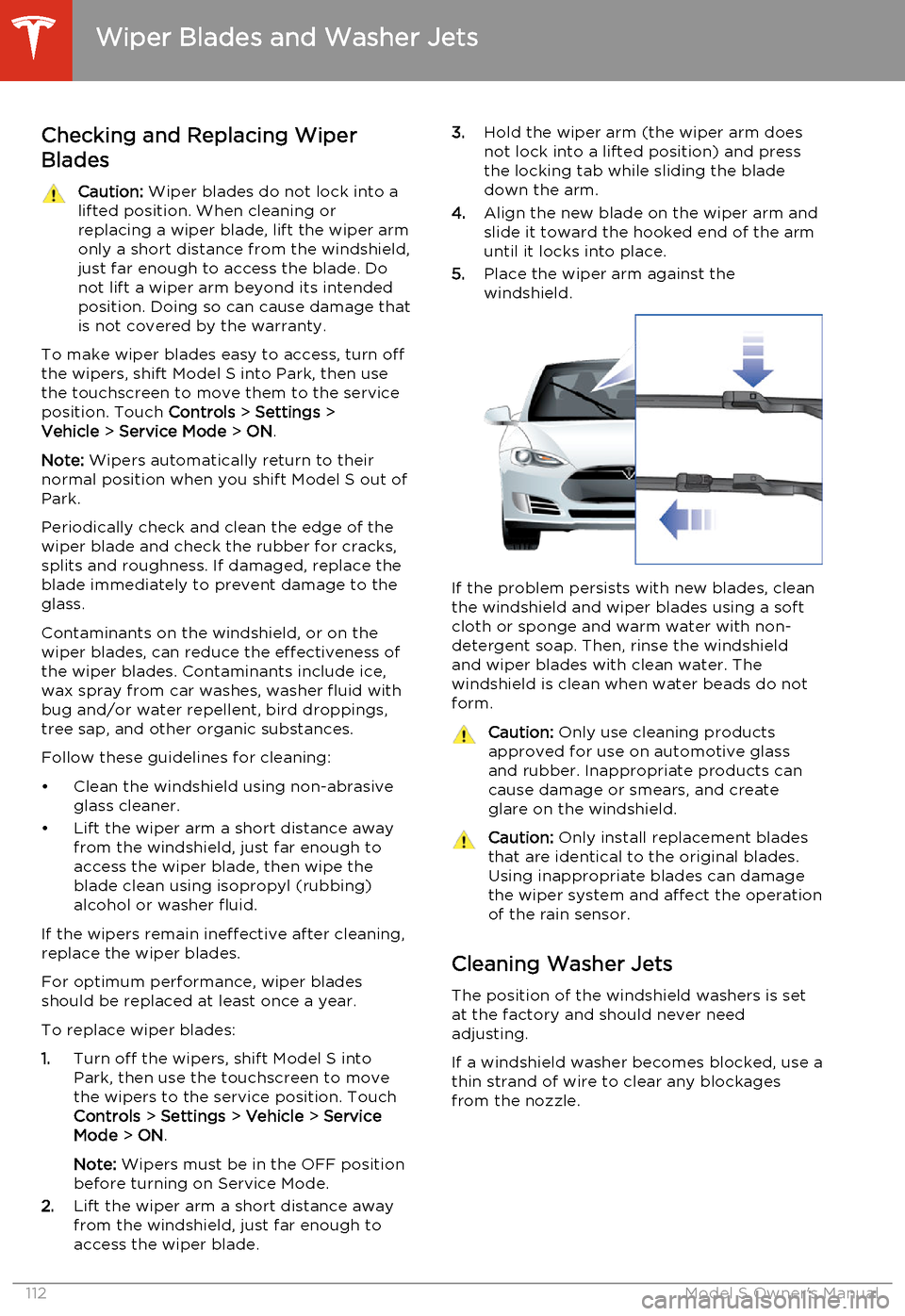
3. Hold the wiper arm (the wiper arm does
not lock into a lifted position) and press
the locking tab while sliding the blade
down the arm.
4. Align the new blade on the wiper arm and
slide it toward the hooked end of the arm
until it locks into place.
5. Place the wiper arm against the
windshield.
If the problem persists with new blades, clean
the windshield and wiper blades using a soft
cloth or sponge and warm water with non-
detergent soap. Then, rinse the windshield
and wiper blades with clean water. The
windshield is clean when water beads do not
form.
Caution: Only use cleaning products
approved for use on automotive glass and rubber. Inappropriate products can
cause damage or smears, and create
glare on the windshield.Caution: Only install replacement blades
that are identical to the original blades.
Using inappropriate blades can damage
the wiper system and affect the operation of the rain sensor.
Cleaning Washer Jets
The position of the windshield washers is set
at the factory and should never need adjusting.
If a windshield washer becomes blocked, use a
thin strand of wire to clear any blockages
from the nozzle.
Wiper Blades and Washer Jets
112Model S Owner's Manual
Page 134 of 159
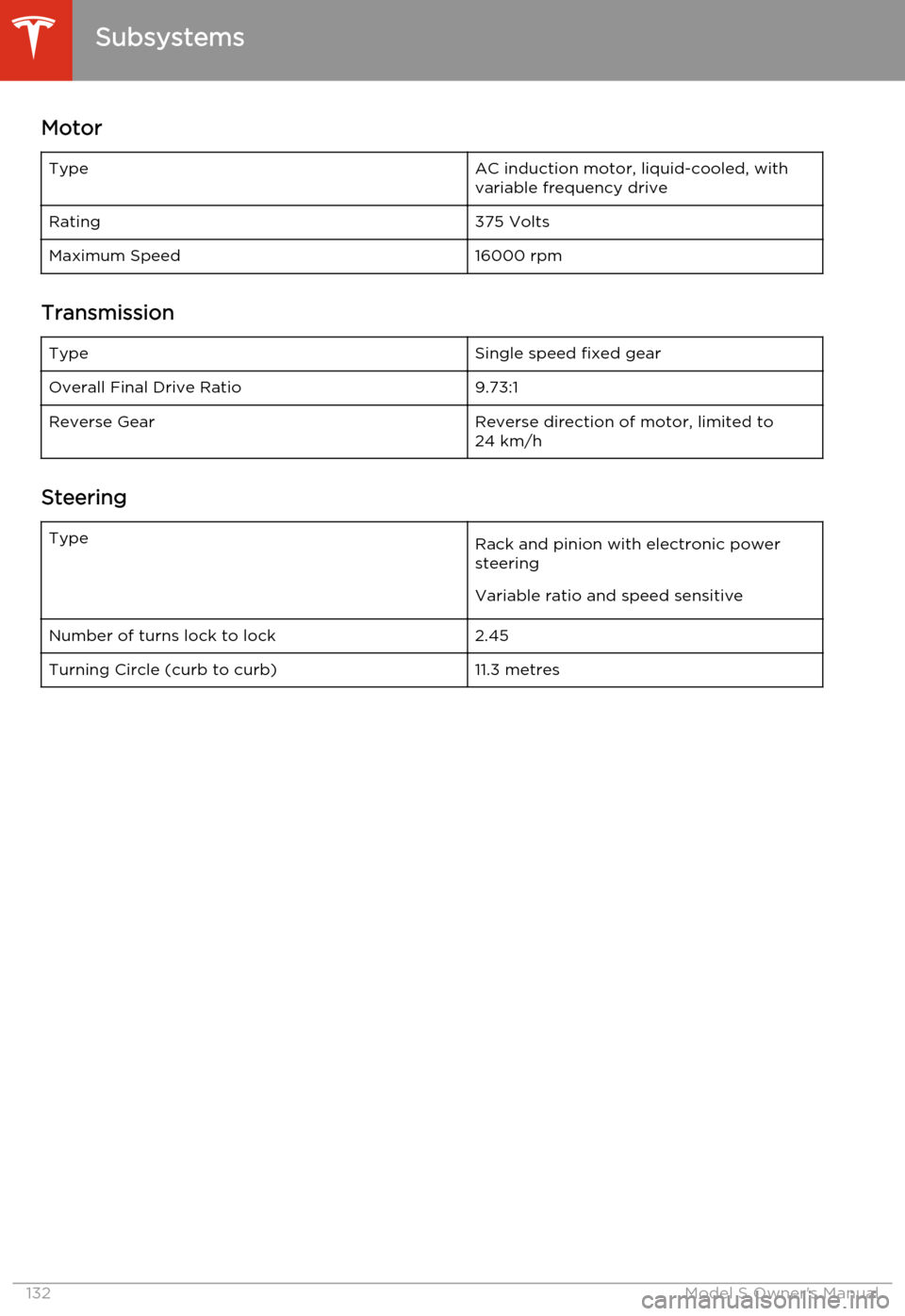
MotorTypeAC induction motor, liquid-cooled, with
variable frequency driveRating375 VoltsMaximum Speed16000 rpm
Transmission
TypeSingle speed fixed gearOverall Final Drive Ratio9.73:1Reverse GearReverse direction of motor, limited to
24 km/h
Steering
TypeRack and pinion with electronic power
steering
Variable ratio and speed sensitiveNumber of turns lock to lock2.45Turning Circle (curb to curb)11.3 metres
Subsystems
132Model S Owner's Manual
Page 135 of 159
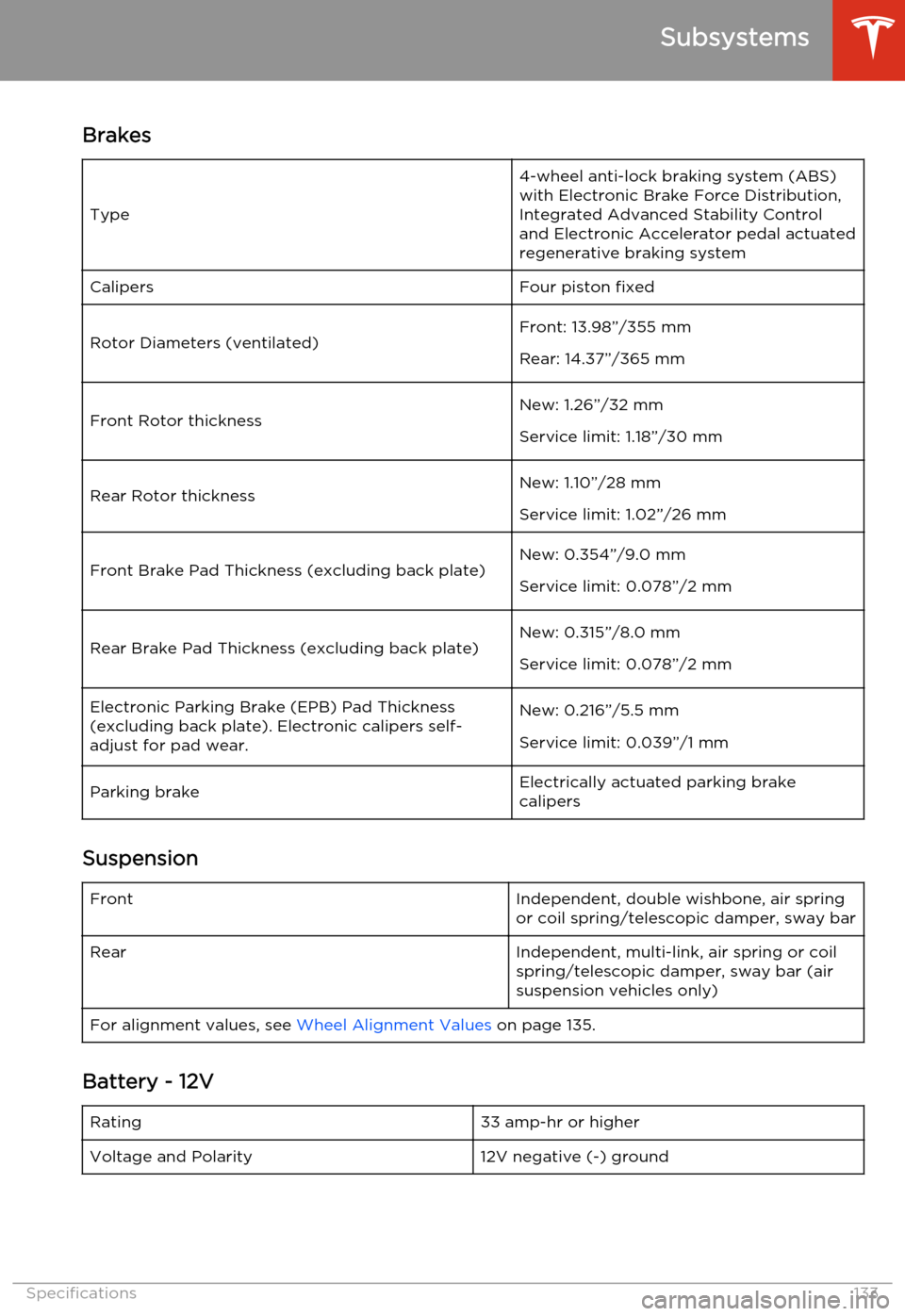
Brakes
Type
4-wheel anti-lock braking system (ABS)with Electronic Brake Force Distribution,
Integrated Advanced Stability Control
and Electronic Accelerator pedal actuated
regenerative braking systemCalipersFour piston fixedRotor Diameters (ventilated)Front: 13.98”/355 mm
Rear: 14.37”/365 mmFront Rotor thicknessNew: 1.26”/32 mm
Service limit: 1.18”/30 mmRear Rotor thicknessNew: 1.10”/28 mm
Service limit: 1.02”/26 mmFront Brake Pad Thickness (excluding back plate)New: 0.354”/9.0 mm
Service limit: 0.078”/2 mmRear Brake Pad Thickness (excluding back plate)New: 0.315”/8.0 mm
Service limit: 0.078”/2 mmElectronic Parking Brake (EPB) Pad Thickness
(excluding back plate). Electronic calipers self-
adjust for pad wear.New: 0.216”/5.5 mm
Service limit: 0.039”/1 mmParking brakeElectrically actuated parking brake
calipers
Suspension
FrontIndependent, double wishbone, air spring
or coil spring/telescopic damper, sway barRearIndependent, multi-link, air spring or coil
spring/telescopic damper, sway bar (air suspension vehicles only)For alignment values, see Wheel Alignment Values on page 135.
Battery - 12V
Rating33 amp-hr or higherVoltage and Polarity12V negative (-) ground
Subsystems
Specifications133
Page 145 of 159
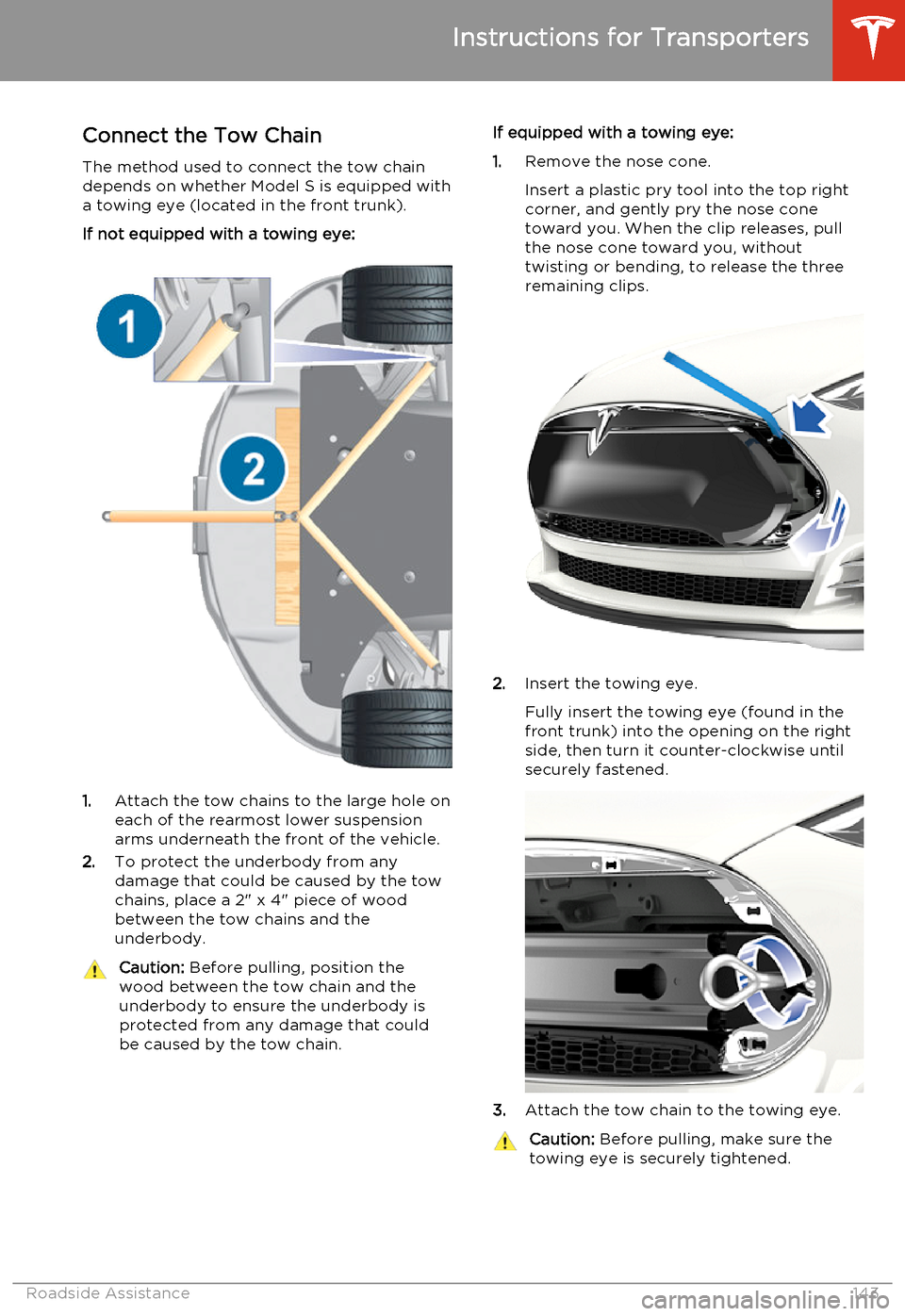
Connect the Tow Chain
The method used to connect the tow chain depends on whether Model S is equipped with
a towing eye (located in the front trunk).
If not equipped with a towing eye:
1. Attach the tow chains to the large hole on
each of the rearmost lower suspension arms underneath the front of the vehicle.
2. To protect the underbody from any
damage that could be caused by the tow
chains, place a 2" x 4" piece of wood
between the tow chains and the
underbody.
Caution: Before pulling, position the
wood between the tow chain and the
underbody to ensure the underbody is protected from any damage that couldbe caused by the tow chain.If equipped with a towing eye:
1. Remove the nose cone.
Insert a plastic pry tool into the top right
corner, and gently pry the nose cone
toward you. When the clip releases, pull
the nose cone toward you, without
twisting or bending, to release the three
remaining clips.
2. Insert the towing eye.
Fully insert the towing eye (found in the
front trunk) into the opening on the right
side, then turn it counter-clockwise until securely fastened.
3. Attach the tow chain to the towing eye.
Caution:
Before pulling, make sure the
towing eye is securely tightened.
Instructions for Transporters
Roadside Assistance143
Page 151 of 159
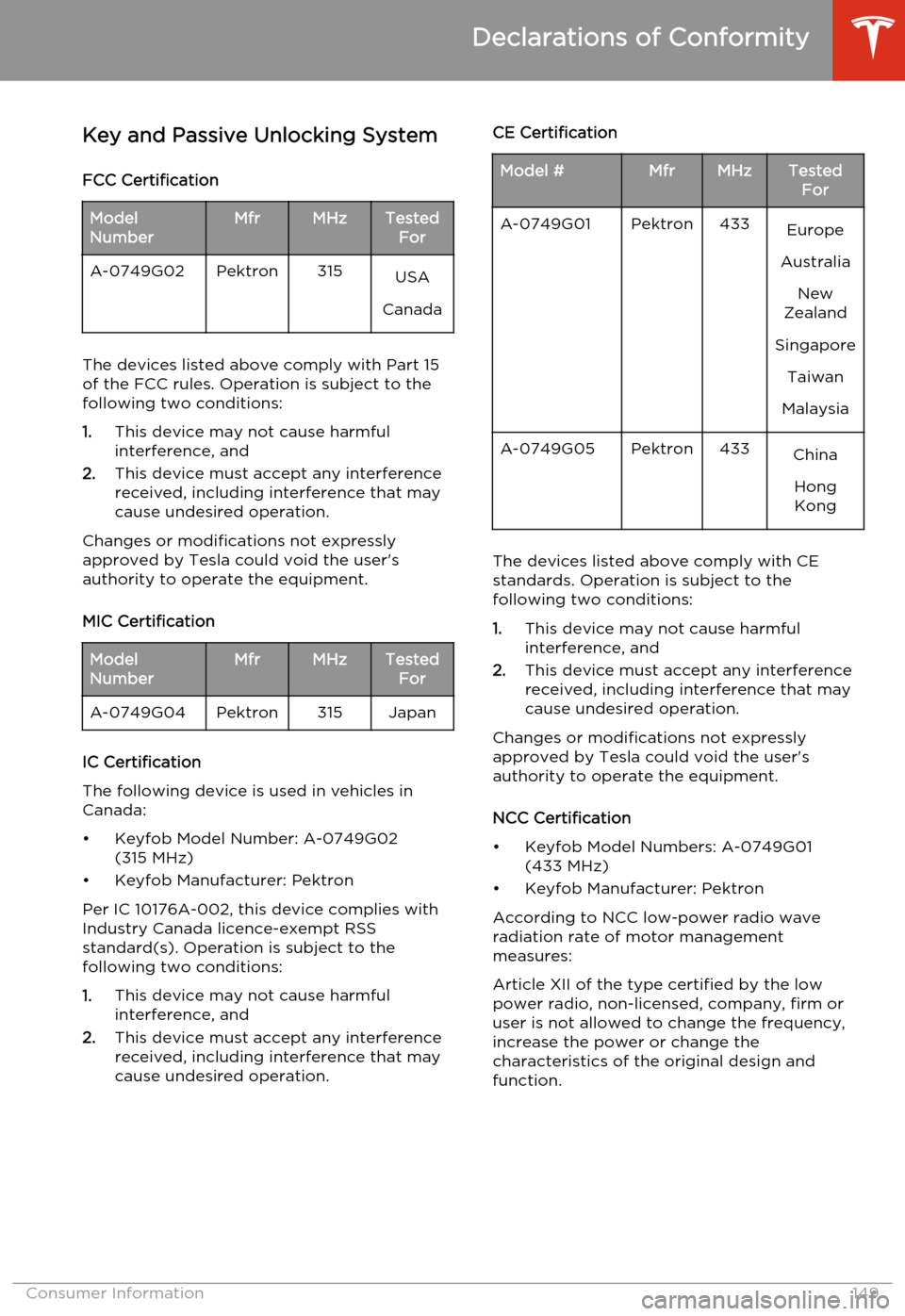
Key and Passive Unlocking System
FCC CertificationModel
NumberMfrMHzTested ForA-0749G02Pektron315USA
Canada
The devices listed above comply with Part 15
of the FCC rules. Operation is subject to the
following two conditions:
1. This device may not cause harmful
interference, and
2. This device must accept any interference
received, including interference that may
cause undesired operation.
Changes or modifications not expressly
approved by Tesla could void the user's
authority to operate the equipment.
MIC Certification
Model
NumberMfrMHzTested ForA-0749G04Pektron315Japan
IC Certification
The following device is used in vehicles in
Canada:
• Keyfob Model Number: A-0749G02 (315 MHz)
• Keyfob Manufacturer: Pektron
Per IC 10176A-002, this device complies with
Industry Canada licence-exempt RSS standard(s). Operation is subject to thefollowing two conditions:
1. This device may not cause harmful
interference, and
2. This device must accept any interference
received, including interference that may
cause undesired operation.
CE CertificationModel #MfrMHzTested ForA-0749G01Pektron433Europe
Australia New
Zealand
Singapore Taiwan
MalaysiaA-0749G05Pektron433China
HongKong
The devices listed above comply with CEstandards. Operation is subject to thefollowing two conditions:
1. This device may not cause harmful
interference, and
2. This device must accept any interference
received, including interference that may
cause undesired operation.
Changes or modifications not expressly
approved by Tesla could void the user's authority to operate the equipment.
NCC Certification
• Keyfob Model Numbers: A-0749G01 (433 MHz)
• Keyfob Manufacturer: Pektron
According to NCC low-power radio wave
radiation rate of motor management measures:
Article XII of the type certified by the low
power radio, non-licensed, company, firm or
user is not allowed to change the frequency,
increase the power or change the
characteristics of the original design and
function.
Declarations of Conformity
Consumer Information149
Page 154 of 159
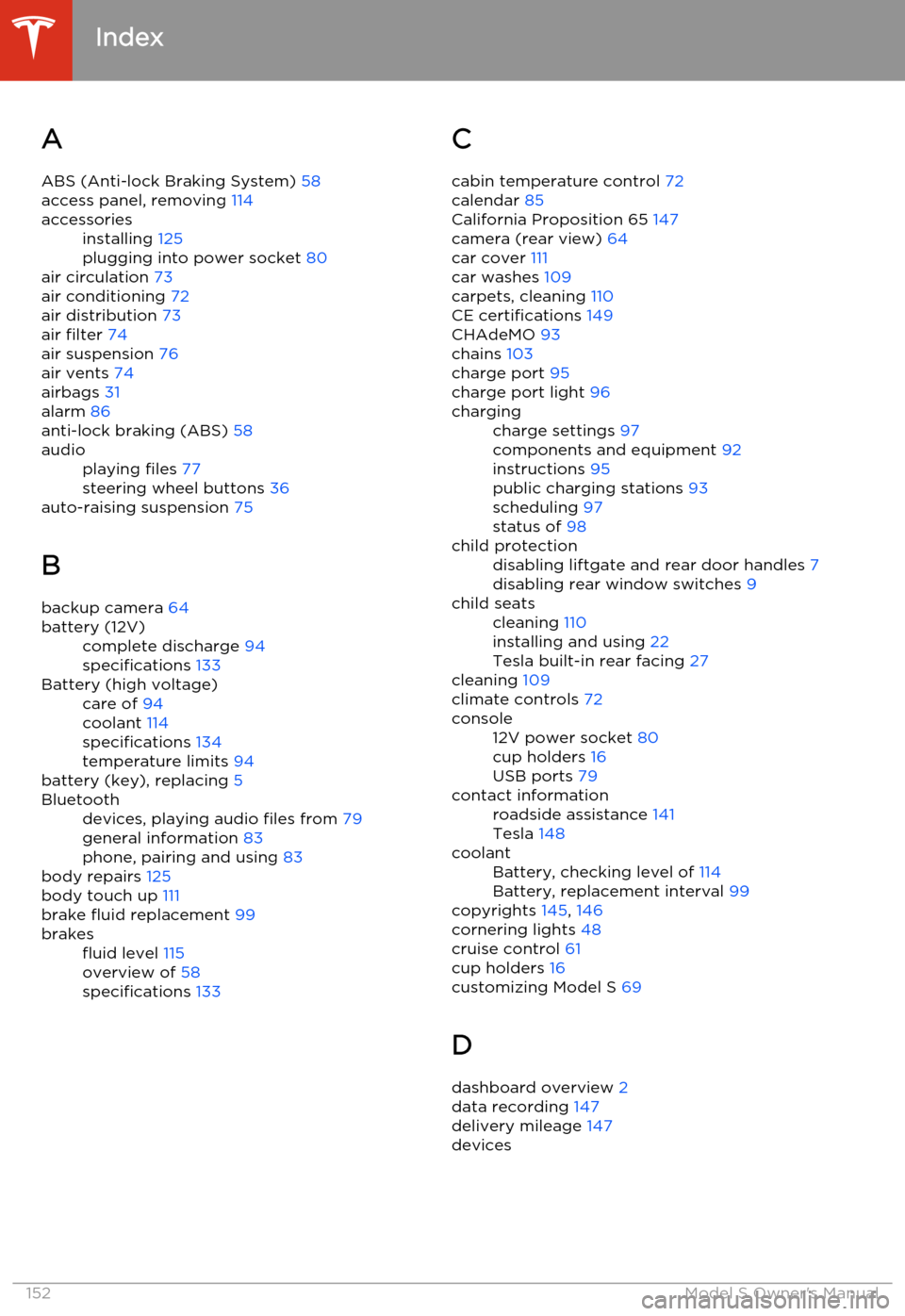
AABS (Anti-lock Braking System) 58
access panel, removing 114accessoriesinstalling 125
plugging into power socket 80
air circulation 73
air conditioning 72
air distribution 73
air filter 74
air suspension 76
air vents 74
airbags 31
alarm 86
anti-lock braking (ABS) 58
audioplaying files 77
steering wheel buttons 36
auto-raising suspension 75
B backup camera 64
battery (12V)complete discharge 94
specifications 133Battery (high voltage)care of 94
coolant 114
specifications 134
temperature limits 94
battery (key), replacing 5
Bluetoothdevices, playing audio files from 79
general information 83
phone, pairing and using 83
body repairs 125
body touch up 111
brake fluid replacement 99
brakesfluid level 115
overview of 58
specifications 133C
cabin temperature control 72
calendar 85
California Proposition 65 147
camera (rear view) 64
car cover 111
car washes 109
carpets, cleaning 110
CE certifications 149
CHAdeMO 93
chains 103
charge port 95
charge port light 96chargingcharge settings 97
components and equipment 92
instructions 95
public charging stations 93
scheduling 97
status of 98child protectiondisabling liftgate and rear door handles 7
disabling rear window switches 9child seatscleaning 110
installing and using 22
Tesla built-in rear facing 27
cleaning 109
climate controls 72
console12V power socket 80
cup holders 16
USB ports 79contact informationroadside assistance 141
Tesla 148coolantBattery, checking level of 114
Battery, replacement interval 99
copyrights 145, 146
cornering lights 48
cruise control 61
cup holders 16
customizing Model S 69
D
dashboard overview 2
data recording 147
delivery mileage 147
devices
Index
152Model S Owner's Manual
Page 155 of 159
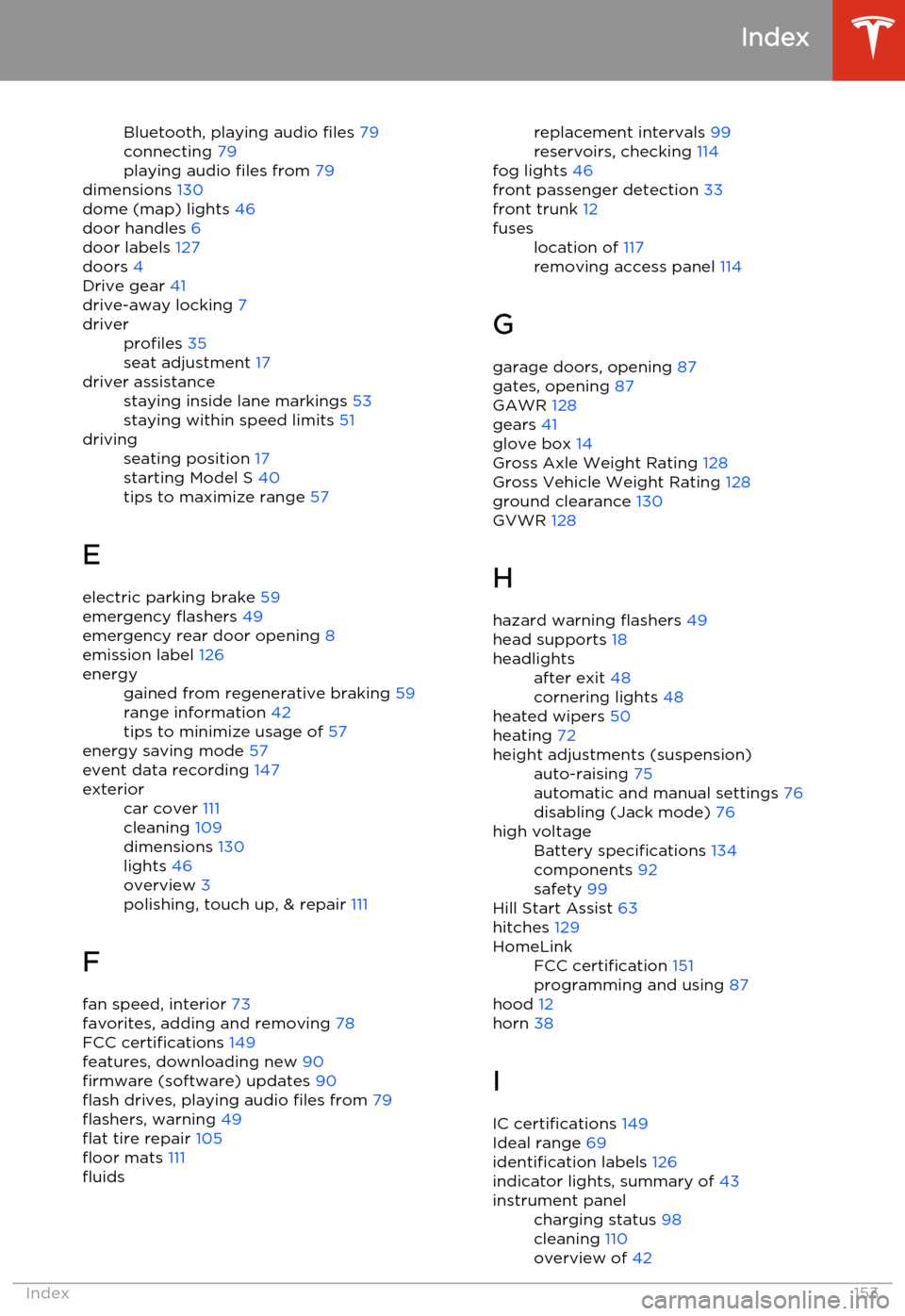
Bluetooth, playing audio files 79
connecting 79
playing audio files from 79
dimensions 130
dome (map) lights 46
door handles 6
door labels 127
doors 4
Drive gear 41
drive-away locking 7driverprofiles 35
seat adjustment 17driver assistancestaying inside lane markings 53
staying within speed limits 51drivingseating position 17
starting Model S 40
tips to maximize range 57
E
electric parking brake 59
emergency flashers 49
emergency rear door opening 8
emission label 126
energygained from regenerative braking 59
range information 42
tips to minimize usage of 57
energy saving mode 57
event data recording 147
exteriorcar cover 111
cleaning 109
dimensions 130
lights 46
overview 3
polishing, touch up, & repair 111
F
fan speed, interior 73
favorites, adding and removing 78
FCC certifications 149
features, downloading new 90
firmware (software) updates 90
flash drives, playing audio files from 79
flashers, warning 49
flat tire repair 105
floor mats 111
fluidsreplacement intervals 99
reservoirs, checking 114
fog lights 46
front passenger detection 33
front trunk 12fuseslocation of 117
removing access panel 114
G
garage doors, opening 87
gates, opening 87
GAWR 128
gears 41
glove box 14
Gross Axle Weight Rating 128
Gross Vehicle Weight Rating 128
ground clearance 130
GVWR 128
H
hazard warning flashers 49
head supports 18
headlightsafter exit 48
cornering lights 48
heated wipers 50
heating 72
height adjustments (suspension)auto-raising 75
automatic and manual settings 76
disabling (Jack mode) 76high voltageBattery specifications 134
components 92
safety 99
Hill Start Assist 63
hitches 129
HomeLinkFCC certification 151
programming and using 87
hood 12
horn 38
I
IC certifications 149
Ideal range 69
identification labels 126
indicator lights, summary of 43
instrument panelcharging status 98
cleaning 110
overview of 42
Index
Index153