tire type TESLA MODEL S 2014 Owner's manual (North America)
[x] Cancel search | Manufacturer: TESLA, Model Year: 2014, Model line: MODEL S, Model: TESLA MODEL S 2014Pages: 159, PDF Size: 6.14 MB
Page 3 of 159
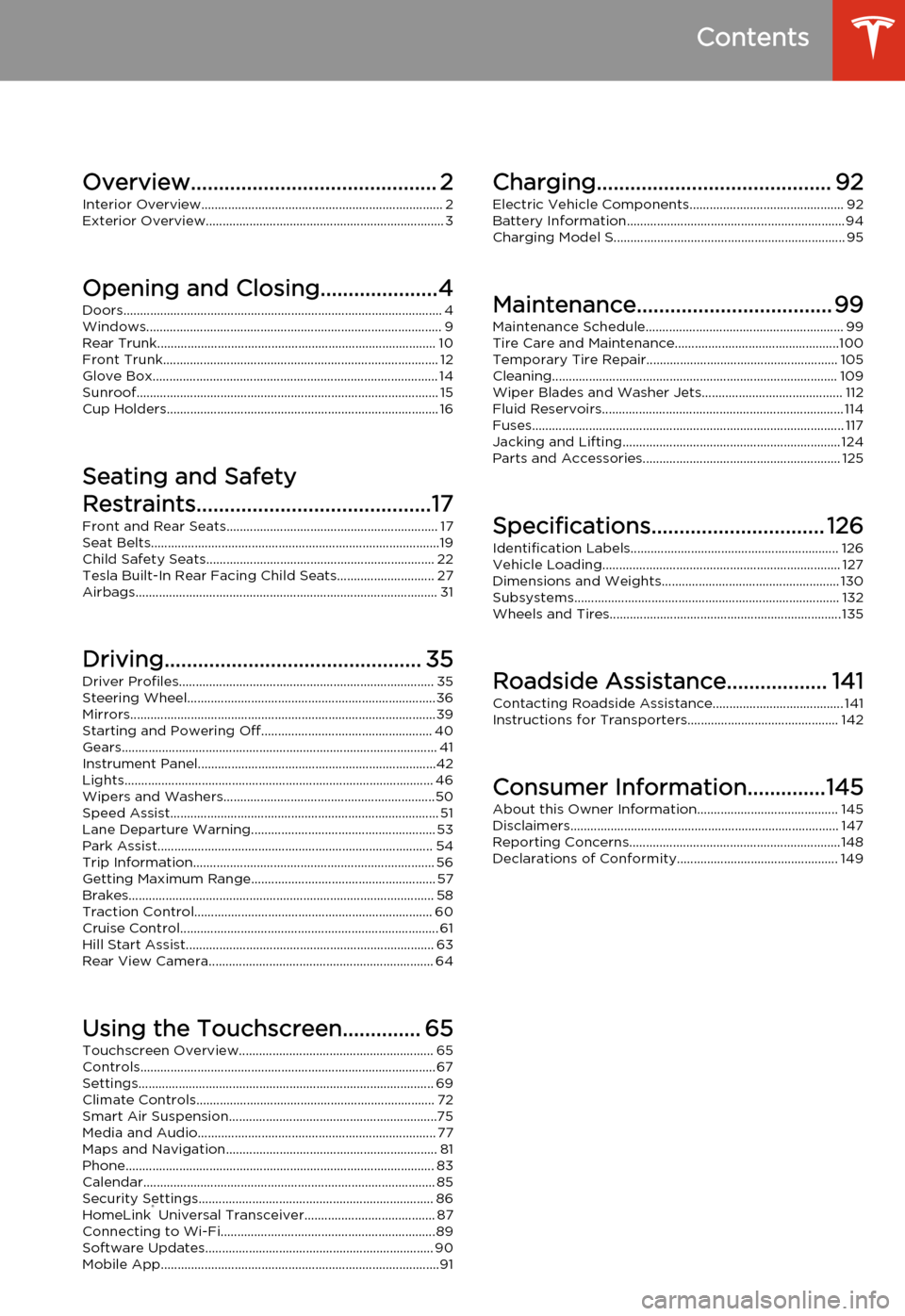
Overview............................................ 2Interior Overview........................................................................ 2
Exterior Overview....................................................................... 3
Opening and Closing.....................4 Doors............................................................................................... 4
Keyless Locking and Unlocking 4Using the Key 4Using Exterior Door Handles 6Using Interior Door Handles 6Interior Locking and Unlocking 6Child-protection Lock 7Drive-away Locking 7Walk-away Locking 7Unlocking When the Key Doesn't Work 7Opening Interior Doors with No Power 8
Windows........................................................................................ 9
Opening and Closing 9Locking Rear Windows 9
Rear Trunk................................................................................... 10
Opening 10Closing 10Adjusting the Opening Height 10Interior Release 11Opening with No Power 11
Front Trunk.................................................................................. 12
Opening 12Closing 12Interior Emergency Release 13Opening with No Power 13
Glove Box..................................................................................... 14
Opening and Closing 14
Sunroof.......................................................................................... 15
Opening and Closing 15
Cup Holders................................................................................. 16
Opening and Closing 16
Seating and Safety
Restraints..........................................17 Front and Rear Seats............................................................... 17
Correct Driving Position 17Adjusting the Driver’s Seat 17Folding Rear Seats 18Raising Rear Seats 18Head Supports 18Seat Covers 18
Seat Belts......................................................................................19
Wearing Seat Belts 19Wearing Seat Belts When Pregnant 19Seat Belt Pre-tensioners 20Testing Seat Belts 20Seat Belt Warnings 20
Child Safety Seats.................................................................... 22
Guidelines for Seating Children 22Choosing a Child Safety Seat 23Seating Larger Children 24Installing Child Safety Seats 24Installing Seat Belt Retained Child Seats 24Installing LATCHChild Seats 25Attaching Upper Tether Straps 25Testing a Child Safety Seat 26Warnings - Child Safety Seats 26
Tesla Built-In Rear Facing Child Seats............................. 27
Usage Restrictions 27Opening 27Folding 27Seating a Child 29Warnings - Tesla Child Seats 29
Airbags.......................................................................................... 31
Location of Airbags 31How the Airbags Work 32Types of Airbags 32Passenger Front Airbag 33Inflation Effects 34Airbag Warning Indicator 34Airbag Warnings 34
Driving.............................................. 35Driver Profiles............................................................................ 35
Creating a Driver Profile 35Restoring a Driver’s Profile 35Saved Driver Settings 35
Steering Wheel..........................................................................36
Adjusting Position 36Adjusting Sensitivity 36Using Left Steering Wheel Buttons 36Using Right Steering Wheel Buttons 37Using Voice Commands 37Horn 38
Mirrors...........................................................................................39
Adjusting Exterior Side Mirrors 39Rear View Mirror 39
Starting and Powering Off................................................... 40
Starting Model S 40Powering Off 40
Gears.............................................................................................. 41
Shifting Gears 41Leaving Model S in Neutral - Tow Mode 41
Instrument Panel.......................................................................42
Instrument Panel Overview 42Indicator Lights 43
Lights............................................................................................ 46
Controlling Lights 46Headlight High Beams 48Headlights After Exit 48Cornering Lights 48Turn Signals 49Hazard Warning Flashers 49
Wipers and Washers...............................................................50
Wipers 50Washers 50
Speed Assist................................................................................ 51
How Speed Assist Works 51Controlling Speed Assist 52Limitations and Inaccuracies 52
Lane Departure Warning....................................................... 53
How Lane Departure Warning Works 53Controlling Lane Departure Warning 53Limitations and Inaccuracies 53
Park Assist.................................................................................. 54
How Park Assist Works 54Visual and Audio Feedback 54Controlling Audible Feedback 54Limitations and False Warnings 55Other Parking Aids 55
Trip Information........................................................................ 56
Displaying Trip Information 56
Getting Maximum Range....................................................... 57
Driving Tips to Maximize Range 57Saving Energy 57
Brakes........................................................................................... 58
Braking Systems 58Brake Wear 58Regenerative Braking 59Parking Brake 59
Traction Control....................................................................... 60
How It Works 60
Cruise Control............................................................................. 61
Operating Cruise Control 61Changing the Cruising Speed 61Canceling and Resuming 61
Hill Start Assist.......................................................................... 63
Rear View Camera................................................................... 64
Camera Location 64
Using the Touchscreen.............. 65Touchscreen Overview.......................................................... 65
The Big Picture 65
Controls........................................................................................ 67
Controlling Model S Features 67
Settings........................................................................................ 69
Customizing Model S 69
Climate Controls....................................................................... 72
Overview of Climate Controls 72Customizing Climate Control 73Ventilation 74Climate Control Operating Tips 74
Smart Air Suspension..............................................................75
Manual Height Adjustments 75Location-Based Suspension 75Automatic Lowering 76Jack Mode 76
Media and Audio....................................................................... 77
Overview 77AM and FM Radio Services 77XM Radio 77Internet Radio 77Media Settings 78Favorites 78My Music & Devices 79USB Connections 7912V Power Socket 80
Maps and Navigation............................................................... 81
Overview 81Using Maps 81Starting Navigation 81During Navigation 82Favorite Destinations 82Updated Maps 82
Phone............................................................................................ 83
Bluetooth®Compatibility 83Pairing a Bluetooth Phone 83Importing Contacts 83Unpairing a Bluetooth Phone 83Connecting to a Paired Phone 84Making a Phone Call 84Receiving a Phone Call 84In Call Options 84
Calendar....................................................................................... 85
Overview 85Calendar and Navigation 85
Security Settings...................................................................... 86
About the Security System 86
HomeLink ®
Universal Transceiver....................................... 87
About HomeLink 87Programming HomeLink 87Troubleshooting HomeLink 87
Connecting to Wi-Fi................................................................ 89
Software Updates.................................................................... 90
Loading New Software 90Viewing Release Notes 90
Mobile App...................................................................................91
Model S Mobile App 91Charging.......................................... 92
Electric Vehicle Components.............................................. 92
High Voltage Components 92Charging Equipment 93
Battery Information................................................................. 94
About the Battery 94Battery Care 94
Charging Model S..................................................................... 95
Opening the Charge Port 95Plugging In 95During Charging 96Stopping Charging 96Charge Port Light 96Changing Charge Settings 97Charging Status 98
Maintenance................................... 99
Maintenance Schedule........................................................... 99
Service Intervals 99Daily Checks 99Monthly Checks 99Fluid Replacement Intervals 99High Voltage Safety 99
Tire Care and Maintenance.................................................100
Maintaining Tire Pressures 100Inspecting and Maintaining Tires 101Replacing Tires and Wheels 102Using Tire Chains 103Tire Pressure Monitoring 103
Temporary Tire Repair......................................................... 105
Tire Repair Kit 105Inflating with Sealant and Air 106Inflating with Air Only 107Replacing the Sealant Canister 108
Cleaning..................................................................................... 109
Cleaning the Exterior 109Cleaning the Interior 110Polishing, Touch Up, and Body Repair 111Using a Car Cover 111Floor Mats 111
Wiper Blades and Washer Jets.......................................... 112
Checking and Replacing Wiper Blades 112Cleaning Washer Jets 112
Fluid Reservoirs........................................................................ 114
Removing the Maintenance Panel 114Checking Battery Coolant 114Checking Brake Fluid 115Topping Up Washer Fluid 116
Fuses............................................................................................. 117
Fuse Box Locations 117Replacing a Fuse 117Fuse Box 1 118Fuse Box 2 120Fuse Box 3 122Fuse Box 4 123
Jacking and Lifting................................................................. 124
Jacking Procedure 124
Parts and Accessories........................................................... 125
Parts, Accessories, and Modifications 125Body Repairs 125
Specifications............................... 126
Identification Labels.............................................................. 126
Vehicle Identification Number 126Emission Control Label 126
Vehicle Loading....................................................................... 127
Load Capacity Labeling 127Calculating Load Limits 128Towing a Trailer 129Roof Racks 129
Dimensions and Weights..................................................... 130
Exterior Dimensions 130Weights 131
Subsystems............................................................................... 132
Motor 132Transmission 132Steering 132Brakes 133Suspension 133Battery - 12V 133Battery - High Voltage 134
Wheels and Tires..................................................................... 135
Wheel Specifications 135Wheel Alignment Values 135Tire Specifications 136Understanding Tire Markings 137Uniform Tire Quality Grading 139Wheels and Tires Glossary 140
Roadside Assistance.................. 141
Contacting Roadside Assistance....................................... 141 Instructions for Transporters............................................. 142
Use a Flatbed Only 142Disable Self-Leveling (air suspension vehicles only) 142Activate Tow Mode 142Connect the Tow Chain 143Pull Onto the Trailer and Secure the Wheels 144
Consumer Information..............145
About this Owner Information.......................................... 145
Illustrations 145Errors or Inaccuracies 145Location of Components 145Document Applicability 145Copyrights and Trademarks 146
Disclaimers................................................................................ 147
Vehicle Telematics/Data Recorders 147Quality Control 147California Proposition 65 147
Reporting Concerns...............................................................148
Contacting Tesla 148Reporting Safety Defects - US 148Reporting Safety Defects - Canada 148
Declarations of Conformity................................................ 149
Key and Passive Unlocking System 149Tire Pressure Monitoring System 150Media Control Unit 150HomeLink 151Radio Frequency Information 151Contents
Page 102 of 159
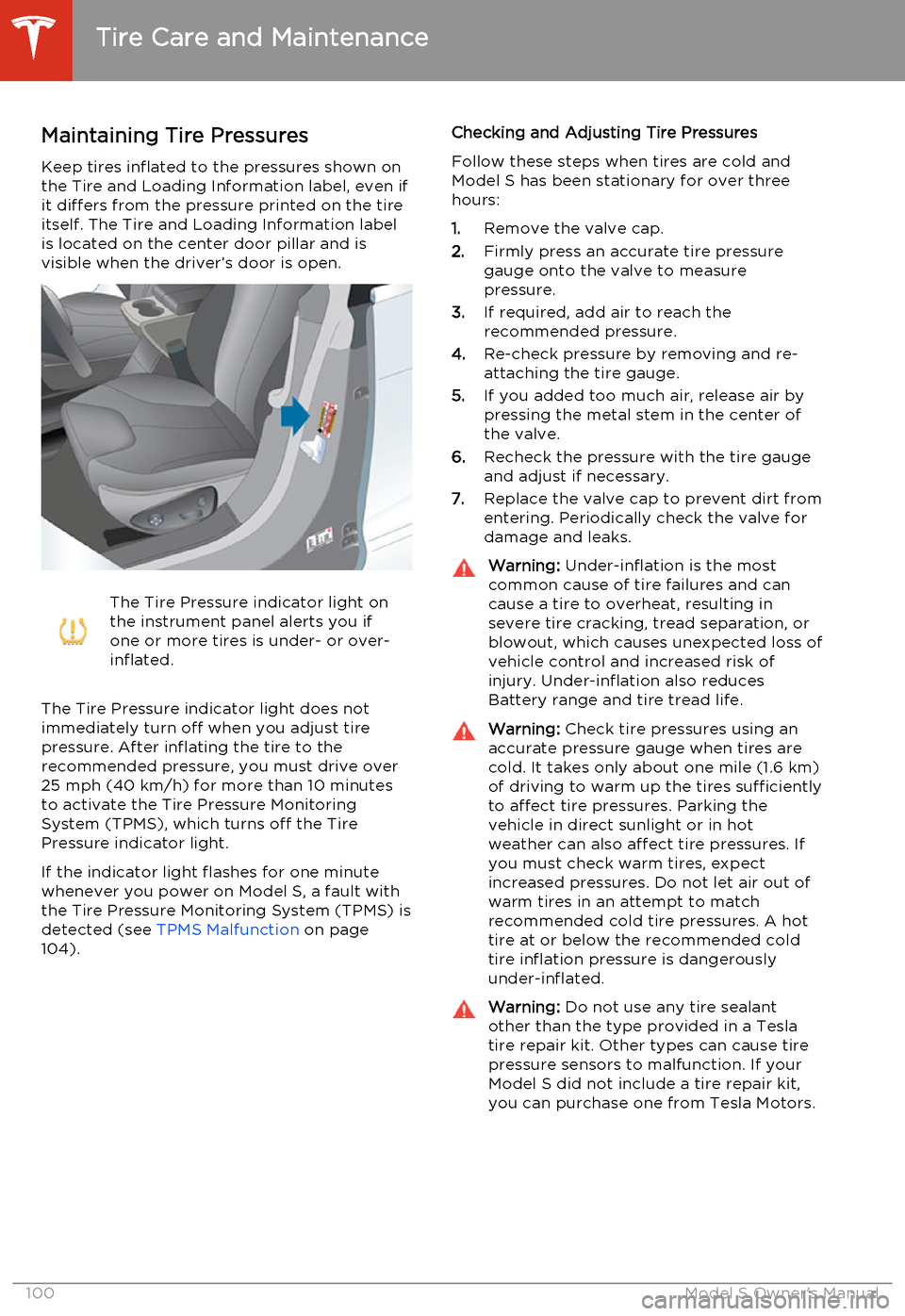
Maintaining Tire PressuresKeep tires inflated to the pressures shown onthe Tire and Loading Information label, even ifit differs from the pressure printed on the tire
itself. The Tire and Loading Information label is located on the center door pillar and isvisible when the driver’s door is open.The Tire Pressure indicator light on
the instrument panel alerts you if
one or more tires is under- or over-
inflated.
The Tire Pressure indicator light does not
immediately turn off when you adjust tire
pressure. After inflating the tire to the
recommended pressure, you must drive over
25 mph (40 km/h) for more than 10 minutes to activate the Tire Pressure MonitoringSystem (TPMS), which turns off the TirePressure indicator light.
If the indicator light flashes for one minute whenever you power on Model S, a fault with
the Tire Pressure Monitoring System (TPMS) is detected (see TPMS Malfunction on page
104).
Checking and Adjusting Tire Pressures
Follow these steps when tires are cold and
Model S has been stationary for over three
hours:
1. Remove the valve cap.
2. Firmly press an accurate tire pressure
gauge onto the valve to measure
pressure.
3. If required, add air to reach the
recommended pressure.
4. Re-check pressure by removing and re-
attaching the tire gauge.
5. If you added too much air, release air by
pressing the metal stem in the center of
the valve.
6. Recheck the pressure with the tire gauge
and adjust if necessary.
7. Replace the valve cap to prevent dirt from
entering. Periodically check the valve for damage and leaks.Warning: Under-inflation is the most
common cause of tire failures and can
cause a tire to overheat, resulting in
severe tire cracking, tread separation, or
blowout, which causes unexpected loss of vehicle control and increased risk ofinjury. Under-inflation also reduces
Battery range and tire tread life.Warning: Check tire pressures using an
accurate pressure gauge when tires are
cold. It takes only about one mile (1.6 km) of driving to warm up the tires sufficiently
to affect tire pressures. Parking the
vehicle in direct sunlight or in hot
weather can also affect tire pressures. If you must check warm tires, expectincreased pressures. Do not let air out of
warm tires in an attempt to match
recommended cold tire pressures. A hot tire at or below the recommended coldtire inflation pressure is dangerously
under-inflated.Warning: Do not use any tire sealant
other than the type provided in a Tesla tire repair kit. Other types can cause tire
pressure sensors to malfunction. If your Model S did not include a tire repair kit,
you can purchase one from Tesla Motors.
Tire Care and Maintenance
100Model S Owner's Manual
Page 107 of 159
Tire Repair KitYour Model S has no spare tire. Depending on
the legislations that apply to the region in which you purchased Model S, a tire repair kitmay or may not be included. If a tire repair kitwas not provided in Model S upon delivery,you can purchase one from Tesla.
Note: Although Model S does not have a spare
tire, in the event of a flat tire, Roadside
Assistance provides towing coverage for up
to 50 miles.
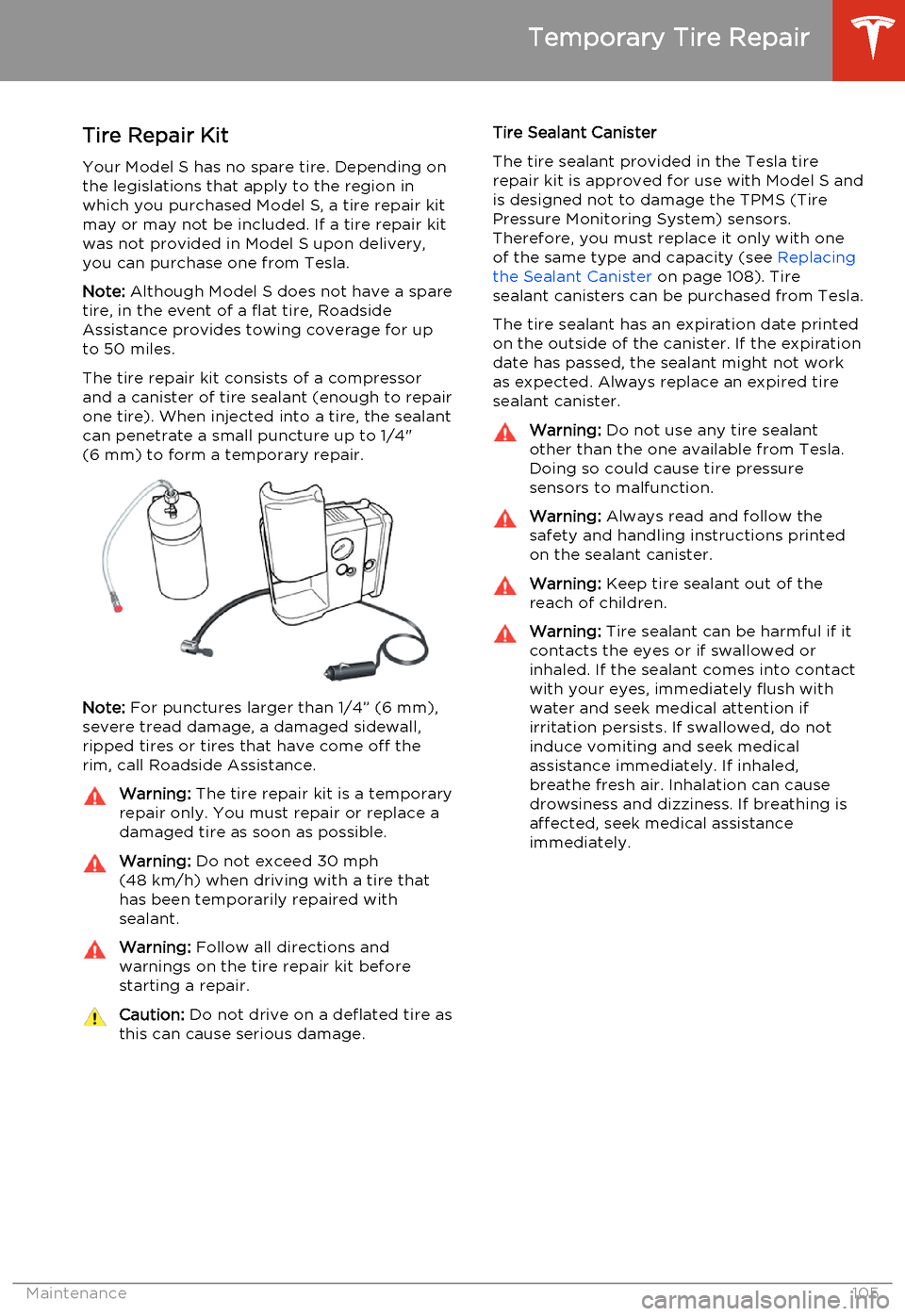
The tire repair kit consists of a compressor
and a canister of tire sealant (enough to repair
one tire). When injected into a tire, the sealant
can penetrate a small puncture up to 1/4"
(6 mm) to form a temporary repair.
Note: For punctures larger than 1/4” (6 mm),
severe tread damage, a damaged sidewall,
ripped tires or tires that have come off the
rim, call Roadside Assistance.
Warning: The tire repair kit is a temporary
repair only. You must repair or replace a
damaged tire as soon as possible.Warning: Do not exceed 30 mph
(48 km/h) when driving with a tire that
has been temporarily repaired with sealant.Warning: Follow all directions and
warnings on the tire repair kit before
starting a repair.Caution: Do not drive on a deflated tire as
this can cause serious damage.Tire Sealant Canister
The tire sealant provided in the Tesla tire repair kit is approved for use with Model S andis designed not to damage the TPMS (TirePressure Monitoring System) sensors.
Therefore, you must replace it only with one
of the same type and capacity (see Replacing
the Sealant Canister on page 108). Tire
sealant canisters can be purchased from Tesla.
The tire sealant has an expiration date printed
on the outside of the canister. If the expiration
date has passed, the sealant might not work as expected. Always replace an expired tire
sealant canister.Warning: Do not use any tire sealant
other than the one available from Tesla. Doing so could cause tire pressure
sensors to malfunction.Warning: Always read and follow the
safety and handling instructions printed on the sealant canister.Warning: Keep tire sealant out of the
reach of children.Warning: Tire sealant can be harmful if it
contacts the eyes or if swallowed or
inhaled. If the sealant comes into contact with your eyes, immediately flush withwater and seek medical attention ifirritation persists. If swallowed, do notinduce vomiting and seek medical
assistance immediately. If inhaled,
breathe fresh air. Inhalation can cause
drowsiness and dizziness. If breathing is
affected, seek medical assistance
immediately.
Temporary Tire Repair
Maintenance105
Page 137 of 159
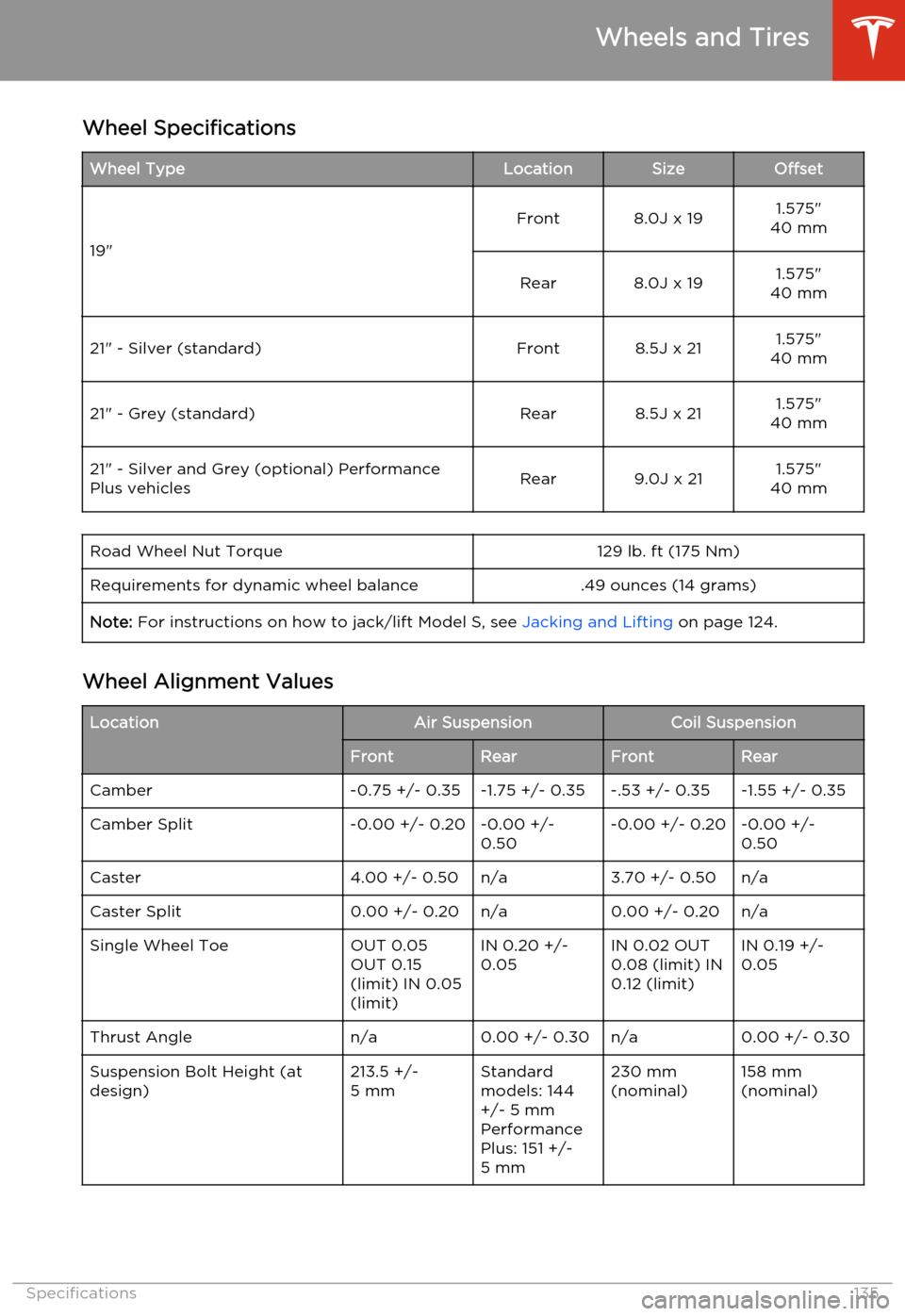
Wheel SpecificationsWheel TypeLocationSizeOffset
19"
Front8.0J x 191.575"
40 mmRear8.0J x 191.575"
40 mm21" - Silver (standard)Front8.5J x 211.575"
40 mm21" - Grey (standard)Rear8.5J x 211.575"
40 mm21" - Silver and Grey (optional) Performance
Plus vehiclesRear9.0J x 211.575"
40 mmRoad Wheel Nut Torque129 lb. ft (175 Nm)Requirements for dynamic wheel balance.49 ounces (14 grams)Note: For instructions on how to jack/lift Model S, see Jacking and Lifting on page 124.
Wheel Alignment Values
LocationAir SuspensionCoil SuspensionFrontRearFrontRearCamber-0.75 +/- 0.35-1.75 +/- 0.35-.53 +/- 0.35-1.55 +/- 0.35Camber Split-0.00 +/- 0.20-0.00 +/-
0.50-0.00 +/- 0.20-0.00 +/-
0.50Caster4.00 +/- 0.50n/a3.70 +/- 0.50n/aCaster Split0.00 +/- 0.20n/a0.00 +/- 0.20n/aSingle Wheel ToeOUT 0.05
OUT 0.15
(limit) IN 0.05
(limit)IN 0.20 +/-
0.05IN 0.02 OUT
0.08 (limit) IN
0.12 (limit)IN 0.19 +/-
0.05Thrust Anglen/a0.00 +/- 0.30n/a0.00 +/- 0.30Suspension Bolt Height (at
design)213.5 +/-
5 mmStandard
models: 144
+/- 5 mm
Performance
Plus: 151 +/-
5 mm230 mm
(nominal)158 mm
(nominal)
Wheels and Tires
Specifications135
Page 138 of 159
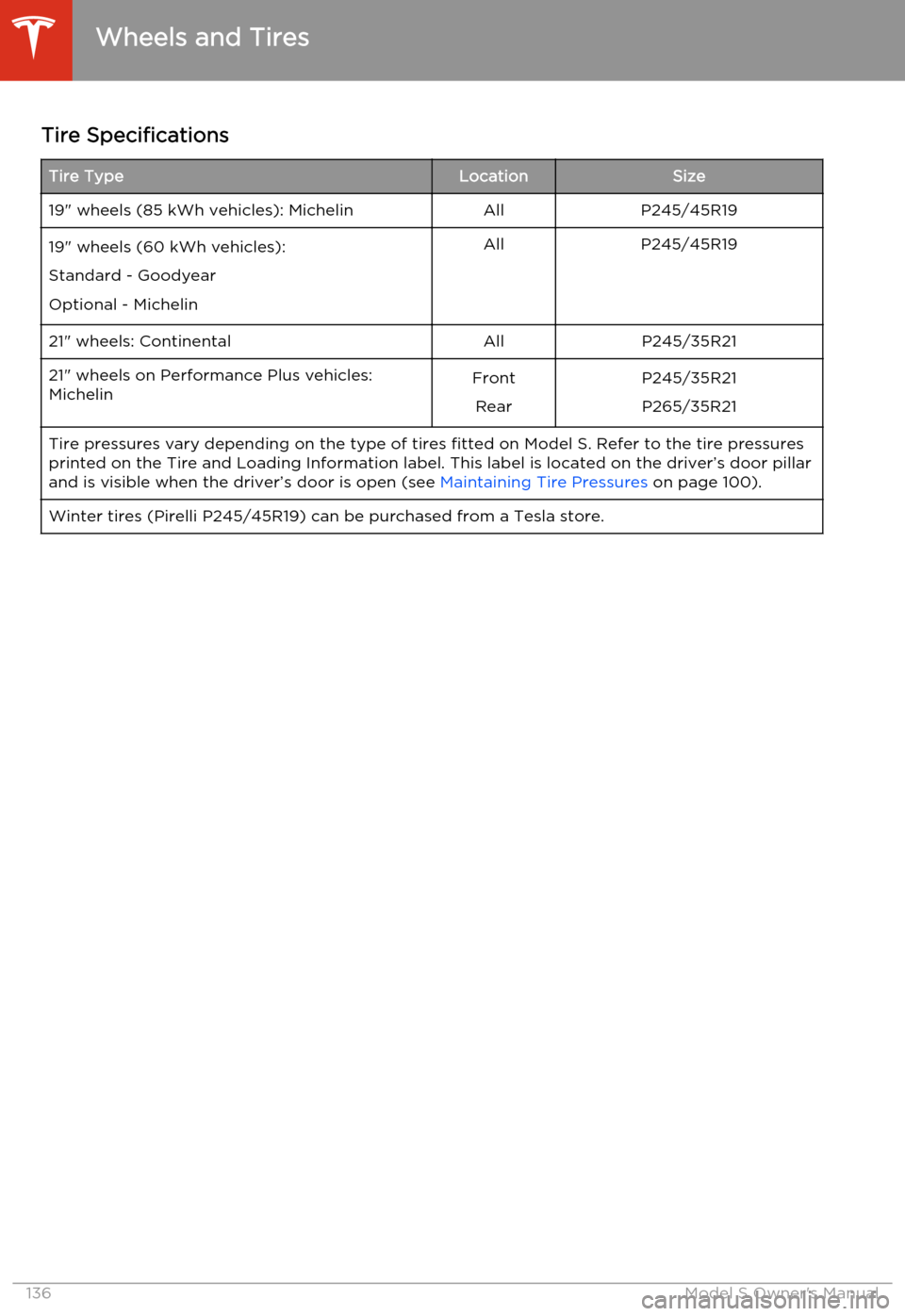
Tire SpecificationsTire TypeLocationSize19" wheels (85 kWh vehicles): MichelinAllP245/45R1919" wheels (60 kWh vehicles):
Standard - Goodyear
Optional - MichelinAllP245/45R1921" wheels: ContinentalAllP245/35R2121" wheels on Performance Plus vehicles: MichelinFront
RearP245/35R21P265/35R21Tire pressures vary depending on the type of tires fitted on Model S. Refer to the tire pressuresprinted on the Tire and Loading Information label. This label is located on the driver’s door pillar
and is visible when the driver’s door is open (see Maintaining Tire Pressures on page 100).Winter tires (Pirelli P245/45R19) can be purchased from a Tesla store.
Wheels and Tires
136Model S Owner's Manual
Page 140 of 159
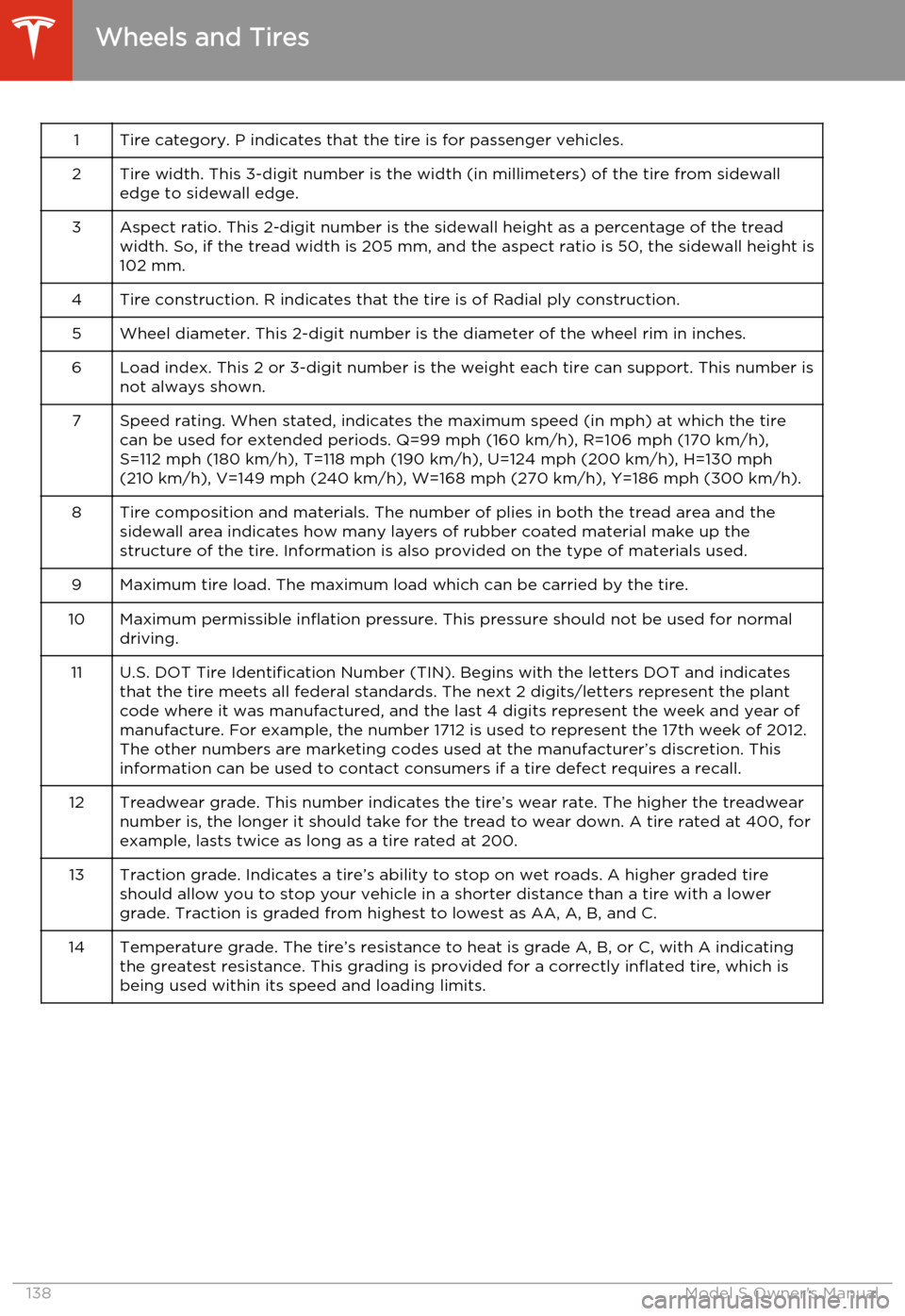
1Tire category. P indicates that the tire is for passenger vehicles.2Tire width. This 3-digit number is the width (in millimeters) of the tire from sidewall
edge to sidewall edge.3Aspect ratio. This 2-digit number is the sidewall height as a percentage of the tread width. So, if the tread width is 205 mm, and the aspect ratio is 50, the sidewall height is
102 mm.4Tire construction. R indicates that the tire is of Radial ply construction.5Wheel diameter. This 2-digit number is the diameter of the wheel rim in inches.6Load index. This 2 or 3-digit number is the weight each tire can support. This number is not always shown.7Speed rating. When stated, indicates the maximum speed (in mph) at which the tire
can be used for extended periods. Q=99 mph (160 km/h), R=106 mph (170 km/h),
S=112 mph (180 km/h), T=118 mph (190 km/h), U=124 mph (200 km/h), H=130 mph
(210 km/h), V=149 mph (240 km/h), W=168 mph (270 km/h), Y=186 mph (300 km/h).8Tire composition and materials. The number of plies in both the tread area and the sidewall area indicates how many layers of rubber coated material make up the
structure of the tire. Information is also provided on the type of materials used.9Maximum tire load. The maximum load which can be carried by the tire.10Maximum permissible inflation pressure. This pressure should not be used for normal driving.11U.S. DOT Tire Identification Number (TIN). Begins with the letters DOT and indicates
that the tire meets all federal standards. The next 2 digits/letters represent the plant
code where it was manufactured, and the last 4 digits represent the week and year of
manufacture. For example, the number 1712 is used to represent the 17th week of 2012.
The other numbers are marketing codes used at the manufacturer’s discretion. This
information can be used to contact consumers if a tire defect requires a recall.12Treadwear grade. This number indicates the tire’s wear rate. The higher the treadwear number is, the longer it should take for the tread to wear down. A tire rated at 400, for
example, lasts twice as long as a tire rated at 200.13Traction grade. Indicates a tire’s ability to stop on wet roads. A higher graded tire should allow you to stop your vehicle in a shorter distance than a tire with a lower
grade. Traction is graded from highest to lowest as AA, A, B, and C.14Temperature grade. The tire’s resistance to heat is grade A, B, or C, with A indicating
the greatest resistance. This grading is provided for a correctly inflated tire, which is
being used within its speed and loading limits.
Wheels and Tires
138Model S Owner's Manual
Page 142 of 159
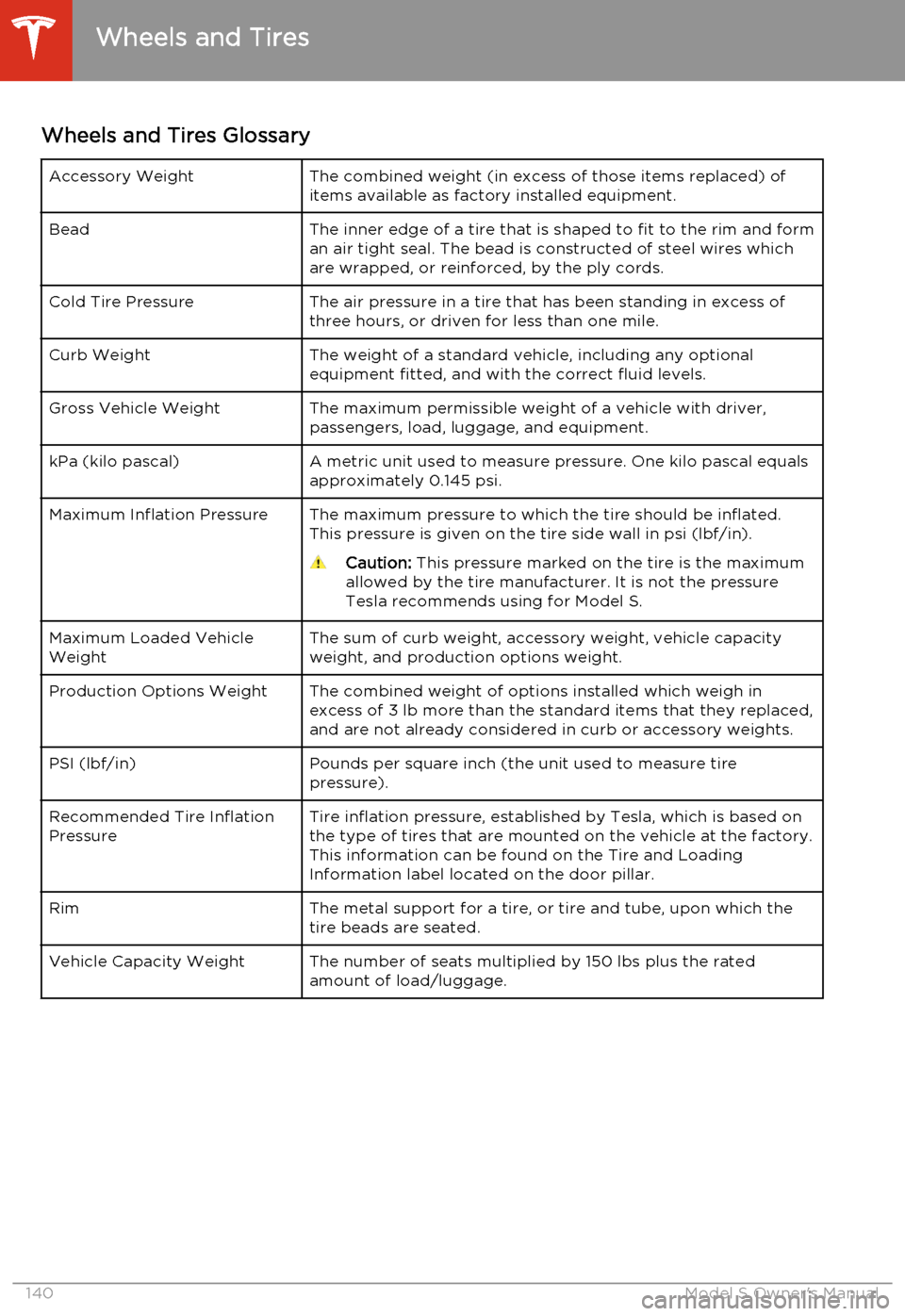
Wheels and Tires GlossaryAccessory WeightThe combined weight (in excess of those items replaced) of
items available as factory installed equipment.BeadThe inner edge of a tire that is shaped to fit to the rim and form an air tight seal. The bead is constructed of steel wires which
are wrapped, or reinforced, by the ply cords.Cold Tire PressureThe air pressure in a tire that has been standing in excess of three hours, or driven for less than one mile.Curb WeightThe weight of a standard vehicle, including any optional
equipment fitted, and with the correct fluid levels.Gross Vehicle WeightThe maximum permissible weight of a vehicle with driver,
passengers, load, luggage, and equipment.kPa (kilo pascal)A metric unit used to measure pressure. One kilo pascal equals
approximately 0.145 psi.Maximum Inflation PressureThe maximum pressure to which the tire should be inflated. This pressure is given on the tire side wall in psi (lbf/in).Caution: This pressure marked on the tire is the maximum
allowed by the tire manufacturer. It is not the pressure Tesla recommends using for Model S.Maximum Loaded Vehicle
WeightThe sum of curb weight, accessory weight, vehicle capacity
weight, and production options weight.Production Options WeightThe combined weight of options installed which weigh in
excess of 3 lb more than the standard items that they replaced, and are not already considered in curb or accessory weights.PSI (lbf/in)Pounds per square inch (the unit used to measure tirepressure).Recommended Tire Inflation
PressureTire inflation pressure, established by Tesla, which is based on the type of tires that are mounted on the vehicle at the factory.
This information can be found on the Tire and Loading
Information label located on the door pillar.RimThe metal support for a tire, or tire and tube, upon which the
tire beads are seated.Vehicle Capacity WeightThe number of seats multiplied by 150 lbs plus the rated amount of load/luggage.
Wheels and Tires
140Model S Owner's Manual