towing TESLA MODEL S 2014 Owner's manual (North America)
[x] Cancel search | Manufacturer: TESLA, Model Year: 2014, Model line: MODEL S, Model: TESLA MODEL S 2014Pages: 159, PDF Size: 6.14 MB
Page 3 of 159
Overview............................................ 2Interior Overview........................................................................ 2
Exterior Overview....................................................................... 3
Opening and Closing.....................4 Doors............................................................................................... 4
Keyless Locking and Unlocking 4Using the Key 4Using Exterior Door Handles 6Using Interior Door Handles 6Interior Locking and Unlocking 6Child-protection Lock 7Drive-away Locking 7Walk-away Locking 7Unlocking When the Key Doesn't Work 7Opening Interior Doors with No Power 8
Windows........................................................................................ 9
Opening and Closing 9Locking Rear Windows 9
Rear Trunk................................................................................... 10
Opening 10Closing 10Adjusting the Opening Height 10Interior Release 11Opening with No Power 11
Front Trunk.................................................................................. 12
Opening 12Closing 12Interior Emergency Release 13Opening with No Power 13
Glove Box..................................................................................... 14
Opening and Closing 14
Sunroof.......................................................................................... 15
Opening and Closing 15
Cup Holders................................................................................. 16
Opening and Closing 16
Seating and Safety
Restraints..........................................17 Front and Rear Seats............................................................... 17
Correct Driving Position 17Adjusting the Driver’s Seat 17Folding Rear Seats 18Raising Rear Seats 18Head Supports 18Seat Covers 18
Seat Belts......................................................................................19
Wearing Seat Belts 19Wearing Seat Belts When Pregnant 19Seat Belt Pre-tensioners 20Testing Seat Belts 20Seat Belt Warnings 20
Child Safety Seats.................................................................... 22
Guidelines for Seating Children 22Choosing a Child Safety Seat 23Seating Larger Children 24Installing Child Safety Seats 24Installing Seat Belt Retained Child Seats 24Installing LATCHChild Seats 25Attaching Upper Tether Straps 25Testing a Child Safety Seat 26Warnings - Child Safety Seats 26
Tesla Built-In Rear Facing Child Seats............................. 27
Usage Restrictions 27Opening 27Folding 27Seating a Child 29Warnings - Tesla Child Seats 29
Airbags.......................................................................................... 31
Location of Airbags 31How the Airbags Work 32Types of Airbags 32Passenger Front Airbag 33Inflation Effects 34Airbag Warning Indicator 34Airbag Warnings 34
Driving.............................................. 35Driver Profiles............................................................................ 35
Creating a Driver Profile 35Restoring a Driver’s Profile 35Saved Driver Settings 35
Steering Wheel..........................................................................36
Adjusting Position 36Adjusting Sensitivity 36Using Left Steering Wheel Buttons 36Using Right Steering Wheel Buttons 37Using Voice Commands 37Horn 38
Mirrors...........................................................................................39
Adjusting Exterior Side Mirrors 39Rear View Mirror 39
Starting and Powering Off................................................... 40
Starting Model S 40Powering Off 40
Gears.............................................................................................. 41
Shifting Gears 41Leaving Model S in Neutral - Tow Mode 41
Instrument Panel.......................................................................42
Instrument Panel Overview 42Indicator Lights 43
Lights............................................................................................ 46
Controlling Lights 46Headlight High Beams 48Headlights After Exit 48Cornering Lights 48Turn Signals 49Hazard Warning Flashers 49
Wipers and Washers...............................................................50
Wipers 50Washers 50
Speed Assist................................................................................ 51
How Speed Assist Works 51Controlling Speed Assist 52Limitations and Inaccuracies 52
Lane Departure Warning....................................................... 53
How Lane Departure Warning Works 53Controlling Lane Departure Warning 53Limitations and Inaccuracies 53
Park Assist.................................................................................. 54
How Park Assist Works 54Visual and Audio Feedback 54Controlling Audible Feedback 54Limitations and False Warnings 55Other Parking Aids 55
Trip Information........................................................................ 56
Displaying Trip Information 56
Getting Maximum Range....................................................... 57
Driving Tips to Maximize Range 57Saving Energy 57
Brakes........................................................................................... 58
Braking Systems 58Brake Wear 58Regenerative Braking 59Parking Brake 59
Traction Control....................................................................... 60
How It Works 60
Cruise Control............................................................................. 61
Operating Cruise Control 61Changing the Cruising Speed 61Canceling and Resuming 61
Hill Start Assist.......................................................................... 63
Rear View Camera................................................................... 64
Camera Location 64
Using the Touchscreen.............. 65Touchscreen Overview.......................................................... 65
The Big Picture 65
Controls........................................................................................ 67
Controlling Model S Features 67
Settings........................................................................................ 69
Customizing Model S 69
Climate Controls....................................................................... 72
Overview of Climate Controls 72Customizing Climate Control 73Ventilation 74Climate Control Operating Tips 74
Smart Air Suspension..............................................................75
Manual Height Adjustments 75Location-Based Suspension 75Automatic Lowering 76Jack Mode 76
Media and Audio....................................................................... 77
Overview 77AM and FM Radio Services 77XM Radio 77Internet Radio 77Media Settings 78Favorites 78My Music & Devices 79USB Connections 7912V Power Socket 80
Maps and Navigation............................................................... 81
Overview 81Using Maps 81Starting Navigation 81During Navigation 82Favorite Destinations 82Updated Maps 82
Phone............................................................................................ 83
Bluetooth®Compatibility 83Pairing a Bluetooth Phone 83Importing Contacts 83Unpairing a Bluetooth Phone 83Connecting to a Paired Phone 84Making a Phone Call 84Receiving a Phone Call 84In Call Options 84
Calendar....................................................................................... 85
Overview 85Calendar and Navigation 85
Security Settings...................................................................... 86
About the Security System 86
HomeLink ®
Universal Transceiver....................................... 87
About HomeLink 87Programming HomeLink 87Troubleshooting HomeLink 87
Connecting to Wi-Fi................................................................ 89
Software Updates.................................................................... 90
Loading New Software 90Viewing Release Notes 90
Mobile App...................................................................................91
Model S Mobile App 91Charging.......................................... 92
Electric Vehicle Components.............................................. 92
High Voltage Components 92Charging Equipment 93
Battery Information................................................................. 94
About the Battery 94Battery Care 94
Charging Model S..................................................................... 95
Opening the Charge Port 95Plugging In 95During Charging 96Stopping Charging 96Charge Port Light 96Changing Charge Settings 97Charging Status 98
Maintenance................................... 99
Maintenance Schedule........................................................... 99
Service Intervals 99Daily Checks 99Monthly Checks 99Fluid Replacement Intervals 99High Voltage Safety 99
Tire Care and Maintenance.................................................100
Maintaining Tire Pressures 100Inspecting and Maintaining Tires 101Replacing Tires and Wheels 102Using Tire Chains 103Tire Pressure Monitoring 103
Temporary Tire Repair......................................................... 105
Tire Repair Kit 105Inflating with Sealant and Air 106Inflating with Air Only 107Replacing the Sealant Canister 108
Cleaning..................................................................................... 109
Cleaning the Exterior 109Cleaning the Interior 110Polishing, Touch Up, and Body Repair 111Using a Car Cover 111Floor Mats 111
Wiper Blades and Washer Jets.......................................... 112
Checking and Replacing Wiper Blades 112Cleaning Washer Jets 112
Fluid Reservoirs........................................................................ 114
Removing the Maintenance Panel 114Checking Battery Coolant 114Checking Brake Fluid 115Topping Up Washer Fluid 116
Fuses............................................................................................. 117
Fuse Box Locations 117Replacing a Fuse 117Fuse Box 1 118Fuse Box 2 120Fuse Box 3 122Fuse Box 4 123
Jacking and Lifting................................................................. 124
Jacking Procedure 124
Parts and Accessories........................................................... 125
Parts, Accessories, and Modifications 125Body Repairs 125
Specifications............................... 126
Identification Labels.............................................................. 126
Vehicle Identification Number 126Emission Control Label 126
Vehicle Loading....................................................................... 127
Load Capacity Labeling 127Calculating Load Limits 128Towing a Trailer 129Roof Racks 129
Dimensions and Weights..................................................... 130
Exterior Dimensions 130Weights 131
Subsystems............................................................................... 132
Motor 132Transmission 132Steering 132Brakes 133Suspension 133Battery - 12V 133Battery - High Voltage 134
Wheels and Tires..................................................................... 135
Wheel Specifications 135Wheel Alignment Values 135Tire Specifications 136Understanding Tire Markings 137Uniform Tire Quality Grading 139Wheels and Tires Glossary 140
Roadside Assistance.................. 141
Contacting Roadside Assistance....................................... 141 Instructions for Transporters............................................. 142
Use a Flatbed Only 142Disable Self-Leveling (air suspension vehicles only) 142Activate Tow Mode 142Connect the Tow Chain 143Pull Onto the Trailer and Secure the Wheels 144
Consumer Information..............145
About this Owner Information.......................................... 145
Illustrations 145Errors or Inaccuracies 145Location of Components 145Document Applicability 145Copyrights and Trademarks 146
Disclaimers................................................................................ 147
Vehicle Telematics/Data Recorders 147Quality Control 147California Proposition 65 147
Reporting Concerns...............................................................148
Contacting Tesla 148Reporting Safety Defects - US 148Reporting Safety Defects - Canada 148
Declarations of Conformity................................................ 149
Key and Passive Unlocking System 149Tire Pressure Monitoring System 150Media Control Unit 150HomeLink 151Radio Frequency Information 151Contents
Page 70 of 159
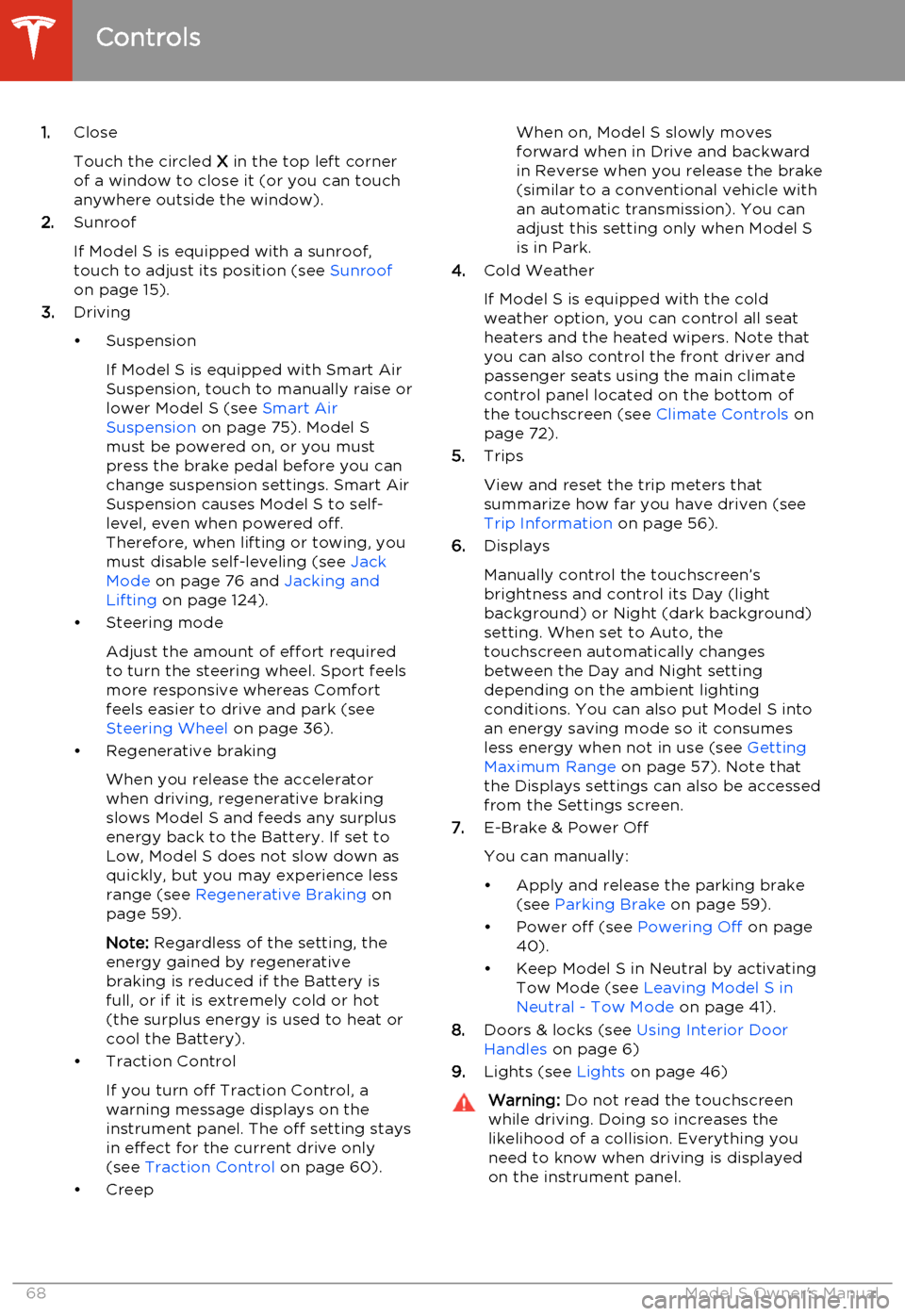
1.Close
Touch the circled X in the top left corner
of a window to close it (or you can touch anywhere outside the window).
2. Sunroof
If Model S is equipped with a sunroof,
touch to adjust its position (see Sunroof
on page 15).
3. Driving
• Suspension If Model S is equipped with Smart AirSuspension, touch to manually raise orlower Model S (see Smart Air
Suspension on page 75). Model S
must be powered on, or you must
press the brake pedal before you can change suspension settings. Smart Air
Suspension causes Model S to self- level, even when powered off.
Therefore, when lifting or towing, you
must disable self-leveling (see Jack
Mode on page 76 and Jacking and
Lifting on page 124).
• Steering mode
Adjust the amount of effort requiredto turn the steering wheel. Sport feels
more responsive whereas Comfort
feels easier to drive and park (see
Steering Wheel on page 36).
• Regenerative braking
When you release the accelerator
when driving, regenerative braking slows Model S and feeds any surplusenergy back to the Battery. If set to
Low, Model S does not slow down as
quickly, but you may experience less
range (see Regenerative Braking on
page 59).
Note: Regardless of the setting, the
energy gained by regenerative
braking is reduced if the Battery is full, or if it is extremely cold or hot(the surplus energy is used to heat orcool the Battery).
• Traction Control
If you turn off Traction Control, a
warning message displays on the
instrument panel. The off setting stays
in effect for the current drive only (see Traction Control on page 60).
• CreepWhen on, Model S slowly moves
forward when in Drive and backward in Reverse when you release the brake
(similar to a conventional vehicle with an automatic transmission). You can
adjust this setting only when Model S is in Park.
4. Cold Weather
If Model S is equipped with the cold weather option, you can control all seatheaters and the heated wipers. Note that
you can also control the front driver and
passenger seats using the main climate
control panel located on the bottom of
the touchscreen (see Climate Controls on
page 72).
5. Trips
View and reset the trip meters that
summarize how far you have driven (see
Trip Information on page 56).
6. Displays
Manually control the touchscreen’s
brightness and control its Day (light
background) or Night (dark background)
setting. When set to Auto, the
touchscreen automatically changes
between the Day and Night setting
depending on the ambient lighting
conditions. You can also put Model S into
an energy saving mode so it consumes
less energy when not in use (see Getting
Maximum Range on page 57). Note that
the Displays settings can also be accessed
from the Settings screen.
7. E-Brake & Power Off
You can manually:
• Apply and release the parking brake (see Parking Brake on page 59).
• Power off (see Powering Off on page
40).
• Keep Model S in Neutral by activating Tow Mode (see Leaving Model S in
Neutral - Tow Mode on page 41).
8. Doors & locks (see Using Interior Door
Handles on page 6)
9. Lights (see Lights on page 46)Warning:
Do not read the touchscreen
while driving. Doing so increases the
likelihood of a collision. Everything you need to know when driving is displayed
on the instrument panel.
Controls
68Model S Owner's Manual
Page 96 of 159
About the Battery
Model S has one of the most sophisticated
battery systems in the world. The most important way to preserve the Battery is to
LEAVE YOUR MODEL S PLUGGED IN when
you are not using it. This is particularly
important if you are not planning to drive
Model S for several weeks. When plugged in,
Model S wakes up when needed to
automatically maintain a charge level that
maximizes the lifetime of the Battery.
There is no advantage to waiting until the
Battery’s level is low before charging. In fact,
the Battery performs best when charged
regularly.
Note: If the Model S Battery becomes
completely discharged in a situation in which
towing is required, the owner is responsible for towing expenses. Discharge-related
towing expenses are not covered under the
Roadside Assistance policy.
Battery Care
Never allow the Battery to fully discharge.
Even when Model S is not being driven, its
Battery discharges very slowly to power the
onboard electronics. On average, the Battery discharges at a rate of 1% per day. Situations
can arise in which you must leave Model S
unplugged for an extended period of time (for
example, at an airport when traveling). In these situations, keep the 1% in mind to ensure
that you leave the Battery with a sufficient
charge level. For example, over a two week
period (14 days), the Battery discharges by
approximately 14%.
Discharging the Battery to 0% may
permanently damage the Battery. To protect against a complete discharge, Model S enters
a low-power consumption mode when the
charge level drops to 5%. In this mode, the
Battery stops supporting the onboard electronics to slow the discharge rate to
approximately 4% per month. Once this low-
power consumption mode is active, it is
important to plug in Model S within two
months to avoid Battery damage.
Note: When the low-power consumption
mode is active, the auxiliary 12V battery is no
longer being charged and can completely
discharge within 12 hours. In the unlikely event
that this occurs, you may need to jump start
or replace the 12V battery before you can
charge. In this situation, contact Tesla.Temperature Limits
For better long-term performance, avoid
exposing Model S to ambient temperatures above 140° F (60° C) or below -22° F (-30° C)
for more than 24 hours at a time.
Energy Saving Feature
Model S has an energy-saving feature that
reduces the amount of energy being consumed when Model S is not in use. Touch
Controls > Displays > Energy Saving . For more
information on maximizing range and saving
energy, see Getting Maximum Range on page
57.
Battery Warnings and CautionsWarning: The Battery has no parts that an
owner or a non-Tesla authorized service technician can service. Under no
circumstances should you open or
tamper with the Battery. Always contact Tesla to arrange for Battery servicing.Caution: If the Battery’s charge level falls
to 0%, you must plug it in. If you leave it
unplugged for an extended period, it may
not be possible to charge Model S or use
the vehicle without jump starting or
replacing the 12V battery. Leaving Model S unplugged for an extendedperiod can also result in permanent
Battery damage. If you are unable to
charge Model S, contact Tesla
immediately.Caution: The Battery requires no owner
maintenance. Do not remove the filler cap
and do not add fluid. If the instrument
panel warns you that the fluid level is low, contact Tesla immediately.
Battery Information
94Model S Owner's Manual
Page 107 of 159
Tire Repair KitYour Model S has no spare tire. Depending on
the legislations that apply to the region in which you purchased Model S, a tire repair kitmay or may not be included. If a tire repair kitwas not provided in Model S upon delivery,you can purchase one from Tesla.
Note: Although Model S does not have a spare
tire, in the event of a flat tire, Roadside
Assistance provides towing coverage for up
to 50 miles.
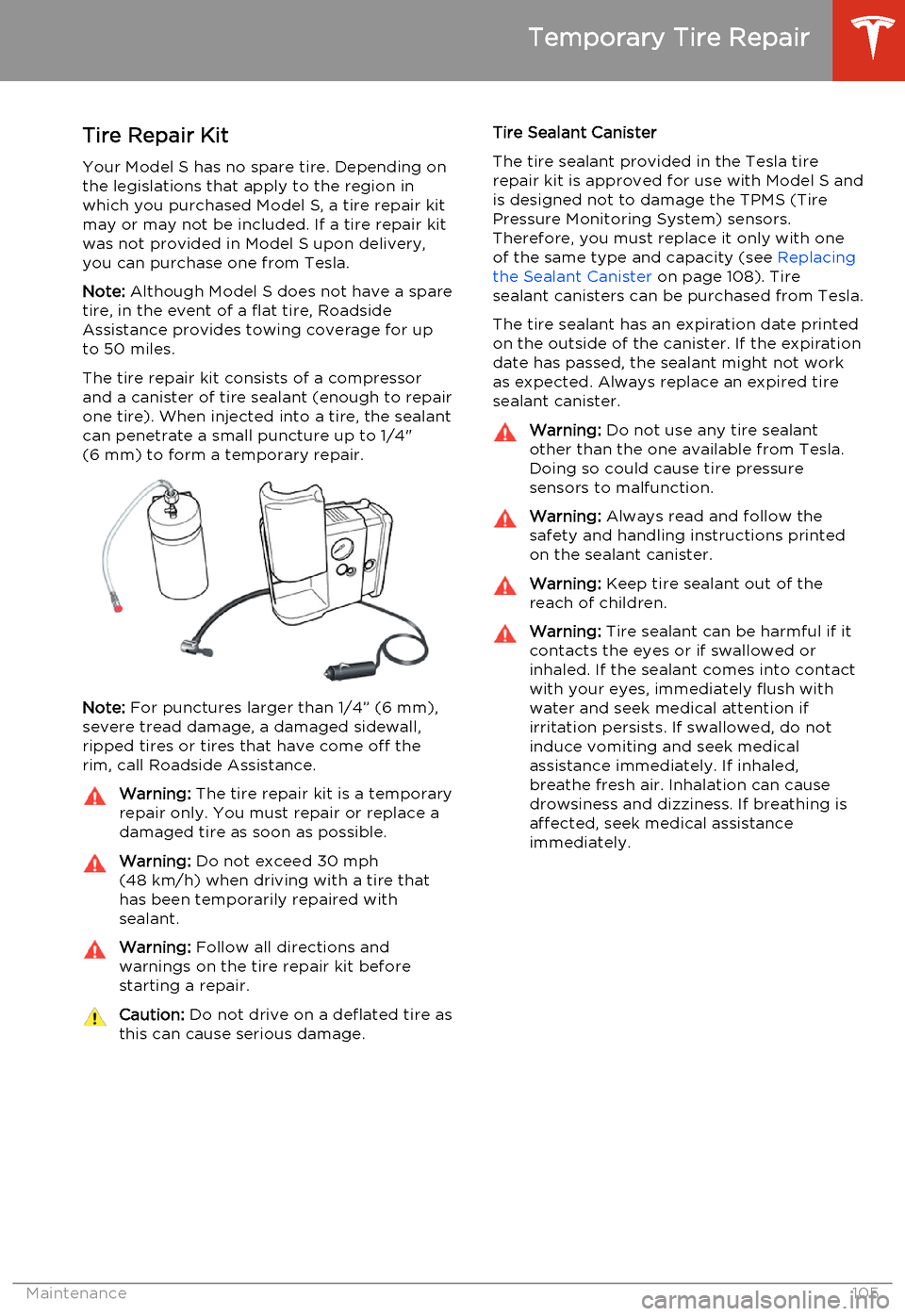
The tire repair kit consists of a compressor
and a canister of tire sealant (enough to repair
one tire). When injected into a tire, the sealant
can penetrate a small puncture up to 1/4"
(6 mm) to form a temporary repair.
Note: For punctures larger than 1/4” (6 mm),
severe tread damage, a damaged sidewall,
ripped tires or tires that have come off the
rim, call Roadside Assistance.
Warning: The tire repair kit is a temporary
repair only. You must repair or replace a
damaged tire as soon as possible.Warning: Do not exceed 30 mph
(48 km/h) when driving with a tire that
has been temporarily repaired with sealant.Warning: Follow all directions and
warnings on the tire repair kit before
starting a repair.Caution: Do not drive on a deflated tire as
this can cause serious damage.Tire Sealant Canister
The tire sealant provided in the Tesla tire repair kit is approved for use with Model S andis designed not to damage the TPMS (TirePressure Monitoring System) sensors.
Therefore, you must replace it only with one
of the same type and capacity (see Replacing
the Sealant Canister on page 108). Tire
sealant canisters can be purchased from Tesla.
The tire sealant has an expiration date printed
on the outside of the canister. If the expiration
date has passed, the sealant might not work as expected. Always replace an expired tire
sealant canister.Warning: Do not use any tire sealant
other than the one available from Tesla. Doing so could cause tire pressure
sensors to malfunction.Warning: Always read and follow the
safety and handling instructions printed on the sealant canister.Warning: Keep tire sealant out of the
reach of children.Warning: Tire sealant can be harmful if it
contacts the eyes or if swallowed or
inhaled. If the sealant comes into contact with your eyes, immediately flush withwater and seek medical attention ifirritation persists. If swallowed, do notinduce vomiting and seek medical
assistance immediately. If inhaled,
breathe fresh air. Inhalation can cause
drowsiness and dizziness. If breathing is
affected, seek medical assistance
immediately.
Temporary Tire Repair
Maintenance105
Page 131 of 159
The available cargo or luggage weight should
then be distributed between the front and
rear trunks.Caution: Do not exceed the maximum
front trunk load weight of 300 lbs
(136 kg).
Towing a Trailer
Warning: Do not use Model S for towing
purposes. Model S does not support a
trailer hitch. Installing one could cause
damage and increase the risk of an
accident.Caution: Using Model S for towing may
void the warranty.
Roof Racks
If Model S is equipped with the all glass
panoramic roof, you can carry up to 75 kg
using a Tesla-approved roof rack (see Parts
and Accessories on page 125). A Model S
equipped with a solid aluminum roof is incompatible with roof racks.
Caution: Damage caused by roof racks is
not covered by the warranty.Caution: Do not use roof racks, or place
any load, on the roof of a Model S that is equipped with a solid aluminum roof.Doing so can cause significant damage.
Vehicle Loading
Specifications129
Page 133 of 159
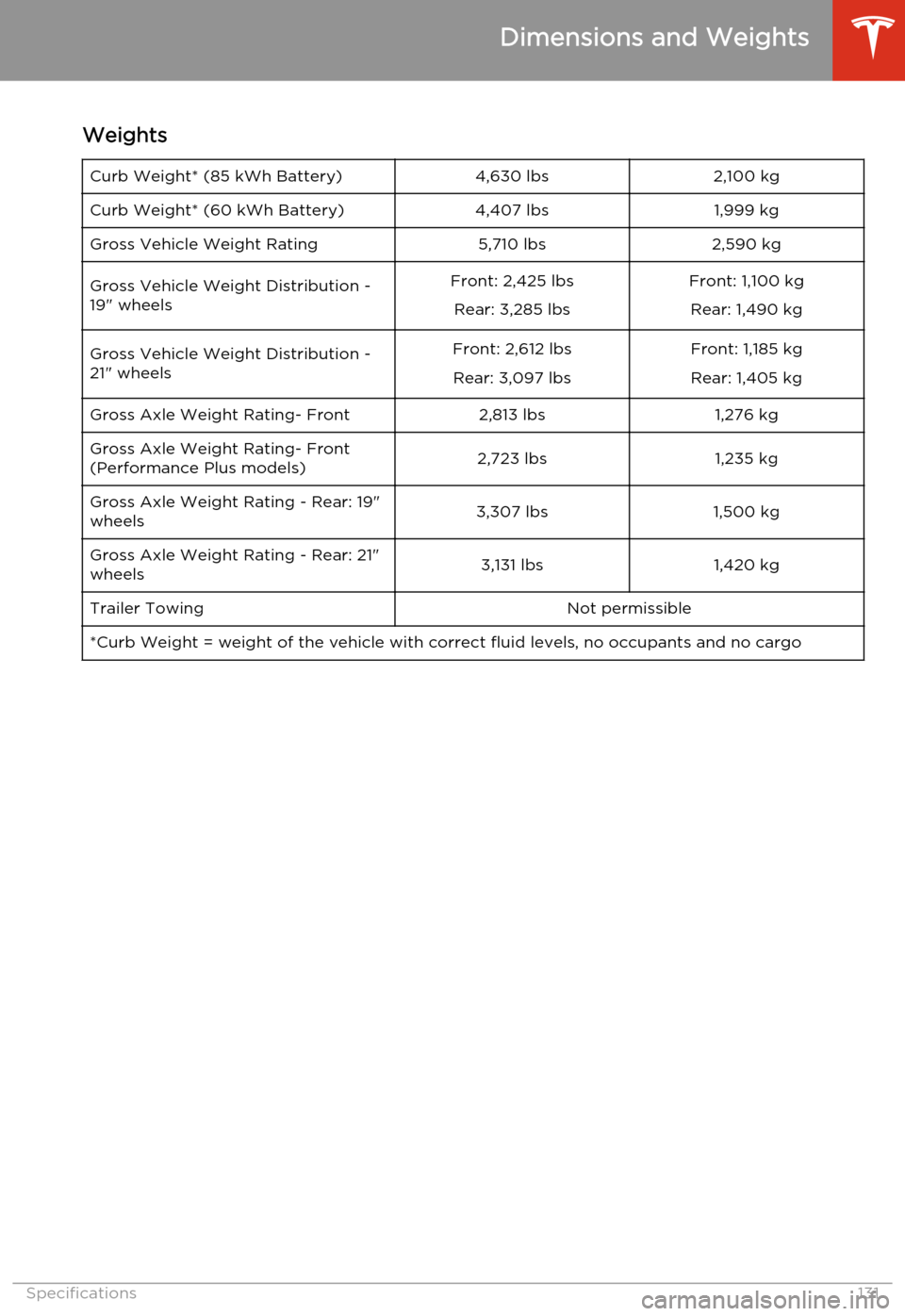
WeightsCurb Weight* (85 kWh Battery)4,630 lbs2,100 kgCurb Weight* (60 kWh Battery)4,407 lbs1,999 kgGross Vehicle Weight Rating5,710 lbs2,590 kgGross Vehicle Weight Distribution -
19" wheelsFront: 2,425 lbs
Rear: 3,285 lbsFront: 1,100 kgRear: 1,490 kgGross Vehicle Weight Distribution -
21" wheelsFront: 2,612 lbs
Rear: 3,097 lbsFront: 1,185 kgRear: 1,405 kgGross Axle Weight Rating- Front2,813 lbs1,276 kgGross Axle Weight Rating- Front
(Performance Plus models)2,723 lbs1,235 kgGross Axle Weight Rating - Rear: 19"
wheels3,307 lbs1,500 kgGross Axle Weight Rating - Rear: 21"
wheels3,131 lbs1,420 kgTrailer TowingNot permissible*Curb Weight = weight of the vehicle with correct fluid levels, no occupants and no cargo
Dimensions and Weights
Specifications131
Page 145 of 159
Connect the Tow Chain
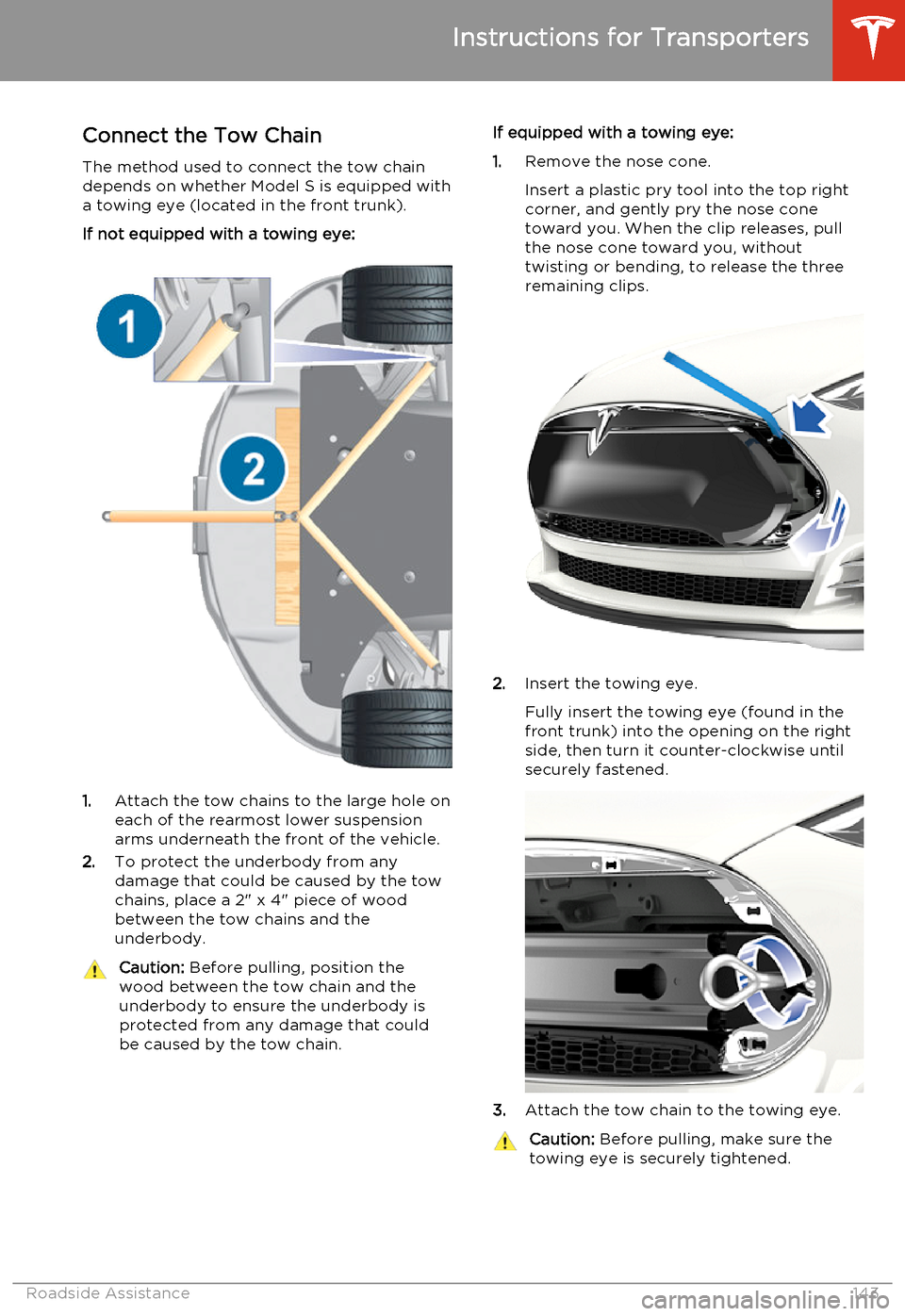
The method used to connect the tow chain depends on whether Model S is equipped with
a towing eye (located in the front trunk).
If not equipped with a towing eye:
1. Attach the tow chains to the large hole on
each of the rearmost lower suspension arms underneath the front of the vehicle.
2. To protect the underbody from any
damage that could be caused by the tow
chains, place a 2" x 4" piece of wood
between the tow chains and the
underbody.
Caution: Before pulling, position the
wood between the tow chain and the
underbody to ensure the underbody is protected from any damage that couldbe caused by the tow chain.If equipped with a towing eye:
1. Remove the nose cone.
Insert a plastic pry tool into the top right
corner, and gently pry the nose cone
toward you. When the clip releases, pull
the nose cone toward you, without
twisting or bending, to release the three
remaining clips.
2. Insert the towing eye.
Fully insert the towing eye (found in the
front trunk) into the opening on the right
side, then turn it counter-clockwise until securely fastened.
3. Attach the tow chain to the towing eye.
Caution:
Before pulling, make sure the
towing eye is securely tightened.
Instructions for Transporters
Roadside Assistance143
Page 158 of 159
balancing 101
chains 103
industry glossary of terms 140
inspecting and maintaining 101
pressures, how to check 100
quality grading 139
replacing 102
replacing a tire sensor 104
rotation 101
specification 136
temperature grades 139
tire markings 137
tire sealant 105
traction grade 139
treadwear grade 139
winter 102
touch up body 111touchscreencleaning 110
Controls 67
overview 65
Settings 69
software updates 90
tow chain, connecting
143
Tow mode 142
towing 142
towing a trailer 129
towing instructions 142
TPMSFCC certification 150
overview of 103
traction control 60
trademarks 145, 146
traffic alerts 78
trailer hitches 129
transmission specifications 132
Transport Canada, contacting 148
transporting 142
trip information 56
trunk, front 12
trunk, rearchild protection lock 7
disabling interior handle 7
TuneIn 77
turn signals 49
U uniform tire quality grading 139
Units & Format 69
unlockingtrunk, front 12
trunk, rear 10
unlocking and locking doors 4
unlocking when key doesn't work 7
USB devicesconnecting 79
playing audio files from 79
USB ports 79
V
vehicle certification label 128
Vehicle Identification Number (VIN) 126
vehicle loading 127
vent, sunroof 15
ventilation 74
VIN (Vehicle Identification Number) 126
volume control 65
W walk-away locking 7
Wall Connector 93
warning flashers 49
warning lights, summary of 43
washer fluid, topping up 116
washer jets, cleaning 112
washers, using 50
weight specifications 131
wheel chocks 144wheelsalignment 101
replacing 102
specifications 135
Wi-Fi, connecting to 89
windshield washer fluid, topping up 116
winter tires 102
wiper blades, replacing 112
wipers and washers 50
wipers, de-icing 50
X
XM radio 77
Index
156Model S Owner's Manual