brake TESLA MODEL S 2015 Owner's Guide
[x] Cancel search | Manufacturer: TESLA, Model Year: 2015, Model line: MODEL S, Model: TESLA MODEL S 2015Pages: 164, PDF Size: 4.78 MB
Page 83 of 164
Note: If Model S is equipped with Smart Air
Suspension, you may hear the sound of the compressor when Model S starts, as thesystem’s reservoir fills with air.
Smart Air Suspension has both manual and
automatic modes of operation.
Manual Height AdjustmentsCaution: Before adjusting the suspension
height, ensure Model S is clear of all
obstacles, above and below.
Manually raising the height of Model S is useful when you need extra ground clearance,
such as steep driveways or ramps, deep snow,
speed bumps, etc.
With Model S powered on, or the brake pedal
pressed, use the touchscreen to manually
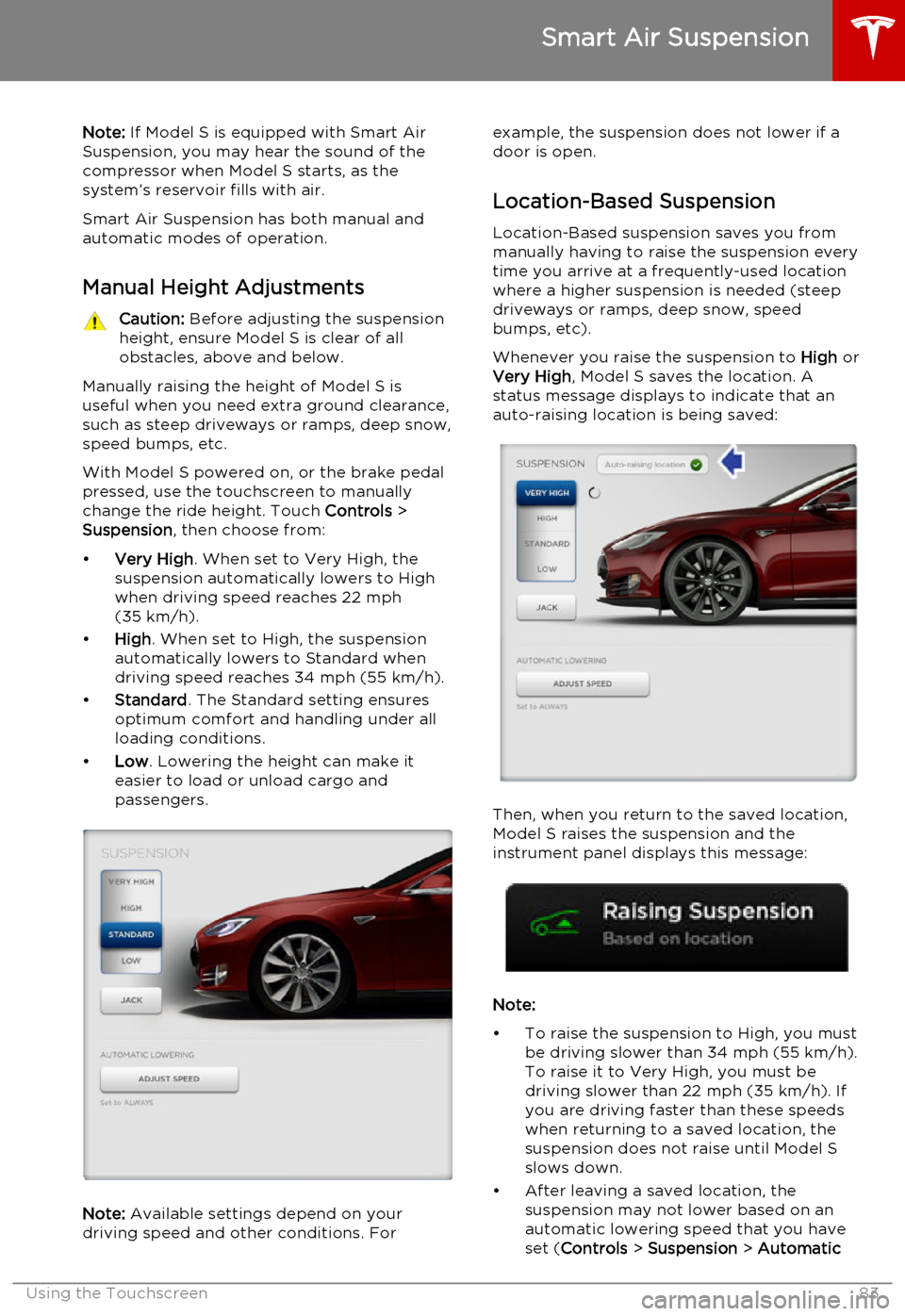
change the ride height. Touch Controls >
Suspension , then choose from:
• Very High . When set to Very High, the
suspension automatically lowers to High when driving speed reaches 22 mph
(35 km/h).
• High . When set to High, the suspension
automatically lowers to Standard when
driving speed reaches 34 mph (55 km/h).
• Standard . The Standard setting ensures
optimum comfort and handling under all
loading conditions.
• Low . Lowering the height can make it
easier to load or unload cargo and
passengers.
Note: Available settings depend on your
driving speed and other conditions. For
example, the suspension does not lower if a
door is open.
Location-Based Suspension Location-Based suspension saves you from
manually having to raise the suspension every
time you arrive at a frequently-used location
where a higher suspension is needed (steep
driveways or ramps, deep snow, speed
bumps, etc).
Whenever you raise the suspension to High or
Very High , Model S saves the location. A
status message displays to indicate that an
auto-raising location is being saved:
Then, when you return to the saved location,
Model S raises the suspension and the
instrument panel displays this message:
Note:
• To raise the suspension to High, you must be driving slower than 34 mph (55 km/h).
To raise it to Very High, you must be
driving slower than 22 mph (35 km/h). If
you are driving faster than these speeds when returning to a saved location, the
suspension does not raise until Model S
slows down.
• After leaving a saved location, the suspension may not lower based on an
automatic lowering speed that you have
set ( Controls > Suspension > Automatic
Smart Air Suspension
Using the Touchscreen83
Page 84 of 164
Lowering) until you are driving faster than
the auto-raising speed thresholds described above.
• If Model S reaches a saved location and the existing suspension setting is higher
than the level that has been saved for that
location, the suspension is not adjusted.
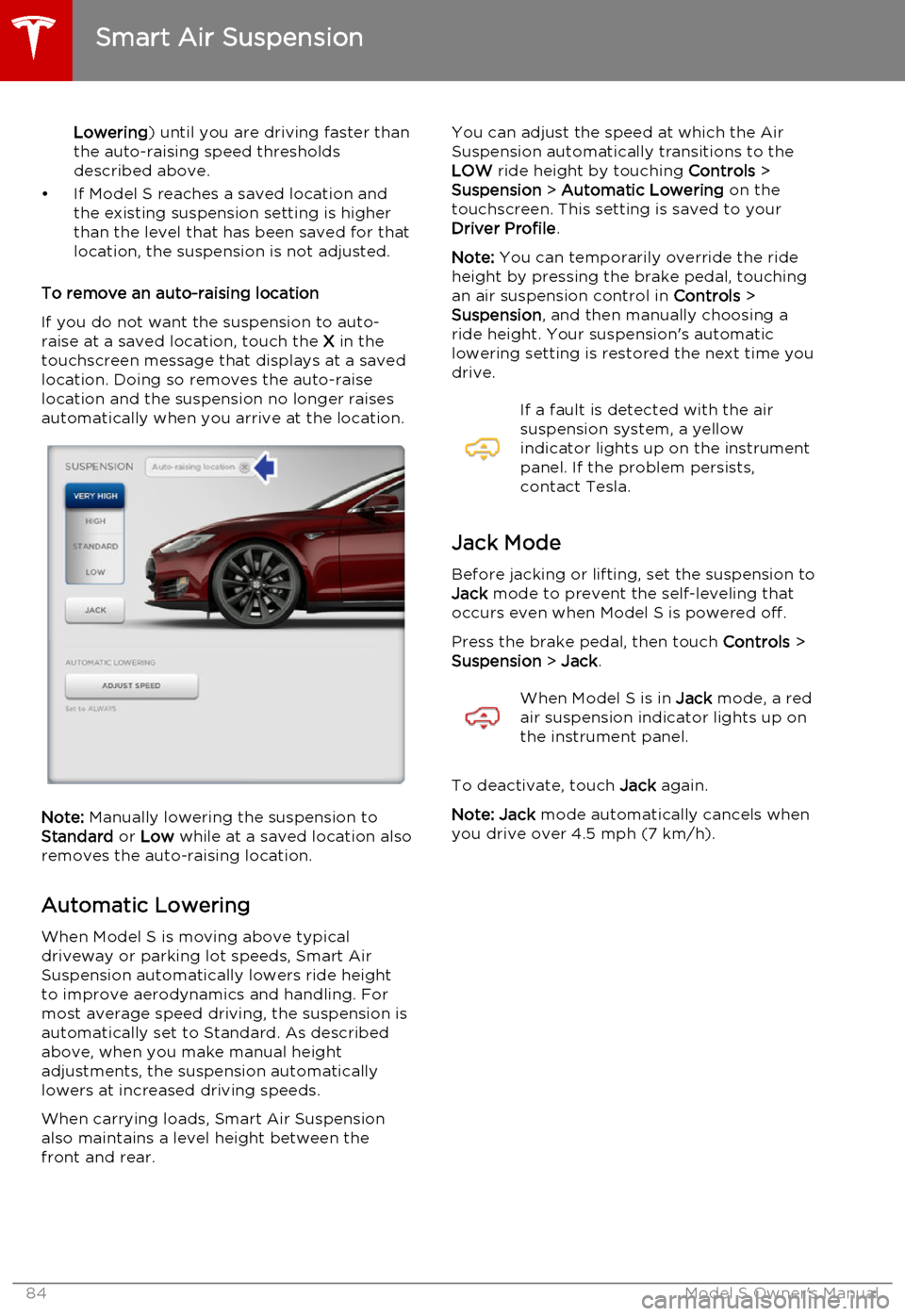
To remove an auto-raising location
If you do not want the suspension to auto-
raise at a saved location, touch the X in the
touchscreen message that displays at a saved
location. Doing so removes the auto-raise
location and the suspension no longer raises automatically when you arrive at the location.
Note: Manually lowering the suspension to
Standard or Low while at a saved location also
removes the auto-raising location.
Automatic Lowering When Model S is moving above typical
driveway or parking lot speeds, Smart Air
Suspension automatically lowers ride height
to improve aerodynamics and handling. For
most average speed driving, the suspension is
automatically set to Standard. As described
above, when you make manual height
adjustments, the suspension automatically lowers at increased driving speeds.
When carrying loads, Smart Air Suspension also maintains a level height between the
front and rear.
You can adjust the speed at which the Air
Suspension automatically transitions to the LOW ride height by touching Controls >
Suspension > Automatic Lowering on the
touchscreen. This setting is saved to your Driver Profile .
Note: You can temporarily override the ride
height by pressing the brake pedal, touching an air suspension control in Controls >
Suspension , and then manually choosing a
ride height. Your suspension's automatic
lowering setting is restored the next time you
drive.If a fault is detected with the air
suspension system, a yellow
indicator lights up on the instrument
panel. If the problem persists,
contact Tesla.
Jack Mode
Before jacking or lifting, set the suspension to
Jack mode to prevent the self-leveling that
occurs even when Model S is powered off.
Press the brake pedal, then touch Controls >
Suspension > Jack .
When Model S is in Jack mode, a red
air suspension indicator lights up on
the instrument panel.
To deactivate, touch Jack again.
Note: Jack mode automatically cancels when
you drive over 4.5 mph (7 km/h).
Smart Air Suspension
84Model S Owner's Manual
Page 108 of 164
Service Intervals
Regular maintenance is the key to ensuring
the continued reliability and efficiency of your
Model S.
Rotate the tires every 5000 miles (8000 km),
maintain the correct tire pressures, and take Model S to Tesla at the regularly scheduledmaintenance intervals of every 12 months, orevery 12,500 miles (20,000 km), whichever
comes first. It is also important to perform the
daily and monthly checks described below.
Model S must be serviced by Tesla-certified
technicians. Damages or failures caused by
maintenance or repairs performed by non-
Tesla certified technicians are not covered by
the warranty.
Daily Checks • Check the Battery’s charge level, displayed on the instrument panel.
• Check that all exterior lights, horn, turn signals, and wipers and washers are
working.
• Check the operation of the brakes, including the parking brake.
• Check the operation of the seat belts (see Seat Belts on page 20).
• Look for fluid deposits underneath Model S that might indicate a leak. It is
normal for a small pool of water to form
(caused by the air conditioning system’s dehumidifying process).
Monthly Checks • Check the mileage to determine if the tires need to be rotated (every
5000 miles/8000 km), and check the
condition and pressure of each tire (see
Tire Care and Maintenance on page 109).
• Check washer fluid level and top up if necessary (see Topping Up Washer Fluid
on page 125).
• Check that the air conditioning system is operating (see Climate Controls on page
80).Warning: Contact Tesla immediately if
you notice any significant or sudden drop in fluid levels or uneven tire wear.Fluid Replacement Intervals
Do not change or top up Battery coolant and
brake fluid yourself. Tesla service technicians replace fluids at the regularly scheduled
service intervals:
• Brake fluid. Every 2 years or 25,000 miles (40,000 km), whichever comes first.
• Battery coolant. Every 5 years or 62,500 miles (100,000 km), whichever
comes first.
Note: Any damage from opening the Battery
coolant reservoir is excluded from the warranty.
High Voltage Safety Your Model S has been designed and built
with safety as a priority. However, be aware of these precautions to protect yourself from the
risk of injury inherent in all high-voltage
systems:
• Read and follow all instructions provided on the labels that are attached to Model S.These labels are there for your safety.
• The high voltage system has no user- serviceable parts. Do not disassemble,
remove or replace high voltage components, cables or connectors. High
voltage cables are colored orange for
easy identification.
• If an accident occurs, do not touch any high voltage wiring, connectors, or
components connected to the wiring.
• In the unlikely event that a fire occurs, immediately contact your local fire
emergency responders.Warning: Always disconnect the charge
cable before working underneath Model S, even if charging is not in
progress.Warning: Keep your hands and clothing
away from cooling fans. Some fans
operate even when Model S is powered
off.Caution: Some fluids (battery acid,
Battery coolant, brake fluid, windshield
washer additives, etc.) used in motor
vehicles are poisonous and should not be
inhaled, swallowed, or brought into contact with open wounds. For your
safety, always read and follow
instructions printed on fluid containers.
Maintenance Schedule
108Model S Owner's Manual
Page 112 of 164

Winter Tires
Your Model S is not originally equipped with
winter tires. In snowy and icy conditions, consider installing winter tires. Winter tires are
designed to increase traction in snowy or icy
conditions. When installing winter tires, always install a complete set of four tires at the sametime. Winter tires must be the same size,brand, construction and tread pattern on allfour wheels. Contact Tesla for winter tire
recommendations.Winter tires can be identified by a
mountain/snowflake symbol on the
tire's sidewall.
When driving with winter tires, you may
experience more road noise, shorter tread life, and less traction on dry roads.
Driving in Low Temperatures Tire performance is reduced in low ambient
temperatures, resulting in reduced grip and an
increased susceptibility to damage from
impacts. Performance tires can temporarily
harden when cold, causing you to hear
rotational noise for the first few miles (kms)
until the tires warm up.
Using Tire Chains Tesla has tested and approved Security Chain
Company (SCC) Model Z-563 chains for use
on the rear wheels. These chains must only be
used if your Model S has 245/45R19 rear tires
installed. Do not use chains on 21 inch tires.
When installing tire chains, follow the
instructions provided by the tire chain
manufacturer. Mount them as tightly as
possible.
When using tire chains:
• Drive slowly. Do not exceed 30 mph (48 km/h).
• Avoid heavily loading Model S (heavy loads can reduce the clearance between
the tires and the body).
• Remove the tire chains as soon as conditions allow.
Note: Tire chains are prohibited in some
jurisdictions. Check local laws before installing
tire chains.
Caution: Using non-recommended tire
chains, or using tire chains on other sized tires, can damage the suspension, body,wheels, and/or brake lines. Damagecaused by using non-recommended tire
chains is not covered by the warranty.Caution: Ensure that tire chains cannot
touch suspension components or brake
lines. If you hear the chains making
unusual noises that would indicate
contact with Model S, stop and
investigate immediately.
Tire Pressure Monitoring
Each tire should be checked monthly when
cold and inflated to the recommended pressures that are printed on the Tire and
Loading Information label located on the
driver’s door pillar (see Maintaining Tire
Pressures on page 109). If your vehicle has
tires of a different size than the size indicated
on the vehicle placard or tire inflation pressure
label, determine the proper tire inflation
pressure for those tires.
As an added safety feature, your vehicle has
been equipped with a tire pressure monitoring
system (TPMS) that displays a tire pressure
telltale (Tire Pressure Warning) on the
instrument panel when one or more of your
tires is significantly under- or over-inflated.
Accordingly, when the Tire Pressure indicator
light displays on the instrument panel alerting
of tire pressure, stop and check your tires as
soon as possible, and inflate them to the
proper pressure (see Maintaining Tire
Pressures on page 109). Driving on a
significantly under-inflated tire causes the tire
to overheat and can lead to tire failure. Under-
inflation also reduces fuel efficiency and tire
tread life, and may affect the vehicle's
handling and stopping ability.
If Model S detects a fault with the
Tire Pressure Monitoring System
(TPMS), this indicator flashes for one
minute whenever you power on
Model S.
Note: Installing accessories that are not
approved by Tesla can interfere with the TPMS system.
Warning: The TPMS is not a substitute for
proper tire maintenance, including
manually checking tire pressures and
regularly inspecting the condition of tires.
It is the driver's responsibility to maintain
correct tire pressure, even if under- or
over-inflation has not reached the level
Tire Care and Maintenance
112Model S Owner's Manual
Page 118 of 164
Cleaning the Exterior
To prevent damage to the paint, immediately
remove corrosive substances (bird droppings, tree resin, dead insects, tar spots, road salt,industrial fallout, etc). Do not wait untilModel S is due for a complete wash. If
necessary, use denatured alcohol to remove
tar spots and stubborn grease stains, then
immediately wash the area with water and a
mild, non-detergent soap to remove the
alcohol.
Follow these steps when washing the exterior of Model S:
1. Rinse Thoroughly
Before washing, flush grime and grit from
the bodywork using a hose. Flush away accumulations of mud in areas where
debris easily collects (such as wheel arches and panel seams). If salt has beenused on the highways (such as duringwinter months), thoroughly rinse all tracesof road salt from the underside of the
vehicle.
2. Hand Wash
Hand wash Model S using a soft cloth and cold or lukewarm water containing a mild,
good quality car shampoo.
3. Rinse with Clean Water
After washing, rinse with clean water to
prevent soap from drying on the surfaces.
4. Dry Thoroughly and Clean Exterior Glass
After washing and rinsing, dry thoroughly with a chamois.
Clean windows and mirrors using an
automotive glass cleaner. Do not scrape,
or use any abrasive cleaning fluid on glass
or mirrored surfaces.Cautions for Exterior CleaningCaution: Do not use windshield treatment
fluids. Doing so can interfere with wiper
friction and cause a chattering sound.Caution: Do not use hot water and
detergents.Caution: In hot weather, do not wash in
direct sunlight.Caution: If using a pressure washer,
maintain a distance of at least 12" (30 cm) between the nozzle and the surface ofModel S. Keep the nozzle moving and do
not concentrate the water jet on any one area.Caution: Do not aim water hoses directly
at window, door or hood seals, or through wheel apertures onto brake components.Caution: Avoid using tight-napped or
rough cloths, such as washing mitts.Caution: If washing in an automatic car
wash, use Touchless car washes only. These car washes have no parts (brushes,etc.) that touch the surfaces of Model S.Using any other type of car wash could
cause damage that is not covered by the warranty.Caution: Do not used chemical based
wheel cleaners. These can damage the finish on the wheels.Caution: Avoid using a high pressure
power washer on the rear view camera or
parking sensors (if equipped) and do not
clean a sensor or camera lens with a
sharp or abrasive object that can scratch
or damage its surface.
Cleaning
118Model S Owner's Manual
Page 124 of 164

Checking Brake FluidWarning: Contact Tesla immediately if
you notice increased movement of the
brake pedal or a significant loss of brake
fluid. Driving under these conditions can result in extended stopping distances orcomplete brake failure.The Brake indicator on the
instrument panel alerts you if the
quantity of fluid in the brake
reservoir drops below the
recommended level. If it displays
while driving, stop as soon as safety
permits by gently applying the
brakes. Do not continue driving.
Contact Tesla immediately.
Fluid Level Check
Tesla checks the brake fluid level at the
regularly scheduled maintenance intervals. To check it yourself, park Model S on level
ground. When Model S is cool, remove the maintenance panel (see Removing the
Maintenance Panel on page 123).
Check the fluid level visually by looking at the
outside marks on the side of the reservoir
without removing the filler cap.
The brake fluid level should always be
between the MIN and the MAX marks.
Note: Although brake fluid level drops slightly
during normal use as a result of brake pad wear, it should not drop below the MIN mark.
Topping Up the Brake Fluid
Do not top up your brake fluid. Tesla service does this when you bring Model S in for
regular servicing. The following instructions are provided for information purposes andfuture reference only:
1. Clean the filler cap before removing to
prevent dirt from entering the reservoir.
2. Unscrew the cap and remove.
3. Top up the reservoir to the MAX mark
using brake fluid meeting DOT3 or DOT4 specifications.
4. Replace the filler cap.Warning: Only use new fluid from a
sealed air-tight container. Never use previously used fluid or fluid from apreviously opened container—fluid
absorbs moisture which decreases
braking performance.Warning: Brake fluid is highly toxic. Keep
containers sealed and out of the reach of children. In the event of accidentalconsumption, seek medical attention
immediately.Caution: Brake fluid damages painted
surfaces. Immediately soak up any spills
with an absorbent cloth and wash the
area with a mixture of car shampoo and
water.
Fluid Reservoirs
124Model S Owner's Manual
Page 127 of 164
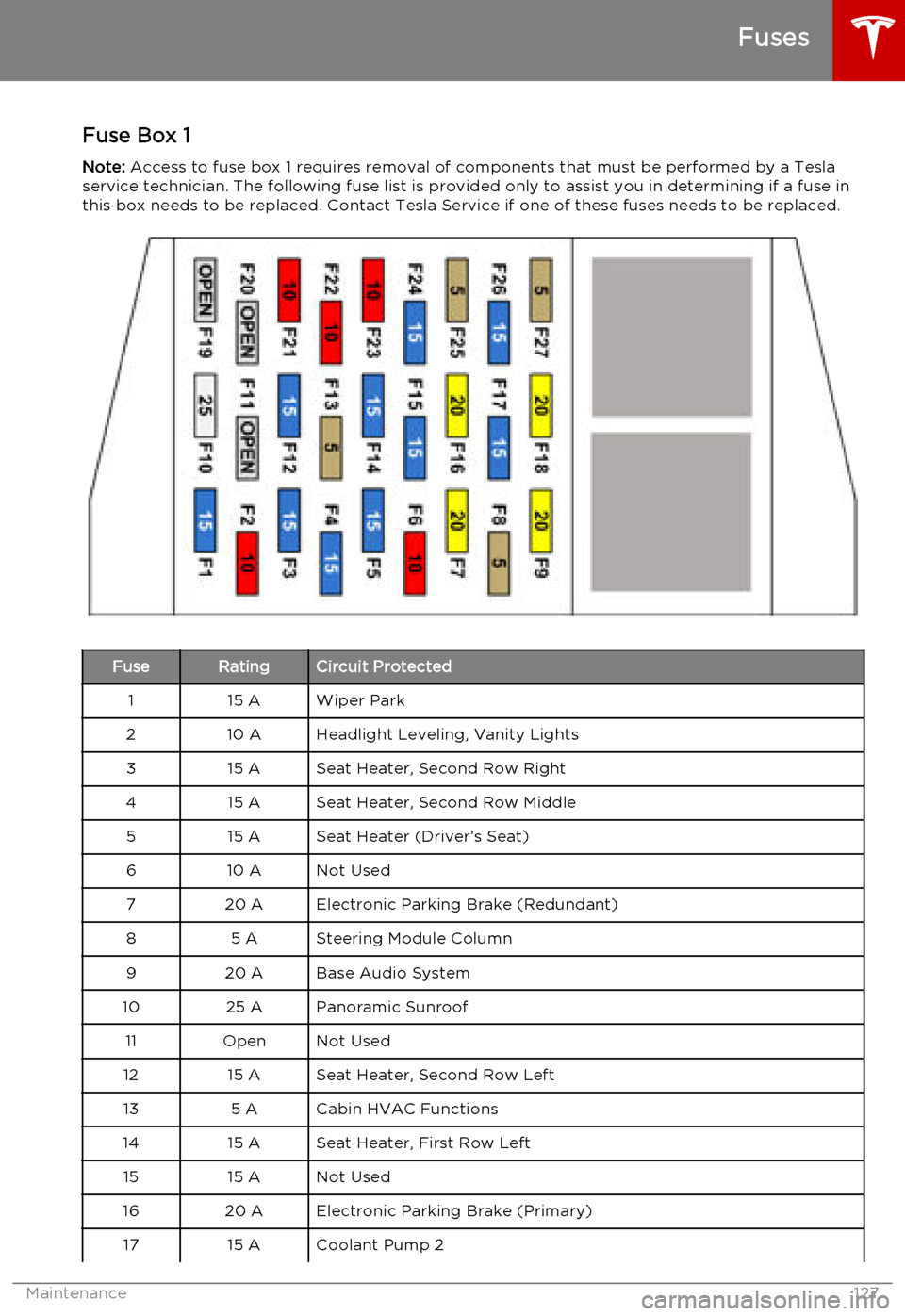
Fuse Box 1Note: Access to fuse box 1 requires removal of components that must be performed by a Tesla
service technician. The following fuse list is provided only to assist you in determining if a fuse in this box needs to be replaced. Contact Tesla Service if one of these fuses needs to be replaced.FuseRatingCircuit Protected115 AWiper Park210 AHeadlight Leveling, Vanity Lights315 ASeat Heater, Second Row Right415 ASeat Heater, Second Row Middle515 ASeat Heater (Driver’s Seat)610 ANot Used720 AElectronic Parking Brake (Redundant)85 ASteering Module Column920 ABase Audio System1025 APanoramic Sunroof11OpenNot Used1215 ASeat Heater, Second Row Left135 ACabin HVAC Functions1415 ASeat Heater, First Row Left1515 ANot Used1620 AElectronic Parking Brake (Primary)1715 ACoolant Pump 2
Fuses
Maintenance127
Page 129 of 164
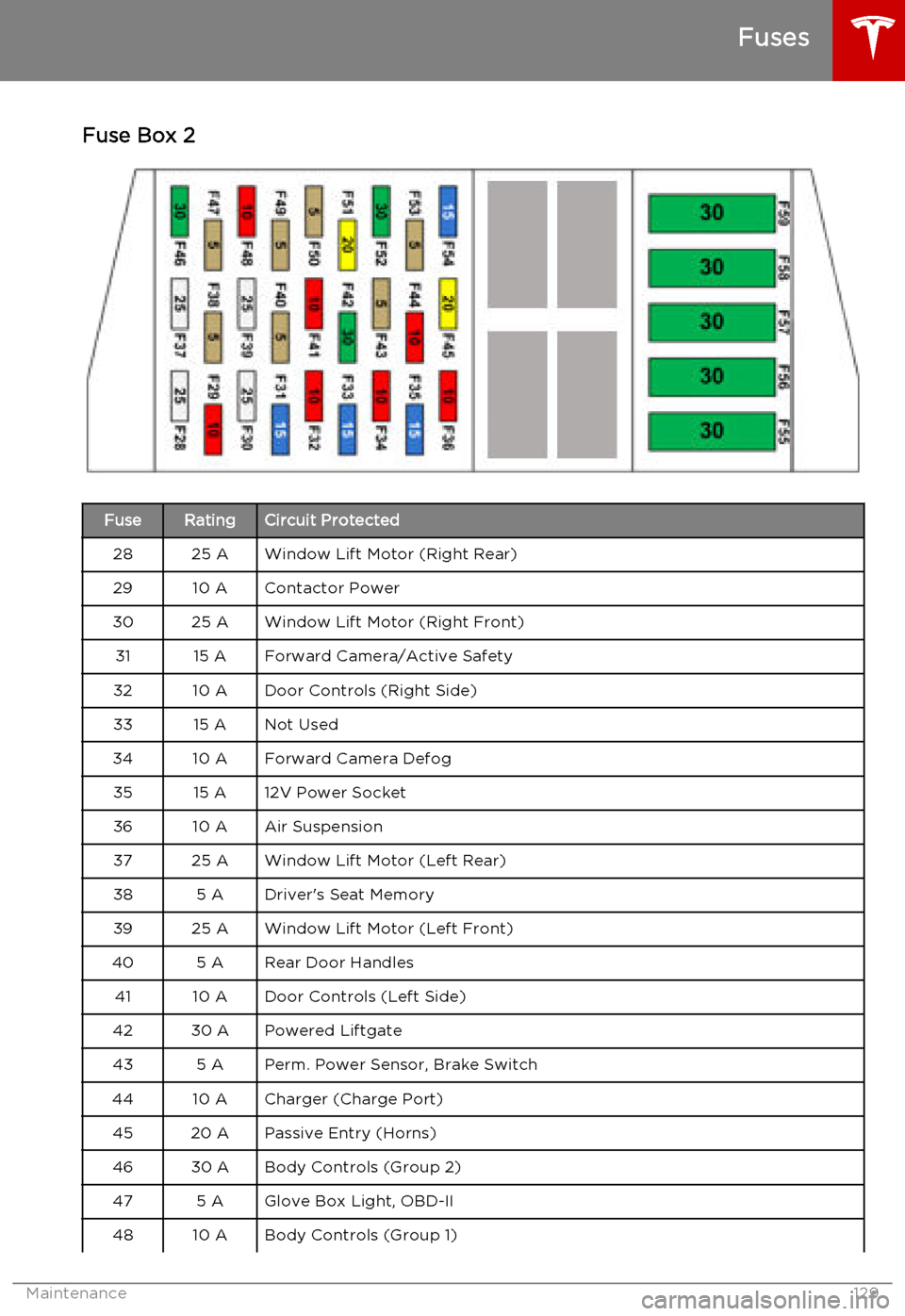
Fuse Box 2FuseRatingCircuit Protected2825 AWindow Lift Motor (Right Rear)2910 AContactor Power3025 AWindow Lift Motor (Right Front)3115 AForward Camera/Active Safety3210 ADoor Controls (Right Side)3315 ANot Used3410 AForward Camera Defog3515 A12V Power Socket3610 AAir Suspension3725 AWindow Lift Motor (Left Rear)385 ADriver's Seat Memory3925 AWindow Lift Motor (Left Front)405 ARear Door Handles4110 ADoor Controls (Left Side)4230 APowered Liftgate435 APerm. Power Sensor, Brake Switch4410 ACharger (Charge Port)4520 APassive Entry (Horns)4630 ABody Controls (Group 2)475 AGlove Box Light, OBD-II4810 ABody Controls (Group 1)
Fuses
Maintenance129
Page 132 of 164
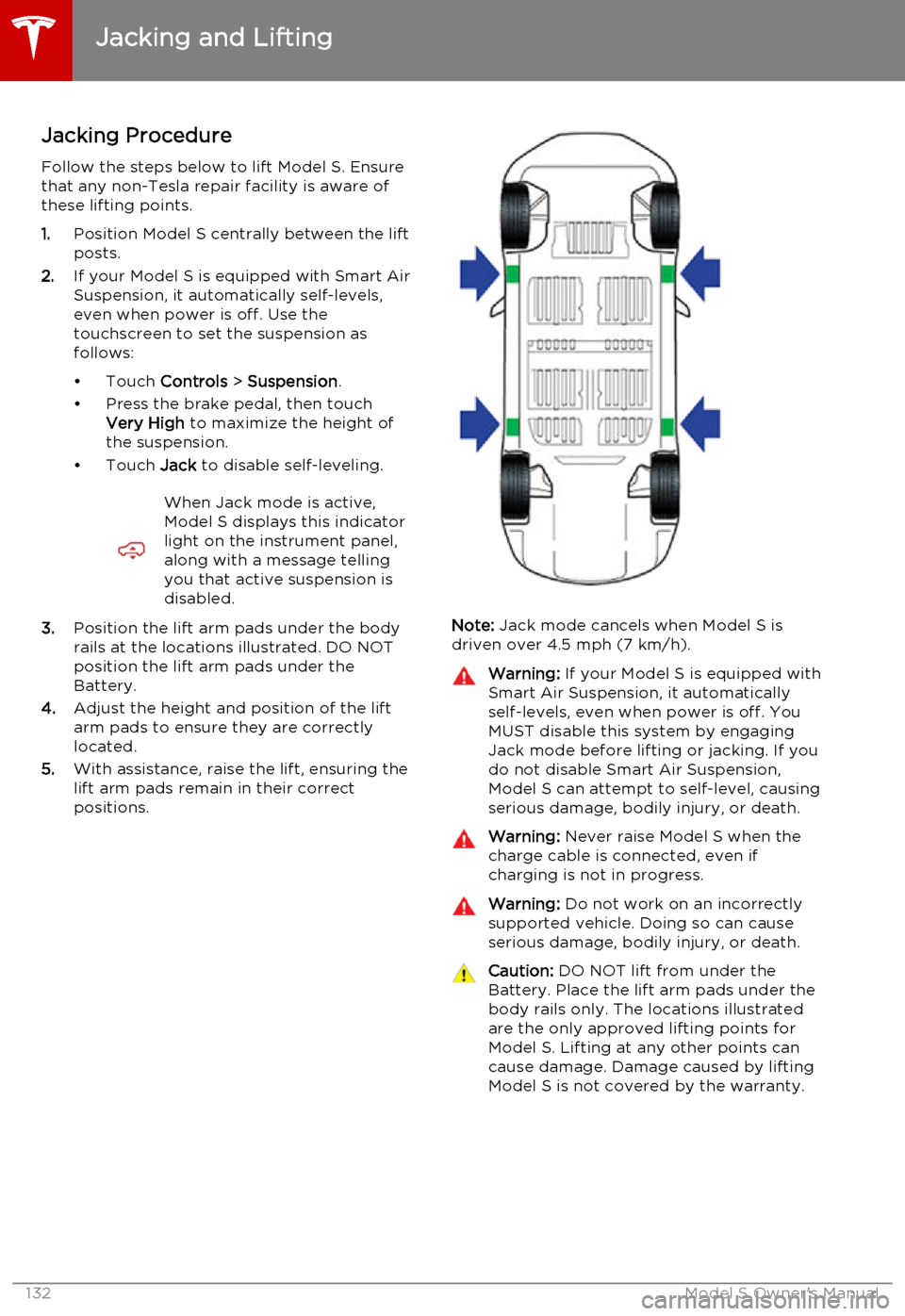
Jacking Procedure
Follow the steps below to lift Model S. Ensure that any non-Tesla repair facility is aware of
these lifting points.
1. Position Model S centrally between the lift
posts.
2. If your Model S is equipped with Smart Air
Suspension, it automatically self-levels,even when power is off. Use thetouchscreen to set the suspension as
follows:
• Touch Controls > Suspension .
• Press the brake pedal, then touch Very High to maximize the height of
the suspension.
• Touch Jack to disable self-leveling.When Jack mode is active,
Model S displays this indicator
light on the instrument panel,
along with a message telling
you that active suspension is
disabled.
3. Position the lift arm pads under the body
rails at the locations illustrated. DO NOT
position the lift arm pads under the
Battery.
4. Adjust the height and position of the lift
arm pads to ensure they are correctly
located.
5. With assistance, raise the lift, ensuring the
lift arm pads remain in their correct
positions.Note: Jack mode cancels when Model S is
driven over 4.5 mph (7 km/h).
Warning: If your Model S is equipped with
Smart Air Suspension, it automatically
self-levels, even when power is off. You
MUST disable this system by engaging
Jack mode before lifting or jacking. If you do not disable Smart Air Suspension,
Model S can attempt to self-level, causing serious damage, bodily injury, or death.Warning: Never raise Model S when the
charge cable is connected, even if
charging is not in progress.Warning: Do not work on an incorrectly
supported vehicle. Doing so can cause
serious damage, bodily injury, or death.Caution: DO NOT lift from under the
Battery. Place the lift arm pads under the body rails only. The locations illustratedare the only approved lifting points forModel S. Lifting at any other points can
cause damage. Damage caused by lifting Model S is not covered by the warranty.
Jacking and Lifting
132Model S Owner's Manual
Page 141 of 164

Brakes
Type
4-wheel anti-lock braking system (ABS)with Electronic Brake Force Distribution,
Integrated Advanced Stability Control
and Electronic Accelerator pedal actuated
regenerative braking systemCalipersFour piston fixedRotor Diameters (ventilated)Front: 13.98”/355 mm
Rear: 14.37”/365 mmFront Rotor thicknessNew: 1.26”/32 mm
Service limit: 1.18”/30 mmRear Rotor thicknessNew: 1.10”/28 mm
Service limit: 1.02”/26 mmFront Brake Pad Thickness (excluding back plate)New: 0.354”/9.0 mm
Service limit: 0.078”/2 mmRear Brake Pad Thickness (excluding back plate)New: 0.315”/8.0 mm
Service limit: 0.078”/2 mmElectronic Parking Brake (EPB) Pad Thickness
(excluding back plate). Electronic calipers self-
adjust for pad wear.New: 0.216”/5.5 mm
Service limit: 0.039”/1 mmParking brakeElectrically actuated parking brake
calipers
Suspension
FrontIndependent, double wishbone, air spring
or coil spring/telescopic damper, sway barRearIndependent, multi-link, air spring or coil
spring/telescopic damper, sway bar (air suspension vehicles only)For alignment values, see Wheel Alignment Values on page 143.
Battery - 12V
Rating33 amp-hr or higherVoltage and Polarity12V negative (-) ground
Subsystems
Specifications141