warning TESLA MODEL S 2021 Owner´s Manual
[x] Cancel search | Manufacturer: TESLA, Model Year: 2021, Model line: MODEL S, Model: TESLA MODEL S 2021Pages: 281, PDF Size: 7.63 MB
Page 128 of 281

How Speed Assist Works
Model S displays a speed limit on the instrument panel and you can choose if and
how you are warned when you exceed the speed limit. Also, instead of using the detected speed limit, you can base warnings on an arbitrary speed limit that you enter
manually.
In situations where Model S is unable to
determine a speed limit, or if Speed Assist is
uncertain that an acquired speed limit is
accurate, the
instrument panel may not
display a speed limit sign and warnings do
not take
effect.
NOTE: Speed limit warnings go away after ten
seconds, or when Model S slows down below
the specified limit.
WARNING: Do not rely on Speed Assist to determine the appropriate speed limit or driving speed. Always drive at a safe speed based on traffic and road conditions.
Controlling Speed Assist
To adjust the Speed Limit Warning setting,
touch Controls > Autopilot > Speed Limit Warning, then choose one of these options:
Page 129 of 281

WARNING: The list above does not represent an exhaustive list of situations that may interfere with proper operation of Speed Assist. Speed Assist may fail to provide warnings for many other reasons.
Speed Assist
127Autopilot
Page 137 of 281
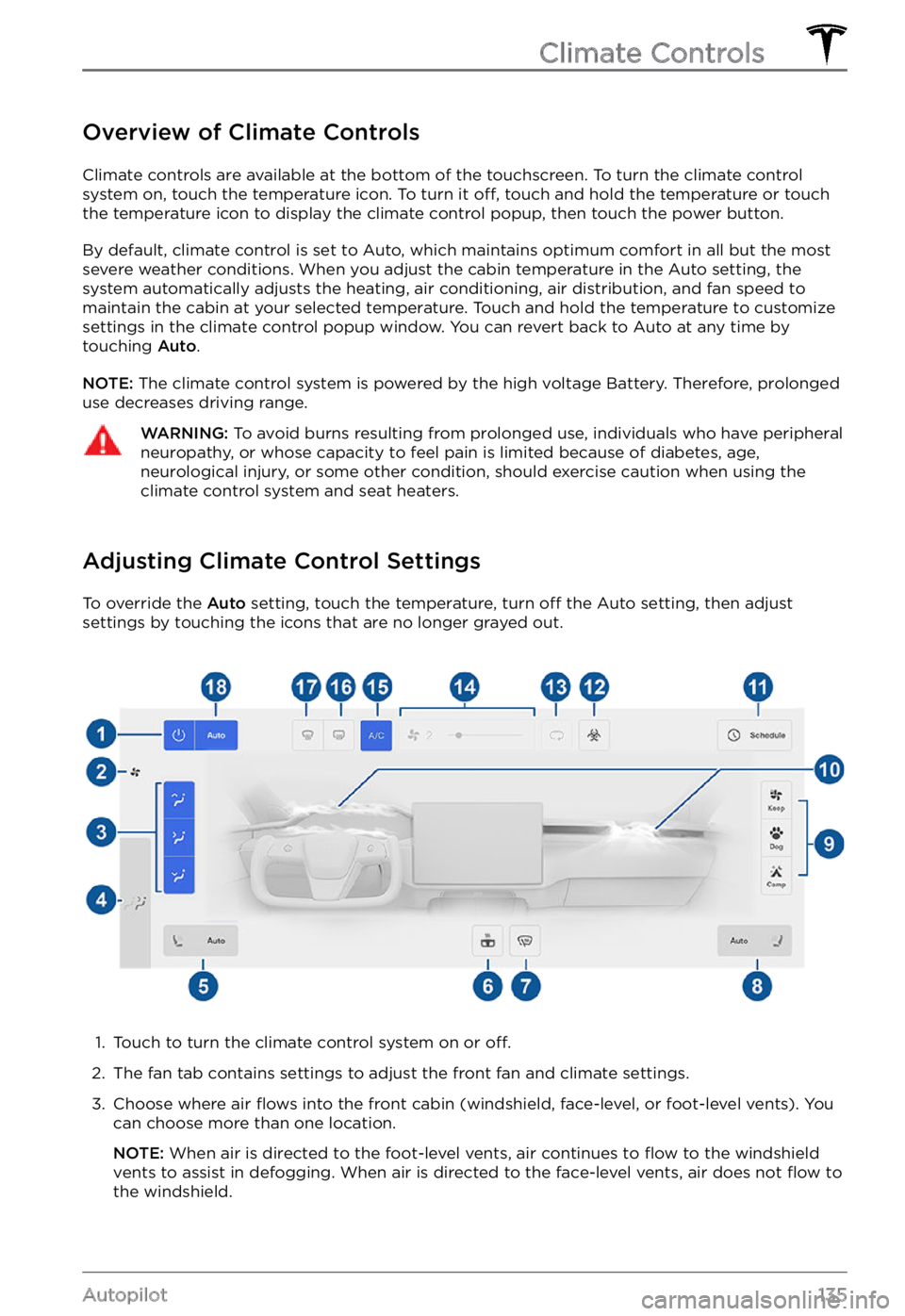
Overview of Climate Controls
Climate controls are available at the bottom of the touchscreen. To turn the climate control
system on, touch the temperature icon. To turn it off, touch and hold the temperature or touch
the temperature icon to display the climate control popup, then touch the power button.
By default, climate control is set to Auto, which maintains optimum comfort in all but the most
severe weather conditions. When you adjust the cabin temperature in the Auto setting, the
system automatically adjusts the heating, air conditioning, air distribution, and fan speed to maintain the cabin at your selected temperature. Touch and hold the temperature to customize
settings in the climate control popup window. You can revert back to Auto at any time by
touching
Auto.
NOTE: The climate control system is powered by the high voltage Battery. Therefore, prolonged
use decreases driving range.
WARNING: To avoid burns resulting from prolonged use, individuals who have peripheral neuropathy, or whose capacity to feel pain is limited because of diabetes, age, neurological injury, or some other condition, should exercise caution when using the climate control system and seat heaters.
Adjusting Climate Control Settings
To override the Auto setting, touch the temperature, turn off the Auto setting, then adjust
settings by touching the icons that are no longer grayed out.
1.
Touch to turn the climate control system on or off.
2.
The fan tab contains settings to adjust the front fan and climate settings.
3.
Choose where air flows into the front cabin (windshield, face-level, or foot-level vents). You
can choose more than one location.
NOTE: When air is directed to the foot-level vents, air continues to flow to the windshield
vents to assist in defogging. When air is directed to the face-level vents, air does not flow to
the windshield.
Climate Controls
135Autopilot
Page 142 of 281

NOTE: Software updates cannot be
performed when Keep Climate On, Dog Mode,
or Camp Mode is active.
NOTE: The intrusion sensor (if equipped)
automatically disables when Keep Climate On,
Dog Mode, or Camp Mode is active. However,
you can override this behavior and keep the intrusion sensor enabled. To do so, touch
Controls > Safety > Tilt/Intrusion after
enabling Keep Climate On, Dog mode, or Camp mode. However, note that keeping the intrusion sensor enabled while Keep Climate On, Dog Mode, and Camp Mode is active can
trigger an alarm event as a result of air
movement inside the cabin.
WARNING: You can adjust the climate control system remotely using the mobile app. However, if you use the mobile app to turn off the climate control system, Keep Climate On, Dog Mode, and Camp Mode stop operating.
WARNING: Avoid using Keep Climate On, Dog Mode, or Camp Mode when the battery charge is low. When leaving a dog or pet in Model S, you must ensure that you have your phone with you and that the Tesla mobile app is running. This allows you to proactively monitor the cabin temperature. To ensure the safety and comfort of anyone or anything in your vehicle, always make sure you have adequate cellular coverage to receive notifications and allow enough time to return to Model S should the climate control system stop operating
Page 154 of 281
Overview
NOTE: The entertainment options available vary depending on market region. Some entertainment features described may not be available in your market region.
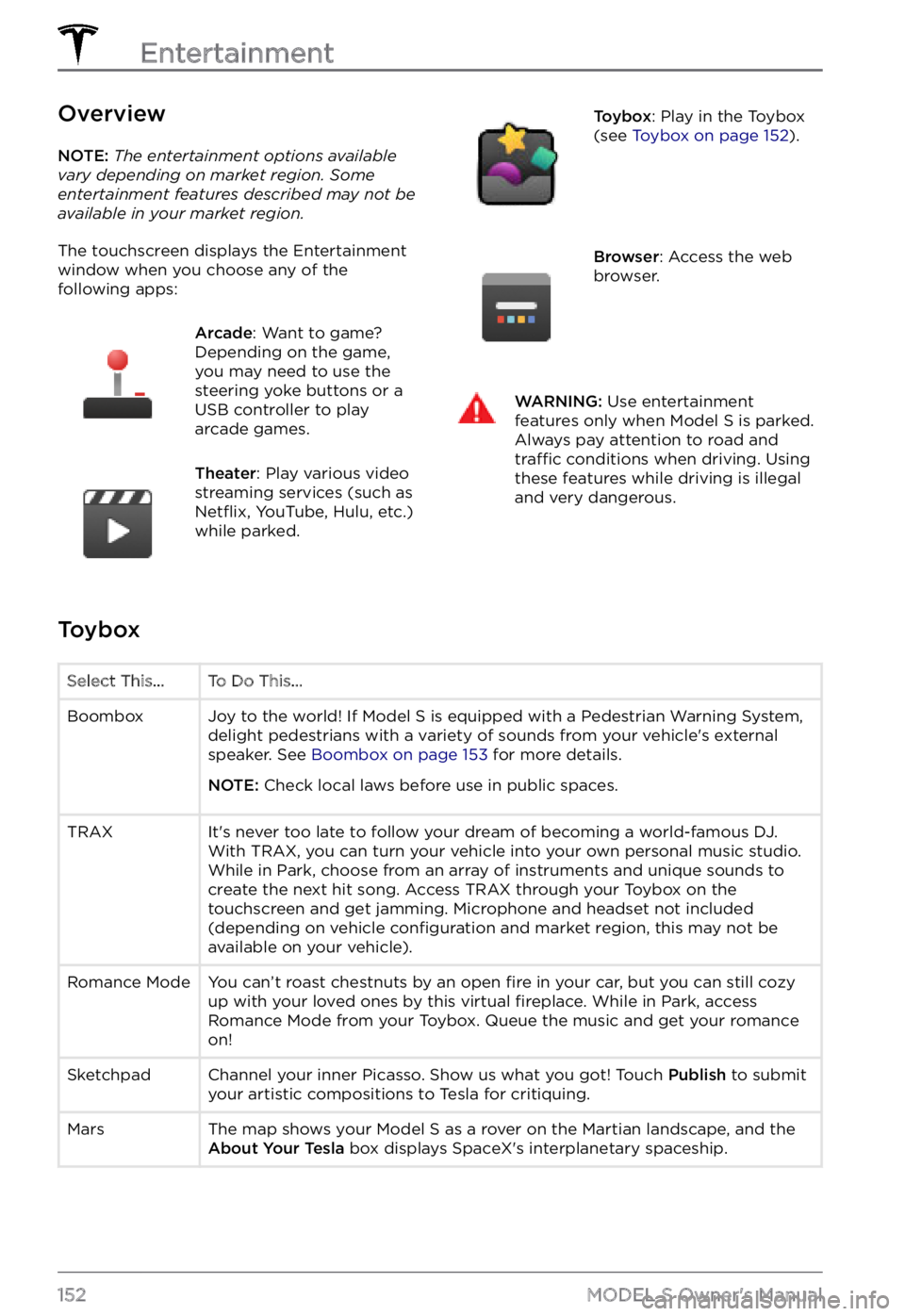
The touchscreen displays the Entertainment window when you choose any of the
following apps:
Arcade: Want to game?
Depending on the game,
you may need to use the
steering yoke buttons or a
USB controller to play
arcade games.Theater: Play various video
streaming services (such as
Netflix, YouTube, Hulu, etc.)
while parked.
Toybox: Play in the Toybox
(see Toybox on page 152).Browser: Access the web
browser.WARNING: Use entertainment features only when Model S is parked. Always pay attention to road and traffic conditions when driving. Using these features while driving is illegal and very dangerous.
Toybox
Select This...To Do This...BoomboxJoy to the world! If Model S is equipped with a Pedestrian Warning System,
delight pedestrians with a variety of sounds from your vehicle
Page 155 of 281

Santa Mode"What have you been longing for?" Enjoy the holidays year-round with this one! Simply initiate a voice command and say "Ho Ho Ho". Or, if you are
feeling extra sour, you can say "Ho Ho Ho Not Funny" instead. If Model S is
equipped with a Pedestrian Warning System, music will be heard externally
as well.
The Answer to
the Ultimate
Question of
Life, The
Universe, and
EverythingRename your car to 42 (touch Controls > Software and touch the vehicle
Page 177 of 281
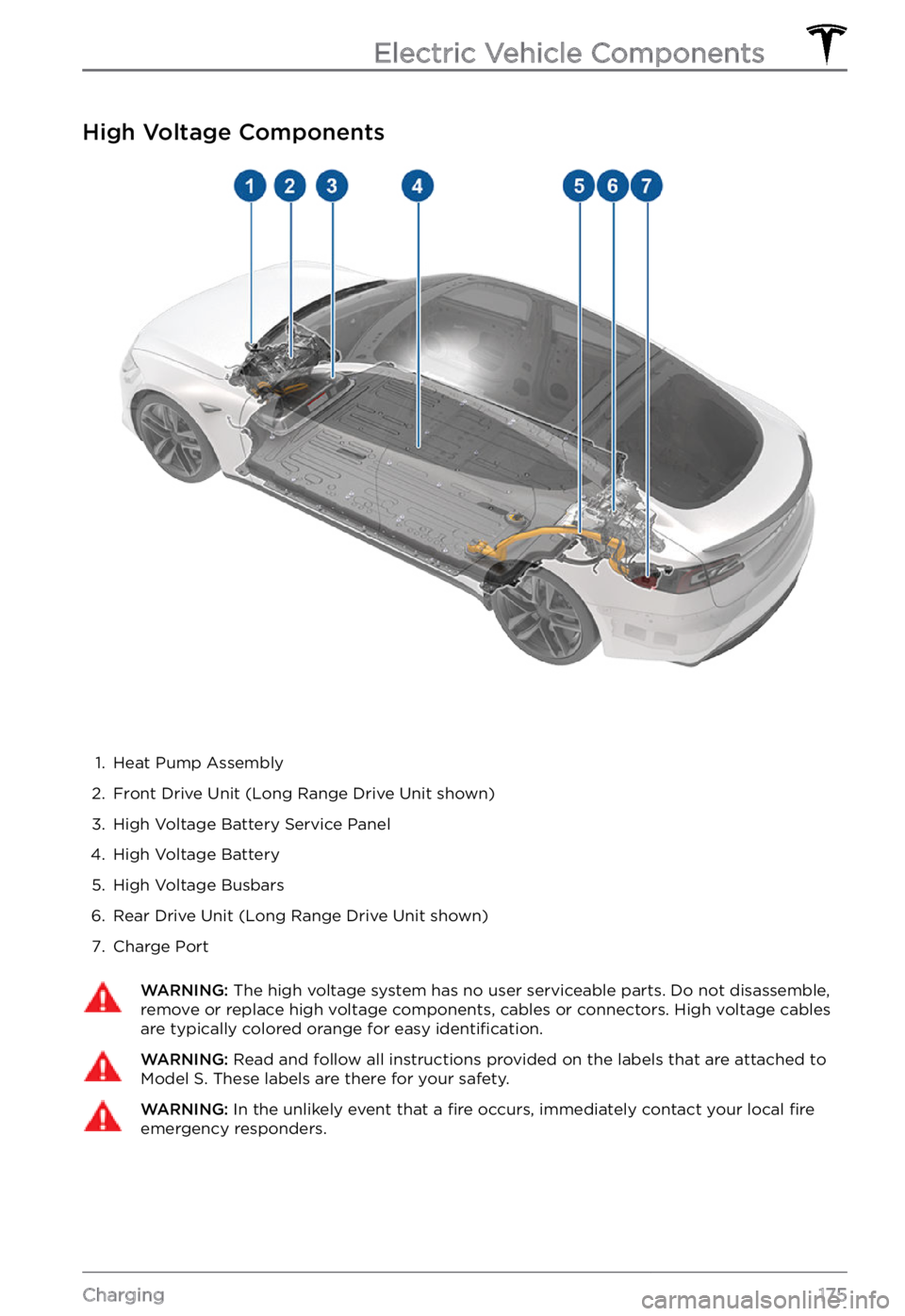
High Voltage Components
1.
Heat Pump Assembly
2.
Front Drive Unit (Long Range Drive Unit shown)
3.
High Voltage Battery Service Panel
4.
High Voltage Battery
5.
High Voltage Busbars
6.
Rear Drive Unit (Long Range Drive Unit shown)
7.
Charge Port
WARNING: The high voltage system has no user serviceable parts. Do not disassemble, remove or replace high voltage components, cables or connectors. High voltage cables are typically colored orange for easy identification.
WARNING: Read and follow all instructions provided on the labels that are attached to Model S. These labels are there for your safety.WARNING: In the unlikely event that a fire occurs, immediately contact your local fire emergency responders.
Electric Vehicle Components
175Charging
Page 190 of 281
Maintaining Tire Pressures
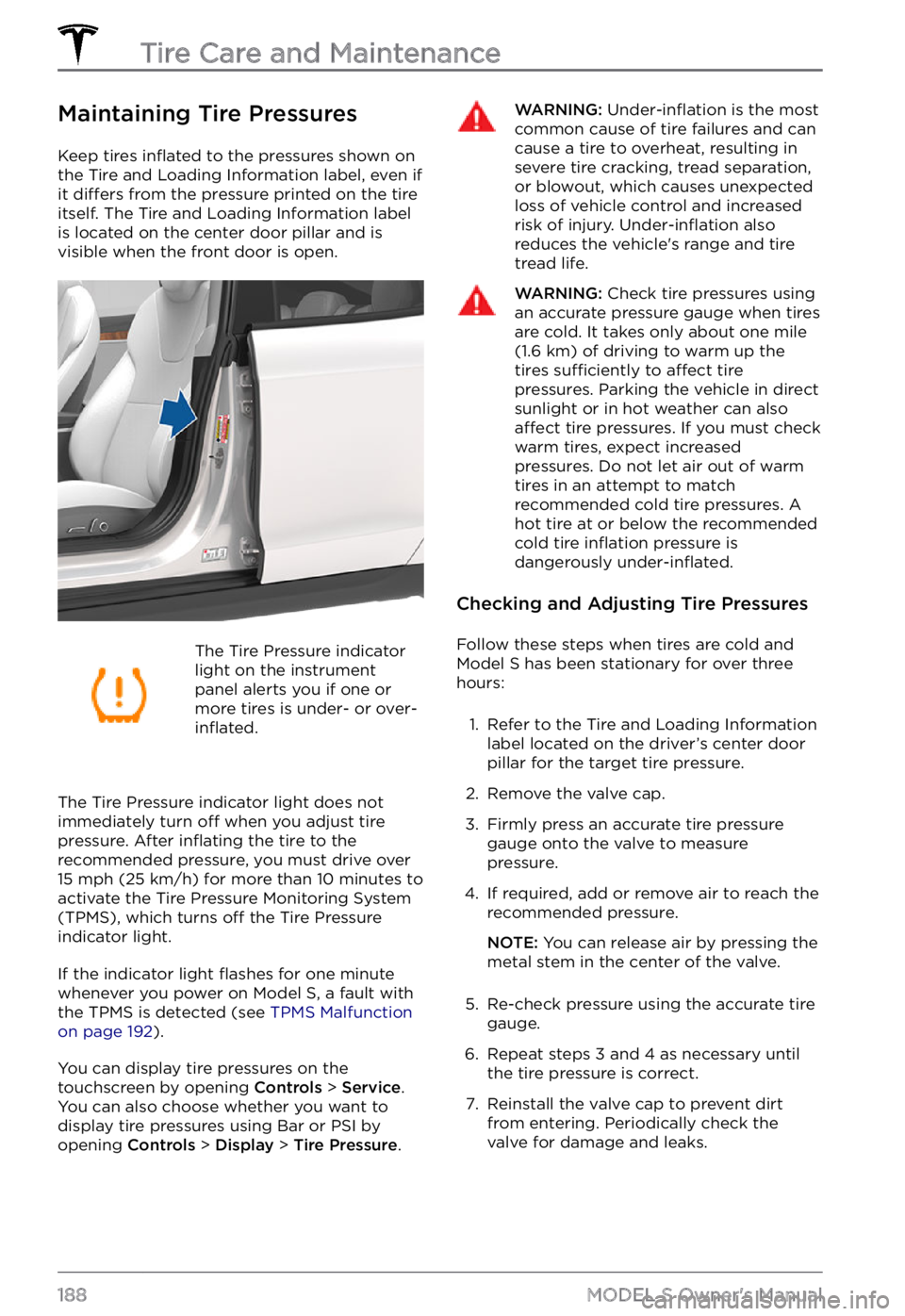
Keep tires inflated to the pressures shown on
the Tire and Loading Information label, even if
it
differs from the pressure printed on the tire
itself. The Tire and Loading Information label is located on the center door pillar and is
visible when the front door is open.
The Tire Pressure indicator
light on the instrument panel alerts you if one or
more tires is under- or over-inflated.
The Tire Pressure indicator light does not immediately turn off when you adjust tire pressure. After inflating the tire to the
recommended pressure, you must drive over
15 mph (25 km/h) for more than 10 minutes to
activate the Tire Pressure Monitoring System
(TPMS), which turns
off the Tire Pressure
indicator light.
If the indicator light flashes for one minute
whenever you power on Model S, a fault with
the TPMS is detected (see TPMS Malfunction on page 192).
You can display tire pressures on the touchscreen by opening Controls > Service.
You can also choose whether you want to
display tire pressures using Bar or PSI by opening
Controls > Display > Tire Pressure.
WARNING: Under-inflation is the most common cause of tire failures and can cause a tire to overheat, resulting in severe tire cracking, tread separation, or blowout, which causes unexpected loss of vehicle control and increased risk of injury. Under-inflation also reduces the vehicle
Page 191 of 281

Inspecting and Maintaining
Tires
Regularly inspect the tread and side walls for
any sign of distortion (bulges), foreign
objects, cuts or wear.
WARNING: Do not drive Model S if a tire is damaged, excessively worn, or inflated to an incorrect pressure. Check tires regularly for wear, and ensure there are no cuts, bulges or exposure of the ply/cord structure.
Tire Wear
Adequate tread depth is important for proper
tire performance. Tires with a tread depth less
than
4/32” (3 mm) are more likely to
hydroplane in wet conditions and should not be used. Tires with a tread depth less than
5/32” (4 mm) do not perform well in snow
and slush and should not be used when driving in winter conditions.
Model S is originally fitted with tires that have
wear indicators molded into the tread
pattern. When the tread has been worn down
to
4/32” (3 mm), the indicators start to
appear at the surface of the tread pattern,
producing the
effect of a continuous band of
rubber across the width of the tire. For
optimal performance and safety, Tesla
recommends replacing tires before the wear indicators are visible.
Tire Rotation, Balance, and Wheel
Alignment
Tesla recommends rotating the tires every 6,250 miles (10,000 km) or if tread depth difference is 2/32 in (1.5 mm) or greater,
whichever comes first.
Unbalanced wheels (sometimes noticeable as
vibration through the steering yoke) affect
vehicle handling and tire life. Even with
regular use, wheels can get out of balance.
Therefore, they should be balanced as
required.
If tire wear is uneven (on one side of the tire
only) or becomes abnormally excessive,
check the alignment of wheels.
NOTE: When replacing only two tires, install
the new tires on the rear if your vehicle
Page 194 of 281
Replacing a Tire Sensor
If the Tire Pressure warning indicator displays
frequently, contact Tesla to determine if a tire
sensor needs to be replaced. If a non-Tesla
Service Center repairs or replaces a tire, the
tire sensor may not work until Tesla performs
the setup procedure.
TPMS Malfunction
Model S has also been equipped with a TPMS
malfunction indicator to indicate when the system is not operating properly.
The TPMS malfunction
indicator is combined with
the tire pressure indicator
light. When the system
detects a malfunction, the
indicator
flashes for
approximately one minute,
then remains continuously
lit. This sequence continues
upon subsequent vehicle
start-ups as long as the
malfunction exists. When
the TPMS malfunction
indicator is on, the system
might not be able to detect
or signal under-
or over-inflated tires as intended.
TPMS malfunctions can occur for a variety of reasons, including installing replacement or
alternate tires or wheels that prevent the
TPMS from functioning properly. Always
check the TPMS malfunction indicator light
after replacing one or more tires or wheels on
your vehicle to ensure that the replacement tires or wheels allow the TPMS to continue to
function properly.
NOTE: If a tire has been replaced or repaired
using a different tire sealant than the one
available from Tesla, and a low tire pressure is
detected, it is possible that the tire sensor has
been damaged. Contact Tesla to have the
fault repaired as soon as possible.
Seasonal Tire Types
Summer Tires
Your vehicle may be originally equipped with
high performance summer tires or all season
tires. Tesla recommends using winter tires if
driving in cold temperatures or on roads
where snow or ice may be present. Contact
Tesla for winter tire recommendations.
WARNING: In cold temperatures or on snow or ice, summer tires do not provide adequate traction. Selecting and installing the appropriate tires for winter conditions is important to ensure the safety and optimum performance of your Model S.
All-Season Tires
Your Model S may be originally equipped with
all-season tires. These tires are designed to
provide adequate traction in most conditions year-round, but may not provide the same level of traction as winter tires in snowy or icy
conditions. All-season tires can be
identified
by “ALL SEASON" and/or "M+S” (mud and
snow) on the tire sidewall.
Winter Tires
Use winter tires to increase traction in snowy
or icy conditions. When installing winter tires,
always install a complete set of four tires at
the same time. Winter tires must be the same
diameter, brand, construction and tread
pattern on all four wheels. Contact Tesla for
winter tire recommendations.
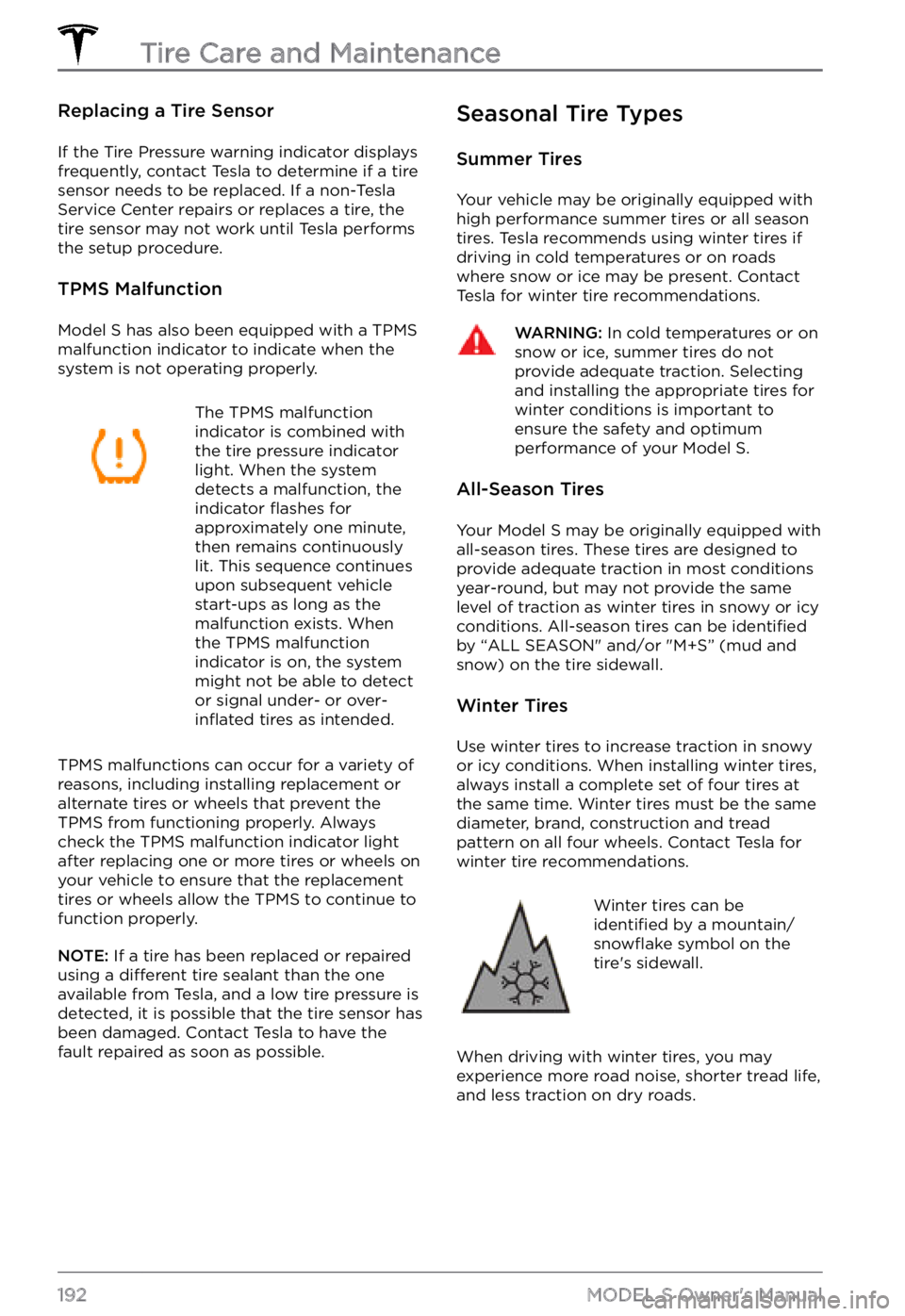
Winter tires can be identified by a mountain/snowflake symbol on the
tire