ac control TESLA MODEL S 2023 Owners Manual
[x] Cancel search | Manufacturer: TESLA, Model Year: 2023, Model line: MODEL S, Model: TESLA MODEL S 2023Pages: 276, PDF Size: 7.88 MB
Page 3 of 276

Overview................................................................3
Exterior Overview............................................................................3
Interior Overview.............................................................................4
Touchscreen Overview..................................................................6
Opening and Closing.......................................12
Keys.....................................................................................................12
Doors...................................................................................................17
Windows............................................................................................19
Rear Trunk.......................................................................................20
Front Trunk......................................................................................22
Interior Storage and Electronics..............................................25
Seating and Safety Restraints.....................29
Front and Rear Seats...................................................................29
Seat Belts.........................................................................................32
Child Safety Seats.........................................................................35
Airbags...............................................................................................41
Driving..................................................................47
Driver Profiles.................................................................................47
Steering Yoke (or Steering Wheel)........................................49
Mirrors................................................................................................52
Starting and Powering Off.........................................................53
Shifting..............................................................................................55
Lights.................................................................................................58
Instrument Panel............................................................................61
Wipers and Washers....................................................................65
Braking and Stopping.................................................................66
Traction Control.............................................................................69
Park Assist.......................................................................................70
Vehicle Hold....................................................................................72
Acceleration Modes......................................................................73
Track Mode......................................................................................74
Trip Information.............................................................................76
Rear Facing Camera(s)...............................................................77
Pedestrian Warning System......................................................78
Cold Weather Best Practices....................................................79
Autopilot...............................................................81
About Autopilot..............................................................................81
Traffic-Aware Cruise Control....................................................84
Autosteer..........................................................................................88
Navigate on Autopilot.................................................................93
Traffic Light and Stop Sign Control.......................................96
Autopark.........................................................................................103
Summon..........................................................................................105
Smart Summon............................................................................108
Active Safety Features....................................111
Lane Assist.......................................................................................111
Collision Avoidance Assist........................................................114
Speed Assist...................................................................................117
Cabin Camera.................................................................................118
Using the Touchscreen..................................119
Climate Controls...........................................................................119
Phone, Calendar, and Web Conferencing...........................126
Air Suspension..............................................................................129
Voice Commands..........................................................................131
Safety & Security Settings.......................................................133
Dashcam..........................................................................................135
Sentry Mode..................................................................................136
USB Drive Requirements for Recording Videos..............138
Smart Garage Connectivity.....................................................139
Connecting to Wi-Fi...................................................................142
Software Updates........................................................................143
Mobile App.....................................................................................145
Navigation and Entertainment..................147
Maps and Navigation.................................................................147
Media................................................................................................153
Theater, Arcade, and Toybox...................................................156
Charging and Energy Consumption........159
Electric Vehicle Components..................................................159
High Voltage Battery Information..........................................161
Charging Instructions.................................................................163
Scheduled Charging and Scheduled Departure..............168
Getting Maximum Range..........................................................169
Maintenance.......................................................171
Maintenance Service Intervals.................................................171
Tire Care and Maintenance.......................................................173
Cleaning...........................................................................................178
Windshield Wiper Blades, Jets and Fluid...........................182
Jacking and Lifting.....................................................................184
Parts and Accessories................................................................185
Do It Yourself Maintenance......................................................186
Specifications...................................................187
Identification Labels...................................................................187
Vehicle Loading............................................................................188
Dimensions....................................................................................190
Subsystems....................................................................................192
Wheels and Tires.........................................................................194
Roadside Assistance.....................................201
Contacting Tesla Roadside Assistance...............................201
Instructions for Transporters..................................................202
Running Out of Range..............................................................206
Jump Starting..............................................................................207
Troubleshooting.............................................209
Troubleshooting Alerts............................................................209
Contents
Page 7 of 276
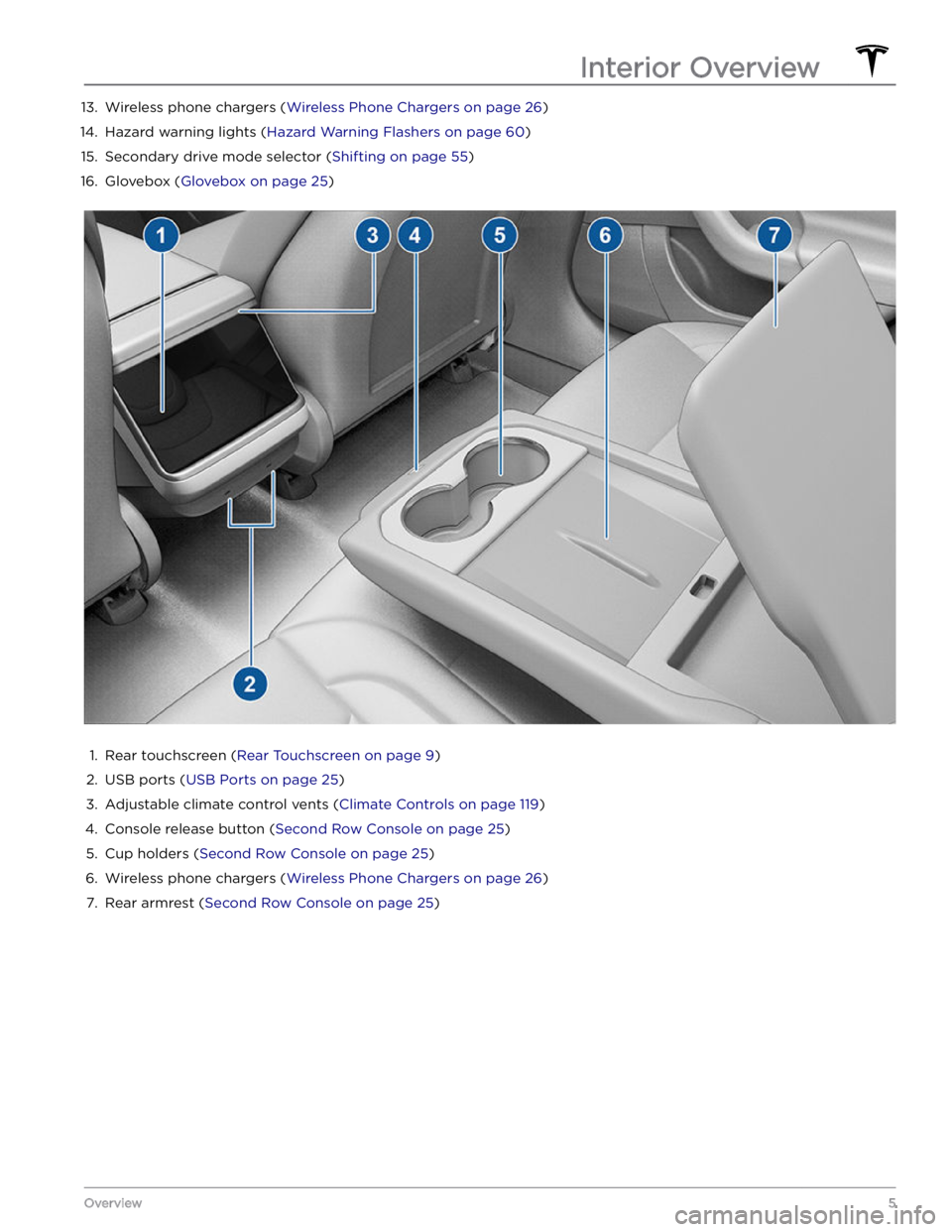
13. Wireless phone chargers (Wireless Phone Chargers on page 26)14.
Hazard warning lights (Hazard Warning Flashers on page 60)
15.
Secondary drive mode selector (Shifting on page 55)
16.
Glovebox (Glovebox on page 25)
1.
Rear touchscreen (Rear Touchscreen on page 9)
2.
USB ports (USB Ports on page 25)
3.
Adjustable climate control vents (Climate Controls on page 119)
4.
Console release button (Second Row Console on page 25)
5.
Cup holders (Second Row Console on page 25)
6.
Wireless phone chargers (Wireless Phone Chargers on page 26)
7.
Rear armrest (Second Row Console on page 25)
Interior Overview
5Overview
Page 9 of 276
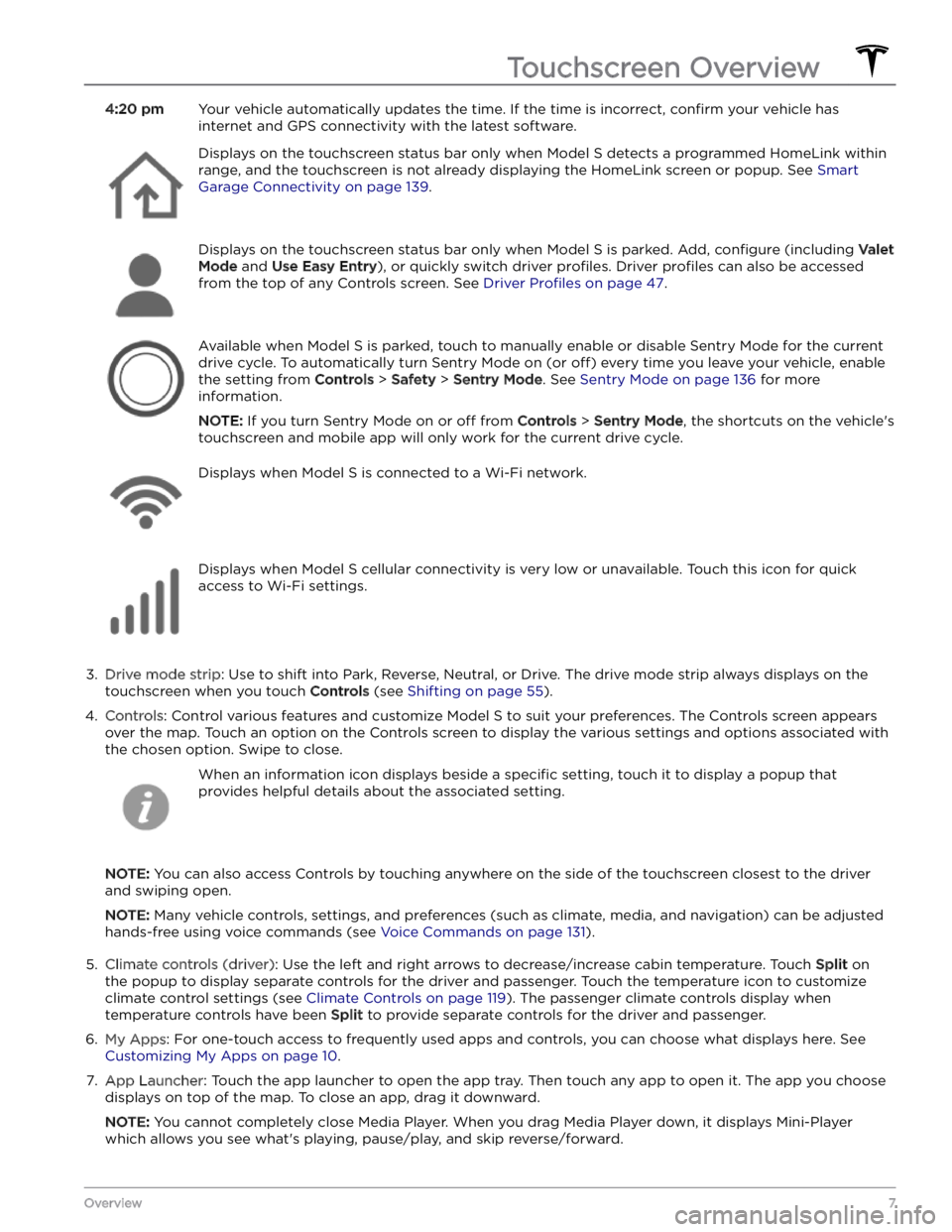
4:20 pmYour vehicle automatically updates the time. If the time is incorrect, confirm your vehicle has
internet and GPS connectivity with the latest software.Displays on the touchscreen status bar only when Model S detects a programmed HomeLink within
range, and the touchscreen is not already displaying the HomeLink screen or popup. See
Smart
Garage Connectivity on page 139.
Displays on the touchscreen status bar only when Model S is parked. Add, configure (including Valet
Mode and Use Easy Entry), or quickly switch driver profiles. Driver profiles can also be accessed
from the top of any Controls screen. See
Driver Profiles on page 47.
Available when Model S is parked, touch to manually enable or disable Sentry Mode for the current
drive cycle. To automatically turn Sentry Mode on (or
off) every time you leave your vehicle, enable
the setting from
Controls > Safety > Sentry Mode. See Sentry Mode on page 136 for more
information.
NOTE: If you turn Sentry Mode on or off from Controls > Sentry Mode, the shortcuts on the vehicle
Page 10 of 276
8. Recent App(s): Displays the most recently used app(s). The number of recent apps displayed here depends on
how many apps have been added to
My Apps. If you add the maximum number of apps to My Apps, only the
most recent app displays.
9.
Climate controls (passenger): Displays when temperature controls have been Split to provide separate controls
for the driver and passenger.
10.
Volume Control: Controls the volume of media player and phone calls (see Volume Controls on page 153). The
volume of navigation instructions is controlled separately (see
Maps and Navigation on page 147).
11.
Media Player: See Media on page 153.
The bottom of the touchscreen may also display the following:
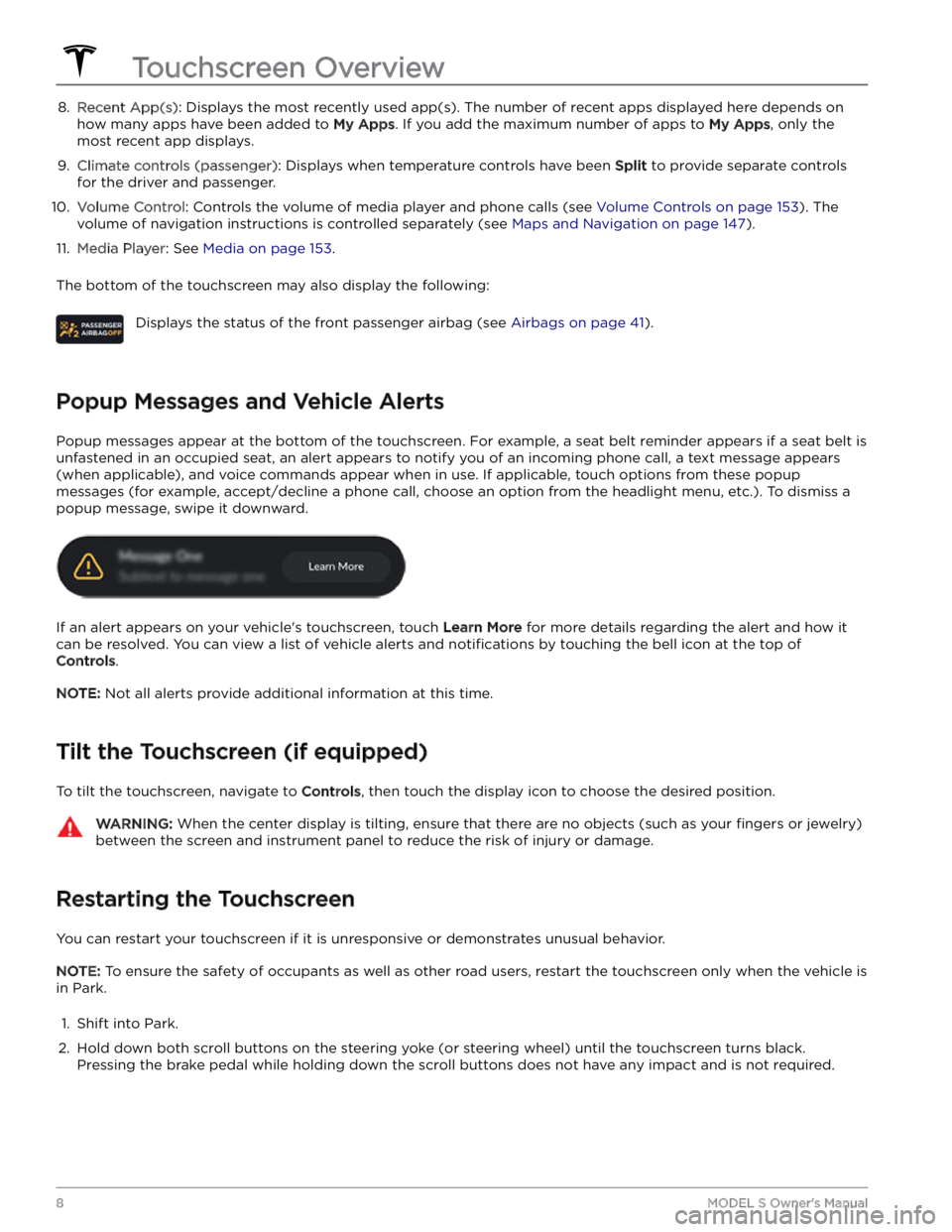
Displays the status of the front passenger airbag (see Airbags on page 41).
Popup Messages and Vehicle Alerts
Popup messages appear at the bottom of the touchscreen. For example, a seat belt reminder appears if a seat belt is unfastened in an occupied seat, an alert appears to notify you of an incoming phone call, a text message appears (when applicable), and voice commands appear when in use. If applicable, touch options from these popup
messages (for example, accept/decline a phone call, choose an option from the headlight menu, etc.). To dismiss a
popup message, swipe it downward.
If an alert appears on your vehicle
Page 11 of 276
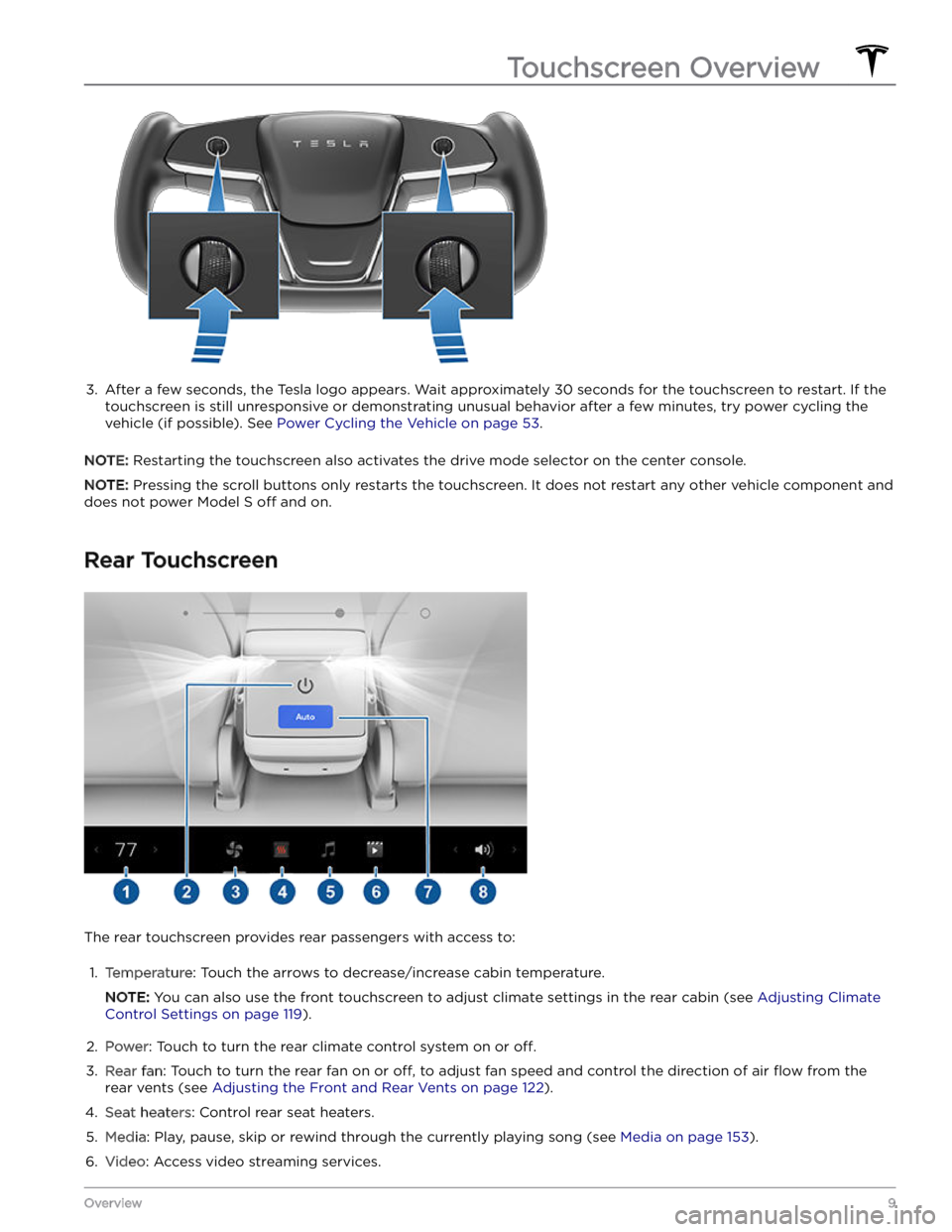
3.
After a few seconds, the Tesla logo appears. Wait approximately 30 seconds for the touchscreen to restart. If the
touchscreen is still unresponsive or demonstrating unusual behavior after a few minutes, try power cycling the
vehicle (if possible). See
Power Cycling the Vehicle on page 53.
NOTE: Restarting the touchscreen also activates the drive mode selector on the center console.
NOTE: Pressing the scroll buttons only restarts the touchscreen. It does not restart any other vehicle component and
does not power
Model S off and on.
Rear Touchscreen
The rear touchscreen provides rear passengers with access to:
1.
Temperature: Touch the arrows to decrease/increase cabin temperature.
NOTE: You can also use the front touchscreen to adjust climate settings in the rear cabin (see Adjusting Climate
Control Settings on page 119).
2.
Power: Touch to turn the rear climate control system on or off.
3.
Rear fan: Touch to turn the rear fan on or off, to adjust fan speed and control the direction of air flow from the
rear vents (see
Adjusting the Front and Rear Vents on page 122).
4.
Seat heaters: Control rear seat heaters.
5.
Media: Play, pause, skip or rewind through the currently playing song (see Media on page 153).
6.
Video: Access video streaming services.
Touchscreen Overview
9Overview
Page 18 of 276

4. When complete, the key list includes the new key.
Touch the associated pencil icon to customize the name of the key.
Removing a key:
When you no longer want a key to access Model S (for
example, you lost your phone or key card, etc.), follow these steps to remove it.
1.
On the touchscreen, touch Controls > Locks.
2.
In the key list, find the key that you would like to
delete and touch its associated trash icon.
3.
When prompted, scan an authenticated key card or key fob on the card reader to
confirm the deletion.
When complete, the key list no longer includes the deleted key.
NOTE: Model S requires at least one authenticated key
card or key fob at all times. If only one key card remains on the key list, you cannot delete it.
Keys
16MODEL S Owner
Page 20 of 276
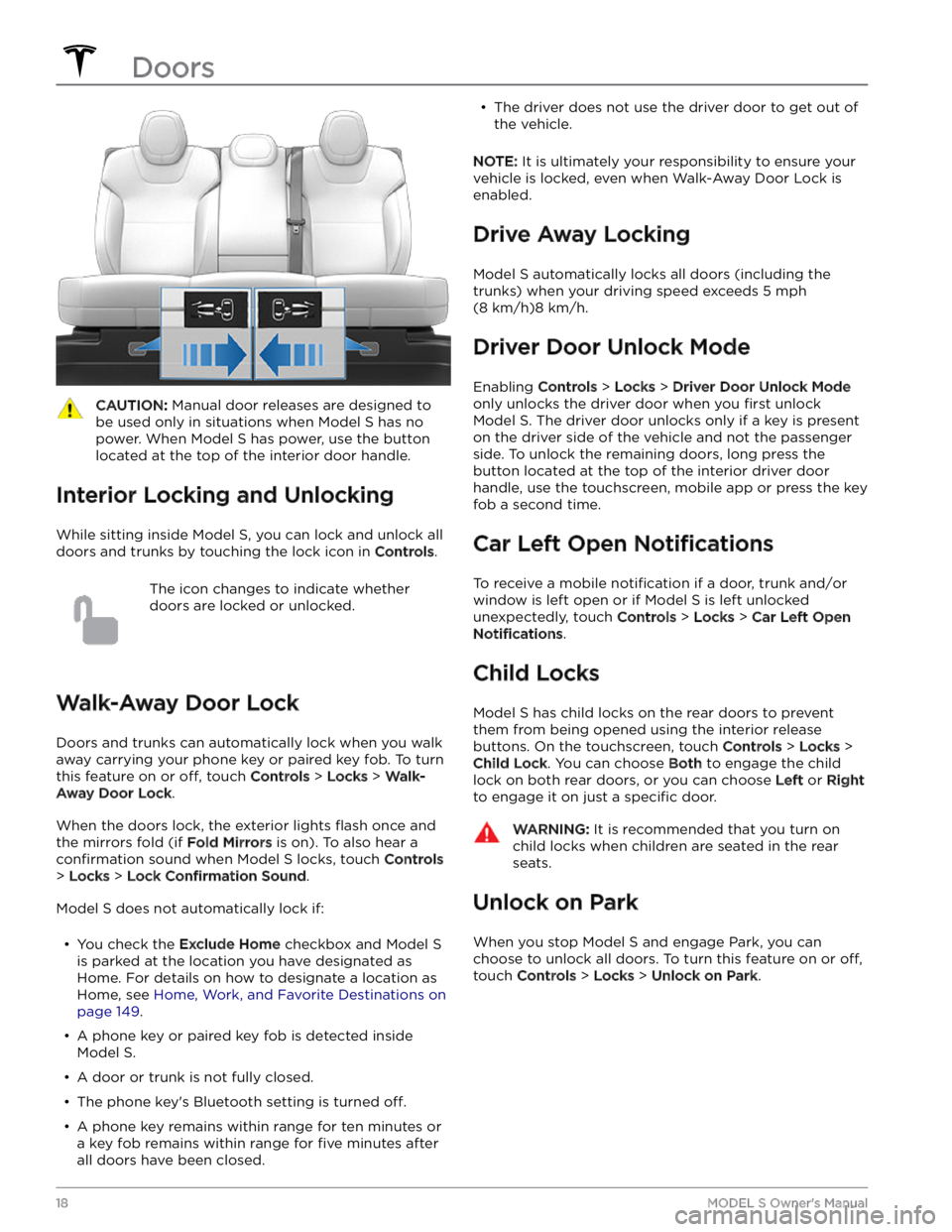
CAUTION: Manual door releases are designed to
be used only in situations when Model S has no
power. When Model S has power, use the button
located at the top of the interior door handle.
Interior Locking and Unlocking
While sitting inside Model S, you can lock and unlock all
doors and trunks by touching the lock icon
in Controls.
The icon changes to indicate whether
doors are locked or unlocked.
Walk-Away Door Lock
Doors and trunks can automatically lock when you walk away carrying your phone key or paired key fob. To turn
this feature on or
off, touch Controls > Locks > Walk-
Away Door Lock.
When the doors lock, the exterior lights flash once and
the mirrors fold (if
Fold Mirrors is on). To also hear a
confirmation sound when Model S locks, touch Controls
> Locks > Lock Confirmation Sound.
Model S does not automatically lock if:
Page 27 of 276
Center Console
In addition to housing an RFID transmitter that reads key fobs and key cards (see
Keys on page 12), the center
console includes cup holders, two storage
compartments, wireless phone chargers, and a rear
touchscreen.
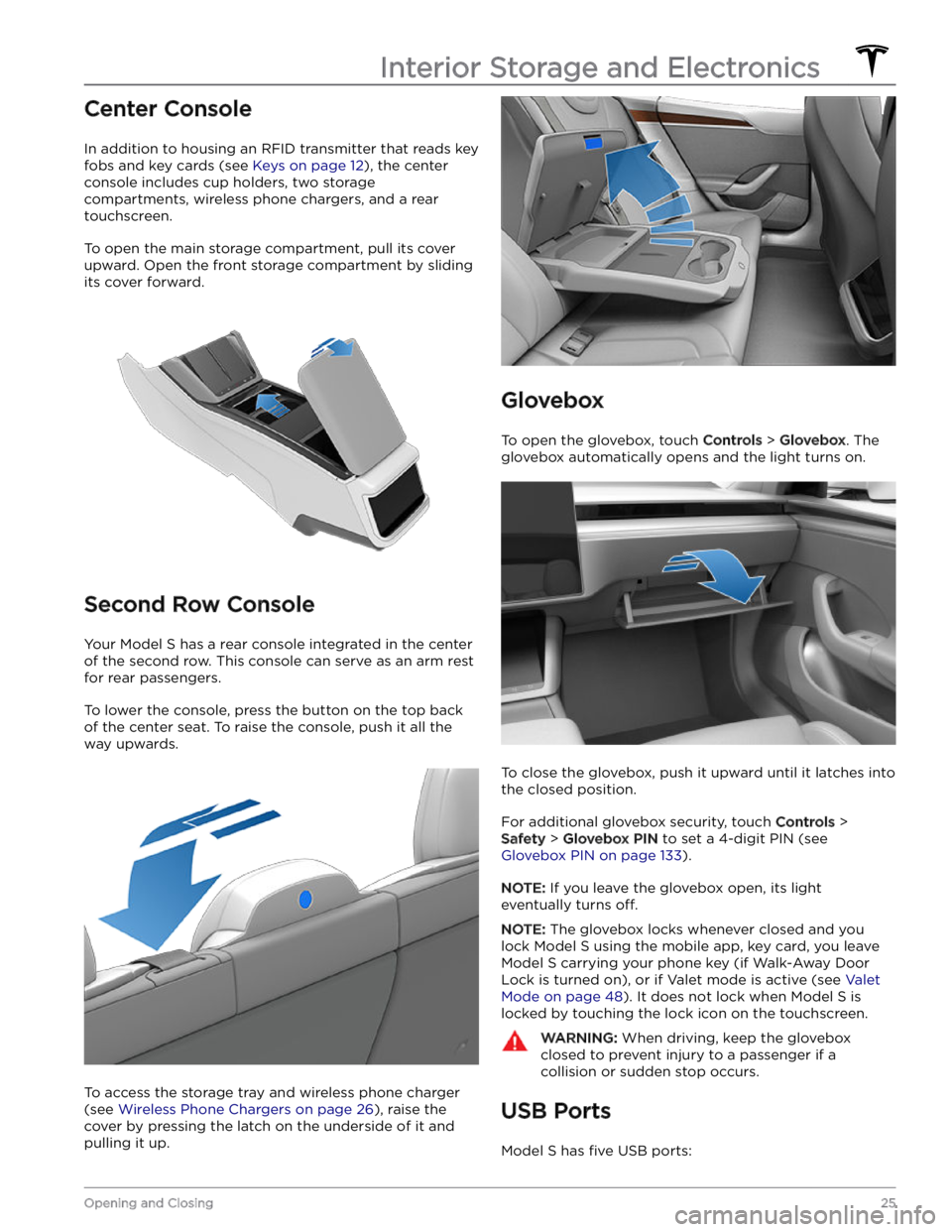
To open the main storage compartment, pull its cover upward. Open the front storage compartment by sliding its cover forward.
Second Row Console
Your Model S has a rear console integrated in the center
of the second row. This console can serve as an arm rest for rear passengers.
To lower the console, press the button on the top back of the center seat. To raise the console, push it all the way upwards.
To access the storage tray and wireless phone charger (see
Wireless Phone Chargers on page 26), raise the
cover by pressing the latch on the underside of it and pulling it up.
Glovebox
To open the glovebox, touch Controls > Glovebox. The
glovebox automatically opens and the light turns on.
To close the glovebox, push it upward until it latches into the closed position.
For additional glovebox security, touch Controls >
Safety > Glovebox PIN to set a 4-digit PIN (see
Glovebox PIN on page 133).
NOTE: If you leave the glovebox open, its light
eventually turns
off.
NOTE: The glovebox locks whenever closed and you
lock
Model S using the mobile app, key card, you leave
Model S carrying your phone key (if Walk-Away Door
Lock is turned on), or if Valet mode is active (see
Valet
Mode on page 48). It does not lock when Model S is
locked by touching the lock icon on the touchscreen.
WARNING: When driving, keep the glovebox
closed to prevent injury to a passenger if a
collision or sudden stop occurs.
USB Ports
Model S has five USB ports:
Interior Storage and Electronics
25Opening and Closing
Page 32 of 276
Calibrating Seats
(If equipped) You can calibrate the driver seat. This is useful if you
find your seat range limited or your driver
profile does not automatically adjust the seat for you.
Navigate to
Controls > Service > Driver Seat, Steering &
Mirrors Calibration and follow the instructions on the
touchscreen.
WARNING: Ensure nothing is behind or
underneath the driver seat during calibration.
Failure to do so may cause serious injury.
Folding Rear Seats
Model S has a split rear seat that can fold forward.
Before folding, remove items from the seats and the rear footwell. To allow the rear seats to fold completely
flat,
you may need to move the front seats forward. To fold a
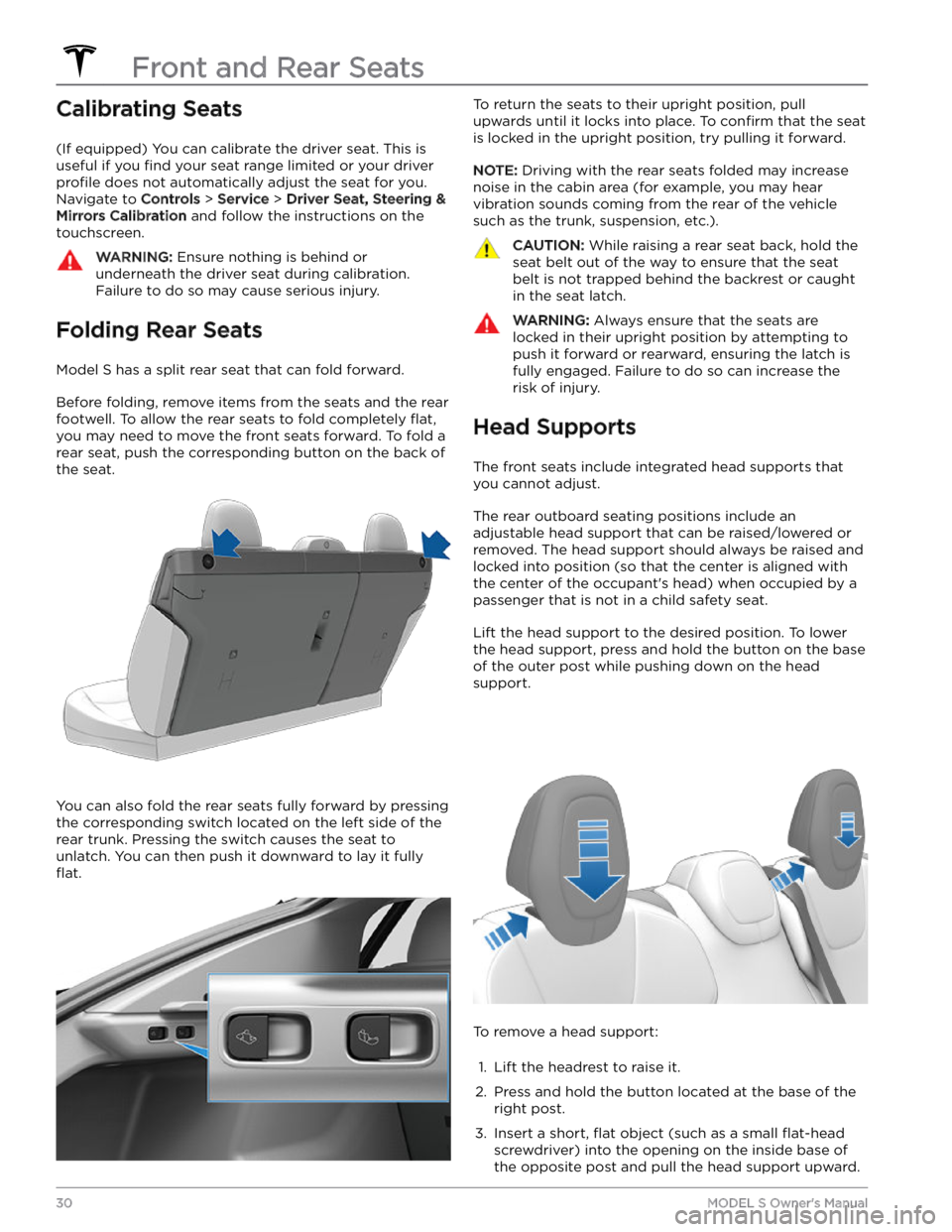
rear seat, push the corresponding button on the back of the seat.
You can also fold the rear seats fully forward by pressing the corresponding switch located on the left side of the rear trunk. Pressing the switch causes the seat to unlatch. You can then push it downward to lay it fully
flat.
To return the seats to their upright position, pull
upwards until it locks into place. To
confirm that the seat
is locked in the upright position, try pulling it forward.
NOTE: Driving with the rear seats folded may increase
noise in the cabin area (for example, you may hear vibration sounds coming from the rear of the vehicle
such as the trunk, suspension, etc.).
CAUTION: While raising a rear seat back, hold the
seat belt out of the way to ensure that the seat
belt is not trapped behind the backrest or caught
in the seat latch.
WARNING: Always ensure that the seats are
locked in their upright position by attempting to
push it forward or rearward, ensuring the latch is
fully engaged. Failure to do so can increase the
risk of injury.
Head Supports
The front seats include integrated head supports that you cannot adjust.
The rear outboard seating positions include an
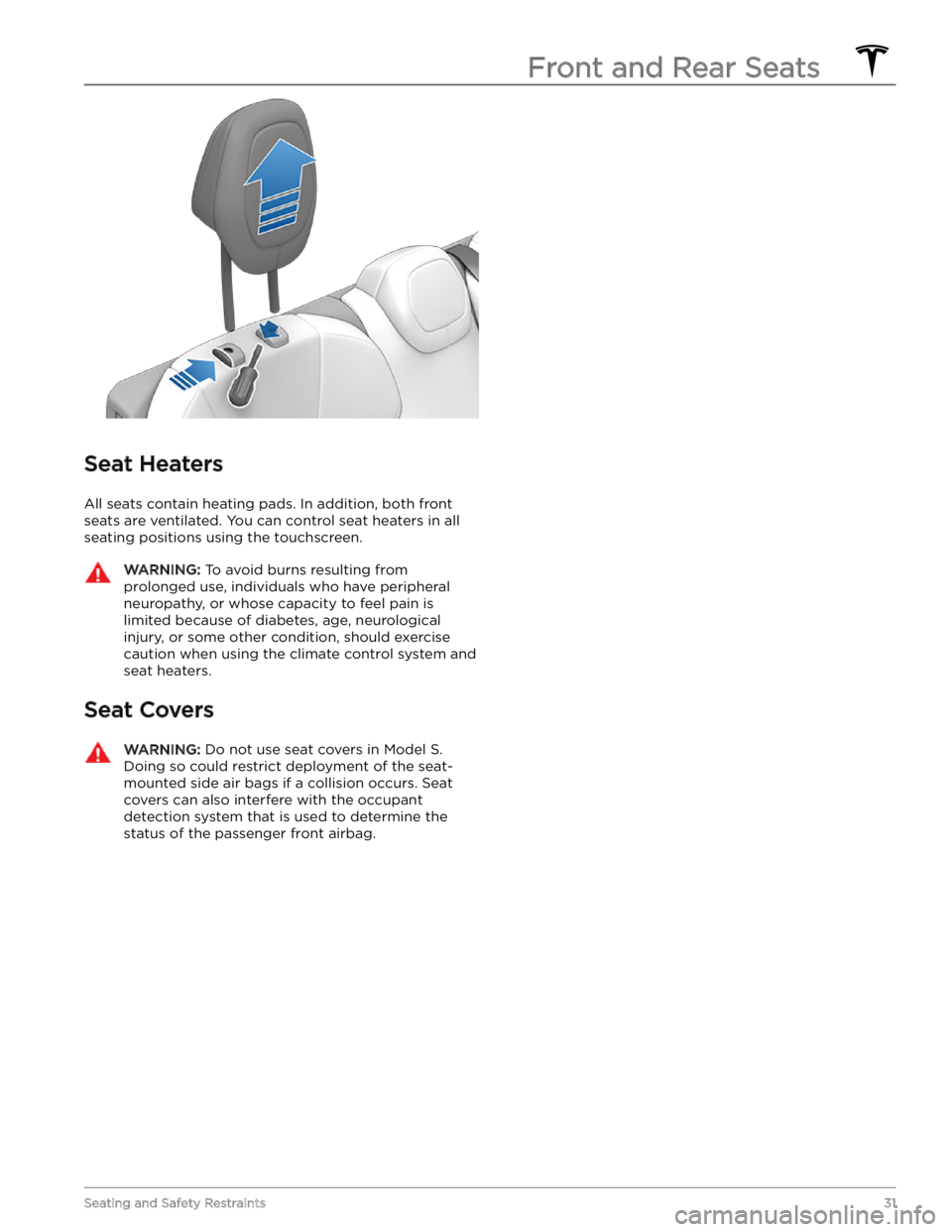
adjustable head support that can be raised/lowered or
removed. The head support should always be raised and locked into position (so that the center is aligned with the center of the occupant
Page 33 of 276
Seat Heaters
All seats contain heating pads. In addition, both front
seats are ventilated.
You can control seat heaters in all
seating positions using the touchscreen.
WARNING: To avoid burns resulting from
prolonged use, individuals who have peripheral
neuropathy, or whose capacity to feel pain is
limited because of diabetes, age, neurological
injury, or some other condition, should exercise
caution when using the climate control system and
seat heaters.
Seat Covers
WARNING: Do not use seat covers in Model S.
Doing so could restrict deployment of the seat-
mounted side air bags if a collision occurs. Seat
covers can also interfere with the occupant
detection system that is used to determine the
status of the passenger front airbag.
Front and Rear Seats
31Seating and Safety Restraints