ac control TESLA MODEL S 2023 Manual PDF
[x] Cancel search | Manufacturer: TESLA, Model Year: 2023, Model line: MODEL S, Model: TESLA MODEL S 2023Pages: 276, PDF Size: 7.88 MB
Page 205 of 276
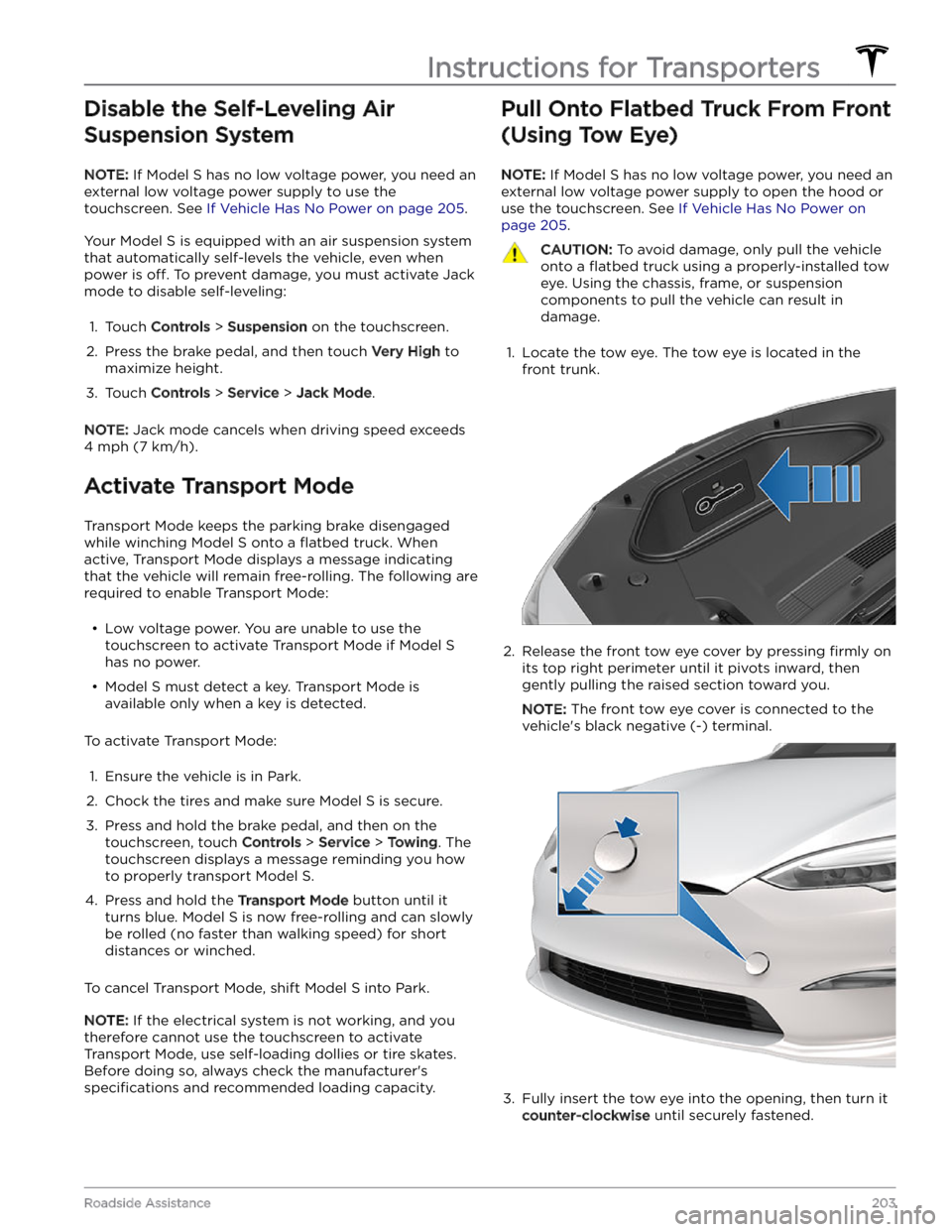
Disable the Self-Leveling Air Suspension System
NOTE: If Model S has no low voltage power, you need an
external
low voltage power supply to use the
touchscreen. See
If Vehicle Has No Power on page 205.
Your Model S is equipped with an air suspension system
that automatically self-levels the vehicle, even when
power is
off. To prevent damage, you must activate Jack
mode to disable self-leveling:
1.
Touch Controls > Suspension on the touchscreen.
2.
Press the brake pedal, and then touch Very High to
maximize height.
3.
Touch Controls > Service > Jack Mode.
NOTE: Jack mode cancels when driving speed exceeds
4 mph (7 km/h).
Activate Transport Mode
Transport Mode keeps the parking brake disengaged
while winching
Model S onto a flatbed truck. When
active, Transport Mode displays a message indicating that the vehicle will remain free-rolling. The following are required to enable Transport Mode:
Page 212 of 276

APP_w218
Autosteer speed limit exceeded
Take control of steering wheel
What this alert means:
Autosteer is unavailable because your vehicle has exceeded the maximum speed limit for this driver assistance
feature.
What to do:
Take immediate control of the steering yoke (or steering wheel) and maintain control until you reach your
destination.
In most cases, Autosteer will not be available for the rest of your current drive. To reset it, bring the vehicle to a
complete stop and shift into Park. When you shift into Drive to travel to your next destination, Autosteer should be
available again.
NOTE: If this alert becomes active while you are driving in Germany, Autosteer should be available again once your
vehicle is traveling below the Autosteer speed limit.
If Autosteer is not available during your next drive, and remains unavailable throughout subsequent drives, schedule
service at your convenience. Your vehicle is OK to drive in the meantime.
For more information, see Autosteer on page 88.
APP_w221
Cruise control unavailable
Reduced front radar visibility
What this alert means:
Traffic-Aware Cruise Control and Autosteer are unavailable because the radar located in the front bumper area of
your vehicle has no or low visibility.
This could be a temporary obstruction caused by factors like snow, ice, dirt, or mud.
What to do:
Continue to your destination. Your vehicle is OK to drive. Traffic-Aware Cruise Control and Autosteer will remain
unavailable as long as the radar lacks adequate visibility.
If the alert persists throughout your drive, examine the front bumper before your next planned drive and attempt to
clear any obstruction. See the About Autopilot on page 81 sections “How It Works” and “Cleaning Cameras and
Sensors” for more information on clearing dirt or debris from that area of the vehicle.
If this alert persists throughout subsequent drives but no obstruction is visible on the front bumper where the radar
is located, schedule service at your earliest convenience. Your vehicle is OK to drive in the meantime.
APP_w222
Cruise control unavailable
Reduced front camera visibility
What this alert means:
Traffic-Aware Cruise Control and Autosteer are unavailable because one or more of the front cameras in your vehicle
is blocked or blinded by external conditions.
Traffic-Aware Cruise Control and Autosteer will remain unavailable while a front camera lacks adequate visibility.
Cameras can be blocked or blinded by:
Troubleshooting Alerts
210MODEL S Owner
Page 233 of 276

What to do:
For more information and troubleshooting suggestions, check in your vehicle touchscreen for other recent alerts that involve charging.
CP_a066
Charging equipment not ready
See equipment instructions to start charging
What this alert means:
Charging cannot begin because the charging station is communicating to your vehicle that either the external
charging equipment is not ready or charging is not authorized. The control pilot signal that communicates between
the charging station and your vehicle indicates that your vehicle is not allowed to start charging.
This could occur because:
Page 234 of 276

To help thaw any ice on the charge port latch, press the Defrost Car button in your Tesla Mobile App to defrost your
vehicle for approximately 30 to 45 minutes.
NOTE: Be sure to use Defrost Car in your Mobile App to defrost your vehicle. Adjusting the climate control settings
in your vehicle
Page 240 of 276

Vehicle Hold is currently unavailable due to system constraints. When stopping, use the brake pedal to bring your
vehicle to a complete stop and keep your vehicle stationary.
What to do:
Continue to your destination. Your vehicle is OK to drive.
If this alert persists throughout subsequent drives, schedule service at your earliest convenience. Your vehicle is OK
to drive in the meantime.
For more information, see Vehicle Hold on page 72.
DI_a250
Adaptive ride control disabled
Drive with caution
What this alert means:
The speed of your vehicle is limited to 90 mph (144 km/h) due to an issue with the Adaptive Suspension Damping
system.
The system cannot provide real-time adjustments to the suspension system to optimize both ride and handling, and
as a result your ride may be softer than usual.
What to do:
If this alert persists throughout subsequent drives, schedule service at your earliest convenience. Your vehicle is OK
to drive in the meantime.
This alert is accompanied by a red indicator light on the instrument panel. For more information, see Air Suspension
on page 129.
ESP_a118
Assist for low brake performance activated
To stop, keep brake pedal firmly pressed
What this alert means:
Hydraulic Fade Compensation is active. This brake assist function activates temporarily to make sure you have full
braking capability in conditions where reduced braking performance is detected by your vehicle.
When this assist function activates, you may feel the brake pedal pull away from your foot and notice a strong
increase in brake pressure. You may also hear a pumping sound coming from the brake hydraulic unit at the front of
the vehicle. This will usually last for a few seconds, depending on road surface and vehicle speed. This is completely
normal and does not indicate any issue with your vehicle.
What to do:
Continue to press the brake pedal as you normally would, and do not "pump" (repeatedly press and release) the
pedal as this will interrupt the function.
This alert will clear when your vehicle comes to a stop or you are no longer pressing the brake pedal. It may still be
displayed for up to 5 seconds afterward.
Reduced braking performance is usually temporary, and can occur for a number of reasons including high brake
temperatures after heavy brake use, or driving in extremely cold or wet conditions. It can also indicate that your
brake pads or rotors have worn to the point that normal replacement is needed.
If you continue to experience reduced braking performance which does not improve over time, please contact Tesla
service at your convenience for a brake inspection.
For more information, see Hydraulic Fade Compensation on page 67.
Troubleshooting Alerts
238MODEL S Owner
Page 251 of 276

UMC_a010
Mobile Connector to adapter connection hot
Let cool - Plug adapter fully into Mobile Connector
What this alert means:
Charging has been interrupted because the Mobile Connector has detected a high temperature at the connection
between the wall plug adapter and the control box.
What to do:
Make sure the wall plug adapter is fully connected to the Mobile Connector control box.
Also make sure the wall plug adapter is not covered by anything, and that there is no heat source nearby.
After unplugging from the power source (wall outlet), inspect the wall plug adapter connection and the Mobile
Connector control box connection for any obstructions or moisture. Make sure any obstruction has been removed
and any moisture has been allowed to dry, then try re-inserting the wall plug adapter into the Mobile Connector and
then connecting to the power source (wall outlet).
Once the Mobile Connector control box temperature has decreased and any obstruction has been removed, the alert
should clear and charging should possible.
You can also try charging your vehicle using a Tesla Supercharger or Destination Charging location, all of which can
be located through the map on your vehicle
Page 266 of 276
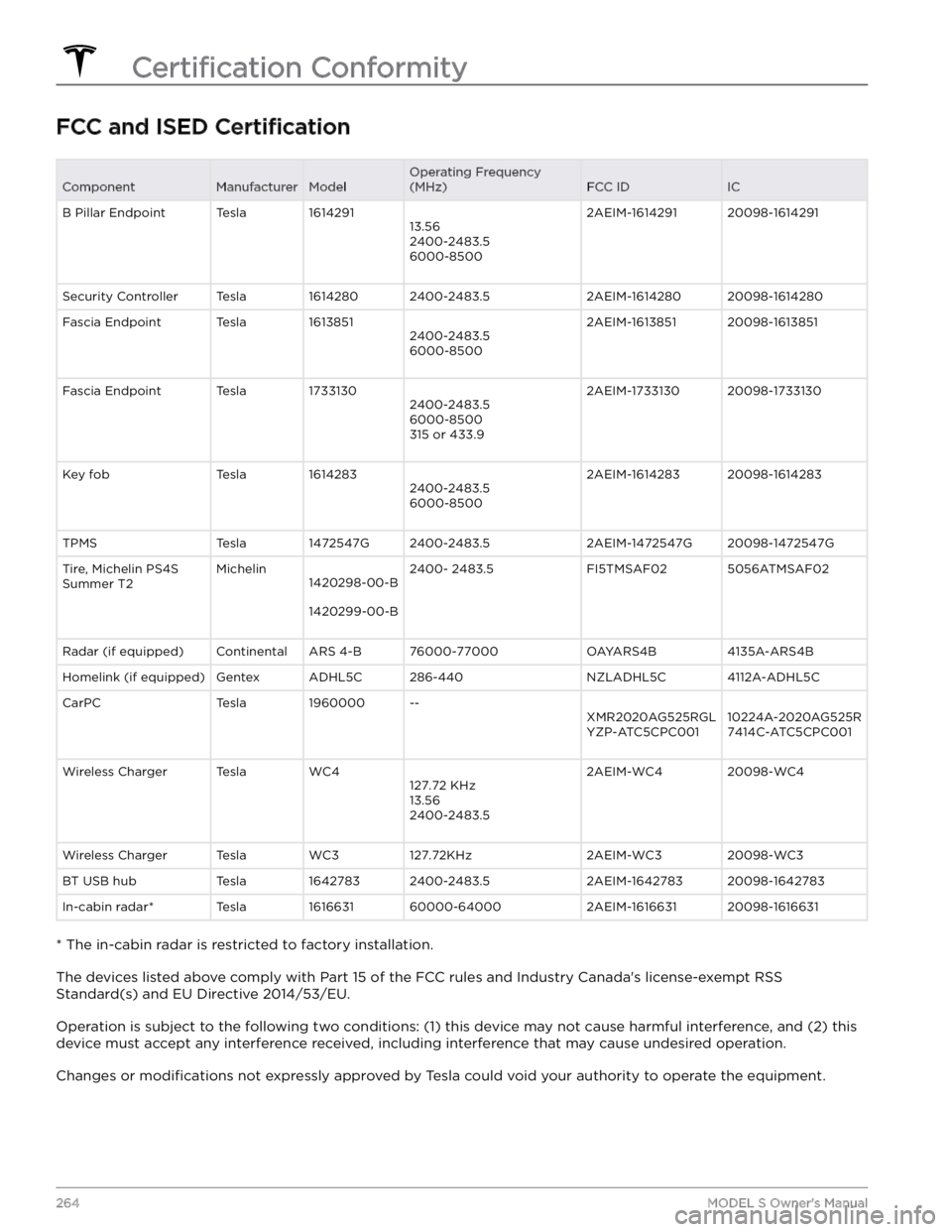
FCC and ISED CertificationComponentManufacturerModelOperating Frequency
(MHz)FCC IDICB Pillar EndpointTesla161429113.56
2400-2483.5
6000-85002AEIM-161429120098-1614291Security ControllerTesla16142802400-2483.52AEIM-161428020098-1614280Fascia EndpointTesla16138512400-2483.5
6000-85002AEIM-161385120098-1613851Fascia EndpointTesla17331302400-2483.5
6000-8500
315 or 433.92AEIM-173313020098-1733130Key fobTesla16142832400-2483.5
6000-85002AEIM-161428320098-1614283TPMSTesla1472547G2400-2483.52AEIM-1472547G20098-1472547GTire, Michelin PS4S
Summer T2Michelin1420298-00-B
1420299-00-B
2400- 2483.5FI5TMSAF025056ATMSAF02Radar (if equipped)ContinentalARS 4-B76000-77000OAYARS4B4135A-ARS4BHomelink (if equipped)GentexADHL5C286-440NZLADHL5C4112A-ADHL5CCarPCTesla1960000--XMR2020AG525RGL
YZP-ATC5CPC00110224A-2020AG525R
7414C-ATC5CPC001Wireless ChargerTeslaWC4127.72 KHz
13.56
2400-2483.52AEIM-WC420098-WC4Wireless ChargerTeslaWC3127.72KHz2AEIM-WC320098-WC3BT USB hubTesla16427832400-2483.52AEIM-164278320098-1642783In-cabin radar*Tesla161663160000-640002AEIM-161663120098-1616631
* The in-cabin radar is restricted to factory installation.
The devices listed above comply with Part 15 of the FCC rules and Industry Canada
Page 269 of 276

A
ABS (Anti-lock Braking System): 66
absolute speed limit: 117
accessories, plugging into power socket: 27
Active Road Noise Reduction: 27
adaptive headlights: 59
adjacent lane speed: 88
adjustment (lumbar): 29
aero covers: 175
air circulation: 119
air conditioning: 119
air distribution: 119
air filter: 124
air vents: 122
airbags: 41
alarm: 133, 136
all-season tires: 177
Always Show Estimated Round Trip Energy: 151
anti-lock braking (ABS): 66
apps: 6
Arcade: 156
audio: 153, 156
playing files: 153, 156
settings: 153
volume control: 153
auto fold: 52
Auto Lane Change: 90
auto tilt: 52
AUTO wipers: 65
automatic emergency braking: 115
automatic navigation: 147
navigating: 147
Autopark: 103
autopilot: 111
side collision warning: 111
Autopilot: 81, 84, 88, 90, 103, 105, 114, 117
Auto Lane Change: 90
automatic emergency braking: 114
Autopark: 103
Autosteer: 88
collision avoidance assist: 114
forward collision warning: 114
overtake acceleration: 84
overview: 81
speed assist: 117
speed limit warning: 117
staying within speed limits: 117
Summon: 105
Traffic-Aware Cruise Control: 84
Autopilot components: 81
Autosteer: 88
average range: 170
B
backup camera: 77
Battery (high voltage): 161, 194
care of: 161
specifications: 194
temperature limits: 161
battery (key), replacing: 14
battery (low voltage): 161, 194
complete discharge: 161
specifications: 194
Blind Spot Camera: 111
Blind Spot Collision Warning: 111
Blind Spot Collision Warning Chime: 111
Bluetooth: 126, 154
devices, playing audio files from: 154
general information: 126
phone, pairing and using: 126
body repairs: 185
body touch up: 180
Boombox: 156, 157
brakes: 66, 115, 192
automatic in emergencies: 115
overview of: 66
specifications: 192
Bumper Clearance (Summon): 105
C
cabin air filter: 124
cabin camera: 118
cabin temperature control: 119
Calendar: 126, 128
California Proposition 65: 262
camera, rear-facing: 77
cameras (autopilot): 81
Camp: 123
car cover: 180
car wash mode: 178
car washes: 179
Caraoke): 154
card: 12
cargo area: 21
cargo volume information: 192
carpets, cleaning: 180
CCS (Combo): 160
CE certifications: 264
CHAdeMO: 160
Index
Page 270 of 276

chains: 177
change of ownership: 11
charge port: 163
charge port light: 164
charge port manual release: 167
charge port release cable: 167
charging: 159, 160, 163
components and equipment: 159
instructions: 163
public charging stations: 160
charging locations, finding: 150
charging stations, displaying on map: 147
child protection: 19
disabling rear window switches: 19
child safety seats, installing and using: 35
cleaning: 178
climate controls: 119
coat hangers, rear: 27
cold weather best practices: 79
collision avoidance assist: 114
Colorizer: 156
connecting to Wi-Fi: 142
console, low voltage power socket: 27
console, rear: 25
consumption chart: 170
contact information: 202, 264
roadside assistance: 202
Tesla: 264
copyrights: 259
covers, seat: 31
cruise control: 84
D
dashboard overview: 4
Dashcam: 135
data recording: 261
data sharing: 261
declarations of conformity: 264
delivery mileage: 262
devices: 154
Bluetooth, playing audio files: 154
dimensions (vehicle exterior): 190
dimensions (vehicle interior): 190
dimensions (vehicle): 190
display settings: 6
Dog: 123
door handles: 17
door labels: 188
door seals: 180
cleaning: 180
doors: 17, 18
Child Lock: 18
interior locking and unlocking: 18
locking: 17
opening from interior: 17
Unlock on Park: 18
unlocking: 17
doors function: 18
Walk-Away Door Lock: 18
Drag Strip Mode: 73
Drive: 56
drive away locking: 18
drive modes: 55
driver: 47
profiles: 47
driving: 53, 169
starting: 53
tips to maximize range: 169
E
easy entry, driver profile: 47
EDR (event data recorder): 261
electric parking brake: 68
emergency braking: 114
Emergency Lane Departure Avoidance: 111
emergency lights: 60
emission control label: 187
energy: 61, 67
gained from regenerative braking: 67
range information: 61
Energy app: 170
energy use predictions (navigating): 151
Entertainment: 156
Erase & Reset: 11
event data recording: 261
exterior: 3, 178, 180
car cover: 180
cleaning: 178
overview: 3
polishing, touch up, & repair: 180
F
factory defaults, restoring: 11
factory reset: 11
fan speed, interior: 119
favorites (Media Player): 154
Favorites (navigation): 147
FCC certifications: 264
feature availability: 260
features, downloading new: 143
Index
Page 271 of 276

firmware (software) updates: 143
flash drive: 135, 136
flashers, hazard warning: 60
floor mats: 181
fluids: 172
replacement intervals: 172
folding and raising rear seats: 30
forward collision warning: 114
front passenger detection: 43
front trunk: 22
front, rear seats: 29
G
G-meter: 74
gaming controllers: 156
garage doors, opening: 139
gates, opening: 139
GAWR: 188
Glovebox PIN: 133
glovebox, open: 25
Gross Axle Weight Rating: 188
Gross Vehicle Weight Rating: 188
ground clearance (vehicle): 190
GVWR: 188
H
Handling Balance (Track Mode): 74
hazard lights: 60
hazards: 60
head restraints: 30
head supports: 30
headlights, adaptive: 59
headlights, after exit: 59
headlights, Auto High Beam: 58
headlights, high beam: 58
headlights, high beams: 58
heating: 119
height adjustments (suspension): 184
disabling (Jack mode): 184
height adjustments, air suspension: 129
high voltage: 159, 172, 194
Battery specifications: 194
components: 159
safety: 172
Home: 6
button: 6
screen: 6
Home location: 149
HomeLink: 105, 139
programming and using: 139
when using Summon: 105
hood: 22
horn: 50
hub caps: 175
I
I