trunk TESLA MODEL X 2017 (UK) User Guide
[x] Cancel search | Manufacturer: TESLA, Model Year: 2017, Model line: MODEL X, Model: TESLA MODEL X 2017Pages: 202, PDF Size: 4.82 MB
Page 137 of 202

About the Security System
If Model X does not detect a key nearby and a
locked door or trunk is opened, an alarm sounds and headlights and turn signals
flash.To deactivate the alarm, press any button on the key.
To manually enable or disable the alarm system, touch Controls > Settings > Safety &
Security > Alarm. When set to on, Model X activates its alarm one minute after the doors
lock and a recognized key is no longer
detected nearby.
If Model X is equipped with the optional security package, it includes a battery-backed
siren that sounds instead of the horn in
situations where a locked door or trunk is
opened and Model X does not detect a key
nearby. If the Tilt/Intrusion setting is on, the
siren also sounds if Model X detects motion inside the cabin, a window is broken, or if it is
moved or tilted (for example, with a tow truck or jack). To turn the tilt/ intrusion detectionsystems on or
off, touch Controls > Settings >
Safety & Security > Tilt/Intrusion.
Note: If you plan to leave something that
moves, such as a dog, inside your locked
Model X, remember to turn
off the tilt/
intrusion system. Any type of motion detected inside Model X activates the siren.
Note: To turn on Tilt/Intrusion, the Alarm must
be ON.
Security Settings
136Model X Owner
Page 165 of 202

Removing the Maintenance Panel
To check
fluid levels, remove the maintenance
panel:
1. Pull the rear edge of the maintenance panel upward to release the
five clips that
hold the panel in place.
2. Maneuver the maintenance panel toward the windshield to remove.
Caution: The maintenance panel protects
the front trunk from water. When re-
attaching, make sure it is fully seated.
Checking Battery Coolant
If the quantity of
fluid in the cooling system
drops below the recommended level, the
instrument panel displays a warning message.
Stop Model X as soon as safety permits and
contact Tesla.
Fluid Level Check
Tesla checks the Battery coolant level at the
regularly scheduled maintenance intervals.
DO NOT ADD FLUID. Doing so can result in
damage not covered by the warranty.
Topping Up the Battery Coolant
Under no circumstances should you add
coolant. If the instrument panel warns you that
the
fluid level is low, contact Tesla
immediately.
To maximize the performance and life of the
Battery, the cooling system uses a
specifictype of G-48 ethylene-glycol coolant (HOAT).
Contact Tesla for more specific information
about the coolant.
Checking Brake FluidWarning: Contact Tesla immediately if you
notice increased movement of the brake
pedal or a
significant loss of brake fluid.Driving under these conditions can result in extended stopping distances or
complete brake failure.
The Brake indicator on the
instrument panel alerts you if the
quantity of
fluid in the brake
reservoir drops below the
recommended level. If it displays
while driving, stop as soon as safety
permits by gently applying the
brakes. Do not continue driving.
Contact Tesla immediately.
Fluid Level Check
Tesla checks the brake
fluid level at the
regularly scheduled maintenance intervals.
Topping Up the Brake Fluid
Do not top up your brake
fluid. Tesla service
does this when you bring Model X in for
regular servicing. The following instructions
are provided for information purposes and future reference only:
1. Clean the
filler cap before removing to
prevent dirt from entering the reservoir.
2. Unscrew the cap and remove.
3. Top up the reservoir to the MAX mark using brake
fluid meeting DOT3specifications.4. Replace the filler cap.
Warning: Only use new fluid from a sealed
air-tight container. Never use previously
used
fluid or fluid from a previously
opened container
Page 166 of 202
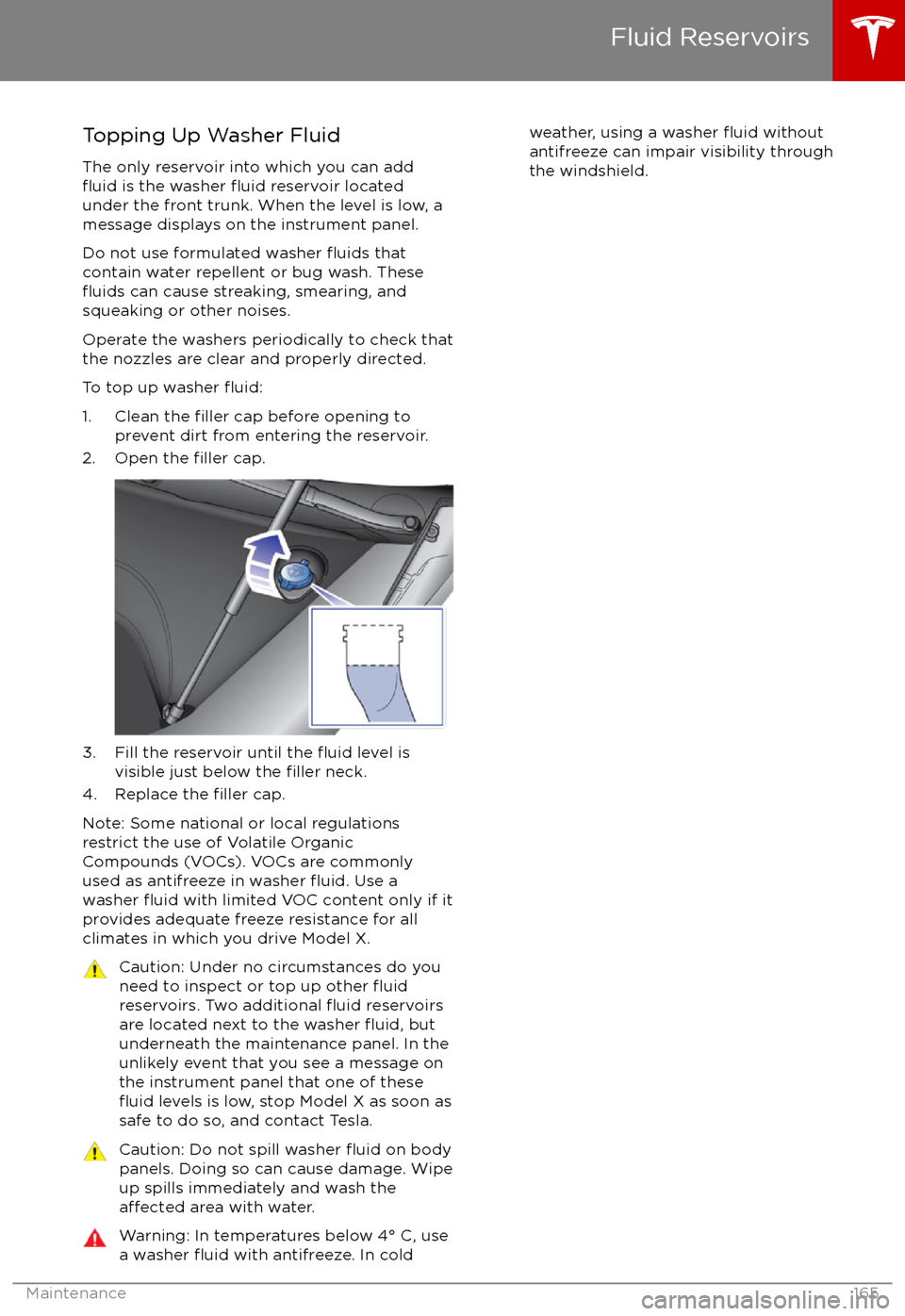
Topping Up Washer Fluid
The only reservoir into which you can add
fluid is the washer fluid reservoir located
under the front trunk. When the level is low, a
message displays on the instrument panel.
Do not use formulated washer
fluids that
contain water repellent or bug wash. These
fluids can cause streaking, smearing, and
squeaking or other noises.
Operate the washers periodically to check that
the nozzles are clear and properly directed.
To top up washer
fluid:
1. Clean the filler cap before opening to
prevent dirt from entering the reservoir.
2. Open the
filler cap.
3. Fill the reservoir until the fluid level is
visible just below the filler neck.
4. Replace the filler cap.
Note: Some national or local regulations
restrict the use of Volatile Organic
Compounds (VOCs). VOCs are commonly
used as antifreeze in washer
fluid. Use a
washer fluid with limited VOC content only if it
provides adequate freeze resistance for all climates in which you drive Model X.
Caution: Under no circumstances do you
need to inspect or top up other fluidreservoirs. Two additional fluid reservoirs
are located next to the washer fluid, but
underneath the maintenance panel. In the
unlikely event that you see a message on the instrument panel that one of these
fluid levels is low, stop Model X as soon as
safe to do so, and contact Tesla.
Caution: Do not spill washer fluid on body
panels. Doing so can cause damage. Wipe
up spills immediately and wash the
affected area with water.
Warning: In temperatures below 4
Page 172 of 202

Driver and four passengersDescriptionTotalVehicle capacity weight954 lbs
(433 kg)Subtract occupant weight (5 x
150 lbs/68 kg)750 lbs
(340 kg)Available cargo weight204 lbs
(93 kg)
The cargo weight should be distributed
between the front and rear trunks.
Vehicle Loading
Specifications171
Page 185 of 202

Connect the Towing Eye1. Locate the towing eye in the front trunk.
2. Remove the tow hook cover by inserting a small
flat screwdriver into the slot located
along the top of the cover, then prying
gently to release the cover from the top
snap.
3. Insert the towing eye.
Fully insert the towing eye into the
opening on the right side, then turn it
counter-clockwise until securely fastened.
4. Attach the winch cable to the towing eye.
Caution: Before pulling, make sure the
towing eye is securely tightened.Pull Onto the Trailer and Secure the
Wheels
Secure wheels using the eight-point tie-downmethod with basket straps or tie-down straps:
Page 196 of 202

delivery mileage 187devicesBluetooth, playing audio files 125
connecting 126
playing audio
files from 125
dimensions 172
display brightness 111
dome (map) lights 53
door labels 169
Door Unlock Mode 9
doors 4
doors, opening 4
Drive gear 47
drive-away locking 9
driverprofiles 40
seat adjustment 18driver assistanceAuto Lane Change 88
Autopark 90
Autosteer 85
blind spot warning 95
collision avoidance assist 97
forward collision warning 97
overtake acceleration 79
overview 77
settings for 111
side collision avoidance 95
side collision warning 95
staying inside lane markings 95
Traffic-Aware Cruise Control 79
drivingseating position 18
starting 46
tips to maximize range 67
E
electric parking brake 60
emergency
flashers 57
energygained from regenerative braking 60
range information 48
energy & charging setting 111
Energy app 67
energy saving mode 67
Erase & Reset 114
event data recording 187
exteriorcar cover 162
cleaning 160
dimensions 172
lights 53
overview 3
polishing, touch up, & repair 162F
factory defaults, restoring 114
factory reset 114
fan speed, interior 116
favorite destinations 132
Favorites 129
Favorites (Media Player) 124
FCC
certifications 189
features, downloading new 140
ferries, avoiding 131
firmware (software) updates 140flash drives, playing audio files from 125flashers, warning 57flat tire repair 156floor mats 162
fluidsreplacement intervals 150
reservoirs, checking 164
fog lights 53
forward collision warning 97
front passenger detection 37
front trunk 14
G
garage doors, opening 137
gates, opening 137
GAWR 170
gears 47
glove box 16
Gross Axle Weight Rating 170
Gross Vehicle Weight Rating 170
ground clearance 172, 173
GVWR 170
H
hazard warning
flashers 57
head restraints 21
headlightsadaptive 56
after exit 56
high beams 56
heated wipers 58
heating 115
height adjustments (suspension)auto-raising 120
automatic and manual settings 121
disabling (Jack mode) 121
high beam headlights 56
high voltageBattery specifications 176
components 142
safety 150
hills, stopping on 64
Home location 132
Index
Index195
Page 199 of 202

temperature (continued)heated steering wheel 44
outside 48
third row seats, folding and raising 20
tie-down straps 184
tilt detection 136
Tire and Loading Information label 170
tire noise 154
Tire Pressure Monitoring SystemFCC certification 189
overview of 154
tire pressures, checking 151
tire pressures, when towing 71
tire repair kitinflating with air only 158inflating with sealant 157
replacing the sealant canister 159tiresall-season 153
balancing 152
chains 154
inspecting and maintaining 152
pressures, how to check 151
replacing 153
replacing a tire sensor 154
rotation 152
specification 177
summer 153
tire markings 178
tire sealant 156
winter 153
toll system transponders, attaching 167
tolls, avoiding 131
torque
specifications 174
touch up body 162
touchscreenclean mode 161
cleaning 161
Controls 107
overview 102
Settings 111
software updates 140
Tow mode 183
towing 183
towing a trailer 71
towing eye, locating 184
towing instructions 183
Towing Label 169
Towing Mode 71
TPMSFCC certification 189
overview of 154
traction control 61
trademarks 185, 186
Traffic-Aware Cruise Control 79Traffic-Based Routing 131
trailer, towing 71
transmission
specifications 174
transponders, attaching 167
transporting 183
trip chart
67
trip meter 66
trip overview 131
trip planner 131
trunk, front 14trunk, rearchild protection lock 9
disabling interior handle 9
TuneIn radio 124
turn signals 57
Typical range 111
U ultrasonic sensors 77
Unlock on Park 4
unlockingtrunk, front 14
trunk, rear 12
unlocking and locking doors 4
unlocking when key doesn