set TESLA MODEL X 2021 Owner´s Manual
[x] Cancel search | Manufacturer: TESLA, Model Year: 2021, Model line: MODEL X, Model: TESLA MODEL X 2021Pages: 212, PDF Size: 5.07 MB
Page 166 of 212
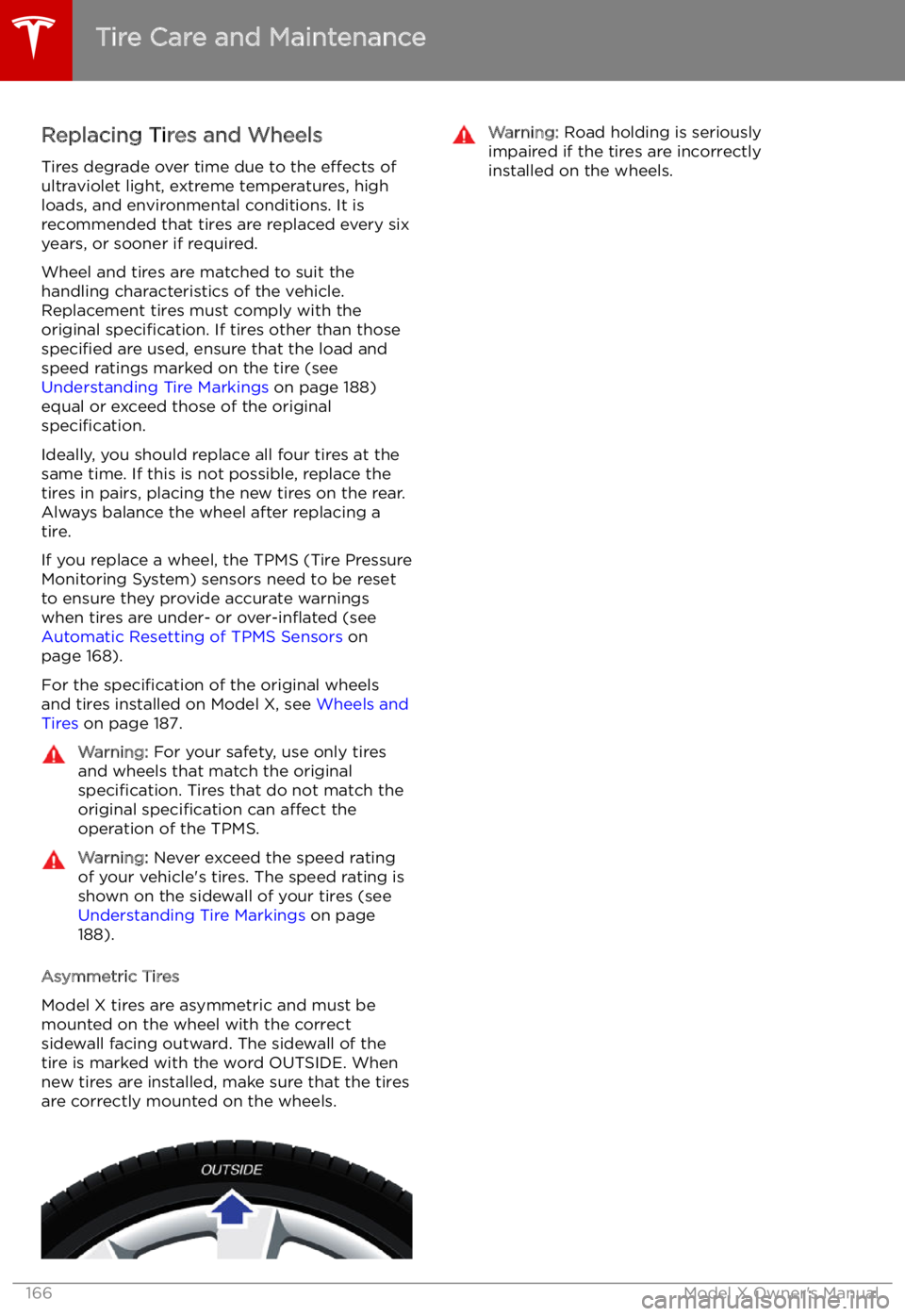
Replacing Tires and Wheels
Tires degrade over time due to the effects of
ultraviolet light, extreme temperatures, high
loads, and environmental conditions. It is
recommended that tires are replaced every six
years, or sooner if required.
Wheel and tires are matched to suit thehandling characteristics of the vehicle.
Replacement tires must comply with the
original specification. If tires other than those
specified are used, ensure that the load and
speed ratings marked on the tire (see Understanding Tire Markings on page 188)
equal or exceed those of the original
specification.
Ideally, you should replace all four tires at the same time. If this is not possible, replace the
tires in pairs, placing the new tires on the rear.
Always balance the wheel after replacing a
tire.
If you replace a wheel, the TPMS (Tire Pressure
Monitoring System) sensors need to be reset to ensure they provide accurate warnings
when tires are under- or over-in
Page 167 of 212
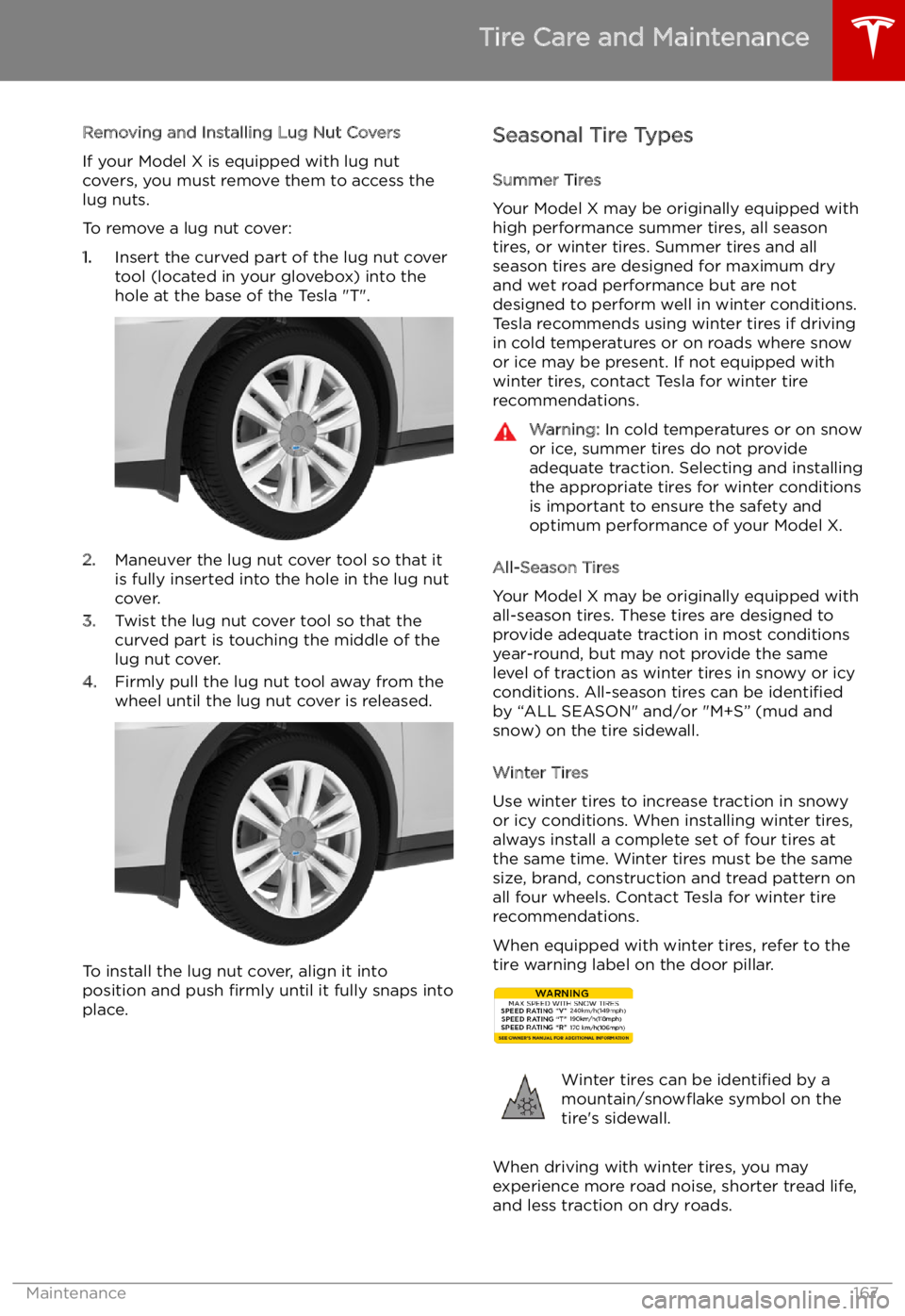
Removing and Installing Lug Nut Covers
If your Model X is equipped with lug nut
covers, you must remove them to access the
lug nuts.
To remove a lug nut cover:
1. Insert the curved part of the lug nut cover
tool (located in your glovebox) into the hole at the base of the Tesla "T".
2. Maneuver the lug nut cover tool so that it
is fully inserted into the hole in the lug nut
cover.
3. Twist the lug nut cover tool so that the
curved part is touching the middle of the
lug nut cover.
4. Firmly pull the lug nut tool away from the
wheel until the lug nut cover is released.
To install the lug nut cover, align it into
position and push firmly until it fully snaps into
place.
Seasonal Tire Types
Summer Tires
Your Model X may be originally equipped with high performance summer tires, all season
tires, or winter tires. Summer tires and all
season tires are designed for maximum dry
and wet road performance but are not
designed to perform well in winter conditions.
Tesla recommends using winter tires if driving
in cold temperatures or on roads where snow
or ice may be present. If not equipped with winter tires, contact Tesla for winter tire
recommendations.Warning: In cold temperatures or on snow
or ice, summer tires do not provide
adequate traction. Selecting and installing the appropriate tires for winter conditions
is important to ensure the safety and
optimum performance of your Model X.
All-Season Tires
Your Model X may be originally equipped with
all-season tires. These tires are designed to
provide adequate traction in most conditions
year-round, but may not provide the same level of traction as winter tires in snowy or icy
conditions. All-season tires can be identified
by “ALL SEASON" and/or "M+S” (mud and
snow) on the tire sidewall.
Winter Tires
Use winter tires to increase traction in snowy
or icy conditions. When installing winter tires,
always install a complete set of four tires at
the same time. Winter tires must be the same
size, brand, construction and tread pattern on all four wheels. Contact Tesla for winter tire
recommendations.
When equipped with winter tires, refer to the
tire warning label on the door pillar.
Winter tires can be identified by a
mountain/snow
Page 169 of 212

Replacing a Tire Sensor
If the Tire Pressure warning indicator displays frequently, contact Tesla to determine if a tire
sensor needs to be replaced. If a non-Tesla Service Center repairs or replaces a tire, the
tire sensor may not work until Tesla performs
the setup procedure.
TPMS Malfunction
Model X has also been equipped with a TPMS
malfunction indicator to indicate when the
system is not operating properly.The TPMS malfunction indicator is
combined with the tire pressure
indicator light. When the system
detects a malfunction, the indicator
Page 173 of 212

Wiper Blades and Washer Jets
Checking and Replacing Wipers To make wiper blades easy to access, turn off
the wipers, shift Model X into Park, then use
the touchscreen to move them to the service
position. Touch Controls > Settings > Service &
Reset > Service Mode > ON .
Note: Wipers automatically return to their
normal position when you shift Model X out of Park.
Periodically check and clean the edge of the wiper blade and check the rubber for cracks,
splits and roughness. If damaged, contact
Tesla Service to have the blades replaced.
Contaminants on the windshield, or on the
wiper blades, can reduce the effectiveness of
the wiper blades. Contaminants include ice,
wax spray from car washes, washer
Page 176 of 212
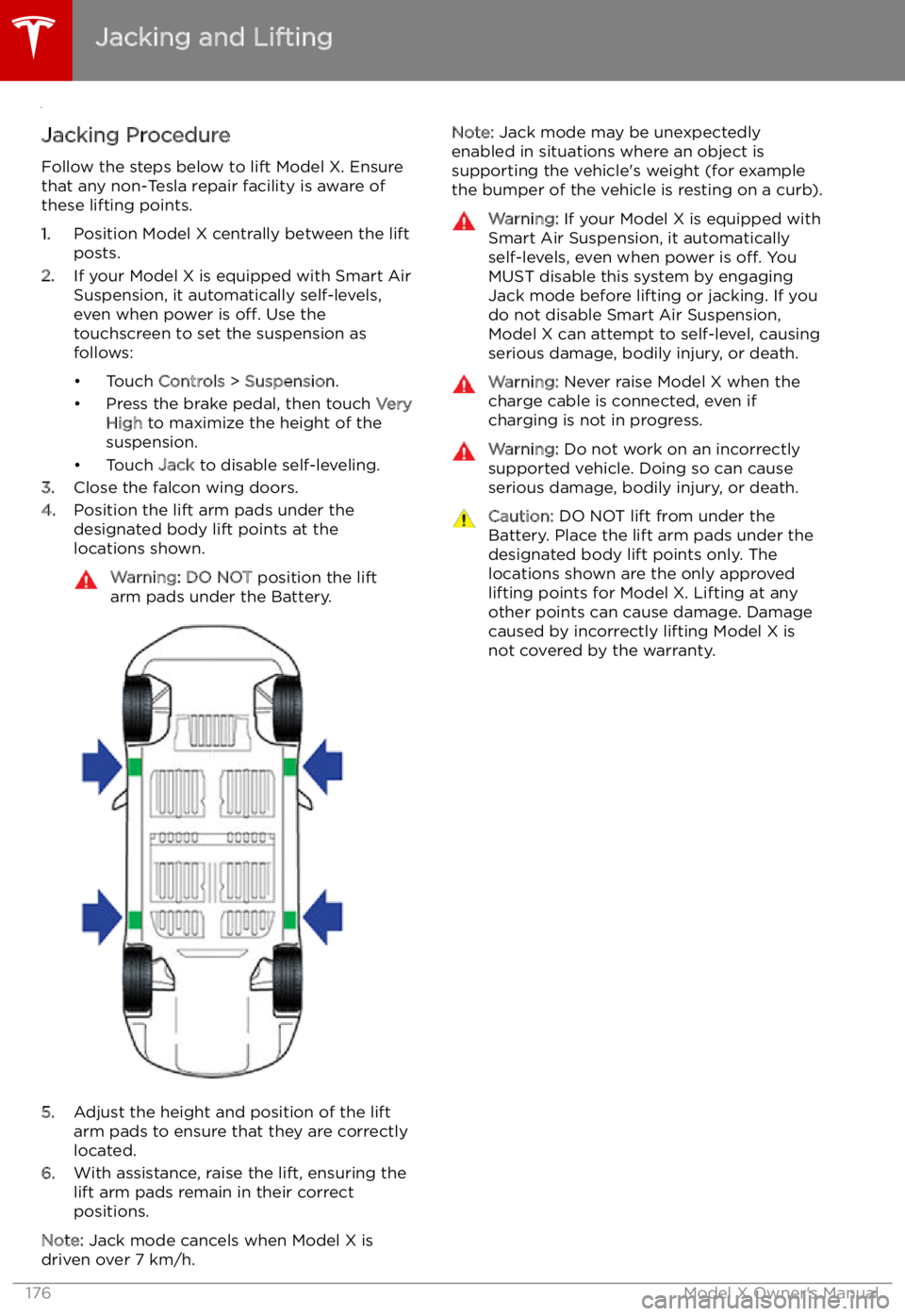
Jacking and Lifting
Jacking Procedure
Follow the steps below to lift Model X. Ensure
that any non-Tesla repair facility is aware of
these lifting points.
1. Position Model X centrally between the lift
posts.
2. If your Model X is equipped with Smart Air
Suspension, it automatically self-levels,
even when power is off. Use the
touchscreen to set the suspension as
follows:
Page 187 of 212
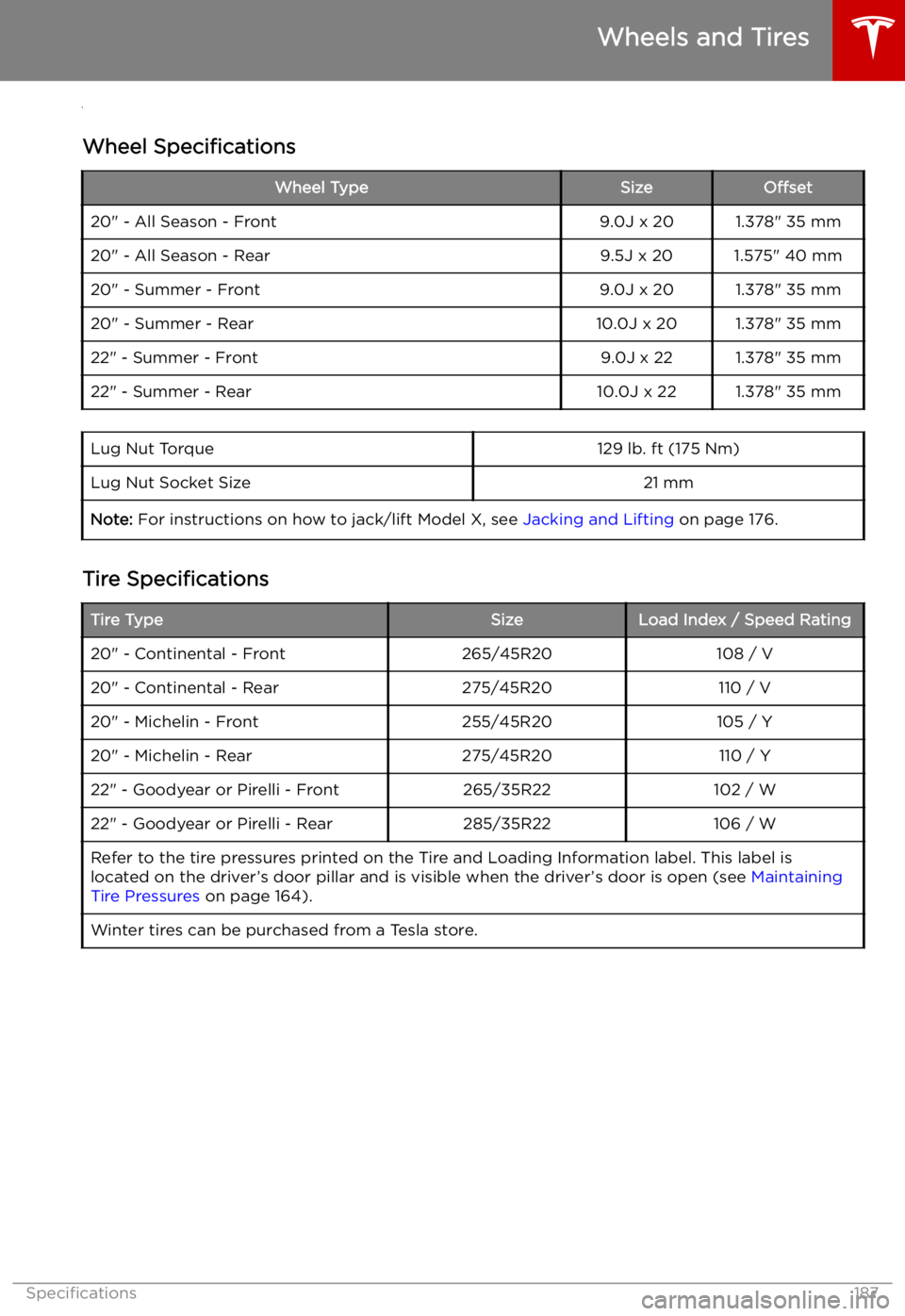
Wheels and Tires
Wheel Specifications
Wheel TypeSizeOffset20" - All Season - Front9.0J x 201.378" 35 mm20" - All Season - Rear9.5J x 201.575" 40 mm20" - Summer - Front9.0J x 201.378" 35 mm20" - Summer - Rear10.0J x 201.378" 35 mm22" - Summer - Front9.0J x 221.378" 35 mm22" - Summer - Rear10.0J x 221.378" 35 mmLug Nut Torque129 lb. ft (175 Nm)Lug Nut Socket Size21 mmNote: For instructions on how to jack/lift Model X, see Jacking and Lifting on page 176.
Tire Specifications
Tire TypeSizeLoad Index / Speed Rating20" - Continental - Front265/45R20108 / V20" - Continental - Rear275/45R20110 / V20" - Michelin - Front255/45R20105 / Y20" - Michelin - Rear275/45R20110 / Y22" - Goodyear or Pirelli - Front265/35R22102 / W22" - Goodyear or Pirelli - Rear285/35R22106 / WRefer to the tire pressures printed on the Tire and Loading Information label. This label is
located on the driver
Page 207 of 212

Index
A ABS (Anti-lock Braking System) 65
absolute speed limit 110
Acceleration 117
Acceleration settings 71
access panel, removing 174
accessoriesplugging into power socket 138
accessory carrier 78
adaptive headlights 62
air circulation 128
air conditioning 126
air distribution 128
air filter 132
air suspension 134
air vents 132
airbag, front passenger, disabling 41
airbags 39
alarm 148
all-season tires 167
always connected, setting 74
anti-lock braking (ABS) 65
audioplaying files 135
steering wheel buttons 46
volume control 135
Auto High Beam 62
Auto Lane Change 98
auto-raising suspension 133
automatic emergency braking 107
Autopark 100
Autopilot components 86
Autosteer 95
average range 74
B
backup camera 76
battery (12V)complete discharge 156
specifications 186Battery (high voltage)care of 156
coolant 174
specifications 186
temperature limits 156
battery (key), replacing 5
bicycle carrier 78
blind spot warning 104
Bluetoothdevices, playing audio files from 138
general information 140
phone, pairing and using 140
body repairs 177
body touch up 172
brake
Page 208 of 212

Creep 117
cruise control 89
cup holders 18
D
DAB radio 136
dashboard overview 2
data recording 199
data sharing 199
day mode 121
declarations of conformity 201
delivery mileage 199devicesBluetooth, playing audio files 138
connecting 138
playing audio files from 138
dimensions 182
display brightness 121
dome (map) lights 59
door labels 179
Door Unlock Mode 10
doors 4
doors, opening 4
Drive gear 52
drive-away locking 10
driverprofiles 44
seat adjustment 20driver assistanceAuto Lane Change 98
automatic emergency braking 106
Autopark 100
Autosteer 95
blind spot warning 104
collision avoidance assist 106
forward collision warning 106
overtake acceleration 89
overview 86
settings for 121
side collision warning 104
speed assist 110
speed limit warning 110
staying inside lane markings 104
staying within speed limits 110
Traffic-Aware Cruise Control 89drivingseating position 20
starting 50
tips to maximize range 74
E
Easter Eggs 197
Easy Entry 23
easy entry, driver profile 44
EDR (event data recorder) 199
electric parking brake
66
emergency braking 106
emergency
Page 210 of 212

mirrors 49
mobile app 153Mobile Connectordescription 155
using 158
modifications 177
motor torque, reduced 108
my car does what? 197
N naming 124
navigation 142
NCC certifications 201
Neutral gear 52
night mode 121
O odometer 73
offset from speed limit 110
overhang dimensions 182
overtake acceleration 89
Owner Information, about 198
P Park Assist 68
Park gear 52
parking brake 66
parking, automatic 100
parts replacement 177
Passive Entry 121
Pedal Misapplication Mitigation 106
personal data, erasing 125
phonesteering wheel buttons 47
using 140
PIN 45
power management 74
power socket 138
power windows 12
powering on and off 50
Preconditioning 121
preferences, setting 121
public charging stations 155
R
radar 86
radio 135
Radio Frequency information 201
rangedisplayed on instrument panel 53
driving tips to maximize 74range (continued)regenerative braking 65
range assurance 74
Range mode 74
Range Mode 117
Rated range 121
re-routing 144
rear seats, accessing 23
rear view camera 76
rear window switches, disabling 12
Recent (Media Player) 137
Recents 142
regenerative braking 65
region format 121
relative speed limit 110
release notes 152
restarting the touchscreen 50
Reverse gear 52
RFID transponders 177
roadside assistance 193
rotating tires 165
route overview 144
S
safety informationairbags 42
child seats 38
seat belts 28seat beltscleaning 171
in a collision 27
overview of 26
pre-tensioners 27
wearing when pregnant 27
seat covers 25
seat heaters 126
seating capacity 180
seatsadjusting 20
heaters 126
seats, second row 21
security settings 148
sensors 86
service data recording 199
service intervals 163
Settings 121
Settings, erasing 125
shifting gears 52
Show Commute Advice 144
side collision warning 104
slip start 67
Smart Preconditioning 121
software reset 125
software updates 152
specificationscargo volume 183
dimensions 182
Index
210Model X Owner
Page 211 of 212
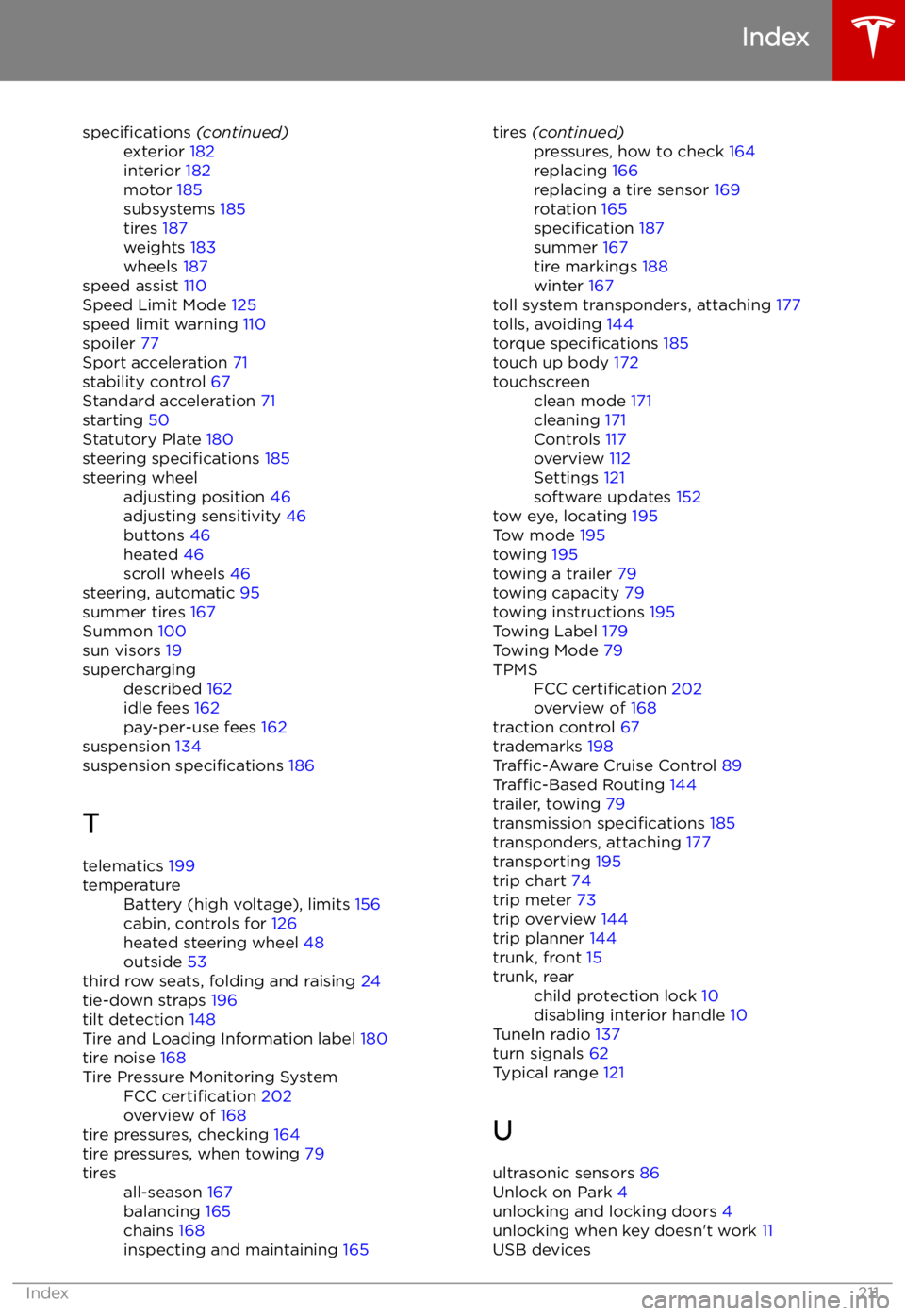
specifications (continued)exterior 182
interior 182
motor 185
subsystems 185
tires 187
weights 183
wheels 187
speed assist 110
Speed Limit Mode 125
speed limit warning 110
spoiler 77
Sport acceleration 71
stability control 67
Standard acceleration 71
starting 50
Statutory Plate 180
steering specifications 185
steering wheeladjusting position 46
adjusting sensitivity 46
buttons 46
heated 46
scroll wheels 46
steering, automatic
95
summer tires 167
Summon 100
sun visors 19
superchargingdescribed 162
idle fees 162
pay-per-use fees 162
suspension 134
suspension specifications 186
T telematics 199
temperatureBattery (high voltage), limits 156
cabin, controls for 126
heated steering wheel 48
outside 53
third row seats, folding and raising 24
tie-down straps 196
tilt detection 148
Tire and Loading Information label 180
tire noise 168
Tire Pressure Monitoring SystemFCC certification 202
overview of 168
tire pressures, checking 164
tire pressures, when towing 79
tiresall-season 167
balancing 165
chains 168
inspecting and maintaining 165tires (continued)pressures, how to check 164
replacing 166
replacing a tire sensor 169
rotation 165
specification 187
summer 167
tire markings 188
winter 167
toll system transponders, attaching 177
tolls, avoiding 144
torque specifications 185
touch up body 172
touchscreenclean mode 171
cleaning 171
Controls 117
overview 112
Settings 121
software updates 152
tow eye, locating 195
Tow mode 195
towing 195
towing a trailer 79
towing capacity 79
towing instructions 195
Towing Label 179
Towing Mode 79
TPMSFCC certification 202
overview of 168
traction control 67
trademarks 198
Traffic-Aware Cruise Control 89
Traffic-Based Routing 144
trailer, towing 79
transmission specifications 185
transponders, attaching 177
transporting 195
trip chart 74
trip meter 73
trip overview 144
trip planner 144
trunk, front 15
trunk, rearchild protection lock 10
disabling interior handle 10
TuneIn radio 137
turn signals 62
Typical range 121
U ultrasonic sensors 86
Unlock on Park 4
unlocking and locking doors 4
unlocking when key doesn