plug TESLA MODEL Y 2023 Owners Manual
[x] Cancel search | Manufacturer: TESLA, Model Year: 2023, Model line: MODEL Y, Model: TESLA MODEL Y 2023Pages: 298, PDF Size: 10.28 MB
Page 28 of 298

NOTE: Power is available whenever the vehicle is
considered "awake". The vehicle may be awake for many
reasons. For example, when using features such as
Summon, or when features such as Preconditioning,
Keep Climate On, Dog Mode, Camp Mode,
Sentry Mode,
etc. are enabled. The vehicle is also awake whenever the
low voltage battery is being charged or is in use, during
HV charging, when the vehicle is communicating with the mobile app, etc. Leaving an accessory plugged in does not deplete the
low voltage battery.
NOTE: Use USB 3.0 compliant cables to connect a
device to a USB port. Using non-compliant cables can result in slower charging, potential connection problems or degraded performance.
NOTE: Do not connect multiple devices using a USB
hub. This can prevent connected devices from charging or from being recognized by Media Player
, Sentry Mode,
Dashcam, etc.
Coat Hangers
Your Model Y has a coat hanger on each side of the
vehicle in the second row next to the reading light. Push the coat hanger to release it. Push it again to retract it.
Interior Storage and Electronics
26MODEL Y Owner
Page 64 of 298
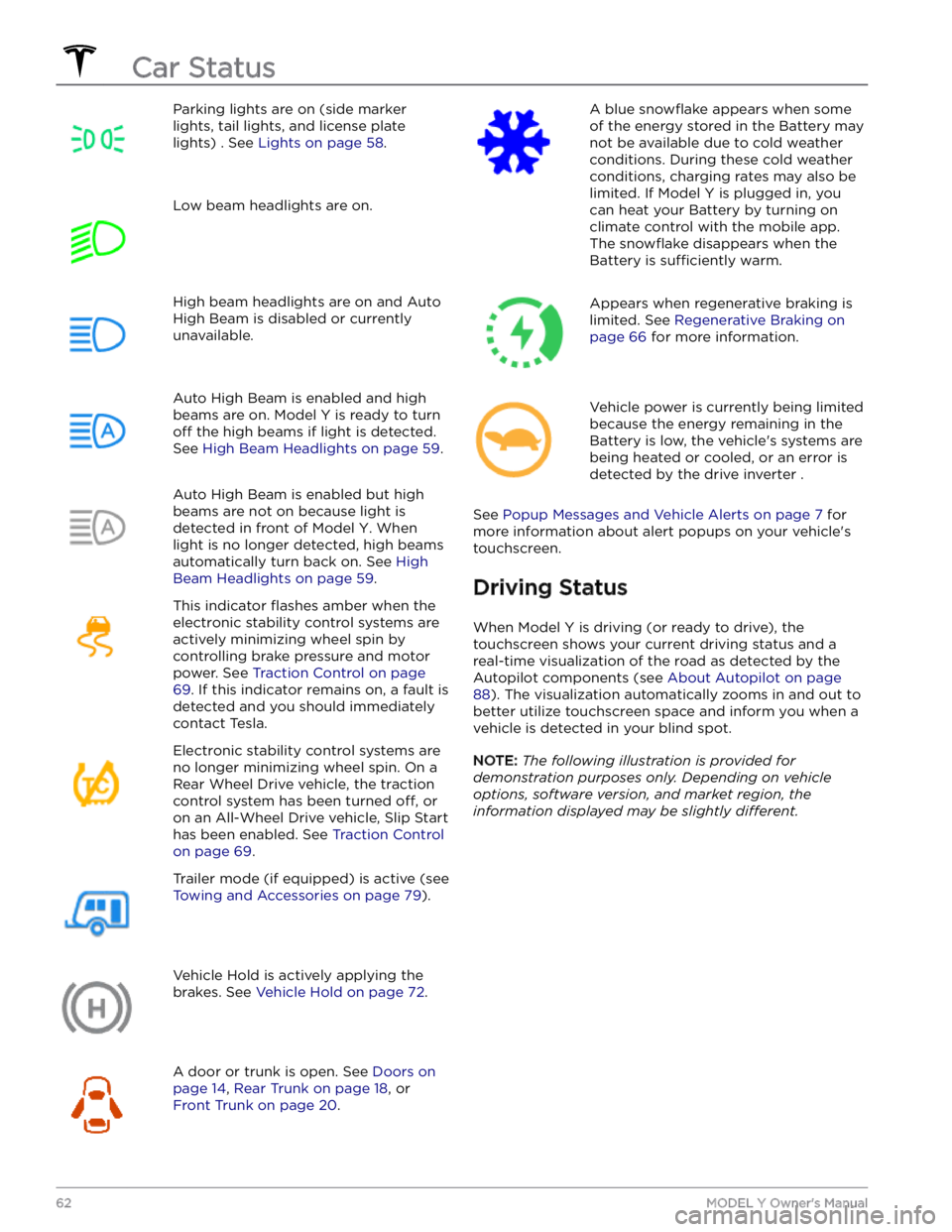
Parking lights are on (side marker
lights, tail lights, and license plate lights) . See
Lights on page 58.
Low beam headlights are on.High beam headlights are on and Auto
High Beam is disabled or currently
unavailable.Auto High Beam is enabled and high
beams are on.
Model Y is ready to turn
off the high beams if light is detected.
See
High Beam Headlights on page 59.
Auto High Beam is enabled but high beams are not on because light is
detected in front of
Model Y. When
light is no longer detected, high beams
automatically turn back on. See
High
Beam Headlights on page 59.
This indicator flashes amber when the
electronic stability control systems are actively minimizing wheel spin by
controlling brake pressure and motor
power. See
Traction Control on page
69. If this indicator remains on, a fault is
detected and you should immediately contact Tesla.
Electronic stability control systems are no longer minimizing wheel spin. On a
Rear Wheel Drive vehicle, the traction
control system has been turned
off, or
on an All-Wheel Drive vehicle, Slip Start has been enabled. See
Traction Control
on page 69.
Trailer mode (if equipped) is active (see
Towing and Accessories on page 79).
Vehicle Hold is actively applying the brakes. See
Vehicle Hold on page 72.
A door or trunk is open. See Doors on
page 14, Rear Trunk on page 18, or
Front Trunk on page 20.
A blue snowflake appears when some
of the energy stored in the Battery may not be available due to cold weather conditions. During these cold weather
conditions, charging rates may also be limited. If
Model Y is plugged in, you
can heat your Battery by turning on climate control with the mobile app. The
snowflake disappears when the
Battery is
sufficiently warm.
Appears when regenerative braking is limited. See
Regenerative Braking on
page 66 for more information.
Vehicle power is currently being limited
because the energy remaining in the
Battery is low, the vehicle
Page 89 of 298

NOTE: Installing winter tires can result in temporarily
reduced regenerative braking power but after a short
period of driving,
Model Y recalibrates to correct this.
Touch
Service > Wheel & Tire Configuration > Tires to
select winter tires and quicken this process.
Blue Snowflake Icon
A blue snowflake icon appears on your
touchscreen when some of the stored energy in
the Battery is unavailable because the Battery is cold. This portion of unavailable energy displays in blue on the Battery meter. Regenerative
braking, acceleration, and charging rates may be limited. The
snowflake icon no longer displays
when the Battery is
sufficiently warm.
After Driving
Leave Model Y plugged in when not in use. This uses the
charging system, rather than the battery itself, to keep the battery warm (see
High Voltage Battery Information
on page 167).
Scheduled Departure
When parked, plug in Model Y and use the Schedule
settings, available on both the charging and climate
control screens, to set a time when you want to precondition
Model Y (see Scheduled Charging and
Scheduled Departure on page 174). Your vehicle
determines the appropriate time to begin charging so it is complete during
off-peak hours and the cabin and
Battery are warm by your set departure time. For more information, see
Scheduled Charging and Scheduled
Departure on page 174.
Storage
If you leave Model Y parked for an extended period of
time, plug the vehicle into a charger to prevent normal range loss and to keep the Battery at an optimal temperature. Your vehicle is safe to stay plugged in for any length of time.
When not in use, Model Y enters a sleep mode to
conserve energy. Reduce the number of times you check
your vehicle
Page 169 of 298

About the High Voltage Battery
Model Y has one of the most sophisticated battery
systems in the world. The most important way to preserve the high voltage Battery is to
LEAVE YOUR
VEHICLE PLUGGED IN when you are not using it. This is
particularly important if you are not planning to drive
Model Y for several weeks.
NOTE: When left idle and unplugged, your vehicle
periodically uses energy from the Battery for system
tests and recharging the
low voltage battery when
necessary.
There is no advantage to waiting until the Battery
Page 173 of 298
NOTE: To prevent unauthorized unplugging of the
charge cable, the charge cable latch remains locked and
Model Y must be unlocked or able to recognize your
authenticated phone before you can disconnect the
charge cable.
To disconnect the charge cable:
1.
Press and hold the button on the connector handle to release the latch.
NOTE: You can also release the latch using the
lightning icon on the car status overview on the
touchscreen or mobile app, or by pressing and holding the rear trunk button on the key fob.
2.
Pull the connector from the charge port. The charge
port door automatically closes.
To disconnect the charge cable when using an adapter at a public charge station:
1.
Unlock Model Y.
2.
While holding the public charging handle in one hand and the adapter in the other hand, press and hold the button on the public charging handle and pull both
outwards, removing the handle and adapter at the same time.
NOTE: If the charging station handle separates from
the adapter, leaving the adapter in
Model Y, use the
touchscreen to unlock the charge port.
3.
Press and hold the button on the charging handle
again to release the adapter from the public charging handle.
NOTE: The charge port door automatically closes within
approximately 10 seconds of removing the connector from the charge port.
CAUTION: Tesla strongly recommends leaving
Model Y plugged in when not in use. This
maintains the Battery at the optimum level of
charge.
CAUTION: Model Y does not shift out of Park if the
charge port is unable to determine whether a
charging cable is plugged in. Ensure the charging
cable is unplugged and follow the instructions on
the touchscreen to proceed (see Park on page 56).
Charge Settings
Access charge settings by touching Controls > Charging
when Model Y is in Park. You can also touch the battery
icon on the touchscreen to access charge settings.
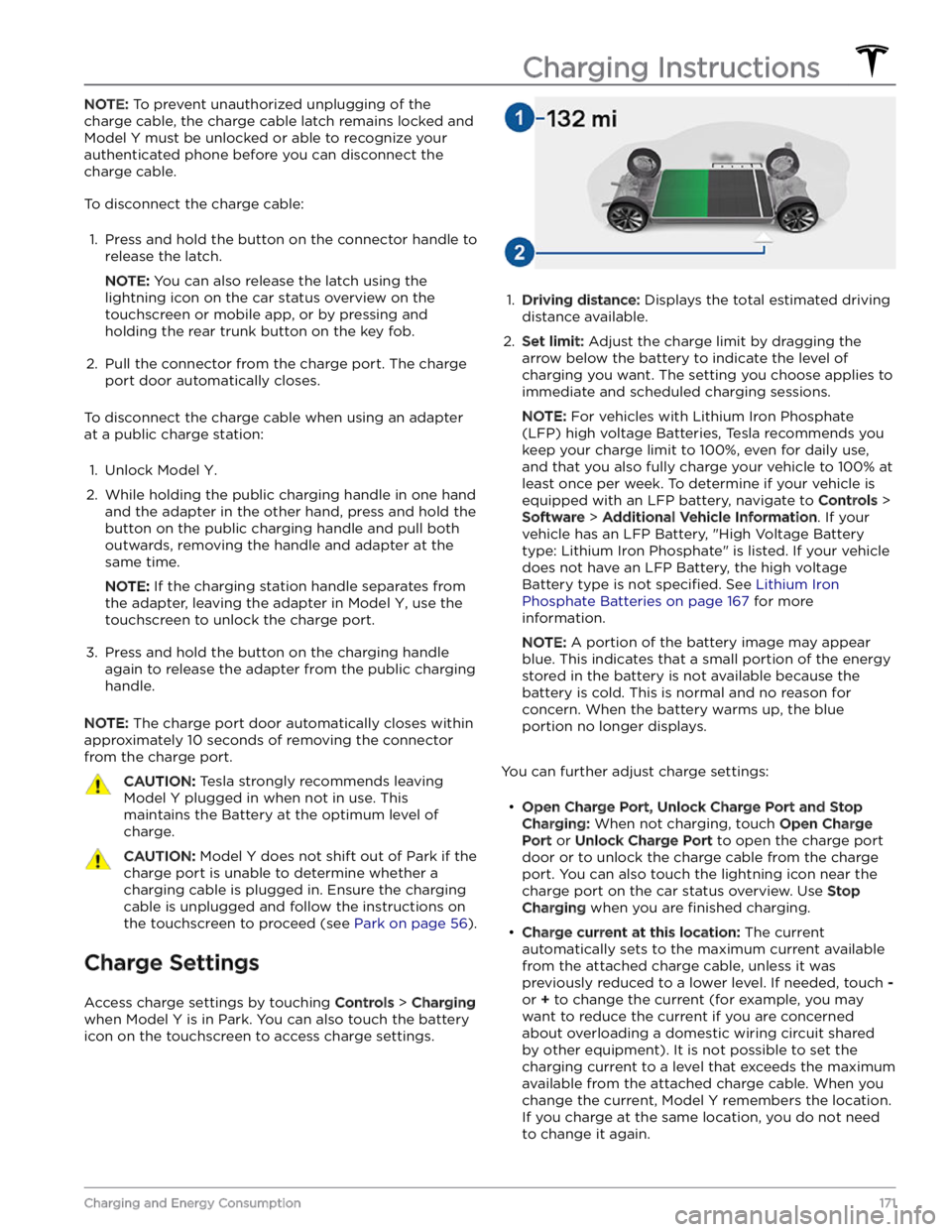
1.
Driving distance: Displays the total estimated driving
distance available.
2.
Set limit: Adjust the charge limit by dragging the
arrow below the battery to indicate the level of charging you want. The setting you choose applies to immediate and scheduled charging sessions.
NOTE: For vehicles with Lithium Iron Phosphate
(LFP) high voltage Batteries, Tesla recommends you keep your charge limit to 100%, even for daily use,
and that you also fully charge your vehicle to 100% at
least once per week. To determine if your vehicle is
equipped with an LFP battery, navigate to
Controls >
Software > Additional Vehicle Information. If your
vehicle has an LFP Battery, "High Voltage Battery type: Lithium Iron Phosphate" is listed. If your vehicle
does not have an LFP Battery, the high voltage Battery type is not
specified. See Lithium Iron
Phosphate Batteries on page 167 for more
information.
NOTE: A portion of the battery image may appear
blue. This indicates that a small portion of the energy
stored in the battery is not available because the battery is cold. This is normal and no reason for concern. When the battery warms up, the blue portion no longer displays.
You can further adjust charge settings:
Page 176 of 298

Toggle between Scheduled Departure and Scheduled Charging by touching
Controls > Charging > Switch to
Scheduled Charging/Scheduled Departure when Model
Y is in Park.
NOTE: Scheduled Charging/Scheduled Departure
settings are also available on the Climate Controls screen and in the Tesla mobile app.
Think of Scheduled Charging as "When do I want
charging to start?" and think of
Scheduled Departure
Off-Peak Charging which is "When do I want charging to
be complete?"
Scheduled Charging can be used together with
Scheduled Departure Preconditioning but not with
Scheduled Departure Off-Peak Charging.
Scheduled Charging/Scheduled Departure settings are
automatically saved for each location.
NOTE: If you plug in Model Y with both Off-Peak
Charging and Scheduled Charging deselected, your
vehicle charges immediately.
Using Scheduled Charging
Use Scheduled Charging to specify a daily time in which
you want
Model Y to start charging.
With Scheduled Charging selected, enable the feature
then set a daily time to start charging.
NOTE: Scheduled Charging starts charging immediately
if
Model Y is plugged in up to six hours after the
scheduled start time. However, if
Model Y is plugged in
after six hours of the scheduled charging time, charging may not start until the scheduled time on the next day.
Using Scheduled Departure
Use Scheduled Departure to set a daily time when you
want
Model Y to be ready to drive. Model Y
automatically calculates when it needs to start preconditioning and/or charging. This ensures that charging is complete and/or the cabin climate and Battery are preconditioned by your departure time.
When Scheduled Departure is displayed, touch
Schedule to set a daily time when you want Model Y to
be ready to drive. Specify a time, then touch
Settings to
enable one or both of the following departure features.
When plugging in with
Off-Peak Charging enabled, the
vehicle
briefly draws power (you may hear clicking) to
calculate the necessary charging start time.
After you
Page 182 of 298

4. Power off the vehicle by navigating to Controls >
Safety > Power Off on the touchscreen.
5.
Disconnect the first responder loop by sliding the red
locking tab toward you and pressing the black tab.
6.
With a 10mm socket, loosen the nut that secures the
negative (-) terminal clamp to the negative (-) post on the lead-acid battery. Release the terminal clamp from the negative (-) post.
7.
With a 10mm socket, release the terminal cover and loosen the nut that secures the positive (+) terminal
clamp to the positive (+) post on the lead-acid
battery. Release the terminal clamp from the positive
(+) post and cover the terminal clamp with a dry rag.
CAUTION: Do not allow the positive (+)
terminal clamp to contact nearby components
like the lead-acid battery hold down bracket or
A/C cooling lines.
8.
Unplug the vent tube hose from the negative (-)
terminal side of the lead-acid battery.
9.
Loosen the nut on the battery hold down on the top of the lead-acid battery with a 10mm socket. To
release the battery hold down, unhook and slide the
strap back. If needed, tilt the battery hold down
backward so it does not slip into the vehicle.
10.
Using the battery handle, carefully remove the lead- acid battery, taking care not to touch or damage the surrounding components.
Maintenance Service Intervals
180MODEL Y Owner
Page 183 of 298

WARNING: When lifting out the lead-acid
battery, stand in front of the vehicle and use
proper lifting technique. The lead-acid battery
weighs approximately 25 lb (12 kg). Failure to
do so may cause serious injury.
11.
Inspect the new lead-acid battery to ensure it has a
red plug in the casing on the positive (+) terminal
side. If the new lead-acid battery does not have a red plug, use a small trim tool to transfer the red plug
from the old battery to the new one.
CAUTION: Dispose of the old lead-acid battery
according to local laws, such as dropping it off
at a battery recycling facility. Keep the lead-
acid battery upright and place it on a towel or
piece of cardboard when transporting it.
Installation:
1. Carefully maneuver the new lead-acid battery into
place, taking care not to touch or damage nearby
components.2.
Install the lead-acid battery hold down and use a 10mm socket to tighten the nut that secures it to the 12V battery. Torque the nut to 6 Nm (4.4 ft-lb).
3.
Reconnect the first responder loop.
4.
Remove the protective caps from the positive (+) and negative (-) posts on the new low voltage lead-acid battery.
5.
Connect the positive (+) terminal by positioning the
clamp over the positive (+) post. Using a 10mm socket, torque the nut to 6 Nm (4.4 ft-lb).
Maintenance Service Intervals
181Maintenance
Page 202 of 298

d. Remove the HEPA filter assembly from the vehicle
by tilting the rear edge of the
filter assembly up
past the brake
fluid reservoir. Lift the filter
assembly out of the vehicle, taking care not to
bump into or damage other components.
4.
Power off the vehicle by navigating to Controls >
Safety > Power Off on the touchscreen.
5.
Disconnect the first responder loop by sliding the red
locking tab toward you and pressing the black tab.
6.
With a 10mm socket, loosen the nut that secures the
negative (-) terminal clamp to the negative (-) post on the lead-acid battery. Release the terminal clamp from the negative (-) post.
7.
With a 10mm socket, release the terminal cover and
loosen the nut that secures the positive (+) terminal
clamp to the positive (+) post on the lead-acid battery. Release the terminal clamp from the positive
(+) post and cover the terminal clamp with a dry rag.
CAUTION: Do not allow the positive (+)
terminal clamp to contact nearby components
like the lead-acid battery hold down bracket or
A/C cooling lines.
8.
Unplug the vent tube hose from the negative (-)
terminal side of the lead-acid battery.
Parts and Accessories
200MODEL Y Owner
Page 203 of 298

9.
Loosen the nut on the battery hold down on the top of the lead-acid battery with a 10mm socket. To
release the battery hold down, unhook and slide the
strap back. If needed, tilt the battery hold down
backward so it does not slip into the vehicle.
10.
Using the battery handle, carefully remove the lead- acid battery, taking care not to touch or damage the surrounding components.
WARNING: When lifting out the lead-acid
battery, stand in front of the vehicle and use
proper lifting technique. The lead-acid battery
weighs approximately 25 lb (12 kg). Failure to
do so may cause serious injury.
11.
Inspect the new lead-acid battery to ensure it has a
red plug in the casing on the positive (+) terminal
side. If the new lead-acid battery does not have a red plug, use a small trim tool to transfer the red plug
from the old battery to the new one.
CAUTION: Dispose of the old lead-acid battery
according to local laws, such as dropping it off
at a battery recycling facility. Keep the lead-
acid battery upright and place it on a towel or
piece of cardboard when transporting it.
Installation:
1.
Carefully maneuver the new lead-acid battery into
place, taking care not to touch or damage nearby
components.
2.
Install the lead-acid battery hold down and use a 10mm socket to tighten the nut that secures it to the 12V battery. Torque the nut to 6 Nm (4.4 ft-lb).
Parts and Accessories
201Maintenance