light TESLA ROADSTER 2008 User Guide
[x] Cancel search | Manufacturer: TESLA, Model Year: 2008, Model line: ROADSTER, Model: TESLA ROADSTER 2008Pages: 115, PDF Size: 46.35 MB
Page 43 of 115
Driving basics
6-5
Driving your vehicle
Hand brake
WARNING: Do not apply the hand
brake when the vehicle is moving. This
could result in a loss of control and may
damage the rear brakes.
S
The hand brake operates on the rear wheels
only, and is totally independent of the foot
operated hydraulic brake system.
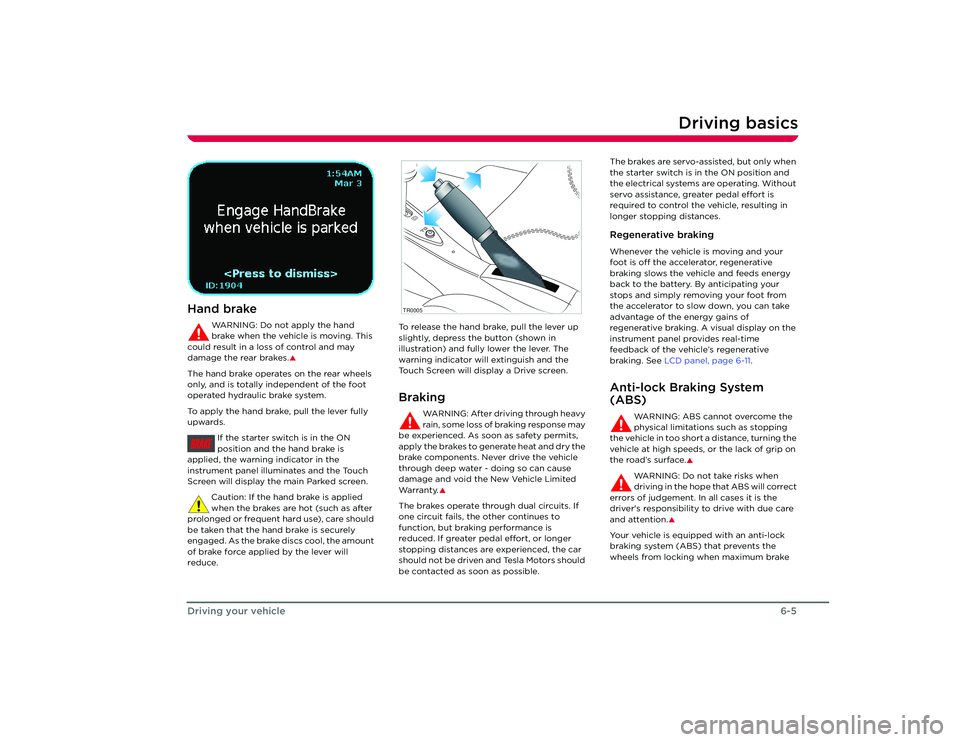
To apply the hand brake, pull the lever fully
upwards.
If the starter switch is in the ON
position and the hand brake is
applied, the warnin g indicator in the
instrument panel illuminates and the Touch
Screen will display the main Parked screen.
Caution: If the hand brake is applied
when the brakes are hot (such as after
prolonged or frequent hard use), care should
be taken that the hand brake is securely
engaged. As the brake discs cool, the amount
of brake force applied by the lever will
reduce. To release the hand brake, pull the lever up
slightly, depress the button (shown in
illustration) and fully lower the lever. The
warning indicator will extinguish and the
Touch Screen will display a Drive screen.
Braking
WARNING: After driving through heavy
rain, some loss of braking response may
be experienced. As soon as safety permits,
apply the brakes to generate heat and dry the
brake components. Never drive the vehicle
through deep water - doing so can cause
damage and void the New Vehicle Limited
Wa r ra n t y.
S
The brakes operate through dual circuits. If
one circuit fails, the other continues to
function, but brakin g performance is
reduced. If greater pedal effort, or longer
stopping distances are experienced, the car
should not be driven and Tesla Motors should
be contacted as soon as possible. The brakes are servo-assisted, but only when
the starter switch is in the ON position and
the electrical systems are operating. Without
servo assistance, greater pedal effort is
required to control the vehicle, resulting in
longer stopping distances.
Regenerative brakingWhenever the vehicle is moving and your
foot is off the accelerator, regenerative
braking slows the vehicle and feeds energy
back to the battery. By anticipating your
stops and simply removing your foot from
the accelerator to slow down, you can take
advantage of the energy gains of
regenerative braking. A visual display on the
instrument panel provides real-time
feedback of the vehicle’s regenerative
braking. See
LCD panel, page 6-11 .Anti-lock Braking System
(ABS)
WARNING: ABS cannot overcome the
physical limitations such as stopping
the vehicle in too short a distance, turning the
vehicle at high speeds, or the lack of grip on
the road’s surface.
S
WARNING: Do not take risks when
driving in the hope that ABS will correct
errors of judgement. In all cases it is the
driver's responsibility to drive with due care
and attention.
S
Your vehicle is equipp ed with an anti-lock
braking system (ABS) that prevents the
wheels from locking when maximum brake
BRAKE
TR0005
Roadster OHB.book Page 5 Th ursday, October 2, 2008 8:59 AM
Page 45 of 115
Switches and controls
6-7
Driving your vehicle
Switches and controlsExterior lightsThe exterior lights are controlled using a
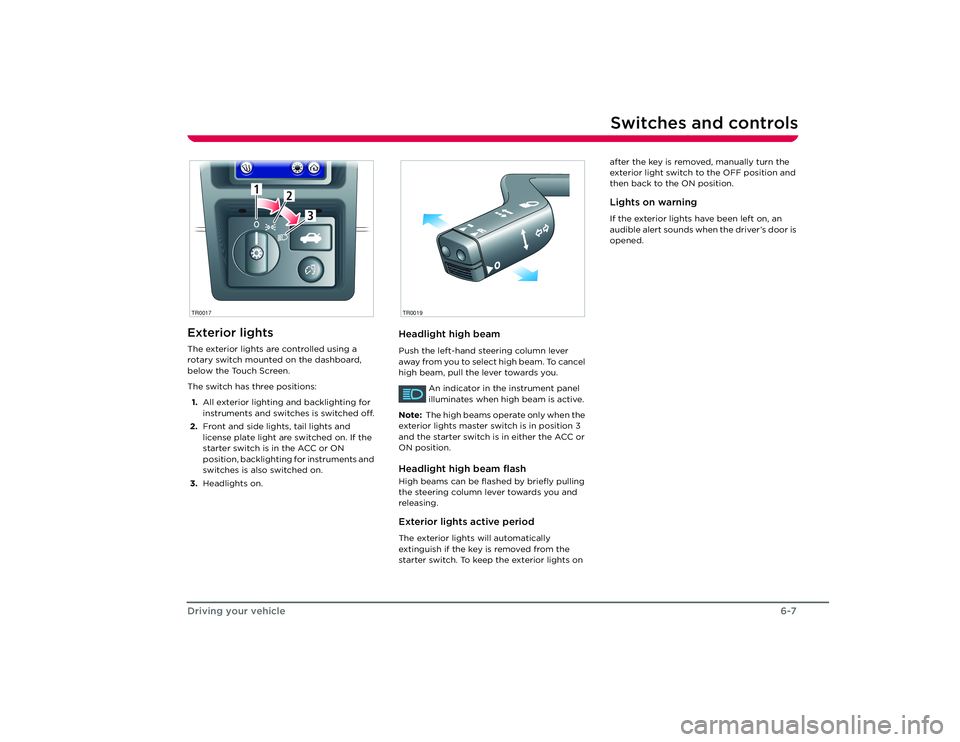
rotary switch mounted on the dashboard,
below the Touch Screen.
The switch has three positions:
1. All exterior lighting and backlighting for
instruments and switches is switched off.
2. Front and side lights, tail lights and
license plate light are switched on. If the
starter switch is in the ACC or ON
position, backlighting for instruments and
switches is also switched on.
3. Headlights on.
Headlight high beamPush the left-hand steering column lever
away from you to select high beam. To cancel
high beam, pull the lever towards you.
An indicator in the instrument panel
illuminates when high beam is active.
Note: The high beams operate only when the
exterior lights master switch is in position 3
and the starter switch is in either the ACC or
ON position.Headlight high beam flashHigh beams can be flas hed by briefly pulling
the steering column lever towards you and
releasing.Exterior lights active periodThe exterior lights will automatically
extinguish if the key is removed from the
starter switch. To keep the exterior lights on after the key is removed, manually turn the
exterior light switch to the OFF position and
then back to the ON position.
Lights on warningIf the exterior lights have been left on, an
audible alert sounds when the driver’s door is
opened.
1
2
3
1
2
3
TR0017
R
O
TR0019
Roadster OHB.book Page 7 Th
ursday, October 2, 2008 8:59 AM
Page 47 of 115
Switches and controls
6-9
Driving your vehicle
Cruise control
WARNING: Only use cruise control
when conditions are favorable, on
straight, dry, open roads with light traffic.
S
The cruise control system allows you to
maintain a selected vehicle speed above
30 mph, without having to use the
accelerator pedal.
When cruise control is active, the
warning indicator in the instrument
panel illuminates.Operating cruise controlOperate cruise control using the following
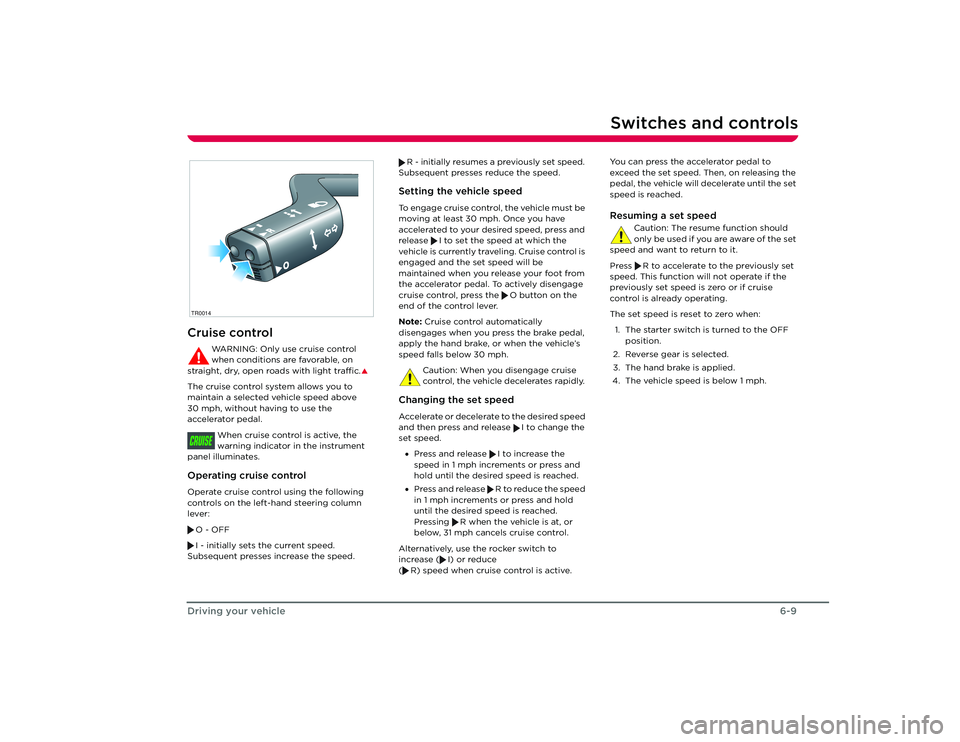
controls on the left-hand steering column
lever:
O - OFF
I - initially sets the current speed.
Subsequent presses increase the speed. R - initially resumes a previously set speed.
Subsequent presses reduce the speed.
Setting the vehicle speedTo engage cruise control, the vehicle must be
moving at least 30 mph. Once you have
accelerated to your desired speed, press and
release I to set the speed at which the
vehicle is currently traveling. Cruise control is
engaged and the set speed will be
maintained when you release your foot from
the accelerator pedal. To actively disengage
cruise control, press the O button on the
end of the control lever.
Note: Cruise control automatically
disengages when you press the brake pedal,
apply the hand brake, or when the vehicle’s
speed falls below 30 mph.
Caution: When you disengage cruise
control, the vehicle decelerates rapidly. Changing the set speedAccelerate or decelerate to the desired speed
and then press and release I to change the
set speed. • Press and release I to increase the
speed in 1 mph increments or press and
hold until the desired speed is reached.
• Press and release R to reduce the speed
in 1 mph increments or press and hold
until the desired speed is reached.
Pressing R when the vehicle is at, or
below, 31 mph cancels cruise control.
Alternatively, use the rocker switch to
increase ( I) or reduce
( R) speed when cruise control is active. You can press the accelerator pedal to
exceed the set speed. Then, on releasing the
pedal, the vehicle will decelerate until the set
speed is reached.
Resuming a set speed
Caution: The resume function should
only be used if you are aware of the set
speed and want to return to it.
Press R to accelerate to the previously set
speed. This function will not operate if the
previously set speed is zero or if cruise
control is already operating.
The set speed is reset to zero when:
1. The starter switch is turned to the OFF position.
2. Reverse gear is selected.
3. The hand brake is applied.
4. The vehicle speed is below 1 mph.
R
O
TR0014CRUISE
Roadster OHB.book Page 9 Th ursday, October 2, 2008 8:59 AM
Page 48 of 115
Switches and controls6-10
Driving your vehicle
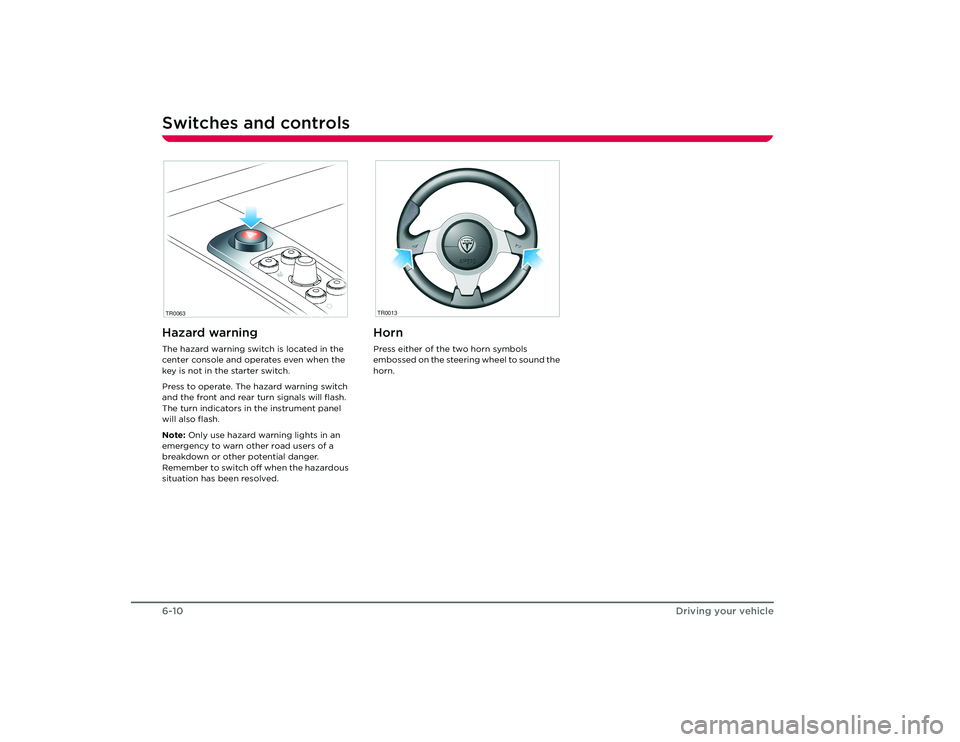
Hazard warningThe hazard warning switch is located in the
center console and operates even when the
key is not in the starter switch.
Press to operate. The hazard warning switch
and the front and rear turn signals will flash.
The turn indicators in the instrument panel
will also flash.
Note: Only use hazard warning lights in an
emergency to warn other road users of a
breakdown or other potential danger.
Remember to switch off when the hazardous
situation has been resolved.
HornPress either of the two horn symbols
embossed on the steering wheel to sound the
horn.
TR0063
TR0013
Roadster OHB.book Page 10 Thursday, October 2, 2008 8:59 AM
Page 50 of 115
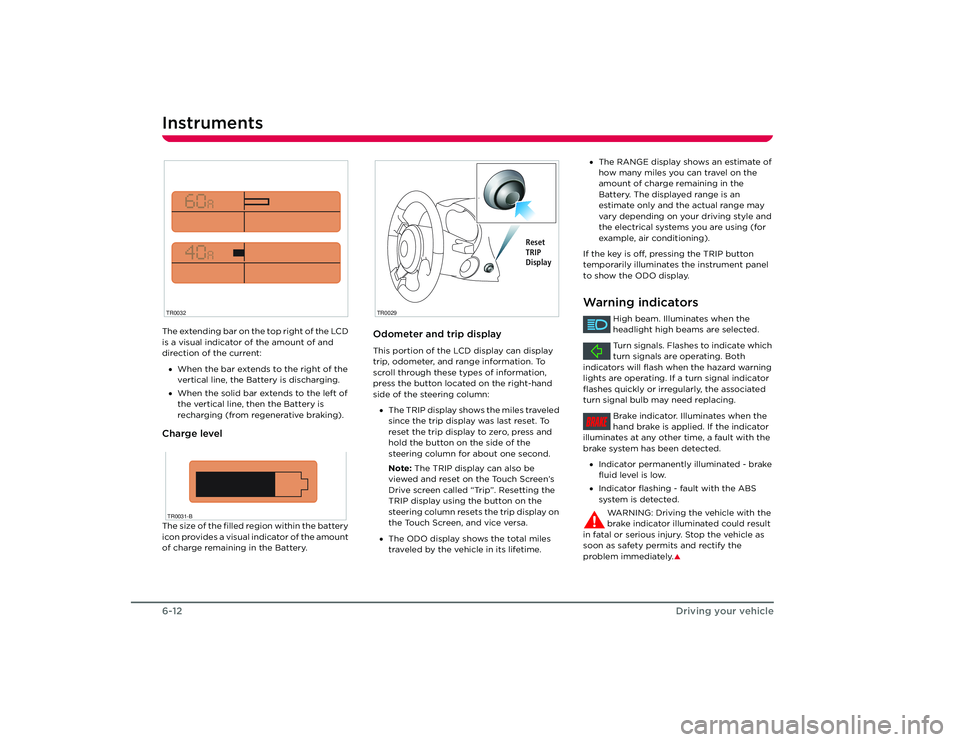
Instruments6-12Driving your vehicleThe extending bar on the top right of the LCD
is a visual indicator of the amount of and
direction of the current:
• When the bar extends to the right of the
vertical line, the Battery is discharging.
• When the solid bar extends to the left of
the vertical line, then the Battery is
recharging (from regenerative braking).Charge levelThe size of the filled region within the battery
icon provides a visual indicator of the amount
of charge remaining in the Battery.
Odometer and trip displayThis portion of the LCD display can display
trip, odometer, and range information. To
scroll through these types of information,
press the button located on the right-hand
side of the steering column:
• The TRIP display shows the miles traveled
since the trip display was last reset. To
reset the trip display to zero, press and
hold the button on the side of the
steering column for about one second.
Note: The TRIP display can also be
viewed and reset on the Touch Screen’s
Drive screen called “Trip”. Resetting the
TRIP display using the button on the
steering column resets the trip display on
the Touch Screen, and vice versa.
• The ODO display shows the total miles
traveled by the vehicle in its lifetime.
TR0032TR0031-B
TR0029
Reset
TRIP
Display
•The RANGE display shows an estimate of
how many miles you can travel on the
amount of charge remaining in the
Battery. The displayed range is an
estimate only and the actual range may
vary depending on your driving style and
the electrical systems you are using (for
example, air conditioning).
If the key is off, pressing the TRIP button
temporarily illuminates the instrument panel
to show the ODO display.Warning indicators
High beam. Illuminates when the
headlight high beams are selected.
Turn signals. Flashes to indicate which
turn signals are operating. Both
indicators will flash when the hazard warning
lights are operating. If a turn signal indicator
flashes quickly or irregularly, the associated
turn signal bulb may need replacing.
Brake indicator. Illuminates when the
hand brake is applied. If the indicator
illuminates at any other time, a fault with the
brake system has been detected.
• Indicator permanently illuminated - brake
fluid level is low.
• Indicator flashing - fault with the ABS
system is detected.
WARNING: Driving the vehicle with the
brake indicator illuminated could result
in fatal or serious injury. Stop the vehicle as
soon as safety permits and rectify the
problem immediately.
S
BRAKE
Roadster OHB.book Page 12 Thursday, October 2, 2008 8:59 AM
Page 51 of 115
Instruments
6-13
Driving your vehicle
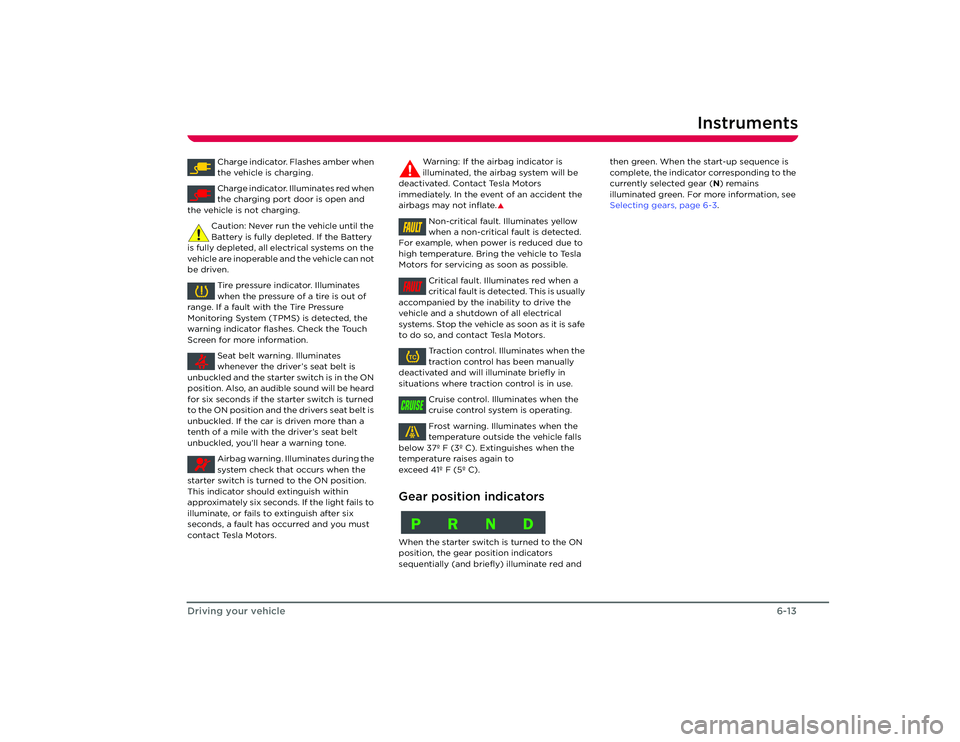
Charge indicator. Flashes amber when
the vehicle is charging.
Charge indicator. Illuminates red when
the charging port door is open and
the vehicle is not charging.
Caution: Never run the vehicle until the
Battery is fully depleted. If the Battery
is fully depleted, all electrical systems on the
vehicle are inoperable and the vehicle can not
be driven.
Tire pressure indicator. Illuminates
when the pressure of a tire is out of
range. If a fault with the Tire Pressure
Monitoring System (TPMS) is detected, the
warning indicator flas hes. Check the Touch
Screen for more information.
Seat belt warning. Illuminates
whenever the driver’s seat belt is
unbuckled and the starter switch is in the ON
position. Also, an audible sound will be heard
for six seconds if the starter switch is turned
to the ON position and the drivers seat belt is
unbuckled. If the car is driven more than a
tenth of a mile with the driver’s seat belt
unbuckled, you’ll hear a warning tone.
Airbag warning. Illu minates during the
system check that occurs when the
starter switch is turned to the ON position.
This indicator should extinguish within
approximately six seconds. If the light fails to
illuminate, or fails to extinguish after six
seconds, a fault has occurred and you must
contact Tesla Motors. Warning: If the airbag indicator is
illuminated, the airbag system will be
deactivated. Contact Tesla Motors
immediately. In the event of an accident the
airbags may not inflate.
S
Non-critical fault. Illuminates yellow
when a non-critical fault is detected.
For example, when power is reduced due to
high temperature. Bring the vehicle to Tesla
Motors for servicing as soon as possible.
Critical fault. Illuminates red when a
critical fault is detected. This is usually
accompanied by the inability to drive the
vehicle and a shutdown of all electrical
systems. Stop the vehicle as soon as it is safe
to do so, and contact Tesla Motors.
Traction control. Illuminates when the
traction control has been manually
deactivated and will il luminate briefly in
situations where traction control is in use.
Cruise control. Illuminates when the
cruise control system is operating.
Frost warning. Illuminates when the
temperature outside the vehicle falls
below 37º F (3º C). Extinguishes when the
temperature raises again to
exceed 41º F (5º C).
Gear position indicatorsWhen the starter switch is turned to the ON
position, the gear po sition indicators
sequentially (and briefly) illuminate red and then green. When the start-up sequence is
complete, the indicator corresponding to the
currently selected gear (
N) remains
illuminated green. For more information, see
Selecting gears, page 6-3 .FAULTFAULTTCCRUISEPRND
Roadster OHB.book Page 13 Thursday, October 2, 2008 8:59 AM
Page 52 of 115
Instruments6-14
Driving your vehicle
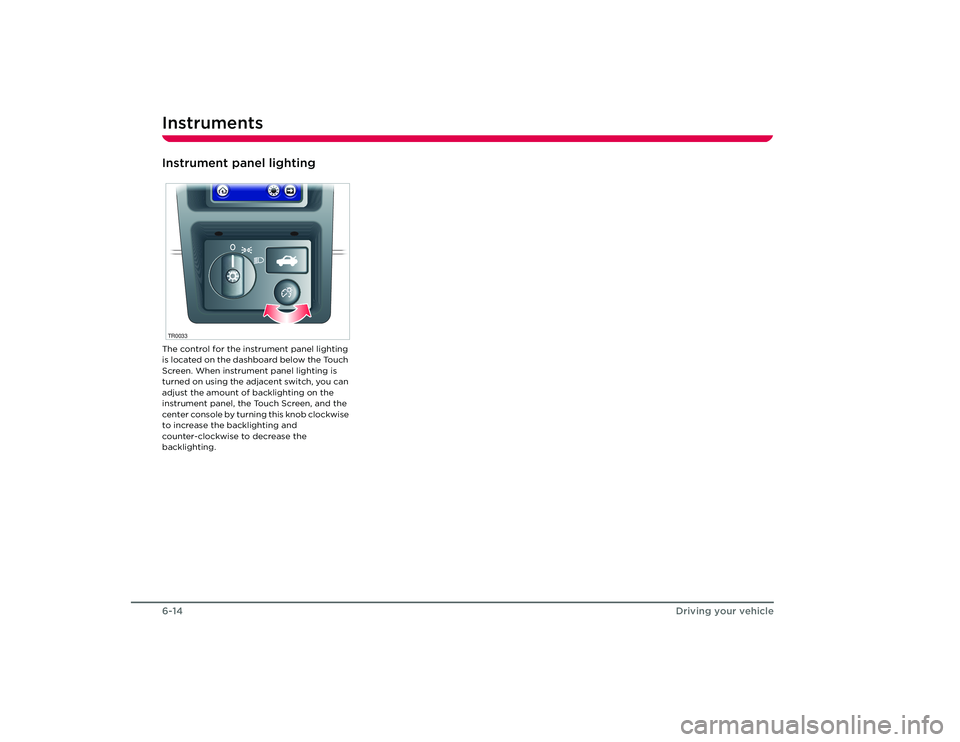
Instrument panel lightingThe control for the instrument panel lighting
is located on the dashboard below the Touch
Screen. When instrument panel lighting is
turned on using the adjacent switch, you can
adjust the amount of backlighting on the
instrument panel, the Touch Screen, and the
center console by turning this knob clockwise
to increase the backlighting and
counter-clockwise to decrease the
backlighting.TR0033Roadster OHB.book Page 14 Thursday, October 2, 2008 8:59 AM
Page 53 of 115
7-1
Comfort and convenience
Power windowsDriver’s door window controls 7-2
Operating the windows 7-2
Rear view mirrors Exterior rear view mirrors 7-3
Interior rear view mirror 7-3
Interior temperature control General information 7-4
Control panel 7-4
Operating the system 7-4
Ventilation 7-5
Windshield defrosting 7-5
Seat heaters 7-6
Interior accessories Interior light 7-7
Sun visors 7-7
Accessory power socket 7-7
USB Port 7-7
Cup holder 7-8
Removable roof Hard-top and soft-top 7-9
Installing the soft-top 7-10
Removing the soft-top 7-11
Installing the hard-top 7-13
Removing the hard-top 7-14
HomeLink® HomeLink® Universal Transceiver 7-15 7-16
Roadster OHB.book Page 1 Thursday, October 2, 2008 8:59 AM
Page 55 of 115
Rear view mirrors
7-3
Comfort and convenience
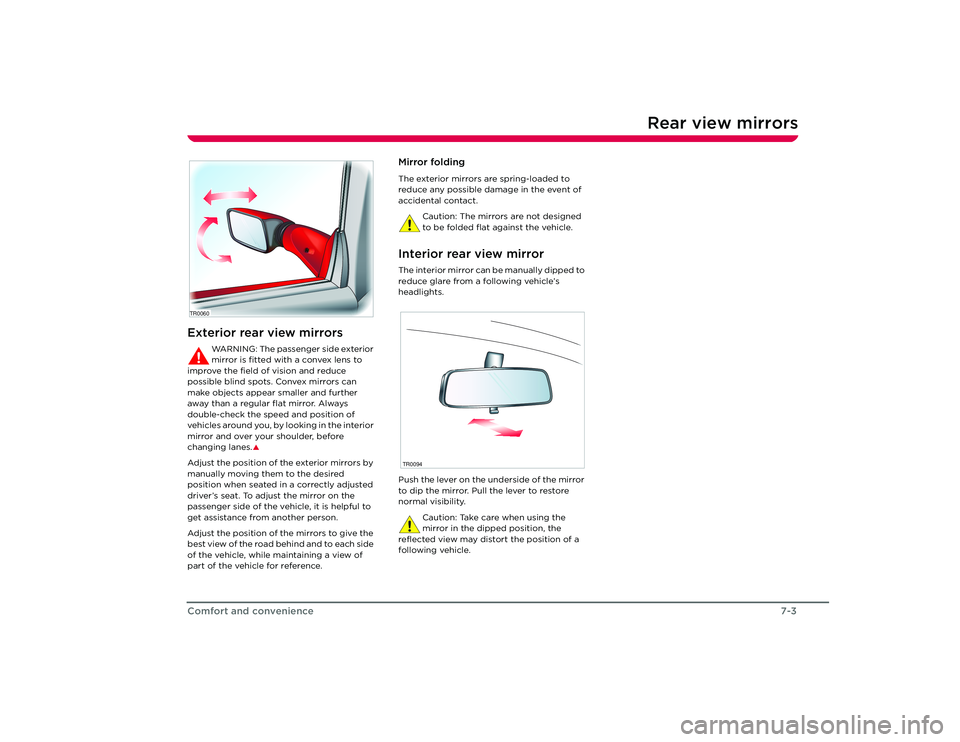
Rear view mirrorsExterior rear view mirrors
WARNING: The passenger side exterior
mirror is fitted with a convex lens to
improve the field of vision and reduce
possible blind spots. Convex mirrors can
make objects appear smaller and further
away than a regular flat mirror. Always
double-check the speed and position of
v e h i c l e s a r o u n d y o u , b y l o o k i n g i n t h e i n t e r i o r
mirror and over your shoulder, before
changing lanes.
S
Adjust the position of the exterior mirrors by
manually moving them to the desired
position when seated in a correctly adjusted
driver’s seat. To adjust the mirror on the
passenger side of the vehicle, it is helpful to
get assistance from another person.
Adjust the position of the mirrors to give the
best view of the road behind and to each side
of the vehicle, while maintaining a view of
part of the vehicle for reference.
Mirror foldingThe exterior mirrors are spring-loaded to
reduce any possible damage in the event of
accidental contact.
Caution: The mirrors are not designed
to be folded flat against the vehicle.Interior rear view mirrorThe interior mirror can be manually dipped to
reduce glare from a following vehicle’s
headlights.
Push the lever on the underside of the mirror
to dip the mirror. Pull the lever to restore
normal visibility.Caution: Take care when using the
mirror in the dipped position, the
reflected view may distort the position of a
following vehicle.
TR0060
TR0094
Roadster OHB.book Page 3 Th ursday, October 2, 2008 8:59 AM
Page 59 of 115
Interior accessories
7-7
Comfort and convenience
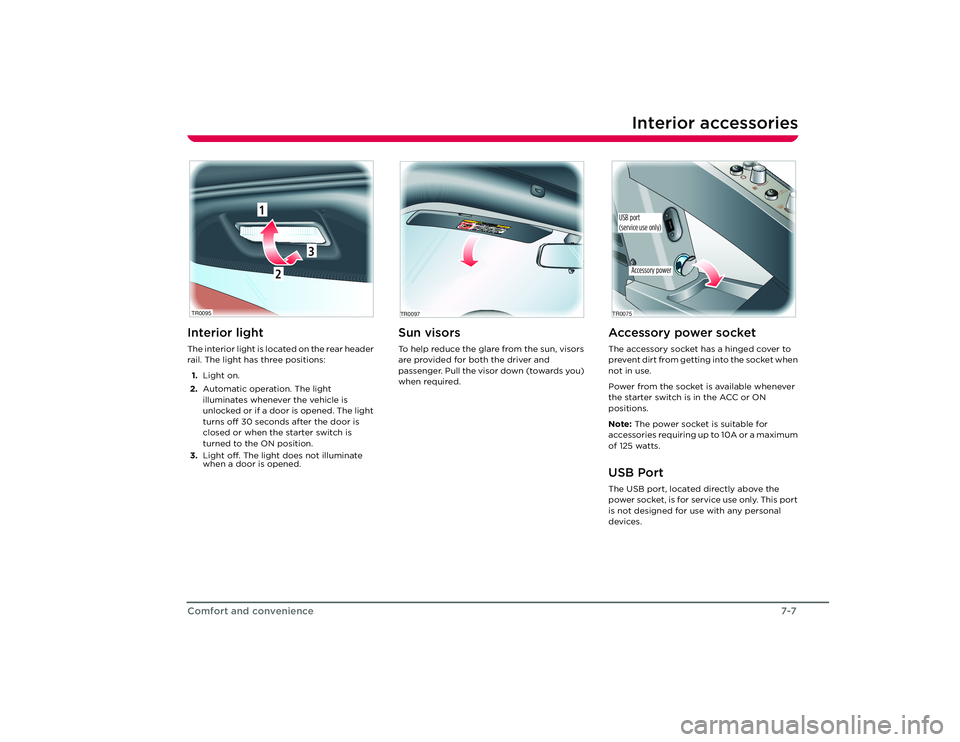
Interior accessoriesInterior lightThe interior light is located on the rear header
rail. The light has three positions:
1. Light on.
2. Automatic operation. The light
illuminates whenever the vehicle is
unlocked or if a door is opened. The light
turns off 30 seconds after the door is
closed or when the starter switch is
turned to the ON position.
3. Light off. The light does not illuminate
when a door is opened.
Sun visorsTo help reduce the glare from the sun, visors
are provided for both the driver and
passenger. Pull the visor down (towards you)
when required.
TR0095
2
1
3
TR0097
Accessory power socketThe accessory socket has a hinged cover to
prevent dirt from getting into the socket when
not in use.
Power from the socket is available whenever
the starter switch is in the ACC or ON
positions.
Note: The power socket is suitable for
accessories requiring up to 10A or a maximum
of 125 watts.USB PortThe USB port, located directly above the
power socket, is for service use only. This port
is not designed for use with any personal
devices.
Accessory power
TR0075USB port
(service use only)
Roadster OHB.book Page 7 Th ursday, October 2, 2008 8:59 AM