lock TOYOTA 4RUNNER 1998 Repair Manual
[x] Cancel search | Manufacturer: TOYOTA, Model Year: 1998, Model line: 4RUNNER, Model: TOYOTA 4RUNNER 1998Pages: 350, PDF Size: 2.25 MB
Page 157 of 350
4RUNNER (1998)
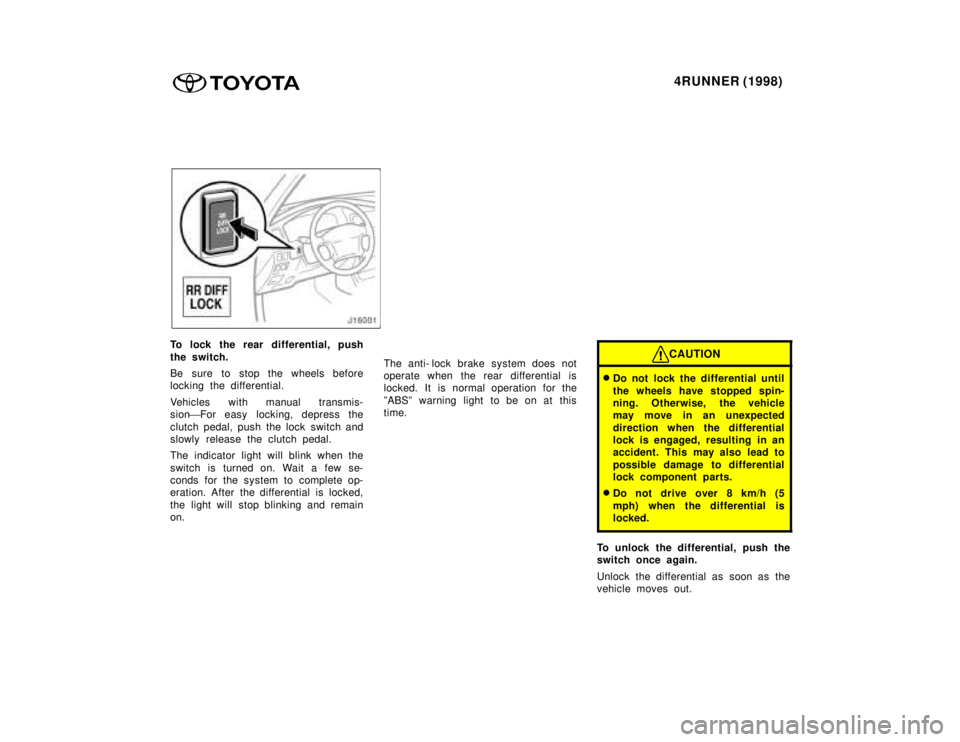
To lock the rear differential, push
the switch.
Be sure to stop the wheels before
locking the differential.
Vehicles with manual transmis-
sion'For easy locking, depress the
clutch pedal, push the lock switch and
slowly release the clutch pedal.
The indicator light will blink when the
switch is turned on. Wait a few se-
conds for the system to complete op-
eration. After the differential is locked,
the light will stop blinking and remain on. The anti- lock brake system does not
operate when the rear differential is
locked. It is normal operation for the
ºABSº warning light to be on at this
time.CAUTION
Do not lock the differential until
the wheels have stopped spin-
ning. Otherwise, the vehicle
may move in an unexpected
direction when the differential
lock is engaged, resulting in an
accident. This may also lead to
possible damage to differential
lock component parts.
Do not drive over 8 km/h (5
mph) when the differential is
locked.
To unlock the differential, push the
switch once again.
Unlock the differential as soon as the
vehicle moves out.
Page 158 of 350
4RUNNER (1998)
For easy unlocking, slightly turn the
steering wheel in either direction while
the vehicle is in motion.
When the differential lock is disen-
gaged, the indicator light will go out. The differential will also unlock if you
shift the front drive control lever out
of ºL4º. Never forget to turn off the
switch after using this feature.
To check the indicator bulb, turn the
ignition key to the ºONº position, but
do not start the engine.
CAUTION
Do not keep driving with the dif-
ferential lock switch on.
Parking brake
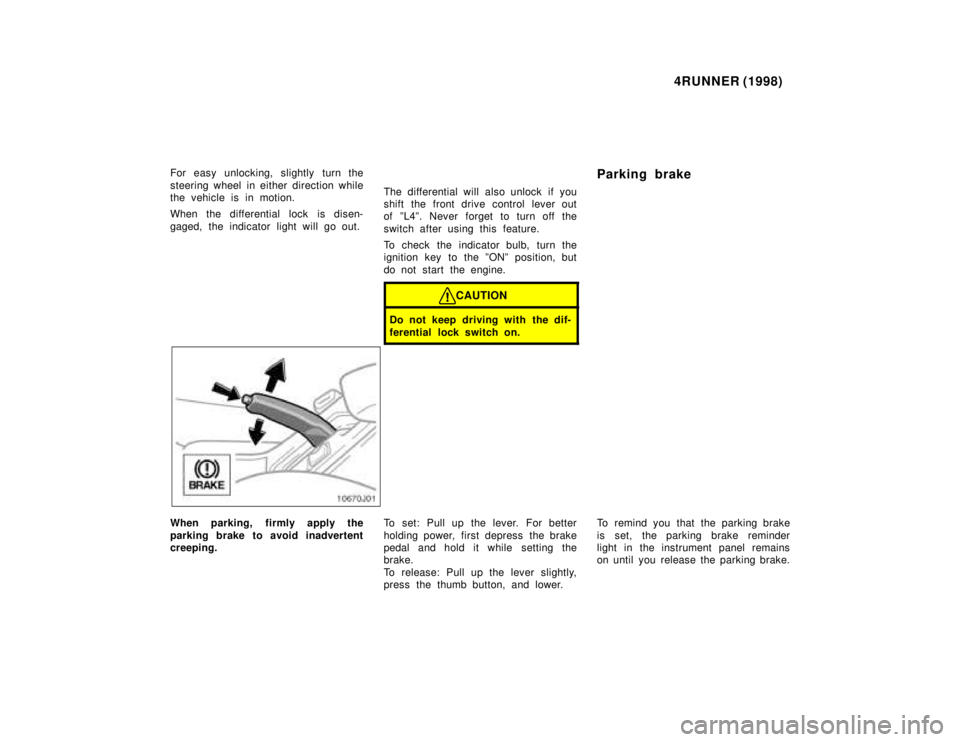
When parking, firmly apply the
parking brake to avoid inadvertent
creeping.
To set: Pull up the lever. For better
holding power, first depress the brake
pedal and hold it while setting the
brake.
To release: Pull up the lever slightly,
press the thumb button, and lower.To remind you that the parking brake
is set, the parking brake reminder
light in the instrument panel remains
on until you release the parking brake.
Page 168 of 350
4RUNNER (1998)
Push ºPWR
V OLº, ºPWR/VOLº or
ºVOL/PWRº to turn the audio system
on and off.
Push ºAMº, ºFMº, ºAM
F Mº, ºTAPEº or
ºCDº to turn on that function without
pushing ºPWR
V OLº, ºPWR/VOLº or
ºVOL/PWRº.
You can turn on each player by insert-
ing a cassette tape or compact disc.
You can turn off each player by eject-
ing the cassette tape or compact disc.
If the audio system was previously
off, then the entire audio system will
be turned off when you eject the cas-
sette tape or compact disc. If the
another function was previously play-
ing, it will come on again.
SWITCHING BETWEEN FUNCTIONS
Push ºAMº, ºFMº, ºAM
F Mº , ºTAPEº
or ºCDº if the system is already on
but you want to switch from one func-
tion to another. TONE AND BALANCE
For details about your system's tone
and balance controls, see the descrip-
tion of your own system.
Tone
How good an audio program sounds
to you is largely determined by the
mix of the treble, midrange, and bass
levels. In fact, different kinds of music
and vocal programs usually sound bet-
ter with different mixes of treble, mi-
drange, and bass.
Balance
A good balance of the left and right
stereo channels and of the front and
rear sound levels is also important.
Keep in mind that if you are listening
to a stereo recording or broadcast,
changing the right/left balance will in-
crease the volume of one group of
sounds while decreasing the volume
of another.YOUR RADIO ANTENNA
To lower a power antenna, turn off the
audio system by pushing ºPWR
VOLº,
ºPWR/VOLº or ºVOL/PWRº, or turn the
ignition key to ºLOCKº.
On some models, the power antenna
automatically retracts when the radio
mode is switched off to turn on the
cassette tape player.
NOTICE
To prevent damage to the anten-
na, make sure it is retracted be-fore driving your Toyota throughan automatic car wash. On ve-
hicles with detachable antenna,remove the antenna before usingan automatic car wash.
Page 170 of 350

4RUNNER (1998)
Details of specific buttons, controls,
and features are described in the al-
phabetical listing that follows. 1 2 3 4 5 6 (Preset buttons)
These buttons are used to preset and
tune in radio stations.
To preset a station to a button: Tune
in the desired station (see ºTUNEº
button). Push and hold down the but-
ton until you hear a beep
'this will
set the station to the button. The but-
ton number will appear on the display.
To tune in to a preset station: Push
the button for the station you want.
The button number and station fre-
quency will appear on the display.
These systems can store one AM and
two FM stations for each button (The
display will show ºAMº, ºFM1º or
ºFM2º when you push ºAMº or ºFMº).
(Eject button)
Push this button to eject a cassette.
After you turn the ignition to ºLOCKº,
you will be able to eject a cassette
but you will not be able to reinsert it.
Page 176 of 350

4RUNNER (1998)
Details of specific buttons, controls,
and features are described in the al-
phabetical listing that follows. 1 2 3 4 5 6 (Preset buttons)
These buttons are used to preset and
tune in radio stations.
To preset a station to a button: Tune
in the desired station (see ºTUNEº
button). Push and hold down the but-
ton until you hear a beep
'this will
set the station to the button. The but-
ton number will appear on the display.
To tune in to a preset station: Push
the button for the station you want.
The button number and station fre-
quency will appear on the display.
These systems can store one AM and
two FM stations for each button (The
display will show ºAMº, ºFM1º or
ºFM2º when you push ºAM´FMº).
(Eject button)
Push this button to eject a compact
disc.
After you turn the ignition to ºLOCKº,
you will be able to eject a disc but
you will not be able to reinsert it.
Page 181 of 350

4RUNNER (1998)
Details of specific buttons, controls,
and features are described in the al-
phabetical listing that follows. 1 2 3 4 5 6 (Preset buttons)
These buttons are used to preset and
tune in radio stations.
To preset a station to a button: Tune
in the desired station (see ºTUNEº or
ºSEEKº button). Push and hold down
the button until you hear a beep
'this
will set the station to the button. The
button number will appear on the dis-
play.
To tune in to a preset station: Push
the button for the station you want.
The button number and station fre-
quency will appear on the display.
These systems can store one AM and
two FM stations for each button (The
display will show ºAMº, ºFM1º or
ºFM2º when you push ºAMº or ºFMº).
(Eject button)
Push this button to eject a cassette.
After you turn the ignition to ºLOCKº,
you will be able to eject a cassette
but you will not be able to reinsert it.
Page 188 of 350

4RUNNER (1998)
Details of specific buttons, controls,
and features are described in the al-
phabetical listing that follows. 1 2 3 4 5 6 (Preset buttons)
These buttons are used to preset and
tune in radio stations.
To preset a station to a button: Tune
in the desired station (see ºTUNEº or
ºSEEKº button). Push and hold down
the button until you hear a beep
'this
will set the station to the button. The
button number will appear on the dis-
play.
To tune in to a preset station: Push
the button for the station you want.
The button number and station fre-
quency will appear on the display.
These systems can store one AM and
two FM stations for each button (The
display will show ºAMº, ºFM1º or
ºFM2º when you push ºAM´FMº).
(Eject button)
Push the cassette tape eject button to
eject a cassette. Push the compact
disc eject button to eject a compact
disc.
After you turn the ignition to ºLOCKº,
you will be able to eject a cassette or
disc but you will not be able to rein-
sert it.
Page 194 of 350
4RUNNER (1998)
TA P E
Push ºTAPEº to switch from radio or
compact disc operation to cassette op-
eration. If the audio system is off, you
can turn on the cassette player by
pushing ºTAPEº. In both cases, a cas-
sette must already be loaded in the
player.
TRACK (Track up/down button):
Compact disc player
By using this button, you can skip up
or down to a different track.
Push either side of the track button
until the number of the track you want
to listen to appears on the display. If
you want to return the beginning of
the current track, push the down side
of the button one time, quickly.
TUNE (Tuning)
Your Toyota has an electronic tuning
radio (ETR). Push and release the º ~º
(up) or º !º (down) side of ºTUNEº to
step up or down the station band. (If
you hear a beep, you held the button
too long and the radio will go into the
seek mode.)
NOTICE
To ensure the correct audio sys-
tem operation:
Be careful not to spill bever-ages over the audio system.
Do not put anything other thana cassette tape or Compact
Disc into the slot.
RADIO RECEPTION
Usually, a problem with radio recep-
tion does not mean there is a problem
with your radio Ðit is just the normal
result of conditions outside the ve-
hicle.
For example, nearby buildings and ter-
rain can interfere with FM reception.
Power lines or telephone wires can
interfere with AM signals. And of
course, radio signals have a limited
range, and the farther you are from a
station, the weaker its signal will be.
In addition, reception conditions
change constantly as your vehicle
moves. Here are some common reception
problems that probably do not indicate
a problem with your radio: FM
Fading and drifting stationsÐGeneral-
ly, the effective range of FM is about
40 km (25 miles). Once outside this
range, you may notice fading and
drifting, which increase with the dis-
tance from the radio transmitter. They
are often accompanied by distortion.
Multi- pathÐFM signals are reflective,
making it possible for two signals to
reach your antenna at the same time.
If this happens, the signals will cancel
each other out, causing a momentary
flutter or loss of reception.
Static and flutteringÐThese occur
when signals are blocked by buildings,
trees, or other large objects. Increas-
ing the bass level may reduce static
and fluttering.
Station swappingÐIf the FM signal
you are listening to is interrupted or
weakened, and there is another strong
station nearby on the FM band, your
radio may tune in the second station
until the original signal can be picked
up again.
ÐCar audio system operati
n
hints
Page 201 of 350

4RUNNER (1998)
ÐOperating tips
To cool off your Toyota after it has
been parked in the hot sun, drive
with the windows open for a few
minutes. This vents the hot air, al-
lowing the air conditioning to cool
the interior more quickly.
Make sure the air intake grilles in
front of the windshield are not
blocked (by leaves or snow, for
example).
On humid days, do not blow cold
air on the windshield. The wind-
shield could fog up because of the
difference in air temperature on the
inside and outside of the wind-
shield.
Keep the area under the front
seats clear to allow air to circulate
throughout the vehicle.
On cold days, move the fan speed
selector to ºHIº for a minute to
help clear the intake ducts of snow
or moisture. This can reduce the
amount of fogging on the windows. Heating
For best results, set controls to:
Fan speedÐ Any setting except
ºOFFº
TemperatureÐ To w a r d s WARM
(red zone)
Air intakeÐFRESH (outside air)
Air flowÐFLOOR
Air conditioningÐOFF
For quick heating, select recircu-
lated air for a few minutes. To
keep the windows from fogging, se-
lect fresh after the vehicle interior
has been warmed.
Press the ºA/Cº button on for dehu-
midified heating.
Choose floor/windshield air flow to
heat the vehicle interior while de-
frosting or defogging the wind-
shield. Air conditioning
For best results, set controls to:
Fan speedÐ Any setting except
ºOFFº TemperatureÐ To w a r d s COLD
(blue zone)
Air intakeÐFRESH (outside air)
Air flowÐPANEL
Air conditioningÐON For quick cooling, move the air in-
take selector to recirculate for a
few minutes.
Ventilation
For best results, set controls to:
Fan speedÐ Any setting except
ºOFFº TemperatureÐ To w a r d s COLD
(blue zone)
Air intakeÐFRESH (outside air)
Air flowÐPANEL
Air conditioningÐOFF
Page 206 of 350
4RUNNER (1998)
Part 1
OPERATION OF
INSTRUMENTS
AND CONTROLSÐ
Chapter 1- 8
Other equipment
Clock
Cigarette lighter and ashtray
Power outlet
Glovebox
Auxiliary holder
Auxiliary box
Cup holder
Tie- down hooks
Luggage cover
Floor mat
Clock