stop start TOYOTA 4RUNNER 2011 N280 / 5.G User Guide
[x] Cancel search | Manufacturer: TOYOTA, Model Year: 2011, Model line: 4RUNNER, Model: TOYOTA 4RUNNER 2011 N280 / 5.GPages: 680, PDF Size: 12.58 MB
Page 92 of 680

92 1-4. Opening and closing the windows and moon roof
4RUNNER_U
■The power windows can be operated when
Vehicles without a smart key system
The engine switch is in the “ON” position.
Vehicles with a smart key system
The “ENGINE START STOP” switch is in IGNITION ON mode.
■ Operating the power windows af ter turning the engine off
Vehicles without a smart key system
The power windows can be operated for approximately 45 seconds even
after the engine switch is turned to the “ACC” or “LOCK” position. They can-
not, however, be operated once either front door is opened.
Vehicles with a smart key system
The power windows can be operated for approximately 45 seconds even
after the “ENGINE START STOP” switch is turned to ACCESSORY mode or
turned off. They cannot, however, be operated once either front door is
opened.
■ Jam protection function
If an object becomes caught between the window and the window frame,
window travel is stopped and the window is opened slightly.
■ Customization that can be co nfigured at Toyota dealer
Settings (e.g. linked door lock operation) can be changed.
(Customizable features P. 640)
Page 95 of 680
95
1-4. Opening and closing the windows and moon roof
1
Before driving
4RUNNER_U
■
The power back window can be operated from inside the vehicle when
Vehicles without a smart key system
The engine switch is in the “ON” position.
Vehicles with a smart key system
The “ENGINE START STOP” switch is in IGNITION ON mode.
● The power back window can be opened when the rear window wiper is
working, but the wiper stops working until the window is closed again.
If the power back window is not fully closed, the rear window wiper,
washer, and defogger will not work.
● If the back door is not fully closed, the power back window cannot be
opened using the switch located in the cabin. (It is still possible to close
the window.)
● If the back door is opened while the power back window is opening or
closing, window operation will stop.
■ The power back window can be op erated from outside the vehicle
when (vehicles with a smart key system)
● The “ENGINE START STOP” switch is off.
● The back door is closed.
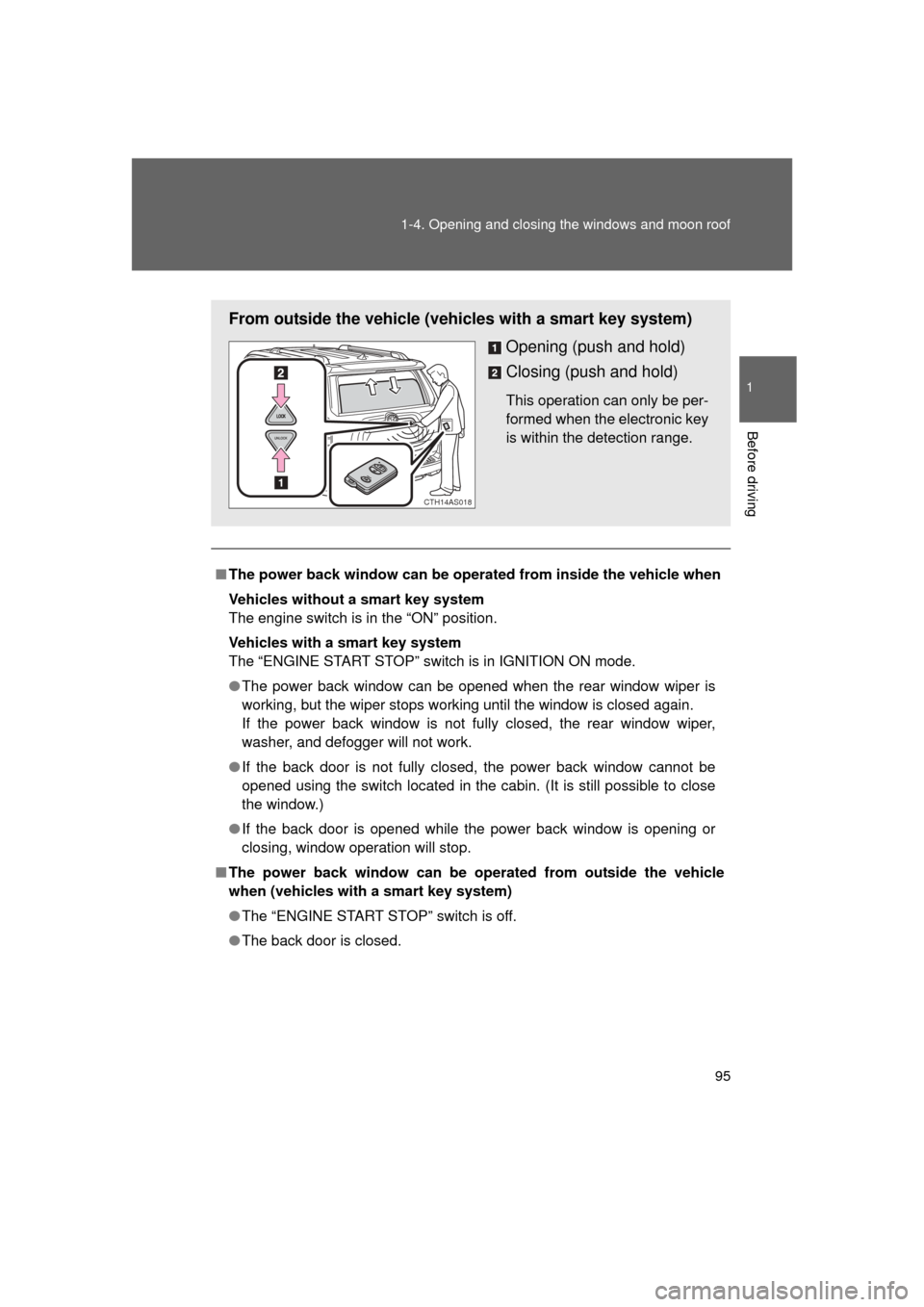
From outside the vehicle (vehicles with a smart key system)
Opening (push and hold)
Closing (push and hold)
This operation can only be per-
formed when the electronic key
is within the detection range.
CTH14AS018
Page 96 of 680

96 1-4. Opening and closing the windows and moon roof
4RUNNER_U
■Operating the power back window from inside the vehicle after turning
the engine off
Vehicles without a smart key system
The power back window can be operated for approximately 45 seconds
even after the engine switch is turned to the “ACC” or “LOCK” posit\
ion. It
cannot, however, be operated once either front door is opened.
Vehicles with a smart key system
The power back window can be operated for approximately 45 seconds
even after the “ENGINE START STOP” switch is turned to ACCESSORY
mode or turned off. It cannot, however, be operated once either front door is
opened.
■ Jam protection function
If an object becomes caught between the window and the window frame,
window travel is stopped and the window is opened slightly.
■ Customization that can be co nfigured at Toyota dealer
Settings (e.g. linked operation) can be changed.
(Customizable features P. 640)
Page 99 of 680
99
1-4. Opening and closing the windows and moon roof
1
Before driving
4RUNNER_U
■
The moon roof can be operated when
Vehicles without a smart key system
The engine switch is in the “ON” position.
Vehicles with a smart key system
The “ENGINE START STOP” switch is in IGNITION ON mode.
■ Operating the moon roof af ter turning the engine off
Vehicles without a smart key system
The moon roof can be operated for approximately 45 seconds even after the
engine switch is turned to the “ACC” or “LOCK” position. It cannot, however,
be operated once either front door is opened.
Vehicles with a smart key system
The moon roof can be operated for approximately 45 seconds even after the
“ENGINE START STOP” switch is turned to ACCESSORY mode or turned
off. It cannot, however, be operated once either front door is opened.
■ Jam protection function
If an object is detected between the moon roof and the frame while the moon
roof is closing or tilting down, travel is stopped and the moon roof opens
slightly.
■ Sunshade
The sunshade can be opened and closed manually. However, the sunshade
will open automatically when the moon roof is opened.
Page 101 of 680

101
1-4. Opening and closing the windows and moon roof
1
Before driving
4RUNNER_U
■
Moon roof open reminder function
Vehicles without a smart key system
An alarm will sound when the driver’s door is opened with the moon roof not
fully closed and the engine switch off.
Vehicles with a smart key system
An alarm will sound when the driver’s door is opened with the moon roof not
fully closed and the “ENGINE START STOP” switch off.
■ Customization that can be co nfigured at Toyota dealer
Settings (e.g. linked door lock operation) can be changed.
(Customizable features P. 640)
CAUTION
■Opening the moon roof
Observe the following precautions.
Failure to do so may cause death or serious injury.
● Do not allow any passengers to put their hands or heads outside the vehi-
cle while it is moving.
● Do not sit on top of the moon roof.
■ Closing the moon roof
Observe the following precautions.
Failure to do so may result in death or serious injury.
● Check to make sure that all passengers do not have any part of their body
in a position where it could be caught when the moon roof is being oper-
ated.
● Do not allow children to operate the moon roof.
Closing the moon roof on someone can cause death or serious injury.
■ Jam protection function
● Never use any part of your body to intentionally activate the jam protection
function.
● The jam protection function may not work if something gets caught just
before the moon roof fully closes.
Page 102 of 680
102
4RUNNER_U
1-5. Refueling
Opening the fuel tank cap
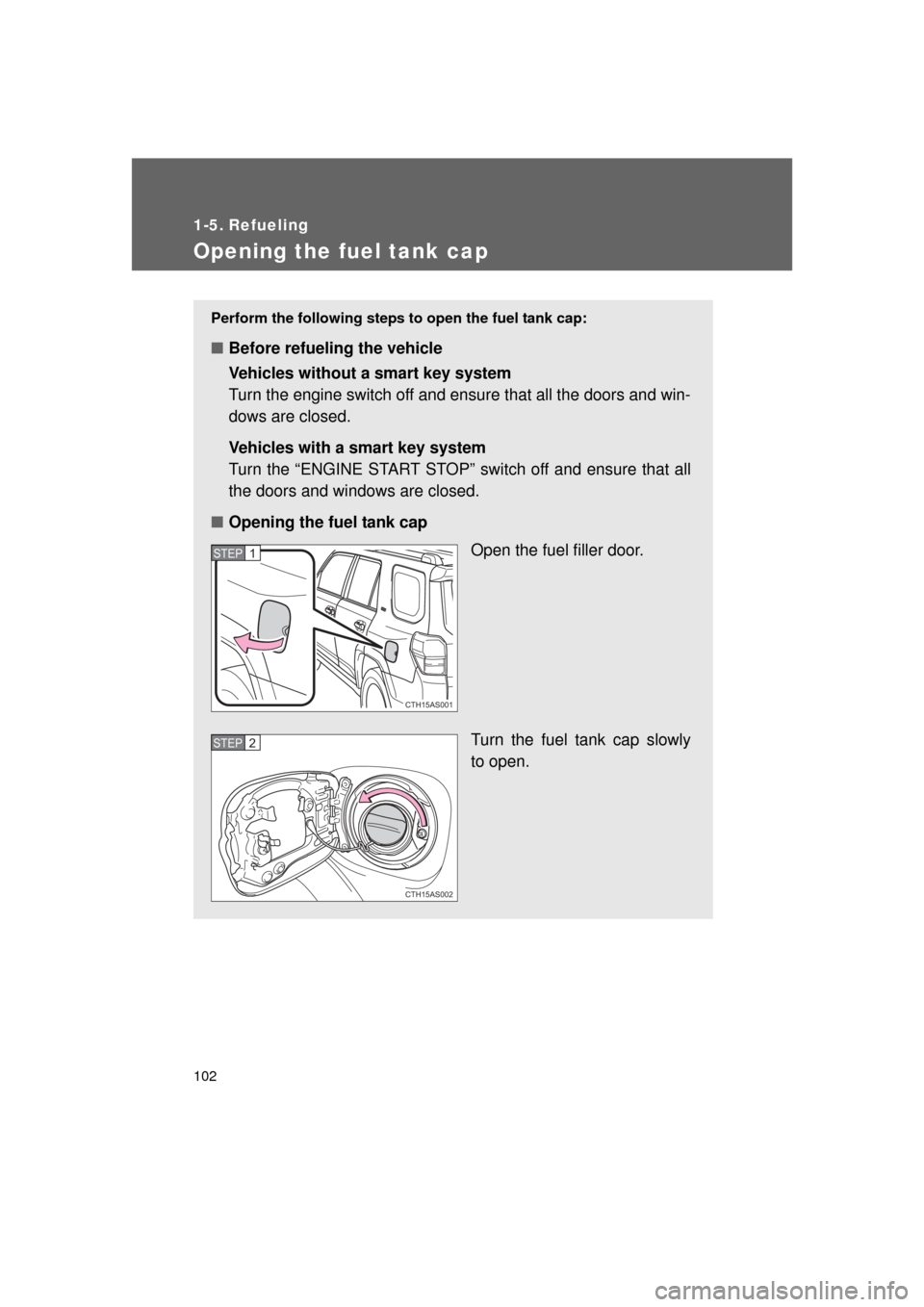
Perform the following steps to open the fuel tank cap:
■Before refueling the vehicle
Vehicles without a smart key system
Turn the engine switch off and ensure that all the doors and win-
dows are closed.
Vehicles with a smart key system
Turn the “ENGINE START STOP” switch off and ensure that all
the doors and windows are closed.
■ Opening the fuel tank cap
Open the fuel filler door.
Turn the fuel tank cap slowly
to open.
CTH15AS001
STEP 1
CTH15AS002
STEP 2
Page 106 of 680

106
4RUNNER_U
1-6. Theft deterrent system
Engine immobilizer system
The vehicle’s keys have built-in transponder chips that prevent the
engine from starting if a key has not been previously registered in
the vehicle’s on-board computer.
Never leave the keys inside the vehicle when you leave the vehicle.
Vehicles without a smart
key system
The indicator light flashes after
the key has been removed
from the engine switch to indi-
cate that the system is operat-
ing.
The indicator light stops flash-
ing after the registered key
has been inserted into the
engine switch to indicate that
the system has been can-
celed.
Vehicles with a smart key
system
The indicator light flashes after
the “ENGINE START STOP”
switch has been turned off to
indicate that the system is
operating.
The indicator light stops flash-
ing after the “ENGINE START
STOP” switch has been turned
to ACCESSORY or IGNITION
ON mode to indicate that the
system has been canceled.
CTH16AS004
Page 109 of 680
109
1
1-6. Theft deterrent system
Before driving
4RUNNER_U
Alarm
: If equipped
The system sounds the alarm and flashes the lights when forced
entry is detected.
■ Triggering of the alarm
The alarm is triggered in the fo llowing situations when the alarm
is set:
● A locked door is unlocked or opened in any way other than
using the entry function, wireless remote control or mechani-
cal key. (The doors will lock again automatically.)
● The hood is opened.
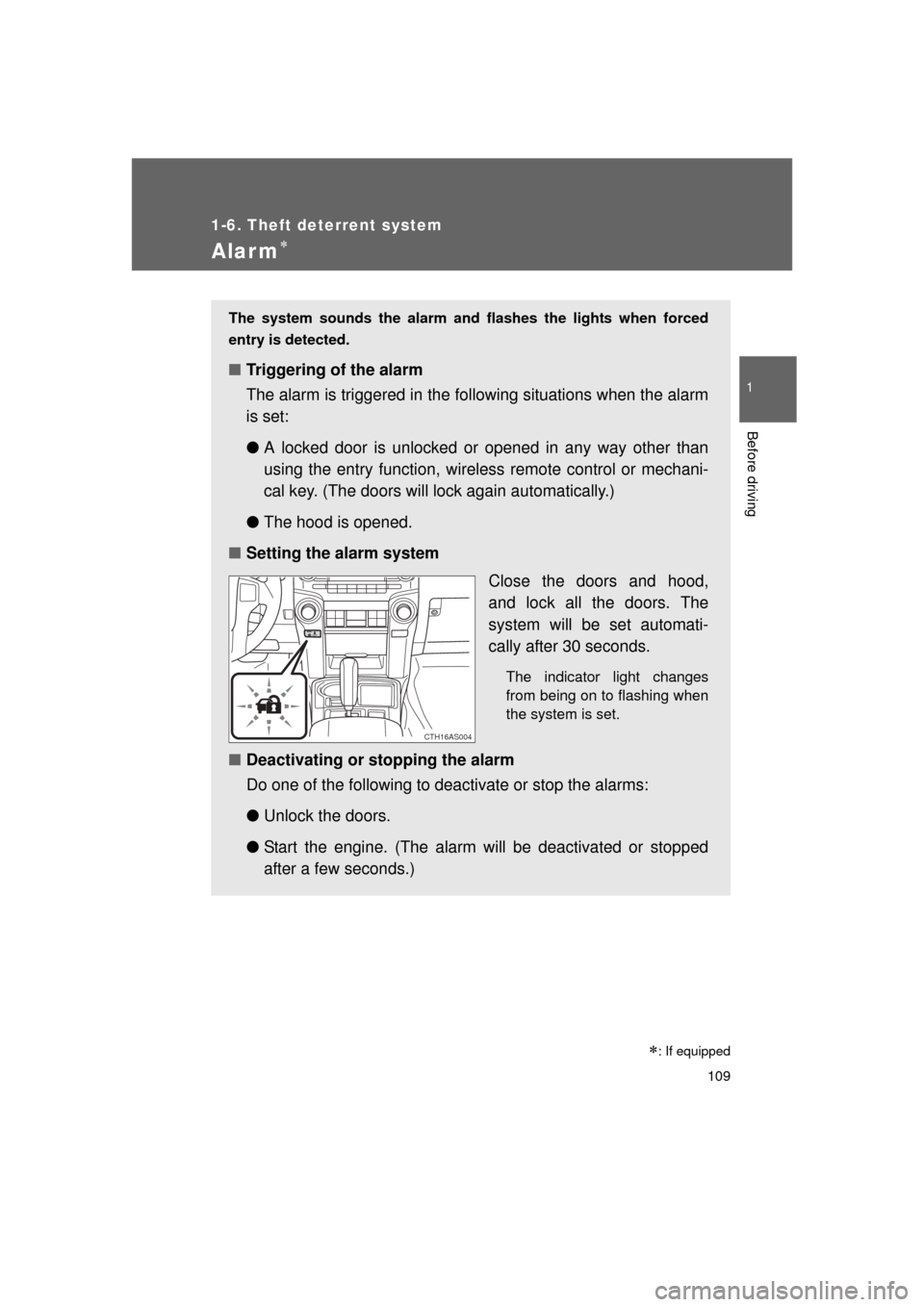
■ Setting the alarm system
Close the doors and hood,
and lock all the doors. The
system will be set automati-
cally after 30 seconds.
The indicator light changes
from being on to flashing when
the system is set.
■Deactivating or stopping the alarm
Do one of the following to deactivate or stop the alarms:
●Unlock the doors.
● Start the engine. (The alarm will be deactivated or stopped
after a few seconds.)
CTH16AS004
Page 128 of 680
128 1-7. Safety information
4RUNNER_U
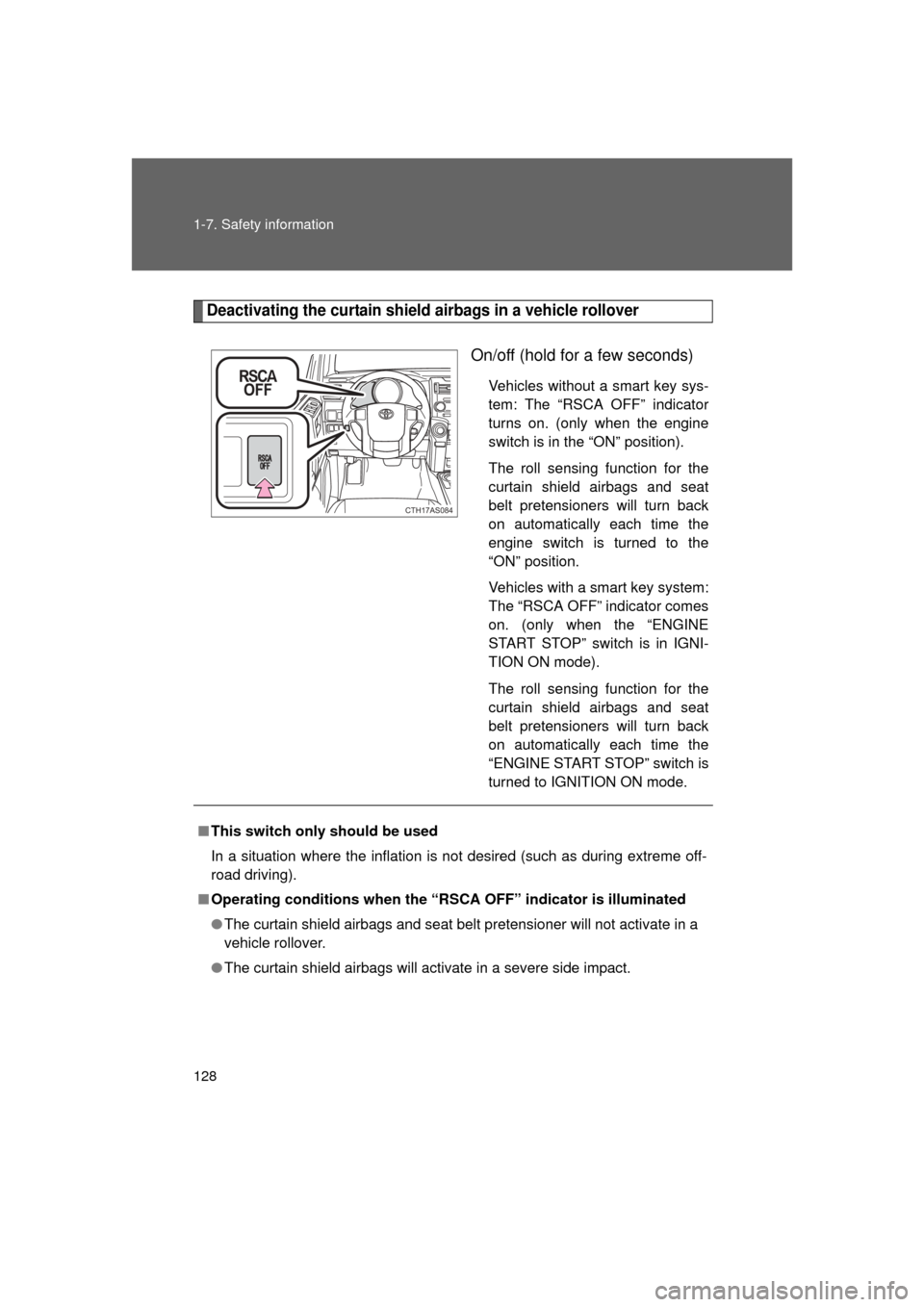
Deactivating the curtain shield airbags in a vehicle rollover
On/off (hold for a few seconds)
Vehicles without a smart key sys-
tem: The “RSCA OFF” indicator
turns on. (only when the engine
switch is in the “ON” position).
The roll sensing function for the
curtain shield airbags and seat
belt pretensioners will turn back
on automatically each time the
engine switch is turned to the
“ON” position.
Vehicles with a smart key system:
The “RSCA OFF” indicator comes
on. (only when the “ENGINE
START STOP” switch is in IGNI-
TION ON mode).
The roll sensing function for the
curtain shield airbags and seat
belt pretensioners will turn back
on automatically each time the
“ENGINE START STOP” switch is
turned to IGNITION ON mode.
CTH17AS084
■This switch only should be used
In a situation where the inflation is not desired (such as during extreme off-
road driving).
■ Operating conditions when the “RSC A OFF” indicator is illuminated
● The curtain shield airbags and seat belt pretensioner will not activate in a
vehicle rollover.
● The curtain shield airbags will activate in a severe side impact.
Page 154 of 680
154
4RUNNER_U
2-1. Driving procedures
Driving the vehicle
The following procedures should be observed to ensure safe driv-
ing:
■ Starting the engine
P. 164, 167
■ Driving
With the brake pedal depressed, shift the shift lever to D.
( P. 173)
Release the parking brake. ( P. 180)
Gradually release the brake pedal and gently depress the
accelerator pedal to accelerate the vehicle.
■ Stopping
With the shift lever in D, depress the brake pedal.
If necessary, set the parking brake.
If the vehicle is to be stopped for an extended period of time, shift
the shift lever to P or N. ( P. 173)
■Parking the vehicle
With the shift lever in D, depress the brake pedal.
Set the parking brake. ( P. 180)
Shift the shift lever to P. ( P. 173)
If parking on a hill, block the wheels as needed.
Vehicles without a smart key system:
Turn the engine switch to the “LOCK” position to stop the
engine.
Vehicles with a smart key system:
Press the “ENGINE START STOP” switch to stop the
engine.
Lock the door, making sure that you have the key on your
person.
STEP 1
STEP 2
STEP 3
STEP 1
STEP 2
STEP 1
STEP 2
STEP 3
STEP 4
STEP 5