light TOYOTA 4RUNNER 2017 N280 / 5.G Service Manual
[x] Cancel search | Manufacturer: TOYOTA, Model Year: 2017, Model line: 4RUNNER, Model: TOYOTA 4RUNNER 2017 N280 / 5.GPages: 528, PDF Size: 10.03 MB
Page 92 of 528
923-1. Key information
4RUNNER (U)_(OM35B37U)
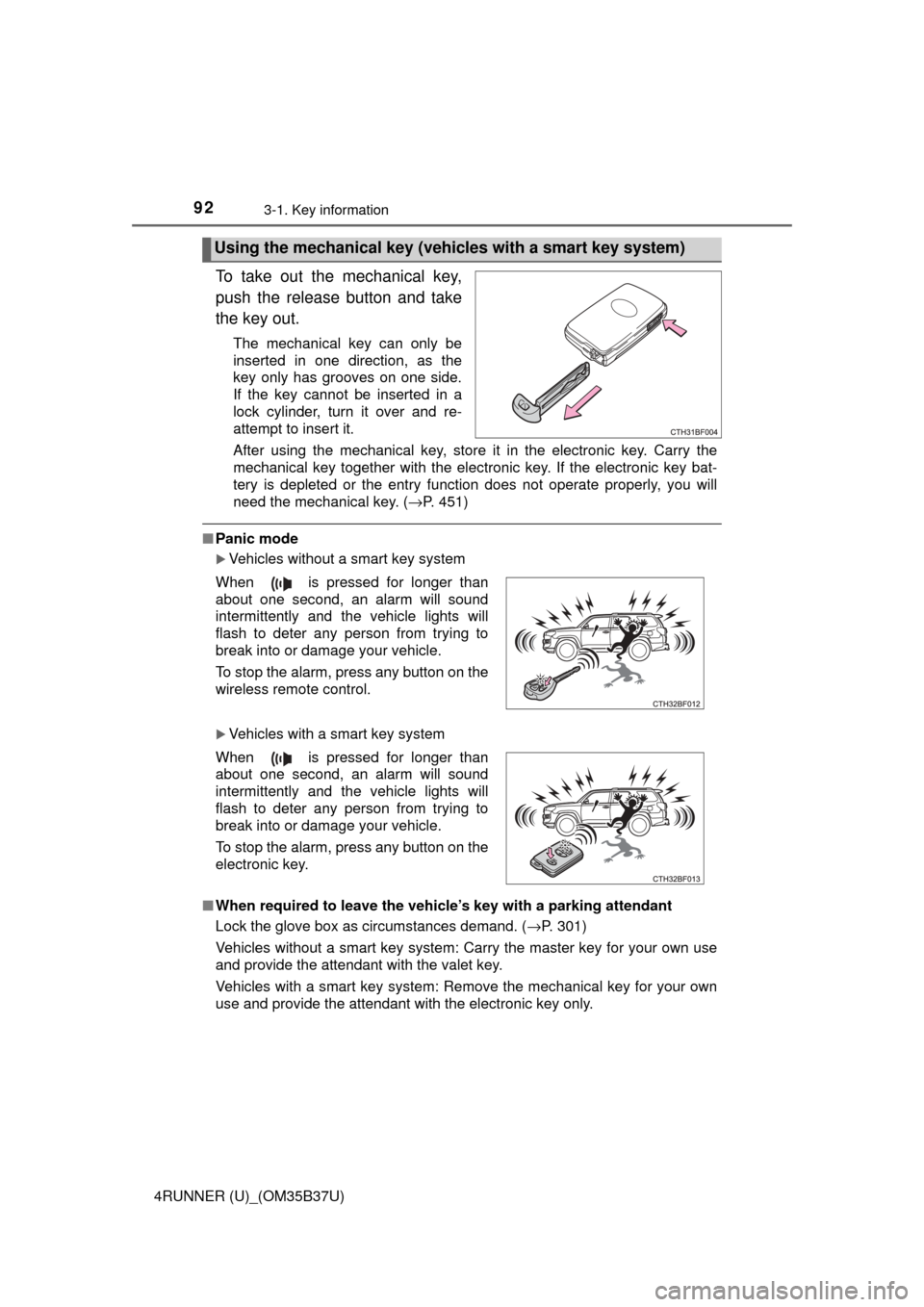
To take out the mechanical key,
push the release button and take
the key out.
The mechanical key can only be
inserted in one direction, as the
key only has grooves on one side.
If the key cannot be inserted in a
lock cylinder, turn it over and re-
attempt to insert it.
After using the mechanical key, store it in the electronic key. Carry the
mechanical key together with the electronic key. If the electronic key bat-
tery is depleted or the entry function does not operate properly, you will
need the mechanical key. (→P. 451)
■Panic mode
Vehicles without a smart key system
Vehicles with a smart key system
■ When required to leave the vehicle’s key with a parking attendant
Lock the glove box as circumstances demand. ( →P. 301)
Vehicles without a smart key system: Carry the master key for your own use
and provide the attendant with the valet key.
Vehicles with a smart key system: Remove the mechanical key for your own
use and provide the attendant with the electronic key only.
Using the mechanical key (vehic les with a smart key system)
When is pressed for longer than
about one second, an alarm will sound
intermittently and the vehicle lights will
flash to deter any person from trying to
break into or damage your vehicle.
To stop the alarm, press any button on the
wireless remote control.
When is pressed for longer than
about one second, an alarm will sound
intermittently and the vehicle lights will
flash to deter any person from trying to
break into or damage your vehicle.
To stop the alarm, press any button on the
electronic key.
Page 109 of 528
1093-2. Opening, closing and locking the doors
3
Operation of each component
4RUNNER (U)_(OM35B37U)■
Note for locking the doors
●Touching the door lock sensor while wearing gloves may delay or prevent
lock operation. Remove the gloves and touch the lock sensor again.
● When the lock operation is performed using the lock sensor, recognition sig-
nals will be shown up to two consecutive times. After this, no recognition
signals will be given.
● If the door handle becomes wet while the electronic key is within the effec-
tive range, the door may lock and unlock repeatedly. Place the electronic
key in a location 6 ft. (2 m) or more away from the vehicle while the vehicle
is being washed. (Take care to ensure that the key is not stolen.)
● If the electronic key is inside the vehicle and a door handle becomes wet
during a car wash, a buzzer will sound outside the vehicle. To turn off the
alarm, lock all the doors.
● The lock sensor may not work properly if it comes into contact with ice,
snow, mud, etc. Clean the lock sensor and attempt to operate it again, or
use the lock sensor on the lower part of the door handle.
● Fingernails may scrape against the door during operation of the door han-
dle. Be careful not to injure fingernails or damage the surface of the door.
■ Note for the unlocking function
●Gripping the door handle when wearing a glove may not unlock the door.
● A sudden approach to the effective range or door handle may prevent the
doors from being unlocked. In this case, return the door handle to the origi-
nal position and check that the doors unlock before pulling the door handle
again.
● If there is another electronic key in the detection area, it may take slightly
longer to unlock the doors after the door handle is gripped.
■ When the vehicle is not driven for extended periods
To prevent theft of the vehicle, do not leave the electronic key within 6 ft. (2 m)
of the vehicle.
■ To operate the system properly
●Make sure to carry the electronic key when operating the system. Do not get
the electronic key too close to the vehicle when operating the system from
the outside of the vehicle.
● Depending on the position and holding condition of the electronic key, the
key may not be detected correctly and the system may not operate properly.
(The alarm may go off accidentally, or the door lock prevention function may
not operate.)
■ If the smart key system do es not operate properly
● Locking and unlocking the doors: Use the mechanical key. ( →P. 451)
● Starting the engine: →P. 452
■ Customization
Settings (e. g. operation signal) can be changed.
(Customizable features: →P. 489)
Page 113 of 528
1133-2. Opening, closing and locking the doors
3
Operation of each component
4RUNNER (U)_(OM35B37U)
■Jam protection function
During Automatic running boards operation:
If a board contacts an obstacle when extending, it will retract. If an obstacle
gets caught between a board and the vehicle when retracting, the board will
extend.
If an obstacle is detected 3 times in a row during Automatic running boards
operation, the board will stop at the position it contacts the obstacle. When a
side door on the same side as the board is opened and closed one more
time, the board will extend and retract, or retract and extend. After this, the
board will resume normal operation.
■ Automatic retraction function
The boards will be automatically retracted, for safety, under the following con-
ditions:
●A board is not completely retracted
● Vehicle speed is approximately 5 mph (8 km/h) or higher
The boards will not automatically extend again when vehicle speed returns to
less than 5 mph (8 km/h).
■ If the Automatic running boards indicator comes on when driving first
commences
A board has not completely retracted. Check that nothing is caught between
the board and the vehicle.
Additionally, if the engine is started immediately after a door has been closed,
the automatic running board may not retract completely and the automatic
running boards indicator may illuminate. In this case, open and close the door
to retract the running board and turn off the indicator.
■ If the Automatic running boa rds indicator light flashes
There may be a malfunction in the Automatic running boards system. Have
the vehicle inspected by your Toyota dealer immediately.
■ When snow or mud is attached to the board or the board is frozen
The Automatic running boards may not operate correctly. Before stepping on
a board, check that it is completely extended. If the Automatic running boards
are not operating correctly, turn the Automatic running boards switch off and
refrain from use.
When removing snow or mud, turn the Automatic running boards switch off.
■ After recharging/reco nnecting the battery
If the Automatic running boards have not completely extended or retracted,
the boards may not move in the intended direction the first time they are oper-
ated. However, from the second time onwards, the boards will resume normal
operation.
■ When getting in and out of the vehicle
Take care because clothes and shoes may become dirty due to contact with
the lower part of the vehicle body.
Page 117 of 528
1173-2. Opening, closing and locking the doors
3
Operation of each component
4RUNNER (U)_(OM35B37U)
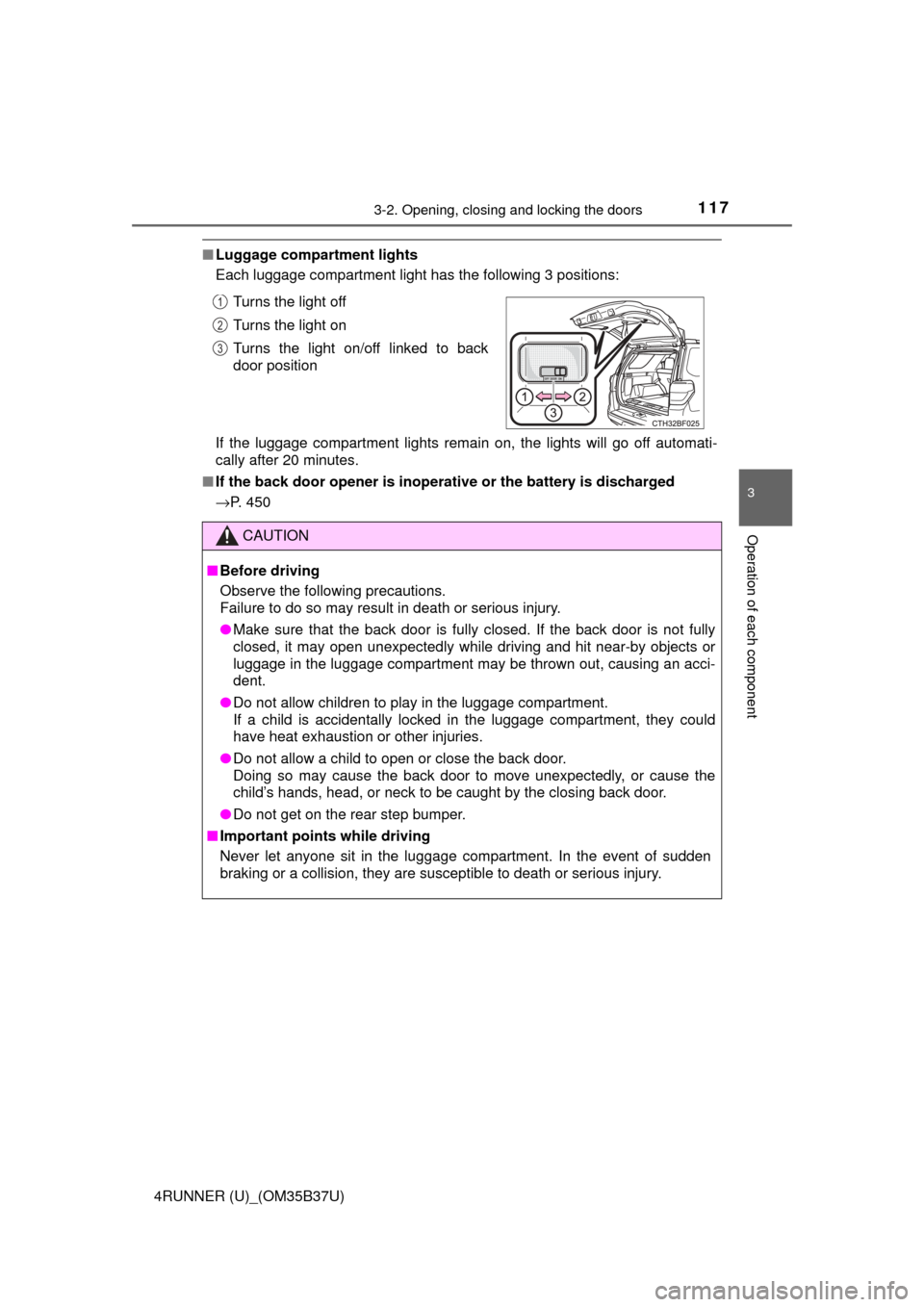
■Luggage compartment lights
Each luggage compartment light has the following 3 positions:
If the luggage compartment lights remain on, the lights will go off automati-
cally after 20 minutes.
■ If the back door opener is inoperative or the battery is discharged
→P. 450
CAUTION
■Before driving
Observe the following precautions.
Failure to do so may result in death or serious injury.
● Make sure that the back door is fully closed. If the back door is not fully
closed, it may open unexpectedly while driving and hit near-by objects or
luggage in the luggage compartment may be thrown out, causing an acci-
dent.
● Do not allow children to play in the luggage compartment.
If a child is accidentally locked in the luggage compartment, they could
have heat exhaustion or other injuries.
● Do not allow a child to open or close the back door.
Doing so may cause the back door to move unexpectedly, or cause the
child’s hands, head, or neck to be caught by the closing back door.
● Do not get on the rear step bumper.
■ Important points while driving
Never let anyone sit in the luggage compartment. In the event of sudden
braking or a collision, they are susceptible to death or serious injury.
Turns the light off
Turns the light on
Turns the light on/off linked to back
door position1
2
3
Page 118 of 528
1183-2. Opening, closing and locking the doors
4RUNNER (U)_(OM35B37U)
CAUTION
■Operating the back door
Observe the following precautions.
Failure to do so may cause parts of the body to be caught, resulting in death
or serious injury.
● Remove any heavy loads, such as snow and ice, from the back door
before opening it. Failure to do so may cause the back door to suddenly
shut again after it is opened.
● When opening or closing the back door, thoroughly check to make sure
the surrounding area is safe.
● If anyone is in the vicinity, make sure they are safe and let them know that
the back door is about to open or close.
● Use caution when opening or closing the back door in windy weather as it
may move abruptly in strong wind.
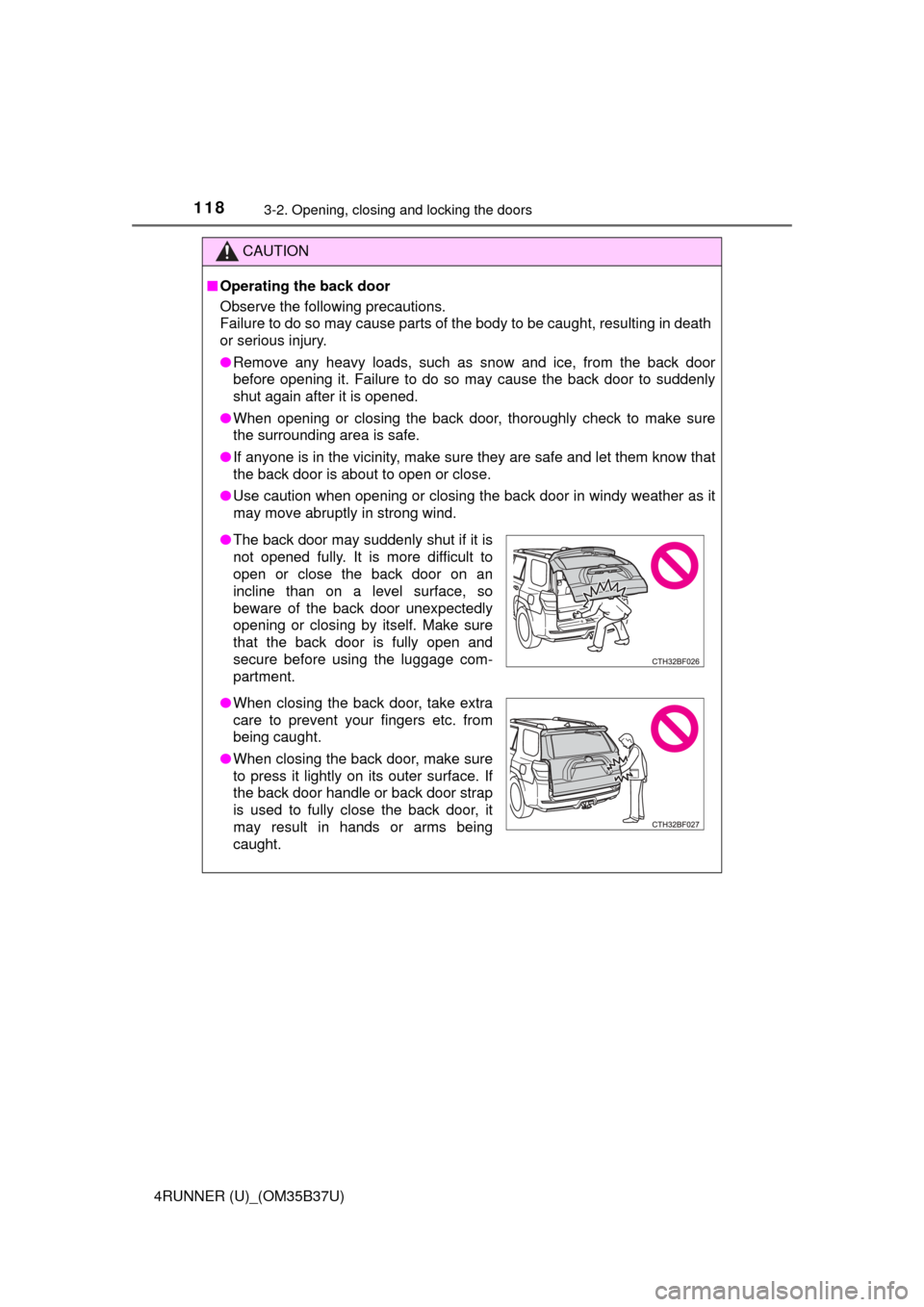
●The back door may suddenly shut if it is
not opened fully. It is more difficult to
open or close the back door on an
incline than on a level surface, so
beware of the back door unexpectedly
opening or closing by itself. Make sure
that the back door is fully open and
secure before using the luggage com-
partment.
● When closing the back door, take extra
care to prevent your fingers etc. from
being caught.
● When closing the back door, make sure
to press it lightly on its outer surface. If
the back door handle or back door strap
is used to fully close the back door, it
may result in hands or arms being
caught.
Page 121 of 528
1213-3. Adjusting the seats
3
Operation of each component
4RUNNER (U)_(OM35B37U)
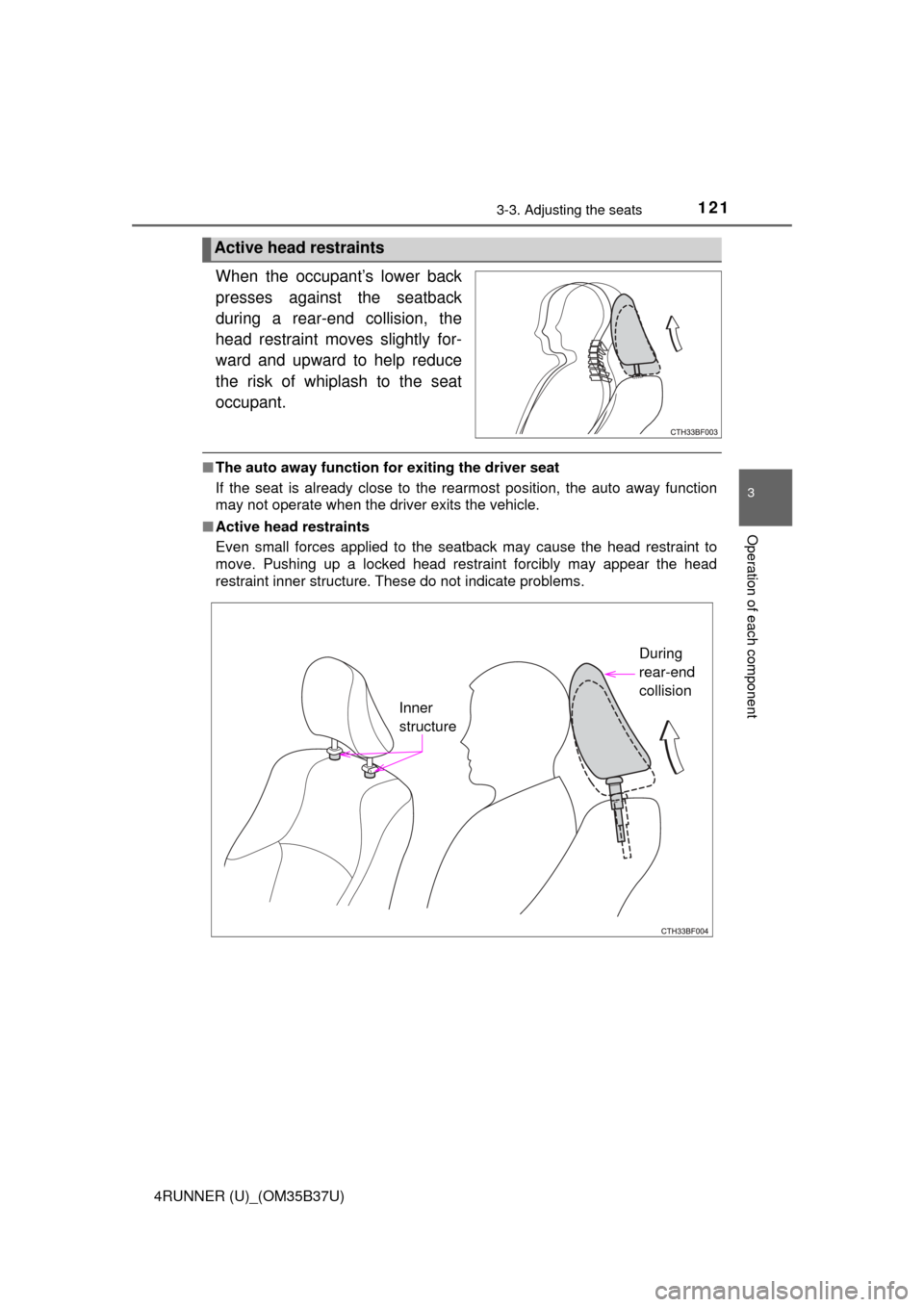
When the occupant’s lower back
presses against the seatback
during a rear-end collision, the
head restraint moves slightly for-
ward and upward to help reduce
the risk of whiplash to the seat
occupant.
■The auto away function for exiting the driver seat
If the seat is already close to the rearmost position, the auto away function
may not operate when the driver exits the vehicle.
■ Active head restraints
Even small forces applied to the seatback may cause the head restraint to
move. Pushing up a locked head restraint forcibly may appear the head
restraint inner structure. These do not indicate problems.
Active head restraints
Inner
structure During
rear-end
collision
Page 134 of 528
1343-3. Adjusting the seats
4RUNNER (U)_(OM35B37U)
■To stop the position recall operation part-way through
Perform any of the following:
● Press the “SET” button.
● Press button “1” or “2”.
● Operate any of the seat adjustment switches (only cancels seat position
recall).
■ Seat positions that can be memorized ( →P. 120)
All adjusted positions can be recorded.
■ Operating the driving position memo ry after turning the engine switch
off
Recorded seat positions can be activated up to 180 seconds after the driver’s
door is opened and another 60 seconds after it is closed again.
■ In order to correctly use the dr iving position memory function
If a seat position is already in the furthest possible position and the seat is
operated in the same direction, the recorded position may be slightly different
when it is recalled.
Each electronic key can be registered to recall your preferred driving
position.
■Registering procedure
Record your driving position to button “1” or “2” before performing
the following:
Carry only the key you want to re gister, and then close the driver’s
door.
If 2 or more keys are in the vehicle, the driving position cannot be
recorded properly.
Check that the shift lever is in P.
Turn the engine switch to IGNITION ON mode.
Recall the driving position that you want to record.
Memory recall function
1
2
3
Page 143 of 528
1433-4. Adjusting the steering wheel and mirrors
3
Operation of each component
4RUNNER (U)_(OM35B37U)
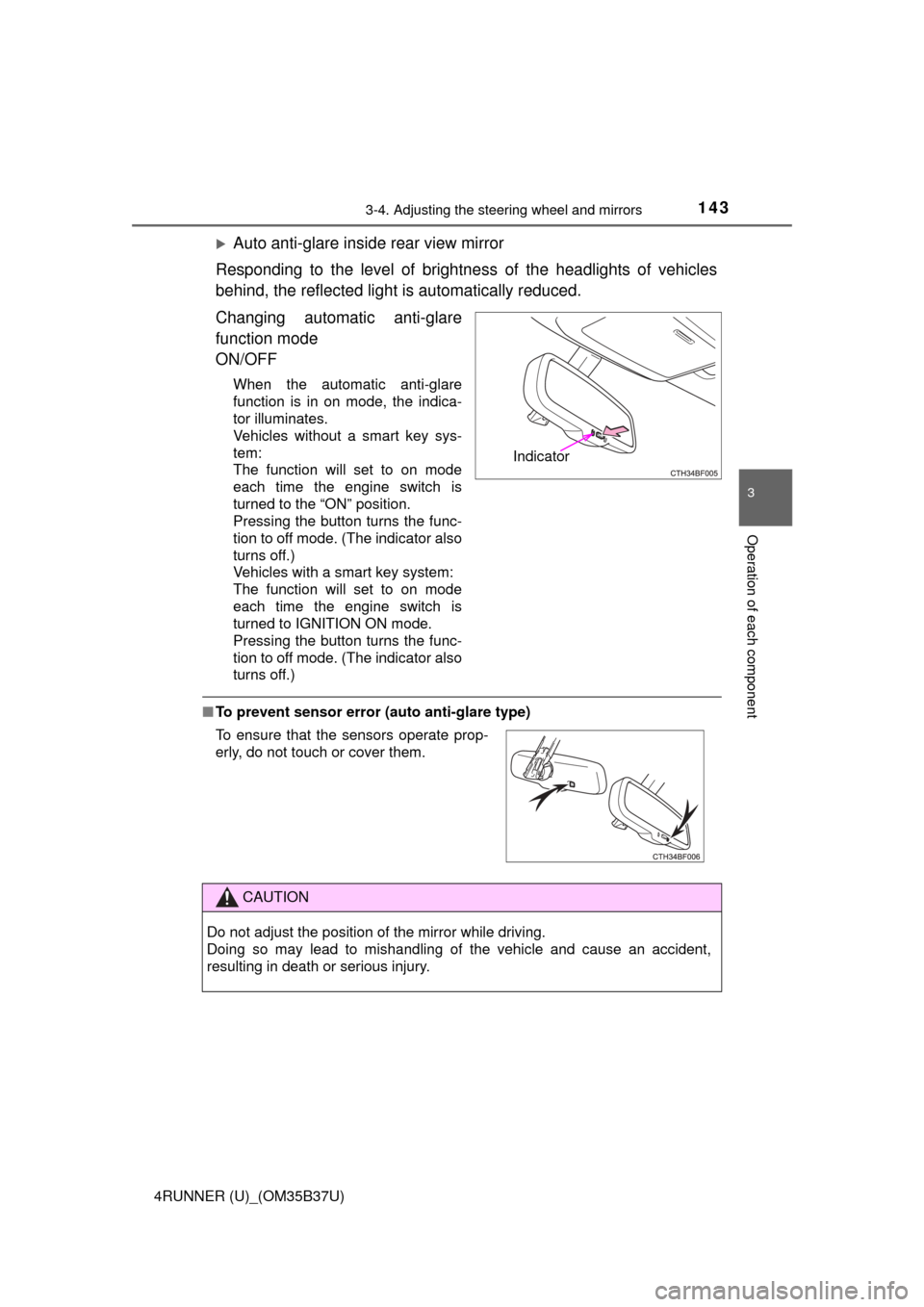
Auto anti-glare inside rear view mirror
Responding to the level of brightne ss of the headlights of vehicles
behind, the reflected light is automatically reduced.
Changing automatic anti-glare
function mode
ON/OFF
When the automatic anti-glare
function is in on mode, the indica-
tor illuminates.
Vehicles without a smart key sys-
tem:
The function will set to on mode
each time the engine switch is
turned to the “ON” position.
Pressing the button turns the func-
tion to off mode. (The indicator also
turns off.)
Vehicles with a smart key system:
The function will set to on mode
each time the engine switch is
turned to IGNITION ON mode.
Pressing the button turns the func-
tion to off mode. (The indicator also
turns off.)
■ To prevent sensor error (a uto anti-glare type)
Indicator
To ensure that the sensors operate prop-
erly, do not touch or cover them.
CAUTION
Do not adjust the position of the mirror while driving.
Doing so may lead to mishandling of the vehicle and cause an accident,
resulting in death or serious injury.
Page 147 of 528
1473-5. Opening, closing the windows and moon roof
3
Operation of each component
4RUNNER (U)_(OM35B37U)
■The power windows can be operated when
Vehicles without a smart key system
The engine switch is in the “ACC” or “ON” position.
Vehicles with a smart key system
The engine switch is in IGNITION ON mode.
■ Operating the power windows a fter turning the engine off
Vehicles without a smart key system
The power windows can be operated for approximately 45 seconds even
after the engine switch is turned to the “ACC” or “LOCK” position. They can-
not, however, be operated once either front door is opened.
Vehicles with a smart key system
The power windows can be operated for approximately 45 seconds even
after the engine switch is turned to ACCESSORY mode or turned off. They
cannot, however, be operated once either front door is opened.
■ Jam protection function
If an object becomes jammed between the window and the window frame
while the window is closing, window movement is stopped and the window is
opened slightly.
■ Catch protection function
If an object becomes caught between the door and window while the window
is opening, window movement is stopped.
Page 152 of 528

1523-5. Opening, closing the windows and moon roof
4RUNNER (U)_(OM35B37U)■
Operating the power back window from inside the vehicle after turning
the engine off
Vehicles without a smart key system
The power back window can be operated for approximately 45 seconds even
after the engine switch is turned to the “ACC” or “LOCK” position. It cannot,
however, be operated once either front door is opened.
Vehicles with a smart key system
The power back window can be operated for approximately 45 seconds even
after the engine switch is turned to ACCESSORY mode or turned off. It can-
not, however, be operated once either front door is opened.
■ Jam protection function
If an object becomes caught between the window and the window frame, win-
dow travel is stopped and the window is opened slightly.
■ When the power back window does not close normally
If the jam protection function is operating abnormally and a window cannot be
closed, perform the following operations using the power back window
switch.
●Vehicles without a smart key system: After stopping the vehicle, the window
can be closed by holding the power back window switch in the one-touch
closing position while the engine switch is turned to the “ON” position.
● Vehicles with a smart key system: After stopping the vehicle, the window
can be closed by holding the power back window switch in the one-touch
closing position while the engine switch is turned to IGNITION ON mode.
● If the window still cannot be closed even by carrying out the operation
explained above, initialize the function by performing the following proce-
dure.
Hold the power back window switch in the one-touch closing position.
Continue holding the switch for a further 6 seconds after the window has
closed.
Hold the power back window switch in the one-touch opening position.
Continue holding the switch for a further 2 seconds after the window has
opened completely.
Hold the power back window switch in the one-touch closing position
once again. Continue holding the switch for a further 2 seconds after the
window has closed.
If you release the switch while the window is moving, start again from t\
he
beginning.
If the window continues to close but then re-open slightly even after perform-
ing the above procedure correctly, have the vehicle inspected by your Toyota
dealer.
■ Customization
Settings (e.g. linked operation) can be changed.
(Customizable features →P. 489)
1
2
3