light TOYOTA 4RUNNER 2017 N280 / 5.G Manual Online
[x] Cancel search | Manufacturer: TOYOTA, Model Year: 2017, Model line: 4RUNNER, Model: TOYOTA 4RUNNER 2017 N280 / 5.GPages: 528, PDF Size: 10.03 MB
Page 227 of 528

2274-5. Using the driving support systems
4
Driving
4RUNNER (U)_(OM35B37U)
■Cruise control can be set when
●The shift lever is in D or range 4 or higher of S has been selected.
● Vehicle speed is above approximately 25 mph (40 km/h).
■ Accelerating after setting the vehicle speed
●The vehicle can be accelerated normally. After acceleration, the set speed
resumes.
● Even without canceling the cruise control, the set speed can be increased
by first accelerating the vehicle to the desired speed and then pushing the
lever down to set the new speed.
■ Automatic cruise co ntrol cancelation
Cruise control will stop maintaining the vehicle speed in any of the following
situations.
● Actual vehicle speed falls more than approximately 10 mph (16 km/h) below
the preset vehicle speed.
At this time, the memorized set speed is not retained.
● Actual vehicle speed is below approximately 25 mph (40 km/h).
● VSC is activated.
● The operation cannot be switched for 5 seconds or more after operating the
front-wheel drive control switch (par t-time 4WD models) or the four-wheel
drive control switch (full-time 4WD models).
■ If the cruise control indicator light flashes
Press the “ON-OFF” button once to deactivate the system, and then press
the button again to reactivate the system.
If the cruise control speed cannot be set or if the cruise control cancels imme-
diately after being activated, there may be a malfunction in the cruise control
system. Have the vehicle inspected by your Toyota dealer.
Page 229 of 528
2294-5. Using the driving support systems
4
Driving
4RUNNER (U)_(OM35B37U)■
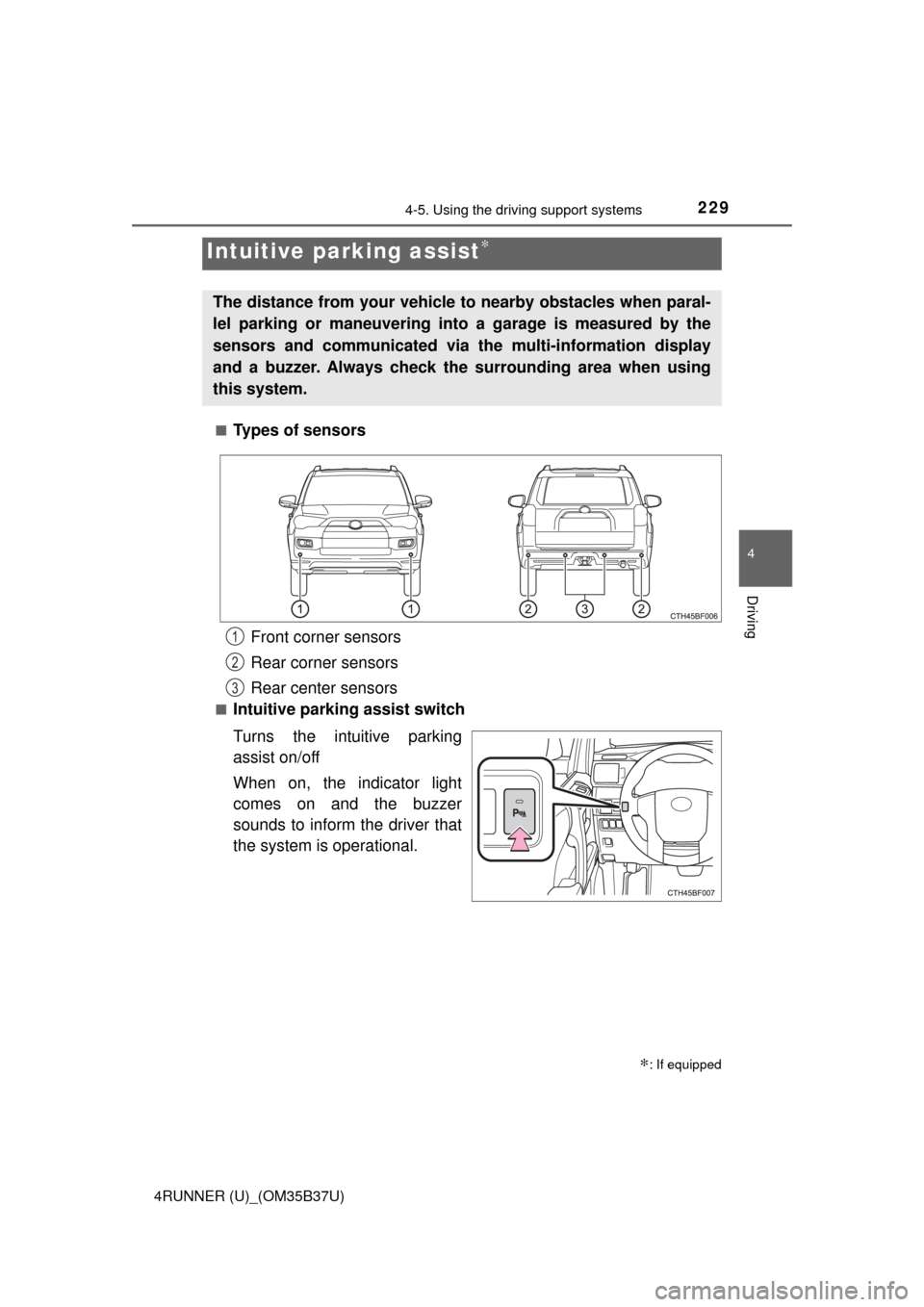
Types of sensors
■Intuitive parking assist switch
Turns the intuitive parking
assist on/off
When on, the indicator light
comes on and the buzzer
sounds to inform the driver that
the system is operational.
Intuitive parking assist∗
∗: If equipped
The distance from your vehicle to nearby obstacles when paral-
lel parking or maneuvering into
a garage is measured by the
sensors and communicated via the multi-information display
and a buzzer. Always check the surrounding area when using
this system.
Front corner sensors
Rear corner sensors
Rear center sensors1
2
3
Page 232 of 528

2324-5. Using the driving support systems
4RUNNER (U)_(OM35B37U)■
Sensor detection information
●The sensor’s detection areas are limited to the areas around the vehicle’s
front corner and rear bumpers.
● Certain vehicle conditions and the surrounding environment may affect the
ability of the sensor to correctly detect obstacles. Particular instances where
this may occur are listed below.
• There is dirt, snow or ice on the sensor. (Wiping the sensors will resolve
this problem.)
• The sensor is frozen. (Thawing the area will resolve this problem.)
In especially cold weather, if a sensor is frozen the screen may show an
abnormal display, or obstacles may not be detected.
• The sensor is covered in any way.
• The vehicle is leaning considerably to one side.
• On an extremely bumpy road, on an incline, on gravel, or on grass.
• The vicinity of the vehicle is noisy due to vehicle horns, motorcycleengines, air brakes of large vehicles, or other loud noises producing ultra-
sonic waves.
• There is another vehicle equipped with parking assist sensors in the
vicinity.
• The sensor is coated with a sheet of spray or heavy rain.
• The vehicle is equipped with a fender pole or wireless antenna.
• Towing eyelet is installed.
• The bumper or sensor receives a strong impact.
• The vehicle is approaching a tall or curved curb.
• In harsh sunlight or intense cold weather.
• The area directly under the bumpers is not detected.
• If obstacles draw too close to the sensor.
• A non-genuine Toyota suspension (lowered suspension etc.) is installed.
• People may not be detected if they are wearing certain types of clothing.
In addition to the examples above, there are instances in which, because of
their shape, signs and other objects may be judged by the sensor to be closer
than they are.
● The shape of the obstacle may prevent the sensor from detecting it. Pay
particular attention to the following obstacles:
• Wires, fences, ropes, etc.
• Cotton, snow and other materials that absorb sound waves
• Sharply-angled objects
• Low obstacles
• Tall obstacles with upper sections projecting outwards in the direction of
your vehicle
Page 248 of 528
2484-5. Using the driving support systems
4RUNNER (U)_(OM35B37U)
Before using the rear differential lock system:
Stop the vehicle, shift the shift lever to N and shift the front-wheel
drive control lever into L4 to see if this is sufficient. If this has no
effect, additionally use the rear differential lock system.
Be sure the wheels have stopped spinning.
Press the rear differential lock switch.
Gently depress the accelerator pedal.
After the rear differential is locked, the indicator will come on.
Unlock the rear differential as soon as the vehicle moves.
To unlock the rear differential, press the switch again.
■ Locking the rear differential
The following systems do not operate when the rear differential is locked. It is
normal operation for the ABS warning light and VSC OFF indicator to be on at
this time.
•ABS
• Multi Terrain ABS
• Brake assist system
•VSC
• Hill-start assist control
■ The rear differential lock is disengaged when
The front-wheel drive control lever or switch is shifted to H2 or H4.
Never forget to turn off the switch after using this feature.
■ After unlocking the rear differential
Check that the indicator goes off.
■ If the rear differential lock indicator flashes rapidly
There may be a malfunction in the rear differential lock system. Have the
vehicle inspected by your Toyota dealer immediately.
Using the rear differential lock system
1
2
3
4
Page 251 of 528
2514-5. Using the driving support systems
4
Driving
4RUNNER (U)_(OM35B37U)
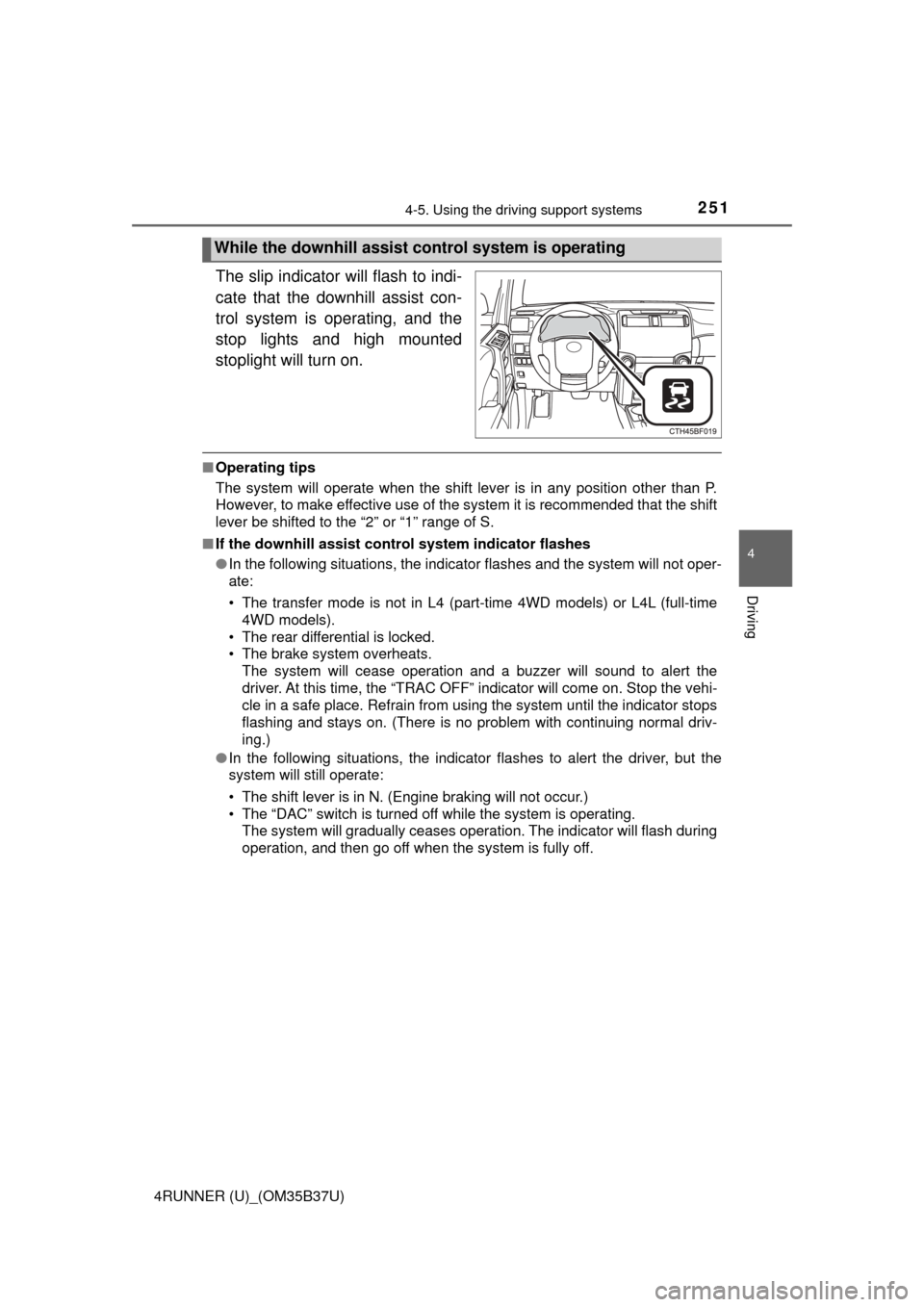
The slip indicator will flash to indi-
cate that the downhill assist con-
trol system is operating, and the
stop lights and high mounted
stoplight will turn on.
■Operating tips
The system will operate when the shift lever is in any position other than P.
However, to make effective use of the system it is recommended that the shift
lever be shifted to the “2” or “1” range of S.
■ If the downhill assist control system indicator flashes
●In the following situations, the indicator flashes and the system will not oper-
ate:
• The transfer mode is not in L4 (part-time 4WD models) or L4L (full-time
4WD models).
• The rear differential is locked.
• The brake system overheats. The system will cease operation and a buzzer will sound to alert the
driver. At this time, the “TRAC OFF” indicator will come on. Stop the vehi-
cle in a safe place. Refrain from using the system until the indicator stops
flashing and stays on. (There is no problem with continuing normal driv\
-
ing.)
● In the following situations, the indicator flashes to alert the driver, but the
system will still operate:
• The shift lever is in N. (Engine braking will not occur.)
• The “DAC” switch is turned off while the system is operating.
The system will gradually ceases operation. The indicator will flash during
operation, and then go off when the system is fully off.
While the downhill assist control system is operating
Page 255 of 528
2554-5. Using the driving support systems
4
Driving
4RUNNER (U)_(OM35B37U)■
Automatic system cancelation
In the following situations, the system will cease operation and a buzzer will
sound to alert the driver. The Crawl Cont rol indicator will flash until the system
is turned off completely.
● When the shift lever is shifted to P or N
● When the front-wheel drive control lever or switch is shifted to H4
● When the driver’s door is opened
● When the system is malfunctioning
● When the brake system overheats
Stop the vehicle in a safe place. (There is no problem with continuing normal
driving.)
● When the automatic transmission system overheats
Stop the vehicle in a safe place until the automatic transmission fluid tem-
perature warning light goes off.
■ Sounds and vibrations caused by the Crawl Control system
● A sound may be heard from the engine compartment when the engine is
started or just after the vehicle begins to move. This sound does not indicate
that a malfunction has occurred in Crawl Control system.
● Either of the following conditions may occur when the Crawl Control system
is operating. None of these indicates that a malfunction has occurred.
• Vibrations may be felt through the vehicle body and steering.
• A motor sound may be heard after the vehicle comes to a stop.
CAUTION
■When using Crawl Control
● Do not overly rely on Crawl Control. This function does not extend the
vehicle’s performance limitations. Always check the terrain thoroughly and
drive safely.
● The recommended speed modes for the listed terrains ( →P. 254) are only
a reference. The selected mode may not be suitable to actual off-road con-
ditions due to factors such as the type or unevenness of the terrain or the
degree of incline. Check the actual terrain thoroughly and drive safely.
● After activating Crawl Control, make sure that the Crawl Control indicator
comes on. If the indicator flashes, the vehicle is not under system control.
■ Conditions under which the syst em may not operate correctly
When driving on the following surfaces, the system may not be able to
maintain a fixed low speed, which may result in an accident:
● Extremely steep inclines
● Extremely uneven surfaces
● Snow-covered roads, or other slippery surfaces
Page 264 of 528
2644-5. Using the driving support systems
4RUNNER (U)_(OM35B37U)
◆Hill-start assist control (if equipped)
Helps to prevent the vehicle from rolling backward when starting on
an incline or slippery slope
◆LSD (Limited Slip Diff erential) (if equipped)
Transfers drive power to the rear tires when front tires spin, and
vice versa, in order to improve traction
◆KDSS (Kinetic Dynamic Suspension System) (if equipped)
Enhances ride comfort and handling response by using a hydraulic
control system to cont rol the suspension stab ilizer bars in response
to road surface and driving condi tions during cornering or off-road
driving
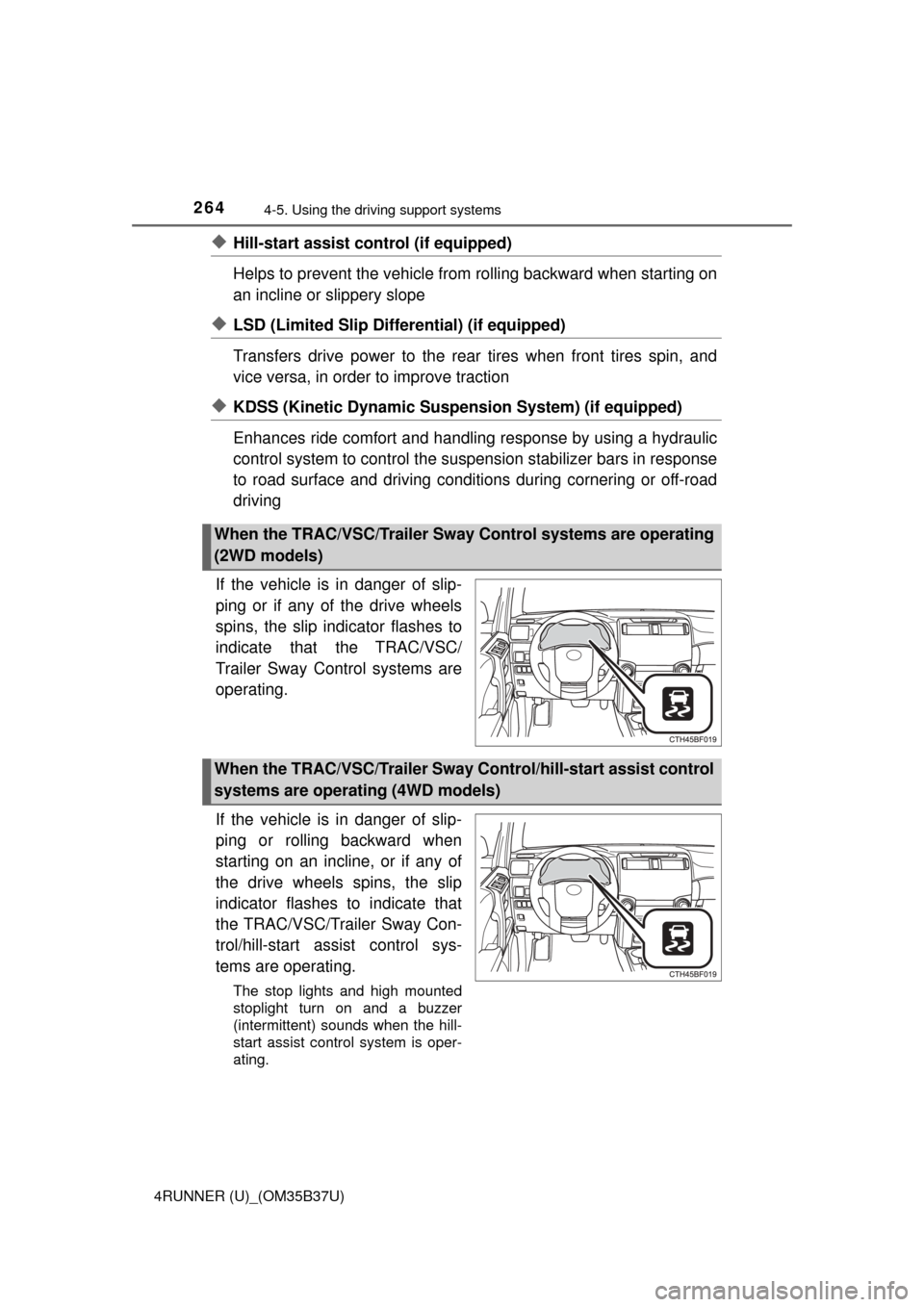
If the vehicle is in danger of slip-
ping or if any of the drive wheels
spins, the slip indicator flashes to
indicate that the TRAC/VSC/
Trailer Sway Control systems are
operating.
If the vehicle is in danger of slip-
ping or rolling backward when
starting on an incline, or if any of
the drive wheels spins, the slip
indicator flashes to indicate that
the TRAC/VSC/Trailer Sway Con-
trol/hill-start assist control sys-
tems are operating.
The stop lights and high mounted
stoplight turn on and a buzzer
(intermittent) sounds when the hill-
start assist control system is oper-
ating.
When the TRAC/VSC/Trailer Sway Control systems are operating
(2WD models)
When the TRAC/VSC/Trailer Sway Control/hill-start assist control
systems are operating (4WD models)
Page 269 of 528

2694-5. Using the driving support systems
4
Driving
4RUNNER (U)_(OM35B37U)
■When the “TRAC OFF” indicator li ght comes on even if the VSC off
switch has not been pressed
TRAC, hill-start assist control, downhill assist control and Crawl Control can-
not be operated. Contact your Toyota dealer.
■ Hill-start assist control operation conditions
●The shift lever is in D or S.
● The brake pedal is not depressed.
● The rear differential is unlocked (if equipped).
■ If the brake system overheats
The hill-start assist control will cease operation and a buzzer will sound to
alert the driver. At this time, the “TRAC OFF” indicator will come on. Stop the
vehicle in a safe place. (There is no problem with continuing with normal driv-
ing.)
The system will be automatically restored after a short time.
■ Sounds and vibrations caused by the ABS, Multi Terrain ABS (if
equipped), brake assist, VSC, Trailer Sway Control, TRAC and hill-start
assist control (if equipped) systems
● A sound may be heard from the engine compartment when the engine is
started or just after the vehicle begins to move. This sound does not indicate
that a malfunction has occurred in any of these systems.
● Any of the following conditions may occur when the above systems are
operating. None of these indicates that a malfunction has occurred.
• Vibrations may be felt through the vehicle body and steering.
• A motor sound may be heard after the vehicle comes to a stop.
• The brake pedal may pulsate slightly a fter the ABS or Multi Terrain ABS is
activated.
• The brake pedal may move down slightly after the ABS or Multi Terrain ABS is activated.
■ Reactivation of the TRAC/VSC/Trail er Sway Control systems after turn-
ing off the engine
Turning off the engine after turning off the TRAC/VSC/Trailer Sway Control
systems will automatically reactivate them.
Page 271 of 528
2714-5. Using the driving support systems
4
Driving
4RUNNER (U)_(OM35B37U)
CAUTION
■When the VSC and Trailer Sway Control are activated
The slip indicator light flashes. Always drive carefully.
Reckless driving may cause an accident. Exercise particular care when the
indicator light flashes.
■ When TRAC/VSC/Trailer Sway Control systems are turned off
Be especially careful and drive at a speed appropriate to the road condi-
tions. As these are systems to help ensure vehicle stability and driving
force, do not turn the TRAC/VSC/Trailer Sway Control systems off unless
necessary.
■ Replacing tires
Make sure that all tires are of the specified size, brand, tread pattern and
total load capacity. In addition, make sure that the tires are inflated to the
recommended tire inflation pressure level.
The ABS, Multi Terrain ABS, VSC and Trailer Sway Control will not function
correctly if different tires are fitted on the vehicle.
Contact your Toyota dealer for further information when replacing tires or
wheels.
■ Handling of tires and the suspension
Using tires with any kind of problem or modifying the suspension will affect
the driving assist systems, and may cause a system to malfunction.
■ Trailer Sway Control precaution
The Trailer Sway Control system is not able to reduce trailer sway in all situ-
ations.
Depending on many factors such as the conditions of the vehicle, trailer,
road surface, and driving environment, the Trailer Sway Control system
may not be effective. Refer to your trailer owner’s manual for information on
how to tow your trailer properly.
■ If trailer sway occurs
Observe the following precautions.
Failing to do so may cause death or serious injury.
● Firmly grip the steering wheel. Steer straight ahead.
Do not try to control trailer swaying by turning the steering wheel.
● Begin releasing the accelerator pedal immediately but very gradually to
reduce speed.
Do not increase speed. Do not apply vehicle brakes.
If you make no extreme correction with the steering or brakes, your vehicle
and trailer should stabilize. ( →P. 188)
Page 273 of 528
2734-6. Driving tips
4
Driving
4RUNNER (U)_(OM35B37U)
Perform the following according to the driving conditions:
● Do not try to forcibly open a window or move a wiper that is frozen.
Pour warm water over the frozen area to melt the ice. Wipe away
the water immediately to prevent it from freezing.
● To ensure proper operation of the climate control system fan,
remove any snow that has accumulated on the air inlet vents in
front of the windshield.
● Check for and remove any excess ice or snow that may have accu-
mulated on the exterior lights, vehicle’s roof, chassis, around the
tires or on the brakes.
● Remove any snow or mud from the bottom of your shoes before
getting in the vehicle.
Accelerate the vehicle slowly, keep a safe distance between you and
the vehicle ahead, and drive at a reduced speed suitable to road con-
ditions.
● Park the vehicle and move the shift lever to P without setting the
parking brake. The parking brake may freeze up, preventing it from
being released. If the vehicle is parked without setting the parking
brake, make sure to block the wheels.
Failure to do so may be dangerous because it may cause the vehi-
cle to move unexpectedly, pos sibly leading to an accident.
● If the vehicle is parked without se tting the parking brake, confirm
that the shift lever ca nnot be moved out of P
*.
*: The shift lever will be locked if it is attempted to be shifted from P to any
other position without depressing the brake pedal. If the shift lever can be
shifted from P, there may be a problem with the shift lock system. Have the
vehicle inspected by your Toyota dealer immediately.
Before driving the vehicle
When driving the vehicle
When parking the vehicle