light TOYOTA 4RUNNER 2017 N280 / 5.G Repair Manual
[x] Cancel search | Manufacturer: TOYOTA, Model Year: 2017, Model line: 4RUNNER, Model: TOYOTA 4RUNNER 2017 N280 / 5.GPages: 528, PDF Size: 10.03 MB
Page 188 of 528

1884-1. Before driving
4RUNNER (U)_(OM35B37U)■
Before towing
Check that the following conditions are met:
●Ensure that your vehicle’s tires are properly inflated. ( →P. 472)
● Trailer tires are inflated according to the trailer manufacturer’s recommen-
dation.
● All trailer lights work as required by law.
● All lights work each time you connect them.
● The trailer ball is set at the proper height for the coupler on the trailer.
● The trailer is level when it is hitched.
Do not drive if the trailer is not level, and check for improper tongue weight,
overloading, worn suspension, or other possible causes.
● The trailer cargo is securely loaded.
● The rear view mirrors conform to all applicable federal, state/provincial or
local regulations. If they do not, install rear view mirrors appropriate for tow-
ing purposes.
■ Break-in schedule
If your vehicle is new or equipped with any new power train components
(such as an engine, transmission, differential or wheel bearing), Toyota rec-
ommends that you do not tow a trailer until the vehicle has been driven for
over 500 miles (800 km).
After the vehicle has been driven for over 500 miles (800 km), you can start
towing. However, for the next 500 miles (800 km), drive the vehicle at a speed
of less than 45 mph (72 km/h) when towing a trailer, and avoid full throttle
acceleration.
■ Maintenance
●If you tow a trailer, your vehicle will require more frequent maintenance due
to the additional load. (See “Scheduled Maintenance Guide” or “Owner’s
Manual Supplement”.)
● Retighten the fixing bolts of the towing ball and bracket after approximately
600 miles (1000 km) of trailer towing.
■ If trailer sway occurs
One or more factors (crosswinds, passing vehicles, rough roads, etc.) can
adversely affect handling of your vehicle and trailer, causing instability.
●If trailer swaying occurs:
• Firmly grip the steering wheel. Steer straight ahead.
Do not try to control trailer swaying by turning the steering wheel.
• Begin releasing the accelerator pedal immediately but very gradually to reduce speed.
Do not increase speed. Do not apply vehicle brakes.
If you make no extreme correction with the steering or brakes, your vehicle
and trailer should stabilize. (if enabled, Trailer Sway Control can also help to
stabilize the vehicle and trailer.)
Page 191 of 528
1914-1. Before driving
4
Driving
4RUNNER (U)_(OM35B37U)
NOTICE
■When installing a trailer hitch
Use only the position recommended by your Toyota dealer. Do not install
the trailer hitch on the bumper; this may cause body damage.
■ Do not directly splice trailer lights
Do not directly splice trailer lights. Directly splicing trailer lights may damage
your vehicle’s electrical system and cause a malfunction.
Page 194 of 528
1944-2. Driving procedures
4RUNNER (U)_(OM35B37U)
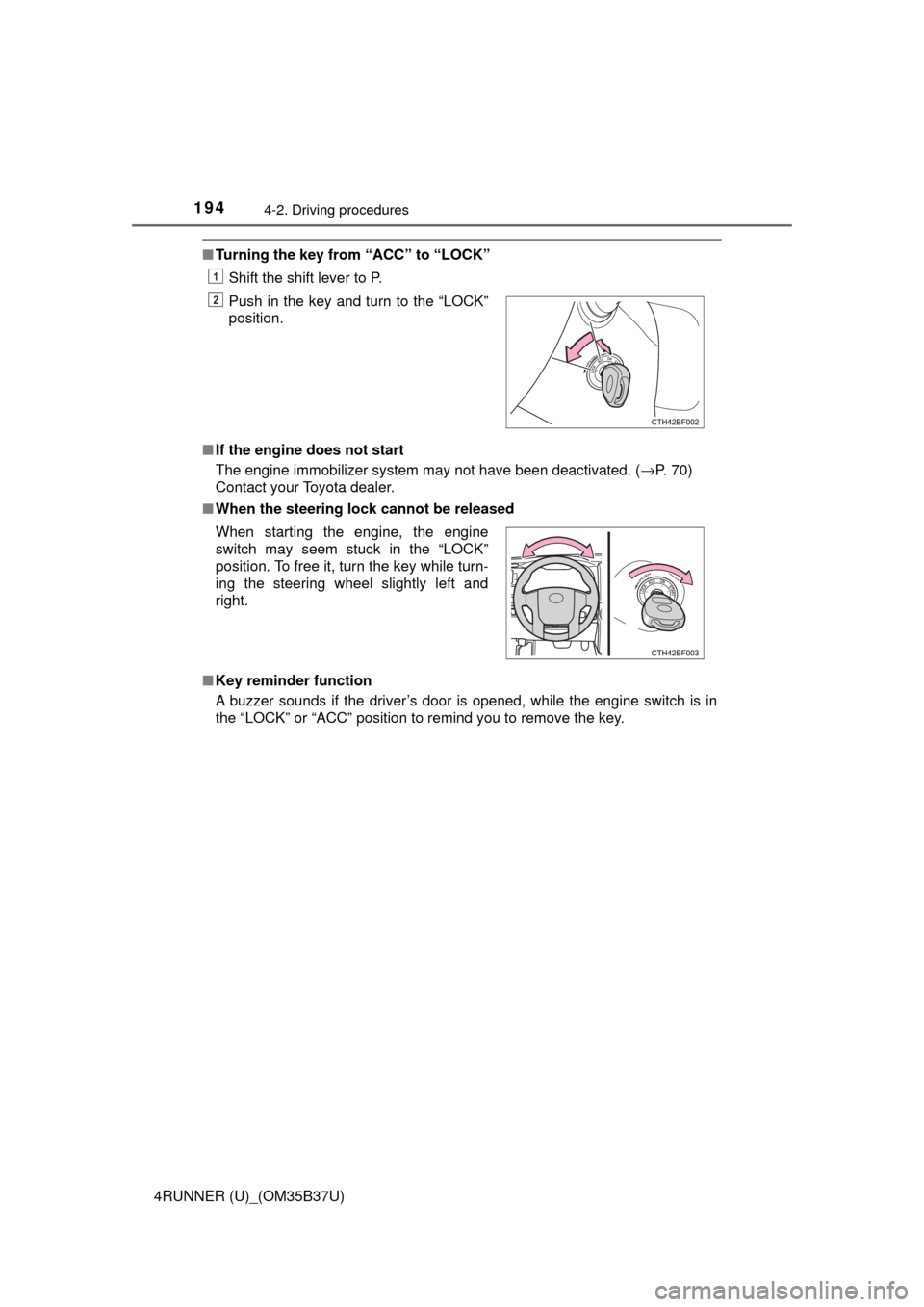
■Turning the key from “ACC” to “LOCK”
Shift the shift lever to P.
■ If the engine does not start
The engine immobilizer system may not have been deactivated. ( →P. 70)
Contact your Toyota dealer.
■ When the steering lock cannot be released
■ Key reminder function
A buzzer sounds if the driver’s door is opened, while the engine switch is in
the “LOCK” or “ACC” position to remind you to remove the key.Push in the key and turn to the “LOCK”
position.
When starting the engine, the engine
switch may seem stuck in the “LOCK”
position. To free it, turn the key while turn-
ing the steering wheel slightly left and
right.
1
2
Page 199 of 528
1994-2. Driving procedures
4
Driving
4RUNNER (U)_(OM35B37U)■
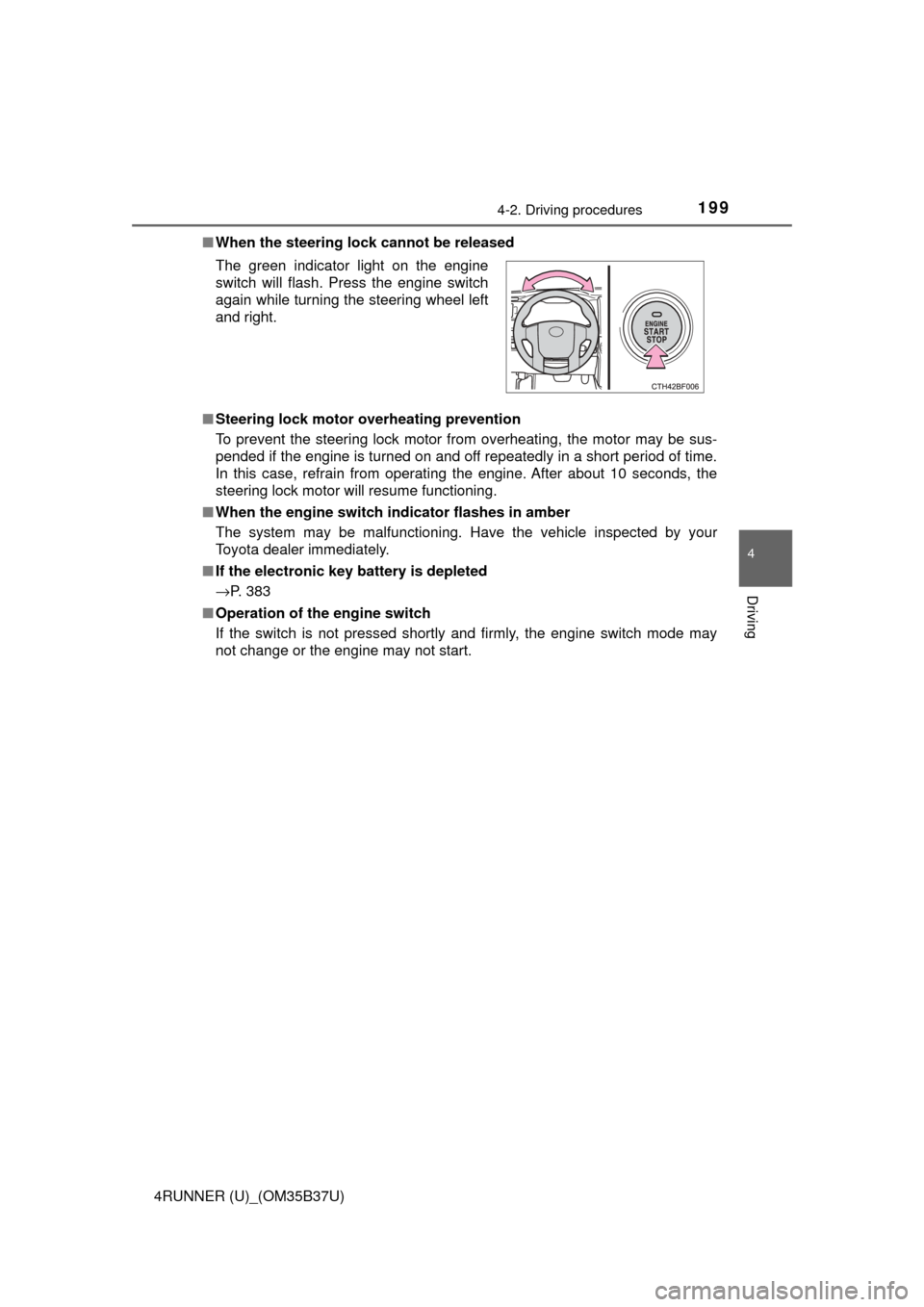
When the steering lock cannot be released
■ Steering lock motor o verheating prevention
To prevent the steering lock motor from overheating, the motor may be sus-
pended if the engine is turned on and off repeatedly in a short period of time.
In this case, refrain from operating the engine. After about 10 seconds, the
steering lock motor will resume functioning.
■ When the engine switch indicator flashes in amber
The system may be malfunctioning. Have the vehicle inspected by your
Toyota dealer immediately.
■ If the electronic key battery is depleted
→P. 383
■ Operation of the engine switch
If the switch is not pressed shortly and firmly, the engine switch mode may
not change or the engine may not start. The green indicator light on the engine
switch will flash. Press the engine switch
again while turning the steering wheel left
and right.
Page 206 of 528
2064-2. Driving procedures
4RUNNER (U)_(OM35B37U)
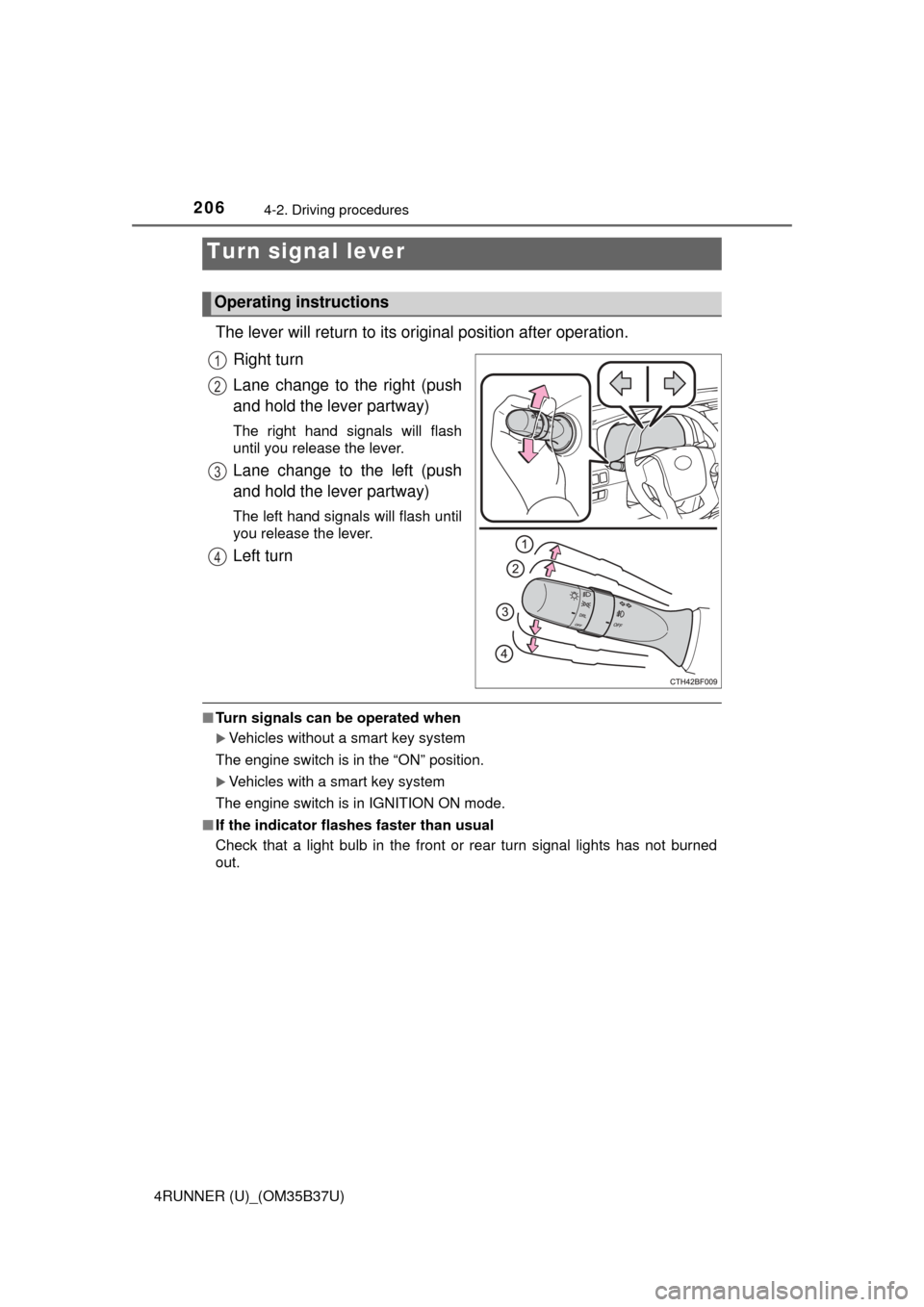
The lever will return to its original position after operation.
Right turn
Lane change to the right (push
and hold the lever partway)
The right hand signals will flash
until you release the lever.
Lane change to the left (push
and hold the lever partway)
The left hand signals will flash until
you release the lever.
Left turn
■ Turn signals can be operated when
Vehicles without a smart key system
The engine switch is in the “ON” position.
Vehicles with a smart key system
The engine switch is in IGNITION ON mode.
■ If the indicator flashes faster than usual
Check that a light bulb in the front or rear turn signal lights has not burned
out.
Turn signal lever
Operating instructions
1
2
3
4
Page 208 of 528
208
4RUNNER (U)_(OM35B37U)
4-3. Operating the lights and wipers
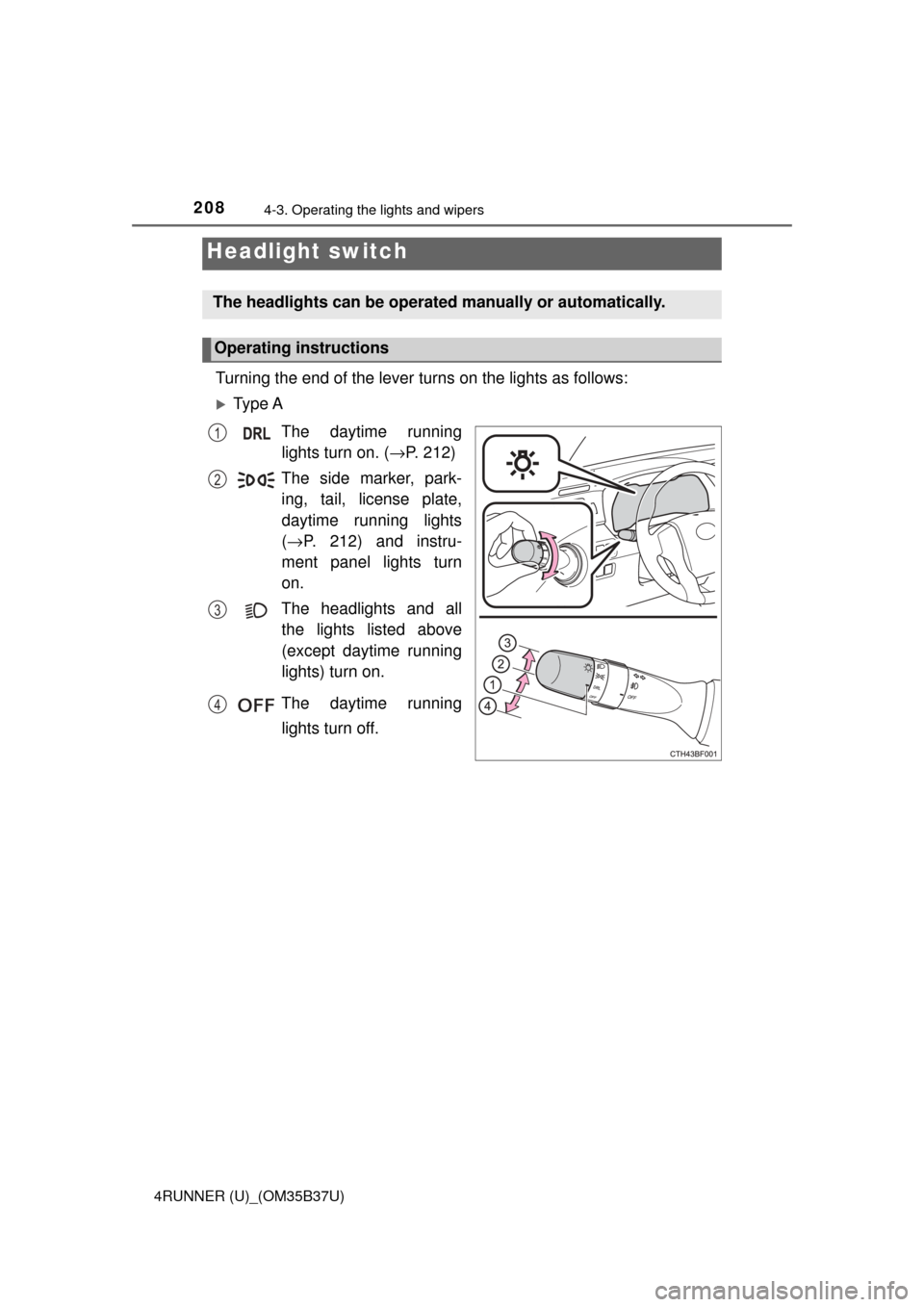
Turning the end of the lever turns on the lights as follows:
Ty p e AThe daytime runninglights turn on. ( →P. 212)
The side marker, park- ing, tail, license plate,
daytime running lights
( → P. 212) and instru-
ment panel lights turn
on.
The headlights and all the lights listed above
(except daytime running
lights) turn on.
The daytime running lights turn off.
Headlight switch
The headlights can be operated manually or automatically.
Operating instructions
1
2
3
4
Page 209 of 528
2094-3. Operating the lights and wipers
4
Driving
4RUNNER (U)_(OM35B37U)
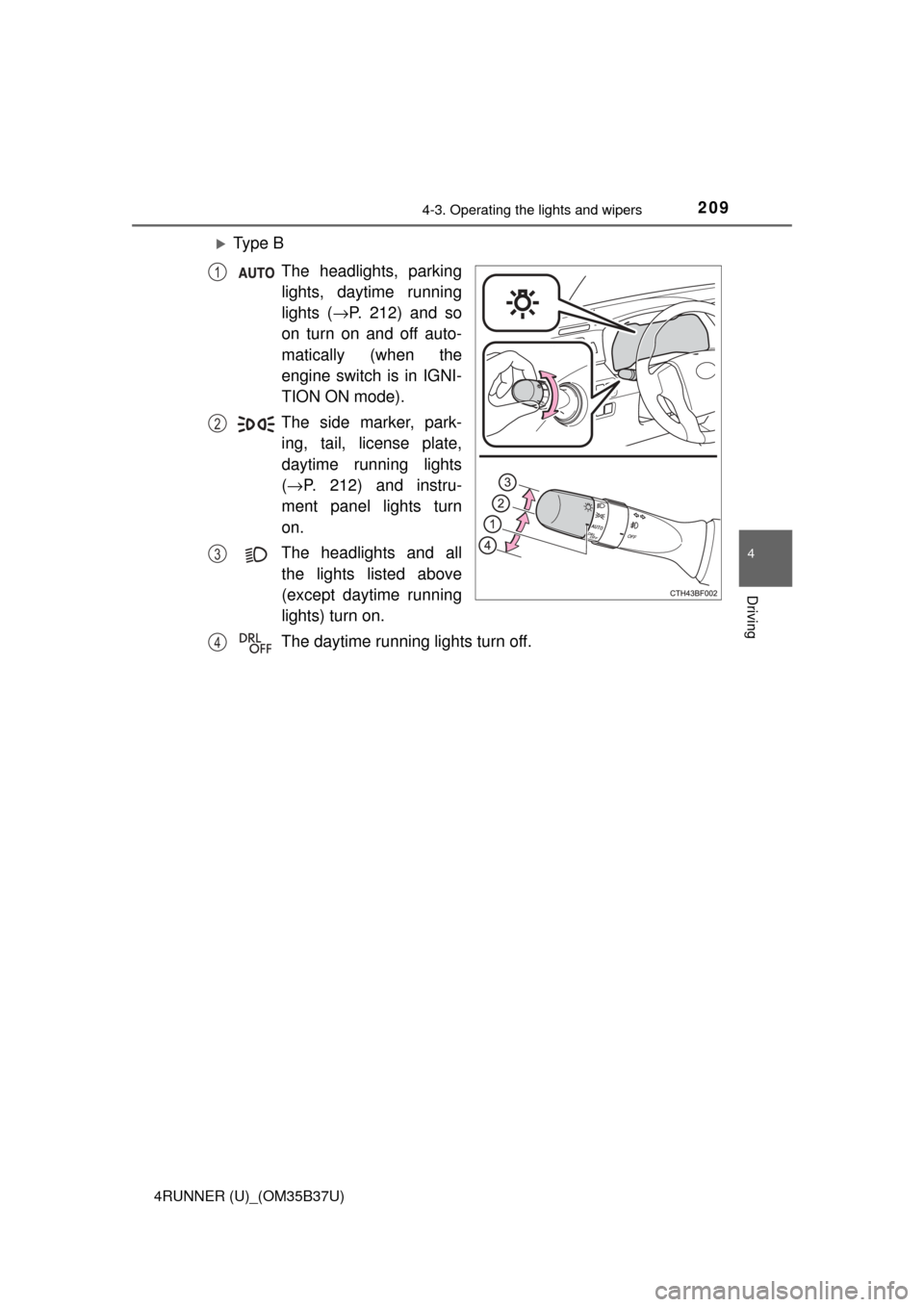
Ty p e BThe headlights, parkinglights, daytime running
lights ( →P. 212) and so
on turn on and off auto-
matically (when the
engine switch is in IGNI-
TION ON mode).
The side marker, park- ing, tail, license plate,
daytime running lights
( → P. 212) and instru-
ment panel lights turn
on.
The headlights and all the lights listed above
(except daytime running
lights) turn on.
The daytime running lights turn off.
1
2
3
4
Page 210 of 528
2104-3. Operating the lights and wipers
4RUNNER (U)_(OM35B37U)
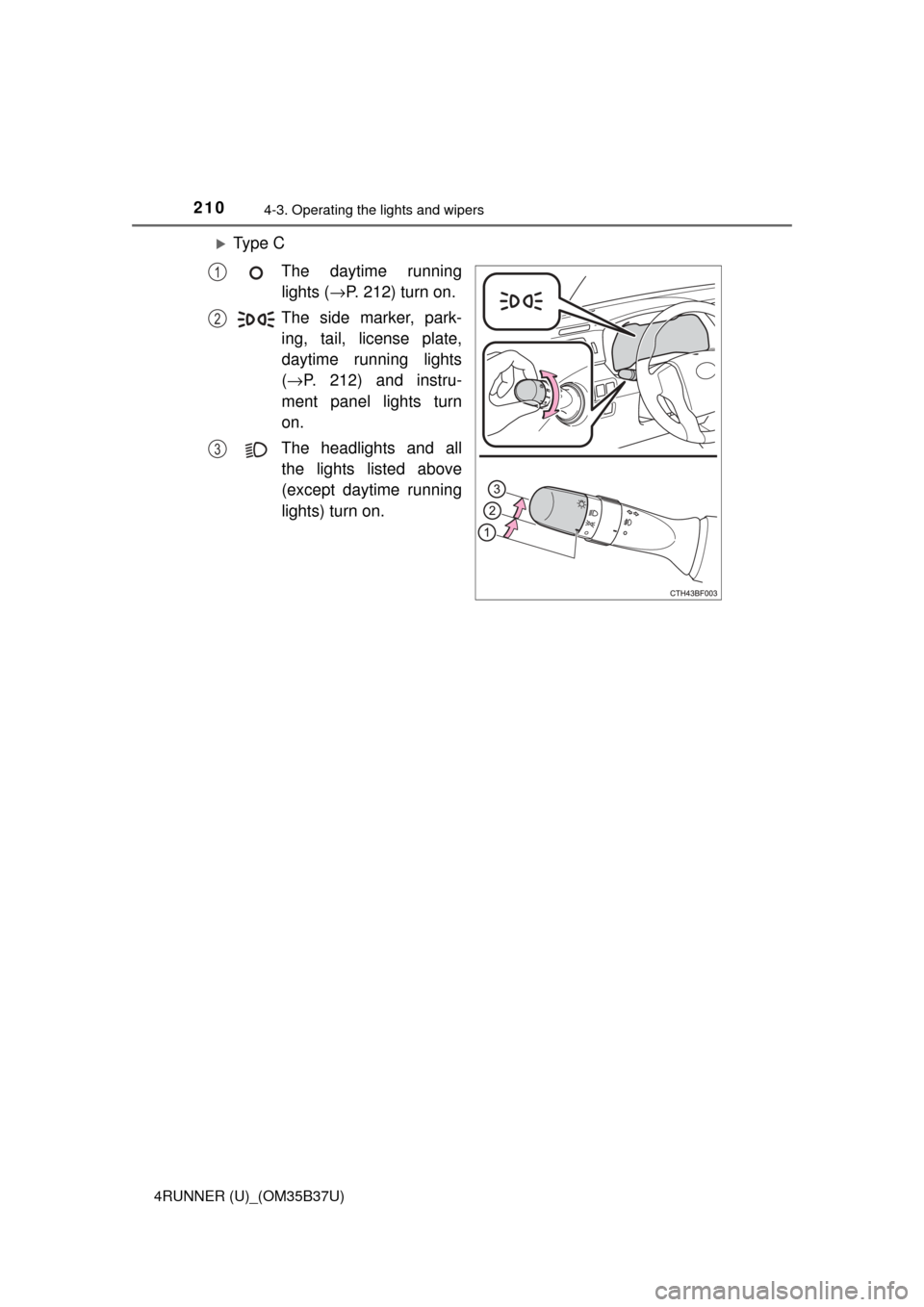
Ty p e CThe daytime runninglights ( →P. 212) turn on.
The side marker, park- ing, tail, license plate,
daytime running lights
( → P. 212) and instru-
ment panel lights turn
on.
The headlights and all the lights listed above
(except daytime running
lights) turn on.
1
2
3
Page 211 of 528
2114-3. Operating the lights and wipers
4
Driving
4RUNNER (U)_(OM35B37U)
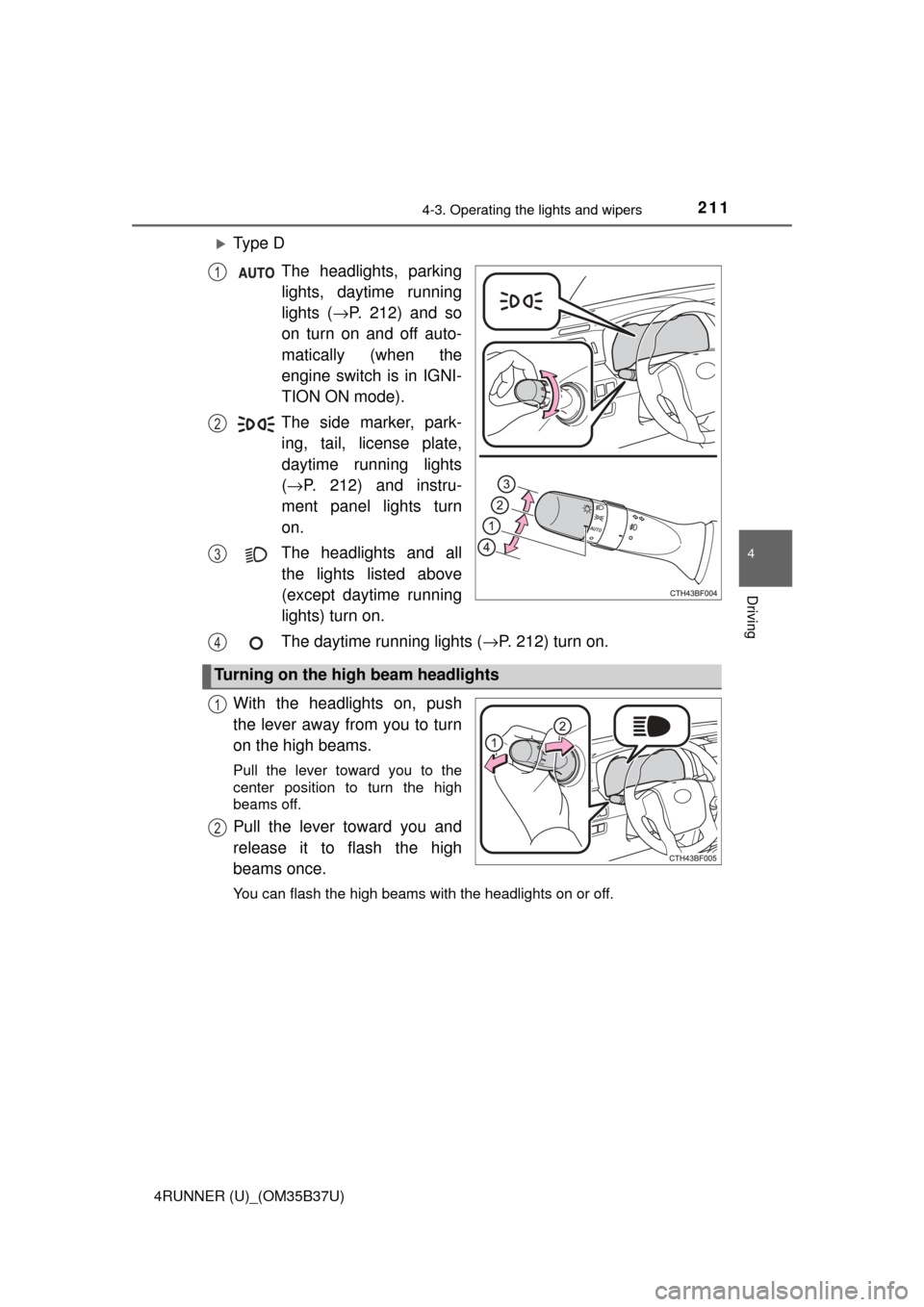
Ty p e DThe headlights, parkinglights, daytime running
lights ( →P. 212) and so
on turn on and off auto-
matically (when the
engine switch is in IGNI-
TION ON mode).
The side marker, park- ing, tail, license plate,
daytime running lights
( → P. 212) and instru-
ment panel lights turn
on.
The headlights and all the lights listed above
(except daytime running
lights) turn on.
The daytime running lights ( →P. 212) turn on.
With the headlights on, push
the lever away from you to turn
on the high beams.
Pull the lever toward you to the
center position to turn the high
beams off.
Pull the lever toward you and
release it to flash the high
beams once.
You can flash the high beams with the headlights on or off.
1
2
3
Turning on the high beam headlights
4
1
2
Page 212 of 528
2124-3. Operating the lights and wipers
4RUNNER (U)_(OM35B37U)
■Daytime running light system
●To make your vehicle more visible to other drivers during daytime driving,
the daytime running lights turn on automatically whenever the engine is
started and the parking brake is released with the headlight switch off or in
the “AUTO” position. (Illuminate dimmer than the headlight high beam.)
Daytime running lights are not designed for use at night.
Type A and B: Daytime running lights can be turned off by operating the
switch.
● Compared to turning on the headlights, the daytime running light system
offers greater durability and consumes less electricity, so it can help improve
fuel economy.
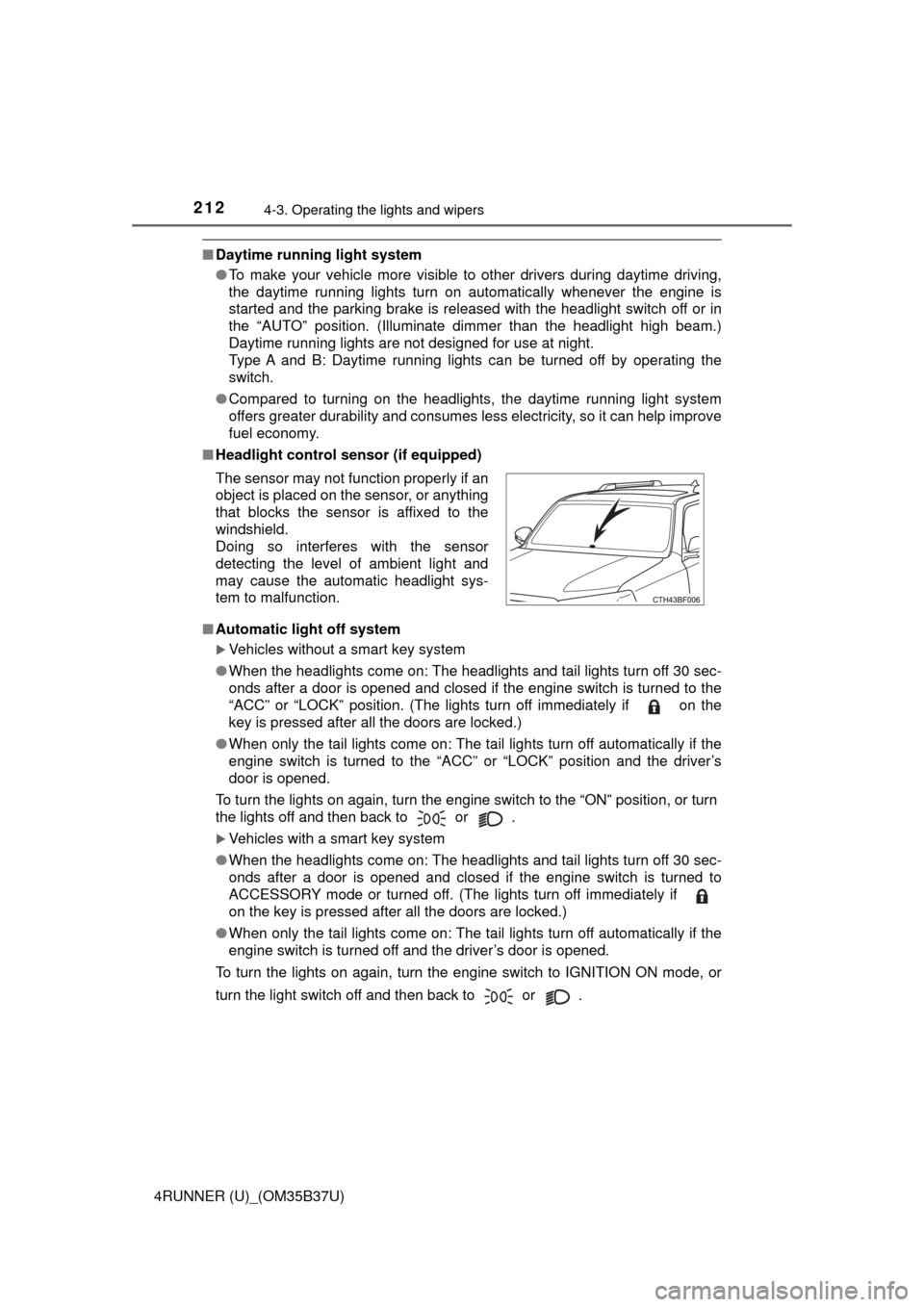
■ Headlight control sensor (if equipped)
■ Automatic light off system
Vehicles without a smart key system
● When the headlights come on: The headlights and tail lights turn off 30 sec-
onds after a door is opened and closed if the engine switch is turned to the
“ACC” or “LOCK” position. (The lights turn off immediately if on the
key is pressed after all the doors are locked.)
● When only the tail lights come on: The tail lights turn off automatically if the
engine switch is turned to the “ACC” or “LOCK” position and the driver’s
door is opened.
To turn the lights on again, turn the engine switch to the “ON” position, or turn
the lights off and then back to or .
Vehicles with a smart key system
● When the headlights come on: The headlights and tail lights turn off 30 sec-
onds after a door is opened and closed if the engine switch is turned to
ACCESSORY mode or turned off. (The lights turn off immediately if
on the key is pressed after all the doors are locked.)
● When only the tail lights come on: The tail lights turn off automatically if the
engine switch is turned off and the driver’s door is opened.
To turn the lights on again, turn the engine switch to IGNITION ON mode, or
turn the light switch off and then back to or . The sensor may not function properly if an
object is placed on the sensor, or anything
that blocks the sensor is affixed to the
windshield.
Doing so interferes with the sensor
detecting the level of ambient light and
may cause the automatic headlight sys-
tem to malfunction.